2016 AUDI RS7 SPORTBACK engine
[x] Cancel search: enginePage 217 of 282
Always r ead and h eed all W ARNING S below
~ A. and
¢A. in Working on the battery on
page 213.
.,. Switch off the ignition and all electrica l con
sumers .
.,. Make sure the area is well venti lated when you
charge the battery.
.,. Open the engine hood
¢page 203.
.,. Open the red cover on the positive pole
¢fig . 188 .
.,. Connect the charger co nnectors according to
the instructions to the
j ump start bo lt s. (Bolts
under the red cover= "positive", Bolts with hex
head
= "negat ive") .
.,. Only now plug the mains lead for the charging
equipment into the wall outlet and turn it on
¢&_ .
.,. M ake s ure th e char ging rate is not o ver
30 amp s/14.8 Volt.
.,. When the battery is fully charged: Turn the
charg ing equipment off and remove the mains
lead from the wall outlet.
.,. Now remove the clamps for the charging equ ip-
ment.
.,. Close the red cover on the positive pole.
.,. Close the hood
¢ page 204.
A discharged battery can fre eze at temperatures
of only 32 F
0 (0 °C). A llow a frozen battery to
thaw comp lete ly before attempt ing to charge it
¢ ,&. However, we recommend not using a
thawed battery again because the battery casing
can be cracked due to ice formation and can leak
battery acid.
Battery chargin g (Ma ximum cha rging rate of
30 amp s/14 .8 Volt )
When charging at low voltages (e.g. with a trick
le cha rger ),
the battery cables do not have to be
d isconnected first. The battery caps should
not
be opened when charging a battery .
It is not necessary to remove the battery from
the luggage compartment, and it is also not nec
essary to disconnect the cables.
Check ing and Filling
Fast charging the batt ery (charging rate
ab ove 14.8 Volt )
For technical reasons do not use a battery charg
er that uses vo ltage greater than 14.8 Volt to
charge your vehicle's battery.
A WARNING
=
Charging a battery can be dangerous .
-Always follow the operating instructions
provided by the battery charger manufactur
er when charging your battery .
- Never charge a frozen battery. It may ex
plode because of gas trapped in the ice. Al
low a froze n battery to thaw out first .
- Do not reuse batter ies which were frozen.
The battery hous ing may have cracked and
weakened when the battery froze .
- Charge the battery in a well ventilated area.
Keep away from open flame or electrical
spark. Do not smoke . Hydrogen gas generat
ed by the battery is explos ive.
- To reduce the danger of explosion, never connect or d isconnect charge r cables while
the charger is ope rating .
- Fast charg ing a battery is dangerous and
should only be attempted by a competent
technicia n w ith the prope r equipment.
- Batte ry acid that may spill during charging
should be washed off w ith a so lution of
warm water and baking soda to neutra lize
t he acid .
{[) Note
Never use a fast charger as a booster to start
the e ngine. This will se riously damage sensi
tive electronic components, such as control
units, re lays, radio, etc., as well as the bat tery
charge r.
Battery replacement
The new battery must have the same specifica
tions and dimensions as the original equipment
battery .
Intelligent ene rgy manageme nt in yo ur vehicle is
responsib le for distr ib uting the electrica l energy
Iii>-
215
Page 218 of 282

Check ing and F illing
througho ut your vehicle ¢ page 186 . The intelli
gent energy management system wi ll keep the
engine battery charged better than veh icles with
out this system . To make sure the addit ional
electrical energy is avai lab le once again after you
have changed the battery, we recommend that
you install batter ies of t he same type and manu
facture on ly (the same as those insta lled at the
time your veh icle was delive red). Spec ificat ions
are listed on t he b attery housing. Your author
i z ed dealer must code the battery in the energy
management system to enable you to use the en
ergy manag ement functions correctly after re
p lacing the battery.
The new battery must have the same capac ity,
voltage (12 -vo lt), amperage, const ruction and
p lug sealing .
W hen insta lling the ba tte ry, make sure the igni
tion and all elec trical consumers are sw itched
off .
(D Note
Mak e sure the ve ntila tio n hose on t he side of
the batte ry is connecte d, othe rw ise f umes o r
battery acid can lea k out .
@) For the sake of the environment
Because of the prob lem of pr oper disposal of
a ba ttery, we recommen d your au thor ized
Audi dea le r change the battery fo r you. Bat
teries contain su lf u ric acid and lea d and must
always be disposed o f prope rly in comp liance
w ith all environmental regulations. D isposing
of vehicle batteries improperly is very danger
ous to the e nvironment.
216
Windshield washer
system
Fi g. 189 En gin e compar tm en t: was her flui d rese rvoir cap
.., N
-N ~ a, m
The w indshield washer reservoir O contains the
cleaning so lution for the windshie ld and the
headlight washer system *
9 page 205, fig. 183.
The reservoir capacity is found in 9 page 260 .
To reduce the risk of lime scale depos its on the
spray nozzles, use clean water with low amo unts
of calcium. Always add w indow cleaner to the wa
ter. When the outside temperatures are cold, an anti-freez ing agent shou ld be added to the water
so that it does not freeze .
(D Note
-The concentration of ant i-f reez ing agent
must be adjusted to the ve hicle operat ing
conditions i n the respective cl imate . A con
cen tration t hat is too high can lead to vehi
cle damage.
- Never ad d radia tor an ti-freeze or other addi
t ives to the washer fluid .
- Do not use a glass cleaner t hat contains
paint so lvents, because th is could damage
the pain t.
Service interval display
The service interval display detects when your ve
hicle is due for service .
The service interval d isplay wo rks i n two stages:
- Inspection or oil change rem inder: after a cer-
tain distance drive n, a message appears in the
instrument cluster display each t ime t he igni
tion is switched on o r off . The remaining d is-
t ance o r time is disp layed b riefly. .,..
Page 219 of 282
-Inspection or oil change due: If your vehicle
has reached an inspection or oi l change interval
or both intervals at the same time, the mes
sage
Inspection due! or Oil change due! or Oil
change and inspection due!
appears briefly af
ter switching the ignition on/off .
Checking service intervals
You can check the remaining distance or time un
til the next oil change or next inspection in the
Car menu. To do this, select: the
ICARI function
button
> (Car)* Systems control button > Service
& control > Service intervals.
Resetting the indicator
Your authorized Audi dealer or authorized Audi
Service Facility will reset the service interval dis
p lay after performing service.
I f you have changed the oil you rself, you must re
set the oil change interval.
To reset the indicator, select: the
ICARI funct ion
button
> (Car)* Systems control button > Service
& control > Service intervals. Turn the contro l
knob downward to
Reset oil change interval and
press the control knob.
@ Note
-Only reset the oil change indicator if the oil
was changed .
- Following the service inte rvals is critical to
maintain ing the service life and va lue of
your vehicle, especially the engine . Even if
the mileage on the vehicle is low, do not ex
ceed the time for the next serv ice.
- Calcu lating the time to the next o il change
i s interrupted when the vehicle battery is
disconnected. If the veh icle is not driven for
a long period of time, check the ma inte
nance schedule so that you can follow the
maintenance intervals.
Checking and Filling
217
Page 232 of 282
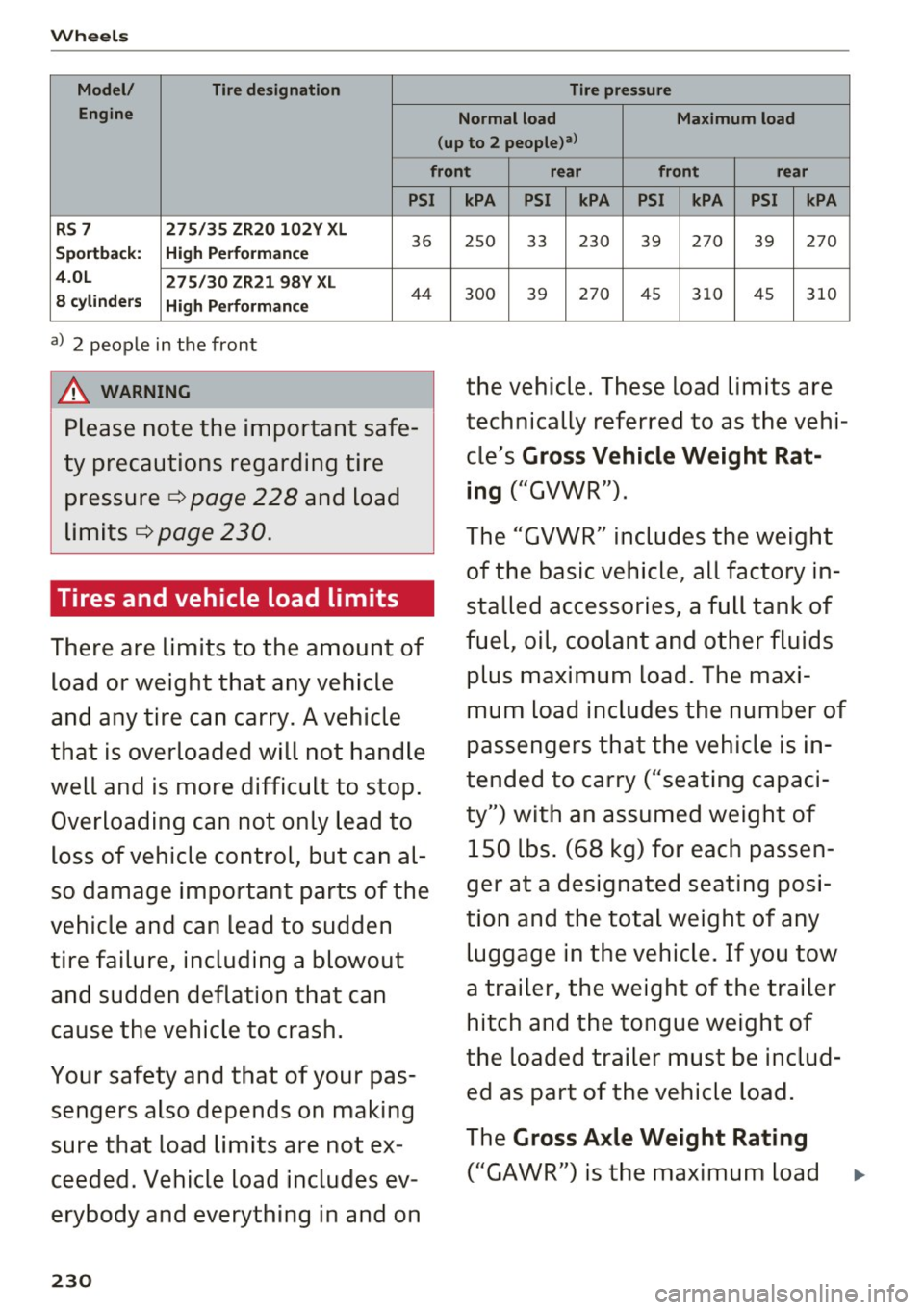
Wheels
Model/ Tire designation Tire pressure
Engine Normal load Maximum load
(up to 2 people)a>
front rear front rear
PSI
RS 7 275/35 ZR20 102Y XL
Sportback: High Performance
36
4.0L 275/30 ZR21 98Y XL
8 cylinders High Performance
44
a) 2 people in the front
A WARNING
Please note the important safe
ty precautions regarding tire
pressure ¢
page 228 and load
limits ¢
page 230.
Tires and vehicle load limits
There are limits to the amount of
load or weight that any vehicle
and any tire can carry. A vehicle
that is overloaded will not handle
well and is more difficult to stop. Overloading can not only lead to
loss of vehicle control, but can al
so damage important parts of the
vehicle and can lead to sudden
tire failure, including a blowout and sudden deflation that can
cause the vehicle to crash.
Your safety and that of your pas sengers also depends on making
sure that load limits are not ex
ceeded . Vehicle load includes ev
erybody and everything in and on
230
kPA PSI kPA PSI kPA PSI kPA
25 0 33 230 39 270
39 270
30 0 39 270 45 310 45
310
the vehicle. These load limits are
technically referred to as the vehi
cle's
Gross Vehicle Weight Rat
ing
("GVWR").
The "GVWR" includes the weight of the basic vehicle, all factory in
stalled accessories , a full tank of
fuel, oil, coolant and other fluids
plus maximum load. The maxi
mum load includes the number of
passengers that the vehicle is in
tended to carry ("seating capaci
ty") with an assumed weight of 150 lbs. (68 kg) for each passen
ger at a designated seating posi
tion and the total weight of any luggage in the vehicle. If you tow
a trailer, the weight of the trailer hitch and the tongue weight of
the loaded trailer must be includ ed as part of the vehicle load.
The
Gross Axle Weight Rating
("GAWR") is the maximum load
Page 241 of 282
Emergency assistance
Equipment
Warning triangle
Applies to: ve hicles with warning triangle
D
Fig. 196 Luggage co mpa rtment lid : w arnin g tria ngle
The warning triangle placed in the vehicle at the
factory is located in the luggage compartment.
• Turn the twist lock ¢
fig. 196 and pull the cover
downward to open the cover .
• Remove the warning triangle from its holder.
The luggage compartment lid is only designed to hold the warning triang le offered by the original
accessories program.
Vehicle tool kit
F ig. 197 Luggage co mpa rtment : veh icle tool kit
The vehicle tool kit , vehicle jack*, tire mobi lity kit
and compressor are stored in the luggage com
partment under the cargo floor cover .
• Lift the cargo floor by the plastic handle.
• Turn the handle counter-clockwise and remove
the cover .
Emergen cy a ssis tanc e
A WARNING
-Improper use of the veh icle jack can cause se-
rious pe rsonal injuries.
- Never use the screw driver hex head to
tighten wheel bolts, since the bolts cannot
attain the necessary tightening torque if you
use the hex head, potentially causing an ac
cident.
- The factory-supplied jack is intended only
for your veh icle model. Under no circum
stances s hou ld it be used to lift heavy
veh icles o r othe r loads; you risk in juring
yourse lf .
- Neve r start the engine when the ve hicle is
raised, which co uld cause an acciden t.
- Support the vehicle securely with appropri
ate stands if work is to be pe rformed under
neath the vehicle; otherwise, there is a po
t ential risk for injury .
- Neve r use the ja ck supplied w ith your Aud i
on anot her vehicle, particularly on a heavier
one. The jack is only s uitable for use on the
vehicle it came with.
(D Tips
The vehicle jack* in your vehicle is m ainte
nance -free .
Tire repair set
General and safety pointers
Tire repair is intended only for temporary, short
term use.
F ig. 198 Tire damage for wh ich the Tire Mob ility Sys tem is
not s uited
IIJI,
239
Page 245 of 282
Replacing wheels
Before changing a wheel
Observe the following precautions for your own
and your passenger's safety when changing a
wheel.
.,. After you experience a tire failure, pull the car
well away from moving traffic and try to reach
level ground before you stop¢.,&..
.. All passengers should
leave the car and move
to a safe location (for instance, beh ind the
guardrail)¢ .,&. .
.,. Engage the
parking brake to prevent your vehi
cle from rolling unintentionally¢ .,&..
.. Move
selector lever to position P ¢ .,&. .
.. Take the
jack out of the luggage compartment
c:>page 239.
A WARNING
You or your passengers could be injured while
chang ing a wheel if you do not follow these
safety precautions:
- If you have a flat tire, move a safe distance
off the road. Turn off the engine, turn the
eme rgency flashers on and use other warn
ing devices to alert other motorists.
- Make sure that passengers wait in a safe
place away from the vehicle and well away
from the road and traffic.
- To help prevent the vehicle from moving
sudden ly and possibly slipping off the jack,
always fully set the parking brake and block
the wheel diagonally opposite the wheel be
ing changed . When one front wheel is lifted
off the ground, placing the Automatic
Transmission in P (Park) will
not prevent the
vehicle from moving.
- Before you change a wheel, be sure the
ground is level and firm. If necessary, use a
sturdy board under the jack.
- Always store the veh icle tool k it, the jack
and the replaced tire in the luggage com
partment
c> page 124.
(D Note
If you are changing the whee l on a steep in
cline, use a rock or similar object to b lock the
Emergency assistance
opposite wheel to prevent the vehicle from
moving.
(D Tips
- Before changing the wheel, you must acti
vate the jacking mode, so that the automat
ic controls for the Adaptive Air Suspension*
do not make it more difficu lt to lift the vehi
cle with the jack
c> page 245.
- Obey all laws .
Changing a wheel
When you change a wheel, follow the sequence
described below step-by-step and in exactly thot
order .
1. Activate the vehicle jack mode* c> page 245.
2. Remove the
wheel bolt caps*. For more de
tails see also
¢ page 244, Wheels with
wheel bolt caps.
3. Loosen the wheel bolts c:> page 244.
4. Locate the proper mounting point for the
jack and align the jack below that point
~page 245.
5. Raise the car with the jack c:> page 245.
6. Remove the
wheel with the flat tire and then
install the other whee l¢
page 246.
7. Tighten all whee l bolts lightly.
8.
Lower the vehicle with the jack.
9. Use the wheel bolt wrench and
firmly tighten
all wheel bolts
c> page 244.
10. Replace the
wheel bolt caps*.
11. Deact ivate the vehicle jack mode* in the
MMI:
I CARI funct ion button> (C ar )* systems
contro l butto n > Servicing & checks > Air
susp.: jack mode >
Off.
The vehicle jack mode* switches off automat ical
ly at speeds above 6 mph (10 km/h) .
A WARNING
-
Always read and follow all WARNINGS and in-
formation
¢ .&. in Raising the vehicle on
page
245 and ¢ page 247.
243
Page 252 of 282

Fuses
Driver side cockpit fuse
assignment
Fig . 209 Driver side cockp it: fuse panel with plastic bracket
Fuse panel @ (black)
No . Equipment
Electromechanical power steering, trailer
1 hitch, ionizer, switch strip, seat heating
(rear), electromechanical parking brake
Horn, climate control system, Gateway,
2 automatic dimming interior rearv iew mir·
ror
4 Park ing aid, headlight range adjustment
5 Dynamic steering, Electron
ic Stabilization
Control (ESC)
6 Headlights
7 Adaptive cruise control
8 Front passenger's seat sensors, airbag
9 Gateway
10 Engine sound, night vision
assist, garage
door opener (Home Link), parking aid
11 Video camera
image processing
12 Headlights
13 Steering column switch module
14 Terminal 15 (luggage compartment)
250
Fuse panel
@ (black)
15 Terminal 15 (engine compartment)
16 Starter
Fuse panel @ (brown)
No. Equipment
1 Infotainment
2 Infotainment
3 F
ron t passenger's seat
5 Airbag, Elect
ronic Stabilization Control
(ESC)
6 Anti·theft alarm system
7 Electromechanical parking brake
8 Inter ior lights
9
Windshield video camera heating, light/
rain sensor
10 Lumbar support (driver's seat)
11 Driver's seat
12 Electronic stabilization control
13 Horn
14 Headlights
15 Front
seat heating
16 Dynamic steering
Fuse panel © (red)
No . Equipment
1 Clutch pedal
2 Fuel pump
3 Brake light sensor
4 AdBlue (diesel
engine)/engine acoustics
5 Rear door
6 Front
door
7 Electronic stab ilizat ion control
8 Windshield wiper motor
9 Headlight washer system
10 Interior
lighting, climate control system
11 Headlights
12 Sunroof
Page 253 of 282

Front passenger side
cockpit fuse assignment
F ig. 21 0 Front passenger side cockpit: f use pane l w it h
p las tic bracket
Fuse panel @ (red )
No . Equipment
1 Infotainment, CD changer
2 I
nf otainment (disp lay)
Fuse panel @ (brown )
No . Equipment
1 Climate control system
2 Climate cont
rol sys tem (blowe r)
3 Diagnostic interface
4 Ele ctrical ignit io n lock
5 Electronic steering column lock
6 Steer ing col umn sw itch module
7 Power steering column adjustment
8 Light switch
9 Head-up display
1 0 I
nst rument cluste r
1 1 Infotainment, DVD changer
Fuses
Luggage compartment
fuse assignment
F ig . 2 1 1 Luggage compa rtment: fuse panel with p last ic
b racket
Fuse panel @ (black )
No . Equipment
1 Tra
iler hitc h/220 volt socket
2 Tra ile r hi tc h /climati zed cup holder
3
Tra iler hitch/ad justing front passenger's
seat from the rear
4 El ec tromec ha nic al pa rking brake
5 Electromec hanical parking brake
6 F ront door (front passenger's s ide)
7 Rear exterior lighting
8 Cen tral locking, closi ng a id
9 Seat heating (front)
1 1 Seat heating (rear), climate control system
12 Tra ile r hitc h
Fuse panel @ (red)
No . Equipment
1 L
eft safety belt tensioner
2 R igh t safety be lt tens ione r
3 Ad B lue tank (diesel engine)/fuel pump
4 Ad B lue tank (diesel engine)/eng ine mo unt
(gaso line e ngine)
s
Sensor-controlled l uggage compartment
li d
6 Air s uspension, adaptive dampers
7 Rear door (front passenger's side)
8 Tail lights
9 Luggage compartmen t lid
251
...