2016 AUDI RS7 SPORTBACK warning light
[x] Cancel search: warning lightPage 91 of 282
Switching on and off
App lies to: ve hicles with Audi active lane assist
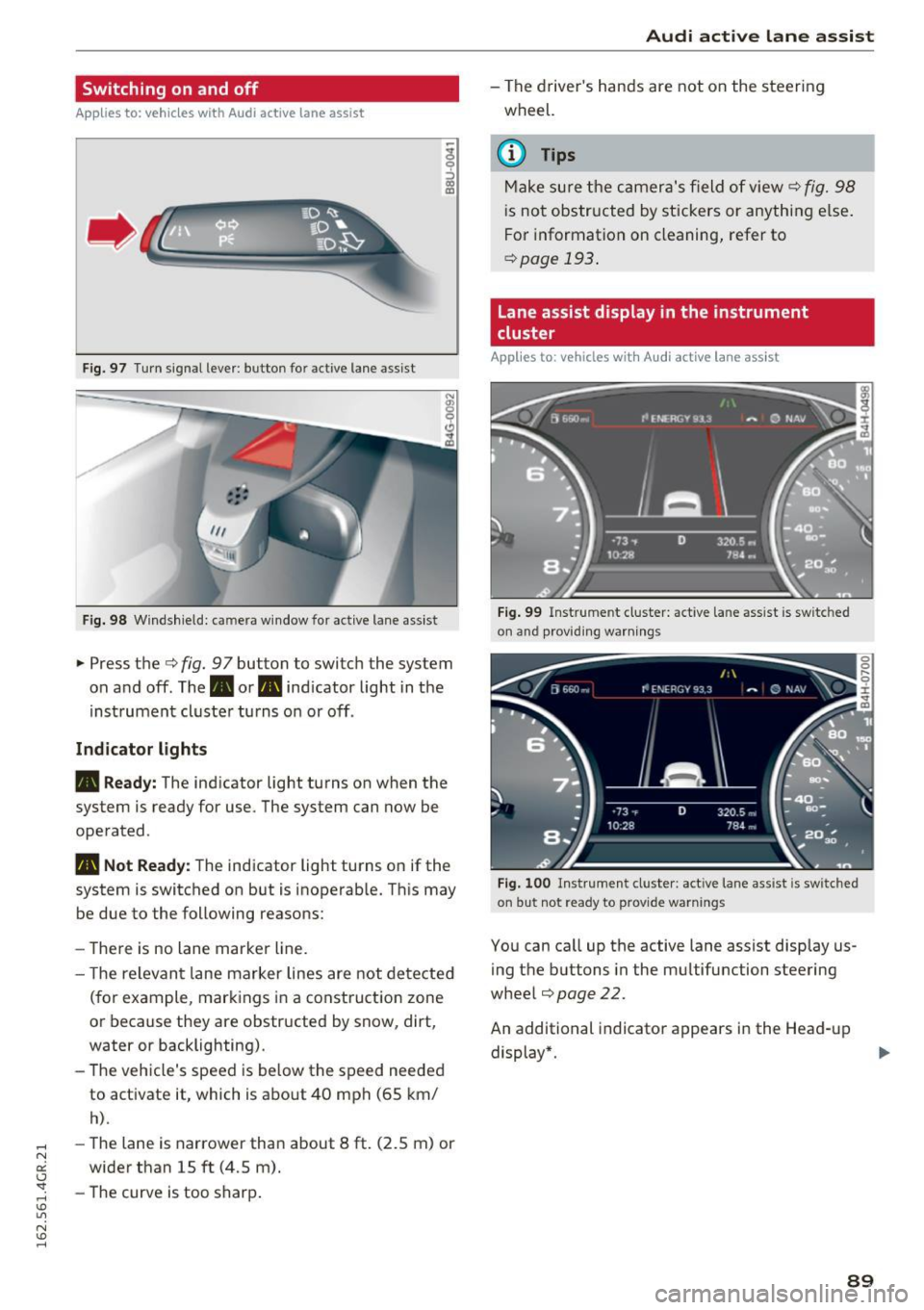
Fig. 97 T urn signal lever: button for act ive lane assist
F ig. 98 W indsh ield: camera window for active lane assist
... Press the c:> fig. 9 7 button to switch the system
on and off. The. or
Pl1 indicator light in the
instrument cluster turns on or off.
Indic ator light s
• Rea dy : The indicator light turns on when the
system is ready for use. The system can now be
operated .
Pl1 Not Read y: The indicator light turns on if the
system is switched on but is inoperable. Th is may
be due to the following reasons:
- There is no lane marker line.
- T he relevant lane marker lines are not detected
(for example, markings in a construction zone
or because they are obstructed by snow, dirt,
water or backlighting).
- The vehicle's speed is below the speed needed
to activate it, which is about 40 mph (65 km/
h).
-The lane is narrower than about 8 ft. (2.5 m) or
wider than 15 ft (4.5 m).
- The curve is too sharp.
Audi act ive lane ass is t
- The driver 's hands are not on the steering
wheel.
(D Tips
Make sure the camera's field of view c:> fig. 98
is not obstructed by stickers or anything else.
For information on cleaning, refer to
c:> page
193 .
Lane assist display in the instrument
cluster
App lies to: vehicles wit h Audi active la ne ass ist
F ig . 99 Inst rum ent clus ter: active la n e assis t is switc hed
on and provid ing warn ing s
Fig. 100 Instrument cluster: act ive lane assist is sw itched
on but not ready to provide warnings
You can ca ll up the active lane assist display us
ing the buttons in the mu ltifunction steering
wheel
c:> page 22.
An additional indicato r appears in the Head-up
display*.
8 9
Page 92 of 282
Audi active lane assist
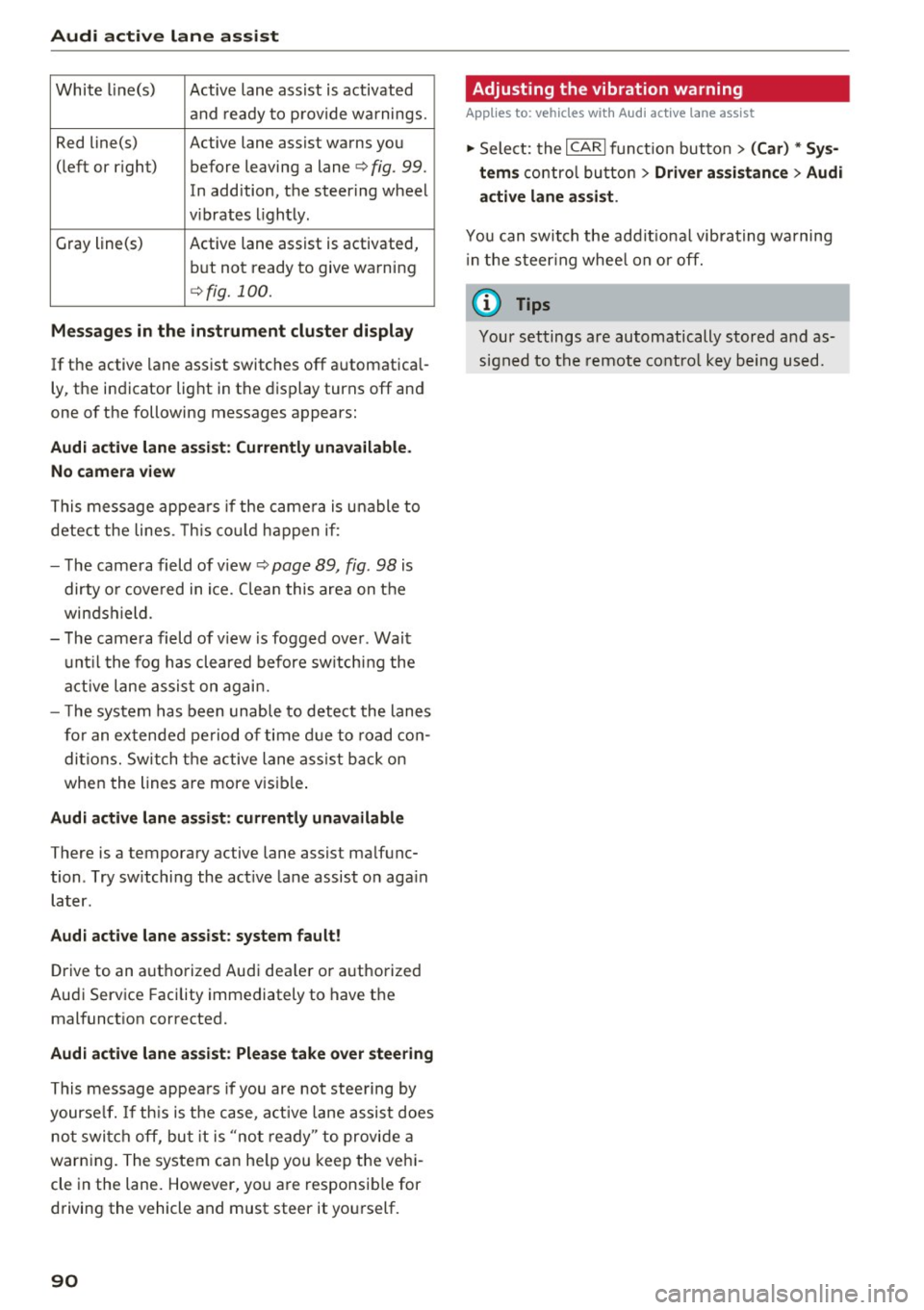
White line(s) Active lane assist is activated
and ready to provide warnings.
Red line(s) Active lane assist warns you
(left or r ig ht) before leaving a lane¢
fig. 99.
In addition, the steering wheel
v ib rates lightly.
Gray line(s)
Active lane assist is activated,
but not ready to give warning
¢fig. 100.
Messages in the instrument cluster display
If the active lane assist switches off automatical
ly, the indicator light in the display turns off and
one of the following messages appears:
Audi active lane a ssist: Currently unavailable.
No camera view
This message appears if the came ra is unable to
detect the lines. This could happen if:
- The camera field of view ¢
page 89, fig. 98 is
dirty o r covered in ice. Clean this area on the
windshield.
- The camera field of v iew is fogged over . Wait
until the fog has cleared before switching the
active lane assist on again.
- T he system has been unable to detect the lanes
for an extended period of time due to road con
ditions. Switch the active lane assist back on
when the lines are more vis ible.
Audi active lane assist: currently unavailable
There is a temporary active lane assist malfunc
tion . Try sw itching the act ive lane assist on aga in
later.
Audi active lane assist: system fault!
Drive to an authorized Aud i dea ler or authorized
Audi Service Facility immediately to have the
malfunct ion corrected.
Audi active lane assist: Please take over steering
This message appears if you are not steering by
yourse lf. If th is is the case, active lane assist does
not switch off, but it is "not ready" to provide a
warn ing. The system can he lp you keep the vehi
cle in the lane. However, you are responsib le for
driving the vehicle and must steer it yourself.
90
· Adjusting the vibration warning
Applies to: vehicles with Audi active lane assist
.,. Select: the I CARI function button > (Car) * Sys
tems
control button > Driver assistance > Audi
active lane assist .
You can switch the addit ional vibrating warning
i n the steer ing whee l on or off.
(D Tips
Your settings are automatically stored and as
signed to the remote control key being used.
Page 98 of 282
Audi dri ve s elec t
Cur ve ligh t*
The curve ligh t adapts to driving on curves . The
pivoting action and the lighting are also adapted
to the mode .
Adaptive cru is e control *
The behavior when accele rating can be adjusted
from comfortab le to sporty, depending on the
drive select mode. Adaptive cru ise control also
responds to the driving behavior of the vehicle
ahead in a more conservative or sporty manner.
Engine sound
The sound of the engine is adapted to the select
ed mode and ranges from subt le to sporty.
(D Note
- Make sure there is enough clearance above
and below the veh icle when parking. The
height of the vehicle can change once it is
parked due to temperature f luctuations,
changes to the load conditions and changes
to the driving modes, which can affect clear
ance.
- When transporting the vehicle on a car car
rier, train, ship or by other means, only tie
the vehicle down at the running surface of
the tires, which is the outer circumference.
Securing the vehicle at the axle compo
nents, suspension struts or towing eyes is
not permitted because the pressu re in the
a ir suspension struts can change dur ing
transport. The vehicle may not be secured
sufficiently if this happens.
@ Tips
- In some models, the maximum vehicle
speed can only be reached in the
Auto and
D ynami c modes.
- Se lec ting the
D ynami c mode results in spor
ty shifting characterist ics. The S gear posi
tion engages automatica lly.
96
- In veh icles that have dynamic steering *, op
erating noise is heard when starting or stop
ping the engine . This does not indicate a
problem.
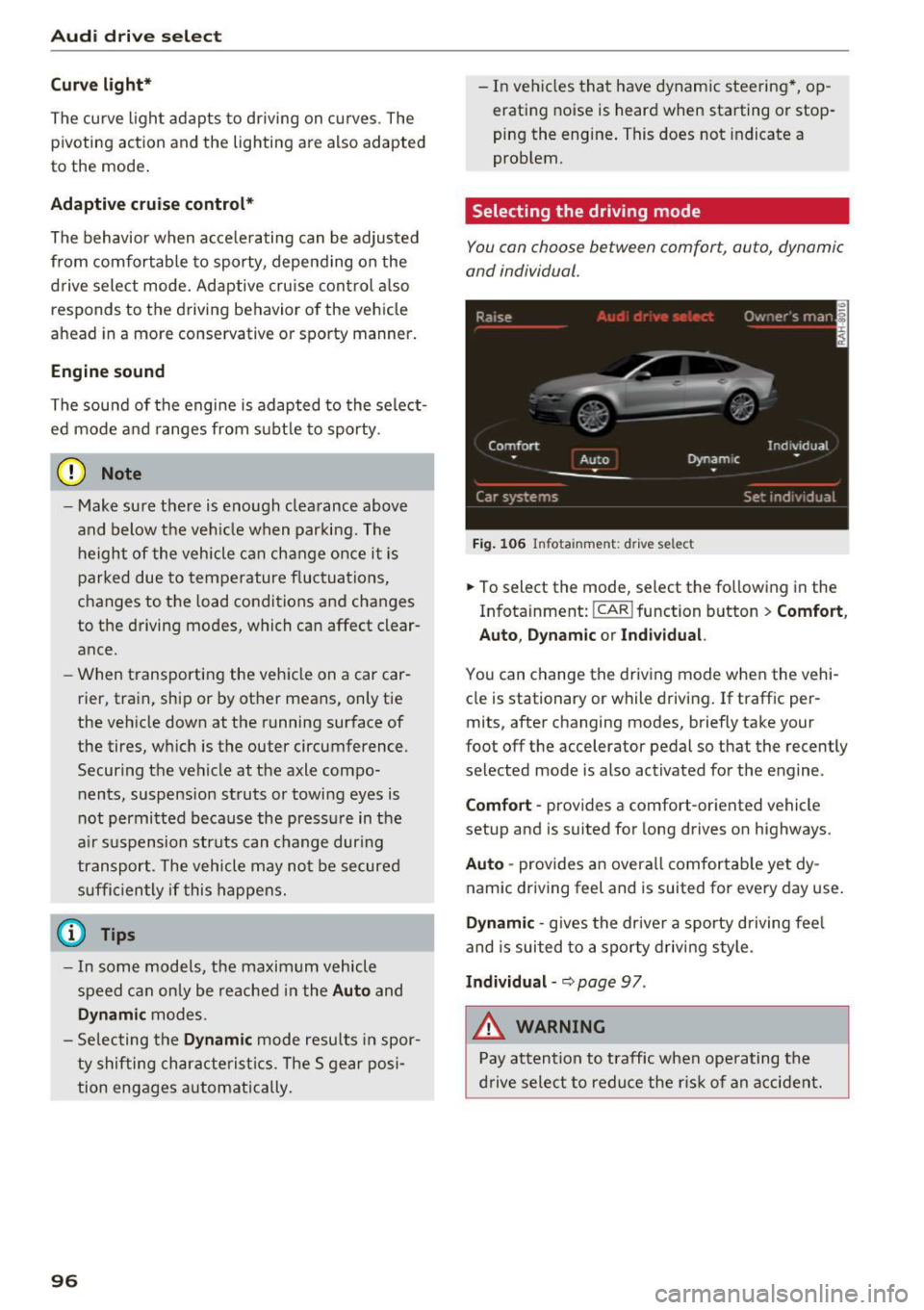
Selecting the driving mode
You con choose between comfort, auto, dynamic
and individual .
Fig. 106 Infota inment: drive se lect
.,. To select the mode, select the following in the
Infotainment:
! CAR ! function button > Comf ort ,
Auto , Dyn amic or In d iv idual.
You can change the driv ing mode when the vehi
cle is stationary or while driving . If traffic per
mits, after changing modes, briefly take your
foot off the accelerator pedal so that the recently
selected mode is also activated for the engine .
Comfo rt -prov ides a comfort-oriented vehicle
setup and is suited for long drives on highways.
Aut o -provides an overall comfortab le yet dy
namic driving feel and is suited for every day use.
Dynami c -gives the drive r a sporty d riving feel
and is suited to a sporty driving style .
Indi vidua l -~ page 97 .
&_ WARNING
Pay attention to traffic when ope rating the
d rive select to reduce the r is k of an accident.
-
Page 100 of 282

Night vision assist
Night vision assist
Night vision assist with
pedestrian and wild
animal highlighting
Description
A pp lies to: ve hicles w ith night v isio n ass ist
The night vision assist can detect, highlight and,
if necessary, warn about pedestrians and large
wild animals.
Night vision assistant with pedestrian and wild
animal detection assists you in darkness by using
an infrared camera to monitor the area in front of
your vehicle, within the limits of the system.
It
can display objects up to approximately 1000 feet (300 meters) away . The heat image
detected by the camera is shown in th e instru
ment cluster display . Warm areas appear lighter
and cold areas appear darker.
Highlighting detected pedestrians and wild
animals
Applies to: ve hicles w ith n ig ht v isio n ass ist
Fig . 107 Instrument cluster: ye llow h ighlig hted pedes
trians
Fig. 108 I n stru ment cluste r: symbol when the i nfrared im
age is not v isible
98
Within the limits of the system, night vision as
sistant can detect pedestrians and wild animals
that are within the detection range between ap
proximately 32 feet (10 meters) and 295 feet
(90 meters) in front of the vehicle. When it is
dark outside and the headlights are switched on,
detected pedestrians and w ild animals are
marked in ye llow
c::> fig. 107 within the limits of
the system
c::> page 99. Wild animal detection is
not active in built-up areas. The system only de
tects large wild animals such as deer.
@ Tips
If another display such as navigation replaces
the image from the night vision assist the~ .. ,
symbol appears in a tab
c::>fig . 108. You can
access night vision assist using the buttons in
the mu ltifunction steering wheel
c::> page 23.
Pedestrian and wild animal warning
Applies to: vehicles wit h night vision assist
Fig. 109 Instrument cl uster: @pedestrian warning, ®
w ild animal warning
Fig. 110 Instrument cluste r: @ pedes trian warning/ @
wild a nimal warning, w hen the image from the n ight v ision
assist is not selected in t he instrument cluster display ...
Page 101 of 282

Display in the instrument cluster/head-up
display*
If there are pedestrians or wild animals in an
area in front of you r vehicle that is classified as
critical, the system will direct your attention to
this :
- Pedestrians or wild animals are highlighted in
red and the corresponding symbol. or.
turns on
¢fig. 109.
-There is also a tone.
The area classified as critical is based on the vehi
cle speed and the steering wheel angle. Pedes
trian and wild animal warning encourages you to
pay more attention.
If the night vision assist image is replaced by an
other display (such as the on-board computer),
the red indicator light . or. will appear if
there is a pedestrian or wild animal warning
¢ fig. 110 .
If the head-up display* is switched on and the
night vision assist content is activated, . or.
will appear in the head-up display*.
Marking light*
To direct the driver's attention to a pedestrian,
the headlights can flash on the pedestrian three
times in a row when there is a pedestrian warn
ing.
This happens at speeds above approximately
35 mph (60 km/h) when you are traveling out
side of well-lit areas and when flashing the head lights will not create glare for a vehicle detected
in the oncoming lane . The marker light* is con
trolled by the high beam assist*
c::;, page 44,
Headlight assistant .
The marking light is not used for wild animals.
Night vision assist
General information
Applies to : vehicles wit h night vision assist
Fig. 111 Front of the vehicle : night vis ion assist ant ca mera
The following situations may affect the function
of the night vision assist system:
- Poor visibility such as snow, rain, fog or heavy
spray
- Dirty lens on the night vision assist camera
Make sure the night vision assist camera
c::;, fig. 111 is not covered by stickers, deposits or
any other obstructions because that can affect
the camera function . For information on clean
ing, refer to
c::;, page 193.
Pedestrian and wild animal detection depends on
the difference in temperature between the per
son/wild animal and the background area. Pedes
trians/wild animals may not be detected if the difference is too small. Pedestrian and wild ani
mal marking and the marker light* are deactivat
ed at temperatures above approximately 77 °F
(25 °C) and when it is light outside . When the
night vision assistant image is selected in the in
strument cluster display, the
II symbol appears
in the upper right.
A WARNING
Pay attention to traffic and the area around
your vehicle when night vision assist is switch
ed on. The driver is always responsible for cor
rectly assessing the traffic situation.
- Night vision assist can only warn about peo
ple and wild animals located within the visu
al range of the infrared camera. The visual
range corresponds to the image in the in
strument cluster display .
-
99
Page 102 of 282
Night vision assist
-Night vision assist may not detect people or
wild animals and mark them if
- they are not in an upright posit ion, for ex
ample if they are sitting or lying down
and/or
- the silhouette in the display appears in
comp lete or interrupted, for example be
cause the person is partia lly covered by a
veh icle or an animal by tall grass. This
could increase the risk of an accident.
- Never try to swerve around animals if doing
so wi ll endanger you o r other road users, be
cause this increases the risk of an accident.
- Ev en though the system evaluat es the
shape and heat given off by all detected ob
j ects, there are limits to the system. There
may be false warnings.
- For technical reasons, the image pauses in
sp lit second intervals.
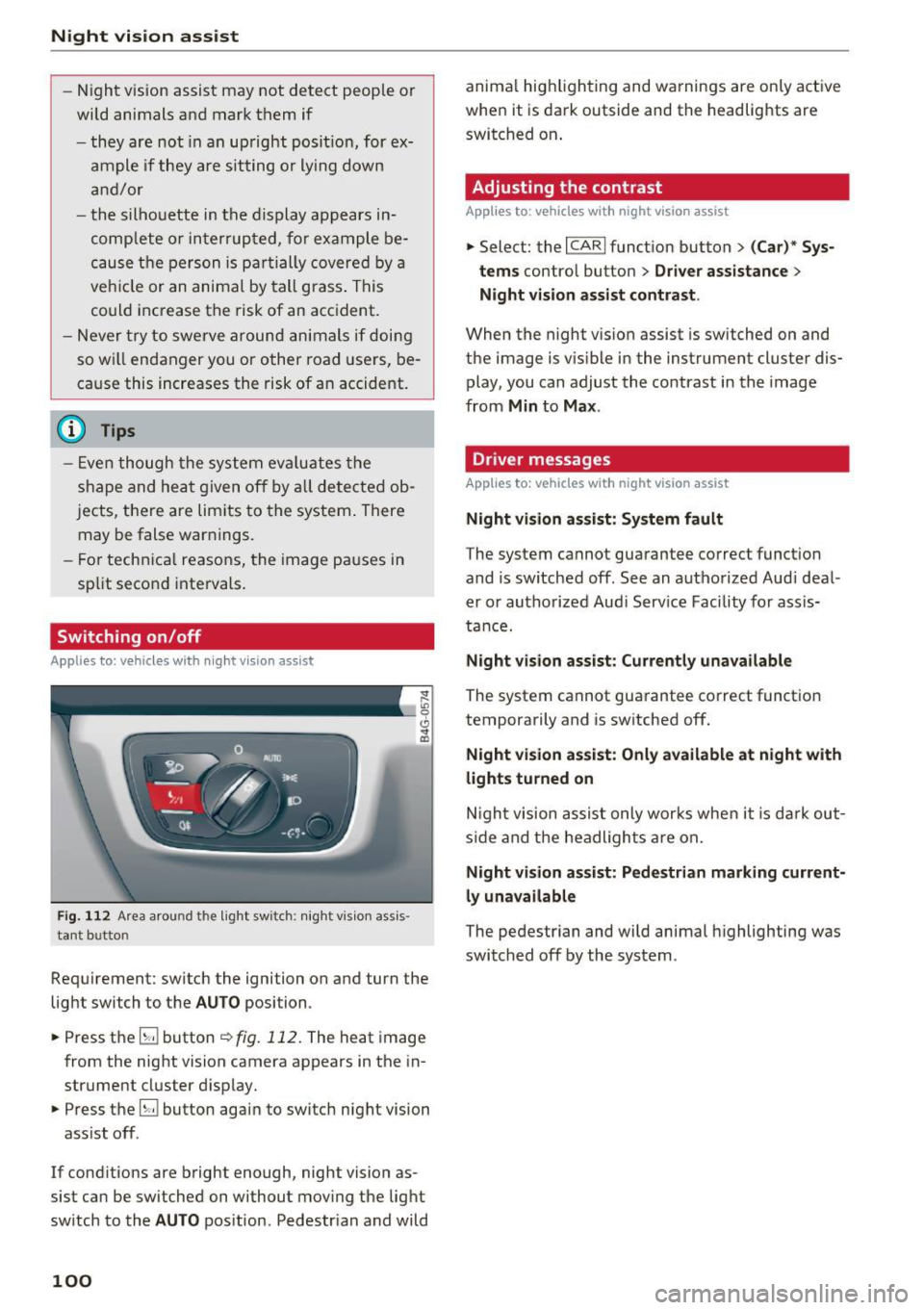
Switching on/off
Applies to: ve hicles w ith night visio n ass ist
Fig. 112 Area arou nd th e light switch: nigh t v is ion ass is ·
tant bu tto n
Requirement: switch the ignition on and turn the
light switch to the
AUTO position .
.,. Press the
5J button ~ fig. 112. The heat image
from the night vision camera appears in the in
strument cluster display .
.,. Press the
B button again to switch night vision
ass ist off .
If cond itions are bright enough, night vision as
sist can be switched on without moving the light
switch to the
AUTO position . Pedestr ian and wild
100
anima l hig hlighting and warnings are only active
when it is dark outside and the headlights are
switched on .
Adjusting the contrast
Applies to : vehicles with night vision assist
.,. Select: the I CARI function button > (C ar)* Sys
tems
contro l button > Driver assistance >
Night vision assist contrast .
When the night vis ion assist is switched on and
the image is v is ib le in the instrument cluster dis
play, you can adjust the contrast in the image
from
Min to Max .
Dr iver messages
Applies to: vehicles with night vision assist
Night vision assist: System fault
The system cannot guarantee correct funct ion
and is switched off. See an authorized Audi deal
er or authorized Aud i Service Facility for assis
tance.
Night vision assist: Currently unavailable
The system cannot guarantee correct funct io n
temporarily and is switched off.
Night vision assist: Only available at night with
lights turned on
Night vision assist only works when it is dark out
side and the headlights are on.
Night vision assist: Pedestrian marking current
ly unavailable
The pedestrian and wild animal highlighting was
switched off by the system .
Page 104 of 282

Automatic transmission
brake before and while moving the lever to D/S
out of N.
A WARNING
Read and follow all WARNINGS r=':> & in Driv
ing the automatic transmission on
page 103.
(D Note
Coasting downhill with the transmission in N
and the engine not running will result in dam
age to the automatic transmission and possi
bly the catalytic converter.
{!) Tips
- Audi drive select: you can adjust the sporty
shift characteristics in the
Dynamic driv ing
mode .Swill appear in the instrument clus
ter display instead of D .
- If you accidentally select
N while driving,
take your foot off the accelerator pedal im
mediately and wa it for the engine to slow
down to idle before selecting D/S .
- If there is a power failure, the selector lever
will not move out of the P posit ion . The
emergency release can be used if this hap
pens
r=':> poge 106.
Automatic Shift Lock (ASL)
.
The Automatic Shift Lock safeguards you against
occidentally shifting into o forward or the re
verse gear and causing the vehicle to move unin
tentionally.
F ig. 114 Shift gate : selecto r lever lock posit io ns and re
l ease bu tton high light ed
The selector lever lock is released as follows:
102
.,. Turn the ignition on .
.,. Step on the brake pedal.
At the some t ime
press and hold the release button on the gear
selector knob
c::> fig. 114 with your thumb until
you have moved the selector lever to the de sired position .
Automatic selector lever lock
The sel ector lever is locked in the P and N posi
tions when the ignition is turned on . You must
press the br ake pedal and the release button to
select another position. As a reminder to the driver, the following warn ing appears in the in
strument cluster display when the selector is in P
and N:
When stationary apply brake pedal while select
ing gear
The Automatic Shift Lock only functions when the
vehicle is sta tionary or at speeds below 1 mph
(2 km/h) .
At speeds above about 1 mph (2 km/h) the Auto
matic Shift Lock is automatically deactivated in
the N position.
A t ime delay element prevents the selector lever
from locking when it is moved through the N po
sition (going from R to D/S). The locking element
will lock the selector lever if the lever is left in N
(Neutral) for more than approximately 2 second,
without the brake pedal being pressed .
Release button
The release button on the selector lever prevents
the lever from being accidentally shifted into cer
tain positions . Depending on the direction of the
shift, the selector lever locks at different posi
tions . The positions are highlighted in the illus
tration
<=:> fig . 114.
Page 105 of 282

Driving the automatic transmission
Fig. 115 Shif t gate o n the cente r conso le : selecto r lever
wi th release button
Starting the engine
.. The selector lever must be in P or N.
Starting off
.. Press and hold the brake pedal.
.. Press and hold the release button in the selec
tor lever handle, select the desired selector lev
er posit ion such as D/S and release the button .
• Wait briefly until the transmission has shifted
(you w ill feel a slight movement) .
.. Remove your foot from the b rake pedal and ac
celerate.
Stopping temporarily
.. Keep the vehicle stationary using the braking
pedal, for example at traffic lights.
.. Do not press the accelerator pedal when doing
this .
.. To prevent the vehicle from rolling when you
start driving, set the parking brake wh en stop
ping on steep inclines¢,& .
.. The parking brake will release au tomatically
and the vehicle will start moving once you press
the accelerator pedal.
Stopping/ parking
If the selector lever is not in the P position when
you open the drive r's door, the vehicle could roll.
The message
Transmission: Car may roll! Shift
to park!
appears .
.. Press and hold the brake pedal until the vehicle
has come to a complete stop .
.. Apply the parking brake¢
page 75 , Parking .
.. Select the P selector lever position ¢ ,& .
Automatic transmission
Stopping on an incline
.. Always press the brake pedal to hold the vehi
cle in pla ce and prevent it from "ro lling back"
¢ ,& . Do
not try to prevent the vehicle from
"rolling back" when a gear is engaged by in
creasing the engine speed ¢CI) .
Starting on an incline
.. Activate the parkin g brake .
.. With the driving gear selected, press the accel
erator pedal carefully. The parking brake will
releas e automatically if your seat belt is fas
tened.
Under certain circumstances, such as driving in
the mountains, it may be useful to switch tempo
rarily to the manual shift program in order to ad
ju st the gears to the driving conditions by hand
¢ page 105 .
On slopes, activate the parking brake first and
then move the selector lever to the P position .
This prevent s too much stress from being placed
on the locking mechanism.
A WARNING
=
- The vehicle can also roll when the eng ine is
stopped .
- Unintended vehicle movement can cause se
rious injury .
- Never leave your veh icle w ith the engine
running while in gear . If you must leave
your veh icle when the engine is running, ac
tivate the parking brake and move the selec
tor lever to P.
- Power is still transmitted to the wheels
when the engine is runn ing at idle. To pre
vent the vehicle from "creeping", yo u must
keep your foot on the brake when the en
gine is running and the selector lever is in D/
5 or R or "tiptronic" mode is selected .
- Do not press the accelerator pedal when
changing the se lector lever position while
the vehicle is stationary and the engine is running .
- Never shift into R or P whi le driving.
103