2016 AUDI RS7 SPORTBACK steering
[x] Cancel search: steeringPage 4 of 282

Table of content s
Owner' s Lit e rature
About thi s Own er' s Manual ... .. .
Opera tion .. .... .... .... ... .... .. .
Cockpit ... .. .. .... .. .... ... .... .. .
5
6
8
8
General illustration . . . . . . . . . . . . . . . . . . 8
Instruments and indicator lights 10
I nstruments . . . . . . . . . . . . . . . . . . . . . . . . 10
I ndicator lights . . . . . . . . . . . . . . . . . . . . . 11
Driver informat ion system . . . . . . . . . . . . . 22
Lap t imer . . . . . . . . . . . . . . . . . . . . . . . . . . 27
On Board D iagnos tic Sys tem (OBD) . . . . . 28
Opening and closing . . . . . . . . . . . . . 30
Keys . . . . . . . . . . . . . . . . . . . . . . . . . . . . . . 30
Cen tral locking . . . . . . . . . . . . . . . . . . . . . . 31
Luggage comp artment lid . . . . . . . . . . . . . 36
Ch ild safety lock . . . . . . . . . . . . . . . . . . . . . 39
Power Windows . . . . . . . . . . . . . . . . . . . . . 39
Sunroof. . . . . . . . . . . . . . . . . . . . . . . . . . . . 40
Garage doo r opener (Home link) . . . . . . . . 41
Lights and Vision . . . . . . . . . . . . . . . . . 43
E xterior l igh ting . . . . . . . . . . . . . . . . . . . . . 43
I nterior lighting . . . . . . . . . . . . . . . . . . . . . 46
V1s1on . . . . . . . . . . . . . . . . . . . . . . . . . . . . . 47
Windsh ield wipers . . . . . . . . . . . . . . . . . . . 49
Seats and storage . . . . . . . . . . . . . . . . 52
G eneral information . . . . . . . . . . . . . . . . . 52
F ront s eats . . . . . . . . . . . . . . . . . . . . . . . . . 53
Head rest raints . . . . . . . . . . . . . . . . . . . . . 55
Memory fun ction . . . . . . . . . . . . . . . . . . . . 56
Ash tray . . . . . . . . . . . . . . . . . . . . . . . . . . . . 58
C igarette lighter . . . . . . . . . . . . . . . . . . . . 58
12 Volt sockets . . . . . . . . . . . . . . . . . . . . . 59
Sto rage . . . . . . . . . . . . . . . . . . . . . . . . . . . . 59
Roof rack .. .. ...... .. .... ... .... .. .
L uggage compartment . ....... .. .. .. .
P ass- throug h w it h ski bag ... ... .. .. .. . 6
1
6 2
65
Warm and cold . . . . . . . . . . . . . . . . . . . 67
4-zone deluxe automatic climate control . 67
Steering whee l heat ing . . . . . . . . . . . . . . . 70
2
Driving .... . .. .. .. .. ... . .. .... ... .. 71
St ee ring . . . . . . . . . . . . . . . . . . . . . . . . . . . 71
Start ing and stopping the eng ine . . . . . . . 72
E le ct rome chan ical p ark ing brake . . . . . . . 74
Speed w arning sy stem . . . . . . . . . . . . . . . . 76
Cru ise control system . . . . . . . . . . . . . . . . 77
Audi adaptive cruise control and
braking guard . . . . . . . . . . . . . . . . . . . .
7 9
Introduction . . . . . . . . . . . . . . . . . . . . . . . . 79
Genera l information . . . . . . . . . . . . . . . . . 79
Audi adaptive c ruise contro l . . . . . . . . . . . 81
A udi braki ng g ua rd . . . . . . . . . . . . . . . . . . 85
Messages . . . . . . . . . . . . . . . . . . . . . . . . . . 86
Audi active lane assist . . . . . . . . . . . 88
La ne assist . . . . . . . . . . . . . . . . . . . . . . . . . 88
Audi side assist . . . . . . . . . . . . . . . . . . 91
S ide assist . . . . . . . . . . . . . . . . . . . . . . . . . 91
Audi drive select . . . . . . . . . . . . . . . . . 95
Drive se tt ings . . . . . . . . . . . . . . . . . . . . . . . 95
Raising/lower ing t he veh icle . . . . . . . . . . . 97
Driver messag es . . . . . . . . . . . . . . . . . . . . . 97
Night vision assist . . . . . . . . . . . . . . . 98
Night vision assist w ith pedest rian and
wild an imal highlighting . . . . . . . . . . . . . . 98
Automatic transmission . . . . . . . . . 101
tiptronic . . . . . . . . . . . . . . . . . . . . . . . . . . . 101
Parking systems . . . . . . . . . . . . . . . . . 107
Genera l info rmation . . . . . . . . . . . . . . . . . 107
Parking syst em plus . . . . . . . . . . . . . . . . . . 108
R earvi ew cam era . . . . . . . . . . . . . . . . . . . . 109
Periphera l cameras . . . . . . . . . . . . . . . . . . 112
Adjusting the d ispl ay and the w arning
tones ........ ... .. .. ............ .. .
E rror messages 1
16
117
Safety ........... .. ............... 118
Driving safety . . . . . . . . . . . . . . . . . . . . 11 8
Bas ics . . . . . . . . . . . . . . . . . . . . . . . . . . . . . 118
Co rrect passenge r seat ing positions. .. .. 119
D rive r's and front passenge r's foo twell . . 123
Pedal are a . . . . . . . . . . . . . . . . . . . . . . . . . . 123
Page 11 of 282
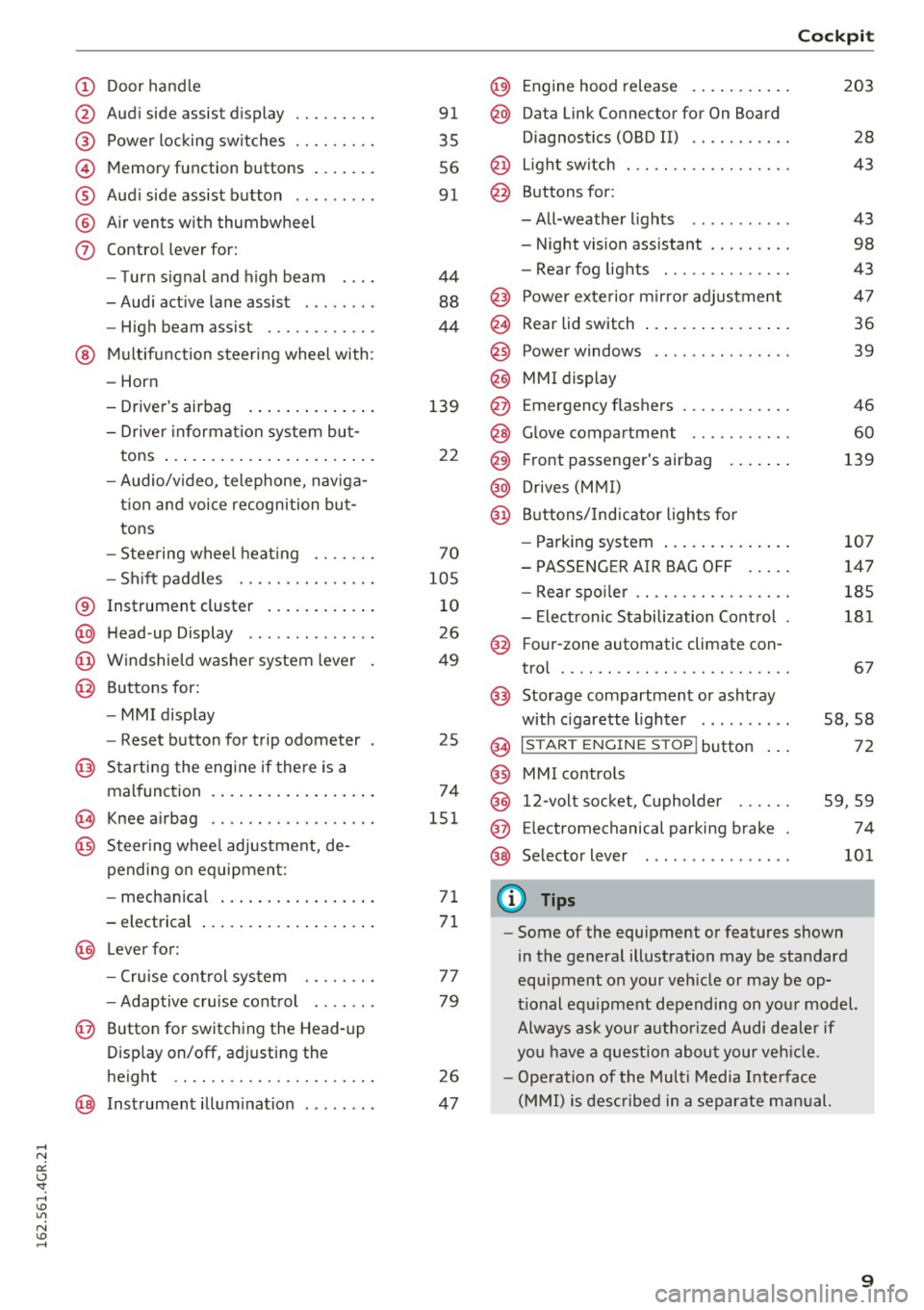
(!) Door handle
@
®
©
®
®
(j)
Audi side assist display
Power locking switches ...... .. .
Memory function buttons ...... .
Audi side assist button .. .. ... . .
Air vents with thumbwheel
Control lever for:
- Turn signal and high beam
- Audi active lane assist . .. ... . .
- High beam assist ......... .. .
@ Multifunction steering wheel with:
- Horn
- Driver's airbag
- Driver information system but-
tons ...................... .
- Audio/video, telephone, naviga
tion and voice recognition but
tons
- Steering wheel heating ...... .
- Shift paddles ............ .. .
® Instrument cluster ........... .
@ Head-up Display ............ . .
@ Windshield washer system lever
@ Buttons for:
- MMI display
- Reset button for trip odometer
@ Starting the engine if there is a
malfunction ................. .
~ Knee airbag .. ............. .. .
@ Steering wheel adjustment, de
pending on equipment:
- mechanical ................ .
- electrical
@ Lever for :
- Cruise control system ... .. .. .
- Adaptive cruise control ...... .
@ Button for switching the Head-up
Display on/off, adjusting the
height .. .. ............... .. .
@ Instrument illumination ....... .
91
35
56
91
44
88
44
139
22
70
105
10
26
49
25
74
151
71
71
77
79
26
47
@) Engine hood release .......... .
@ Data Link Connector for On Board
Diagnostics (OBD II) .... ...... .
@ Light switch . .. .............. .
@ Buttons for :
-All-weather lights - Night vision assistant .. ...... .
- Rear fog lights ............. .
@ Power exterior mirror adjustment
@ Rear lid switch ............... .
@
@
@ Power windows
MMI display
E mergency flashers
@ Glove compartment .......... .
@ Front passenger's airbag ...... .
@ Drives (MMI)
@ Buttons/Indicator lights for
- Parking system ............. .
- PASSENGER AIR BAG OFF .... .
- Rear spoiler .. .............. .
- Electronic Stabilization Control .
@ Four-zone automatic climate con-
trol .... .... .. .............. .
@) Storage compartment or ashtray
with cigarette lighter ......... .
@ I ST AR T ENGINE ST OP ! button
@ MMI controls
@
@
@ 12-volt socket, (upholder
E lectromechanical parking brake
Selector lever
(D Tips
Cockpit
203
28
43
43
98
43
47
36
39
46
60
139
107
147
185
181
67
58,58
72
59 ,59
74
101
- Some of the equipment or features shown
in the general illustration may be standard
equipment on your vehicle or may be op
tional equipment depending on your model.
Always ask your authorized Audi dealer if
you have a question about your vehicle.
- Operation of the Multi Media Interface
(MMI) is described in a separate manual.
9
Page 14 of 282

Instruments and indicator lights
-Whenever stalled or stopped for repair,
move the vehicle a safe distance off the
road, stop the engine, and turn on the
emergency flasher
c> page 46.
- The engine compartment of any motor vehi
cle is a potentially hazardous area. Before
you check anything in the engine compart
ment, stop the engine and let it cool down.
Always exercise extreme caution when work
ing under the hood
c> page 203.
Overview
Some indicator lights turn on briefly to check the
function of that system when you switch the igni
tion on. These systems are marked with a../ in
the following tables. If one of these indicator
lights does not turn on, there is a malfunction in
that system.
Red indicator lights
12
-------------
US A models:
Brake malfunction../
c>page 14
Canada models:
Brake malfunction../
c>poge 14
USA models:
Electromechanical parking brake
c>page 14
Canada models:
Electromechanical parking brake
c>page 14
Engine cooling system
c>poge 15
Engine oil pressure
c>poge 16
Engine oil level
c>poge 16
Battery
c>page 15
Engine stops while driving
c>page 16
Safety belt
c>page 16
Electromechanical steering../
c>page 184
Electronic steering column lock
c>page 16
Engine start system
c>page 17
USA models: Speed warning sys
tem
c>poge 76
Canada models: Speed warning
system
c> poge 76
Adaptive cruise control*../
c>page 81
Air suspension*
c>page 17
Night vision assistant*
c>page 98
Night vision assistant*
c>poge98
Rear spoiler
~page 185
Yellow indicator lights
A IR
BAG
-------------
US A models: Safety systems
c>page 17
Canada models: Safety systems
c>poge 17
Electronic Stabilization Control
(ESC) ../
c>poge 18
Electronic Stabilization Control
(ESC) ../
c::>page 18
Electronic Stabilization Control
(ESC) ../
c::>page 180
USA models:
Anti-lock braking system (ABS)
defective ../
c>poge 18
Page 15 of 282
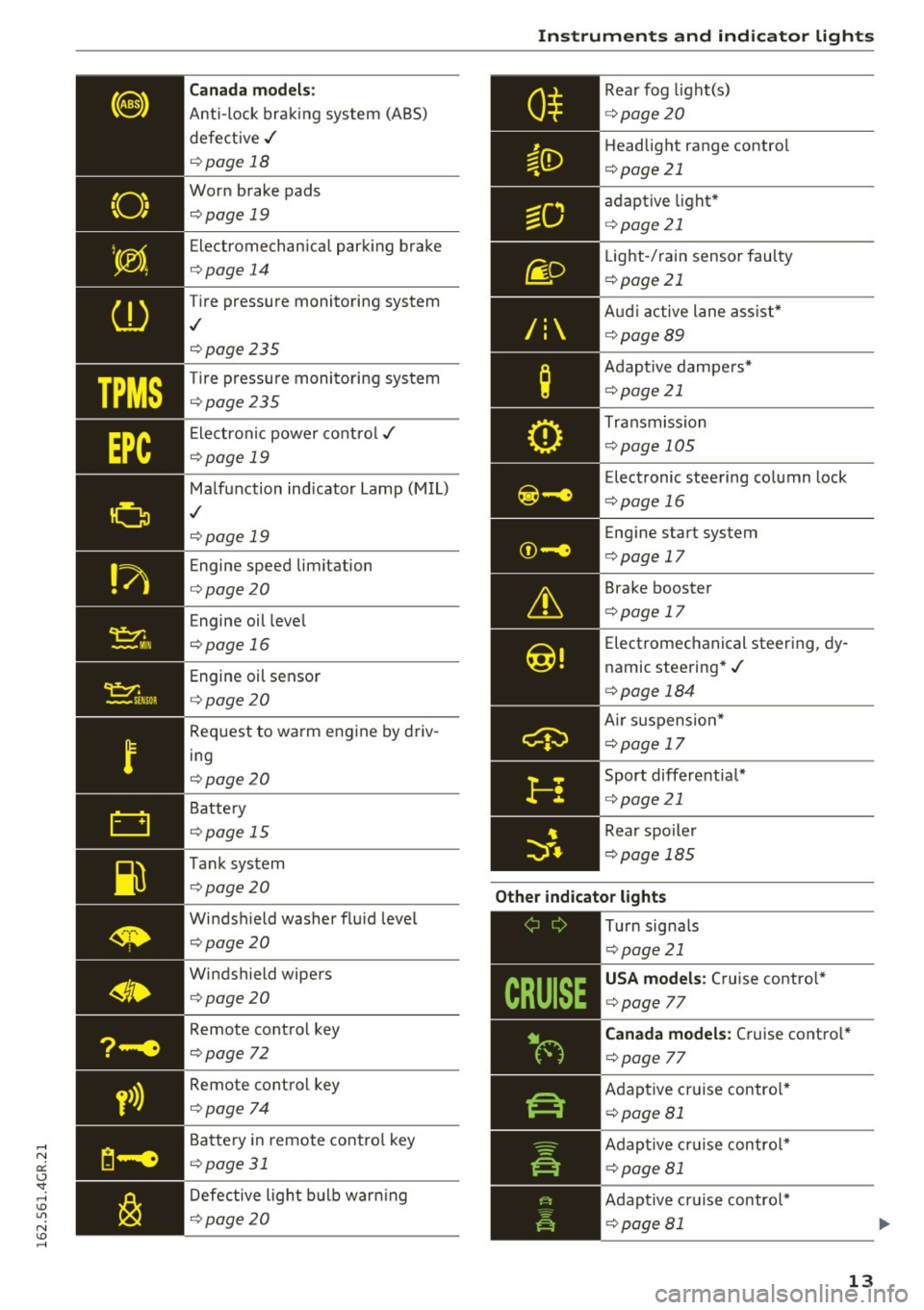
TPMS
Canada models:
Anti-lock bra king system (ABS)
defective ,/
¢page 18
Worn brake pads
¢page 19
Electromechan ica l park ing brake
¢ page 14
Tire pressure monito ring system
,I
¢page 235
Tire pressu re moni toring sys tem
¢page 235
Ele ct ron ic power co ntro l./
¢page 19
Malf u nction ind icator La mp (M IL)
,I
¢page 19
Engine speed limitation
¢page 20
Engine oil leve l
¢page 16
Engine oil sensor
¢page 20
Request to wa rm eng ine by driv
ing
¢ page 20
Battery
¢ page 15
T ank sys tem
¢page 20
Windshield washer flu id leve l
¢page 20
Windshield wipers
¢page 20
Remote cont rol key
¢page 72
Remote cont ro l key
¢ page 74
Battery in remote contro l key
¢page 31
Defective ligh t bulb warning
¢ page 20
Instruments and ind icator lights
R ea r fog light(s)
Headlight range contro l
¢page 21
ad aptive light *
¢page 21
Light-/ rain sensor fau lty
¢ page 21
Audi a ctive lane as sist*
¢ page89
Adap tive da mpe rs*
¢ page 21
Tra nsmission
¢pag e 105
Elec tronic steering column lock
¢ page 16
Engine start system
¢ page 17
Brake booster
¢page 17
Electromechanical steer ing, dy
namic stee ring* ./
¢page 184
Air su sp ensio n*
¢page 17
Sport differentia l*
¢page 21
Rear spoiler
¢ pag e 18 5
Other indicator lights
-------------
Turn signa ls
¢ pag e 21
USA models : Cruise contro l*
¢ page 77
Canada models: Cruise co ntro l*
¢ page 77
Adap tive c ruise contro l*
¢ page 81
Adap tive c ruise contr ol*
¢page 81
Adap tive cr uise contro l*
¢ page 81
13
Page 18 of 282

Instruments and indicator lights
If the message does not tu rn o ff, have your a u
thor iz e d A udi dealer or qualified worksho p cor
rect the malfunction.
~ Engine stop while driving
• Engine stopped: No power steering and
brake support.
There is a malfunction in the en gine or in the fue l
supp ly system .
Mo re fo rce is nee ded to stee r and bra ke the mov
i ng vehicl e w hen t he engine is stoppe d. If the ve
h icle is ro llin g, try to stop it caref ully on the side
of the road away from moving traffic . See an au
thor iz ed Audi dealer or author iz ed A udi Service
F acility for assista nce .
A WARNING
-
If th e eng in e stops whi le driv ing, yo u w ill
n eed to u se mor e fo rce t o brak e the ve hicle.
T his i ncre ases the r is k of a n acci dent. Th ere
w ill still b e po wer steer ing if th e ignition is
s wi tched on w hile th e ve hicle is ro lling an d
t here is s ufficien t bat tery ch arge. O the rwise,
yo u must use greate r fo rce whe n steer ing.
4'-Safety belts
T his w arn ing/indi cator ligh t remind s y ou to put
on your safe ty belt.
T he . warni ng/in dica tor lig ht ill uminates whe n
the ig nition is sw itch ed on to remi nd the dr iver
and an y fr on t pa sse nger to pu t on the safe ty bel t.
Ad diti ona lly, an a co ustic warning ( gong) wi ll also
sound.
F or mor e In form ati on ¢
page 1 2 7, ~ S afety bel t
w arning ligh t.
~ Engine oil pressure malfunction
The red engine oil pressure warning symbol re
quires immed iate service or re pair. Driving wi th a
low- oil-pressure indi cation is likely to inflict se
vere damage to the engine .
• Switch off engine and check oil level
16
If the indica to r li gh t turns on and the message
a ppears, the oil p ress ure is too low .
.,. Pull off the ro ad .
.,. St op the vehicle .
.,. Tur n o ff th e engine .
.,. Check the engine oil level¢ page 207 .
.,. If the eng ine o il level is too low , add engine oil
¢
page 20 7 . M ake s ure t hat the o il press ure
warni ng symbo l. appears no lo nger in the
disp lay b efore you sta rt driving again .
.,. If the eng ine o il level is correc t and the indica
t o r li gh t still turns on, turn t he e ngine off and
do not co ntinu e drivi ng. Seek professiona l as
sis ta nc e.
(D Tips
- The engine oil pressure symbol. is not
an indicator for a low engine oil level. Do not rely on it . Instead, check the oil level in
your engine at regular intervals , preferably
each time you refuel , and always before
going on a long trip.
- The yellow oil level warning indication
Ell
requires oil refill or workshop service with
out delay. Do not wait until the red oil
pressure warning. starts to flash before
you respond to the low oil level warning
l!I. By then, your engine may already have
suffered serious damage.
·
~ Engine oil
• Please add oil immediately .
Add oil immediate ly ¢ pag e 205.
Ill Add oil max . X L. You may continue driving
Add th e am ount of oil i nd ic a te d in t he dis pla y im
med iate ly
¢ page 205.
@-Steering lock
• Do not drive vehicle: Steering defective
There is a mal func tion in the e le ctr onic st eer ing
l ock. You canno t tur n the ign ition on .
Do
not tow yo ur vehicl e bec ause it cannot be
stee red. See an authorized Audi dea ler or author
iz ed Audi Service Facili ty f or as sis tance .
....
Page 19 of 282

l!II Steering lock: System fault Please contact
deale r
There is a malfunction in the elec tronic stee ring
l o ck .
D rive to an aut ho rized Aud i dea le r or a uthorized
Aud i Serv ice Faci lity immediately to have t he
m alfunc tion corrected.
A WARNING
Do no t tow your veh icle when there i s a mal
function in the elec tronic steering loc k -this
increases the r is k of an accident .
©-c Engine start system
• Engine start system fault. Please contact
dealer
D o not switch the ignit ion off because yo u may
not be able to switc h it on aga in.
-
Dr ive to an autho rized Aud i dea le r o r a uth o rized
Au di Serv ice Fa cility immedi ately to have the
mal funct ion correcte d.
11111 Engine start system fault. Please contact
dealer
There is a malfunction in the eng ine start ing sys
tem .
Drive to an authori zed Aud i dea ler or a uth ori zed
Aud i Service Facility immediately to have the
malfunc tion corrected .
0 Air suspens ion
• Air suspens ion: System fault You can contin
ue driving slowly (max . speed 60 km/h).
There is a malfunction that can result in restrict
ed driving s tabili ty .
Ca refully drive at a max imum speed of 35 mph
(60 km/h) to your authorized Audi dealer or
qua lified workshop to have the ma lf un ction cor
rected .
;:::: • Air suspension: Service mode. Vehicle can er:
~ only be moved with restrictions
,....,
Caref ully drive to yo ur autho rize d Aud i dea le r o r
autho rize d Au di Serv ice Facility immediately to
have the se rvice mode deactivated.
II Air suspension: System fault
T he re is a system malfu nction t hat can resul t in
r estr icted dr iv ing stabi lity or red uced g round
cl earan ce.
Drive to an author ized A udi dealer or authorized
Audi Se rvice Facility immed iate ly to have the
malfu nction correcte d.
II Air suspension: Vehicle is too low. Ground
clearance limited
The gro und clearance is ve ry low due to a system
malfunction . Wait until the a ir suspension sys
tem has restored normal gro und clearance . Oth
erwise , cond itions s uch as an uneven road surface
can lead to vehi cle damage .
tlit !f Safety systems
The II (USA models)/ E,I (C anad a models) ind i
cator lig ht monitors the s afety sys tems (e.g . a ir
bags, pretensione rs) and illumina tes fo r a few
secon ds each time you switc h the ignition on .
If the II (USA mo dels) !E,I (Canada mode ls) in
di cator light does not go ou t, o r if it ill umin ates
wh ile you are dr iv ing, or if it star ts to b link, then
t h ere is a malfunct io n somewhere in the system.
If the light does not illum inate when yo u switc h
the ignit ion on, this a lso means there is a mal
funct ion.
A WARNING
If yo u have a ma lf u nct ion in the safety sys
t e ms, con tact your au tho rized Aud i dealer im
m ediately . Ot herwise the safety systems may
n ot wor k properly in a n acci dent.
& Brake booster
D Brake servo : limited functionality. You can
continue driving. Contact workshop
T he re is a ma lf u nction in t he br ake booster . The
brak e bo oste r is ava ilab le, but its effectiveness is
r ed uce d. Brakin g behavior may be d iffere nt from .,_
17
Page 25 of 282

-Always reduce your speed and drive with
special care in cold weather cond itions when
the chance of encountering icy road surfaces
increases.
(D Tips
- If the vehicle is stat iona ry, o r if you are driv
i ng at a very low speed, the temperature
s hown in the d isp lay m ight be slightly high
er t han the actual outside temperature. T his
i s caused by t he heat be ing radiated from
t h e eng ine.
- You can select the u nits used for temp era
ture, speed and othe r measureme nts in the
MM I.
- Fo r info rmation o n the a udio/video and nav
i ga tion* func tions, re fer to the s epa ra te
M MI owner's manual.
Operation
The driver information system is operated using
the buttons on the multifunc tion steering wheel.
F ig. 6 M ultifunct io n steering wheel: operating the driver
info rmation system
Fig. 7 In strume nt cluste r: o penin g the vehicle funct ions
menu
Instruments and indicator lights
Operating
.,. Switch t he igni tion on.
.,. To switch be twee n the tabs, p ress the rocker
sw itch
(D to the left o r right¢ fig. 6 .
.,. To access additiona l information below or
above, t urn the th umbwheel @down or up .
.,. To confirm a selection, p ress the thumbwheel
@.
.,. To open the submenu for an ac tive tab , press
the button [ii@.
.,. To sele ct a func tion p rogrammed to a steering
wheel button *, p re ss the butto n @ .
Opening the Vehicle functions
.,. Select the first tab with the rocker sw itch (D .
.,. Press the~ button @. The Vehicle functions
menu is disp layed ¢ fig. 7.
.,. To sele ct a men u it em, turn an d press the
t humbwhee l@ .
Resetting values to zero
.,. In the Vehicle functions menu, select On
board computer or Efficiency program .
.,. You ca n now se lec t b etw een the long-term
memory an d short- term memory .
.,. To reset the val ue s in a m emo ry, pres s and hold
the t humbwheel @for one se cond.
Assigning a function to a programmable
steering wheel button*
.,. Sele ct the I CAR ! fun ction butt on> (Car) *Sy s
tem s
contro l butto n > Vehicle settings > Steer
ing wheel button programming .
The la st fun ction sele cte d di spla ys w hen yo u
swi tch the ig nition on.
On-board computer
Fi g. 8 Instrument cluster: fuel consu mptio n display
23
Page 27 of 282

Economy tips
In certain situations, economy tips appear auto
matica lly for a short time in the efficiency pro
gram~
fig. 10. If you fo llow these economy tips,
you can reduce your vehicle's fuel consumption.
To turn an economy tip
off immediately after it
appears, press any button on the mult ifunction
steering whee l.
(D Tips
- If you erase the data in the efficiency pro
gram, the values in the on-board computer
will a lso be reset.
- Once you have turned an economy tip off, it
will only appear again after you turn the ig
nition on again .
- The economy tips are not displayed in every
instance, but rather in intervals over a peri
od of time.
Odometer
Fig . 11 Instrument cluster: odometer and reset butto n
The display of distance dr iven is shown in miles
"mi" or kilometers "km". The units of measure
ment (kilometers/miles) can be changed in the
Infotainment system.
Upper odometer
The trip odome ter shows the distance driven
since it was last reset.
It can be used to measu re
short distances. The last digit shows distances of
100 meters or 1/10 of a mile.
The trip odome ter can be reset to zero by press
ing the reset button
I ~ ].
Instruments and indicator lights
Lower odometer
The lower odomete r shows the tota l number of
kilometers or miles that the vehicle has driven.
Malfunction indicator
If there is a malfunction in the instrument clus
te r,
DEF will appear in the trip odometer display.
Have the malfunction corrected as soon as possi
ble.
Time/date display
Fig. 12 Instrument cluste r: time and date
The date, time of day and time and date format
can be set in the Infotainment system. Refer to
the Infotainment system operat ing manua l for
instructions .
When you open the driver's door, the date and
time appear in the instrument cluster display for
30 seconds.
25