2016 AUDI RS7 SPORTBACK warning light
[x] Cancel search: warning lightPage 30 of 282

Instruments and indicator lights
Evaluating times and continuing or
resetting timing
You can evaluate the fastest, slowest and aver
age Lap times .
Fig. 17 Display: lap time evaluation
... To evaluate lap times, press the thumbwheel.
The number of laps traveled, the fastest lap
"+", the slowest lap"-" and the average lap
time "0" appears in the display .
... To continue timing for additional laps, press
the thumbwheel.
... To reset the timer to zero, press the thumb
whee l again. The lap timer is switched off now.
(D Tips
-Saved lap times cannot be individually de
l eted from the total results .
- The saved lap timer values will not be lost
after turning the ignition off.
On Board Diagnostic
System (OBD)
Malfunction Indicator Lamp (MIL)
The Malfunction Indicator Lamp (MIL) I! in the
i n str ument cluster is part of the On-Board Diag
nostic (OBD II) system.
The warning/indicator light illuminates when the
ignit ion is switched on and goes ou t after the en
g in e starts and the idle has st abilized. This indi
cates that the MIL is working properly .
If the light does not go out after the engine is
started, or illuminates wh ile you are dr iving, a
malfunct ion may exis t in the engine system.
If
28
the light illuminates, the catalyt ic converte r
could be damaged.
Continue driving
with reduced power (avoidi ng
sustai ned high speeds and/or rapid accelera
tions) and have the condition corrected. Contact
your authorized Audi dealer.
An improperly closed fuel filler cap may also
cause the MIL light to illuminate
q page 200.
On-Board Diagnostics
Fig. 18 Location of Data Link Connector (DLC)
On-Boa rd Diagnostics monitors the components
of your emission control system. Each monitored
component in your engine system has been as
s ig ned a code . In case o f a malfunct ion, the com
ponent will be identified and the fault stored as a
code in the contro l module memory.
The MIL light may also illuminate if there is a
leak in the on-board fuel vapor recovery system.
If the light illuminates after a refuelling, stop
the vehicle and make sure the fuel filler cap is properly closed
q page 200.
In order to make an accurate diagnosis, the stor
ed data can only be displayed using special diag
nostic equipment (generic scan tool for OBD) .
In order to connect the special diagnostic equip
ment, push the plug into the Data Link Connector
(DLC). The DLC is located to the right of the hood
release <=>
fig. 18.
Your authorized Audi dealer or a qua lified service
station can interpret the code and perform the
necessary repair. .,.
Page 31 of 282
A WARNING ,~
Do not use the diagnostic connector for pe r
sonal use . Incorrect usage can cause malfu nc
t ions, which can i ncrease the risk of a colli
sion !
Instruments and ind icator lights
-
29
Page 32 of 282

Opening and closing
Opening and closing
Keys
Key set
Fig. 19 Key set
@ Remote control key with mechanical key
You can centrally lock and unlock your vehicle
and start the engine w ith the master key with re
mote control. A mechanical key is integrated in
the remote control key¢
page 30.
@ Emergency key
The emergency key is not intended for constant
use. It shou ld only be used in an emergency.
Keep it in a safe place and do not carry it on your
key ring.
Key replacement
If you lose a key , contact your authorized Audi
dealer immediately to have the
lost key disab led .
Be sure to bring all your keys with you.
Personal comfort settings
If two people use one vehicle, it is recommended
that each person always uses "their own" master
key. When the ignition is switched off or when
the vehicle is locked , personal convenience set
tings for the following systems are stored and as
signed to the remote master key .
- Automatic climate contro l
- Central locking system
- Amb ience lighting*
- Seat memory*
- Parking system*
- Adaptive cruise control*
- Audi active lane assist*
30
-Audi side assist*
- Audi drive se lect
- Night vision assistant*
- Heated steering wheel*
The stored settings are automatically recalled
when you unlock the vehicle, when you open the
doors or when you switch the ignition on.
A WARNING
-
-Do not leave your vehicle unattended. Al
ways take your ignition key with you and
loc k your vehicle . Entr y by unautho rized per
sons could endanger yo u or result in theft or
damage the vehicle.
- Do not leave children unattended in the ve
hicle, especially with access to vehicle keys.
Unguarded access to the keys provides chil
dren the opport unity to start the engine
and/or activate vehicle systems s uch as the
power windows, etc. Unsupervised opera
tion of any vehicle system by ch ildren can
result in serious injury .
(D Tips
-The operation of the remote control key can
be temporarily disrupted by interference
from transmitters in the v icinity of the vehi
cle working in the same frequency range
(e.g . a cell phone, radio equipment).
- For security reasons, replacement keys are
only ava ilable from Audi dealers .
- For Declaration of Compliance to United
States FCC and Industry Canada regulations
~page 265 .
Removing the mechanical key
Fig. 20 Remote contro l maste r key : removing the mec hani -
ca l key
Ill>-
Page 33 of 282

.. Press the release button@ c::> fig. 20.
.. Pull the mechanical key @ out of the master
key.
Using the mechanical key, you can:
- lock and unlock the storage compartment on
the passenger's s ide
c::> page 60.
- lock and unlock the vehicle manually
Qpage 35.
-lock the front and rear passenger doors me
chanically
c::> page 36.
LED and batteries in the remote control key
Fig. 21 Remote control key: re m ov ing the battery holder
LED in the remote control key
The LED ® informs you about the function of the
remote control key .
.. If you press a button quickly, the LED blinks
once.
.. If you press a button longer (convenience open
ing), the LED blinks several times .
.. If the LED does not blink, the remote control
key battery is dead . The
Ill indicator light and
the message
Plea se change key battery ap
pear. Replace the battery.
Replacing the remote control key battery
.. Remove the emergency key
c::> page 30 .
.,. Press the release button ® on the battery
holder and pull the battery holder out of the
master key in the direction of the arrow at the
same time.
.. Insert the new battery with the
"+ " facing
down .
.. Slide the battery holder carefully into the re
mote control key .
.. Insert the emergency key .
Opening and closing
@) For the sake of the environment
Dead batteries must be disposed of using
methods that will not harm the environment.
Do not d ispose of them in household trash.
@ Tips
The replacement battery must meet the same
specificat ions as the origina l battery.
Electronic immobilizer
The immobilizer helps to prevent unauthorized
use of your vehicle .
A computer chip ins ide your key automatically
deactivates the electronic immobilizer when the
key is inside the vehicle. When you remove the
key from the vehicle, the electronic immobilizer
is automatically activated once again.
A WARNING
-Always take the key with you when you leave
the vehicle. The key can disarm the electronic
engine immobilizer and permit an unauthor
iz ed person to start the engine and enable op
e ration of the vehicle systems such as power
window or power s unroof leading to serious
personal injury .
@ Tips
- The vehicle cannot be started if an unau
thorized key is used. The vehicle may not
start if another radio device such as a key
for another vehicle or a transponder is lo
cated on the key ring.
- For Declaration of Compliance to United
States FCC and Industry Canada regulations
Qpage265 .
Central Locking
General description
The power locking system locks or unlocks all
doors and the rear lid simultaneously.
You can lock and unlock the vehicle centrally. You have the following choices: .,.
31
Page 34 of 282

Opening and closing
-Remote master key¢ page 33,
-Door handles with convenience key*
¢page 34,
- Lock cylinder at the driver's door¢ page 35,
or
- Power locking switch inside¢
page 35.
Selective unlocking
When you lock the vehicle, the power locking sys
tem will lock the doors and the rear lid . When
unlocking, you can set in the MMI whether only
the driver's door or the entire vehicle should be unlocked
¢ page 33.
Automatic locking
The automatic locking feature locks all the vehi
cle doors and the rear lid when you drive faster
than 9 mph (15 km/h) .
The car is unlocked again, when the opening
function in the power locking system switch or at
one of the door levers is actuated. The Auto Lock
function can be turned on and off in the MMI
¢page 33.
Anti-theft alarm warning system
If the anti-theft alarm warning system detects a
break-in into the vehicle, acoustic and visual
warning signals are triggered .
The anti-theft warning system is activated auto matically when you lock the vehicle. It is deacti
vated when unlocking using the remote key, with
the mechanical key, and when you switch the ig nition on .
The alarm also turns off when the alarm cycle has
expired .
Turn signals When you unlock the vehicle, the turn signals
flash twice. When you lock the vehicle the turn
signals flash once. If they do not flash, one of the
doors, the rear lid or the hood is not locked.
Unintentionally locking yourself out
In the following cases there safeguards to pre
vent you locking your remote master key in the
vehicle:
32
- The vehicle does not lock with the central lock
ing switch ~
page 35 if the driver's door is
open.
- On vehicles with convenience key*, if the most
recently used master key is in the luggage com
partment, the rear lid is automatically unlocked
again after it is closed.
Do not lock your vehicle with the
remote master
key or convenience key*
until all doors and the
rear lid are closed . In this way you avoid locking
yourself out accidentally.
Power side door closer*
The vehicle doors are equipped with a power side door closer. When closing a door, you only have
to let it fall lightly into the latch. The door will
then automatically close by itself¢,&. .
A WARNING
-
-When you lock your vehicle from outside,
nobody - especially children - should remain
inside the vehicle . Remember, when you
lock the vehicle from the outside the win
dows cannot be opened from the inside.
- When you leave the vehicle, always take the
ignition key with you. This will prevent pas
sengers (children, for example) from acci
dentally being locked in the vehicle should
they accidentally press the power locking
switch in the doors.
- Do not leave children inside the vehicle un
supervised. In an emergency it would be im
possible to open the doors from the outside
without the key.
- Applies to vehicles with power side door
closer*:
- When closing a door, make sure nothing
can interfere with the door. This could
cause serious personal injury .
- You can stop the door from closing at any
time by pulling on the inside or outside
door handle.
(D Tips
- In the event of a crash with airbag deploy
ment all locked doors will be automatically
Page 37 of 282

Operating locks with the key
In the event of a failure of the power locking system, the driver's door can be locked and un
locked at the lock cylinder.
• p.
Fig . 24 Key turns fo r open ing a nd clos ing.
• Remove the mechanica l key c::> page 30.
• Turn the mechanical key to position @
<=>fig . 24 to unlock the driver's door .
• Turn the key to position ® to lock the driver's
door
c::> & -
A WARNING
co
0 9 (!)
" ID
Read and follow all WARNINGS c::> .&. in Gener
al description on page 32.
Locking and unlocking the vehicle from
inside
Fig. 25 Driver's doo r: powe r locking sw itc h
Open ing and closing
Fig. 26 Rear powe r lock ing switc h
• Press the button @l to lock the vehicle c::> ,&.
• Press the button @I to unlock the vehicle.
If you lock the veh icle using the power locking
switch, p lease note the follow ing:
- You cannot open the doors or the rear lid from
the
outside (increased security, for example
when you are stopped at a red light).
- The diodes in the power locking switches illumi
nate when all the doors are closed and locked .
- Front doors: you can unlock and open the doors
from the ins ide by pulling on the door handle.
- Rear doors: pull the door handle
once to re
lease the lock. Pull the handle
again to open
the door .
- If you have a crash and the airbag is activated,
the doors automatically unlock .
A WARNING
-- The power locking switch works with the ig-
n ition off and automatically locks the entire
veh icle when it is actuated.
- On a vehicle locked from the outs ide the
power locking system switch is inoperative.
- Locked doors make it more difficult for emergency workers to get into the vehicle,
which puts lives at ris k . Do not leave anyone
behind in the vehi cle, especially children.
(0 Tips
Your vehicle is locked automatically at a
speed of 9 mph (15 km/h)
~ page 31. You can
unlock the vehicle aga in usi ng the opening
function in the power locking system switch.
35
Page 43 of 282
@ Opening/sliding (ver sion 2 )
• To open the sunroof completely , press the
switch back to just before the second level.
• To close the sunroof comp letely, press the
switch forward briefly to the second level¢
A_.
• To select an intermediate position, press/pull
the switch forward/back to the first level until
the desired position is reached .
T he sun shade can be opened and closed by hand
when the roof is closed. The sun shade opens au
tomatically when the roof is opened.
You can still operate the sliding/tilting sunroof
for about 10 minutes after the ignition is switch
ed off. The switch is deactivated once the driver's
or front passenger 's door is opened.
A WARNING
Pay careful attention when closing the slid
ing/tilting sunroof - otherwise serious injury
cou ld result! Always take the ign ition key with
you when leaving the vehicle .
0 Note
Always close your sliding/tilting sunroof when
leaving your veh icle. Sudden ra in can cause
damage to the interior eq uipment of your ve
hicle, particularly the electronic equ ipment.
a) Tips
- For information on convenie nce opening, re
fer to¢
page 40.
- The sunroof will only open down to -20 °C
(-4 °F) .
Sunroof power emergency closing
I f the sunroof detects an object in its path when
it is clos ing, it w il l open again automatically. In
this case, you can close the roof w ith the power
emergency closing function.
• Wi thin five seconds after the sunroof opens au
tomat ically, pull the switch until the roof
closes.
I f you let go of the sw itch early, the sunroof will
open again.
Op enin g an d clos ing
Garage door opener
(Homelink)
Description
Applies to: vehicles with garage door opener (Home link)
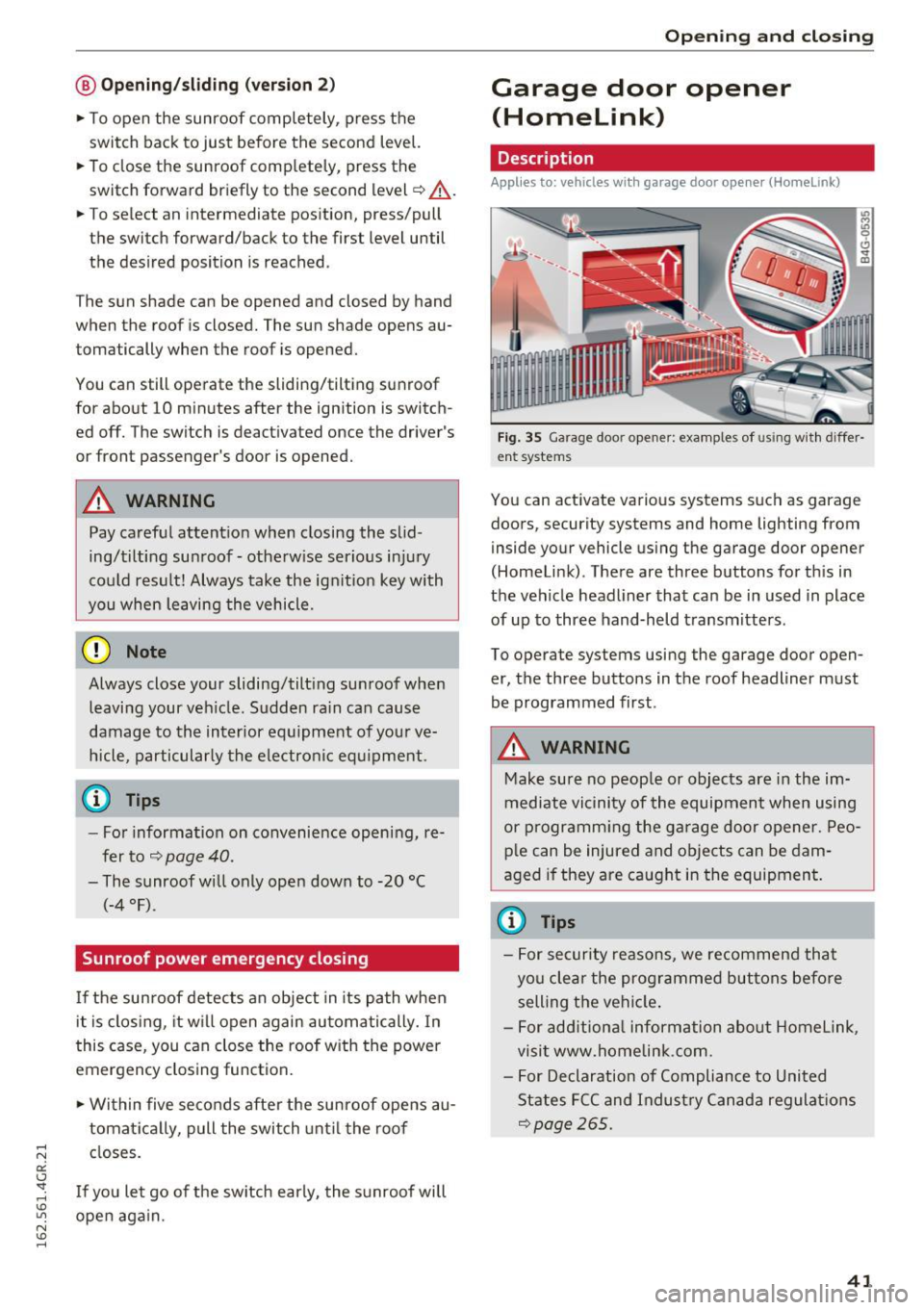
F ig. 35 Garage door opener: examples of using w it h differ
en t systems
You can activate various systems such as garage
doors, security systems and home lighting from
inside your vehicle using the garage door opener
(Homelink) . There are three buttons for th is in
the vehicle headliner that can be in used in place
of up to three hand-held transmitters .
To operate systems using the garage door open er, the three buttons in the roof headliner must
be programmed first.
A WARNING
-Make sure no peop le or objects are in the im-
mediate vicinity of the equipment when using
or p rogramm ing the ga rage door opener. Peo
p le can be injured and objects can be dam
aged if they are caught in the equipment.
(¼} Tips
- For security reasons, we recommend that
you clear the programmed buttons befo re
selling the vehicle .
- For add itiona l information about Homelink,
visit www.homelink.com.
- For Declaration of Compliance to United
States FCC and Indust ry Canada regulations
¢page 265.
4 1
Page 45 of 282

Lights and Vision
Exterior Lighting
Switching the lights on and off
Fig. 3 7 Instrument panel: l ig ht sw itc h w ith all we ath er
li g hts
Light switch -f/
Tu rn the switch to the co rresponding posi tion .
When the lights are sw itched on, the
:oo: symbo l
turns on .
O -The lights are off or the daytime running
l ights are on :
-USA models: The daytime running lig hts will
come on automatically when the ignition is on
and the light sw itch
9 fig . 37 is in the O posi
t io n or th e
AUTO pos ition (only i n day light con
di tions). The
Daytime running lights func tion
c an be turned on and off in the MM I
q page 45, q .&..
-Canada models : The daytime runn ing ligh ts
will come on au toma tically when t he ig nit ion is
on a nd the light swi tch
q fig . 37 is in the O po
sition, the
: oo: position or the AUTO position
(only in daylig ht conditions) ¢,&. .
AUTO -Au tomatic hea dligh ts switc h on and o ff
depending on br igh tness, for example in tw ilight,
d ur ing ra in or in tunne ls.
,oo : -Parking light
io -Low beam headlights
~ - All weather lights
@II -Rea r fo g lig hts
Lights and V ision
All-weather lights
T he front lights a re adju sted au toma tic a lly so
that there is less g lare for the driver from his or
her own lights, fo r example whe n roa ds are wet.
Automatic dynamic headlight range control
system
Yo ur vehicle is equip ped with a headlight r ange
contro l system so that the headlights do not
blind oncoming t raffic if the vehicle load
c h anges . The head light range also ad justs auto
matically when brak ing and acce lerating.
Static cornering light*
T he s tat ic cornering li ght depends on equipment
and only wo rks when the lig ht switch is in the AU·
TO position . The cornering light switches on au
tomat ica lly at speeds up to approximately
44 mp h (70 km) when the steering wheel is a t a
ce rtain ang le . The area to the side of the vehicle
is illum inated bette r when turn ing .
A WARNING
-Automatic headlights are only intended to
a ssi st the driver. They do no t relieve the
dr iver of resp ons ibility to check the head
lig hts and to turn them on manu ally a ccord
i ng to the cur rent light and visib ility co ndi
tions. Fog, for e xamp le , cannot be detected
by the ligh t sensors. So always switch on the
low beam under these weather cond itions
and when dr iving in the da rk
io.
- The rear fog lights sho uld only be turned on
in accordance w ith traffic regulations, to
p revent glare for traffic behind your vehicle.
- Please observe lega l regulat ions w hen us ing
the lighting systems described .
(D Tips
-The lig ht sensor for the automat ic head
lights is in t he rearview m irror mount.
Therefore, do not p lace any st ic kers i n this
area on the winds hield.
- Some functions of the exterior lighting can
be adjusted ¢
page 45.
-If you t urn off the i gnit io n while the exte rior
lights a re on a nd open the d oor, yo u will
hear a warn ing tone.
1J,,
43