2016 AUDI RS7 SPORTBACK lock
[x] Cancel search: lockPage 58 of 282
Sea ts and stor age
Rear head restraints
Applies to: ve hicles w ith adj ustable head restra ints
/
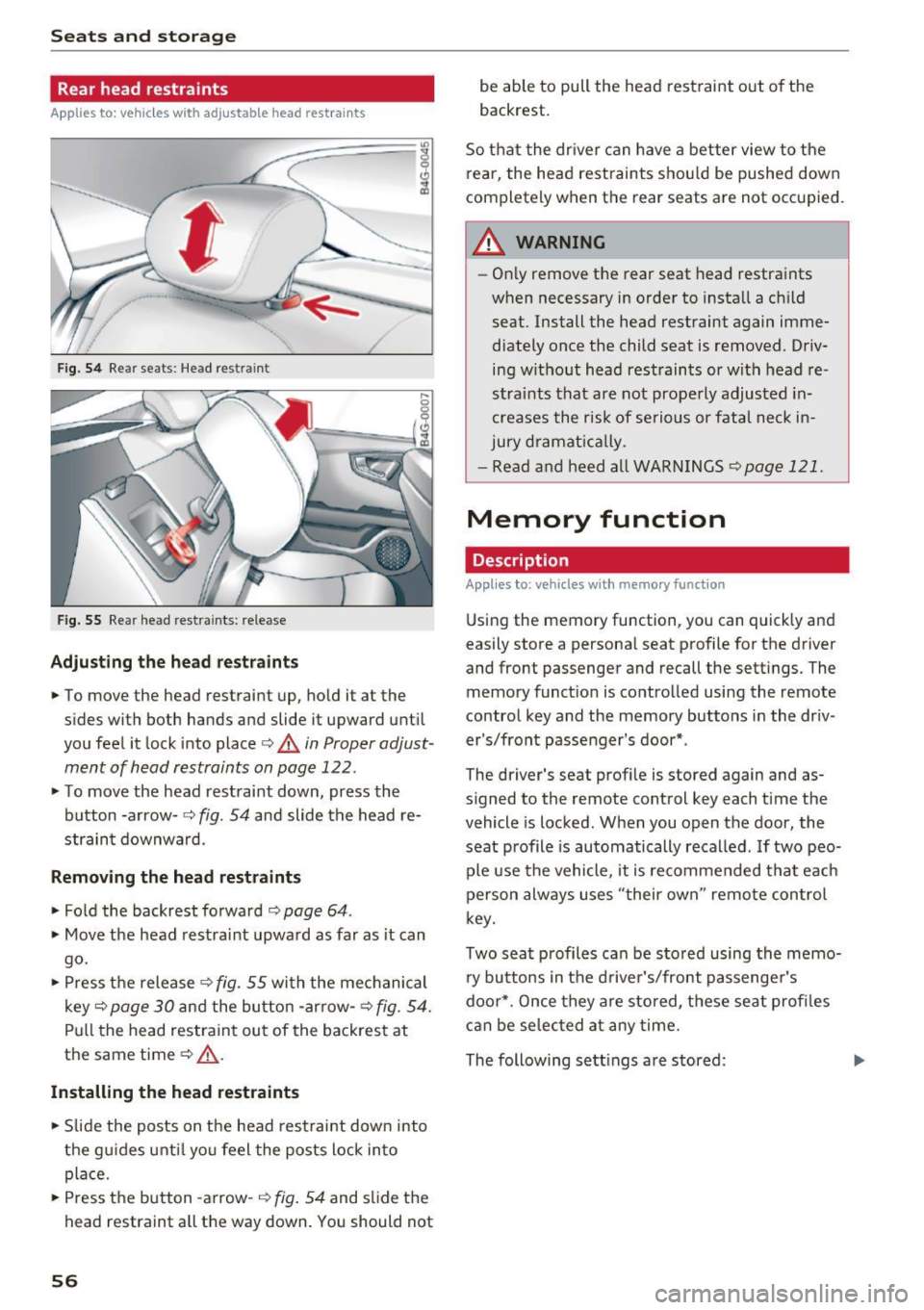
Fig. 54 Re ar seats: Head res train t
Fig . 5 5 Re ar head rest ra in ts: re lease
Adjust ing th e he ad rest raints
• To move the head restraint up, ho ld i t a t the
s ides with both hands and slide it upward unt il
you feel it lock into place
c::> A in Proper adjust
ment of head restraints on page 122.
• To move the head rest raint down, press the
button -arrow -
c::> fig. 54 and slide the head re
strain t downward .
Removing the head restraints
• Fold the backrest forward o page 64 .
• Move the head restrai nt upwa rd as far as it can
go.
• Press the release
c::> fig . 55 with the mechanical
key
c::> page 30 and the button -arrow-c::> fig . 54.
Pull the head restraint out of the backrest at
the same time
o .&_ .
Installing the head rest ra ints
• Slide the posts on t he head restraint down into
the gu ides unti l yo u feel the posts lock in to
place.
• Press the button -a rrow-
c::> fig. 54 and slide the
head restraint all the way down. You should not
56
be able to pull the head restraint out o f the
backrest.
So that the dr ive r can have a better view to the
rear, the head rest raints shou ld be pushed down
completely when the rear seats are not occupied .
A WARNING
-On ly remove the rear seat head restraints
when necessary in order to install a ch ild
seat . Install the head restraint again imme
diately once the child seat is removed . Driv
ing without head restraints or with head re
stra ints that are not prope rly adjusted in
creases the risk of serio us or fata l neck in
jury d ramat ica lly .
- Read and heed all WARN INGS
<=> page 121.
Memory function
Description
Applies to : vehicles wi th memo ry function
Using the memory function, you can quick ly and
easily store a personal seat profile for the dr iver
and front passenger and recall the sett ings. The
memory funct io n is co ntrolled using the remote
control key and the memory buttons in the dr iv
er's/front passenger's door* .
-
The driver' s seat prof ile is sto red aga in and as
s igned to the remote control key each time the
vehicle is locked . When you open the door, the
seat profile is automatically recalled .
If two peo
ple use the vehicle , it is recommended that eac h
person always uses "t heir own" remote control
k ey.
Two sea t profiles can be stored using the memo
ry bu ttons in the d rive r's/front passenge r's
doo r*. Once they are stored, these seat profi les
can be selec ted at any time.
The following sett ings are stored :
Page 59 of 282

Remote Memory button control key
Driver D river Front
passen-ger
Seat X X X
Steering wheel* X X
Both
exterior X X
mirrors*
Remote control key
Applies to: vehicles with memory function
The driver's seat profile can be assigned to the
remote control key when the vehicle is locked.
• Select: the ICARI function button > (Car)* Sys
tems
control button > Vehicle settings > Driv
er's seat
> Remote control key > On .
(D Tips
If you do not wish to have the seat profile for
another driver assigned to the remote control
key, switch the memory function off in the In
fotainment system or using the IOFFI button
r:::;,pag e 57.
Memory buttons
Applies to: vehicles with memory function
Fig. S6 Driver 's door: memory function buttons
The memory buttons are located in the driver's/
front passenger's door*.
Switching the memory function on/off
• Press the IOFFI button to switch the memory
function on/off. The
LED in the button turns on
Seats and storage
when the memory function is off . Seat profiles
are neither stored nor recalled.
Storing a seat profile
• Press thelSETI button. When the word SET
lights up, the memory is ready to store set
tings .
• Now press a memory button briefly.
A tone
confirms that the settings were stored.
Accessing a seat profile
• If the driver's door is open and the ignition is
sw itched off, press the memo ry button.
.. If the driver's door is closed or the ignition is
switched on, press and hold the memory but
ton until the seat adjustment is complete .
A WARNING
-For safety reasons, the seat setting can only
be recalled when the vehicle is stationary,
otherwise the re is a risk of an accident.
- If necessary, you can stop the recall process
by press ing the IOFFI button or any memory
button.
Adjusting the front passenger's seat in the
Infotainment system
Applies to: vehicles with memory function
The driver can move the front passenger's seat
into various positions.
Adjusting the front passenger's seat from
the driver's seat
• Select: the I CAR I funct ion button > (Car) * Sys
tems
contro l button > Vehicle settings > Seats
> Front passenger's seat > Adjust seat posi
tion .
• You can now adjust the front passenger's seat
using the driver's seat buttons
r:::;, page 53,
fig.
so.
Align with driver's seat
• To transfer the settings from the driver's seat
to the front passenger's seat, select: the I CAR I
fu nction button
> (Car)* Systems control but
ton >
Vehicle settings> Seats > Front passeng-
er 's seat > Align with driver 's seat. ..,.
57
Page 60 of 282

Sea ts and stor age
.. Press and hold the control knob until the ad
justing process is complete.
@ Tips
The lumbar support and upper th igh support
settings a re not transferred when aligning
the front passenger's seat with the driver's
seat.
Ashtray
Applies to: vehicles with ashtray
F ig . 57 Center console : front ashtray
F ig. 58 Door tr im: rea r asht ray
Opening /closing
.. To open the front ashtray, slide the cover up .
.. To close the front ashtray, press down o n the
cove r .
.. To open the rear ashtray, tap the cover on the
rim .
Emptying
.. To empty t he front ashtray, pu ll it upward and
out .
.. To empty the rear ash tray, press the rea r side
of the cover down when it is open ¢ fig . 58 . The
ashtray will lift up out of its mount .
.. To insert the ashtray again, press it down into
the mount until it locks into place.
58
A WARNING
Never use the ashtray to hold paper, because
this increases the risk of a fire .
Cigarette lighter
Applies to: vehicles with cigarette lighter
F ig . 59 Center console: cigarette lighter
.. Push the knob on the cigarette lighte r in .
.. Remove the cigarette lighter when it pops out.
A WARNING
The c igarette lighter only works when the ig
n ition is switched on. Incorrect usage can lead
to serious injuries or burns. For this reason,
chi ldren should never be left unattended in
the vehicle because th is increases the risk of
injury .
Page 62 of 282
Seats and storage
-Never carry any beverage containers with
hot liquids, such as hot coffee or hot tea, in
the vehicle while it is moving. In case of an
accident, sudden braking or other vehicle movement, hot liquid could spill, causing
scalding burns. Spilled hot liquid can also cause an accident and personal injury .
- Use only soft cups in the cupholder. Hard
cups and glasses can cause injury in an acci
dent .
- Never use the cupholder or adapter as an
ashtray - risk of fire.
(D Note
Only drink containers with lids should be car
ried in the cupholder. Liquid could spill out
and damage your vehicle's electronic equip
ment or stain the upholstery, etc.
Cooled glove compartment
Applies to : ve hicles with coole d glove compar tme nt
The cooled glove compartment only functions
when the AIC system is switched on .
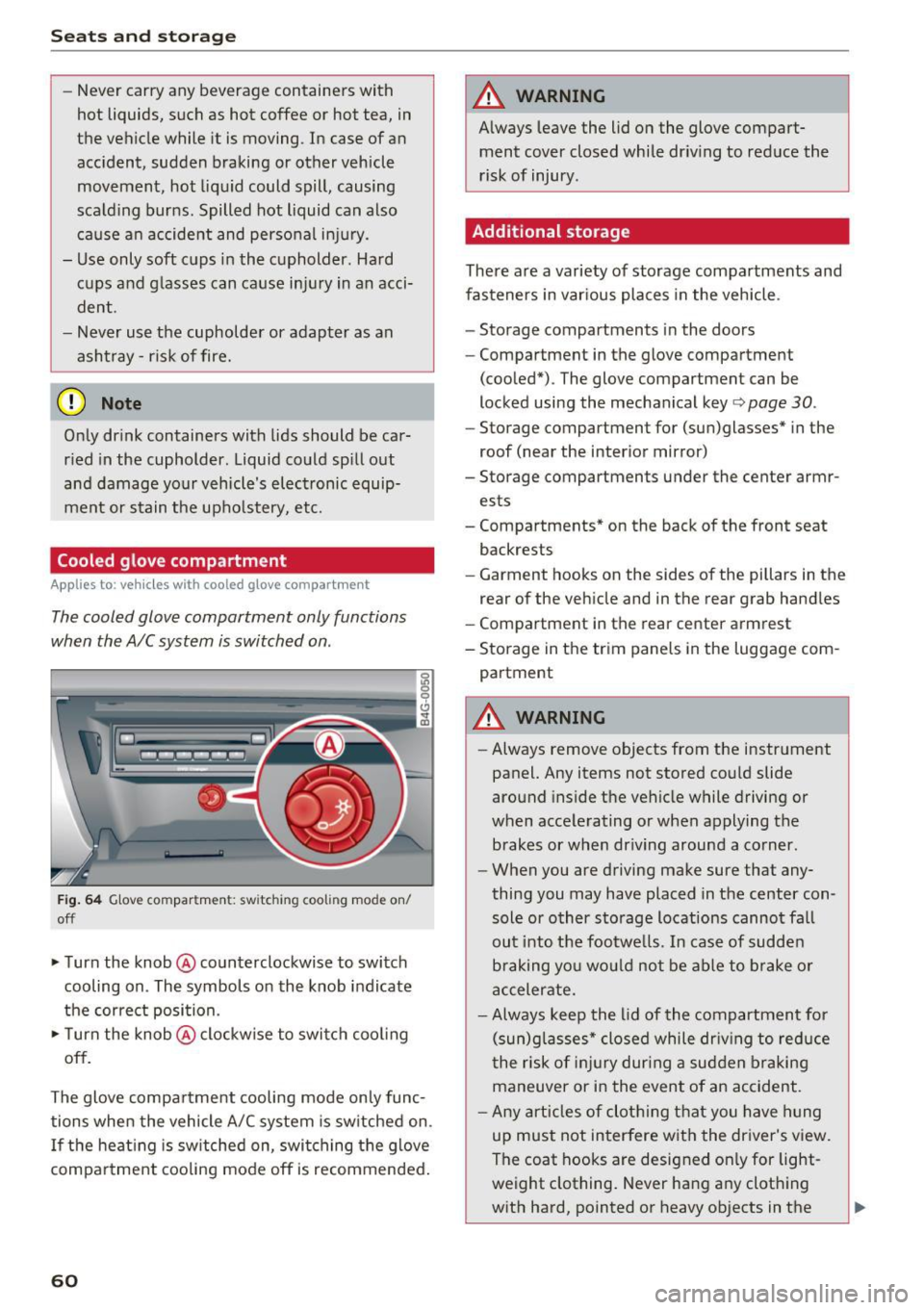
Fig. 64 Glove compar tment: sw itch in g coo ling mode on/
off
• Turn the knob @counterclockwise to switch
cooling on . The symbols on the knob indicate
the correct position.
• Turn the knob @clockwise to switch cooling
off.
The glove compartment cooling mode only func tions when the vehicle A/C system is switched on.
If the heating is switched on, switching the glove
compartment cooling mode off is recommended.
60
A WARNING
Always leave the lid on the glove compart
ment cover closed while driving to reduce the
risk of injury .
Additional storage
There are a variety of storage compartments and
fasteners in various places in the vehicle .
- Storage compartments in the doors
- Compartment in the glove compartment
(cooled*) . The glove compartment can be
locked using the mechanical key
r:::> page 30 .
-Storage compartment for (sun)glasses* in the
roof (near the interior mirror)
- Storage compartments under the center armr
ests
- Compartments* on the back of the front seat
backrests
- Garment hooks on the sides of the pillars in the
rear of the vehicle and in the rear grab handles
- Compartment in the rear center armrest
- Storage in the trim panels in the luggage com-
partment
A WARNING
- Always remove objects from the instrument
panel. Any items not stored could slide
around inside the vehicle while driving or
when accelerating or when applying the brakes or when driving around a corner.
- When you are driving make sure that any
thing you may have placed in the center con
sole or other storage locations cannot fall
out into the footwells . In case of sudden
braking you would not be able to brake or
accelerate.
- Always keep the lid of the compartment for
(sun)glasses* closed while driving to reduce
the risk of injury during a sudden braking
maneuver or in the event of an accident.
- Any articles of clothing that you have hung
up must not interfere with the driver's view.
The coat hooks are designed only for light
weight clothing. Never hang any clothing
with hard, pointed or heavy objects in the
Page 65 of 282

.. Distribute the load as evenly as possible .
.. Place heavy objects as far forward as possib le
¢ fig. 66 .
.. Secure luggage items with the cargo net* or
with non-elastic retaining straps to the tie
down r ings*
¢ page 64.
A WARNING
-loose objects in the luggage compartment
can slide about s udden ly and alter the vehi
cle's handling characte ristics.
- loose objects in the passenger compa rt
ment can fly forward during abrupt mane u
vers or ac ciden ts a nd injure oc cupants.
- Always store objects in the luggage com
partment and use sui table straps, particu
larly with heavy objects.
- When you transport heavy objects, always
remember that a change in the cente r of
grav ity may result in a change in the ve hi
cle's handling characteristics .
- Follow a ll warnings
¢ page 118, Driving
safety.
@ Tips
The tire pressure must be adjusted to the load
- see the t ire pressu re sticker lo cated on the
driver's s ide B-pillar.
Luggage compartment cover
The luggage compartment cover consists of two
parts.
• • Fig. 67 Cove r in the ope n lu gg age compartme nt lid
Seats and storag e
Fig. 68 Cover beh in d th e rear be nch sea t
Removing the cover in th e luggage
compartment lid
.,. Remove the knobs (D ¢ fig. 67 from the ball
mounts .
.. Pull the cover @ out of the retainers @in the
direction of the arrow.
Installing the cover in the luggage
compartment lid
.,. Slide the cover upward into the retainers @.
.. Press the knobs
seat
.. Pull the cover ¢ fig. 68 back.
.. Pull the cover upward to release.
Installing the cove r behind the rea r bench
se at
.. Place the left and right sides of the cover into
the mounts on the side trim.
.. Slide the cover forward until it locks into place .
A WARNING -~·
- To prevent accidents, never install the lug-
gage compartment cover unsecured.
- The luggage compartment cover is not a surface for stor ing objects . Objects p laced
on the cover could endanger all veh icle oc
cupants dur ing sudden braking maneuvers
or in a crash .
(D Note
The defogger and antenna w ires in the rear
window can be damaged by objects on the luggage compartment cover rubbing against
them .
63
Page 70 of 282

Warm and cold
Operating
Applies to: vehicles with 4-zone deluxe automatic climate control
Fig . 77 4-zone deluxe a utomat ic climate contro l: cont rols
F ig. 78 4-zone deluxe automat ic climate contro l syste m:
rear controls
N :g
9 CJ
" lD
Press the buttons to turn the functions on or off.
Use the controls to adjust the temperature, the
b lower speed and the a ir distribution . The LED in
a butto n wi ll light up when the funct ion is
sw itched on. The front settings a re shown in the
clim ate cont rol sys tem display and in the Info
tainment system disp lay for a few seconds. The
driver and front passenger settings can be ad
justed separately.
The settings can also be adjus ted in the rear
¢fig . 78.
IOFF ! Switching the climate control syst em
on /off
The I OFF I b utton swi tc h es the clima te contro l
system on or off . It also switches on whe n you
p ress the control. Airflow from outside is b locked
when the climate control system is switched off.
68
The ! O FF ! button in the rear only switches the A/C
system on/off in the rear of the ve hicle.
IA/C l Switching cooling mode on /off
The air is not coo led and h umid ity is not removed
when coo ling mode is switched off . This can
cause fog on the windows. The coo ling mode
switches off automatically when there are cold outside temperatures.
l ""-'I Switching recirculation mode on /off
In recirculat ion mode, the air inside the vehicle is
c irculated and filtered. This prevents the unf il
tered air outs ide the ve hicle from entering the
vehicle interior. We recommend sw itching recir
cu lation mode on when driving throug h a tunnel
or when sitt ing in traffic ¢,&. .
The
! AUTOI button or l lllP FRONT ! button switches
recircu lation mode off.
IAUTO I Switching automatic mode on
Automat ic mo de main tains a constan t tempera
ture inside t he vehi cle. Ai r temperatu re, a irflow
and air distrib ution are controlled automatically.
Adjusting the temperature
Temperatures between 60 ° F (+ 16 °C) and 84 ° F
( + 28 °C) c an be se t. O utsi de of t his range,
lo o r hi
will appear in the cl imate control system display .
At both of these settings, the cl imate contro l
1111-
Page 73 of 282
Driving
Steering
Manually adjustable steering wheel
A pplies to: ve hicles with man ually adjustable steering whee l
The height and reach of the steering wheel can
be adjusted .
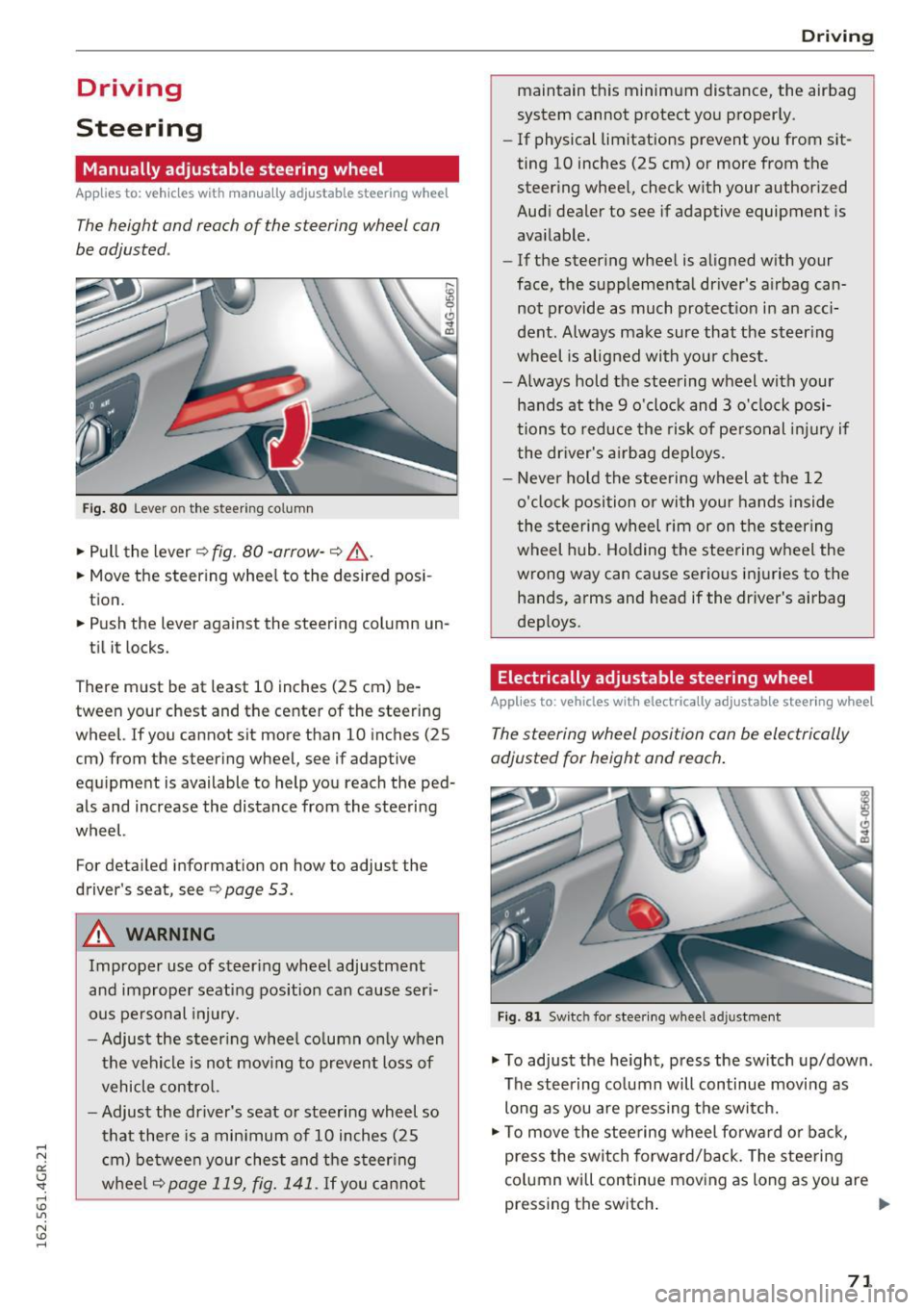
Fig. 80 Lever on the steer ing co lumn
.,. Pull the lever 9 fig . 80 -arrow -9 ,&..
.. Move the steer ing wheel to the desired pos i
tion.
.. Push the lever against the steering column un -
ti l it locks.
There must be at least 10 inches (25 cm) be tween your chest and the center of the steering
wheel. If you cannot sit more than 10 inches (25
cm) from the steering wheel, see if adaptive
equ ipment is available to help you reach the ped
als and increase the distance from the steering
wheel.
For detailed information on how to adjust the
driver's seat, see
9page 53.
A WARNING
Improper use of steer ing whee l adjustment
and improper seating position can cause ser i
ous pe rsonal injury.
- Adjust the s teer ing whee l co lumn only when
the vehicle is not mov ing to prevent loss of
vehicle contro l.
- Adjust the driver's seat or steering wheel so
that there is a min imum of 10 inches (25
c m) be twee n your ches t and the steer ing
w heel
9page 119, fig. 141. If you ca nnot
D rivi ng
maintain this minimum distance, the airbag
system cannot protect yo u proper ly.
- If physical limitations prevent you from sit
ting 10 inches (25 cm) or more from the
steer ing whee l, check with your author ized
Audi dealer to see if adaptive equipment is
available.
- If the steer ing whee l is aligned w ith your
face, the supplementa l driver's a irbag can
not provide as much protect io n in an acci
dent. Always make sure that the steer ing
wheel is aligned with you r chest.
- Always hold the steering wheel with your
hands at the 9 o'clock and 3 o'clock posi
tions to reduce the risk of pe rsonal inju ry if
the dr iver's a irbag dep loys .
- Never ho ld the stee ring wheel at the 12
o'clock position or with you r hands inside
the stee rin g wheel rim or on t he steer ing
wheel hub. Holding the stee ring w heel the
wrong way can cause serious inj uries to the
hands, arms and head if the driver's airbag
deploys .
Electrically adjustable steering wheel
Applies to : vehicles wit h electrically adjustable stee ring wheel
The steering wheel position can be electrically
adjusted for height and reach .
Fig . 81 Sw itc h for stee ring wheel adju stment
.,. To adjust the he ight, press the sw itch up/down .
The steering co lumn will continue moving as
long as you are press ing the sw itch.
.,. To move the stee ring wheel fo rwa rd or back,
press the switch forward/back. The stee ring
column will continue mov ing as long as you are
pressing the switch . ""
71
Page 74 of 282
Driving
There must be at least 10 inches (25 cm) be
tween your chest and the center of the steering
wheel. If you cannot sit more than 10 inches (25
cm) from the steer ing wheel, see if adaptive
equipment is available to help you reach the ped
als and increase the distance from the steering
wheel.
For detai led information on how to adjust the
driver's seat, see
¢ page 53.
In vehicles with the memory function*, the steer
ing column sett ings are stored together with the
seat position.
A WARNING
Improper use of steer ing whee l adjustment
and improper seating position can cause ser i
ous pe rsonal injury.
- Adjust the steering wheel column only when
the vehicle is not moving to prevent loss of
vehicle control.
- Adjust the driver's seat or steering wheel so
that there is a minimum of 10 inches (25
cm) between your chest and the steer ing
wheel
r::.> page 119, fig. 141. If you cannot
mainta in this min imum distance, the airbag
system cannot protect you properly.
- If phys ica l limitations prevent you from sit
t ing 10 inches (25 cm) or more from the
steering wheel , check with your authorized
Audi dealer to see if adaptive equ ipment is
available.
- If the steering wheel is aligned with your
face, the supp lemental driver's airbag can
not provide as m uch protection in an acci
dent. Always make sure that the steering
wheel is aligned w ith your chest.
- Always hold the steer ing whee l with your
hands at the 9 o'clock and 3 o'clock posi
tions to reduce the risk of personal injury if
the driver's airbag deploys .
- Never hold the steer ing wheel at the 12
o'clock posit ion or w ith your hands inside
the steering wheel rim or on the steering
wheel hub . Holding the steer ing whee l the
wrong way can cause ser ious injuries to the
hands, arms and head if the driver's airbag
deploys.
72
-
Easy seat entry
Applies to: vehicles with power steering wheel adjustment
Easy seat entry makes it easier to enter and exit
the vehicle by adjusting the steering column au
tomatically .
.,. In the Infotainment system, select the ICARI
function button > ( Car )* Systems control but
ton
> Vehicle settings > Seats > Driver's seat>
Easy seat entry > On .
When easy seat entry is switched on, the steer ing
column goes back up into the park position when
the ignit ion is switched off . After enter ing the ve
hicle, the steering col umn returns to t he sto red
pos ition once the ign it ion is swi tched on.
Starting and stopping
the engine
Starting the engine
The I START ENGINE STOP I button switches the
ignition on and starts the engine .
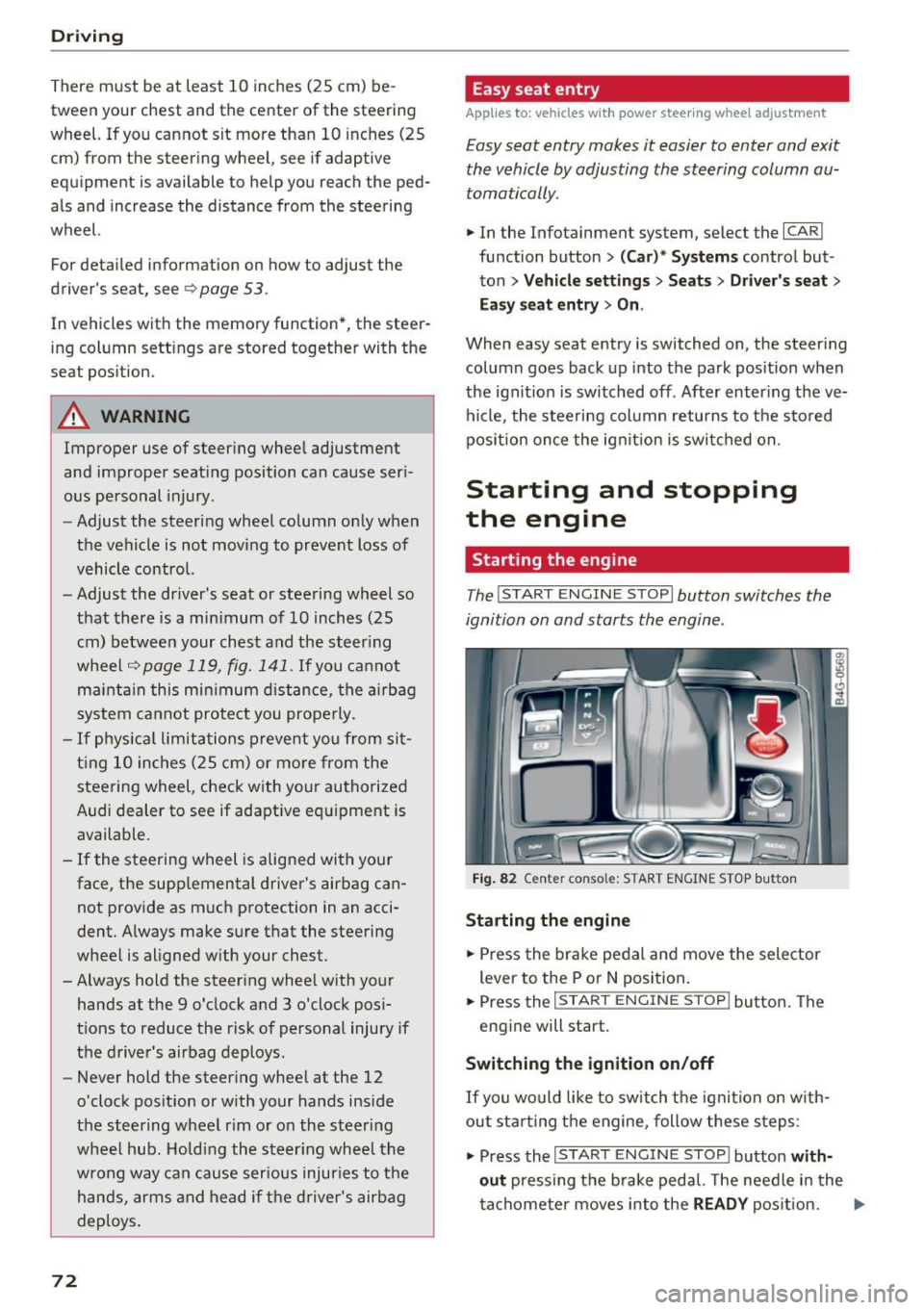
Fig. 82 Cente r conso le: S TART ENGINE STOP b utt on
Starting the engine
.,. Press the brake pedal and move the selector
lever to the P or
N position.
... Press the
!STAR T ENGINE ST OP ! button. The
engine will start.
Switching the ignition on/off
If you would like to switch the ignition on w ith
out sta rting the engine, follow these steps:
.,. Press the
I START ENGINE STOP ! button with
out
pressing the brake pedal. The needle in the
tachometer moves into the
READY position. II>-