2016 AUDI RS7 SPORTBACK ignition
[x] Cancel search: ignitionPage 45 of 282

Lights and Vision
Exterior Lighting
Switching the lights on and off
Fig. 3 7 Instrument panel: l ig ht sw itc h w ith all we ath er
li g hts
Light switch -f/
Tu rn the switch to the co rresponding posi tion .
When the lights are sw itched on, the
:oo: symbo l
turns on .
O -The lights are off or the daytime running
l ights are on :
-USA models: The daytime running lig hts will
come on automatically when the ignition is on
and the light sw itch
9 fig . 37 is in the O posi
t io n or th e
AUTO pos ition (only i n day light con
di tions). The
Daytime running lights func tion
c an be turned on and off in the MM I
q page 45, q .&..
-Canada models : The daytime runn ing ligh ts
will come on au toma tically when t he ig nit ion is
on a nd the light swi tch
q fig . 37 is in the O po
sition, the
: oo: position or the AUTO position
(only in daylig ht conditions) ¢,&. .
AUTO -Au tomatic hea dligh ts switc h on and o ff
depending on br igh tness, for example in tw ilight,
d ur ing ra in or in tunne ls.
,oo : -Parking light
io -Low beam headlights
~ - All weather lights
@II -Rea r fo g lig hts
Lights and V ision
All-weather lights
T he front lights a re adju sted au toma tic a lly so
that there is less g lare for the driver from his or
her own lights, fo r example whe n roa ds are wet.
Automatic dynamic headlight range control
system
Yo ur vehicle is equip ped with a headlight r ange
contro l system so that the headlights do not
blind oncoming t raffic if the vehicle load
c h anges . The head light range also ad justs auto
matically when brak ing and acce lerating.
Static cornering light*
T he s tat ic cornering li ght depends on equipment
and only wo rks when the lig ht switch is in the AU·
TO position . The cornering light switches on au
tomat ica lly at speeds up to approximately
44 mp h (70 km) when the steering wheel is a t a
ce rtain ang le . The area to the side of the vehicle
is illum inated bette r when turn ing .
A WARNING
-Automatic headlights are only intended to
a ssi st the driver. They do no t relieve the
dr iver of resp ons ibility to check the head
lig hts and to turn them on manu ally a ccord
i ng to the cur rent light and visib ility co ndi
tions. Fog, for e xamp le , cannot be detected
by the ligh t sensors. So always switch on the
low beam under these weather cond itions
and when dr iving in the da rk
io.
- The rear fog lights sho uld only be turned on
in accordance w ith traffic regulations, to
p revent glare for traffic behind your vehicle.
- Please observe lega l regulat ions w hen us ing
the lighting systems described .
(D Tips
-The lig ht sensor for the automat ic head
lights is in t he rearview m irror mount.
Therefore, do not p lace any st ic kers i n this
area on the winds hield.
- Some functions of the exterior lighting can
be adjusted ¢
page 45.
-If you t urn off the i gnit io n while the exte rior
lights a re on a nd open the d oor, yo u will
hear a warn ing tone.
1J,,
43
Page 46 of 282

Lights and Vision
-In cool or damp weather, the inside of the
headlights, turn signals and tail lights can
fog over due to the temperature difference between the inside and outs ide. They will
clear short ly after sw itching them on. This
does not affect the service life of the light i ng.
Turn signals and high beam lever
The lever on the left side of the steering column
is used to operate the turn signals and the high
beam as well as the headlight flasher.
F ig . 38 Turn signal and high beam lever
The turn s ignal and high beam lever has the fol
lowing f unctions:
Turn signals ¢¢@@
N
0 ,.._ 0 ±
~
• Pu sh the lever u p as far as it can go to turn on
t he righ t turn s ignal or down to t urn on the left
turn s ignal
c:> fig. 38 .
• Move the lever briefly until you meet resistance
and release it to flash three t imes.
• Move the lever (up or down) until you meet re
s istance and hold it there to determine the
flashing time for the tu rn signals.
High beam ~D @
• Push the lever forward to switch on the high
beam (veh icles with high beam assist*
c:> page44).
• Pull the lever back towards you to sw itch off
the h igh beam.
Headlight flasher ~D ©
• Pull the lever toward the steering wheel to use
the headlight flasher.
44
Notes on these features
- The turn signals on ly wor k w it h the ignition
sw itched on. The ind icator lights
II or B in
the instrument cluster c:> page 11 also blink.
- After you have turned a co rner, the turn signa l
sw itches o ff automat ica lly.
- Th e
high beam works only when the head ligh ts
are on. The indicator light
Bl in the instrumen t
cl uster illuminates when the high beams are
on.
- The
headlight flasher works o nly as long as yo u
hold the lever - even if there are no lights
turned on. T he indicator light
Bl in the instru
ment cluster i lluminates when you use the
headlight flas her .
A WARNING
Do not use the h igh beam or head light flasher
if you know that these could blind oncoming
traffic.
Headlight assistant
App lies to: vehicles with headlight assist
Fig. 39 Turn s ig nal and high beam leve r: turn ing headlight
ass ist o n/off
A camer a on the rearv iew mirror mou nt can de
tect light sources from other road users. The high
beams switch on or off automatically depending
o n the positio n of vehicles driving ahead and on
coming vehicles, the vehicle speed and other en
vironmental and traffic cond itions.
Activ ating headlight assistant
Requirement: the AUTO light sw itch posit ion
must be selected and t he headlight assistant
must be sw itched on in the Infotainment system
c:> page45. "'
Page 47 of 282

~ To activate the headlight assistant, tap the lev
er forward (!). The
112 indicator light appears
in the instrument cluster disp lay and the head
light assistant is switched on/off automatically .
The
El indicator light also turns on if the high
beams are switched on .
Switching the high beams on/off manually
If the high beams did not switch on/off automat
ically as expected, you may switch them on or off
manually instead:
~ To switch the high beams on manually, tap the
l ever forward (!). The
El indicator light turns
on.
~ To switch the high beams off manually, pull the
lever back@. The headlight assistant is deacti
vated .
Operating the headlight flasher
~ To operate the headlight flasher when the
headlight assistant is activated and h igh beams
are switched off, pull the lever back@. The
headlight assistant remains active .
Messages in the instrument cluster display
r!IJ Audi adaptive light: system fault!
Headlight assist: System fault
Drive to an authorized Aud i dealer or authorized
Aud i Service Facility immediately to have the
malfunction corrected. You can still switc h the
high beams on or off manually.
Headlight assist: Unavailable. No camera view
The camera view is blocked, for example by a
sticker or debris.
The sensor is located between the interior rear
view mirror and the windshield. Therefore, do not p lace any st ickers in this area on the windshie ld.
A WARNING
Headlight ass istant is only intended to assist
the driver . The dr iver is still responsible for
controll ing the headlights and switching
them manually depending on light and visibil
i t y cond itions.
It may be necessary to operate
them manually in situations such as:
Lights and Vision
-In adverse weather conditions such as fog,
heavy rain, blowing snow or spraying water.
- On roads where oncoming traffic may be
partially obscured, such as expressways.
- When there are road users that do not have
suff icient lighting, such as b icyclers or
veh icles with dirty tail lamps.
- In tight curves and on steep slopes.
- I n poorly lit areas.
- With strong reflectors, such as signs.
- If the area of the w indshield near the sensor
is fogged over, dirty, icy or covered with a
sticker.
Adjusting the exterior lighting
The settings are adjusted in the MMI .
~ Select: !CAR ! function button> (Car) " systems
control button > Vehicle settings> Exterior
lighting .
Automatic headlights
You can adjust the following settings in the Au
tomatic headlights
menu:
Headlights activation time -You can adjust if the
headlights switch on
Early , Med . or Late accord
ing to the sensit ivity of the light sensor.
Audi adaptive light* -You can switch adaptive
light
On and Off .
Automatic high beams*
You can switch t he h igh beam assist on and off.
Daytime running lights
USA models:
You can switch the daytime running
lights
on and off .
Canada models:
The function cannot be turned
off. It is activated automatically each time the ig
nition is switched on. This menu item is shown
"greyed out" .
Coming home, Leaving home
The coming home function illuminates the area
outside the vehicle when you switch the ignition
off and open the driver's door. To turn the func-
tion on, select
Lights when leaving car> On. .,.
45
Page 48 of 282

Lights and Vision
The leaving home function illuminates the area
outside the vehicle when you unlock the vehicle.
To turn the function on, select
Lights when un
locking car> On .
The coming home and leaving home functions
only operate when it is dark and th e light switch
is in the
AUTO position.
Emergency flasher
The emergency flasher makes other motorists
aware that you or your vehicle are in an emer
gency s ituation.
Fig. 40 Cente r console: emerge ncy flasher switch
~ Press the switch~ Q fig. 40 to turn the emer-
gency flashers on or off.
When the emergency flasher is on, all four turn
signals blink at the same time . The turn signal in
dicator lights
111!1 in the instrument cluster, as
well as the light in the emergency flasher switch
~ blink likewise. The emergency flashers also
work when the ignition is turned off.
The emergency flashers will turn on automatical
ly if you are in an accident where the airbag has
deployed.
(j) Tips
You should turn on the emergency flashers
when:
-you are the last vehicle standing in a traffic
jam so that any other vehicles coming can
see you, or when
- your vehicle has broken down or you are in
an emergency situation, or when
46
-your vehicle is being towed by a tow truck or
if you are towing another vehicle behind
you.
Interior Lighting
Front and rear interior lighting
Fig. 41 Front headli ner: in terio r light ing contro ls
Fig . 42 Rear head liner: Reading light
Press the corresponding button Q fig . 41:
5:1-Interior lighting on/off
rn -Door contact switch on/off . The interior light
ing is controlled automatically.
~- Reading lights on/off
~ *·Switching the rear reading lights on/off
from the cockpit .
Ambient lighting
Applies to: vehicles with ambient lighting
You can adjust the brightness of the interior
lighting .
~ In the Infotainment system, select: I CARI func
tion button
> (Car)* Systems control button >
Vehicle settings > Interior lighting > Bright·
ness.
Page 49 of 282

.. To increase or reduce the brightness, turn the
knob and press it.
The interior lig hting turns on when you switch
the headlights on whi le the ignition is on .
(D Tips
The setting is automat ically stored and as
signed to the remote control key that is in
use.
Instrument illumination
The brightness of the illumination for the instru
ments, display and head-up display* can
be ad
justed .
Fig. 43 Instrument illum ination
.. Press the knob to release it .
.. Turn the knob toward " -" or" +" to reduce or in
crease the brightness .
.. Press the knob aga in to return it to its o riginal
pos it ion.
@ Tips
The instrument illumination for the need les
and d ia ls t urns on when the ignition is turned
on and the lights are turned off. The illumina
tion for the dials reduces automatically and
eventua lly turns off as brightness outside in
creases . This function reminds the driver to
turn the headlights on at the appropriate
time.
Lights and V ision
Vision
Adjusting the exterior mirrors
Fig. 44 Driver 's doo r: knob fo r the exterio r mirrors
Turn the knob to the desired position:
Q/P -adjusting the left/right exterior mirror.
Move the knob in the des ired direct ion .
Qill -Heating the mir ror glass depend ing on the
outside temperature .
8- Folding exte rior mirro rs* . In the Infota in
ment system , you can se lect if t he mirro rs fo ld in
automat ica lly when you lock the vehicle
~ page 33.
Front passenger 's e xterior mirror tilt
function *
To help you see the curb when backing into a parking space, the surface of the mirro r tilts
slight ly . For this to happen, the knob must be in
the position for the front passenger's outside
mirror.
You can adjust the tilted mir ror surface by turn
ing the knob in the desired direction . When you
move out of reverse and into another gear, the
new mirror position is stored and assigned to the
key you are using.
The m irror goes back into its or iginal pos ition
once you drive forward faster than 9 mph (15
km/h) or switch the ignition off.
A WARNING
-Curved (i .e. convex) m irror surfaces increase
your f ield of view. Remember that vehicles or
other objects will appear smaller and farther
away than when seen in a flat m irro r. If yo u
47
Page 52 of 282

Lights and Vision
by moving the lever to position® within 10 sec
onds of the after-wipe. The after-wipe function is
react ivated the next time you switch the ignition
on.
Cleaning the headlights*. The headlight washer
system* operates only when the low beam head lights are on. If you move the lever to position
@ , the headlights and the night vision assist
camera* are washed in intervals.
A WARNING
-The rain sensor is only intended to assist the
driver . The driver is still responsible for
manually switching the wipers on according
to the visibility conditions.
- The windshield may not be treated with wa
ter-repelling windshield coating agents. Un
favorable conditions, such as wetness, dark
ness or low sun, can result in increased
glare, which increases the risk of an acci
dent. Wiper blade chatter is also possible.
- Properly functioning windshield wiper
blades are required for a clear view and safe
driving ~
page 50, Replacing windshield
wiper blades.
(Jd) Note
- If there is frost, make sure the windshield
wiper blades are not frozen to the wind
shield. Switching on the windshield wipers
when the blades are frozen to the wind
shield can damage the wiper blades.
- Prior to using a car wash, the windshield
wiper system must be switched off (lever in position 0). This prevents unintentional
switching on and damage to the windshield
wiper system.
(Di Tips
- The windshield wipers switch off when the
ignition is turned off. You can activate the
windshield wipers after the ignition is
switched back on by moving the windshield
wiper lever to any position.
- Worn or dirty windshield wiper blades result
in streaking . This can affect the rain sensor
so
function. Check your windshield wiper
blades regularly.
- The washer fluid nozzles of the windshield
washer system are heated at low tempera
tures when the ignition is on.
- When stopping temporarily, such as at a
traffic light, the speed of the windshield
wipers automatically reduces by one level.
Cleaning windshield wiper blades
Clean the wiper blades when you see wiper
streaks. Use a soft cloth and a glass cleaner.
.,. Place the windshield wiper arms in the service
position
c:> page 50.
.,. Fold the windshield wiper arms away from the
windshield.
A WARNING
Dirty windshield wiper blades can impair vi
sion, which increases the risk of an accident.
Replacing windshield wiper blades
Fig. 49 Removing windshield wiper blades
Wiper service position/blade replacement
position
.,. Switch the ignition off and move the windshield
wiper lever to position
@ briefly c:> page 49,
fig. 48. The windshield wipers move into the
service position.
.,. To bring the wiper blades back into the original
position, switch the ignition on and operate the
windshield wiper lever.
You can also turn the service position on or off in
the Infotainment system:
IJll-
Page 55 of 282
Front passenger's seat
Always move the front passenger seat into the
rearmost position .
To avoid contact with the airbag while it is de
ploying, do not sit any closer to the instrument
panel than necessary and always wear the three
point safety belt provided adjusted correctly. We
recommend that you adjust the passenger's seat
in the following manner:
.. Bring the backrest up to an (almost) upright
posit ion . Do not ride with the seat reclined .
.. For adjustable head restraints: adjust the head
restraint so the upper edge is as even as poss i
ble with the top of your head. If that is not pos
sible, try to adjust the head restraint so that it
is as close to this position as possible
¢ page 55. Mov e the head restraint so that it
is as close to the back of the head as possible.
.. Place your feet on the floor in front of the pas
senger's seat.
Front seats
Controls
Moving the seat forward or back and adjusting
the height, backrest angle and seat angle.
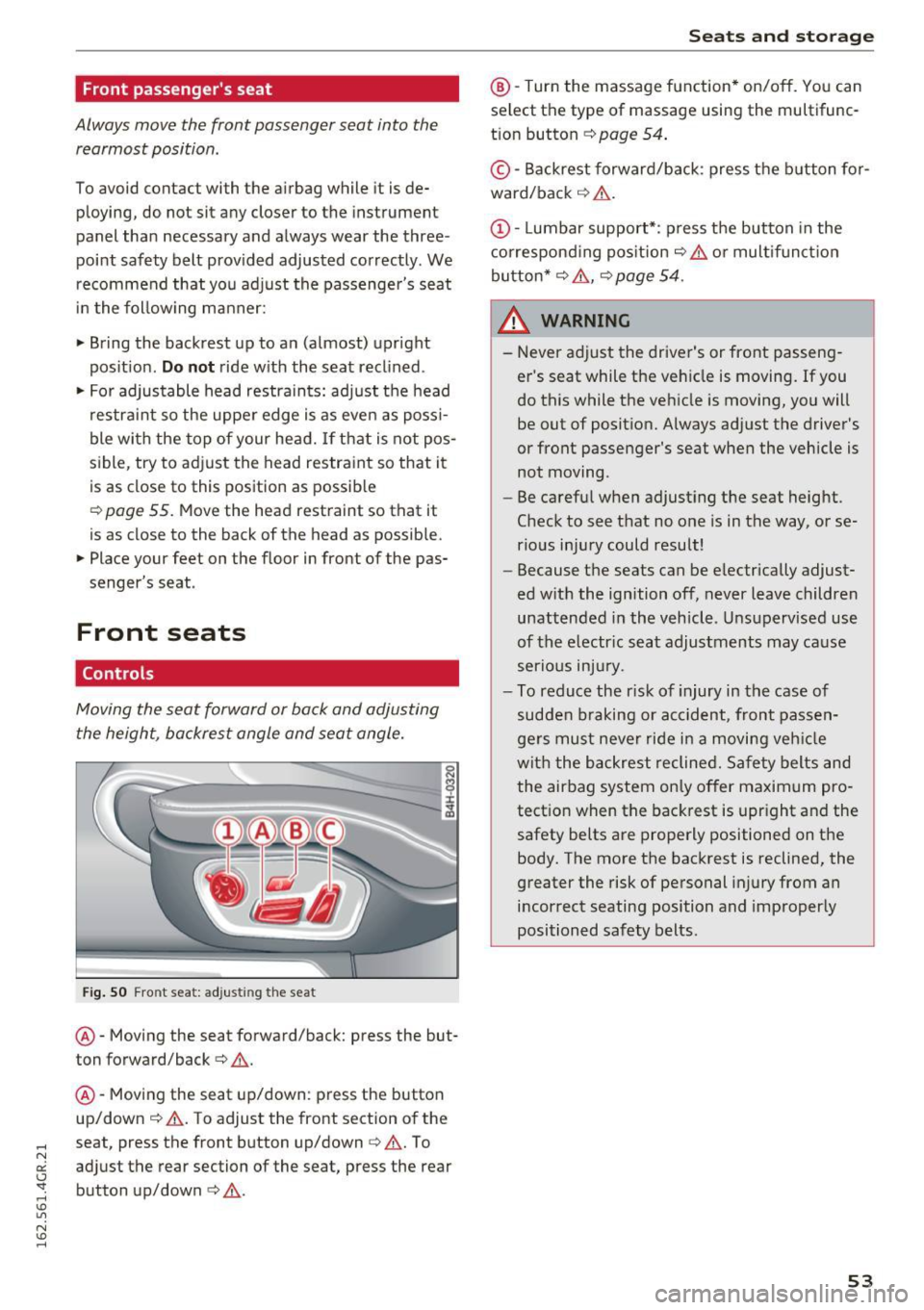
Fig. SO Front seat: adjusting the seat
@ -Moving the seat forward/back: press the but
ton forward/back¢
A.
@ -Moving the seat up/down: press the button
up/down ¢
A. To adjust the front section of the
seat, press the front button up/down¢
A. To
adjust the rear section of the seat, press the rear
button up/down
c> A .
Seats and storage
@-Turn the massage function* on/off. You can
select the type of massage using the multifunc
tion button
¢ page 54 .
© -Backrest forward/back : press the button for
ward/back ¢
A.
(D -Lumbar support*: press the button in the
corresponding position¢
A or multifunction
button*¢
A , ¢ page 54 .
& WARNING
=
-Never adjust the driver's or front passeng-
er 's seat while the vehicle is moving. If you
do this while the vehicle is moving, you will
be out of position. Always adjust the driver's
or front passenger's seat when the vehicle is
not moving.
- Be careful when adjusting the seat height.
Check to see that no one is in the way, or se
rious injury could result!
- Because the seats can be electrically adjust
ed with the ignition off, never leave children
unattended in the vehicle . Unsupervised use
of the electric seat adjustments may cause
serious injury.
- To reduce the r isk of injury in the case of
sudden braking or accident, front passen
gers must never ride in a moving vehicle
with the backrest reclined. Safety belts and
the airbag system only offer maximum pro
tection when the backrest is upright and the
safety belts are properly positioned on the body. The more the backrest is reclined, the
greater the risk of personal injury from an
incorrect seating position and improperly
positioned safety belts.
-
53
Page 56 of 282

Sea ts and stor age
Multifunction button
Applies to: ve hicles w ith memory funct ion
You con adjust the massage function, lumbar
support, side bolsters and seating surface using
the multifunction button .
Fig . 5 1 MMI display: seat settings
Operating
.. The MMI displays the possible sea t settings @
when you turn the m ultif unct ion button
CD
¢ page 53, fig. 50 to the left or right¢ fig. 51,
¢ £ .
.. To select a seat setting, turn the multifunction
button
CD until the desired seat setting is high
lighted with a red border .
.. The arrows @ indicate the possible adjust
ments . For example, to
move the lumbar sup
port down, press the mult ifunct ion button
CD
down. The corresponding arrow © lights up.
The following seat sett ings @are possible:
Massage function* -Massage type Wave, Kno ck
ing, Stretch , Lumb ar, Shoulder or Off .
You can
set the massage strength level from 1 to S. You
can turn the selected massage on/off us ing the
button @¢
page 53, fig . 50 .
Lumbar support -Moving the lumbar support
up/down and making it firmer/softer¢&.
Side bolste rs* -Increasing/reducing the side
support in the seat using the side bo lsters on the
seating surface and backrest¢& .
Seating surfac e -Mak ing the seating surface lon
ger/shorter ¢& .
54
A WARNING
-Never adjust the driver's or front passeng
er's seat while the veh icle is moving. If you
do this while the veh icle is moving, you will
be out of posit ion . Always ad just the d river 's
or front passenger's seat when the vehicle is
no t moving.
- Be ca refu l when adjust ing the seat height .
Check to see t hat no one is in the way, or se
rio us inju ry could resu lt!
- Because the seats can be electrically adjust
ed w ith the ignition off,
never leave children
unattended in the vehicle . Unsupervised use
of the e lectric seat adjustments may cause
serious injury.
- To reduce the risk of injury in the case of
sudden braking or accident, front passen
ge rs must never ride in a moving veh icle
with the backrest reclined. Safety belts and
the airbag system only offer maximum pro
tect ion when the backrest is upr ight and the
safety bel ts are properly positioned on the
body. T he mo re the backrest is reclined, the
greater the risk of pe rsonal inju ry from an
incor rect seating posi tion and imprope rly
positioned safety belts .
(D Tips
- T he massage funct io n sw itches off auto
matically after approximate ly 10 m inutes.
- T he side bolsters* deflate when the driver's
door is opened . This allows you to enter and
ex it comfortab ly. The side bolste rs infla te
again once you begin driving.