Page 85 of 425

If the driver or the passenger seats are not locked in
facing forward position before the first vehicle move-
ment, shifting out of park is not allowed until the seats
are both locked in facing forward position. When the
seats are not in the right position and the first vehicle
movement after the cranking is attempted, a chime and a
text message will appear in EVIC. Rotate and lock the
swivel seats in the correct position before trying again.
If the driver or the passenger seats are not locked in
facing forward position during movement of the vehicle,
a message will be visualized in the EVIC and an inter-
mittent chime will sound until key-off or until the swivel
seats are locked in facing forward position. Stop and
move the swivel seats in the correct position before
proceeding.If a fault is present in the system and it is not possible to
check the correct position of the swivel seats, a message
and the generic warning light appears in the EVIC to
inform about the failure. In these conditions, check the
status of the swivel seats and not drive the vehicle until
the swivel seats are locked in facing forward position.
Swivel Seat Lever
3
UNDERSTANDING THE FEATURES OF YOUR VEHICLE 83
Page 95 of 425

To activate the Daytime Running Lights (DRL), rotate the
end of the multifunction lever to the O (Off) position.
NOTE:The low beams and side/taillights will not be on
with DRL. The DRL function may be programmed to be
ON or OFF through the Uconnect® system screen if
equipped, or through the instrument clusters menu.
Refer to “Uconnect® Settings” or “EVIC” in “Under-
standing Your Instrument Panel” for further information.
The Daytime Running Lights will come on whenever the
ignition is ON, the headlight switch is off, the parking
brake is off, and the turn signal is off.
Battery Saver
To protect the life of your vehicle’s battery when the
ignition is OFF and any door is left ajar for 15 minutes the
interior lights will automatically turn off.
NOTE: Battery saver mode is cancelled if the ignition is
ON.
Fog Lights — If Equipped
The fog light switch is located on the center
stack of the instrument panel, just below the
climate controls. Push the switch once to turn
the fog lights on. Push the switch a second time to turn
the fog lights off.
Turn Signals
Move the multifunction lever up or down and the arrows
on each side of the instrument cluster flash to show
proper operation of the front and rear turn signal lights.
NOTE: If either light remains on and does not flash, or
there is a very fast flash rate, check for a defective outside
light bulb. If an indicator fails to light when the lever is
moved, it would suggest that the indicator bulb is
defective.
3
UNDERSTANDING THE FEATURES OF YOUR VEHICLE 93
Page 97 of 425
The warning light on the instrument panel will light up
and the corresponding message will appear in the EVIC
display for as long as the function is activated. The
warning light comes on when the lever is operated and
stays on until the function is automatically deactivated.
Each movement of the lever only increases the amount of
time the lights stay on.
Deactivation
Pull the multifunction lever toward the steering wheel
and hold it for more than two seconds.
Map/Dome/Lights
These lights are mounted between the sun visors on the
overhead console. Each light is turned on by pushing the
corresponding switch.
Left Switch
•Push the left switch to the left to turn OFF the auto
dome lights. The dome lights will not automatically
turn on when a door is opened.
• Push the left switch to the right to turn ON the dome
lights.
Right Switch
• Push the right switch to the left to turn ON the left
map light.
3
UNDERSTANDING THE FEATURES OF YOUR VEHICLE 95
Page 110 of 425
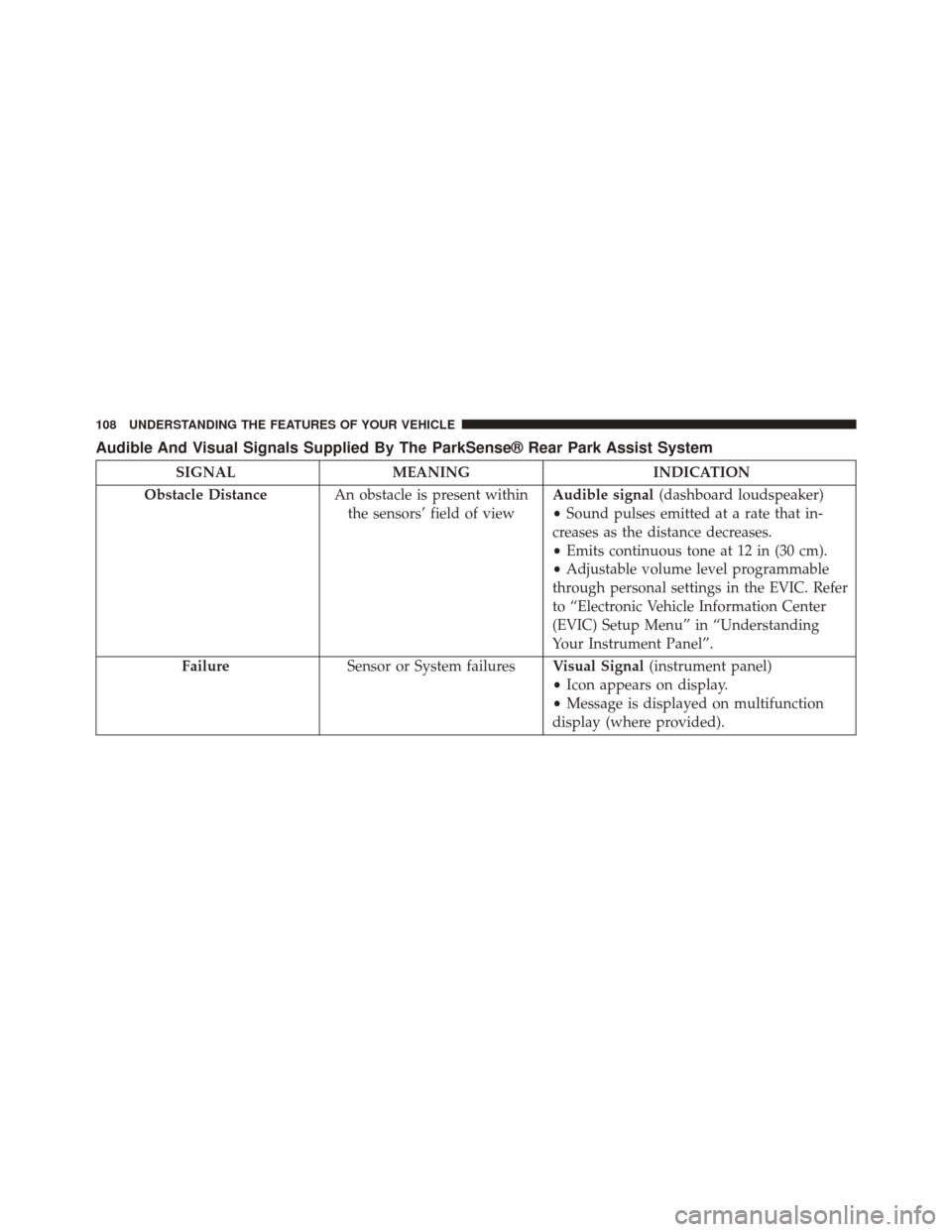
Audible And Visual Signals Supplied By The ParkSense® Rear Park Assist System
SIGNALMEANING INDICATION
Obstacle Distance An obstacle is present within
the sensors’ field of view Audible signal
(dashboard loudspeaker)
• Sound pulses emitted at a rate that in-
creases as the distance decreases.
• Emits continuous tone at 12 in (30 cm).
• Adjustable volume level programmable
through personal settings in the EVIC. Refer
to “Electronic Vehicle Information Center
(EVIC) Setup Menu” in “Understanding
Your Instrument Panel”.
Failure Sensor or System failures Visual Signal(instrument panel)
• Icon appears on display.
• Message is displayed on multifunction
display (where provided).
108 UNDERSTANDING THE FEATURES OF YOUR VEHICLE
Page 118 of 425
Load Compartment Power Outlet
The Load Compartment Power Outlet is located on the
left rear side of the rear cargo compartment. The outlet
can be is used for powering 12 Volt adaptive accessories
and recharging communications devices.
NOTE:Do not connect devices with power higher than
180 W to the socket. Do not damage the socket by using
unsuitable adaptors.
Power Outlet Fuse Locations
1 — F14 Fuse 20 A Yellow Front Power Outlet
2 — F09 Fuse 15 A Blue Rear Power Outlet
116 UNDERSTANDING THE FEATURES OF YOUR VEHICLE
Page 119 of 425

WARNING!
To avoid serious injury or death:
•Only devices designed for use in this type of outlet
should be inserted into any 12 Volt outlet.
• Do not touch with wet hands.
• Close the lid when not in use and while driving the
vehicle.
• If this outlet is mishandled, it may cause an electric
shock and failure.
CAUTION!
•Many accessories that can be plugged in draw
power from the vehicle’s battery, even when not in
use (i.e., cellular phones, etc.). Eventually, if
plugged in long enough, the vehicle’s battery will
discharge sufficiently to degrade battery life and/or
prevent the engine from starting.
• Accessories that draw higher power (i.e., coolers,
vacuum cleaners, lights, etc.) will degrade the bat-
tery even more quickly. Only use these intermit-
tently and with greater caution.
• After the use of high power draw accessories, or
long periods of the vehicle not being started (with
accessories still plugged in), the vehicle must be
driven a sufficient length of time to allow the
generator to recharge the vehicle’s battery.
3
UNDERSTANDING THE FEATURES OF YOUR VEHICLE 117
Page 125 of 425
UNDERSTANDING YOUR INSTRUMENT PANEL
CONTENTS
�INSTRUMENT PANEL FEATURES ..........126
� INSTRUMENT CLUSTER .................127
� INSTRUMENT CLUSTER DESCRIPTIONS .....128
� ELECTRONIC VEHICLE INFORMATION CENTER
(EVIC) ...............................141
▫ Electronic Vehicle Information Center (EVIC)
Setup Menu ........................ .143
▫ Change Engine Oil Indicator System ........145
▫ Trip Computer .......................146
▫ Trip Button ..........................146 ▫
Trip Functions .......................147
▫ Values Displayed ..................... .147
▫ Personal Settings
(Customer-Programmable Features) ........148
� Uconnect® RH3 ........................149
▫ Introduction ........................ .149
▫ Recommendations .....................150
▫ Identification Number ..................151
▫ Security Code ........................151
▫ General ............................ .1524
Page 128 of 425
INSTRUMENT PANEL FEATURES
1 — Air Outlet10 — Lower Glove Compartment 19 — Uconnect® Phone Buttons
2 — Multifunction Lever (External Lights) 11 — Cup Holder20 — Tilt Steering Column Release Lever
3 — Instrument Cluster 12 — USB Charger/12V21 — Horn
4 — Multifunction Lever (Front/Rear Wiper, Trip Computer) 13 — Climate Controls 22 — Mute/Uconnect® Voice Command Buttons
5 — Radio 14 — Lower Switch Ban23 — Cruise Control Switches
6 — Clip Board 15 — Cup Holders24 — Fuse Box Lid
7 — Upper Glove Compartment 16 — Shift Lever25 — Electronic Vehicle information Center (EVIC)
Controls
8 — Passenger Air Bag
17 — USB / AUX
26 — Hood Release
9 — Storage Compartment
18 — Ignition Switch
126 UNDERSTANDING YOUR INSTRUMENT PANEL