2015 MITSUBISHI LANCER wheels
[x] Cancel search: wheelsPage 124 of 434
![MITSUBISHI LANCER 2015 8.G Owners Manual Steering wheel lock
Features and controls 5-55
5
N00512500195
[For vehicles equipped with the F.A.S.T.-key] For information on operations for vehiclesequipped with the F.A.S.T.-key, refer to “F.A.S](/manual-img/19/7462/w960_7462-123.png "MITSUBISHI LANCER 2015 8.G Owners Manual Steering wheel lock
Features and controls 5-55
5
N00512500195
[For vehicles equipped with the F.A.S.T.-key] For information on operations for vehiclesequipped with the F.A.S.T.-key, refer to “F.A.S")
Steering wheel lock
Features and controls 5-55
5
N00512500195
[For vehicles equipped with the F.A.S.T.-key] For information on operations for vehiclesequipped with the F.A.S.T.-key, refer to “F.A.S.T.-key: Steering wheel lock” on page 5-20. [Except for vehicles equipped with the F. A . S . T. - k e y ]
Remove the key at the “LOCK” position. Turn the steering wheel until it is locked. Turn the key to the “ACC” position while moving the steering wheel slightly.
N00542100060
Do not operate the starter motor continu- ously for longer than 15 seconds as thiscould run the battery down or damage the starter motor. If the engine does not start, turn the ignition switch back to the“LOCK” position, wait a few seconds, and then try again. Trying repeatedly with the engine or starter motor still turningwill damage the starter mechanism. If the engine will not start because the bat- tery is weak or discharged, refer to“Jump-starting the engine” (on page 8-2) for instructions. [Except for vehicles equipped with the turbocharger]
If the engine is turned off while driving, the power brake booster will stop functioning and braking efficiency will be reduced. Also, the power steering system will not function and it will require greater effort to manuallysteer the vehicle. Do not leave the key in the “ON” position for a long time when the engine is not running. This will cause the battery to run down. Do not turn the key to the “START” position when the engine is running. It will damage the starter motor.
Steering wheel lock
CAUTION
To l o c k To u n l o c k
CAUTION Remove the key when leaving the vehicle.
NOTE
If the front wheels are turned, the anti-theft lock may sometimes make it difficult to turn the key from “LOCK” position to “ACC” position. Firmly turn the steering wheel to the left or to the right as you turn the key.
Starting and stopping the engine Tips for starting
BK0210300US.bo
ok 55 ページ 2014年4月8日 火曜日 午前10時46分
Page 126 of 434

Starting and stopping the engine Features and controls 5-57
5
7. Turn the ignition switch to the “ON” posi- tion and make certain that all warning lights are functioning properly beforestarting the engine. 8. Turn the ignition switch to the “START”pedal. Release the key when the engine starts.
After several attempts, you may experience that the engine still does not start.
1. Make sure that all electric devices, such as lights, air conditioning blower and rear window defogger, are turned off. 2. While depressing the brake pedal on vehi-cles equipped with continuously variable transmission (CVT) or Twin Clutch SST or the clutch pedal on the vehiclesequipped with manual transaxle, press the accelerator pedal halfway and hold it there, then crank the engine. Release theaccelerator pedal, immediately after theengine starts. 3. If the engine still will not start, the engine could be flooded with too much gasoline.While depressing the brake pedal on vehi- cles equipped with CVT or Twin Clutch SST or the clutch pedal on the vehiclesequipped with manual transaxle, push the accelerator pedal all the way down and hold it there, then crank the engine for 5to 6 seconds. Return the ignition switch to the “LOCK” position and release the accelerator pedal. Wait a few seconds, andthen crank the engine again for 5 to 6 sec- onds while depressing the brake pedal or the clutch pedal, but do not push theaccelerator pedal. Release the ignition key if the engine starts. If the engine fails to start, repeat these procedures. If theengine still will not start, contact your local Mitsubishi Motors dealer or a repair facility of your choice for assistance.
When the ambient temperature is -4 °F (-20 °C) or lower on vehicles with CVT, or -22 °F (-30 °C) or lower on vehicles withTwin Clutch SST, it may not be possible tostart from a standstill even with the selector lever (CVT) or the gearshift lever (Twin Clutch SST) in the “D” (DRIVE) or “R”(REVERSE) position. This phenomenon occurs because the trans- axle has not warmed up sufficiently; it doesnot indicate a problem. If it occurs, place the selector lever (CVT) or the gearshift lever (Twin Clutch SST) in the “P” (PARK) posi-tion and let the engine idle for at least 10 min- utes. The transaxle will warm up, and you will beable to start normally. Do not leave the vehicle during warm-up operation.
N00547600015
At high altitude locations, the idle speed maybe higher. This is done in order to stabilize
NOTE
On vehicles with CVT, the starter will not operate unless the selector lever is in the “P” (PARK) or “N” (NEUTRAL) position. On vehicles with Twin Clutch SST, the starter will not operate unless the gearshiftlever is in the “P”
(PARK) position or the
gearshift lever is in the “N” (NEUTRAL) position with the brake pedal depressed.For safety reasons, start the engine in the “P” (PARK) position so that the wheels are locked.NOTE
Minor noises may be heard on engine start- up. These will disappear as the engine warms up.
When the engine is hard to start
Startability of continuously vari- able transmission (CVT) vehicles or Twin Clutch SST vehicles at extremely cold ambient tempera- ture Idle speed in high altitude area
BK0210300US.bo
ok 57 ページ 2014年4月8日 火曜日 午前10時46分
Page 147 of 434
Twin Clutch SST (Sportronic Shif
t Transmission) (if so equipped)
5-78 Features and controls
5
N00540700033
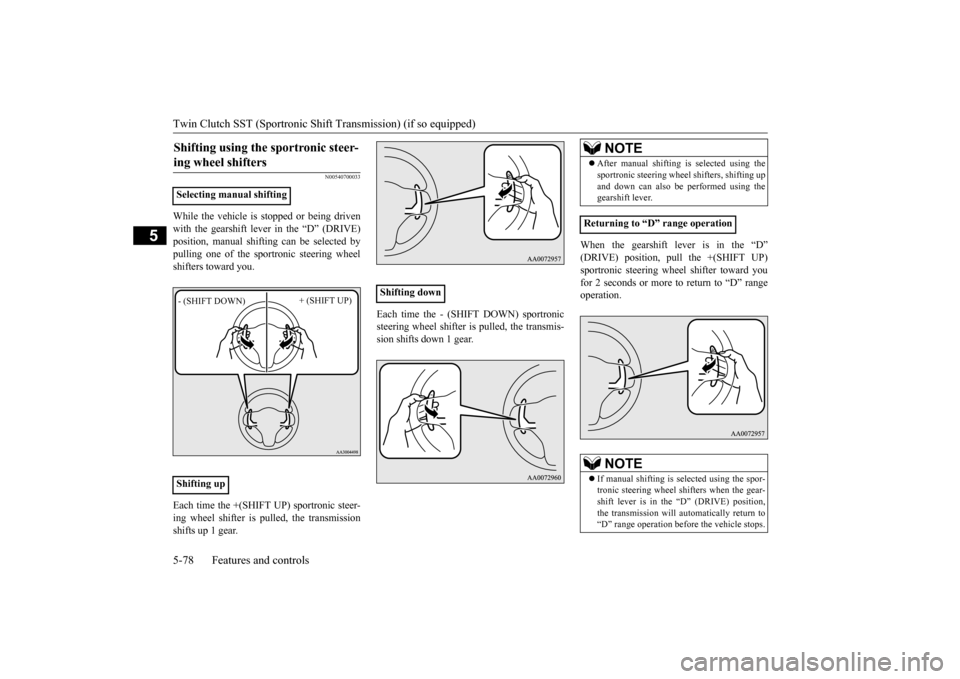
While the vehicle is stopped or being driven with the gearshift lever in the “D” (DRIVE) position, manual shifting can be selected by pulling one of the sportronic steering wheelshifters toward you. Each time the +(SHIFT UP) sportronic steer- ing wheel shifter is pulled, the transmissionshifts up 1 gear.
Each time the - (SHIFT DOWN) sportronic steering wheel shifter is pulled, the transmis- sion shifts down 1 gear.
When the gearshift lever is in the “D” (DRIVE) position, pull the +(SHIFT UP)sportronic steering wheel shifter toward youfor 2 seconds or more to return to “D” range operation.
Shifting using the sportronic steer- ing wheel shifters
Selecting manual shifting Shifting up- (SHIFT DOWN)
+ (SHIFT UP)
Shifting down
NOTE
After manual shifting is
selected using the
sportronic steering wheel shifters, shifting up and down can also be performed using the gearshift lever.
Returning to “D” range operation
NOTE
If manual shifting is selected using the spor- tronic steering wheel shifters when the gear- shift lever is in the “D” (DRIVE) position,the transmission will automatically return to “D” range operation before the vehicle stops.
BK0210300US.bo
ok 78 ページ 2014年4月8日 火曜日 午前10時46分
Page 151 of 434

ACD (Active center differential system) (if so equipped) 5-82 Features and controls
5
However, if the vehicle does not move or accelerate normally, or if this problem occurs repeatedly, have the vehicle checked by an authorized Mitsubishi Motors dealer or arepair facility of your choice as soon as possi- ble.
N00538500034
The ACD is a system that improves accelera- tion performance and straight-ahead stabilityby regulating the differential limiting action and power drive distribution of the center dif- ferential.
N00545400048
Select the control mode from the followingthree types to suit the driving conditions.
When the ignition switch is set to the “ON” position, operate the AWC switch to change the control mode. Each time the switch is pushed, the control mode changes in the order “TARMAC”
“GRAVEL”
“SNOW”
“TARMAC”.
CAUTIONWhen the Twin Clutch SST fluid tempera- ture is high, the engine idle speed when the vehicle is stopped may increase or the vehi- cle will have a weak tendency to creep. After that, if the Twin Clutch SST fluid tem- perature rises even higher, the warning display will appear.
ACD (Active center differ- ential system)
(if so equipped)
CAUTION Do not over-rely on the ACD. Even the ACD cannot prevent the natural laws of physics from acting on the vehicle. This system, like any other system, has limits and cannot help you to maintain traction and control of thevehicle in all circumstances. Reckless driv- ing can lead to accidents. It is the driver’s responsibility to drive carefully. This meanstaking into account the traffic, road and envi- ronmental conditions. Be sure to use tires that are the same speci- fied size, type, and brand, and have no differ- ence in the amount of wear for all fourwheels. Otherwise, the ACD may not work properly.NOTE
If the parking brake lever is pulled up while the vehicle is moving, the center differential is designed to switch to a free state condition which will allow the rear wheel to lock eas-ier.
ACD control mode
ACD control
mode
Operation
TA R M A C
Normally, use this control mode. Use this mode for paved roads.
GRAVEL
Use this control mode when driving on somewhat slip- pery road surfaces, such as wet road surfaces and gravel roads.
SNOW
Use this control mode when driving on slippery road sur-faces, such as snow-covered roads.
ACD control mode switch
BK0210300US.bo
ok 82 ページ 2014年4月8日 火曜日 午前10時46分
Page 153 of 434

Electronically controlled 4WD system (if so equipped) 5-84 Features and controls
5
N00548300019
The electronically controlled 4WD system is an all-wheel drive system that allows one of three drive modes to be selected with aswitch, in accordance with the driving condi- tions. The following drive modes are available.
4-wheel drive operation requires special driv- ing skills. Carefully read the “All-wheel driving opera- tion” section on page 5-86 and take care todrive safely.
N00548400010
The drive mode can be selected by pressingthe switch while the ignition switch is in the “ON” position.
The drive mode is displayed as an interrupt display on the information screen in the multi-information display when the drive mode is switched.After a few seconds, the information screenreturns from the drive mode display to the previous screen.
NOTE
If the ambient temperature drops and the vis- cosity of the AWC control fluid increases, the warning may be displayed. At this time, ACD control is temporarily sus- pended, but this will not affect normal driv-ing. After the vehicle is driven for a while, if the engine is restarted after the AWC controlfluid warms up or the ambient temperature increases, the ACD control will start operat- ing again if the warning display goes out.
Electronically controlled 4WD system
(if so equipped)
Drive mode
Function
2WD
This mode is for economical driving on normal dry roads and freeways. Driving in front-wheel drive.
4WD AUTO
The default mode. This mode is for automati- cally controlling the distribu-tion of driving torque to all four wheels according to the driving conditions.
4WD LOCK
This mode is for driving in slippery conditions such as on snow-covered roads or sand.The large amount of driving torque that is applied to the rear tires enables getting out of slippery areas and power- ful driving is possible across all ranges.
Drive mode-selector
Drive mode
Function
1- 2WD2- 4WD AUTO3- 4WD LOCKDrive mode
Display
Ty p e 1
Ty p e 2
2WD
4WD AUTO
BK0210300US.bo
ok 84 ページ 2014年4月8日 火曜日 午前10時46分
Page 154 of 434

Electronically controlled 4WD system (if so equipped)
Features and controls 5-85
5
N00549400017
Normally the indicator illuminates when the ignition switch is turned to the “ON” posi- tion, and then the drive mode is displayed afew seconds after the engine is started. The status of each drive mode display is as follows.
4WD LOCK
CAUTION Do not operate the drive mode-selector with the front wheels spinning on a snowy road or in similar conditions. The vehicle couldlunge in an unexpected direction. Driving on dry, paved roads in “4WD LOCK” mode causes increased fuel con- sumption, noise, and premature tire wear. Do not drive with the tires spinning in “2WD” mode. Doing so could generate heat in the drive-system components.NOTE
The drive mode can be switched while driv- ing or stopped.
Drive mode indicator
Type 1Drive mode
Display
Ty p e 1
Ty p e 2
Type 2Drive mode
Drive mode indicator
“4WD” indi-
cator
“LOCK” indicator
2WD OFF OFF
4WD AUTO ON OFF4WD LOCK ON ON
CAUTION If the selected drive m
ode indicator is blink-
ing, the vehicle switches automatically to front-wheel drive in order to protect the drive-system components, and drive mode selection is no longer pos
sible with the drive
mode-selector. The warning display is also displayed in the information screen in the multi-informationdisplay. Reduce speed, and if the indicator goes out after driving a while, resume driving asbefore. If the indicator continues blinking for more than about 5 minutes, have the vehicle inspected at an authorized Mitsubishi Motorsdealer or a repair facility of your choice as soon as possible.
Type 1 Type 2
BK0210300US.bo
ok 85 ページ 2014年4月8日 火曜日 午前10時46分
Page 155 of 434

All-wheel driving operation 5-86 Features and controls
5
N00530600169
Full-time 4WD vehicles are propelled by engine power distributed constantly andappropriately to all 4 wheels. Not only does this ensure enhanced handling on dry, paved roads but also permits bettertraction when driving on slippery, wet orsnow-covered roads and when moving out of mud. These vehicles, however, are not designedfor off-road use, and are unsuitable for driving on bumpy ground that may cause excessive strain.
Full-time 4WD vehicles
should be driven only under the same condi- tions as are suitable for ordinary front-wheel drive vehicles. Electronically controlled 4WD system vehi- cles are propelled by engine power distrib- uted constantly and appropriately to all 4 wheels. Not only does this ensure enhanced handling on dry, paved roads but also permits better
traction when driving on slippery, wet or snow-covered roads and when moving out of mud. These vehicles, however, are not designedfor off-road use, and are unsuitable for driving on bumpy ground that may cause excessive strain.
Electronically controlled
4WD system vehicles should be driven only under the same conditions as are suitable for ordinary front-wheel drive vehicles. When turning a sharp corner in “4WD LOCK” position at low speed, a slight differ- ence in steering may be experienced similarto feeling as if the brakes were applied. This is called tight corner braking and results from each of the four tires being at a different dis-tance from the corner. The phenomenon is typical of 4-wheel drive vehicles. If this occurs, either straighten out the steeringwheel, or change to “2WD” or “4WD AUTO” mode. Set the drive mode-selector to “4WD AUTO” conditions, and then gradually depress theaccelerator pedal for a smooth start.
CAUTION The warning display on the information screen in the multi-information display, a problem has occurred with the electronically controlled 4WD system and the safety device has activated. Have an inspection made byan authorized Mitsubishi Motors dealer or a repair facility of your choice as soon as pos- sible.
Type 1 Type 2
CAUTION Always use tires of the same size, type, and brand that have no wear differences. Using tires that differ in size, type, brand, or wear amount may activate the protection of thedrive-system components, causing the drive mode in “4WD AUTO” mode to lock or the “4WD” and “LOCK” indicators to blinkalternately.
All-wheel driving operation For vehicles with full-time 4WD For vehicles with electronically controlled 4WD system
Turning sharp corners On snowy or icy roads
BK0210300US.bo
ok 86 ページ 2014年4月8日 火曜日 午前10時46分
Page 156 of 434

Cautions on handling of all-wheel drive vehicles
Features and controls 5-87
5
Set the drive mode-selector to “4WD LOCK” and then gradually depress the accelerator pedal for a smooth start. Keep the pressure on the accelerator pedal asconstant as possible, and drive at low speed.
Your vehicle may not provide sufficient hill climbing ability and engine braking on steepslopes. Avoid driving on steep slopes even though the vehicle is a 4-wheel drive vehicle.
N00530800190
Since driving torque can
be applied to all four
wheels, the performance of the vehicle when operating in all-wheel drive is greatly affected by the condition of the tires. Pay close attention to the tires. Install specified tires on all wheels. Refer to “Tires and wheels” on page 11-5. Be sure to fit all four tires and wheels of the same size and type.When replacement of any of the tires or wheels is necessary, replace all of them. All tires should be rotated whenever the wear difference between the front and rear tires is recognizable.
NOTE
The use of snow tires is recommended. Maintain a safe distance between vehicles, avoid sudden braking, and use engine brak- ing (downshifting).CAUTION Avoid sudden braking, sudden acceleration, and sharp turning. Skidding occurs and con- trol of the vehicle could be lost.
Moving out of mud
CAUTION If any of the following conditions occur, fol- low these procedures:• The engine coolant temperature display appears on the information screen in the multi-information display or the engine power drops suddenly. Refer to “Engine overheating” on page 8-4.
• The “ ” warning display or the “ ” warning display appear on the information screen in the multi-information display. Refer to “Warning display” on page 5-64.WA R N I N G When attempting to rock your vehicle out of a stuck position, be sure that the area around the vehicle is clear of people and physical objects. The rocking motion may cause the vehicle to suddenly launch for- ward/backward, causing injury or dam-age to nearby people or objects.NOTE
Avoid sudden braking, sudden acceleration and sharp turning; such operations couldresult in the vehicle becoming stuck. If the vehicle becomes stuck in muddy roads, it can often be moved with a rocking motion. Move the selector lever alternately between “D” (DRIVE) and “R” (REVERSE) posi-tions, while pressing lightly on the accelera- tor pedal.CAUTION
Climbing/descending sharp grades Cautions on handling of all- wheel drive vehicles Tires and wheels
BK0210300US.bo
ok 87 ページ 2014年4月8日 火曜日 午前10時46分