2015 MITSUBISHI LANCER lock
[x] Cancel search: lockPage 220 of 434

Combination headlights and dimmer switch
Features and controls 5-151
5
N00563201133
This function turns on the front side-marker and parking lights for about 30 seconds after the UNLOCK button (A) on the remote con-trol transmitter is pressed when the combina- tion headlights and dimmer switch is in the “OFF” or “AUTO” position (for vehiclesequipped with the automatic light control). On vehicles equipped with the automatic light control, the welcome light function will oper-ate only when it is dark outside the vehicle.
N00547300054
This function turns on the headlights in thelow beam setting for about 30 seconds afterthe ignition switch is turned to the “LOCK” position. 1. Turn the combination headlights and dim- mer switch to the “OFF” or “AUTO” automatic light control). 2. Turn the ignition switch to the “LOCK”position. Also, if a key was used to start the engine, remove the key from the igni- tion switch.3. Within 60 seconds of turning the ignition switch to the “LOCK” position, pull the turn signal lever toward you.
If you turn the lights off with the headlights set to high-beam illumination, the headlights are automatically returned to their low-beam setting when the combination headlights and dimmer switch is next turned to the “ ”
Welcome light (for vehicles with the theft-alarm system)
NOTE
NOTE
While the welcome light function is operat- ing, perform one of the following operations to cancel the function. • Push the LOCK button (B) on the remote control transmitter. • Turn the combination headlights and dim- mer switch to the “ ” or “ ” position. • Turn the ignition switch to the “ON” posi- tion.
It is possible to modify functions as follows: • The headlights can be set to come on in the low beam setting.
• The welcome light function can be deacti- vated. For details, consult a Mitsubishi Motors dealer.
Coming home light
NOTE
BK0210300US.book
151 ページ 2014年4月8日 火曜日 午前10時46分
Page 221 of 434

Headlight leveling switch (if so equipped) 5-152 Features and controls
5
4. The headlights will come on in the low beam setting for about 30 seconds. Afterthe headlights go off, the headlights can be turned on again in the low beam setting for about 30 seconds by pulling the turnsignal lever toward you within 60 seconds of turning the ignition switch to the “LOCK” position. To turn on the head-lights again after 60 seconds of turningthe ignition switch to the “LOCK” posi- tion, repeat the process from step 1.
N00537100088
The direction of the headlight beam (thedirection in which the light shines) alters according to the number of people and theload in the vehicle. Lower the headlight angle if it is too high due to the number of people and/or the load in the vehicle so that the head-lights’ glare does not distract the drivers of approaching vehicles. First set the combina- tion headlights and di
mmer switch to the
“ ” position, then turn the headlight level- ing switch knob to lower the beam. The greater the number on the headlight leveling switch knob, the lower the beam will point.Set the switch to the appropriate position so that the headlight beam is level with the road.
N00522601545
When changing lanes, or to making a gradual turn, hold the lever in the “lane change” posi- tion (1). It will return to the neutral position when you let go. Use the full position (2)when making a normal turn. The lever will return to the neutral position when the turn is complete. There may be times when the lever
NOTE
While the coming home light function is operating, perform one of the followingoperations to cancel the function. • Pull the turn signal lever toward you.• Turn the combination headlights and dim- mer switch to the “ ” or “ ” position. • Turn the ignition switch to the “ON” posi- tion.
It is possible to modify functions as follows: • The time that the headlights remain on can be changed. • The coming home light function can be deactivated. For details, consult a Mitsubishi Motors dealer.
Headlight leveling switch
(if
so equipped)
NOTE
NOTE
Start adjusting when the knob is at the “0” position (when the beam is at its highest). Keep the knob in the “0” position except when using the knob to lower the headlight beam angle. Always return the knob to the “0” position when the load is removed and the people have left the vehicle.
Turn signal lever
BK0210300US.book
152 ページ 2014年4月8日 火曜日 午前10時46分
Page 227 of 434

Electric rear window defogger switch 5-158 Features and controls
5
N00523500209
N00523700315
The electric rear window defogger can be used when the engine is running. The indicator light (A) will come on when you press the electric rear window defoggerswitch. Electric current will flow through the heating wires on the rear window to help clear away moisture or frost.
After about 20 minutes of operation, the sys- tem will shut off automatically. To switch the defogger OFF before 20 min-utes have passed, press the switch again. The indicator light will go out and the defogger will turn off. If you need the defogger for more than 20minutes, press the switch again. This will add 20 more minutes.
NOTE
It is possible to modify functions as follows: • Causing the wiper never to operate when washer fluid is sprayed. • Intelligent washer can be deactivated. • The wipers can be set to operate again after about 6 seconds. For details, consult a Mitsubishi Motors dealer.
Precautions to observe when using wipers and washers
CAUTION If the washer is used in cold weather, the washer fluid sprayed onto the glass might freeze, blocking your view. In cold weather,heat the glass with the defroster before using the washer.NOTE
Do not use the wipers when the windshield is dry. This could scratch the glass and wear the wiper blades prematurely. Before using the wipers in cold weather, check to be sure that the wiper blades are notfrozen to the windshield. Using the wipers while the blades are frozen could cause the wiper motor to burn out.
If the wipers become blocked by ice or other deposits on the glass, the motor may still burn out even if the wiper switch is OFF. If deposits form on the windshield, park your vehicle in a safe place, turn off the engine,and clean the glass so that the wipers can operate smoothly. Avoid using the washer for more than 20 sec- onds at a time. Do not operate the washer when the fluid reservoir is empty or thepump may fail. During cold weather, add a recommended washer solution that will not freeze in the washer reservoir. Otherwise the washer may not work or may be damaged. Replace the wiper blades when they are worn. Use the proper size replacementblades. If you have questions, ask your authorized Mitsubishi Motors dealer.
Electric rear window defog- ger switch
NOTE
CAUTION The rear window defogger is not designed to melt snow. Remove any snow manuallybefore using the rear window defogger. Use the rear window defogger only after the engine has started and is running. Be sure to turn the defogger switch off immediately after the window is clear to save on batterypower.
BK0210300US.book
158 ページ 2014年4月8日 火曜日 午前10時46分
Page 233 of 434

Bluetooth® 2.0 interface (if so equipped) 5-164 Features and controls
5
With the confirmation function activated, you are given more opportunities than normal to confirm a command when making various settings to the Bluetooth
® 2.0 interface. This
allows you to decrease the possibility that a setting is accidentally changed. The confirmation function can be turned onor off by following the steps below. 1. Press the SPEECH button (except for vehicles with Mitsubishi Multi-Commu- nication System) or PICK-UP button (forvehicles with Mitsubishi Multi-Commu-nication System). 2. Say “Setup.” 3. Say “Confirmation prompts.”4. The voice guide will say “Confirmation prompts are
N00564601118
It is possible to use a passcode as a securityfunction by setting a passcode of your choice for the Bluetooth
® 2.0 interface.
When the security function is turned on, it is necessary to make a voice input of a 4-digit
passcode in order to use all functions of the Bluetooth
® 2.0 interface, except for recep-
tion. Use the following procedure to turn on the security function by setting a passcode. 1. Press the SPEECH button (except for vehicles with Mitsubishi Multi-Commu- nication System) or PICK-UP button (forvehicles with Mitsubishi Multi-Commu-nication System). 2. Say “Setup.” 3. Say “Passcode.”4. The voice guide will say “Passcode is dis- abled. Would you like to enable it?” Answer “Yes.”Answer “No” to cancel the setting of the passcode and return to the main menu. 5. The voice guide will say “Please say a 4-digit passcode. Remember this passcode. It will be required to use this system.” Say a 4-digit number which you want toset as a passcode. 6. For confirmation purposes, the voice guide will say “Passcode <4-digit pass-code>. Is this correct?” Answer “Yes.” Answer “No” to return to the passcode input in Step 5.
7. When the registration of the passcode is completed, the voice guide will say “Pass- code is enabled” and the system will return to the main menu.
If a passcode has been set and the security function is enabled, the voice guide will say “Hands-free system is locked. State the pass- code to continue” when the SPEECH button(except for vehicles with Mitsubishi Multi- Communication System) or PICK-UP button (for vehicles with Mitsubishi Multi-Commu-nication System) is pressed to enter voice rec- ognition mode. Say the 4-digit passcode number to enter the passcode. If the entered passcode is wrong, the voice guide will say “<4-digit passcode>, Incorrect
Security function
Setting the passcode
NOTE
Passcode will be required to access the sys- tem after the next ignition cycle. It is required for a little time after engine stop that the entered passcode is actuallyrecorded in the system. If the ignition switch is made to “ACC” or “ON” or the engine is started immediately after engine stop, thereis a case when the entered passcode is not recorded in the system. At this time, please try to enter the passcode again.
Entering the passcode
BK0210300US.book
164 ページ 2014年4月8日 火曜日 午前10時46分
Page 234 of 434

Bluetooth® 2.0 interface (if so equipped)
Features and controls 5-165
5
passcode. Please try again.” Enter the correct passcode. Use the following procedure to turn off the security function by disabling the passcode. 1. Press the SPEECH button (except for vehicles with Mitsubishi Multi-Commu-nication System) or PICK-UP button (for vehicles with Mitsubishi Multi-Commu- nication System).2. Say “Setup.” 3. Say “Passcode.” 4. The voice guide will say “Passcode isenabled. Would you like to disable it?” Answer “Yes.” Answer “No” to cancel the disabling ofthe passcode and return to the main menu.
5. When the disabling of the passcode is completed, the voice guide will say “Pass- code is disabled” and the system will return to the main menu.
N00564700011
The Bluetooth
® 2.0 interface can use the
speaker enrollment function to create a voicemodel for one person per language. This makes it easier for the Bluetooth
® 2.0
interface to recognise voice commands said by you. You can turn a voice model registered with the speaker enrollment function on and off whenever you want.
N00564801080
It takes about 2 to 3 minutes to complete thespeaker enrollment process.To ensure the best results, run through the process while in the driver’s seat, in an envi- ronment that is as quiet as possible (whenthere is no rain or strong winds and the vehi- cle windows are closed). Please turn off your phone while in speaker enrollment to preventinterruption of the process. Use the following procedure for speaker enrollment.
1. Stop your vehicle in a safe area, put the shift lever (manual transaxle) in the “N” (Neutral) position, or the selector lever {continuously variable transmission(CVT)} or gearshift lever (Twin Clutch SST) in the “P”(PARK) position, and then pull the parking brake lever. 2. Press the SPEECH button (except for vehicles with Mitsubishi Multi-Commu- nication System) or PICK-UP button (forvehicles with Mitsubishi Multi-Commu- nication System). 3. Say “Voice training.”4. The voice guide will say “This operation must be performed in a quiet environment while the vehicle is stopped. See theowner’s manual for the list of required training phrases. Press and release the SPEECH button when you are ready tobegin. Press the HANG-UP button to can- cel at any time.” Press the SPEECH button to start thespeaker enrollment process.
NOTE
You can reenter the passcode as many times as you want. If you have forgotten your passcode, say “Cancel” to quit the voice input mode and then check with an authorized MitsubishiMotors dealer.
Disabling the passcode
NOTE
System must be unlocked to disable the pass- code.
Speaker enrollment function
Speaker enrollment
NOTE
Speaker enrollment is not possible unless the vehicle is parked. Make sure you park the vehicle in a safe area before attempting speaker enrollment.
BK0210300US.book
165 ページ 2014年4月8日 火曜日 午前10時46分
Page 250 of 434

USB input terminal (if so equipped)
Features and controls 5-181
5
Connect the equipment into an outlet on a circuit different from that to which the receiver is connected. Consult the dealer or an experienced radio/TV technician for help.
ICES Notice: This Class B digital apparatus complies with Canadian ICES-003.
N00566401093 N00566701070
You can connect your USB memory device or iPod
* to play music files stored in the USB
memory device or iPod. The following explains how to connect andremove a USB memory device or iPod.
N00566800074
1. Park your vehicle in a safe place and turnthe ignition switch to the “LOCK” posi-tion.2. Open the USB input terminal cover (A) in the glove compartment. 3. Connect a commercially available USB connector cable (C)
to the USB memory
device (B).
4. Connect the USB connector cable (C) to the USB input terminal (D).
Enrollment commands
USB input terminal
(if so
equipped)
* :“iPod” is a registered trademark of Apple Inc. in the United States and other coun-tries.
How to connect a USB memory device
WA R N I N G An open glove compartment door can cause a serious injury or death to the front passenger in an accident, even if the pas- senger is wearing his/her seat belt. Alwayskeep the glove compartment door closed when driving.
BK0210300US.book
181 ページ 2014年4月8日 火曜日 午前10時46分
Page 251 of 434
USB input terminal (if so equipped) 5-182 Features and controls
5
5. To remove the USB connector cable, turn the ignition switch to the “LOCK” posi- tion first and perform the installation stepsin reverse.
N00566900020
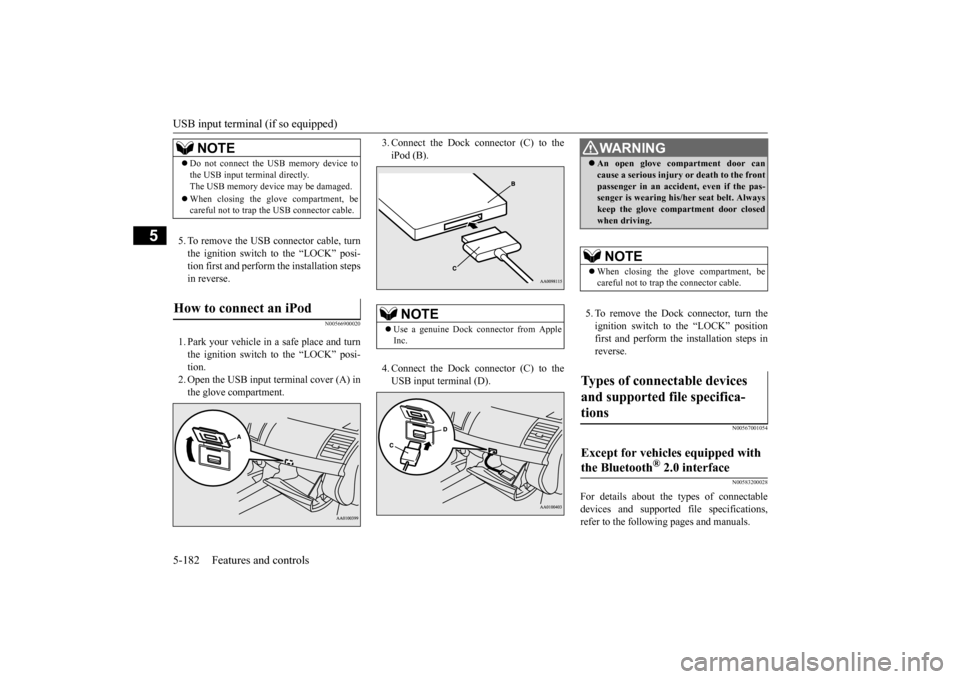
1. Park your vehicle in a safe place and turnthe ignition switch to the “LOCK” posi- tion. 2. Open the USB input terminal cover (A) inthe glove compartment.
3. Connect the Dock connector (C) to the iPod (B). 4. Connect the Dock connector (C) to the USB input terminal (D).
5. To remove the Dock connector, turn the ignition switch to the “LOCK” position first and perform the installation steps inreverse.
N00567001054 N00583200028
For details about the types of connectable devices and supported file specifications, refer to the following pages and manuals.
NOTE
Do not connect the USB memory device to the USB input terminal directly. The USB memory device may be damaged. When closing the glove compartment, be careful not to trap the USB connector cable.
How to connect an iPod
NOTE
Use a genuine Dock connector from Apple Inc.
WA R N I N G An open glove compartment door can cause a serious injury or death to the front passenger in an accident, even if the pas- senger is wearing his/her seat belt. Always keep the glove compartment door closedwhen driving. NOTE
When closing the glove compartment, be careful not to trap the connector cable.
Types of connectable devices and supported file specifica- tions
Except for vehicles equipped with the Bluetooth
® 2.0 interface
BK0210300US.book
182 ページ 2014年4月8日 火曜日 午前10時46分
Page 252 of 434

USB input terminal (if so equipped)
Features and controls 5-183
5
Refer to “Listen to an iPod” on page 7-47, “Listen to Audio Files on a USB Device” on page 7-49 and “Audio Files(MP3/WMA/AAC)” on page 7-34. Refer to the separate owner’s manual. Refer to the separate owner’s manual.
N00583300029
For details about the types of connectable devices and supported file specifications, refer to the following section.
N00583400020
Devices of the following types can be con- nected.
For these connectable device types, “iPod*,” “iPod classic*,” “iPod nano*,” “iPod touch*”and “iPhone*,” refer to the following web- site: [For vehicles sold in U.S.A.]You can access the Mitsubishi Motors North America website. [For vehicles sold in Canada and Mexico]You can access the Mitsubishi Motors web-site. Please read and agree to the “Warning about Links to the Web Sites of Other Com- panies”. The websites mentioned above mayconnect you to websites other than the Mitsubishi Motors website. http://www.mitsubishi-motors.com/en/prod-ucts/index.html
N00583500021
You can play music files of the followingspecifications that are saved in a USB mem-ory device or other device supporting mass storage class. When you connect your iPod, playable file specifications depend on theconnected iPod.
For vehicles equipped with the AM/FM radio/CD player For vehicles equipped with the DISPLAY AUDIO For vehicles equipped with the Mitsubishi Multi-Communication Sys-temFor vehicles equipped with the Bluetooth
® 2.0 interface
Device types
Model name
Condition
USB memory device
Storage capacity of 256 Mbytes or more
Models other than USB memory devices and iPods
Digital audio player supporting mass storage class
* : “iPod,” “iPod classic,” “iPod nano,” “iPod touch,” and “iPhone” are regis- tered trademarks of Apple Inc. in the United States and other countries.
NOTE
Depending on the type of the USB memory device or other device connected, the con- nected device may not function properly or the available functions may be limited. It is recommended to us
e an iPod with firm-
ware updated to the latest version. You can charge your iPod by connecting it to the USB input terminal when the ignition switch is in the “ACC” or “ON” position. Do not keep your USB memory device or iPod in your vehicle. It is recommended that
you back up the files
in case of data damage. Do not connect to the USB input terminal any device (hard disk, card reader, memoryreader, etc.) other than the connectable devices specified in
the previous section.
The device and/or data may be damaged. Ifany of these devices was connected by mis- take, remove it after turning the ignition switch to the “LOCK” position.
File specifications
BK0210300US.book
183 ページ 2014年4月8日 火曜日 午前10時46分