2015 MITSUBISHI LANCER lock
[x] Cancel search: lockPage 334 of 434

System Settings
Comfort controls 7-59
7
Set the time manually. 1. Select “YES” at the “Adjust time” screen, and press the /SEL key. The hour can be adjusted. Press the
/SEL key again to adjust the minutes.
2. Turn the /SEL key to adjust the time.3. Press the /SEL key. This completes the adjustment.
Change the mobile phone voice cut- in set- tings and the Bluetooth
® 2.0 interface lan-
guage.
Depending on the vehicle, PHONE settings may not be possible.
Supported profiles A hands-free kit (available separately) is required.(“Set value” bold typeface indicates factory default settings.)
*2:Once the CODE (passcode) of your choice is entered, each time th
e /SET key is pressed, this switches in the order Settings chan
nel select,
Change LOCK settings, and Complete settings. To return to “each channel LOCK setting”, press the 6
key. Input the CODE from the 1 RPT key to the 6 key.
Time Setting
NOTE
In order to finish adjusting the time, hold down the /SEL key until the seconds are reset to “00”.
PHONE Settings
NOTE
Cancel functions such as the mobile phone “dial lock”, and connect while on the standby screen. While connected, mobile phone (receiving calls, etc.) operations may not function cor- rectly. Depending on the distance between the prod- uct and the mobile phone, the conditions within the vehicle, and types of screening, connection may not be possible. In thesecases, situate the mobile phone as close as possible to the product. Even though a Bluetooth-capable mobile phone, characteristics and specifications may mean that correct operation may not be pos-sible. For safety’s sake, do not operate the mobile phone while driving. When operating the mobile phone, first stop the vehicle in a safe location. Even though a Bluetooth-capable mobile phone, phone specifications and settings mayresult in differences in display, or prevent correct operation.
Some models may not be confirmed as con- nected, or may not connect.Hands-free
HFP(v1.5)
Phonebook transfer
OPP(v1.1), PBAP(v1.0)
Vehicles without a Bluetooth
® 2.0 Inter-
faceSettings value
Settings content
PHONE OFF
Do not use mobile phone voice cut-in.
PHONE MUTE
During mobile phone voice cut- in, mute the audio.
PHONE AT T
During mobile phone voice cut- in, output audio from all speak- ers.
NOTE
BK0210300US.bo
ok 59 ページ 2014年4月8日 火曜日 午前10時46分
Page 337 of 434
Antenna 7-62 Comfort controls
7
Here is a list of symptoms, causes and responses
if you think something is not working properly.
N00734200426
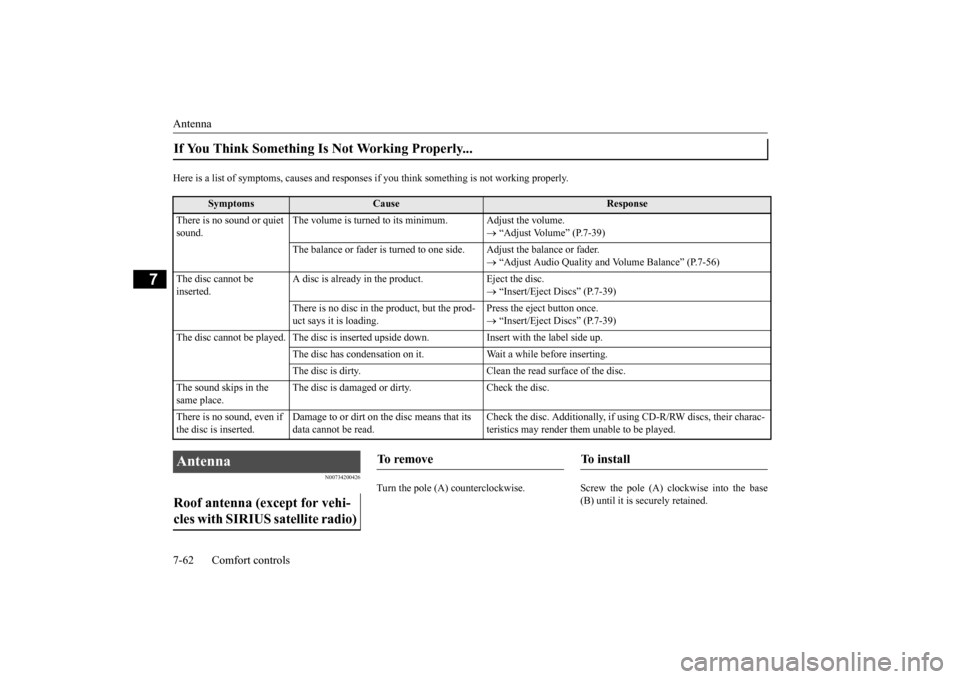
Turn the pole (A) counterclockwise. Screw
the pole (A) clockwise into the base
(B) until it is securely retained.
If You Think Something Is Not Working Properly...
Symptoms
Cause
Response
There is no sound or quiet sound.
The volume is turned to its minimum. Adjust the volume.
“Adjust Volume” (P.7-39)
The balance or fader is turned to one side. Adjust the balance or fader.
“Adjust Audio Quality and Volume Balance” (P.7-56)
The disc cannot be inserted.
A disc is already in the product. Eject the disc.
“Insert/Eject Discs” (P.7-39)
There is no disc in the product, but the prod- uct says it is loading.
Press the eject button once. “Insert/Eject Discs” (P.7-39)
The disc cannot be played. The disc is inserted upside down. Insert with the label side up.
The disc has condensation on it. W
ait a while before inserting.
The disc is dirty. Clean the read surface of the disc.
The sound skips in the same place.
The disc is damaged or dirty. Check the disc.
There is no sound, even if the disc is inserted.
Damage to or dirt on the disc means that its data cannot be read.
Check the disc. Additionally, if using CD-R/RW discs, their charac- teristics may render them unable to be played.
Antenna Roof antenna (except for vehi- cles with SIRIUS satellite radio)
To remove
To i n s t a l l
BK0210300US.bo
ok 62 ページ 2014年4月8日 火曜日 午前10時46分
Page 338 of 434
General information about your radio
Comfort controls 7-63
7
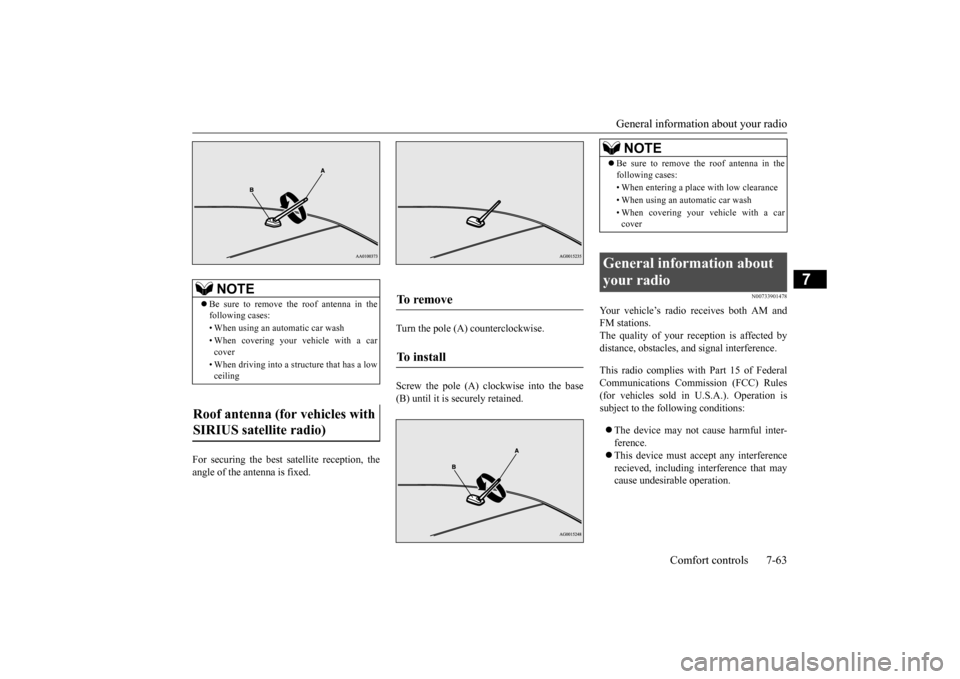
For securing the best satellite reception, the angle of the antenna is fixed.
Turn the pole (A) counterclockwise. Screw the pole (A) clockwise into the base (B) until it is securely retained.
N00733901478
Your vehicle’s radio receives both AM andFM stations.The quality of your reception is affected by distance, obstacles, and signal interference. This radio complies with Part 15 of Federal Communications Commission (FCC) Rules(for vehicles sold in U.S.A.). Operation is subject to the following conditions: The device may not cause harmful inter- ference. This device must accept any interference recieved, including interference that may cause undesirable operation.
NOTE
Be sure to remove the roof antenna in the following cases: • When using an automatic car wash• When covering your vehicle with a car cover • When driving into a structure that has a low ceiling
Roof antenna (for vehicles with SIRIUS satellite radio)
To remove To install
NOTE
Be sure to remove the roof antenna in the following cases: • When entering a place with low clearance • When using an automatic car wash • When covering your vehicle with a car cover
General information about your radio
BK0210300US.bo
ok 63 ページ 2014年4月8日 火曜日 午前10時46分
Page 339 of 434
General information about your radio 7-64 Comfort controls
7
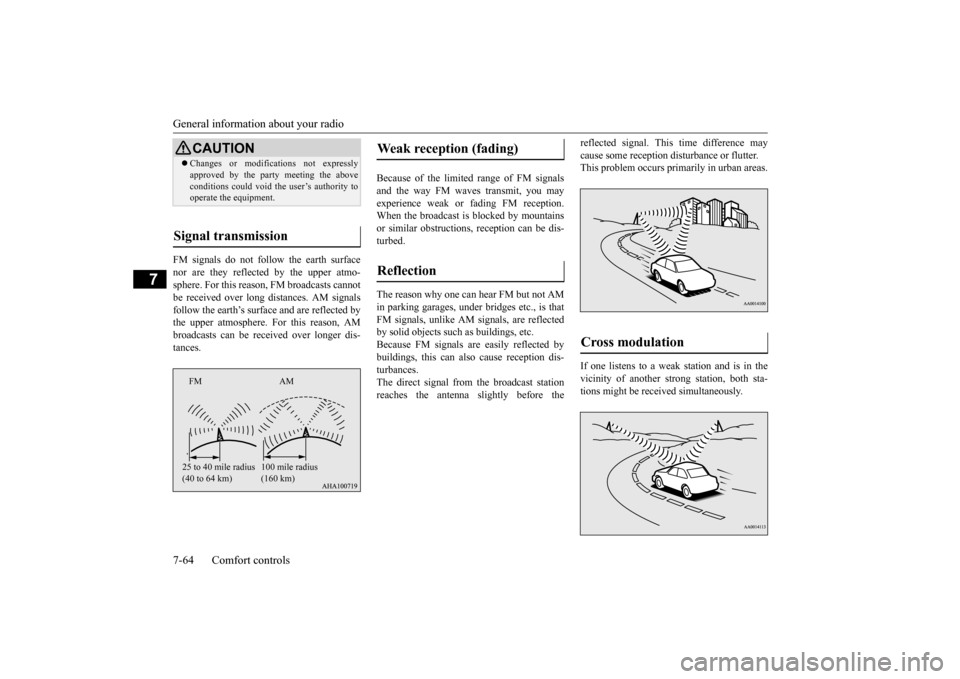
FM signals do not follow the earth surface nor are they reflected by the upper atmo- sphere. For this reason, FM broadcasts cannot be received over long distances. AM signalsfollow the earth’s surface and are reflected by the upper atmosphere. For this reason, AM broadcasts can be received over longer dis-tances.
Because of the limited
range of FM signals
and the way FM waves transmit, you mayexperience weak or fading FM reception. When the broadcast is blocked by mountains or similar obstructions, reception can be dis-turbed. The reason why one can hear FM but not AM in parking garages, under bridges etc., is that FM signals, unlike AM signals, are reflectedby solid objects such as buildings, etc. Because FM signals are easily reflected by buildings, this can also cause reception dis-turbances. The direct signal from the broadcast station reaches the antenna slightly before the
reflected signal. This time difference may cause some reception disturbance or flutter. This problem occurs primarily in urban areas. If one listens to a weak station and is in the vicinity of another strong station, both sta-tions might be received simultaneously.
CAUTION Changes or modifications not expressly approved by the party meeting the above conditions could void the user’s authority to operate the equipment.
Signal transmission
FM AM 25 to 40 mile radius (40 to 64 km)
100 mile radius (160 km)
Weak reception (fading) Reflection
Cross modulation
BK0210300US.bo
ok 64 ページ 2014年4月8日 火曜日 午前10時46分
Page 343 of 434

If the vehicle breaks down 8-2 For emergencies
8
N00836300161
If your vehicle breaks down on the road, move to the shoulder and turn on the hazardwarning flashers. If there is no shoulder, or the shoulder is not safe, drive in the right lane slowly, with the hazard lights flashing, untilyou come to a safe stopping place. Keep the flashers flashing. If the engine stops, there will be no power assist to the steering and brakes, making these difficult to use. The brake booster will not work, so the brakes will not grip well. The brake pedalwill be harder to press than usual. Since there is no power steering assist, the steering wheel will be hard to turn.
Get help from your passengers, bystanders, etc. to push the vehicl
e and move it to a safe
zone.
N00836400713
If the engine cannot be started because the battery is weak or dead, you can start it withthe battery from another vehicle using jumper cables. 1. Take off any metal jewelry such as watch bands or bracelets that might make an accidental electrical contact. 2. Position the vehicles close enough together so that the jumper cables can reach, but be sure the vehicles aren’ttouching each other.
3. You could be injured if the vehicles move. Set the parking brake firmly on each vehi-cle. Put an automatic transaxle, CVT or Twin Clutch SST in “P” (PARK) or a manual transaxle in “N” (Neutral). Turnthe ignition key to the “LOCK” position. 4. Make sure your battery electrolyte is at the proper level. (Refer to “Checking bat- tery electrolyte level” on page 9-15.)
If the vehicle breaks down If the engine stops/fails When the engine fails at the intersection
Jump-starting the engine
WA R N I N G When using jumper cables to start a vehi- cle, follow the procedures and be very cau- tious. CAUTION Do not try to start your vehicle by pushing or towing. Vehicles with continuously variable transmission (CVT) or Twin Clutch SST cannot be started this way. Pushing or towinga vehicle that has a manual transaxle may overheat and damage the catalytic converter. Also, there is more ri
sk of an accident when
a vehicle is being pushed or towed.
CAUTION Check the other vehicle. It must have a 12- volt battery. If the other system isn’t 12-volt, both systems can be damaged.WA R N I N G Turn the ignition key to the “LOCK” posi- tion on both vehicles. Make sure that thecables or your clothes cannot be caught by the fan or drive belt. Personal injury could result. NOTE
Turn off all lights, heater, and other electrical loads. This will avoid sparks and help save both batteries.
BK0210300US.bo
ok 2 ページ 2014年4月8日 火曜日 午前10時46分
Page 344 of 434

Jump-starting the engine For emergencies 8-3
8
5. For vehicles equipped with turbocharger, remove the air duct and then the battery upper cover. (Refer to “Removing and installing thebattery upper cover” on page 9-14.) 6. Connect one end of one jumper cable to the positive (+) terminal of the dischargedbattery (A), and the other end to the posi- tive (+) terminal of the booster battery (B).
7. Connect one end of the other jumper cable to the negative (-) terminal of the boosterbattery (B), and the other end to the engine block of the vehicle with the low battery (A) at the point farthest from thebattery.
8. Start the engine in the vehicle providing the boost. Let the engine idle a few min- utes, then start the engine in the vehiclewith the low battery. 9. After the engine is started, disconnect the cables in the reverse order from the way you connected them.
10. For vehicles equipped with turbocharger,
install the battery upper cover and then the air duct.(Refer to “Removing and installing thebattery upper cover” on page 9-14.)
WA R N I N G If the electrolyte fluid is not visible, or looks frozen, DO NOT ATTEMPT JUMP STARTING!! The battery might split open or explode if the temperature is below the freezingpoint or if it is not filled to the proper level.
NOTE
Open the terminal cover before connecting the jumper cable to the positive terminal of the battery. (Refer to “Disconnection and connection” on page 9-16.) Use the proper cables suitable for the battery size.Otherwise heat damage to the cables could result. Check the jumper cables for damage and cor- rosion before use.WA R N I N G Be sure to follow the proper order when connecting the batteries, of:
.
Make sure that the connection is made to the engine properly. If the connection isdirectly made to the negative side of the battery, the flammable gases from inside the battery might catch fire and explode,causing personal injury.
When connecting the jumper cable, do not connect the positive (+) cable to the nega- tive (-) terminal. Otherwise sparks can make the battery explode.CAUTION Make sure that the jumper cable will not be caught in the cooling fan or other movingparts in the engine compartment.NOTE
If the engine is started with the air duct removed, the noise produced as air is drawn into the engine will be greater than when theduct is installed.WA R N I N G
BK0210300US.bo
ok 3 ページ 2014年4月8日 火曜日 午前10時46分
Page 345 of 434

Engine overheating 8-4 For emergencies
8
If you drive your vehicle with a low battery charge, after the engine has been started by
using jumper cables, the engine may misfire. This can cause the anti-lock braking system warning light to blink on and off. This is only due to the low battery voltage. It is not aproblem with the brake system. If this hap- pens, fully charge the battery and ensure the charging system is operating properly.
N00836500323
When the engine has overheated, the infor- mation screen in the multi-information dis- play will be interrupted and the enginecoolant temperature warning display will appear. The screen will then change to the engine coolant temperature display screen and “ ” will flash. If this happens: 1. Stop the vehicle in a safe place. Turn on the hazard warning flashers. 2. With the engine still running, carefullyraise the engine hood to vent the engine compartment. 3. Check that the cooling fan is running. Ifthe fan is not turning, stop the engine immediately and contact an authorized Mitsubishi Motors dealer or a repair facil-ity of your choice for assistance.
4. If you see steam or spray coming from under the hood, turn off the engine.5. If you do not see steam or spray coming from under the hood, leave the engine on until the bar graph for the engine coolanttemperature warning display on the multi-information display goes down. When it is in the middle of the normal zone, you can start driving again. If the bar graphstays in the red zone, turn off the engine. 6. When you do not see any more steam or spray, open the hood. Look for obvious leaks, such as a split radiator hose. Becareful as components will be hot. Any leak source must be repaired.
WA R N I N G Charging your battery while it is still in your vehicle might cause the battery to catch fire and explode. If you have to charge it while in the vehicle, disconnect the negative terminal. Keep sparks, cigarettes and flames away from the battery because the battery mayexplode. Keep your work area well vented when charging or using the battery in an enclosed space. Remove all the caps before charging the battery. Electrolyte (battery acid) is corrosive diluted sulphuric acid. If electrolyte comes in contact with your hands, eyes, clothes,or the painted surface of your vehicle, thoroughly flush with water. If electrolyte gets in your eyes, flush them immediatelyand thoroughly with water, and get prompt medical attention. Always wear protective clothing and gog- gles when working near the battery. Keep the battery out of the reach of chil- dren.
As your vehicle has anti-lock brakes
Engine overheating
WA R N I N G To avoid personal injury, keep hands, hair, jewelry and clothes away from the cooling fan. The cooling fan can start at any time.WA R N I N G Before raising the engine hood, check to see if there is steam or spray coming from under the hood. Steam or spray comingfrom an overheated engine could seriously scald you. Do not open the hood until there is nosteam or spray.
BK0210300US.bo
ok 4 ページ 2014年4月8日 火曜日 午前10時46分
Page 346 of 434

Tools and jack
For emergencies 8-5
8
7. If there is no obvious leak source, check the coolant level in the reserve tank. If there is none, or if it is too low, slowly add coolant.8. If the reserve tank needs coolant, you will probably also need to add coolant to the radiator. Do not loosen or remove theradiator cap until the engine has cooled down. 9. Start the engine, and slowly add coolant, up to the bottom of the filler neck. Use plain water if you have to (and replace it with the right coolant as soon as possible).
10. Replace the radiator cap and tighten it
fully. Check the engine coolant tempera- ture display on the multi-information dis-play. You can start driving again when the bar graph for the engine coolant tempera- ture display returns to the normal zone.
11. Have your vehicle checked by your autho-
rized Mitsubishi Motors dealer or a repair facility of your choice.
N00836600265
The tools and jack are stowed in the trunk.
N00832600124 N00832700255
Before removing the jack, lift up the luggage floor board. For front-wheel drive vehicles, pull the lug-gage floor board (A) rearward to release the hooks (B), and then lift it up.
WA R N I N G Removing the radiator cap could scald you with escaping hot water or steam. When checking the radiator level, coverthe cap with a cloth before trying to remove it. Turn it slowly counterclock- wise, without pressing down, to the firstnotch. The pressure in the system will then be let out. When the pressure is COM- PLETELY LET OUT, press down andkeep turning the cap counterclockwise until it will come off.
Tools and jack Storage 1- Tools 2- Jack
Tools 1- Tool bag 2- Bar3- Wheel nut wrenchJack
BK0210300US.bo
ok 5 ページ 2014年4月8日 火曜日 午前10時46分