2015 MERCEDES-BENZ S-Class Distance
[x] Cancel search: DistancePage 274 of 502

Due to the nature of the system:
R warnings may be issued in error when driv-
ing close to crash barriers or similar solid
lane borders.
R warnings may be interrupted when driving
alongside particularly long vehicles, e.g.
trucks, for a prolonged time.
Warning display :
Warning display
Active Blind Spot Assist is not operational at
speeds below approximately 20 mph
(30 km/h). Vehicles in the monitoring range
are then not indicated.
If a vehicle is detected within the blind spot
monitoring range at speeds above 20 mph
(30 km/h), warning lamp :on the corre-
sponding side lights up red. This warning is
always emitted when a vehicle enters the
blind spot monitoring range from behind or
from the side. When you overtake a vehicle,
the warning only occurs if the difference in
speed is less than 7 mph (12 km/h).
If you select the reverse gear, Active Blind
Spot Assist is not operational.
The brightness of the warning lamps is auto-
matically adapted to the brightness of the
surroundings. When Active Blind Spot Assist is activated,
gray radar waves propagating backwards
appear next to the vehicle in the assistance
display in the multifunction display. Above a
speed of 20 mph (30 km/h), the color of the
radar waves in the assistance display
changes to green ;. Active Blind Spot Assist
is then ready for use.
Visual and acoustic collision warning
If you switch on the turn signals to change
lanes and a vehicle is detected in the side
monitoring range, you receive a visual and
acoustic collision warning. You will then hear a double warning tone and red warning
lamp :flashes. If the turn signal remains on,
detected vehicles are indicated by the flash-
ing of red warning lamp :. There are no fur-
ther warning tones.
Course-correcting brake application
If Active Blind Spot Assist detects a risk of a
lateral collision in the monitoring range, a
course-correcting brake application is carried
out. This is meant to assist you in avoiding a
collision. G
WARNING
A course-correcting brake application cannot always prevent a collision. There is a risk of an
accident.
Always steer, brake or accelerate yourself,
especially if Active Blind Spot Assist warns
you or makes a course-correcting brake appli-
cation. Always maintain a safe distance at the sides. 272
Driving systemsDriving an
d parking
Page 275 of 502

If a course-correcting brake application
occurs, red warning lamp :flashes in the
exterior mirror and a dual warning tone
sounds. In addition, display ;underlining
the danger of a side collision appears in the
multifunction display.
In very rare cases, the system may make an
inappropriate brake application. A course-
correcting brake application may be interrup-
ted at any time if you steer slightly in the
opposite direction or accelerate.
The course-correcting brake application is
available in the speed range between 20 mph (30 km/h) and 120 mph (200 km/h).
Either no braking application, or a course-
correcting brake application adapted to the
driving situation occurs if:
R there are vehicles or obstacles, e.g. crash
barriers, located on both sides of your vehi-
cle.
R a vehicle approaches you too closely at the
side.
R you have adopted a sporty driving style with
high cornering speeds.
R you clearly brake or accelerate.
R a driving safety system intervenes, e.g.
ESP ®
or PRE-SAFE ®
Brake.
R ESP ®
is switched off.
R a loss of tire pressure or a defective tire is
detected.
Switching on Active Blind Spot Assist X Make sure that Active Blind Spot Assist is
activated in the on-board computer
(Y page 309).
X Turn the SmartKey to position 2in the igni-
tion lock.
Warning lamps :in the exterior mirrors
light up red for approximately 1.5 seconds. Gray radar waves propagating backwards
appear next to the vehicle in the assistance
display in the multifunction display. Active Lane Keeping Assist General notes
Active Lane Keeping Assist monitors the area
in front of your vehicle by means of camera
system :at the top of the windshield. Vari-
ous different areas to the front, rear and side of your vehicle are also monitored with the aid
of the radar sensor system. Active Lane Keep-
ing Assist detects lane markings on the road
and can warn you before you leave your lane
unintentionally. If you do not react to the
warning, a lane-correcting application of the
brakes can bring the vehicle back into the
original lane.
If you select km kmin the Display Unit
Display Unit
Speed-/Odometer:
Speed-/Odometer: function on the on-board
computer (Y page 312), Active Lane Keeping
Assist is activated starting at a speed of
60 km/h. If the miles milesdisplay unit is selected,
the assistance range begins at 40 mph.
Important safety notes
If you fail to adapt your driving style, Active
Lane Keeping Assist can neither reduce the
risk of accident nor override the laws of phys- ics. Active Lane Keeping Assist cannot take
account of road and weather conditions. It
may not recognize traffic situations. Active
Lane Keeping Assist is only an aid. You are
responsible for the distance to the vehicle in
front, for vehicle speed, for braking in good
time and for staying in your lane.
Active Lane Keeping Assist cannot continu-
ously keep your vehicle in its lane. Driving systems
273Driving and parking Z
Page 276 of 502

G
WARNING
Active Lane Keeping Assist cannot always
clearly detect lane markings.
In such cases, Active Lane Keeping Assist
can:
R give an unnecessary warning and then
make a course-correcting brake application
to the vehicle
R not give a warning or intervene
There is a risk of an accident.
Always pay particular attention to the traffic
situation and keep within the lane, especially
if Active Lane Keeping Assist alerts you. Ter-
minate the intervention in a non-critical driv-
ing situation.
The system may be impaired or may not func-
tion if:
R there is poor visibility, e.g. due to insuffi-
cient illumination of the road, or due to
snow, rain, fog or spray
R there is glare, e.g. from oncoming traffic,
the sun or reflections (e.g. when the road
surface is wet)
R the windshield is dirty, fogged up, damaged
or covered, for instance by a sticker, in the
vicinity of the camera
R the radar sensors in the front or rear bump-
ers or the radiator trim are dirty, e.g.
obscured by snow
R there are no, several or unclear lane mark-
ings for a lane, e.g. in areas with road con-
struction work
R the lane markings are worn away, dark or
covered up, e.g. by dirt or snow
R the distance to the vehicle in front is too
small and the lane markings thus cannot be
detected
R the lane markings change quickly, e.g.
lanes branch off, cross one another or
merge
R the road is narrow and winding
R there are strong shadows cast on the road If no vehicle is detected in the adjacent lane
and broken lane markings are detected, no
lane-correcting brake application is made.
Warning vibration in the steering wheel
A warning may be given if a front wheel
passes over a lane marking. It will warn you by
means of intermittent vibration in the steer-
ing wheel for up to 1.5 seconds.
Lane-correcting brake application
If you leave your lane, under certain circum-
stances the vehicle will brake briefly on one
side. This is meant to assist you in bringing
the vehicle back to the original lane. G
WARNING
A lane-correcting brake application cannot
always bring the vehicle back into the original lane. There is a risk of an accident.
Always steer, brake or accelerate yourself,
especially if Active Lane Keeping Assist warns
you or makes a lane-correcting brake appli-
cation. If a lane-correcting brake application occurs,
display :appears in the multifunction dis-
play. The brake application also slightly
reduces vehicle speed.
This function is available in the range between
40 mph and 120 mph (60 km/h and
200 km/h).
A lane-correcting brake application can be
made after driving over a lane marking rec-
ognized as being solid or broken. Before this,
a warning must be given by means of inter-
mittent vibration in the steering wheel. In 274
Driving systemsDriving and parking
Page 289 of 502

Additional point of resistance in the hap-
tic accelerator pedal
The maximum available electric performance is indicated by a tangible point of resistance
in the haptic accelerator pedal.
The additional point of resistance is available
in E-MODE operating mode (Y page 280)
If you depress the haptic accelerator pedal
beyond the pressure point, the combustion
engine is switched on.
Double pulses in the haptic accelerator
pedal
A tangible double pulse in the haptic acceler- ator pedal gives you a recommendation to
release the accelerator pedal. By this means, in HYBRID, E-MODEorE-SAVE operating
mode the combustion engine can be switched
off and disconnected from the power train
(overrun mode).
The double pulse is available in drive program
E+ (Ypage 285).
After the accelerator pedal has been
released, the coasting characteristics of the
vehicle are adapted to the traffic conditions.
To avoid getting too close to the vehicle in
front, you must apply the brakes manually
when necessary.
Driving tips General driving tips
Drive carefully and maintain a safe distance
from the vehicle in front. Avoid frequent and
sudden acceleration as well as abrupt brak-
ing.
During partial electric driving, pulling away
and acceleration, the electric motor supports
the internal combustion engine.
During overrun in transmission position Dand
braking, the electric motor will operate as a
generator.
Further information on the ECO start/stop
function (Y page 288).
Additional driving tips (Y page 224).Stationary vehicle
If the vehicle is stopped, the combustion
engine is, for the most part, switched off.
Automatic climate control continues to func-
tion. The electromechanically assisted steer-
ing gear allows you to use the power steering
without reduced comfort.
Acceleration
Depending on the operating mode, pulling
away and driving under low load conditions
are performed:
R entirely by electric propulsion
R in combination with the internal combus-
tion engine
When accelerating at an increased or full
load, boost mode is utilized. The electric
motor supports the internal combustion
engine by providing additional torque when
the accelerator is depressed rapidly.
Overrun mode or braking
There are three possible operating modes
when the hybrid vehicle is decelerating:
R energy recovery takes place even when the
vehicle is decelerating purely in overrun
mode (Y page 276). The electric motor
operates as a generator and stores the
recovered energy in the high-voltage bat-
tery.
R when the brakes are applied lightly, the
vehicle is slowed down further by the elec-
tric motor. This increases the energy recov- ery taking place (Y page 276). The electric
motor operates as a generator and stores
the recovered energy in the high-voltage
battery.
R when the brakes are applied with greater
force, the service brakes are also used to
slow the vehicle down. The two systems
work together.
Urban driving
Energy is recuperated during frequent decel-
eration and stopping in city traffic. PLUG-IN HYBRID operation
287Driving and parking Z
Page 290 of 502

The vehicle can be driven by the electric
motor alone up to a speed of approximately
130 km/h.
The vehicle is driven by the electric motor
alone only when all conditions for the auto-
matic engine switch-off are fulfilled.
Further information on the automatic engine
switch-off (Y page 288).
Driving on inter-urban roads
The following phases are possible when driv-
ing on inter-urban roads: R rapid acceleration (boost mode)
R constant energy consumption
R energy recuperation
R electric operation mode
A great deal of recovered energy may be
available, depending on the route profile. This reduces consumption and emissions.
Highway driving
During highway driving, fuel consumption andemissions are favorably influenced in partic-
ular by reduced power losses.
The internal combustion engine will be
switched off automatically, if:
R the driver removes his foot from the accel-
erator pedal in drive program Eand a speed
of 130 km/h is not exceeded
R the driver removes his foot from the accel-
erator pedal in drive program E+and a
speed of 180 km/h is not exceeded.
Further information on the automatic engine
switch-off (Y page 288).
ECO start/stop function General notes
The ECO start/stop function switches the
internal combustion engine off automatically
when the vehicle stops moving and at high
speeds (Y
page 289).
All vehicle systems remain active, e.g. the
automatic climate control. The ECO start/stop function is only available
in drive programs Eand E+. Electric-only
operation is only possible in drive programs E
and E+. Additional information for drive pro-
grams Eand E+(Ypage 285).
Automatic engine switch-off
The engine is switched off automatically,
including when:
R the driver removes his foot from the accel-
erator in drive program Eand a speed of
130 km/h is not exceeded (Y page 289)
R the driver removes his foot from the accel-
erator in drive program E+and a speed of
180 km/h is not exceeded (Y page 289)
R the engine has reached its operating tem-
perature
R the driver’s seat belt is fastened and the
driver’s door is closed
R the driver only slightly depresses the accel-
erator pedal in order to, for example, main- tain the current speed for a limited distance
R the hood is closed and engaged properly
R the high-voltage battery is charged suffi-
ciently
R there are no malfunctions in the hybrid sys-
tem
The internal combustion engine will not be
switched off automatically, if:
R the self-diagnosis function of the engine
control unit is still active
R there is a malfunction in the hybrid system
R the climate control of the vehicle requires it
R the high-voltage battery is being charged
(Y page 282)
R automatic emissions tests are running 288
PLUG-IN HYBRID operationDriving and parking
Page 302 of 502
depends on the engine installed and is
therefore not available in all vehicles.
PLUG-IN HYBRID vehicles: information on
total range and electric range can be found in
the "PLUG-IN HYBRID drive" section
(Y page 284).
ECO display The ECO display is not available for AMG vehi-
cles.
X Use ò on the steering wheel to call up
the list of menus.
X Press the :or9 button on the steer-
ing wheel to select the Trip
Trip menu.
X Confirm by pressing aon the steering
wheel.
X Press :or9 to select ECO ECODisplay
Display.
If the ignition remains switched off for longer than four hours, the ECO display will be auto-
matically reset.
For further information on the ECO display,
see (Y page 225). Trip computer "From Start" or "From
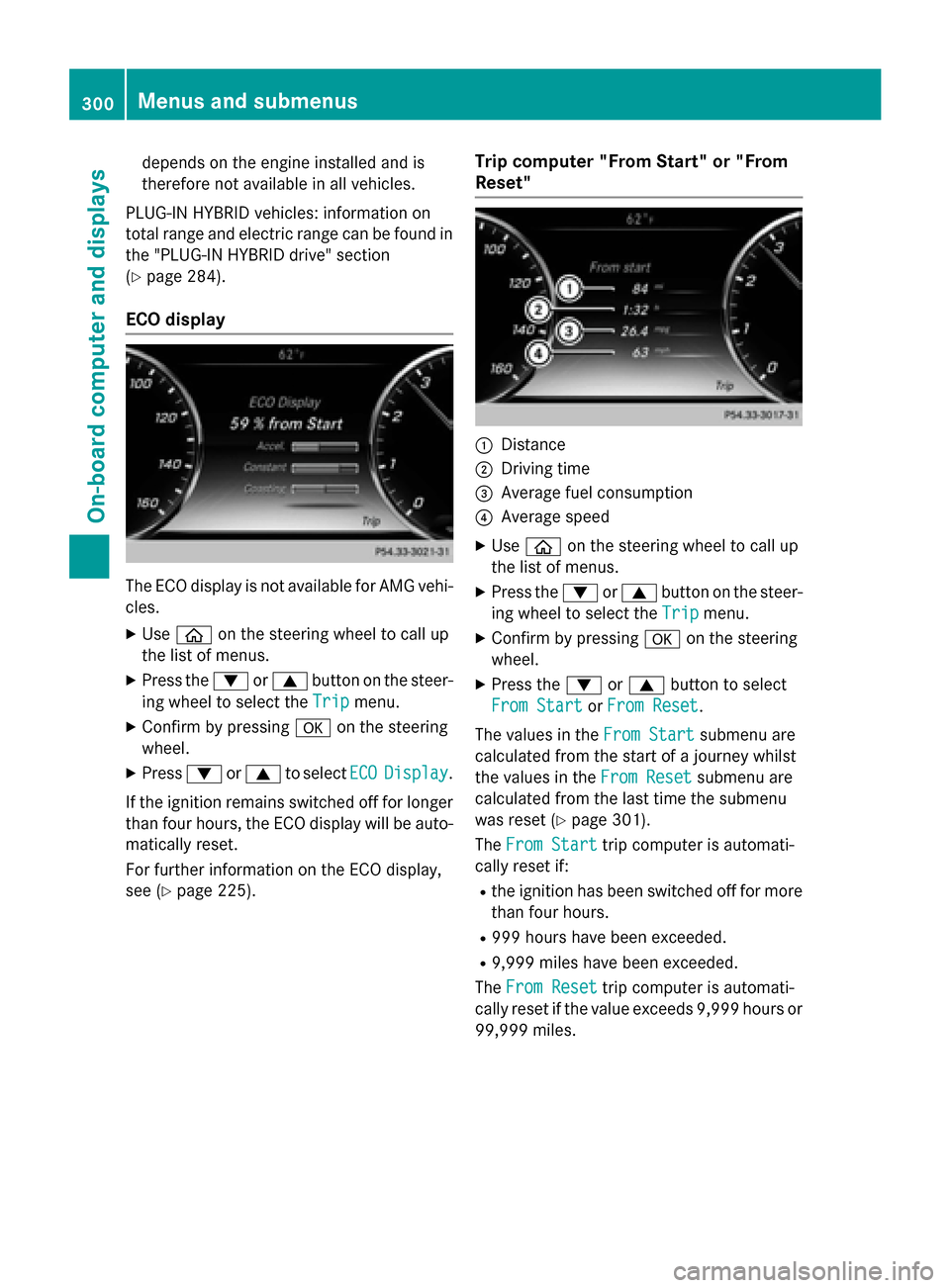
Reset" :
Distance
; Driving time
= Average fuel consumption
? Average speed
X Use ò on the steering wheel to call up
the list of menus.
X Press the :or9 button on the steer-
ing wheel to select the Trip Tripmenu.
X Confirm by pressing aon the steering
wheel.
X Press the :or9 button to select
From Start
From Start orFrom Reset
From Reset.
The values in the From Start
From Start submenu are
calculated from the start of a journey whilst
the values in the From Reset From Resetsubmenu are
calculated from the last time the submenu
was reset (Y page 301).
The From Start
From Start trip computer is automati-
cally reset if:
R the ignition has been switched off for more
than four hours.
R 999 hours have been exceeded.
R 9,999 miles have been exceeded.
The From Reset
From Reset trip computer is automati-
cally reset if the value exceeds 9,999 hours or
99,999 miles. 300
Menus and submenusOn-board computer and displays
Page 304 of 502
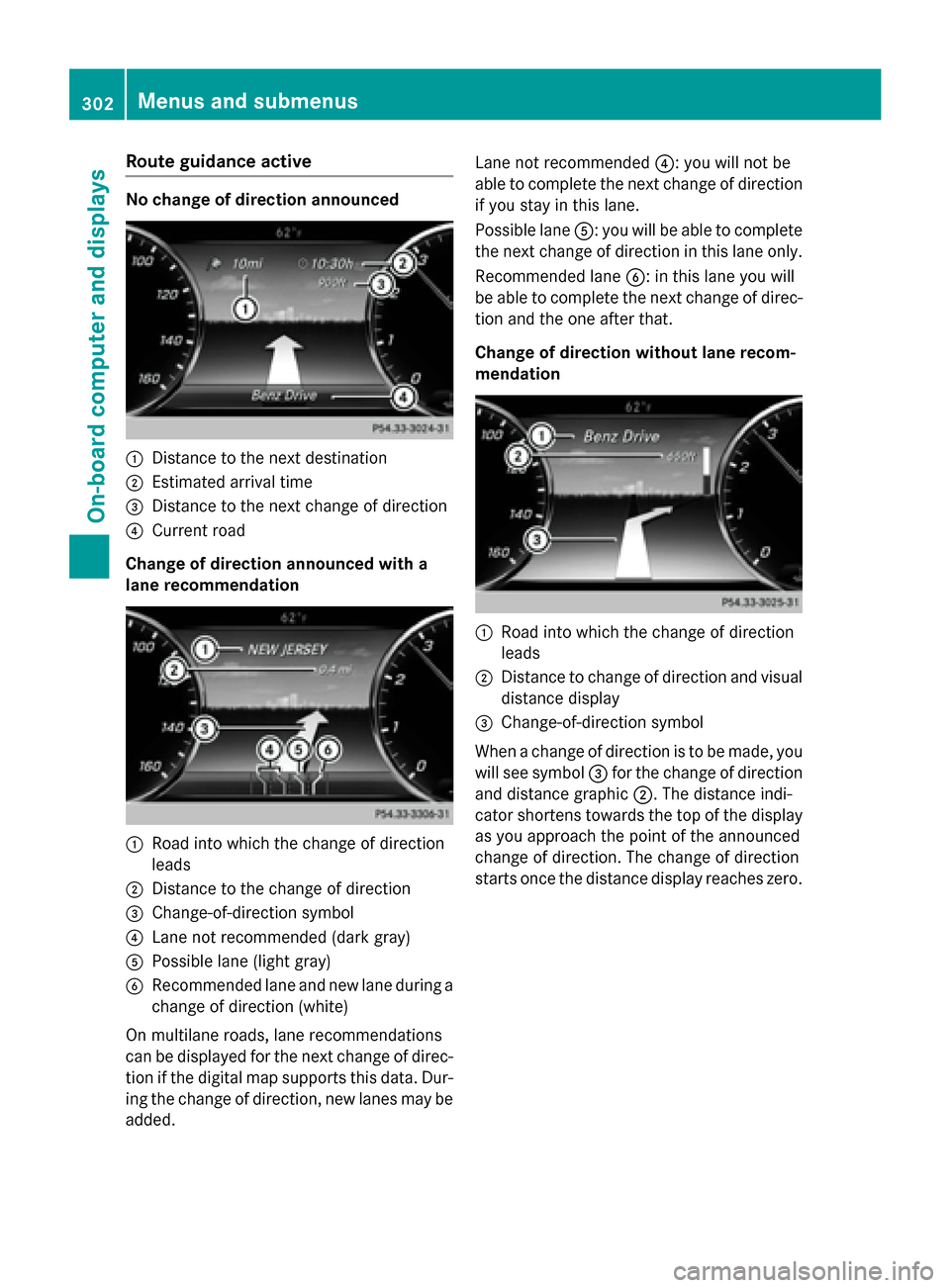
Route guidance active
No change of direction announced
:
Distance to the next destination
; Estimated arrival time
= Distance to the next change of direction
? Current road
Change of direction announced with a
lane recommendation :
Road into which the change of direction
leads
; Distance to the change of direction
= Change-of-direction symbol
? Lane not recommended (dark gray)
A Possible lane (light gray)
B Recommended lane and new lane during a
change of direction (white)
On multilane roads, lane recommendations
can be displayed for the next change of direc- tion if the digital map supports this data. Dur-
ing the change of direction, new lanes may be added. Lane not recommended
?: you will not be
able to complete the next change of direction
if you stay in this lane.
Possible lane A: you will be able to complete
the next change of direction in this lane only.
Recommended lane B: in this lane you will
be able to complete the next change of direc- tion and the one after that.
Change of direction without lane recom-
mendation :
Road into which the change of direction
leads
; Distance to change of direction and visual
distance display
= Change-of-direction symbol
When a change of direction is to be made, you will see symbol =for the change of direction
and distance graphic ;. The distance indi-
cator shortens towards the top of the display as you approach the point of the announced
change of direction. The change of direction
starts once the distance display reaches zero. 302
Menus and submenusOn-board computer and displays
Page 305 of 502
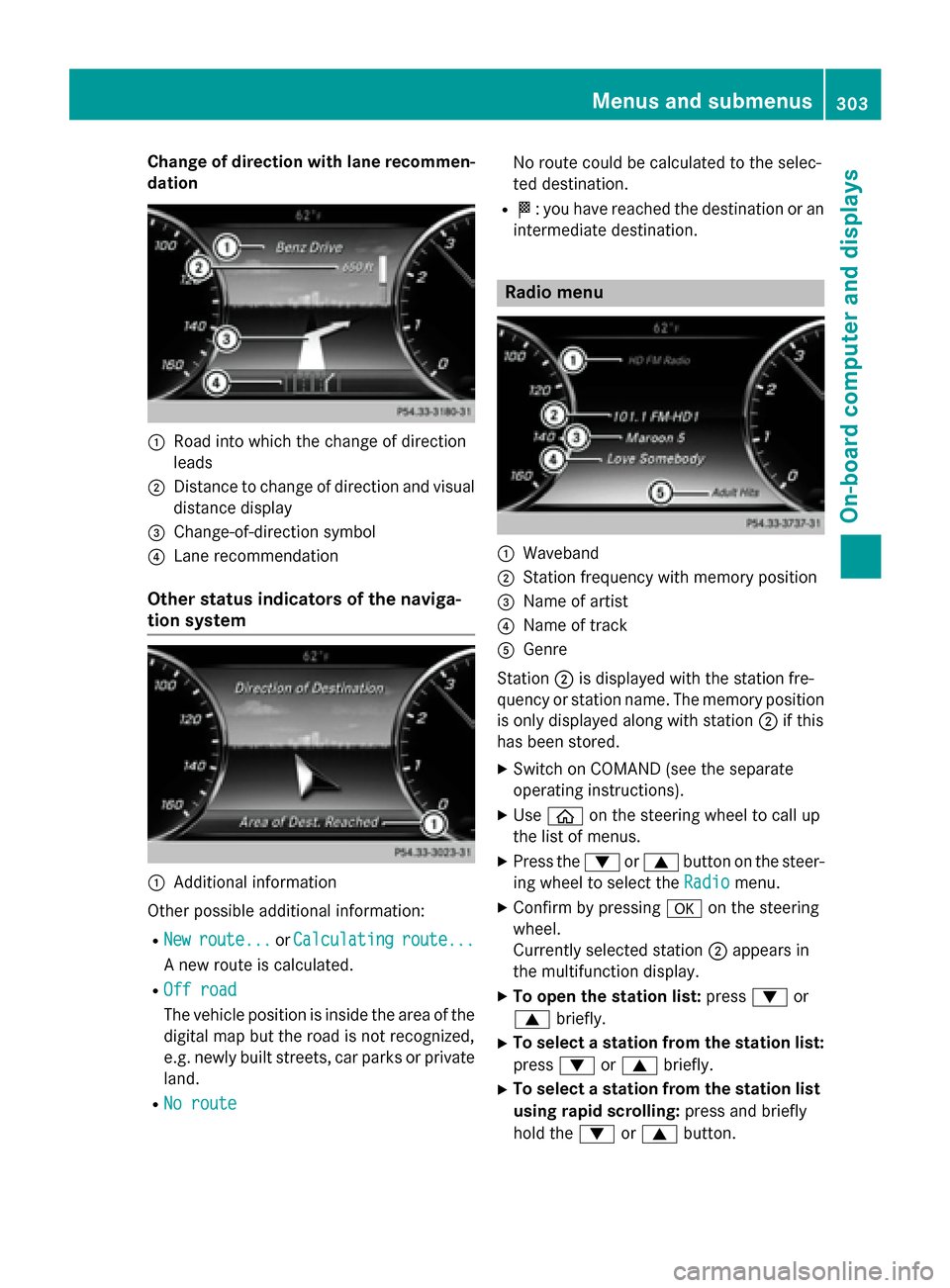
Change of direction with lane recommen-
dation :
Road into which the change of direction
leads
; Distance to change of direction and visual
distance display
= Change-of-direction symbol
? Lane recommendation
Other status indicators of the naviga-
tion system :
Additional information
Other possible additional information:
R New
New route...
route... orCalculating Calculating route...
route...
A new route is calculated.
R Off road
Off road
The vehicle position is inside the area of the
digital map but the road is not recognized,
e.g. newly built streets, car parks or private
land.
R No route No route No route could be calculated to the selec-
ted destination.
R O: you have reached the destination or an
intermediate destination. Radio menu
:
Waveband
; Station frequency with memory position
= Name of artist
? Name of track
A Genre
Station ;is displayed with the station fre-
quency or station name. The memory position
is only displayed along with station ;if this
has been stored.
X Switch on COMAND (see the separate
operating instructions).
X Use ò on the steering wheel to call up
the list of menus.
X Press the :or9 button on the steer-
ing wheel to select the Radio
Radio menu.
X Confirm by pressing aon the steering
wheel.
Currently selected station ;appears in
the multifunction display.
X To open the station list: press:or
9 briefly.
X To select a station from the station list:
press :or9 briefly.
X To select a station from the station list
using rapid scrolling: press and briefly
hold the :or9 button. Menus and submenus
303On-board computer and displays Z