2015 MERCEDES-BENZ S-Class Display
[x] Cancel search: DisplayPage 204 of 502
Automatic drive program
Automatic drive program E Drive program
E(drive program Con MAG
vehicles) is characterized by the following:
R comfort-oriented engine settings.
R optimal fuel consumption resulting from
the automatic transmission shifting up
sooner.
R the vehicle pulling away more gently in
forward and reverse gears, unless the
accelerator pedal is depressed fully.
R increased sensitivity. This improves driving
stability on slippery road surfaces, for
example.
R the automatic transmission shifting up
sooner. This results in the vehicle being
driven at lower engine speeds and the
wheels being less likely to spin.
Automatic drive program S Drive program
Sis characterized by the fol-
lowing:
R sporty engine settings
R the vehicle pulling away in first gear
R the automatic transmission shifting up
later.
R the fuel consumption possibly being higher
as a result of the later automatic transmis- sion shift points.
Manual drive program M General notes
In this drive program, you can briefly change
gear yourself by using the steering wheel pad-
dle shifters. The transmission must be in posi- tion D.
You can activate manual drive program Min
the E(C in AMG vehicles) and Sautomatic
drive programs.
AMG vehicles: as well as temporary drive
program M, you can also activate permanent drive program
M. Further information about
permanent drive program M(Y page 203).
Activating X Shift the transmission to position D.
X Pull the left or right steering wheel paddle
shifter (Y page 201).
Manual drive program Mis temporarily acti-
vated.
All vehicles except AMG vehicles: M and
the selected gear appear in the multifunc-
tion display.
Further information on activating manual
drive program Mon PLUG-IN HYBRID vehicles
(Y page 286).
Shifting gears
If you pull on the left or right steering wheel
paddle shifter, the automatic transmission
switches to manual drive program Mfor a
limited amount of time. Depending on which
paddle shifter is pulled, the automatic trans-
mission immediately shifts into the next gear down or up, if permitted.
X To shift up: pull the right-hand steering
wheel paddle shifter (Y page 201).
The automatic transmission shifts up to the
next gear.
If the maximum engine speed on the cur-
rently engaged gear is reached and you
continue to accelerate, the automatic
transmission automatically shifts up in
order to prevent engine damage.
AMG vehicles: the automatic transmission
will not shift up to the next gear when the
engine speed is very low.
X To shift down: pull on the left-hand steer-
ing wheel paddle shifter (Y page 201).
The automatic transmission shifts down to
the next gear.
If the engine exceeds the maximum engine speed when shifting down, the automatic
transmission protects against engine dam- age by not shifting down. 202
Automatic trans
missionDriving and parking
Page 205 of 502
Automatic down shifting occurs when
coasting.
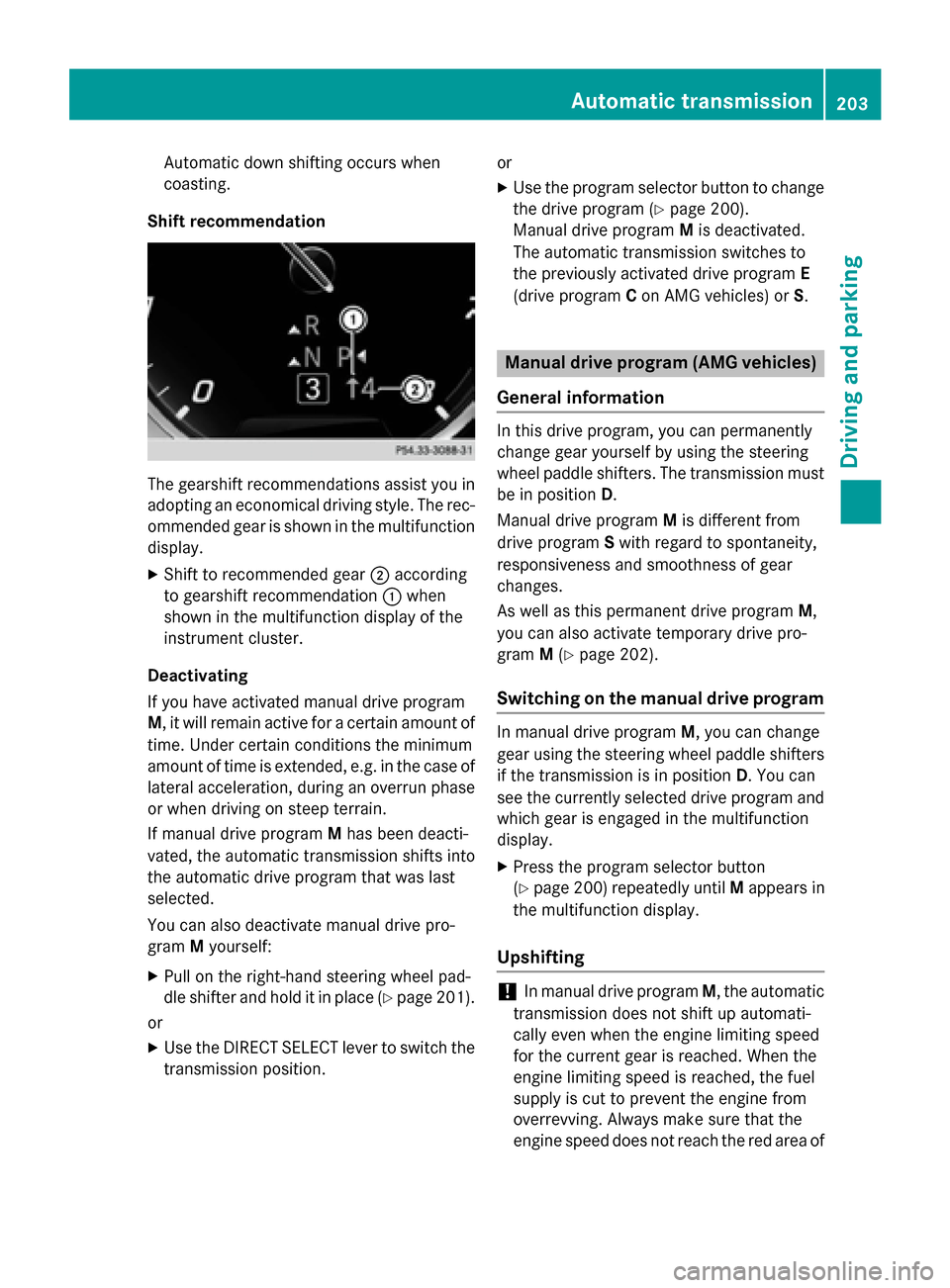
Shift recommendation The gearshift recommendations assist you in
adopting an economical driving style. The rec- ommended gear is shown in the multifunction
display.
X Shift to recommended gear ;according
to gearshift recommendation :when
shown in the multifunction display of the
instrument cluster.
Deactivating
If you have activated manual drive program
M , it will remain active for a certain amount of
time. Under certain conditions the minimum
amount of time is extended, e.g. in the case of lateral acceleration, during an overrun phase
or when driving on steep terrain.
If manual drive program Mhas been deacti-
vated, the automatic transmission shifts into
the automatic drive program that was last
selected.
You can also deactivate manual drive pro-
gram Myourself:
X Pull on the right-hand steering wheel pad-
dle shifter and hold it in place (Y page 201).
or X Use the DIRECT SELECT lever to switch the
transmission position. or
X Use the program selector button to change
the drive program (Y page 200).
Manual drive program Mis deactivated.
The automatic transmission switches to
the previously activated drive program E
(drive program Con AMG vehicles) or S. Manual drive program (AMG vehicles)
General information In this drive program, you can permanently
change gear yourself by using the steering
wheel paddle shifters. The transmission must
be in position D.
Manual drive program Mis different from
drive program Swith regard to spontaneity,
responsiveness and smoothness of gear
changes.
As well as this permanent drive program M,
you can also activate temporary drive pro-
gram M(Y page 202).
Switching on the manual drive program In manual drive program
M, you can change
gear using the steering wheel paddle shifters
if the transmission is in position D. You can
see the currently selected drive program and
which gear is engaged in the multifunction
display.
X Press the program selector button
(Y page 200) repeatedly until Mappears in
the multifunction display.
Upshifting !
In manual drive program
M, the automatic
transmission does not shift up automati-
cally even when the engine limiting speed
for the current gear is reached. When the
engine limiting speed is reached, the fuel
supply is cut to prevent the engine from
overrevving. Always make sure that the
engine speed does not reach the red area of Automatic transmission
203Driving and parking Z
Page 206 of 502
the tachometer. There is otherwise a risk of
engine damage. :
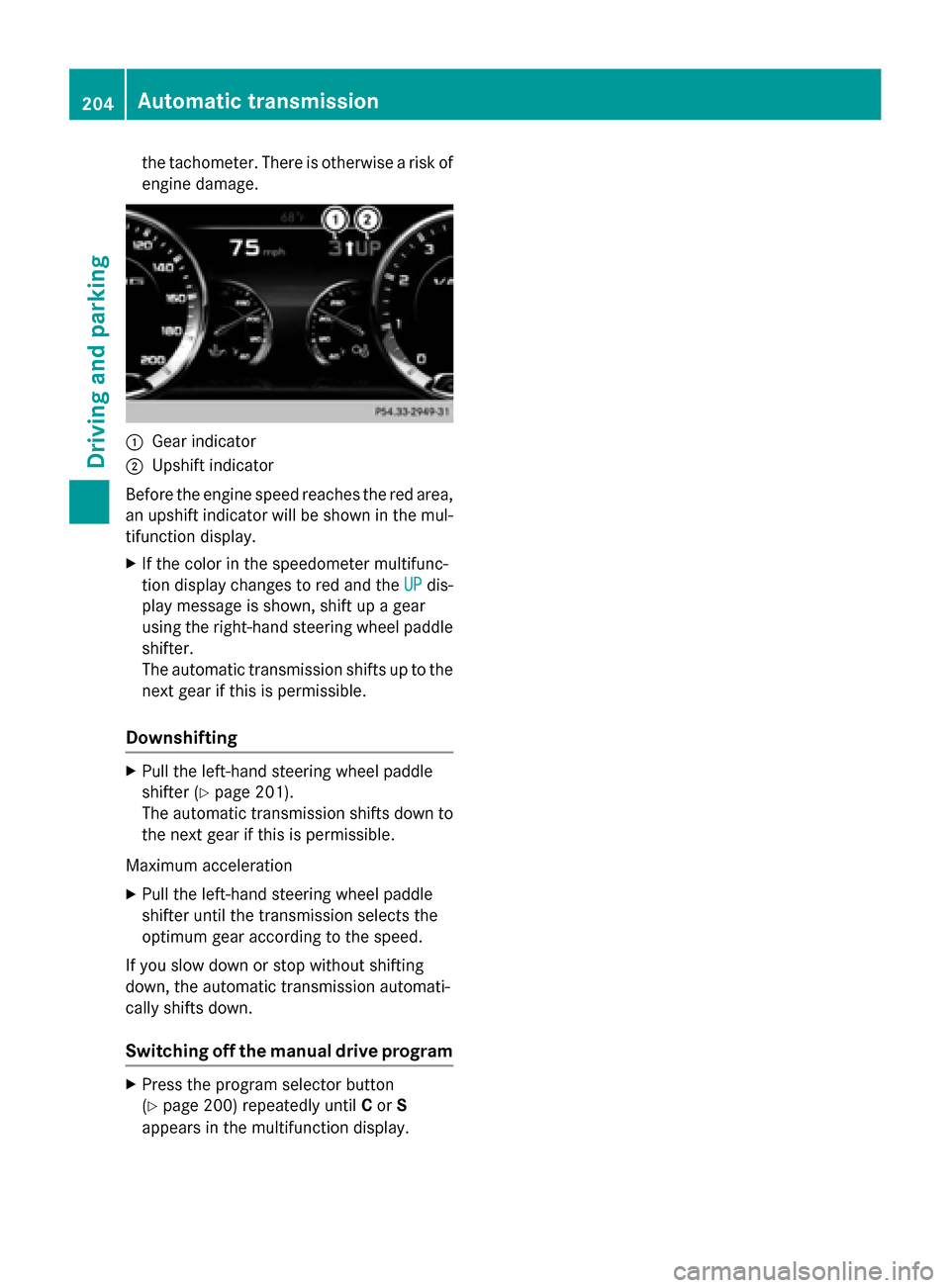
Gear indicator
; Upshift indicator
Before the engine speed reaches the red area, an upshift indicator will be shown in the mul-
tifunction display.
X If the color in the speedometer multifunc-
tion display changes to red and the UP UPdis-
play message is shown, shift up a gear
using the right-hand steering wheel paddle
shifter.
The automatic transmission shifts up to the
next gear if this is permissible.
Downshifting X
Pull the left-hand steering wheel paddle
shifter (Y page 201).
The automatic transmission shifts down to
the next gear if this is permissible.
Maximum acceleration X Pull the left-hand steering wheel paddle
shifter until the transmission selects the
optimum gear according to the speed.
If you slow down or stop without shifting
down, the automatic transmission automati-
cally shifts down.
Switching off the manual drive program X
Press the program selector button
(Y page 200) repeatedly until Cor S
appears in the multifunction display. 204
Automatic transmissionDriving an
d parking
Page 208 of 502
and that it is not swallowed. Do not inhale fuel
vapors. Keep fuel away from children.
If you or others come into contact with fuel,
observe the following:
R Wash away fuel from skin immediately
using soap and water.
R If fuel comes into contact with your eyes,
immediately rinse them thoroughly with
clean water. Seek medical assistance with-
out delay.
R If fuel is swallowed, seek medical assis-
tance without delay. Do not induce vomit-
ing.
R Immediately change out of clothing which
has come into contact with fuel. G
WARNING
Electrostatic buildup can create sparks and
ignite fuel vapors. There is a risk of fire and
explosion.
Always touch the vehicle body before opening the fuel filler flap or touching the fuel pump
nozzle. Any existing electrostatic buildup is
thereby discharged.
Do not get into the vehicle again during the
refueling process. Otherwise, electrostatic
charge could build up again.
! Do not use diesel to refuel vehicles with a
gasoline engine. Do not switch on the igni-
tion if you accidentally refuel with the
wrong fuel. Otherwise, the fuel will enter
the fuel system. Even small amounts of the wrong fuel could result in damage to the
fuel system and the engine. Notify a quali-
fied specialist workshop and have the fuel
tank and fuel lines drained completely.
! Overfilling the fuel tank could damage the
fuel system.
! Take care not to spill any fuel on painted
surfaces. You could otherwise damage the
paintwork.
! Use a filter when refueling from a fuel can.
Otherwise, the fuel lines and/or injection system could be blocked by particles from
the fuel can.
If you overfill the fuel tank, fuel could spray
out when the fuel pump nozzle is removed.
For further information on fuel and fuel quality
(Y page 490). Refueling
General information Pay attention to the important safety notes
(Y
page 205).
PLUG-IN HYBRID vehicles: pressure in the
fuel tank must be released before refueling.
Except PLUG-IN HYBRID vehicles: If you
unlock/lock the vehicle from the outside, the fuel filler flap also unlocks/locks.
The position of the fuel filler cap is displayed
8 in the instrument cluster. The arrow
next to the filling pump indicates the side of
the vehicle.
Preparing to refuel X
Switch off the engine.
X Open the driver's door.
The on-board electronics now have status
0. This is the same as the SmartKey having
been removed.
or, if the SmartKey is inserted in the ignition
lock: X Remove the SmartKey from the ignition
lock. 206
RefuelingDriving and parking
Page 209 of 502
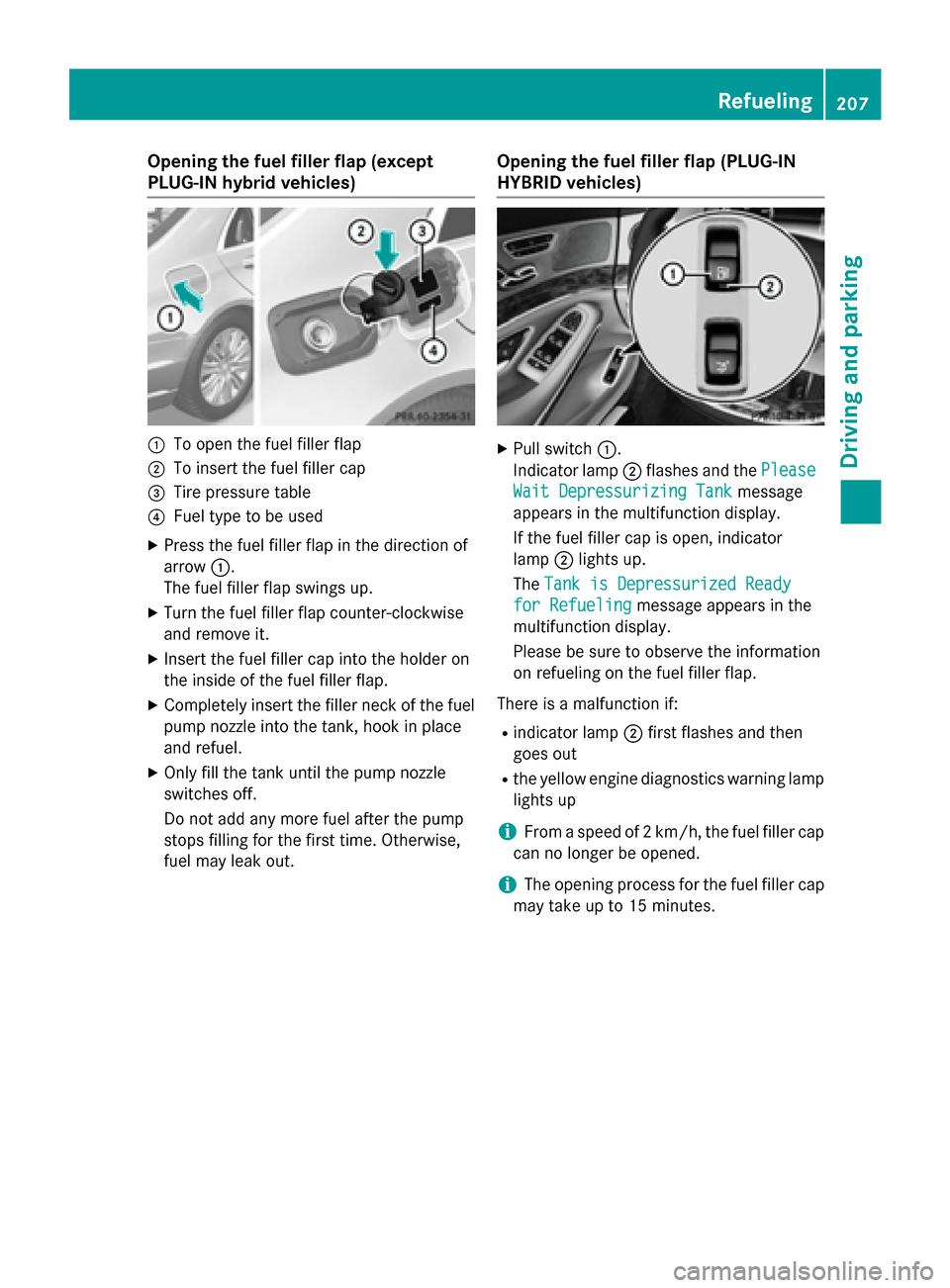
Opening the fuel filler flap (except
PLUG-IN hybrid vehicles)
:
To open the fuel filler flap
; To insert the fuel filler cap
= Tire pressure table
? Fuel type to be used
X Press the fuel filler flap in the direction of
arrow :.
The fuel filler flap swings up.
X Turn the fuel filler flap counter-clockwise
and remove it.
X Insert the fuel filler cap into the holder on
the inside of the fuel filler flap.
X Completely insert the filler neck of the fuel
pump nozzle into the tank, hook in place
and refuel.
X Only fill the tank until the pump nozzle
switches off.
Do not add any more fuel after the pump
stops filling for the first time. Otherwise,
fuel may leak out. Opening the fuel filler flap (PLUG-IN
HYBRID vehicles) X
Pull switch :.
Indicator lamp ;flashes and the Please Please
Wait Depressurizing Tank
Wait Depressurizing Tank message
appears in the multifunction display.
If the fuel filler cap is open, indicator
lamp ;lights up.
The Tank is Depressurized Ready Tank is Depressurized Ready
for Refueling
for Refueling message appears in the
multifunction display.
Please be sure to observe the information
on refueling on the fuel filler flap.
There is a malfunction if: R indicator lamp ;first flashes and then
goes out
R the yellow engine diagnostics warning lamp
lights up
i From a speed of 2 km/h, the fuel filler cap
can no longer be opened.
i The opening process for the fuel filler cap
may take up to 15 minutes. Refueling
207Driving and parking Z
Page 210 of 502

:
To insert the fuel filler cap
; Tire pressure table
= Fuel type to be used
X Turn the fuel filler flap counter-clockwise
and remove it.
X Insert the fuel filler cap into the holder on
the inside of the fuel filler flap.
X Completely insert the filler neck of the fuel
pump nozzle into the tank, hook in place
and refuel.
X Only fill the tank until the pump nozzle
switches off.
Do not add any more fuel after the pump
stops filling for the first time. Otherwise,
fuel may leak out.
Closing the fuel filler flap X
Replace the cap on the filler neck and turn
clockwise until it engages audibly.
X Close the fuel filler flap.
If you drive at speeds above 2 km/hw ith the
fuel filler flap open, the Tankklappe
Tankklappe offen offen
(Fuel filler flap open)
(Fuel filler flap open) message is
shown in the multifunction display.
i Close the fuel filler flap before locking the
vehicle.
i For further information on warning and
indicator lamps in the instrument cluster,
see (Y page 363).
i If you are driving with the fuel filler cap
open, the 8reserve fuel warning lamp
flashes. A message appears in the multi-
function display (Y page 339). In addition, the
;Check Engine warning
lamp may light up (Y page 363).
For further information on warning and indi- cator lamps in the instrument cluster, see
(Y page 363). 208
RefuelingDriving and parking
Page 215 of 502

Controls on the charging cable
:
Alternating current status indicator
; Control/protection system indicator
= Charge current indicator
? Charge current setting button
When displays :and ;on the charging
cable light up, this means the following: Display
:
: Lights up
green The external power supply
connection is working prop-
erly. The high-voltage bat-
tery can be charged. Flashes red A malfunction has been
detected in the external
power supply. The high-volt-
age battery is recharged as
soon as the electricity signal
registers normal values. Lights up red There is a malfunction. The
charging cable must be
removed from the electrical
outlet and then re-inserted.
Display
; ; Lights up
green There are no malfunctions.
The high-voltage battery
can be charged.
Lights up red An impermissible current is
being supplied to the con-
trol unit. The high-voltage
battery cannot be charged. i
For information on problems relating to
the charging process, see (Y page 218).
Setting the maximum charge current G
WARNING
If the charge current draw via a mains socket is too high during the charging process, the
external electrical system may overheat.
There is a risk of fire.
Before beginning the charging process, checkthe maximum permissible charge current
locally. Consult a qualified expert to do so
where necessary.
If necessary, adjust your vehicle's settings.
! An excessive charge current can blow a
fuse or lead to overheating of the external
power supply. Check whether the external
power supply is compatible with the set
charge current. If necessary, lower the set
charge current or use another power
socket.
You can set a limit for the values of the charge current used in charging the high-voltage bat-
tery. This acts as a means of preventing the
power supply from overloading. You can set
this limit by using the controls on the charging
cable or in the on-board computer's menu.
Only set the maximum charge current in the
on-board computer menu if there are no
charge current settings on the charging
cable.
The default standard value in the vehicle cor- responds to the maximum charge current
value.
The default standard value on the charging
cable is the minimum charge current setting.This corresponds to the minimum available
charge current from the power supply. The
value on the charging cable can be increased
and is described in the following section.
i The value of the maximum setting and the
adjustment values may vary depending on
the country. Charging the high-voltage battery (plug-in hybrid vehicles)
213Driving and parking Z
Page 216 of 502
Before charging the high-voltage battery,
check the maximum permissible charge cur-
rent for the relevant power socket.
X To adjust the setting: press button?
repeatedly until the desired setting is selec-
ted in display =.
R Two LEDs are flashing: minimum setting
R All LEDs are flashing: maximum setting
If, after the charging process, the charging
cable is:
R left connected to the power socket, the
currently selected values will be used for
the next charging process.
R removed from the power socket, the values
will be reset to the minimum setting for the next charging process. You may then need
to reset the values of the maximum charge current.
i If the vehicle requires more time than
usual when charging, check the maximum
charge current settings using the controls
on the charging cable or in the on-board
computer's menu.
Indicator lamp on the vehicle socket
When the indicator lamp on the vehicle
socket lights up, this means the following: Indicator
lamp
Ý Ý Flashes
slowly in
orange The connection between
the vehicle and the current
source is being established
before charging begins.
Flashes
slowly in
green The high-voltage battery is
being charged.
Flashes rap-
idly in red A malfunction has occurred
while charging. Indicator
lamp
Ý Ý Lights up
orange A charging break for the
high-voltage battery is tak-
ing place.
Lights up
green The high-voltage battery is
fully charged.
i
If the indicator lamp is off, lock or unlock
the vehicle with the SmartKey. The indica-
tor lamp will then display the current status
of the charging process.
i You can view the condition of charge of
the high-voltage battery in the multifunc-
tion display (see "Charging the high-voltage battery when stationary" in the "Energy
flow display" section (Y page 281)).
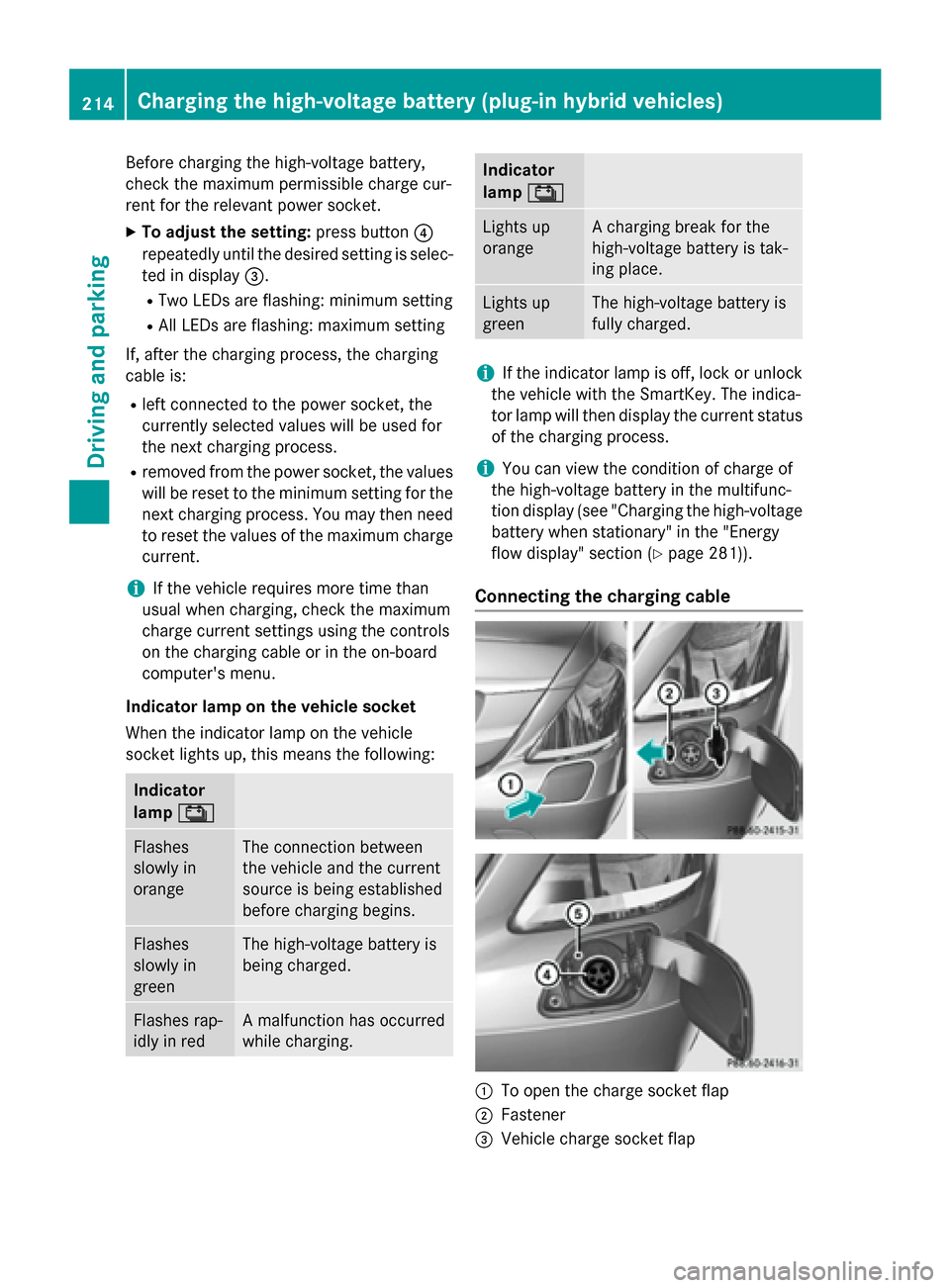
Connecting the charging cable :
To open the charge socket flap
; Fastener
= Vehicle charge socket flap 214
Charging the high-voltage battery (plug-in hybrid vehicles)Driving and parking