2015 MERCEDES-BENZ S-Class Display
[x] Cancel search: DisplayPage 175 of 502

out. The function which has not been changed
manually, however, continues to be control-
led automatically. When the manually set
function switches back to automatic mode,
the AUTO
AUTO display reappears in the rear-com-
partment display. Adjusting the climate mode settings
In automatic mode you can select the follow-
ing airflow settings for the driver's and front-
passenger areas:
FOCUS high airflow that is set slightly cooler
MEDIUM medium airflow, standard setting
DIFFUSE low airflow that is set slightly warmer and with less of a draft
X To set: set the climate mode using
COMAND (see the separate operating
instructions). Setting the temperature
General notes You can set the temperature separately for
the following areas on vehicles with rear-com-
partment climate control:
R front footwells, left and right
R driver and front passenger area
R rear compartment, left and right You can set the temperature separately for
the following areas on vehicles without rear-
compartment climate control:
R front footwells, left and right
R driver and front passenger area
Setting the temperature in the front
compartment using the front control
panel X
Turn the SmartKey to position 2in the igni-
tion lock (Y page 189).
X To increase/reduce: press thew
rocker switch up or down.
or X Set the temperature using COMAND (see
the separate operating instructions).
Only change the temperature setting in
small increments. Start at 72 ‡ (22 †).
Setting the temperature in the rear
compartment using the front control
panel Observe the notes on controlling the rear-
compartment climate control using the front
control panel (Y page 169). Operating the climate control systems
173Climate control
Page 177 of 502
Setting the rear compartment airflow
using the front control panel X
Turn the SmartKey to position 2in the igni-
tion lock (Y page 189).
X Press the top or bottom section of the t
rocker switch.
The COMAND climate control menu opens.
X Select "Rear adjustment" in the air-condi-
tioning setting bar (see the separate
COMAND operating instructions).
You can control the rear-compartment cli-
mate control using the front control panel
or COMAND.
X To increase/reduce: press theK
rocker switch on the front control panel up or down.
or
X Set the airflow using COMAND (see the
separate operating instructions).
Setting the rear compartment airflow
using the rear control panel X
Turn the SmartKey to position 2in the igni-
tion lock (Y page 189).
X To increase/reduce: press rocker switch
K up or down (Y page 165). Switching the synchronization func-
tion on/off
Climate control can be set centrally using the synchronization function. The settings for
temperature, air distribution and airflow on
the driver's side are adopted for the front-
passenger side and the rear compartment
(vehicles with rear-compartment air condi-
tioning).
X To activate/deactivate: switch the syn-
chronization function on or off using COMAND (see the separate operating
instructions).
Vehicles with rear-compartment air condi-
tioning: the
SYNC SYNCdisplay appears on the
rear-compartment display.
The synchronization function is deactivated:
R if the settings for the front-passenger side
are changed
R vehicles with rear-compartment air condi-
tioning: the settings for the rear compart-
ment are changed Defrosting the windshield
You can use this function to defrost the wind-
shield or to clear a fogged up windshield or
front side windows on the inside.
Switch off the "Windshield defrosting" func-
tion as soon as the windshield is clear again.
X Turn the SmartKey to position 2in the igni-
tion lock (Y page 189).
X To activate: press the¬rocker switch
on the front control unit up or down.
The indicator lamp in the ¬rocker
switch lights up.
The climate control system switches to the
following functions:
R high airflow
R high temperature
R air distribution to the windshield and
front side windows
R air-recirculation mode off
R windshield heating on
X To deactivate: press the¬rocker
switch up or down.
The indicator lamp in the ¬rocker
switch goes out. The previously selected
settings are restored. Air-recirculation
mode remains deactivated.
or
X Press the Ãrocker switch up or down. Operating the climate control systems
175Climate control
Page 180 of 502
Front control panel
X
Turn the SmartKey to position 0in the igni-
tion lock or remove it (Y page 189).
X To activate: press theÁrocker switch
up or down.
The indicator lamp in the Árocker
switch lights up.
The blower will run at a low speed regardless
of the airflow setting.
If you activate the residual heat function at
high temperatures, only the ventilation will be activated. The blower runs at medium speed.
X To deactivate: press theÁrocker
switch up or down.
The indicator lamp in the Árocker
switch goes out.
Rear control panel X
Turn the SmartKey to position 0in the igni-
tion lock or remove it (Y page 189).
REST appears in the rear compartment dis-
play.
X To activate: press rocker switch Lup or
down (Y page 165).
The indicator lamp in rocker switch L
lights up.
X To deactivate: press rocker switch Lup
or down (Y page 165).
The indicator lamp in rocker switch Lgoes
out. REST goes out on the rear compart-
ment display.
i If you do not activate the residual heat
function, REST goes out automatically after
five minutes on the rear compartment dis-
play.
Residual heat is deactivated automatically:
R after approximately 30 minute sif the resid-
ual heat function is activated in the front or
rear compartment
R after approximately 15 minutes if the resid-
ual heat function is activated in the front
and rear compartments R
when the ignition is switched on
R if the battery voltage drops perfume atomizer
Operating the perfume atomizer G
WARNING
If children open the perfume vial, they could
drink the perfume or it could come into con-
tact with their eyes. There is a risk of injury. Do not leave children unsupervised in the vehicle.
If the perfume liquid has been drunk, consult
a doctor. If perfume comes into contact with
your eyes or skin, rinse the eyes with clean
water. If you continue to experience difficul-
ties, consult a doctor. H
Environmental note Full perfume vials must not
be disposed of with house-
hold rubbish. They must be
collected separately and
recycled to protect the envi-
ronment.
Dispose of full perfume vials
in an environmentally
responsible manner and
take them to a special waste
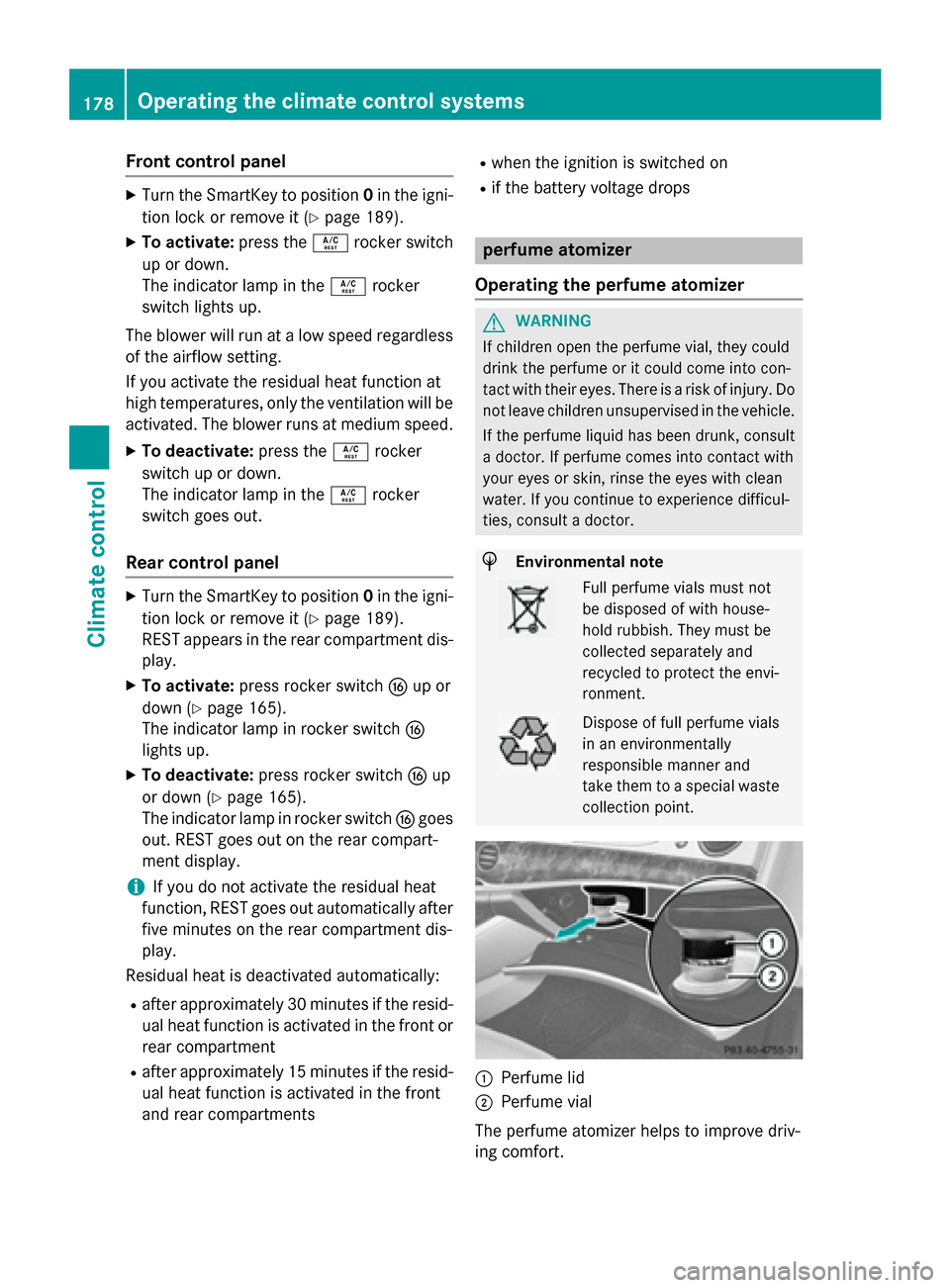
collection point. :
Perfume lid
; Perfume vial
The perfume atomizer helps to improve driv-
ing comfort. 178
Operating the climate control systemsClimate control
Page 194 of 502

General notes
During a cold start, the engine runs at higher
speeds to enable the catalytic converter to
reach its operating temperature. The sound of the engine may change during this time.
Automatic transmission X
Shift the transmission to position P
(Y page 197).
The transmission position display in the
multifunction display shows
P (Y page 199).
You can start the engine in transmission posi-
tion Pand N.
Starting procedure with the SmartKey To start the engine using the SmartKey
instead of the Start/Stop button, pull the
Start/Stop button out of the ignition lock.
X Turn the SmartKey to position 3in the igni-
tion (Y page 189) lock and release it as
soon as the engine is running.
Starting procedure with the Start/Stop button The Start/Stop button can be used to start
the vehicle manually without inserting the
SmartKey into the ignition lock. The Start/
Stop button must be inserted in the ignition
lock and the SmartKey must be in the vehicle. This mode for starting the engine operates
independently of the ECO start/stop auto-
matic engine start function.
You can start the engine if a valid SmartKey is
in the vehicle. Always take the SmartKey with you when leaving the vehicle, even if you only
leave it for a short time. Pay attention to the
important safety notes.
X Depress the brake pedal and keep it
depressed.
X Press the Start/Stop button once
(Y page 189).
The engine starts. Pulling away
General notes G
WARNING
If the engine speed is above the idling speed
and you engage transmission position Dor R,
the vehicle could pull away suddenly. There is a risk of an accident.
When engaging transmission position Dor R,
always firmly depress the brake pedal and do not simultaneously accelerate.
Depress the accelerator carefully when pull-
ing away.
The vehicle locks centrally once you have
pulled away. The locking knobs in the doors
drop down.
You can open the doors from the inside at any
time.
You can also deactivate the automatic locking feature (Y page 98).
It is only possible to shift the transmission
from position Pto the desired position if you
depress the brake pedal. Only then is the
parking lock released. If the brake pedal is not
depressed, the DIRECT SELECT lever can still be moved but the parking lock remains
engaged.
i Upshifts take place at higher engine
speeds after a cold start. This helps the
catalytic converter to reach its operating
temperature more quickly.
Information on the automatic release of the
electric parking brake (Y page 222).
Hill start assist Hill start assist helps you when pulling away
forwards or in reverse on an uphill gradient. It
holds the vehicle for a short time after you
have removed your foot from the brake pedal.
This gives you enough time to move your foot from the brake pedal to the accelerator pedal and to depress it before the vehicle begins to
roll. 192
DrivingDriving and parking
Page 195 of 502

G
WARNING
After a short time, hill start assist will no lon-
ger brake your vehicle and it could roll away.
There is a risk of an accident and injury.
Therefore, quickly move your foot from the
brake pedal to the accelerator pedal. Never
leave the vehicle when it is held by hill start
assist.
Hill start assist is not active if: R you are pulling away on a level road or on a
downhill gradient.
R the transmission is in position N.
R the electric parking brake is applied.
R ESP ®
is malfunctioning. ECO start/stop function (all vehicles
except plug-in hybrid)
Introduction This section describes the ECO start/stop
function for all vehicles except PLUG-IN
HYBRID vehicles. Information on the ECO
start/stop function in PLUG-IN HYBRID vehi-
cles (Y page 288).
The ECO start/stop function switches the
engine off automatically if the vehicle is stop- ped under certain conditions.
The engine starts automatically when the
driver wants to pull away again. The ECO
start/stop function thereby helps you to
reduce the fuel consumption and emissions
of your vehicle.
Important safety notes G
WARNING
If the engine is switched off automatically and you exit the vehicle, the engine is restarted
automatically. The vehicle may begin moving. There is a risk of accident and injury.
If you wish to exit the vehicle, always turn off
the ignition and secure the vehicle against
rolling away. General notes
:
ECO start/stop display
If the engine has been switched off automat-
ically by the ECO start/stop function, the
è ECO symbol is shown in the multifunc-
tion display.
Every time you switch on the engine using the SmartKey or the Start/Stop button, the ECO
start/stop function is activated.
The ECO start/stop function is only available in drive program E(drive program Con AMG
vehicles).
Automatic engine switch-off If the vehicle is braked to a standstill in
Dor N,
the ECO start/stop function switches off the engine automatically.
The ECO start/stop function is operational
when:
R the indicator lamp in the ECO button is lit
green.
R the outside temperature is within the range
that is suitable for the system.
R the engine is at normal operating temper-
ature.
R the set temperature for the vehicle interior
has been reached.
R the battery is sufficiently charged.
R the system detects that the windshield is
not fogged up when the air-conditioning
system is switched on. Driving
193Driving and parking Z
Page 199 of 502

Automatic transmission
Important safety notes
G
WARNING
If the engine speed is above the idling speed
and you engage transmission position Dor R,
the vehicle could pull away suddenly. There is a risk of an accident.
When engaging transmission position Dor R,
always firmly depress the brake pedal and do not simultaneously accelerate. G
WARNING
The automatic transmission switches to neu-
tral position Nwhen you switch off the engine.
The vehicle may roll away. There is a risk of an
accident.
After switching off the engine, always switch
to parking position P. Prevent the parked vehi-
cle from rolling away by applying the parking
brake.
Observe the important safety notes for PLUG-
IN HYBRID vehicles (Y page 46).DIRECT SELECT lever
Overview of transmission positions j
Park position with parking lock
k Reverse gear
i Neutral
h Drive
The DIRECT SELECT lever is on the right of the
steering column. The DIRECT SELECT lever always returns to
its original position. The current transmission
position P,R, Nor Dappears in the transmis-
sion position display (Y page 199) in the mul-
tifunction display.
Engaging park position P !
If the engine speed is too high or the vehi-
cle is moving, do not shift the automatic
transmission directly from Dto R, from Rto
D or directly to P. The automatic transmis-
sion could otherwise be damaged. j
Park position with parking lock
k Reverse gear
i Neutral
h Drive
X Push the DIRECT SELECT lever in the direc-
tion of arrow P.
Engaging park position P automatically Park position
Pis automatically engaged if:
R you switch off the engine using the Smart-
Key and remove the SmartKey.
R you switch off the engine using the Start/
Stop button and open the driver's door.
R you open the driver's door when the vehicle
is stationary or driving at very low speed
and the transmission is in position Dor R.
Engaging reverse gear R !
Only shift the automatic transmission to
R
when the vehicle is stationary. Automatic trans
mission
197Driving an d parking Z
Page 201 of 502
Transmission position display
General notes !
If the transmission position display in the
multifunction display is not working, you
should pull away carefully to check whether the desired transmission position is
engaged. For this purpose, we recommend
selecting transmission position Dand auto-
matic drive program E(drive program Cin
AMG vehicles, drive program E+in PLUG-IN
HYBRID vehicles) or S.
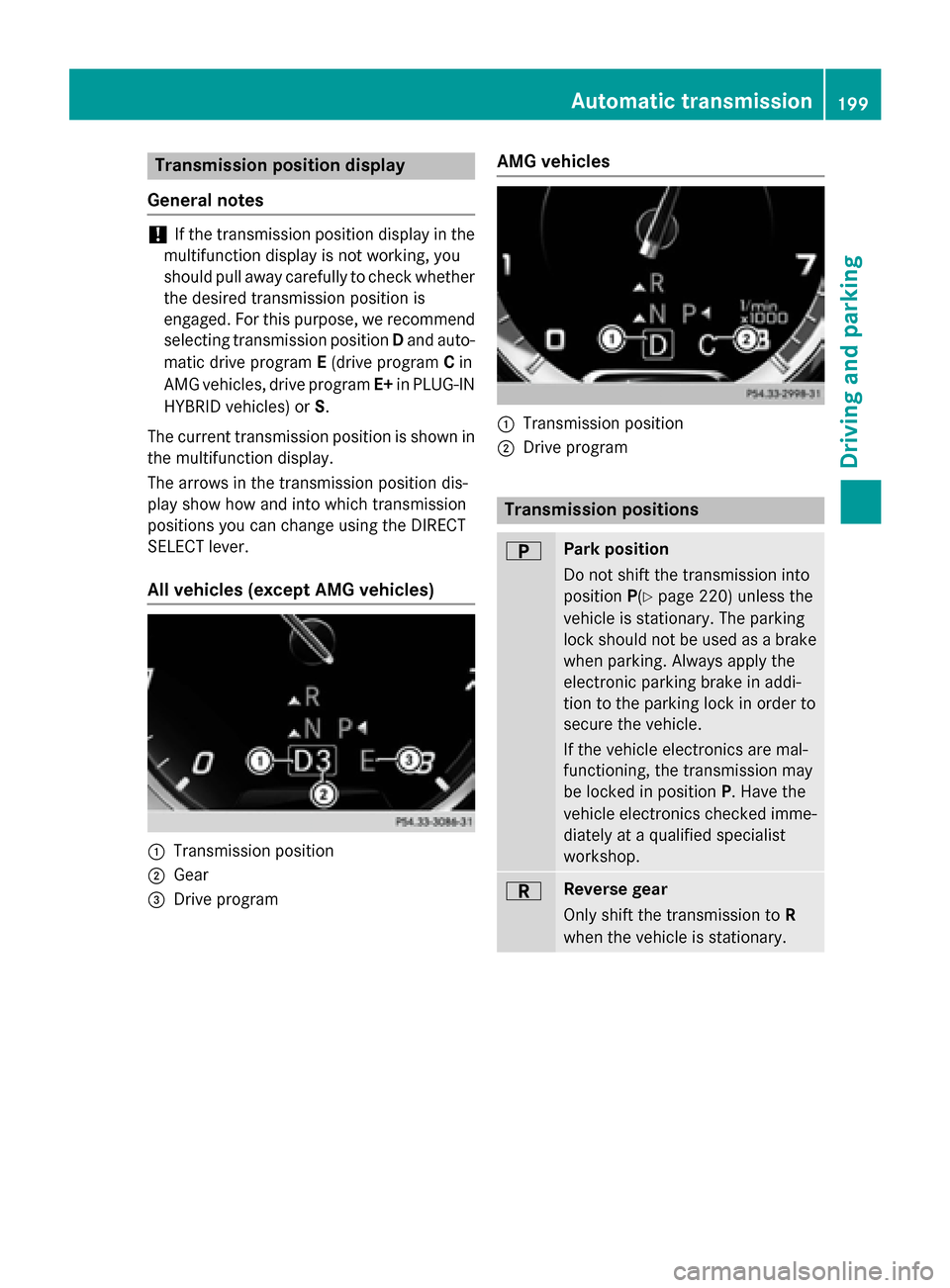
The current transmission position is shown in
the multifunction display.
The arrows in the transmission position dis-
play show how and into which transmission
positions you can change using the DIRECT
SELECT lever.
All vehicles (except AMG vehicles) :
Transmission position
; Gear
= Drive program AMG vehicles :
Transmission position
; Drive program Transmission positions
B Park position
Do not shift the transmission into
position
P(Ypage 220) unless the
vehicle is stationary. The parking
lock should not be used as a brake when parking. Always apply the
electronic parking brake in addi-
tion to the parking lock in order to
secure the vehicle.
If the vehicle electronics are mal-
functioning, the transmission may
be locked in position P. Have the
vehicle electronics checked imme-
diately at a qualified specialist
workshop. C Reverse gear
Only shift the transmission to
R
when the vehicle is stationary. Automatic transmission
199Driving and parking Z
Page 203 of 502
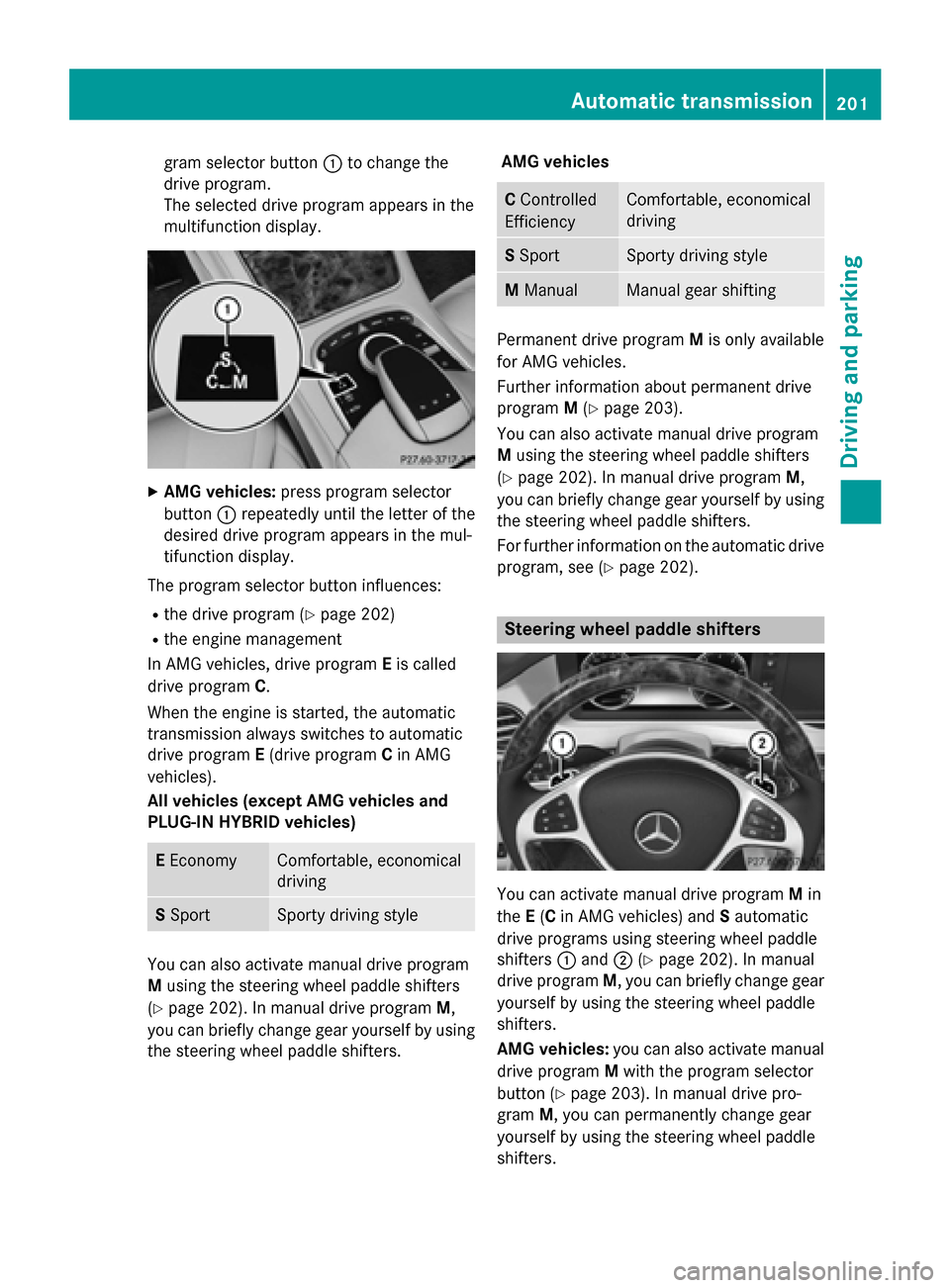
gram selector button
:to change the
drive program.
The selected drive program appears in the
multifunction display. X
AMG vehicles: press program selector
button :repeatedly until the letter of the
desired drive program appears in the mul-
tifunction display.
The program selector button influences: R the drive program (Y page 202)
R the engine management
In AMG vehicles, drive program Eis called
drive program C.
When the engine is started, the automatic
transmission always switches to automatic
drive program E(drive program Cin AMG
vehicles).
All vehicles (except AMG vehicles and
PLUG-IN HYBRID vehicles) E
Economy Comfortable, economical
driving
S
Sport Sporty driving style
You can also activate manual drive program
M
using the steering wheel paddle shifters
(Y page 202). In manual drive program M,
you can briefly change gear yourself by using the steering wheel paddle shifters. AMG vehicles C
Controlled
Efficiency Comfortable, economical
driving
S
Sport Sporty driving style
M
Manual Manual gear shifting
Permanent drive program
Mis only available
for AMG vehicles.
Further information about permanent drive
program M(Y page 203).
You can also activate manual drive program
M using the steering wheel paddle shifters
(Y page 202). In manual drive program M,
you can briefly change gear yourself by using
the steering wheel paddle shifters.
For further information on the automatic drive
program, see (Y page 202). Steering wheel paddle shifters
You can activate manual drive program
Min
the E(C in AMG vehicles) and Sautomatic
drive programs using steering wheel paddle
shifters :and ;(Ypage 202). In manual
drive program M, you can briefly change gear
yourself by using the steering wheel paddle
shifters.
AMG vehicles: you can also activate manual
drive program Mwith the program selector
button (Y page 203). In manual drive pro-
gram M, you can permanently change gear
yourself by using the steering wheel paddle
shifters. Automatic transmission
201Driving and parking Z