2015 MERCEDES-BENZ S-Class emergency trunk release
[x] Cancel search: emergency trunk releasePage 12 of 502

Deactivating/activating ................. 194
General information ....................... 193
Important safety note s.................. 193
Introduction ................................... 193
Electronic Stability Program
see ESP ®
(Electronic Stability Program)
Emergency
Automatic measures after an acci-
dent ................................................. 68
Emergency release
Driver's door .................................... 98
Trunk ............................................. 105
Vehicle ............................................. 98
Emergency Tensioning Devices
Activation ......................................... 65
Emissions control
Service and warranty information .... 25
Engine
Check Engine warning lamp ........... 363
Display message ............................ 336
ECO start/stop function ................ 193
Engine number ............................... 489
Irregular running ............................ 196
Jump-starting ................................. 432
Starting problems .......................... 196
Starting the engine with the
SmartKey ....................................... 192
Starting with the Start/Stop but-
ton ................................................. 192
Switching off .................................. 221
Switching off with the Start/Stop
button ............................................ 221
Switching off with the vehicle key .. 221
Tow-starting (vehicle) ..................... 438
Engine electronics
Problem (malfunction) ................... 196
Engine emergency stop .................... 440
Engine oil
Adding ........................................... 407
Additives ........................................ 492
Checking the oil level ..................... 405
Checking the oil level using the
dipstick .......................................... 405
Checking the oil level using the
on-board computer ........................ 407
Display message ............................ 338
Filling capacity ............................... 492
Notes about oil grade s................... 491 Notes on oil level/consumption .... 405
Temperature (on-board com-
puter) ............................................. 314
Viscosity ........................................ 492
ESP ®
(Electronic Stability Pro-
gram)
AMG menu (on-board computer) ... 314
Characteristics ................................. 82
Deactivating/activating ................... 82
Display message ............................ 317
ETS/4ETS ........................................ 82
Function/note s................................ 81
General notes .................................. 81
Important safety information ........... 82
Warning lamp ................................. 360
ETS/4ETS (Electronic Traction Sys-
tem) ...................................................... 82
Exhaust
see Exhaust pipe
Exhaust check ................................... 224
Exhaust pipe
Cleaning ......................................... 417
Exhaustive discharging (high-volt-
age battery) ....................................... 429
Exterior lighting
Cleaning ......................................... 415
see Lights
Exterior mirrors
Adjusting ....................................... 141
Dipping (automatic) ....................... 142
Folding in/out (automatically )....... 141
Folding in/out (electrically) ........... 141
Out of position (troubleshooting) ... 142
Setting ........................................... 141
Storing settings (memory func-
tion) ............................................... 144
Storing the parking position .......... 142
Eyeglasses compartment ................. 373 F
Features ............................................. 378
Filler cap
see Fuel filler flap
Filling capacities (Technical data) ... 489
Flat tire
Changing a wheel/mounting the
spare whee l................................... 465 10
Index
Page 23 of 502

Structure and characteristics
(definition) ..................................... 463
Summer tires in winter .................. 444
Temperature .................................. 459
TIN (Tire Identification Number)
(definition) ..................................... 465
Tire bead (definition) ...................... 465
Tire pressure (definition) ................ 464
Tire pressures (recommended) ...... 463
Tire size (data )............................... 471
Tire size designation, load-bearing capacity, speed rating .................... 459
Tire tread ....................................... 443
Tire tread (definition) ..................... 465
Total load limit (definition) ............. 465
Traction ......................................... 458
Traction (definition) ....................... 465
Tread wear ..................................... 458
Uniform Tire Quality Grading
Standards ...................................... 458
Uniform Tire Quality Grading
Standards (definition) .................... 463
Wear indicator (definition) ............. 465
Wheel and tire combination ........... 473
Wheel rim (definition) .................... 463
see Flat tire
Top Tether ............................................ 73
Tow-starting
Emergency engine starting ............ 438
Important safety notes .................. 435
Towing away
Important safety guidelines ........... 435
Installing the towing eye ................ 436
Notes for 4MATIC vehicles ............ 438
Removing the towing eye ............... 436
With both axles on the ground ....... 436
With the rear axle raised ................ 437
Towing eye ......................................... 422
Transfer case ..................................... 205
Transmission
see Automatic transmission
Transporting the vehicle .................. 437
Trim pieces (cleaning instruc-
tions) .................................................. 418
Trip computer (on-board com-
puter) .................................................. 300 Trip odometer
Calling up ....................................... 299
Resetting (on-board computer) ...... 301
Trunk
Emergency release ........................ 105
Important safety notes .................. 100
Locking separately ......................... 104
Opening/closing (automatically
from inside) ................................... 104
Opening/closing (automatically
from outside) ................................. 101
Opening/closing (from outside,
HANDS-FREE ACCESS) .................. 102
Opening/closing (manually from
outside) ......................................... 101
Power closing .................................. 98
Trunk lid
Display message ............................ 352
Obstacle recognition ...................... 100
Opening dimensions ...................... 495
Opening/closing ............................ 100
Trunk load (maximum) ...................... 495
Turn signals
Display message ............................ 333
Switching on/of f........................... 152
Two-way radio
Windshield (infrared reflective) ...... 401
Type identification plate
see Vehicle identification plate U
Unlocking Emergency unlocking ....................... 98
From inside the vehicle (central
unlocking button) ............................. 97 V
Vanity mirror (in the sun visor) ........ 381
Vehicle
Correct use ...................................... 29
Data acquisition ............................... 30
Display message ............................ 351
Equipment ....................................... 25
Individual settings .......................... 308
Limited Warranty ............................. 30
Loading .......................................... 453
Locking (in an emergency) ............... 99 Index
21
Page 107 of 502
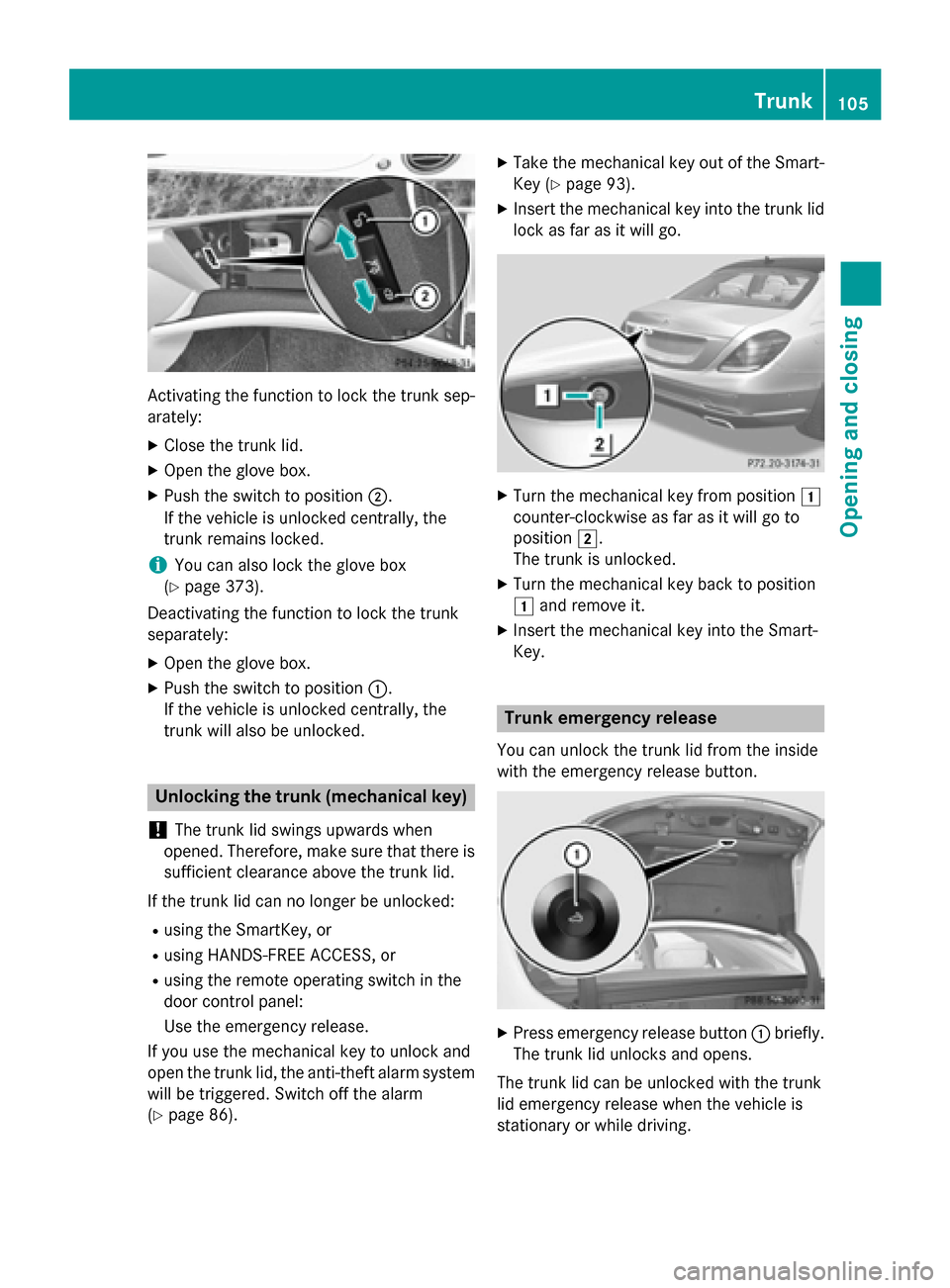
Activating the function to lock the trunk sep-
arately:
X Close the trunk lid.
X Open the glove box.
X Push the switch to position ;.
If the vehicle is unlocked centrally, the
trunk remains locked.
i You can also lock the glove box
(Y page 373).
Deactivating the function to lock the trunk
separately:
X Open the glove box.
X Push the switch to position :.
If the vehicle is unlocked centrally, the
trunk will also be unlocked. Unlocking the trunk (mechanical key)
! The trunk lid swings upwards when
opened. Therefore, make sure that there is sufficient clearance above the trunk lid.
If the trunk lid can no longer be unlocked: R using the SmartKey, or
R using HANDS-FREE ACCESS, or
R using the remote operating switch in the
door control panel:
Use the emergency release.
If you use the mechanical key to unlock and
open the trunk lid, the anti-theft alarm system
will be triggered. Switch off the alarm
(Y page 86). X
Take the mechanical key out of the Smart-
Key (Y page 93).
X Insert the mechanical key into the trunk lid
lock as far as it will go. X
Turn the mechanical key from position 1
counter-clockwise as far as it will go to
position 2.
The trunk is unlocked.
X Turn the mechanical key back to position
1 and remove it.
X Insert the mechanical key into the Smart-
Key. Trunk emergency release
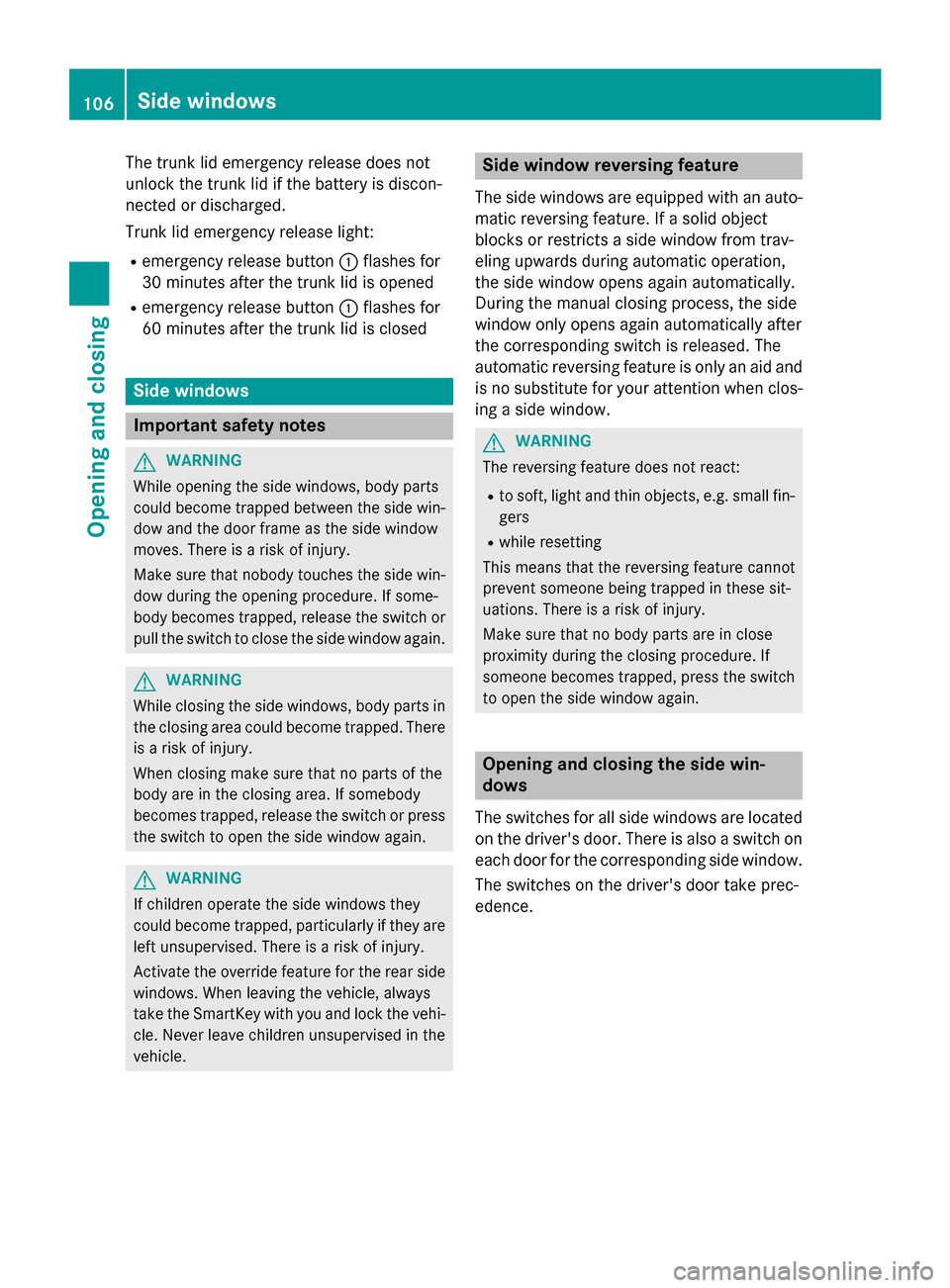
You can unlock the trunk lid from the inside
with the emergency release button. X
Press emergency release button :briefly.
The trunk lid unlocks and opens.
The trunk lid can be unlocked with the trunk
lid emergency release when the vehicle is
stationary or while driving. Trunk
105Opening and closing Z
Page 108 of 502
The trunk lid emergency release does not
unlock the trunk lid if the battery is discon-
nected or discharged.
Trunk lid emergency release light:
R emergency release button :flashes for
30 minutes after the trunk lid is opened
R emergency release button :flashes for
60 minutes after the trunk lid is closed Side windows
Important safety notes
G
WARNING
While opening the side windows, body parts
could become trapped between the side win- dow and the door frame as the side window
moves. There is a risk of injury.
Make sure that nobody touches the side win-
dow during the opening procedure. If some-
body becomes trapped, release the switch or pull the switch to close the side window again. G
WARNING
While closing the side windows, body parts in the closing area could become trapped. There is a risk of injury.
When closing make sure that no parts of the
body are in the closing area. If somebody
becomes trapped, release the switch or press
the switch to open the side window again. G
WARNING
If children operate the side windows they
could become trapped, particularly if they are left unsupervised. There is a risk of injury.
Activate the override feature for the rear side
windows. When leaving the vehicle, always
take the SmartKey with you and lock the vehi-
cle. Never leave children unsupervised in the
vehicle. Side window reversing feature
The side windows are equipped with an auto- matic reversing feature. If a solid object
blocks or restricts a side window from trav-
eling upwards during automatic operation,
the side window opens again automatically.
During the manual closing process, the side
window only opens again automatically after
the corresponding switch is released. The
automatic reversing feature is only an aid and
is no substitute for your attention when clos- ing a side window. G
WARNING
The reversing feature does not react:
R to soft, light and thin objects, e.g. small fin-
gers
R while resetting
This means that the reversing feature cannot
prevent someone being trapped in these sit-
uations. There is a risk of injury.
Make sure that no body parts are in close
proximity during the closing procedure. If
someone becomes trapped, press the switch
to open the side window again. Opening and closing the side win-
dows
The switches for all side windows are located on the driver's door. There is also a switch on
each door for the corresponding side window.
The switches on the driver's door take prec-
edence. 106
Side windowsOpening and closing
Page 225 of 502

The electric parking brake is also engaged
automatically if:
R DISTRONIC PLUS brings the vehicle to a
standstill or
R the HOLD function is keeping the vehicle
stationary
R Active Parking Assist is holding the vehicle
at a standstill
In addition, at least one of the following con-
ditions must be fulfilled:
R there is a system malfunction.
R the power supply is insufficient.
R the vehicle is stationary for a lengthy
period.
The red F(USA only) or !(Canada
only) indicator lamp in the instrument cluster
lights up.
The electric parking brake is not automati-
cally engaged if the engine is switched off by the ECO start/stop function.
Releasing automatically The electric parking brake is released auto-
matically when all of the following conditions
are fulfilled:
R the engine is running.
R the transmission is in position Dor R.
R the seat belt has been fastened.
R you depress the accelerator pedal.
If the automatic transmission is in position R,
the trunk lid must be closed.
If your seat belt is not fastened, the following conditions must be fulfilled to automatically
release the electric parking brake:
R the driver's door is closed.
R you have shifted out of transmission posi-
tion Por you have previously driven faster
than 2 mph (3 km/h).
Ensure that you do not depress the acceler-
ator pedal unintentionally. Otherwise the
parking brake will be released and the vehicle
will start to move. Emergency braking The vehicle can also be braked during an
emergency by using the electric parking
brake.
X While driving, push handle :of the electric
parking brake (Y page 222).
The vehicle is braked as long as you keep
handle :of the electric parking brake
pressed. The longer electric parking brake
handle :is depressed, the greater the brak-
ing force.
During braking:
R a warning tone sounds
R the Release parking brake Release parking brake message
appears
R the red F(USA only) or !(Canada
only) indicator lamp in the instrument clus- ter flashes
When the vehicle has been braked to a stand- still, the electric parking brake is engaged. Parking the vehicle for a long period
If you leave the vehicle parked for longer than
four weeks, the battery may be damaged by
exhaustive discharging and further damaged
in the event of this occurring again.
X Connect a trickle charger.
i You can obtain information about trickle
chargers from a qualified specialist work-
shop.
If you leave the vehicle parked for longer than
six weeks, the vehicle may suffer damage as a result of lack of use.
X Visit a qualified specialist workshop and
seek advice.
PLUG-IN HYBRID vehicles: observe the
important safety notes for the high-voltage
battery (Y page 429). Parking
223Driving and parking Z
Page 442 of 502

X
Use a dry cloth to remove any moisture
from the fuse box.
X Undo screws =on the fuse box.
X Remove fuse box cover ?forwards.
X To close: check whether the seal is lying
correctly in cover ?.
X Insert cover ?at the rear of the fuse box
into the retainer.
X Fold down cover ?of the fuse box and
tighten screws =.
X Insert cover ;and secure with retaining
clamps :.
X Close the hood. Fuse box in the trunk
! Make sure that no moisture can enter the
fuse box when the cover is open.
! When closing the cover, make sure that it
is lying correctly on the fuse box. Moisture seeping in or dirt could otherwise impair
the operation of the fuses. Example: S‑Class MAYBACH X
Open the trunk lid.
X To open: release cover :at the top right
and left-hand sides with a flat object.
X Open cover :downwards in the direction
of the arrow.
i The fuse allocation chart is located in a
recess at the side of the fuse box. You can find the corresponding fuse rating and fuse
type on the fuse allocation chart. Engine emergency off
If the engine cannot be switched off as descri- bed, observe the following procedure:
X Take the fuse allocation chart from the fuse
box in the trunk (Y page 440).
X Search for “Emergency engine shutdown”
in the fuse allocation chart.
X Remove the fuses listed under "Emergency
engine shutdown". 440
FusesRoadside Assistance