2015 MERCEDES-BENZ S-Class engine
[x] Cancel search: enginePage 310 of 502

X
Use : or9 to select the Coolant
Coolant
submenu.
X Press ato confirm the selection.
The multifunction display shows the cool-
ant temperature in a bar display. Settings menu
Introduction In the
Settings
Settings menu, you have the following
options:
R Changing assistance settings
(Y page 308)
R Changing hybrid settings (PLUG-IN hybrid
vehicles) (Y page 310)
R Changing head-up display settings
(Y page 311)
R Changing the light settings (Y page 312)
R Changing the instrument cluster settings
(Y page 312)
R Restoring the factory settings
(Y page 314)
Assistance submenu Deactivating/activating ESP
®
Observe the "Important safety notes" section
in the description of ESP ®
(Y page 82). G
WARNING
If you deactivate ESP ®
, ESP ®
no longer sta-
bilizes the vehicle. There is an increased risk
of skidding and an accident. Only deactivate ESP
®
in the situations descri-
bed in the following.
It may be best to deactivate ESP ®
in the fol-
lowing situations:
R when using snow chains
R in deep snow
R on sand or gravel
For further information about ESP ®
, see
(Y page 81).
X Start the engine.
X Use ò on the steering wheel to call up
the list of menus.
X Press the :or9 button on the steer-
ing wheel to select the Settings
Settings menu.
X Confirm by pressing aon the steering
wheel.
X Use : or9 to select the DriveAs‐ DriveAs‐
sist sist submenu.
X Press ato confirm.
X Press the :or9 button to select
ESP
ESP.
X Press ato confirm.
The current selection is displayed.
X To activate/deactivate: press thea
button again.
ESP ®
is deactivated if the åwarning lamp
in the instrument cluster lights up continu-
ously when the engine is running.
If the ÷ warning lamp lights up continu-
ously, ESP ®
is not available due to a malfunc-
tion.
Observe the information on warning lamps
(Y page 360).
Observe the information on display messages
(Y page 317).
Automatic activation of Night View Assist Plus
X Use ò on the steering wheel to call up
the list of menus.
X Press the :or9 button on the steer-
ing wheel to select the Settings Settingsmenu. 308
Menus and submenusOn-board computer and displays
Page 316 of 502

X
Use : or9 to select the Addi‐
Addi‐
tional Speedometer
tional Speedometer function.
The current selection is displayed.
X To activate/deactivate: press thea
button again.
Restoring the factory settings X
Use ò on the steering wheel to call up
the list of menus.
X Press the :or9 button on the steer-
ing wheel to select the Settings
Settingsmenu.
X Confirm by pressing aon the steering
wheel.
X Press the :or9 button to select the
Factory Settings
Factory Settings submenu.
X Press ato confirm.
The Reset All Settings?
Reset All Settings? message
appears.
X Press the :or9 button to select No
No
or Yes
Yes.
X Press ato confirm the selection.
If you have selected Yes
Yes, the multifunction
display shows a confirmation message.
For safety reasons, the Daytime Running
Daytime Running
Lights
Lights function in the Lights
Lightssubmenu is
only reset if the vehicle is stationary. AMG menu in AMG vehicles
AMG displays :
Digital speedometer
; Gear indicator
= Upshift indicator ?
Transmission fluid temperature
A Engine oil temperature
X Use ò on the steering wheel to call up
the list of menus.
X Press the :or9 button on the steer-
ing wheel to select the AMG AMGmenu.
X Confirm by pressing aon the steering
wheel.
Upshift indicator UP UP= indicates that the
engine has reached the overrevving range
when in the manual gearshift program.
Upshift indicator UP UP= fades out other mes-
sages until you have shifted up.
If the engine oil temperature is below 160 ‡
(71 †), the symbol in oil temperature display
A is shown in blue. Avoid driving at full
engine output during this time.
If the transmission fluid temperature is below 122 ‡ (50 †), the symbol in oil temperature
display ?is shown in blue. Avoid driving at
full engine output during this time.
SETUP :
Drive program (C C/SS/MM)
; ESP ®
mode (ON ON/OFFOFF)
= Suspension tuning (SPORT SPORT/COMFORTCOMFORT)
X Use ò on the steering wheel to call up
the list of menus.
X Press the :or9 button on the steer-
ing wheel to select the AMG AMGmenu. 314
Menus and submenusOn-board computer and displays
Page 325 of 502
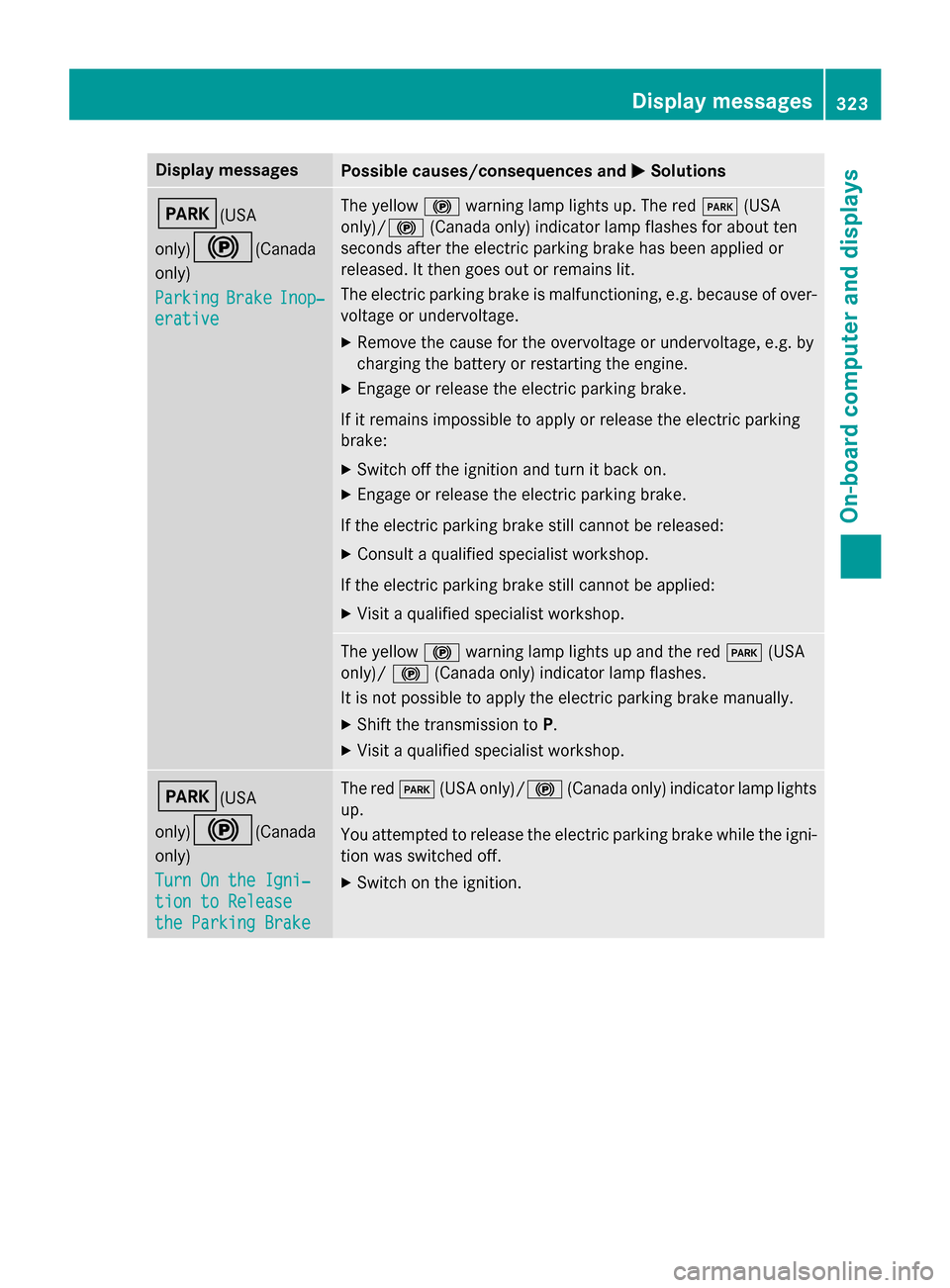
Display messages
Possible causes/consequences and
M
MSolutions F(USA
only)!
(Canada
only)
Parking Parking Brake
BrakeInop‐
Inop‐
erative
erative The yellow
!warning lamp lights up. The red F(USA
only)/ !(Canada only) indicator lamp flashes for about ten
seconds after the electric parking brake has been applied or
released. It then goes out or remains lit.
The electric parking brake is malfunctioning, e.g. because of over-
voltage or undervoltage.
X Remove the cause for the overvoltage or undervoltage, e.g. by
charging the battery or restarting the engine.
X Engage or release the electric parking brake.
If it remains impossible to apply or release the electric parking
brake:
X Switch off the ignition and turn it back on.
X Engage or release the electric parking brake.
If the electric parking brake still cannot be released: X Consult a qualified specialist workshop.
If the electric parking brake still cannot be applied: X Visit a qualified specialist workshop. The yellow
!warning lamp lights up and the red F(USA
only)/ !(Canada only) indicator lamp flashes.
It is not possible to apply the electric parking brake manually.
X Shift the transmission to P.
X Visit a qualified specialist workshop. F(USA
only)!
(Canada
only)
Turn On the Igni‐ Turn On the Igni‐
tion to Release tion to Release
the Parking Brake the Parking Brake The red
F(USA only)/! (Canada only) indicator lamp lights
up.
You attempted to release the electric parking brake while the igni-
tion was switched off.
X Switch on the ignition. Display
messages
323On-board computer and displays Z
Page 326 of 502

Display messages
Possible causes/consequences and
M
MSolutions $(USA
only)J
(Canada
only)
Check Brake Fluid Check Brake Fluid
Level Level There is not enough brake fluid in the brake fluid reservoir.
In addition, the
$(USA only)/ J(Canada only) warning
lamp lights up in the instrument cluster and a warning tone
sounds.
G WARNING
The braking effect may be impaired.
There is a risk of an accident. X Pull over and stop the vehicle safely as soon as possible, paying
attention to road and traffic conditions. Do not continue driving
under any circumstances.
X Secure the vehicle against rolling away (Y page 220).
X Consult a qualified specialist workshop.
X Do not add brake fluid. This does not correct the malfunction. #
Check Brake Pad Check Brake Pad
Wear Wear The brake pads/linings have reached their wear limit.
USA only: the red
$brake system warning lamp also lights up
while the engine is running.
X Visit a qualified specialist workshop. G
Inoperative Inoperative One or more main features of the mbrace system are malfunc-
tioning.
X Have the mbrace system checked immediately at a qualified
specialist workshop. PRE-SAFE Inopera‐ PRE-SAFE Inopera‐
tive See Opera‐ tive See Opera‐
tor's Manual tor's Manual
Important functions of PRE-SAFE
®
have failed. All other occupant
safety systems, e.g. air bags, remain available.
X Visit a qualified specialist workshop immediately. 324
Display
messagesOn-board computer and displays
Page 327 of 502

Display messages
Possible causes/consequences and
M
MSolutions Collision Preven‐
Collision Preven‐
tion Assist Plus tion Assist Plus
Currently Unavail‐ Currently Unavail‐
able See Opera‐ able See Opera‐
tor's Manual tor's Manual COLLISION PREVENTION ASSIST PLUS is temporarily not opera-
tional. Possible causes are:
R the radar sensor system is temporarily inoperative, e.g. due to
electromagnetic radiation emitted by nearby TV or radio sta-
tions or other sources of electromagnetic radiation.
R the system is outside the operating temperature range.
R the on-board voltage is too low.
When the causes stated above no longer apply, the display mes-
sage disappears.
COLLISION PREVENTION ASSIST PLUS is operational again.
If the display message does not disappear:
X Pull over and stop the vehicle safely as soon as possible, paying
attention to road and traffic conditions.
X Secure the vehicle against rolling away (Y page 220).
X Restart the engine. Collision Preven‐ Collision Preven‐
tion Assist Plus tion Assist Plus
Inoperative Inoperative COLLISION PREVENTION ASSIST PLUS is temporarily inoperative
due to a malfunction. Adaptive Brake Assist may also have failed.
X Visit a qualified specialist workshop. PRE-SAFE
PRE-SAFE
Functions
Functions
Currently Limited
Currently Limited
See See Operator's
Operator's Man‐
Man‐
ual
ual PRE
‑SAFE ®
PLUS or PRE ‑SAFE®
Brake is temporarily inoperative.
Possible causes are:
R function is impaired due to heavy rain or snow.
R the radar sensor system is temporarily inoperative, e.g. due to
electromagnetic radiation emitted by nearby TV or radio sta-
tions or other sources of electromagnetic radiation.
R the system is outside the operating temperature range.
R the on-board voltage is too low.
When the causes stated above no longer apply, the display mes-
sage disappears.
PRE ‑SAFE ®
PLUS and PRE ‑SAFE®
Brake are operational again.
If the display message does not disappear:
X Pull over and stop the vehicle safely as soon as possible, paying
attention to road and traffic conditions.
X Secure the vehicle against rolling away (Y page 220).
X Restart the engine. PRE-SAFE PRE-SAFE
Functions
Functions
Limited See Opera‐
Limited See Opera‐
tor's Manual tor's Manual PRE
‑SAFE ®
PLUS or PRE‑ SAFE®
Brake is unavailable due to a mal-
function. BAS PLUS may also have failed.
X Visit a qualified specialist workshop. Display
messages
325On-board computer and displays Z
Page 328 of 502

Display messages
Possible causes/consequences and
M
MSolutions Radar Sensors
Radar Sensors
Dirty See Opera‐ Dirty See Opera‐
tor's Manual tor's Manual At least one of the following driving systems or driving safety sys-
tems is temporarily restricted or inoperative:
R PRE-SAFE ®
PLUS
R PRE-SAFE ®
Brake
R COLLISION PREVENTION ASSIST PLUS
R Active Lane Keeping Assist
R Active Blind Spot Assist
R DISTRONIC PLUS with Steering Assist and Stop&Go Pilot
Possible causes are:
R the sensors in the radiator trim and/or in the bumpers are dirty.
R the function of the driving system and/or driving safety system
is impaired due to heavy rain or snow.
A warning tone also sounds.
When the causes stated above no longer apply, the display mes-
sage disappears. All driving systems/driving safety systems are
operative again.
If the display message does not disappear:
X Pull over and stop the vehicle safely as soon as possible, paying
attention to road and traffic conditions.
X Secure the vehicle against rolling away (Y page 220).
X Switch off the engine.
X Clean the sensors in the following locations (Y page 415):
R in the radiator trim
R in the front bumper
R in the rear bumper, particularly in the middle of the rear
bumper
X Restart the engine.
The display message disappears. 326
Display
messagesOn-board computer and displays
Page 338 of 502

Display messages
Possible causes/consequences and
M
MSolutions Adaptive Highbeam
Adaptive Highbeam
Assist Assist
Plus
PlusInoper‐
Inoper‐
ative
ative Adaptive Highbeam Assist Plus is faulty.
X Visit a qualified specialist workshop. Adaptive Highbeam
Adaptive Highbeam
Assist Plus Cur‐ Assist Plus Cur‐
rently rently
Unavailable
Unavailable
See
See Operator's
Operator's Man‐
Man‐
ual
ual Adaptive Highbeam Assist Plus is deactivated and temporarily
inoperative. Possible causes are:
R the windshield in the camera's field of vision is dirty.
R visibility is impaired due to heavy rain, snow or fog.
X Clean the windshield.
If the system detects that the camera is fully operational, display
message Adaptive Adaptive Highbeam
HighbeamAssist
AssistPlus
PlusAvailable
Available Again
Again
is displayed.
Adaptive Highbeam Assist Plus is operational again. Engine
Display messages
Possible causes/consequences and
M MSolutions +
Check Coolant Check Coolant
Level See Opera‐ Level See Opera‐
tor's Manual tor's Manual The coolant level is too low.
! Avoid making long journeys with too little coolant in the engine
cooling system. The engine will otherwise be damaged.
X Add coolant, observing the warning notes before doing so
(Y page 408).
X If coolant needs to be added more often than usual, have the
engine coolant system checked at a qualified specialist work-
shop. ? ? The fan motor is faulty.
X At coolant temperatures below 257 ‡ (125 †), drive to the
nearest qualified specialist workshop.
X Avoid subjecting the engine to heavy loads, e.g. driving in moun-
tainous terrain, and stop-and-go traffic. 336
Display
messagesOn-board computer and displays
Page 339 of 502

Display messages
Possible causes/consequences and
M
MSolutions ?
Coolant Too Hot Coolant Too Hot
Stop Vehicle Turn Stop Vehicle Turn
Engine Off Engine Off The coolant is too hot.
A warning tone also sounds.
G WARNING
Do not drive when your engine is overheated. This can cause some
fluids which may have leaked into the engine compartment to
catch fire.
Steam from the overheated engine can also cause serious burns
which can occur just by opening the hood.
There is a risk of injury.
X Pull over and stop the vehicle safely and switch off the engine,
paying attention to road and traffic conditions.
X Secure the vehicle against rolling away (Y page 220).
X Wait until the engine has cooled down.
X Make sure that the air supply to the engine radiator is not
blocked, e.g. by snow, slush or ice.
X Do not start the engine again until the display message goes out
and the coolant temperature is below 257 ‡ (125 †). Other-
wise, the engine could be damaged.
X Pay attention to the coolant temperature display.
X If the temperature increases again, visit a qualified specialist
workshop immediately.
Under normal operating conditions and with the specified coolant
level, the coolant temperature may rise to 255 ‡ (124 †). #
See See
Operator's
Operator's Man‐
Man‐
ual
ual The battery is not being charged.
A warning tone also sounds.
Possible causes are:
R a defective alternator
R defective power electronics (PLUG-IN HYBRID vehicles)
R a torn poly-V-belt
R a malfunction in the electronics
! Do not continue driving. The engine could otherwise overheat.
X Pull over and stop the vehicle safely and switch off the engine,
paying attention to road and traffic conditions.
X Secure the vehicle against rolling away (Y page 220).
X Consult a qualified specialist workshop. Display
messages
337On-board computer and displays Z