2015 MERCEDES-BENZ S-Class engine
[x] Cancel search: enginePage 291 of 502
Automatic engine start
The automatically switched-off internal com-
bustion engine starts automatically in certain situations, if:
R the power demand from the driver via the
accelerator pedal is greater than the elec-
tric motor alone can provide
R the driver switches to drive program Sor M
R the condition of charge of the high-voltage
battery has reached the lower limit
R the settings of the automatic climate con-
trol require it, e.g. at external temperatures
above 30 †
Overrun mode
In overrun mode, the combustion engine is
switched off and is disconnected from the
drive train. The electric motor:
R generates low thrust, which corresponds to
the overrun mode of an active combustion
engine
R functions as a generator and produces the
necessary energy for the auxiliary consum-
ers and charges the high-voltage battery
Overrun mode is possible in the following
speed range:
R in drive program Ebelow 130 km/h
R in drive program E+below 180 km/h
In drive program E+, after the accelerator
pedal has been released the coasting char-
acteristics of the vehicle are adapted to the
traffic conditions. Further information about
the haptic accelerator pedal (Y page 286).
Map-based energy management For map-based energy management, the sys-
tem factors in information about the expec-
ted route when route guidance is active.
The information on the route is provided by
COMAND and includes the following:
R road categories
R speed limitations
R data on downhill gradients The use of electric energy is automatically
optimally distributed from the beginning to
the end of the journey, using information
about the route. The distribution is pre-emp-
tive and takes into consideration:
R the sections of the journey ahead
R the energy consumption on the whole route
The condition of charge of the high-voltage
battery is thus systematically controlled. In
addition, the control function takes into
account that:
R the fuel saving through the use of electrical
energy can vary, dependent on the route
(e.g. urban, interurban or highway)
R the use of electrical energy is held available
for electric driving, particularly for urban
routes
The vehicle thus automatically selects the
optimum driving mode for the respective sec- tion of the route.
Map-based energy management is available
under the following conditions:
R drive program E+is selected
R HYBRID driving mode is selected
R active route guidance is activated
R suitable map data is available
When map-based energy management is
engaged, the area in front of the vehicle in the
multifunction display will be green. Parking
X Apply the electric parking brake.
The red !indicator lamp in the instru-
ment cluster lights up.
X Use the DIRECT SELECT lever to shift the
automatic transmission to P.
X Switch the ignition off.
The READY indicator in the instrument clus-
ter goes out.
Further information on parking and switching off the internal combustion engine
(Y page 221). PLUG-IN HYBRID operation
289Driving and parking Z
Page 292 of 502

Problems with PLUG-IN HYBRID operation
Internal combustion engine Problem
Possible causes/consequences and
M
MSolutions You cannot start the
internal combustion
engine. The multifunc-
tion display shows no
display messages. The
READY indicator in the
multifunction display is
off. For example, the self-diagnosis is not yet complete or the hybrid
system is malfunctioning.
X Switch off the ignition and turn it back on.
X Try to start the internal combustion engine again.
If the internal combustion engine still does not start: X Consult a qualified specialist workshop. You wish to pull away,
but the ECO start/stop
function does not start
the internal combus-
tion engine. The READY
indicator in the multi-
function display is off. The ECO start/stop function has failed. The warning and indicator
lamps in the instrument cluster light up.
X Shift the transmission to P.
X Switch off the ignition and turn it back on.
X Start the engine. The hybrid system is malfunctioning.
X Consult a qualified specialist workshop. Recuperative Brake System
Problem
Possible causes/consequences and
M MSolutions Braking resistance is
reduced and brake
pedal travel is longer
than usual.
G
Risk of accident
The Recuperative Brake System is malfunctioning.
X Observe the additional display messages in the multifunction
display (Y page 316).
X Observe the information regarding indicator and warning lamps
in the instrument cluster (Y page 366) .290
PLUG-IN HYBRID operationDriving and parking
Page 293 of 502
Hybrid system
Problem
Possible causes/consequences and
M
MSolutions The hybrid system was
deactivated automati-
cally. You have been in an accident.
The hybrid system remains deactivated if:
R the internal combustion engine cannot be restarted after a few
seconds.
R the red SRS warning lamp 6in the instrument cluster is lit.
X Consult a qualified specialist workshop. The hybrid system was
deactivated automati-
cally. The multifunction
display also shows a
display message. An electrical short circuit has occurred in the hybrid system or an
electrical connection has been disconnected.
X Observe the additional display messages in the multifunction
display (Y page 316).
X Consult a qualified specialist workshop. PLUG-IN HYBRID operation
291Driving and parking Z
Page 296 of 502

Useful information
i This Operator's Manual describes all
models and all standard and optional equip- ment of your vehicle available at the time of
publication of the Operator's Manual.
Country-specific differences are possible.
Please note that your vehicle may not be
equipped with all features described. This
also applies to safety-related systems and
functions.
i Read the information on qualified special-
ist workshops (Y page 29). Important safety notes
G
WARNING
If you operate information systems and com-
munication equipment integrated in the vehi- cle while driving, you will be distracted from
traffic conditions. You could also lose control of the vehicle. There is a risk of an accident.
Only operate the equipment when the traffic
situation permits. If you are not sure that this
is possible, park the vehicle paying attention
to traffic conditions and operate the equip-
ment when the vehicle is stationary.
You must observe the legal requirements for
the country in which you are currently driving when operating the on-board computer.
Only PLUG-IN HYBRID vehicles: G
WARNING
If the instrument cluster has failed or mal-
functioned, you may not recognize function
restrictions in systems relevant to safety. The operating safety of your vehicle may be
impaired. There is a risk of an accident.
Pull over as soon as it is safe to do so and
consult a qualified specialist workshop.
All vehicles except PLUG-IN HYBRID vehi-
cles: G
WARNING
If the instrument cluster has failed or mal-
functioned, you may not recognize function
restrictions in systems relevant to safety. The operating safety of your vehicle may be
impaired. There is a risk of an accident.
Drive on carefully. Have the vehicle checked
at a qualified specialist workshop immedi-
ately.
If the operating safety of your vehicle is
impaired, pull over as soon as it is safe to do
so. Contact a qualified specialist workshop.
The on-board computer only shows messages
or warnings from certain systems in the mul- tifunction display. You should therefore make
sure your vehicle is operating safely at all
times.
For an overview, see the instrument panel
illustration (Y page 35). Displays and operation
Tachometer
! Do not drive in the overrevving range, as
this could damage the engine.
The red band in the tachometer indicates the
engine's overrevving range.
The fuel supply is interrupted to protect the
engine when the red band is reached. Coolant temperature display
G
WARNING
Opening the hood when the engine is over-
heated or when there is a fire in the engine
compartment could expose you to hot gases
or other service products. There is a risk of
injury.
Let an overheated engine cool down before
opening the hood. If there is a fire in the
engine compartment, keep the hood closed
and contact the fire department. 294
Displays and operationOn-board computer and displays
Page 297 of 502

!
A display message is shown if the coolant
temperature is too high.
If the coolant temperature is above 257 ‡
(125 †) do not drive any further. The
engine will otherwise be damaged.
The coolant temperature is displayed in the
lower section of the tachometer (Y page 35).
Hybrid and PLUG-IN HYBRID vehicles: the
multifunction display shows the coolant tem-
perature in the Coolant
Coolant submenu
(Y page 307).
Under normal operating conditions and with
the specified coolant level, the coolant tem-
perature may rise to 255 ‡ (124 †). Outside temperature display
You should pay special attention to road con-
ditions when temperatures are around freez-
ing point.
Bear in mind that the outside temperature
display indicates the temperature measured
and does not record the road temperature.
The outside temperature display is in the mul- tifunction display (Y page 296).
Changes in the outside temperature are dis-
played after a short delay. Operating the on-board computer
:
Multifunction display
; Right control panel
= Left control panel
X To activate the on-board computer: turn
the SmartKey to position 1in the ignition
lock.
You can control the multifunction display and
the settings in the on-board computer using
the buttons on the multifunction steering
wheel.
Left control panel ò R
Calls up the main menu 9
: Press briefly:
R Scrolls in lists
R Selects a menu or function
R In the Radio Radio/Media Mediamenu:
opens the track or station list
and selects an audio track or
video scene
R In the Telephone Telephone menu:
switches to the phone book and
selects a name or a telephone
number Displays and operation
295On-board computer and displays Z
Page 300 of 502

Head-up display
Content and information for the following systems are shown in the head-up display:
: Navigation messages
; Current speed
= Set DISTRONIC PLUS speed (Y page 231)
The selected cruise control speed (Y page 229)Contents and Information in the AMG display in AMG vehicles:
: Current engine speed
; Current speed
= Upshift indicator
? Currently selected gear, gearshift options when shifting manually 298
Displays and operationOn-board computer and displays
Page 302 of 502
depends on the engine installed and is
therefore not available in all vehicles.
PLUG-IN HYBRID vehicles: information on
total range and electric range can be found in
the "PLUG-IN HYBRID drive" section
(Y page 284).
ECO display The ECO display is not available for AMG vehi-
cles.
X Use ò on the steering wheel to call up
the list of menus.
X Press the :or9 button on the steer-
ing wheel to select the Trip
Trip menu.
X Confirm by pressing aon the steering
wheel.
X Press :or9 to select ECO ECODisplay
Display.
If the ignition remains switched off for longer than four hours, the ECO display will be auto-
matically reset.
For further information on the ECO display,
see (Y page 225). Trip computer "From Start" or "From
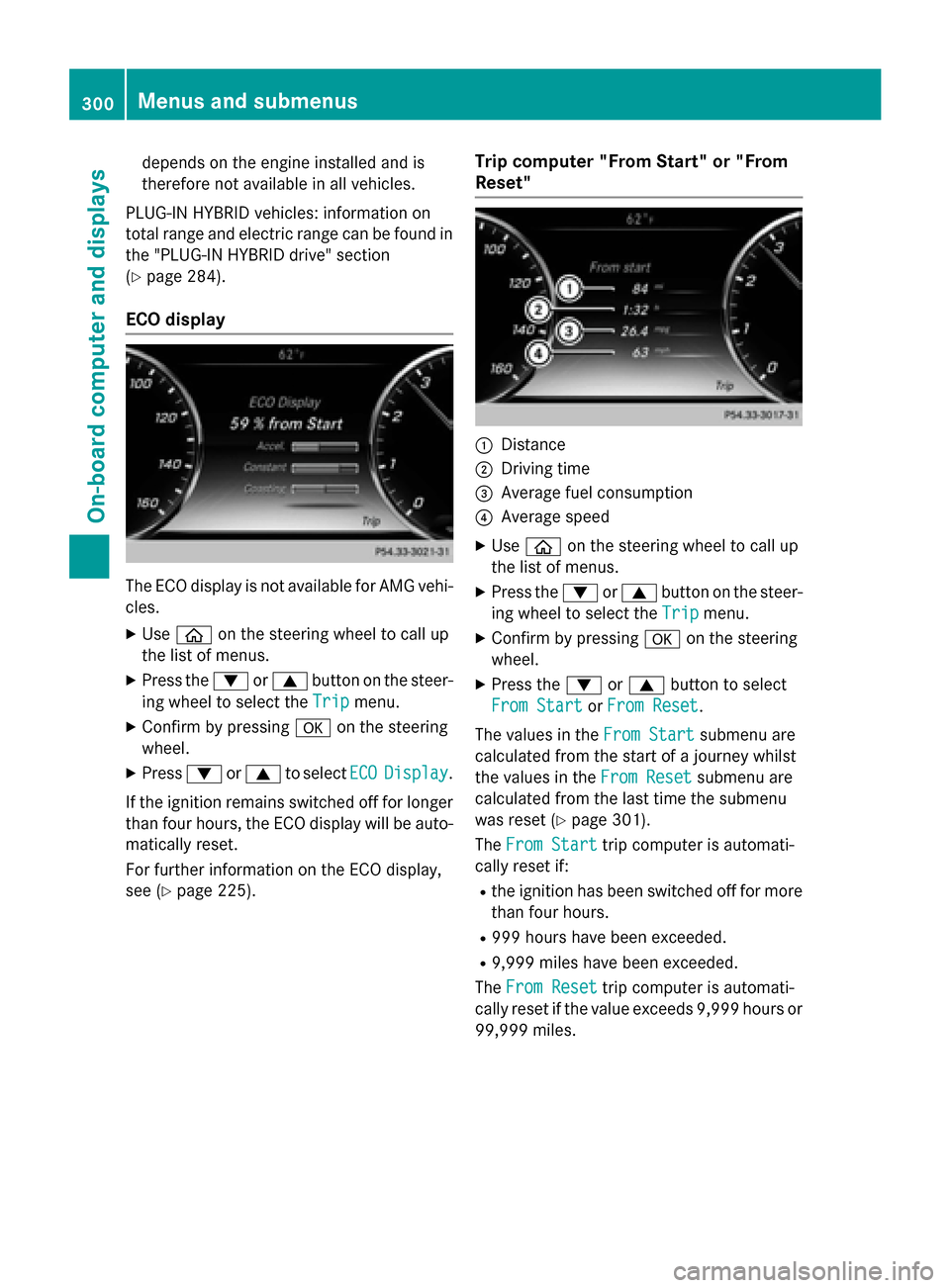
Reset" :
Distance
; Driving time
= Average fuel consumption
? Average speed
X Use ò on the steering wheel to call up
the list of menus.
X Press the :or9 button on the steer-
ing wheel to select the Trip Tripmenu.
X Confirm by pressing aon the steering
wheel.
X Press the :or9 button to select
From Start
From Start orFrom Reset
From Reset.
The values in the From Start
From Start submenu are
calculated from the start of a journey whilst
the values in the From Reset From Resetsubmenu are
calculated from the last time the submenu
was reset (Y page 301).
The From Start
From Start trip computer is automati-
cally reset if:
R the ignition has been switched off for more
than four hours.
R 999 hours have been exceeded.
R 9,999 miles have been exceeded.
The From Reset
From Reset trip computer is automati-
cally reset if the value exceeds 9,999 hours or
99,999 miles. 300
Menus and submenusOn-board computer and displays
Page 309 of 502

X
Press the 6button to switch to the
redial memory.
X Press the :or9 button to select the
desired name or number.
X Press the 6ora button to start dial-
ing.
or X To exit the redial memory: press the
~ or% button. Assistance graphic menu
X
Use ò on the steering wheel to call up
the list of menus.
X Press the :or9 button on the steer-
ing wheel to select the Assistance
AssistanceInfo
Info
Display
Display menu.
X Confirm by pressing aon the steering
wheel.
The multifunction display shows the
DISTRONIC PLUS distance display in the
assistance graphic.
X Press :to display the ATTEN-
TION ASSIST assessment.
The assistance graphic displays the status of and information from the following driving
systems or driving safety systems:
R DISTRONIC PLUS (Y page 237)
R Spotlight function of Night View Assist Plus
(Y page 312)
R Distance warning and the autonomous
braking function COLLISION PREVENTION
ASSIST PLUS (Y page 79)
R PRE-SAFE ®
Brake (Y page 84) R
Active Blind Spot Assist (Y page 270)
R ATTENTION ASSIST (Y page 264)
R Active Lane Keeping Assist (Y page 273) Maintenance menu
Introduction In the
Service Service menu, you have the following
options:
R Calling up display messages in message
memory (Y page 316)
R Restarting the tire pressure loss warning
system (Y page 452)
R Checking the tire pressure electronically
(Y page 449)
R Calling up the service due date
(Y page 410).
R Displaying the coolant temperature (hybrid
or PLUG-IN HYBRID vehicles)
(Y page 307)
R Checking the engine oil level using the on-
board computer (Y page 407) (S 600, S
600 MAYBACH and S 65 AMG only)
Displaying the coolant temperature The
Coolant Coolant submenu is only present on
hybrid or plug-in hybrid vehicles.
X Use ò on the steering wheel to call up
the list of menus.
X Press the :or9 button on the steer-
ing wheel to select the Service Servicemenu.
X Confirm by pressing aon the steering
wheel. Menus and submenus
307On-board computer and displays Z