2015 MERCEDES-BENZ S-Class engine
[x] Cancel search: enginePage 340 of 502

Display messages
Possible causes/consequences and
M
MSolutions #
Stop Vehicle See Stop Vehicle See
Operator's Manual Operator's Manual The battery is no longer being charged and the battery charge level
is too low.
A warning tone also sounds.
X Pull over and stop the vehicle safely and switch off the engine,
paying attention to road and traffic conditions.
X Secure the vehicle against rolling away (Y page 220).
X Observe the instructions in the #See SeeOperator's
Operator's Manual
Manual
display message.
X Consult a qualified specialist workshop. #
Start Engine See Start Engine See
Operator's Manual Operator's Manual The engine is switched off and the battery charge level is too low.
X Switch off electrical consumers that you do not need, such as
the rear window defroster and interior lighting.
X Leave the engine running for a few minutes or drive a long dis-
tance.
The battery is being charged. 4
Check Engine Oil Check Engine Oil
At Next Refueling At Next Refueling The engine oil level has dropped to the minimum level.
A warning tone also sounds.
! Avoid long journeys with too little engine oil. The engine will
otherwise be damaged.
X Check the oil level when next refueling, at the latest
(Y page 405).
X If necessary, add engine oil (Y page 407).
X Have the engine checked at a qualified specialist workshop if
engine oil needs to be added more often than usual.
Information on approved engine oils can be obtained from any
qualified specialist workshop or on the Internet at http://
bevo.mercedes-benz.com. 4
Check Engine Oil Check Engine Oil
Level Level
(Add
(Add1
1quart)
quart) The engine oil level has dropped to the minimum level.
! Avoid long journeys with too little engine oil. The engine will
otherwise be damaged.
X Check the oil level when next refueling, at the latest
(Y page 405).
X If necessary, add engine oil (Y page 407).
X Have the engine checked at a qualified specialist workshop if
engine oil needs to be added more often than usual.
Information on approved engine oils can be obtained from any
qualified specialist workshop or on the Internet at http://
bevo.mercedes-benz.com. 338
Display
messagesOn-board computer and displays
Page 341 of 502

Display messages
Possible causes/consequences and
M
MSolutions 4
Engine Oil Level Engine Oil Level
Low Stop Vehicle Low Stop Vehicle
Turn Engine Off Turn Engine Off The engine oil level is too low. There is a risk of engine damage.
X Pull over and stop the vehicle safely and switch off the engine,
paying attention to road and traffic conditions.
X Secure the vehicle against rolling away (Y page 220).
X Check the engine oil level (Y page 405).
X If necessary, add engine oil (Y page 407).8
Fuel Level Low Fuel Level Low The fuel level has dropped into the reserve range.
X Refuel at the nearest gas station. C
C There is only a very small amount of fuel in the fuel tank.
X Refuel at the nearest gas station without fail. 8
Gas Cap Loose Gas Cap Loose The fuel system pressure is too low. The fuel filler cap is not closed
correctly or the fuel system is leaking.
X Check that the fuel filler cap is correctly closed.
If the fuel filler cap is not correctly closed: X Close the fuel filler cap.
If the fuel filler cap is correctly closed: X Visit a qualified specialist workshop. Display
messages
339On-board computer and displays Z
Page 342 of 502
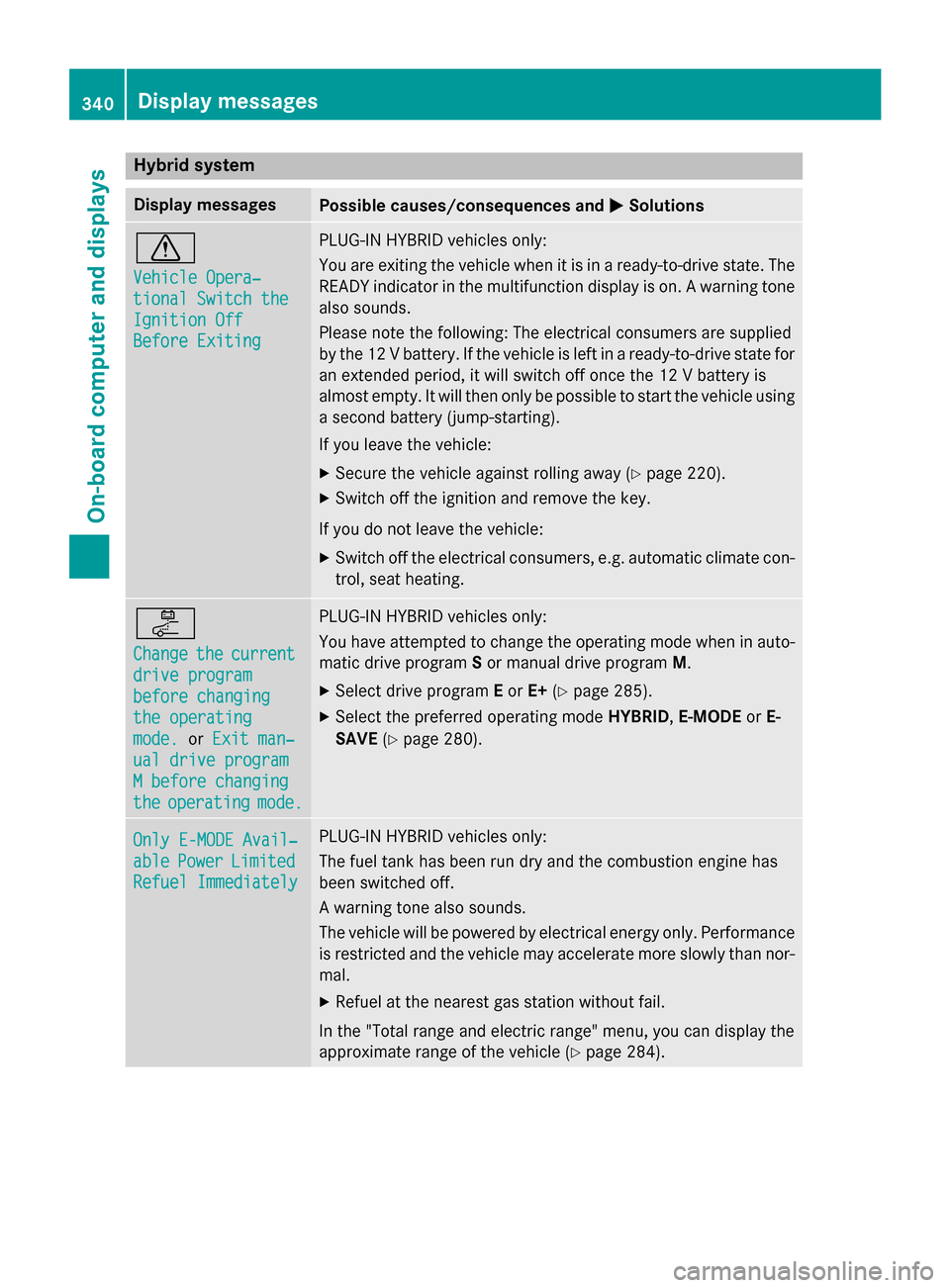
Hybrid system
Display messages
Possible causes/consequences and
M
MSolutions d
Vehicle Opera‐ Vehicle Opera‐
tional Switch the tional Switch the
Ignition Off Ignition Off
Before Exiting Before Exiting PLUG-IN HYBRID vehicles only:
You are exiting the vehicle when it is in a ready-to-drive state. The
READY indicator in the multifunction display is on. A warning tone also sounds.
Please note the following: The electrical consumers are supplied
by the 12 V battery. If the vehicle is left in a ready-to-drive state foran extended period, it will switch off once the 12 V battery is
almost empty. It will then only be possible to start the vehicle using
a second battery (jump-starting).
If you leave the vehicle:
X Secure the vehicle against rolling away (Y page 220).
X Switch off the ignition and remove the key.
If you do not leave the vehicle: X Switch off the electrical consumers, e.g. automatic climate con-
trol, seat heating. i
Change Change
the
thecurrent
current
drive program
drive program
before changing before changing
the operating the operating
mode. mode. orExit man‐
Exit man‐
ual drive program
ual drive program
M before changing M before changing
the the operating
operating mode.
mode. PLUG-IN HYBRID vehicles only:
You have attempted to change the operating mode when in auto- matic drive program Sor manual drive program M.
X Select drive program Eor E+ (Ypage 285).
X Select the preferred operating mode HYBRID,E-MODE orE-
SAVE (Ypage 280). Only E-MODE Avail‐
Only E-MODE Avail‐
able able
Power
Power Limited
Limited
Refuel Immediately
Refuel Immediately PLUG-IN HYBRID vehicles only:
The fuel tank has been run dry and the combustion engine has
been switched off.
A warning tone also sounds.
The vehicle will be powered by electrical energy only. Performance
is restricted and the vehicle may accelerate more slowly than nor-
mal.
X Refuel at the nearest gas station without fail.
In the "Total range and electric range" menu, you can display the
approximate range of the vehicle (Y page 284).340
Display messagesOn-board computer and displays
Page 346 of 502

Display messages
Possible causes/consequences and
M
MSolutions Active Blind Spot
Active Blind Spot
Assist Currently Assist Currently
Unavailable See Unavailable See
Operator's Manual Operator's Manual Active Blind Spot Assist is temporarily inoperative.
Possible causes are:
R function is impaired due to heavy rain or snow.
R the radar sensor system is outside the operating temperature
range.
R the radar sensor system is temporarily inoperative, e.g. due to
electromagnetic radiation emitted by nearby TV or radio sta-
tions or other sources of electromagnetic radiation.
When the causes stated above no longer apply, the display mes-
sage disappears.
Active Blind Spot Assist is operational again.
If the display message does not disappear:
X Pull over and stop the vehicle safely as soon as possible, paying
attention to road and traffic conditions.
X Secure the vehicle against rolling away (Y page 220).
X Restart the engine. Active Blind Spot Active Blind Spot
Assist Inoperative Assist Inoperative Active Blind Spot Assist is defective.
X Visit a qualified specialist workshop. Park Assist Can‐
Park Assist Can‐
celed celed The driver's door is open.
X Repeat the parking gap measurement and parking process with
the driver's door closed. You touched the multifunction steering wheel while steering inter-
vention was active.
X While steering intervention is active, make sure that the multi-
function steering wheel is not touched unintentionally. The vehicle has started to skid and ESP
®
has intervened.
X Use Active Parking Assist again later (Y page 251).Park Park
Assist
Assist Inoper‐
Inoper‐
ative
ative PARKTRONIC is malfunctioning or faulty.
X Follow the instructions and helpful hints in the "Problems with
PARKTRONIC" section (Y page 251).
If the display message continues to be displayed: X Visit a qualified specialist workshop. 344
Display
messagesOn-board computer and displays
Page 347 of 502
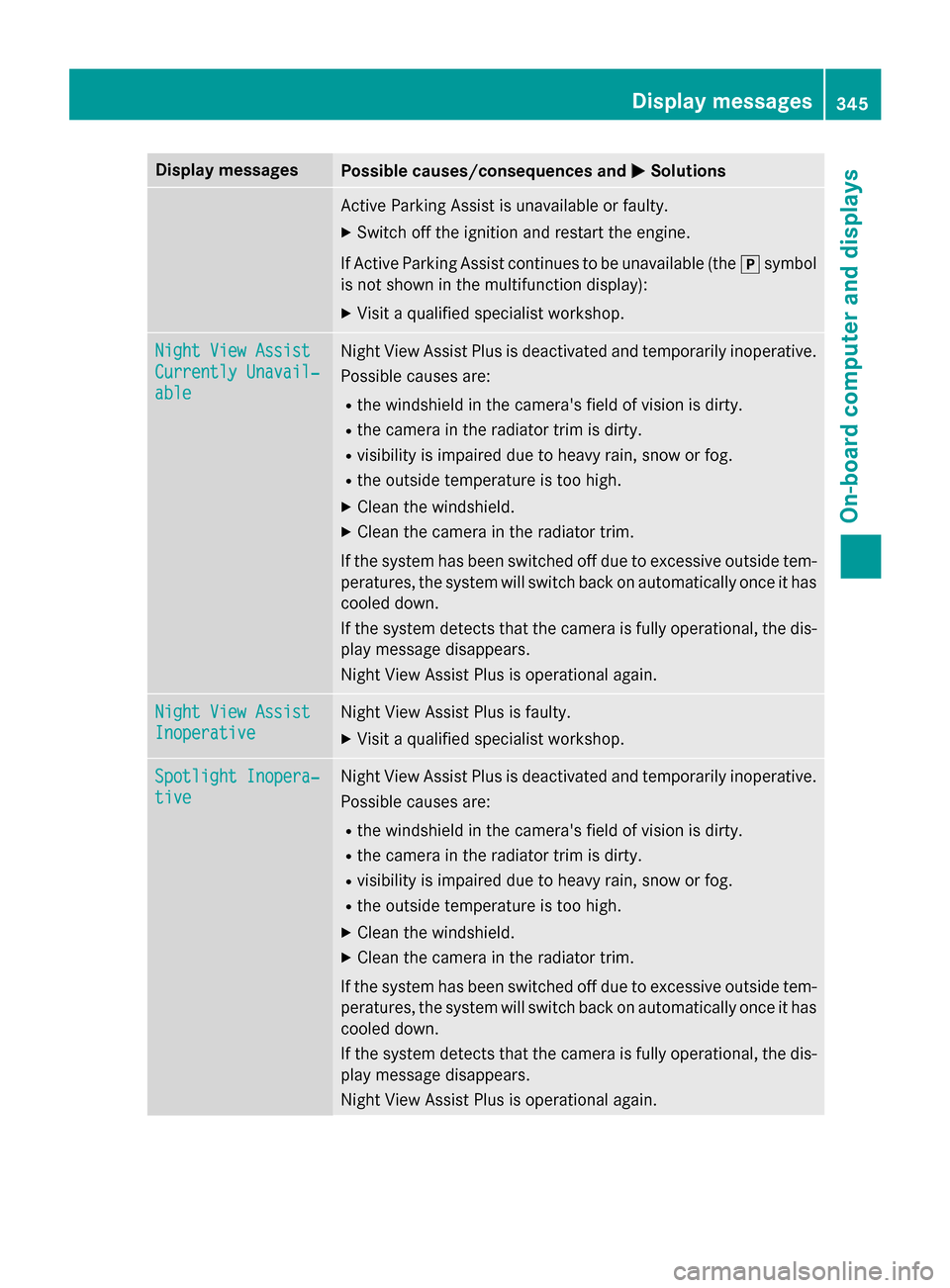
Display messages
Possible causes/consequences and
M
MSolutions Active Parking Assist is unavailable or faulty.
X Switch off the ignition and restart the engine.
If Active Parking Assist continues to be unavailable (the jsymbol
is not shown in the multifunction display):
X Visit a qualified specialist workshop. Night View Assist
Night View Assist
Currently Unavail‐ Currently Unavail‐
able able Night View Assist Plus is deactivated and temporarily inoperative.
Possible causes are:
R the windshield in the camera's field of vision is dirty.
R the camera in the radiator trim is dirty.
R visibility is impaired due to heavy rain, snow or fog.
R the outside temperature is too high.
X Clean the windshield.
X Clean the camera in the radiator trim.
If the system has been switched off due to excessive outside tem-
peratures, the system will switch back on automatically once it has cooled down.
If the system detects that the camera is fully operational, the dis- play message disappears.
Night View Assist Plus is operational again. Night View Assist Night View Assist
Inoperative Inoperative Night View Assist Plus is faulty.
X Visit a qualified specialist workshop. Spotlight Inopera‐
Spotlight Inopera‐
tive tive Night View Assist Plus is deactivated and temporarily inoperative.
Possible causes are:
R the windshield in the camera's field of vision is dirty.
R the camera in the radiator trim is dirty.
R visibility is impaired due to heavy rain, snow or fog.
R the outside temperature is too high.
X Clean the windshield.
X Clean the camera in the radiator trim.
If the system has been switched off due to excessive outside tem-
peratures, the system will switch back on automatically once it has cooled down.
If the system detects that the camera is fully operational, the dis- play message disappears.
Night View Assist Plus is operational again. Display
messages
345On-board computer and displays Z
Page 348 of 502

Display messages
Possible causes/consequences and
M
MSolutions Night View Assist Plus is faulty.
X Visit a qualified specialist workshop. ë
Off Off The HOLD function is deactivated. The vehicle is skidding.
A warning tone also sounds.
X Reactivate the HOLD function later (Y page 242).DISTRONIC PLUS Off DISTRONIC PLUS Off DISTRONIC PLUS has been deactivated (Y
page 231).
If it was not deactivated by the driver, a warning tone also sounds. DISTRONIC
DISTRONIC
PLUS
PLUSNow
Now
Available
Available DISTRONIC PLUS is operational again after having been tempo-
rarily unavailable. You can now reactivate DISTRONIC PLUS
(Y
page 231). DISTRONIC DISTRONIC
PLUS
PLUSCur‐
Cur‐
rently
rently Unavailable
Unavailable
See
See Operator's
Operator's Man‐
Man‐
ual
ual DISTRONIC PLUS is temporarily inoperative.
Steering Assist and Stop&Go Pilot are temporarily inoperative.
Possible causes are:
R function is impaired due to heavy rain or snow.
R the radar sensor system is temporarily inoperative, e.g. due to
electromagnetic radiation emitted by nearby TV or radio sta-
tions or other sources of electromagnetic radiation.
R the system is outside the operating temperature range.
R the on-board voltage is too low.
A warning tone also sounds.
When the causes stated above no longer apply, the display mes-
sage disappears.
DISTRONIC PLUS is operational again.
If the display message does not disappear:
X Pull over and stop the vehicle safely as soon as possible, paying
attention to road and traffic conditions.
X Secure the vehicle against rolling away (Y page 220).
X Restart the engine. DISTRONIC PLUS DISTRONIC PLUS
Inoperative Inoperative DISTRONIC PLUS is defective.
The following may have also failed:
R BAS PLUS with Cross-Traffic Assist
R PRE-SAFE ®
Brake
R Steering Assist and Stop&Go Pilot
A warning tone also sounds.
X Visit a qualified specialist workshop. 346
Display
messagesOn-board computer and displays
Page 353 of 502

Vehicle
Display messages
Possible causes/consequences and
M
MSolutions Shift to 'P' or
Shift to 'P' or
'N' 'N'
to
toStart
Start Engine
Engine You have attempted to start the engine with the transmission in
position
Ror D.
X Shift the transmission to position Por N. Auxiliary Battery Auxiliary Battery
Malfunction Malfunction The auxiliary battery for the transmission is no longer being
charged.
X Visit a qualified specialist workshop. Apply Brake to Apply Brake to
Shift from 'P' Shift from 'P' You have attempted to move the transmission selector lever to
position
D,Ror Nwithout depressing the brake pedal.
X Depress the brake pedal. Transmission Not Transmission Not
in P Risk of Vehi‐ in P Risk of Vehi‐
cle Rolling Away cle Rolling Away The driver's door is open/not completely closed and the trans-
mission is in position
R,Nor D.
A warning tone also sounds.
G WARNING
The vehicle may roll away.
There is a risk of an accident. X Shift the transmission to position P.
X Secure the vehicle against rolling away (Y page 220).
X Close the driver's door completely. Service Required Service Required
Do Do
Not
Not Shift
Shift Gears
Gears
Visit Dealer
Visit Dealer You cannot change the transmission position due to a malfunction.
A warning tone also sounds.
If transmission position Dis selected:
X Drive to a qualified specialist workshop without shifting the
transmission from position D.
If transmission position R,Nor Pis selected:
X Notify a qualified specialist workshop or breakdown service. Transmission Mal‐ Transmission Mal‐
function Stop function Stop A malfunction has occurred in the mechanical transmission com-
ponents.
A warning tone also sounds. The gearbox automatically shifts to
position N.
X Pull over and stop the vehicle safely as soon as possible, paying
attention to road and traffic conditions.
X Shift the transmission to position P.
X Secure the vehicle against rolling away (Y page 220).
X Notify a qualified specialist workshop or breakdown service. Display messages
351On-board computer and displays Z
Page 356 of 502

SmartKey
Display messages
Possible causes/consequences and
M
MSolutions Â
Key Does Not Key Does Not
Belong to Vehicle Belong to Vehicle You have put the wrong SmartKey in the ignition lock.
X Use the correct SmartKey. Â
Take Take
Your
YourKey
Keyfrom
from
Ignition
Ignition The SmartKey is in the ignition lock.
X Remove the SmartKey. Â
Obtain a New Key Obtain a New Key The SmartKey needs to be replaced.
X Visit a qualified specialist workshop. Â
Replace Replace
Key
KeyBattery
Battery The SmartKey batteries are discharged.
X Change the batteries (Y page 94).Â
Don't Forget Your Don't Forget Your
Key Key The SmartKey is not in the ignition lock. You have opened the
driver's door with the engine switched off.
This display message is displayed for a maximum of 60 seconds
and is simply a reminder.
X Take the SmartKey with you when you leave the vehicle. Â
Key Not Detected Key Not Detected
(white display mes-
sage) The SmartKey is currently undetected.
X Change the location of the SmartKey in the vehicle.
If the SmartKey still cannot be detected:
X Insert the SmartKey into the ignition lock and turn it to the
desired position. Â
Key Not Detected Key Not Detected
(red display message) The SmartKey is not in the vehicle.
A warning tone also sounds.
If the engine is switched off, you can no longer lock the vehicle
centrally or start the engine.
X Pull over and stop the vehicle safely as soon as possible, paying
attention to road and traffic conditions.
X Secure the vehicle against rolling away (Y page 220).
X Locate the SmartKey.
X Press aon the steering wheel to confirm the display mes-
sage. 354
Display messagesOn-board computer and displays