2015 MERCEDES-BENZ S-Class engine
[x] Cancel search: enginePage 257 of 502

Active Parking Assist can only assist you with
exiting a parking space if you have parked thevehicle parallel to the direction of travel using
Active Parking Assist.
i If PARKTRONIC detects obstacles, Active
Parking Assist brakes automatically whilst
the vehicle exits the parking space. You are
responsible for braking in good time.
X Start the engine.
X Release the electric parking brake.
X Switch on the turn signal in the direction
you are pulling away.
X Shift the transmission to position Dor R.
The Start Park Assist? Yes: OK No:
Start Park Assist? Yes: OK No:
message appears in the multifunction dis-
play %.
X To cancel the procedure: press the%
button on the multifunction steering wheel
or pull away.
or
X To exit a parking space using Active
Parking Assist: press theabutton on
the multifunction steering wheel.
The Park Assist Active Accelerate
Park Assist Active Accelerate
and and Brake
Brake Observe
Observe Surroundings
Surroundings mes-
sage appears in the multifunction display.
X Let go of the multifunction steering wheel.
X Pull away, being ready to brake at all times.
Do not exceed a maximum speed of
approximately 6 mph (10 km/h) when exit-
ing a parking space. Otherwise Active Park- ing Assist will be canceled.
X Shift the transmission to position Dor Ras
required or according to the message while
the vehicle is stationary.
Active Parking Assist immediately steers in
the other direction. The Park Assist
Park Assist
Active Accelerate and Brake
Active Accelerate and Brake
Observe Observe Surroundings
Surroundings message appears
in the multifunction display.
i You will achieve the best results by wait-
ing for the steering procedure to complete before pulling away. If you back up after activation, the steering
wheel is moved to the straight-ahead posi-
tion.
X Drive forwards and back up as prompted by
the PARKTRONIC warning displays, several
times if necessary.
Once you have exited the parking space com- pletely, the steering wheel is moved to the
straight-ahead position. You hear a tone and
the Park Assist Finished
Park Assist Finished message
appears in the multifunction display. You will
then have to steer and merge into traffic on
your own. PARKTRONIC is still available. You
can take over the steering, before the vehicle has exited the parking space completely. This
is useful, for example when you recognize
that it is already possible to pull out of the
parking space.
Canceling Active Parking Assist X
Stop the movement of the multifunction
steering wheel or steer yourself.
Active Parking Assist will be canceled at
once. The Park Assist Canceled Park Assist Canceled mes-
sage appears in the multifunction display.
or X Press the PARKTRONIC button
(Y page 250).
PARKTRONIC is switched off and Active
Parking Assist is immediately canceled.
The Park Assist Canceled Park Assist Canceled message
appears in the multifunction display.
Active Parking Assist is canceled automati-
cally if:
R the electric parking brake is engaged
R transmission position Pis selected
R parking using Active Parking Assist is no
longer possible
R you are driving faster than 6 mph (10 km/h)
R a wheel spins, ESP ®
intervenes or fails. The
÷ warning lamp lights up in the instru-
ment cluster.
A warning tone sounds. The parking symbol
disappears and the multifunction display Driving systems
255Driving and parking Z
Page 258 of 502

shows the
Park Assist Canceled
Park Assist Canceled mes-
sage.
When Active Parking Assist is canceled, you
must steer and brake again yourself.
If a system malfunction occurs, the vehicle is braked to a standstill. To drive on, depress the
accelerator again. Rear view camera
General notes Rear view camera
:is in the trunk lid handle.
Rear view camera :is an optical parking and
maneuvering aid. It shows the area behind
your vehicle with guide lines in the COMAND
display.
The area behind the vehicle is displayed as a
mirror image, as in the rear view mirror.
i The text of messages shown in the
COMAND display depends on the language
setting. The following are examples of rear view camera messages in the COMAND
display.
Important safety notes The rear view camera is only an aid. It is not a
replacement for your attention to your imme-
diate surroundings. You are always responsi-
ble for safe maneuvering and parking. When
maneuvering or parking, make sure that there are no persons, animals or objects in the area in which you are maneuvering. Under the following circumstances, the rear
view camera will not function, or will function
in a limited manner:
R if the trunk lid is open
R in heavy rain, snow or fog
R at night or in very dark places
R if the camera is exposed to very bright light
R if the area is lit by fluorescent bulbs or LED
lighting (the display may flicker)
R if the camera lens fogs up, e.g. when driving
into a heated garage in winter, causing a
rapid change in temperature
R if the camera lens is dirty or obstructed.
Observe the notes on cleaning
(Y page 416)
R if the rear of your vehicle is damaged. In this
event, have the camera position and setting checked at a qualified specialist workshop
The field of vision and other functions of the
rear view camera may be restricted due to
additional accessories on the rear of the vehi-
cle (e.g. license plate holder, bicycle rack).
The guide lines in the COMAND display show
the distances to your vehicle. The distances
only apply to road level.
i The rear view camera is protected from
raindrops and dust by means of a flap.
When the rear view camera is activated,
this flap opens.
The flap closes again when:
R you have finished the maneuvering proc-
ess
R you switch off the engine
R you open the trunk
Observe the notes on cleaning
(Y page 416).
For technical reasons, the flap may remain
open briefly after the rear view camera has
been deactivated. 256
Driving systemsDriving and parking
Page 267 of 502

recognize them at all. The system is not a
substitute for a well-rested and attentive
driver.
The functionality of ATTENTION ASSIST is
restricted and warnings may be delayed or
not occur at all:
R if the length of the journey is less than
approximately 30 minutes
R if the road condition is poor, e.g. if the sur-
face is uneven or if there are potholes
R if there is a strong side wind
R if you have adopted a sporty driving style
with high cornering speeds or high rates of
acceleration
R if you are predominantly driving slower
than 37 mph (60 km/h) or faster than
125 mph (200 km/h)
R if you are driving with the active Steer
Assist of DISTRONIC PLUS
R if the time has been set incorrectly
R in active driving situations, such as when
you change lanes or change your speed
ATTENTION ASSIST is reset when you con-
tinue your journey and starts assessing your
tiredness again if:
R you switch off the engine.
R you take off your seat belt and open the
driver's door, e.g. for a change of drivers or
to take a break.
Displaying the attention level You can have current status information dis-
played in the assistance menu (Y page 308)
of the on-board computer. X
Select the Assistance display for Attention
Assist using the on-board computer
(Y page 307).
The following information is displayed: R length of the journey since the last break.
R the attention level determined by ATTEN-
TION ASSIST, displayed in a bar display in
five levels from high to low.
R if ATTENTION ASSIST is unable to calculate
the attention level and cannot output a
warning, the System Passive
System Passive message
appears. The bar display then changes the
display, e.g. if you are driving at a speed
below 37 mph (60 km/h) or above 124 mph
(200 km/h).
Activating ATTENTION ASSIST X
Activate ATTENTION ASSIST using the on-
board computer (Y page 310).
The system determines the attention level
of the driver depending on the setting
selected:
Standard selected: the sensitivity with
which the system determines the attention
level is set to normal.
Sensitive selected: the sensitivity is set
higher. The attention level detected by Atten- tion Assist is adapted accordingly and the
driver is warned earlier.
When ATTENTION ASSIST is deactivated, the é symbol appears in the multifunction
display in the assistance graphic display.
When ATTENTION ASSIST has been deactiva- ted, it is automatically reactivated after the
engine has been stopped. The sensitivity
selected corresponds to the last selection
activated (standard/sensitive).
Warning in the multifunction display If fatigue or increasing lapses in concentra-
tion are detected, a warning appears in the
multifunction display:
Attention Assist: Attention Assist:
Take a break!
Take a break! Driving systems
265Driving and parking Z
Page 270 of 502

Switching Night View Assist on/off
Activation conditions
You can only activate Night View Assist Plus if
all of the following conditions are met:
R the ignition is switched on (Y page 189) or
the engine has been started.
R the light switch is in the ÃorL posi-
tion.
R reverse gear has not been engaged.
Activating Night View Assist Plus X
Press button :.
The Night View Assist Plus display appears in the multifunction display.
i The infrared headlamps only switch on in
the dark from speeds of approximately
6 mph (10 km/h). This means that you do
not have the full visual range while the vehi- cle is stationary and cannot check whether
Night View Assist Plus is working. The infra- red headlamps are deactivated at speeds
below 3 mph (5 km/h). The Night View
image continues to be displayed until you
deactivate it by pressing button :.
Automatic activation
You can select the Night View Assist
Night View Assist
Automatic Automatic Activation
Activation option via the Night
View Assist menu. The pedestrian and animal search function remains active even when the
Night View image is not displayed. In the dark,
in unlit surroundings and at speeds of more
than 60 km/h, the Night View image is auto-
matically displayed in the multifunction dis- play as soon as pedestrians or animals are
detected.
X In the assistance menu, select automatic
delayed switch-off of Night View Assist Plus
(Y page 308).
Deactivating Night View Assist Plus
X Press button :.
The Night View Assist Plus display disap-
pears from the multifunction display. Night View Assist is deactivated.
Spotlight function General notes
Under certain conditions, the spotlight func-
tion uses the headlamps to flash at detected
pedestrians.
The spotlight function is only active if:
R pedestrian recognition is active
R the road surface is not lit
R the driving speed is at least 40 mph
(60 km/h)
R the "Adaptive Highbeam Assist PLUS" func-
tion is activated (Y page 154)
The spotlight function is not active or is active
only to a limited extent if:
R you are driving in city traffic
R there are pedestrians located in the area of
an oncoming vehicle or a vehicle in front
Activating the spotlight function
The pedestrian detection with spotlight func- tion is running the background. If the prereq-uisites are met, the spotlight function uses
the headlamps to flash four short pulses at a
pedestrian detected on or near to the road
surface.
X In the light menu, select the spotlight func-
tion of Night View Assist (Y page 312).
The spotlight function does not flash at ani-
mals. 268
Driving systemsDriving an
d parking
Page 278 of 502

R
you switch on the turn signals. In this
event, the warnings are suppressed for a
certain period of time.
R a driving safety system intervenes, e.g.
ABS, BAS or ESP ®
.
R you accelerate hard, e.g. kickdown.
R you brake hard.
R you steer actively, e.g. swerve to avoid an
obstacle or change lanes quickly.
R you cut the corner on a sharp bend.
In order that you are warned only when nec-
essary and in good time if you cross the lane marking, the system recognizes certain con-
ditions and warns you accordingly.
The warning vibration occurs earlier if:
R you approach the outer lane marking on a
bend.
R the road has very wide lanes, e.g. a high-
way.
R the system recognizes solid lane markings.
The warning vibration occurs later if:
R the road has narrow lanes.
R you cut the corner on a bend. PLUG-IN HYBRID operation
Points to remember
General notes Hybrid technology combines a fuel efficient
internal combustion engine with a powerful
electric motor. In HYBRIDmode, the hybrid
system automatically selects the most effi-
cient operating mode for every driving situa-
tion. Drive the vehicle in the usual manner.
To save fuel, in HYBRIDmode, the hybrid
system switches off the combustion engine
as often as possible during the journey when power output requirements are low. When
power output requirements are low, the elec-
tric motor powers the vehicle. The engine is
switched on, even while the vehicle is in
motion, when a higher power output is
required. The engine is usually switched off when the vehicle is stationary. Consequently,
there is usually no engine idling as with com-
bustion engine vehicles.
For pulling away and accelerating, the electric motor supports the internal combustion
engine using the power stored in the high-
voltage battery. This energy is also used for
driving in partially electric mode, to operate
the electric refrigerant compressor and sup-
port the 12 V on-board electrical system. In
this way the hybrid drive helps to reduce your
vehicle's fuel consumption.
Observe the driving tips on PLUG-IN HYBRID
operation (Y page 287).
Recuperative Brake System If you release the accelerator pedal when the
vehicle is in motion, overrun recuperation is
initiated. The electric motor is operated as a
generator when in overrun mode and when
you brake. Hybrid technology converts the
kinetic energy of the vehicle into electricity
and stores it in the high-voltage battery.
Observe the important safety notes for the
Recuperative Brake System (Y page 48). Important safety notes
If the engine is switched off by the ECO start/
stop function and you open the driver's door:
R a message appears in the multifunction dis-
play and
R a warning tone sounds
Further information (Y page 340).
All of the vehicle's systems remain active, if:
R the vehicle is stationary
R the combustion engine is switched off and
R the READY indicator in the instrument clus-
ter lights up
If you remove your foot from the brake pedal
while in transmission position D or R, the
vehicle may pull away automatically.
Observe the notes on the READY display of
the ECO start/stop function (Y page 288).276
PLUG-IN HYBRID operationDriving and pa
rking
Page 279 of 502
Vehicles with an electric motor generate
much less driving noise than vehicles with
internal combustion engines. As a result, your vehicle may not be heard by other road users
in certain situations.
Depending on the vehicle's equipment and
country-specific regulations, the vehicle can
be equipped with Acoustic Vehicle Indication.
Acoustic Vehicle Indication generates a cer-
tain sound at a speed between 0 and 20 mph
(30 km/h). This helps other road users, par-
ticularly pedestrians and cyclists, to hear your vehicle better. The sound can also be heard
inside the vehicle.
The volume depends on the engine speed.
The faster you accelerate, the louder the
sound is. At a speed of over 20 mph
(30 km/h) the sound is switched off. Above
this speed, the natural sounds from the vehi-
cle are sufficient that it can be heard in good time by other road users. PLUG-IN HYBRID operation
277Driving and parking Z
Page 281 of 502
Instrument cluster
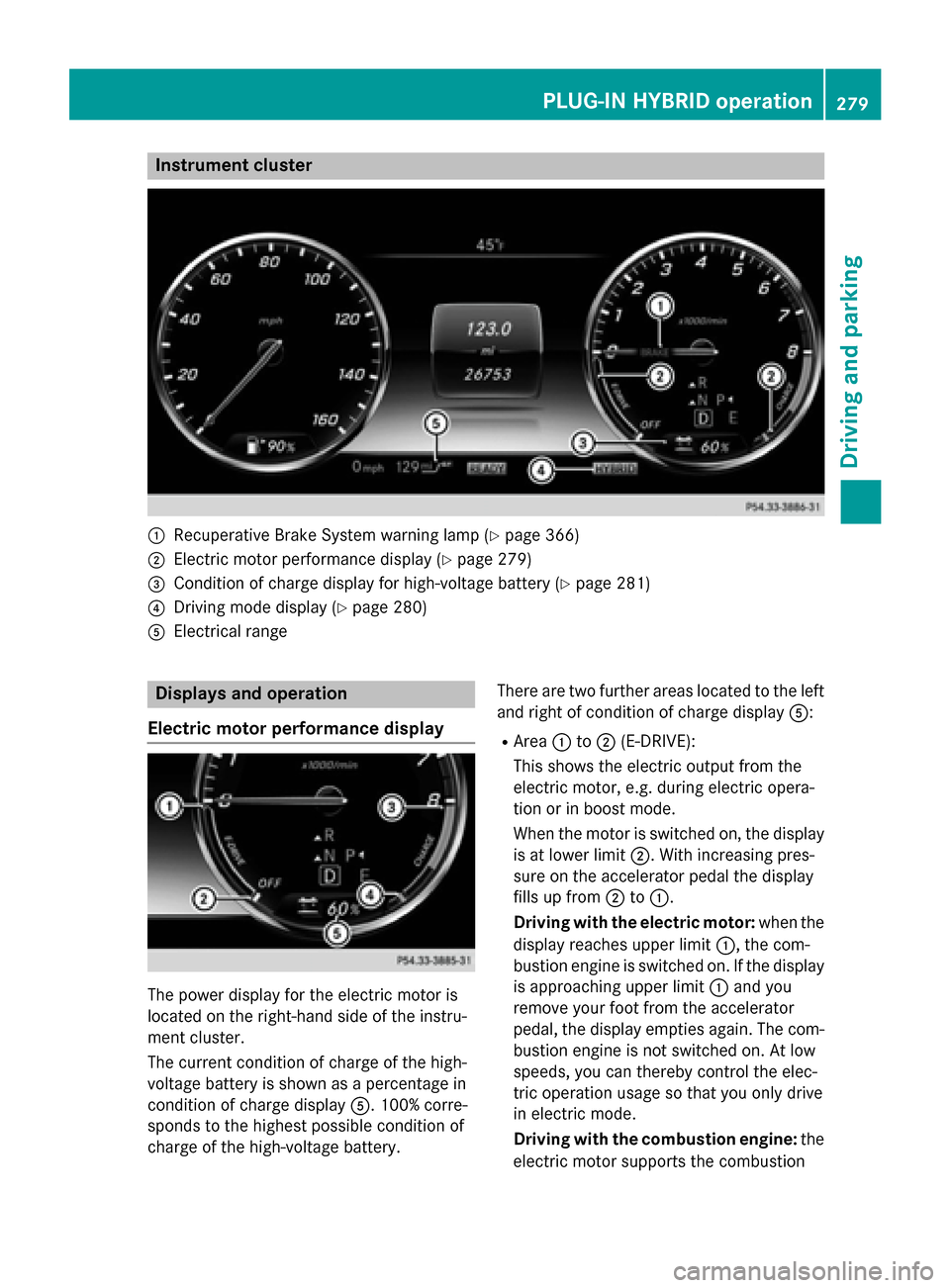
:
Recuperative Brake System warning lamp (Y page 366)
; Electric motor performance display (Y page 279)
= Condition of charge display for high-voltage battery (Y page 281)
? Driving mode display (Y page 280)
A Electrical range Displays and operation
Electric motor performance display The power display for the electric motor is
located on the right-hand side of the instru-
ment cluster.
The current condition of charge of the high-
voltage battery is shown as a percentage in
condition of charge display A. 100% corre-
sponds to the highest possible condition of
charge of the high-voltage battery. There are two further areas located to the left
and right of condition of charge display A:
R Area :to; (E-DRIVE):
This shows the electric output from the
electric motor, e.g. during electric opera-
tion or in boost mode.
When the motor is switched on, the display is at lower limit ;. With increasing pres-
sure on the accelerator pedal the display
fills up from ;to:.
Driving with the electric motor: when the
display reaches upper limit :, the com-
bustion engine is switched on. If the display is approaching upper limit :and you
remove your foot from the accelerator
pedal, the display empties again. The com- bustion engine is not switched on. At low
speeds, you can thereby control the elec-
tric operation usage so that you only drive
in electric mode.
Driving with the combustion engine: the
electric motor supports the combustion PLUG-IN HYBRID operation
279Driving and parking Z
Page 282 of 502
engine by providing additional torque
(boost mode) until the display reaches
upper limit
:.
You can also select the operating mode of
the hybrid system (Y page 280).
R Area =to? (CHARGE):
This shows the recuperated energy which is stored in the high-voltage battery as elec-
trical energy.
When the display reaches lower limit ?,
the maximum recuperative braking power
has been exhausted. The mechanical brake is activated.
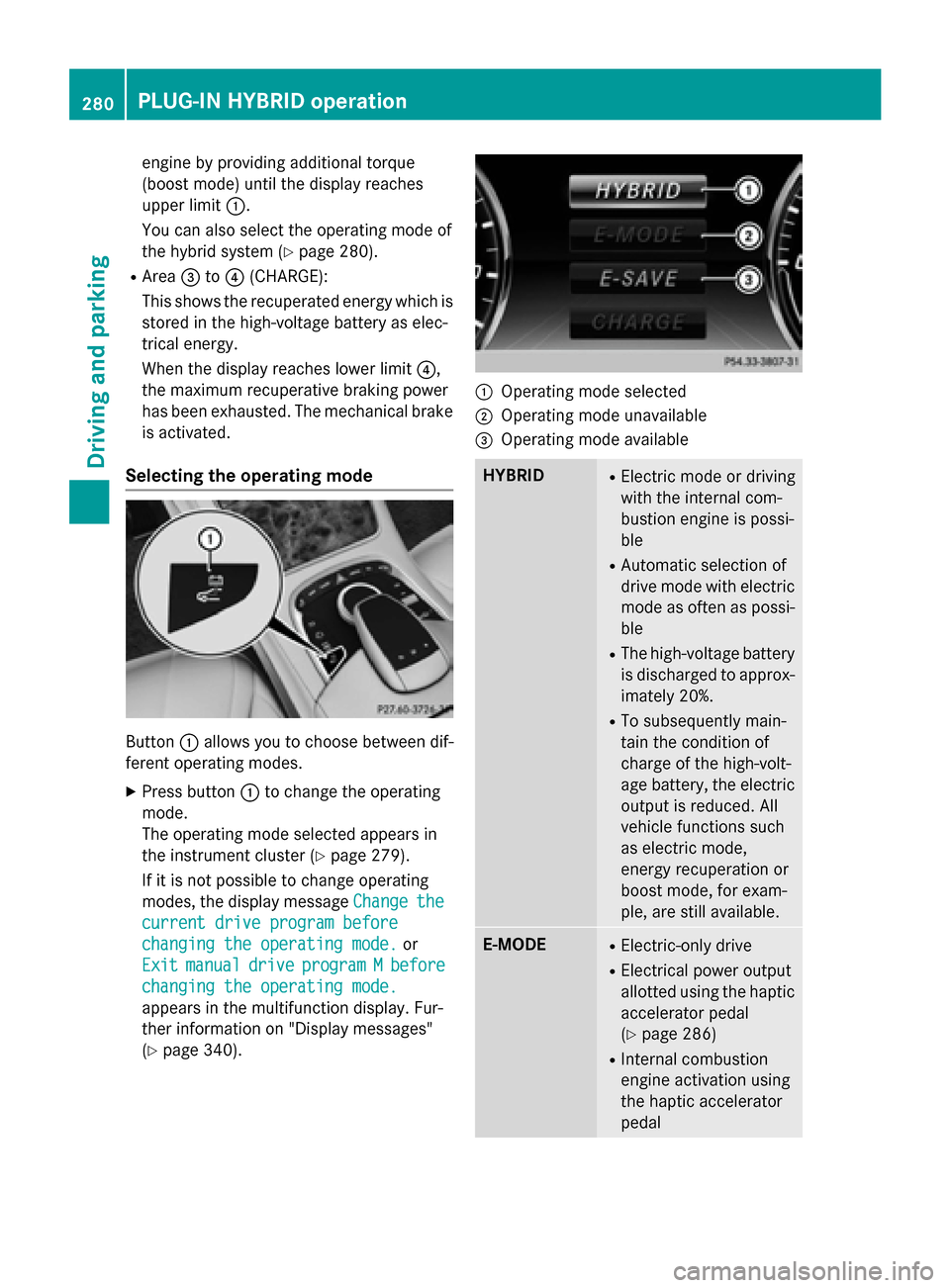
Selecting the operating mode Button
:allows you to choose between dif-
ferent operating modes.
X Press button :to change the operating
mode.
The operating mode selected appears in
the instrument cluster (Y page 279).
If it is not possible to change operating
modes, the display message Change
Change the the
current drive program before
current drive program before
changing the operating mode. changing the operating mode. or
Exit
Exit manual
manual drive
driveprogram
program M
Mbefore
before
changing the operating mode.
changing the operating mode.
appears in the multifunction display. Fur-
ther information on "Display messages"
(Y page 340). :
Operating mode selected
; Operating mode unavailable
= Operating mode available HYBRID R
Electric mode or driving
with the internal com-
bustion engine is possi-
ble
R Automatic selection of
drive mode with electric
mode as often as possi-
ble
R The high-voltage battery
is discharged to approx-imately 20%.
R To subsequently main-
tain the condition of
charge of the high-volt-
age battery, the electric
output is reduced. All
vehicle functions such
as electric mode,
energy recuperation or
boost mode, for exam-
ple, are still available. E-MODE R
Electric-only drive
R Electrical power output
allotted using the haptic
accelerator pedal
(Y page 286)
R Internal combustion
engine activation using
the haptic accelerator
pedal 280
PLUG-IN HYBRID operationDriving and parking