2015 MERCEDES-BENZ S-CLASS COUPE engine
[x] Cancel search: enginePage 174 of 417
If you switch the engine off with the trans-
mission in position Ror D, the automatic
transmission shifts to Nautomatically.
With the key: if you then open the driver's
door or the front-passenger door or remove
the key from the ignition, the automatic trans- mission shifts to Pautomatically.
With the Start/Stop button: if you then
open the driver's door or the front-passenger
door, the automatic transmission shifts to P
automatically.
If you want the automatic transmission to
remain in neutral N, e.g. when having the
vehicle cleaned in an automatic car wash with a towing system:
With the key:
X Switch the ignition on.
X Depress the brake pedal and keep it
depressed.
X Shift to neutral N.
X Release the brake pedal.
X Release the electric parking brake.
X Switch off the ignition and leave the key in
the ignition lock.
With the Start/Stop button: X Remove the Start/Stop button from the
ignition lock.
X Insert the key into the ignition lock.
X Switch the ignition on.
X Depress the brake pedal and keep it
depressed.
X Shift to neutral N.
X Release the brake pedal.
X Release the electric parking brake.
X Switch off the ignition and leave the key in
the ignition lock. Engaging drive position D X
If the transmission is in position Ror N:
push the DIRECT SELECT lever down past
the first point of resistance.
X If the transmission is in position P: depress
the brake pedal and push the DIRECT
SELECT lever down past the first point of
resistance. Transmission position display
All vehicles (except Mercedes-AMG
vehicles) The current transmission position and drive
program appear in the multifunction display.
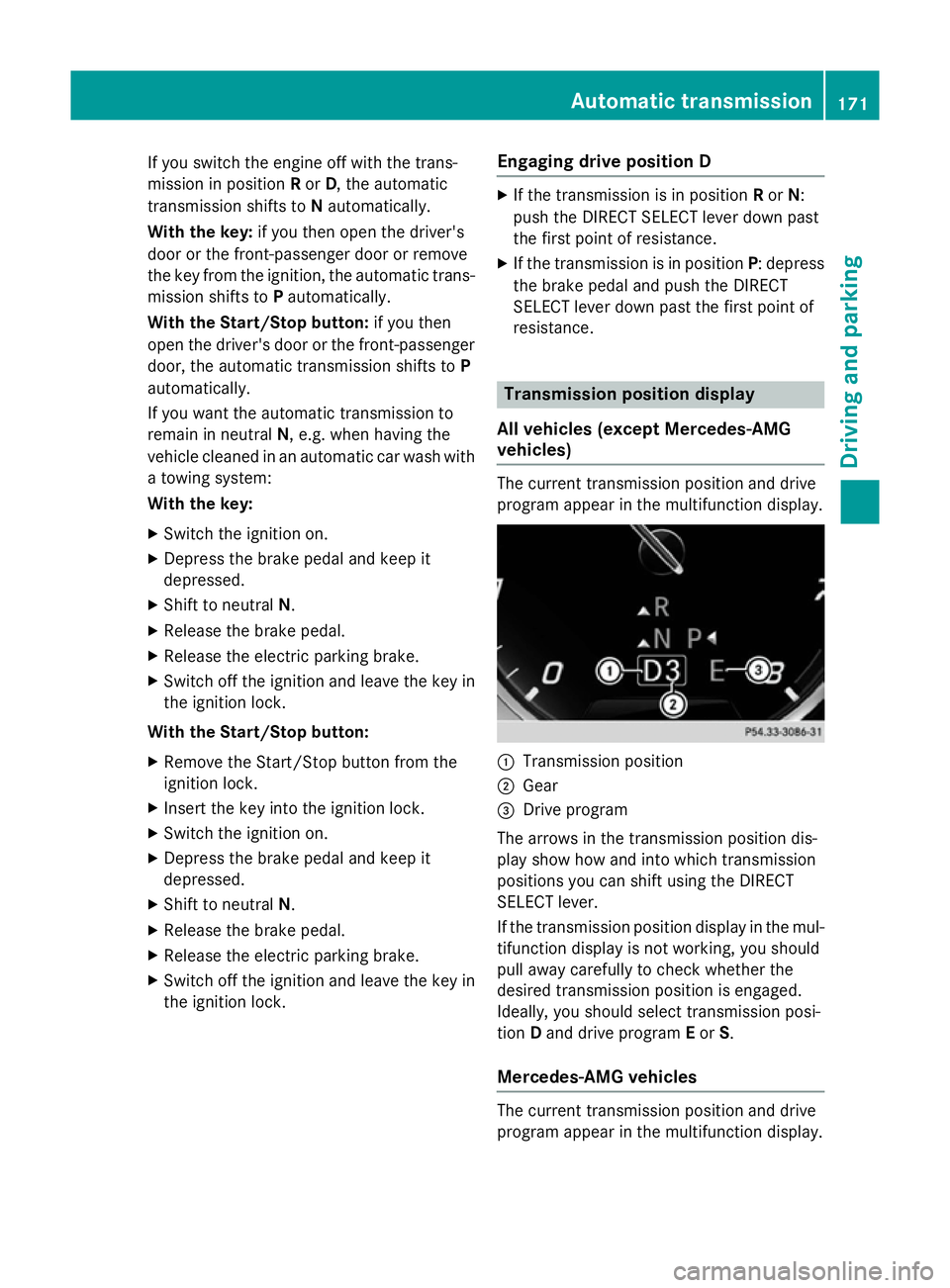
:
Transmission position
; Gear
= Drive program
The arrows in the transmission position dis-
play show how and into which transmission
positions you can shift using the DIRECT
SELECT lever.
If the transmission position display in the mul-
tifunction display is not working, you should
pull away carefully to check whether the
desired transmission position is engaged.
Ideally, you should select transmission posi-
tion Dand drive program Eor S.
Mercedes-AMG vehicles The current transmission position and drive
program appear in the multifunction display. Automatic transmission
171Driving and parking Z
Page 175 of 417
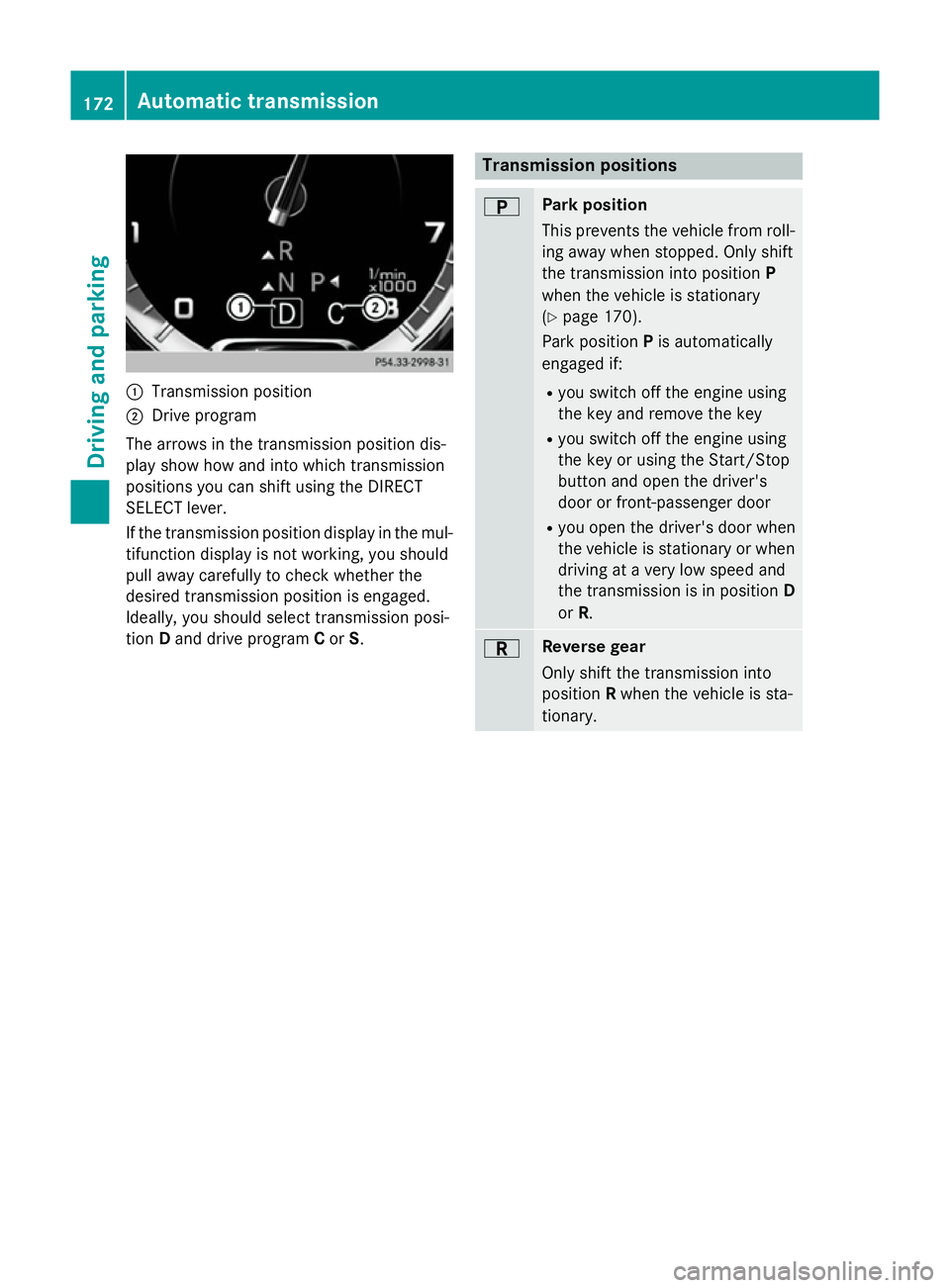
:
Transmission position
; Drive program
The arrows in the transmission position dis-
play show how and into which transmission
positions you can shift using the DIRECT
SELECT lever.
If the transmission position display in the mul-
tifunction display is not working, you should
pull away carefully to check whether the
desired transmission position is engaged.
Ideally, you should select transmission posi-
tion Dand drive program Cor S. Transmission positions
B Park position
This prevents the vehicle from roll-
ing away when stopped. Only shift
the transmission into position P
when the vehicle is stationary
(Y page 170).
Park position Pis automatically
engaged if:
R you switch off the engine using
the key and remove the key
R you switch off the engine using
the key or using the Start/Stop
button and open the driver's
door or front-passenger door
R you open the driver's door when
the vehicle is stationary or when
driving at a very low speed and
the transmission is in position D
or R. C Reverse gear
Only shift the transmission into
position
Rwhen the vehicle is sta-
tionary. 172
Automatic transmissionDriving and parking
Page 176 of 417
A Neutral
Do not shift the transmission to
N
while driving. Otherwise, the auto-
matic transmission could be dam-
aged.
If ESP ®
is deactivated or faulty:
shift the transmission to position N
if the vehicle is in danger of skid-
ding, e.g. on icy roads.
If you switch the engine off with the
transmission in position Ror D, the
automatic transmission shifts to N
automatically.
! Rolling in neutral
Ncan lead to
damage to the transmission. 7 Drive
The automatic transmission
changes gear automatically. All
forward gears are available.
Driving tips
Changing gear The automatic transmission shifts to the indi-
vidual gears automatically when it is in trans-
mission position D. Gearshifting is deter-
mined by:
R the selected drive program (Y page 173)
R the position of the accelerator pedal
(Y page 173)
R the road speed
Accelerator pedal position Your style of driving influences how the auto-
matic transmission shifts gear:
R little throttle: early upshifts
R more throttle: late upshifts Kickdown Using kickdown for maximum acceleration:
X Depress the accelerator pedal beyond the
pressure point.
The transmission shifts to a lower gear
depending on the engine speed.
X Ease off the accelerator pedal once the
desired speed is reached.
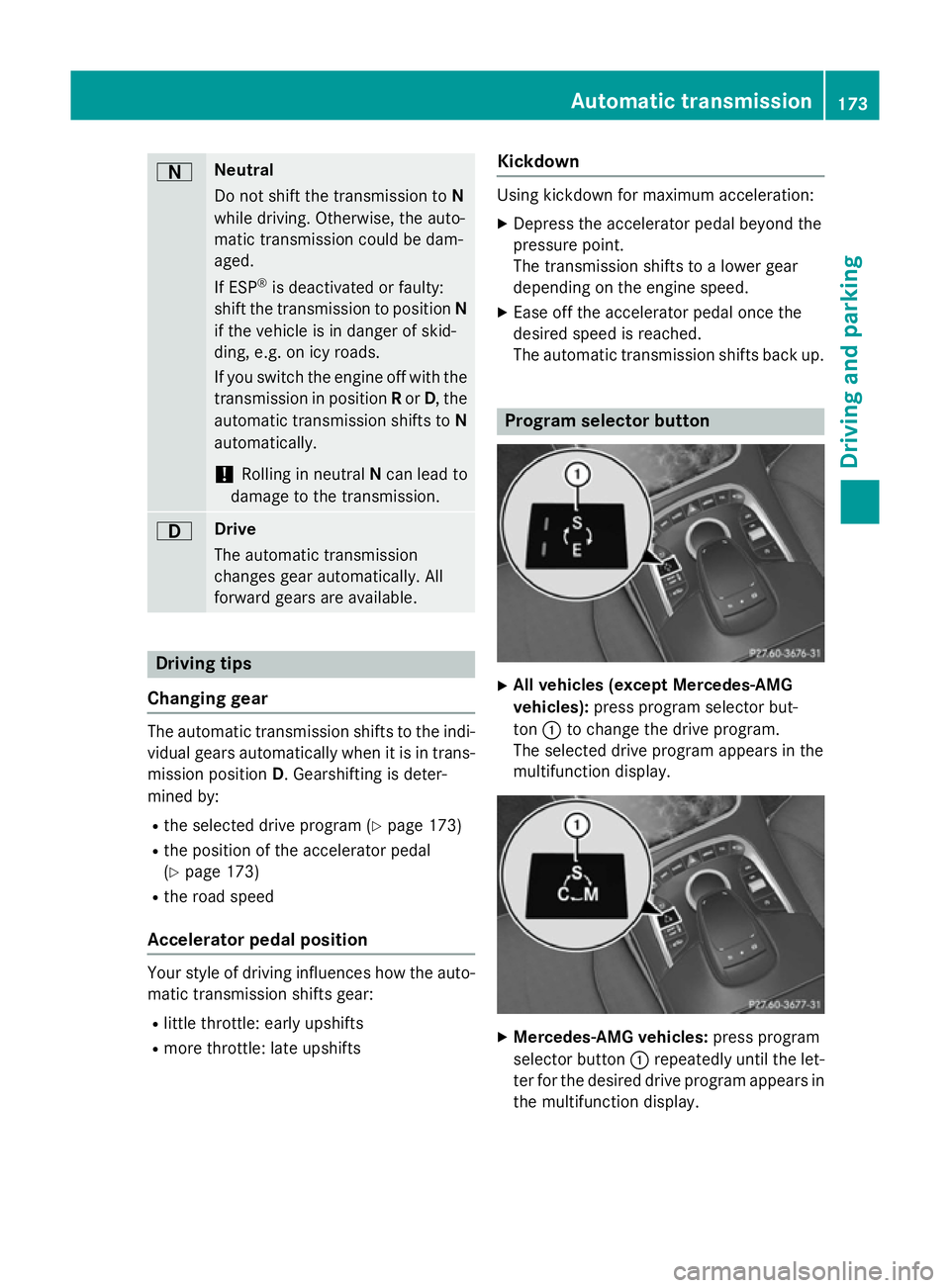
The automatic transmission shifts back up. Program selector button
X
All vehicles (except Mercedes-AMG
vehicles): press program selector but-
ton :to change the drive program.
The selected drive program appears in the
multifunction display. X
Mercedes-AMG vehicles: press program
selector button :repeatedly until the let-
ter for the desired drive program appears in
the multifunction display. Automatic transmission
173Driving and parking Z
Page 177 of 417
The program selector button influences:
R the drive program (Y page 174)
R the engine management
On Mercedes-AMG vehicles, drive program E
is called drive program C.
The automatic transmission switches to auto-
matic drive program E(drive program Cin
Mercedes-AMG vehicles).
All vehicles (except Mercedes-AMG vehi-
cles) E
Economy Comfortable, economical
driving
S
Sport Sporty driving style
You can also activate manual drive program
M
using the steering wheel gearshift paddles
(Y page 175). In manual drive program M,
you can briefly change gear yourself by using
the steering wheel gearshift paddles.
Mercedes-AMG vehicles C
Controlled
Efficiency Comfortable, economical
driving
S
Sport Sporty driving style
M
Manual Manual gearshifting
Permanent drive program
Mis only available
for Mercedes-AMG vehicles.
Further information about permanent drive
program M(Y page 176).
You can also activate manual drive program
M using the steering wheel gearshift paddles
(Y page 175). In manual drive program M,
you can briefly change gear yourself by using
the steering wheel gearshift paddles.
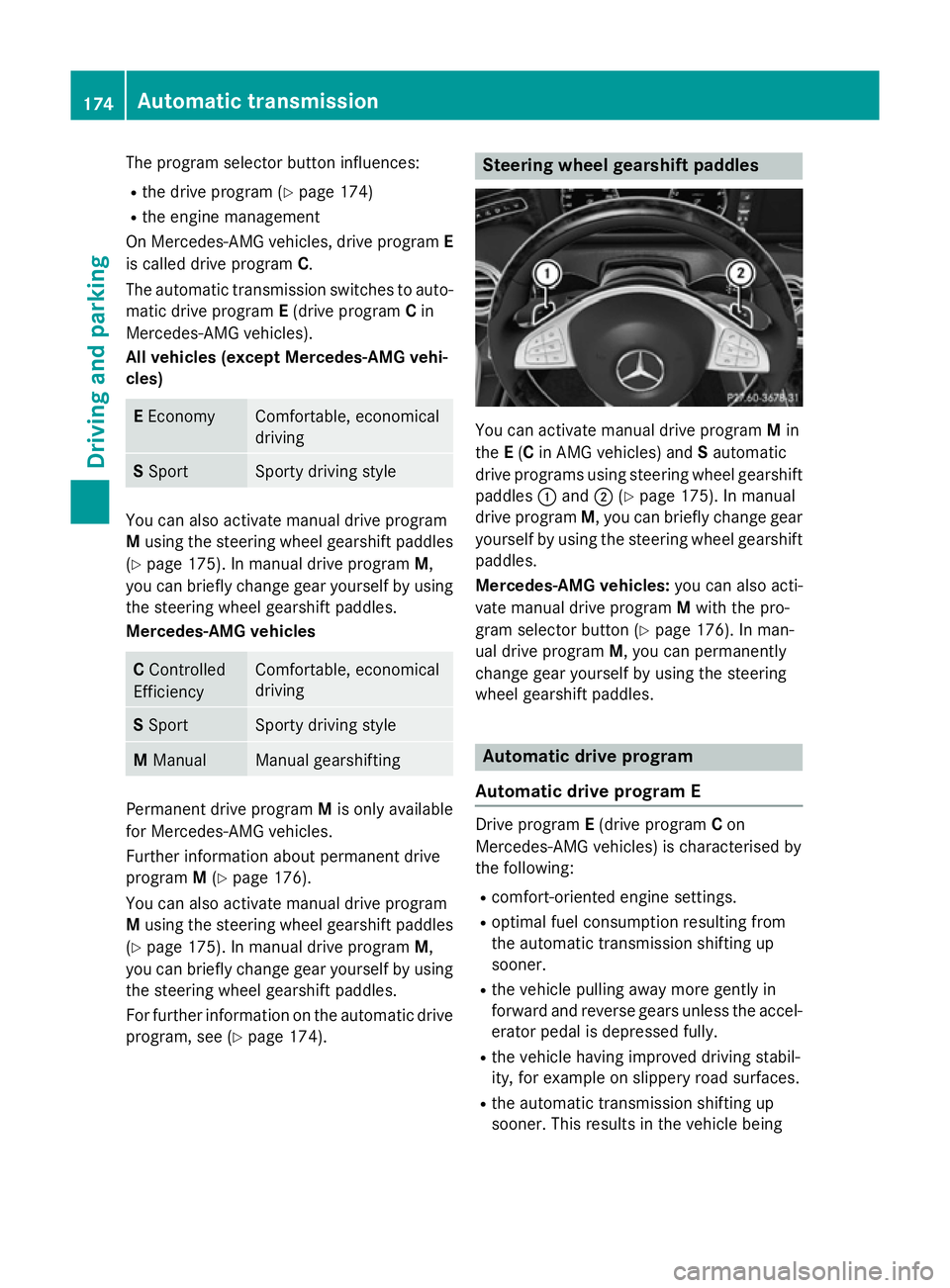
For further information on the automatic drive program, see (Y page 174). Steering wheel gearshift paddles
You can activate manual drive program
Min
the E(C in AMG vehicles) and Sautomatic
drive programs using steering wheel gearshift paddles :and ;(Ypage 175). In manual
drive program M, you can briefly change gear
yourself by using the steering wheel gearshift
paddles.
Mercedes-AMG vehicles: you can also acti-
vate manual drive program Mwith the pro-
gram selector button (Y page 176). In man-
ual drive program M, you can permanently
change gear yourself by using the steering
wheel gearshift paddles. Automatic drive program
Automatic drive program E Drive program
E(drive program Con
Mercedes-AMG vehicles) is characterised by
the following:
R comfort-oriented engine settings.
R optimal fuel consumption resulting from
the automatic transmission shifting up
sooner.
R the vehicle pulling away more gently in
forward and reverse gears unless the accel-
erator pedal is depressed fully.
R the vehicle having improved driving stabil-
ity, for example on slippery road surfaces.
R the automatic transmission shifting up
sooner. This results in the vehicle being 174
Automatic transmissionDriving and parking
Page 178 of 417
driven at lower engine speeds and the
wheels being less likely to spin.
Automatic drive program S Drive program
Sis characterised by the fol-
lowing:
R sporty engine settings
R the vehicle pulling away in first gear.
R the automatic transmission shifting up
later.
R as a result of the later automatic transmis-
sion shift points, the fuel consumption pos-sibly being higher.
Manual drive program M General notes
In this drive program, you can briefly change
gear yourself by using the steering wheel
gearshift paddles. The transmission must be
in position
D.
You can activate manual drive program Min
the E(C in Mercedes-AMG vehicles) and S
automatic drive programs.
Mercedes-AMG vehicles: as well as tempo-
rary drive program M, you can also activate
permanent drive program M. Further infor-
mation about permanent drive program M
(Y page 176).
Activating
X Shift the transmission to position D.
X Pull the left or right steering wheel gearshift
paddle (Y page 174).
Manual drive program Mis temporarily acti-
vated.
All vehicles (except Mercedes-AMG
vehicles:) M and the selected gear appear
in the multifunction display.
Shifting gears
If you pull on the left or right-hand steering
wheel gearshift paddle, the automatic trans-
mission switches to manual drive program M
for a limited amount of time. Depending on which gearshift paddle is pulled, the auto-
matic transmission immediately shifts into
the next gear up or down, if permitted.
X To shift up: pull the right-hand steering
wheel gearshift paddle (Y page 174).
The automatic transmission shifts up to the
next gear.
If the maximum engine speed on the cur-
rently engaged gear is reached and you
continue to accelerate, the automatic
transmission automatically shifts up in
order to prevent engine damage.
Mercedes-AMG vehicles: the automatic
transmission will not shift up to the next
gear when the engine speed is very low.
X To shift down: pull on the left-hand steer-
ing wheel gearshift paddle (Y page 174).
The automatic transmission shifts down to
the next gear.
If the engine exceeds the maximum engine speed when shifting down, the automatic
transmission protects against engine dam- age by not shifting down.
Automatic downshifting occurs when
coasting.
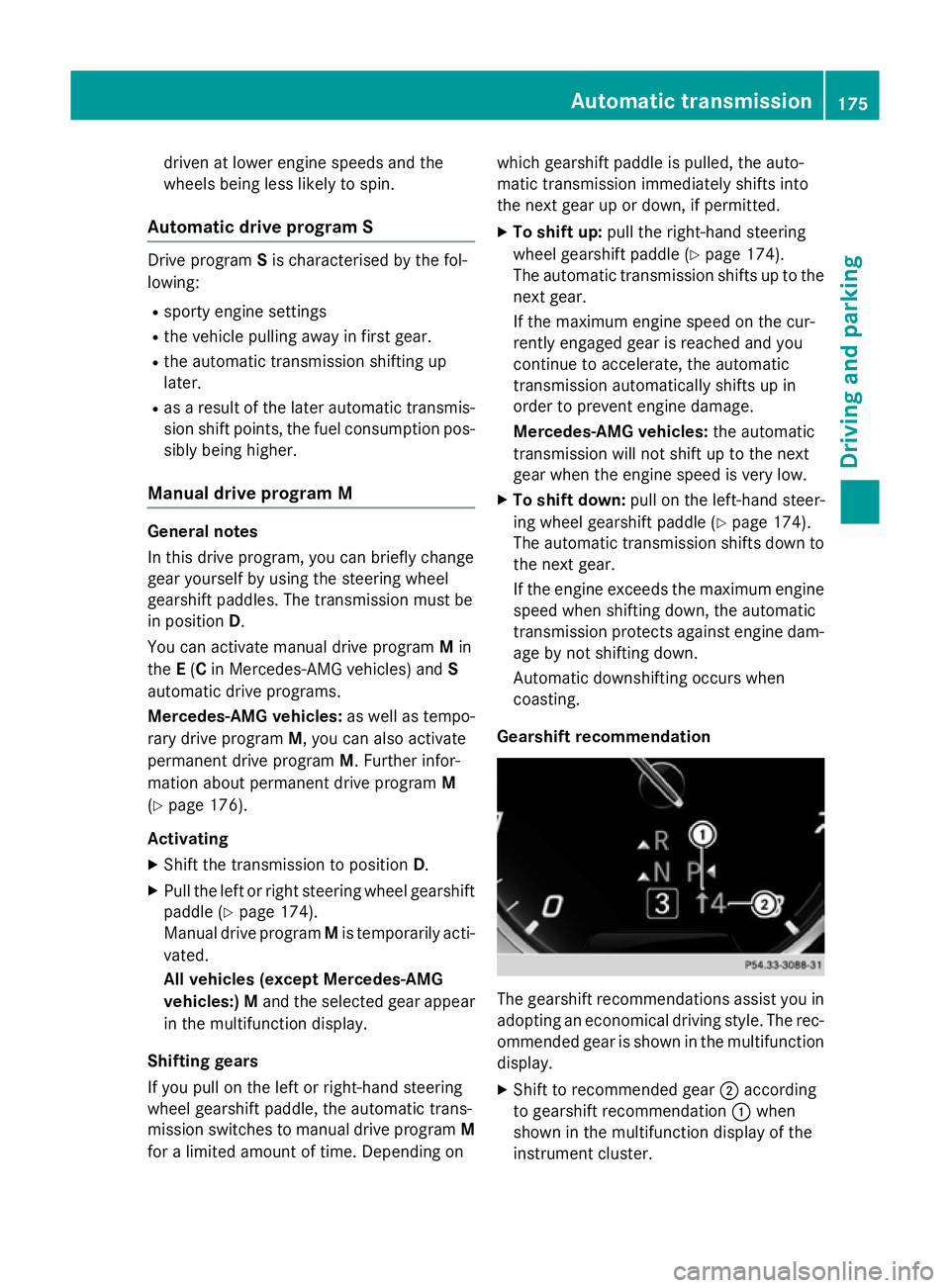
Gearshift recommendation The gearshift recommendations assist you in
adopting an economical driving style. The rec- ommended gear is shown in the multifunction
display.
X Shift to recommended gear ;according
to gearshift recommendation :when
shown in the multifunction display of the
instrument cluster. Automatic transmission
175Driving and parking Z
Page 179 of 417
Deactivating
If you have activated manual drive program
M, it will remain active for a certain amount of
time. Under certain conditions the minimum
amount of time is extended, e.g. in the case of lateral acceleration, during an overrun phase or when driving on steep terrain.
When manual drive program Mis deactivated,
the automatic transmission shifts into the
automatic drive program that was last selec-
ted.
You can also deactivate manual drive pro-
gram Myourself:
X Pull on the right-hand steering wheel gear-
shift paddle and hold it in place
(Y page 174).
or
X Use the DIRECT SELECT lever to shift the
transmission position.
or
X Use the program selector button to change
the drive program (Y page 173).
Manual drive program Mis deactivated.
The automatic transmission switches to
the previously activated drive program E
(drive program Con Mercedes-AMG vehi-
cles) or S. Manual drive program (Mercedes-
AMG vehicles)
General notes In this drive program, you can permanently
change gear yourself by using the steering
wheel gearshift paddles. The transmission
must be in position
D.
Manual drive program Mdiffers from drive
program Swith regard to spontaneity,
responsiveness and the smoothness of the
gear changes.
As well as this permanent drive program M,
you can also activate temporary drive pro-
gram M(Y page 175). Activating the manual drive program In manual drive program
M, you can change
gear yourself using the steering wheel gear-
shift paddles if the transmission is in position
D. The current drive program and the engaged
gear are shown in the multifunction display.
X Press the program selector button
(Y page 173) repeatedly until Mappears in
the multifunction display.
Upshifting !
In manual gearshift program
M, the auto-
matic transmission does not shift up auto-
matically even when the engine limiting
speed for the current gear is reached.
When the engine limiting speed is reached, the fuel supply is cut to prevent the engine
from overrevving. You must make sure that the engine speed does not reach the red
area of the rev counter. Otherwise, there is
a risk of engine damage. :
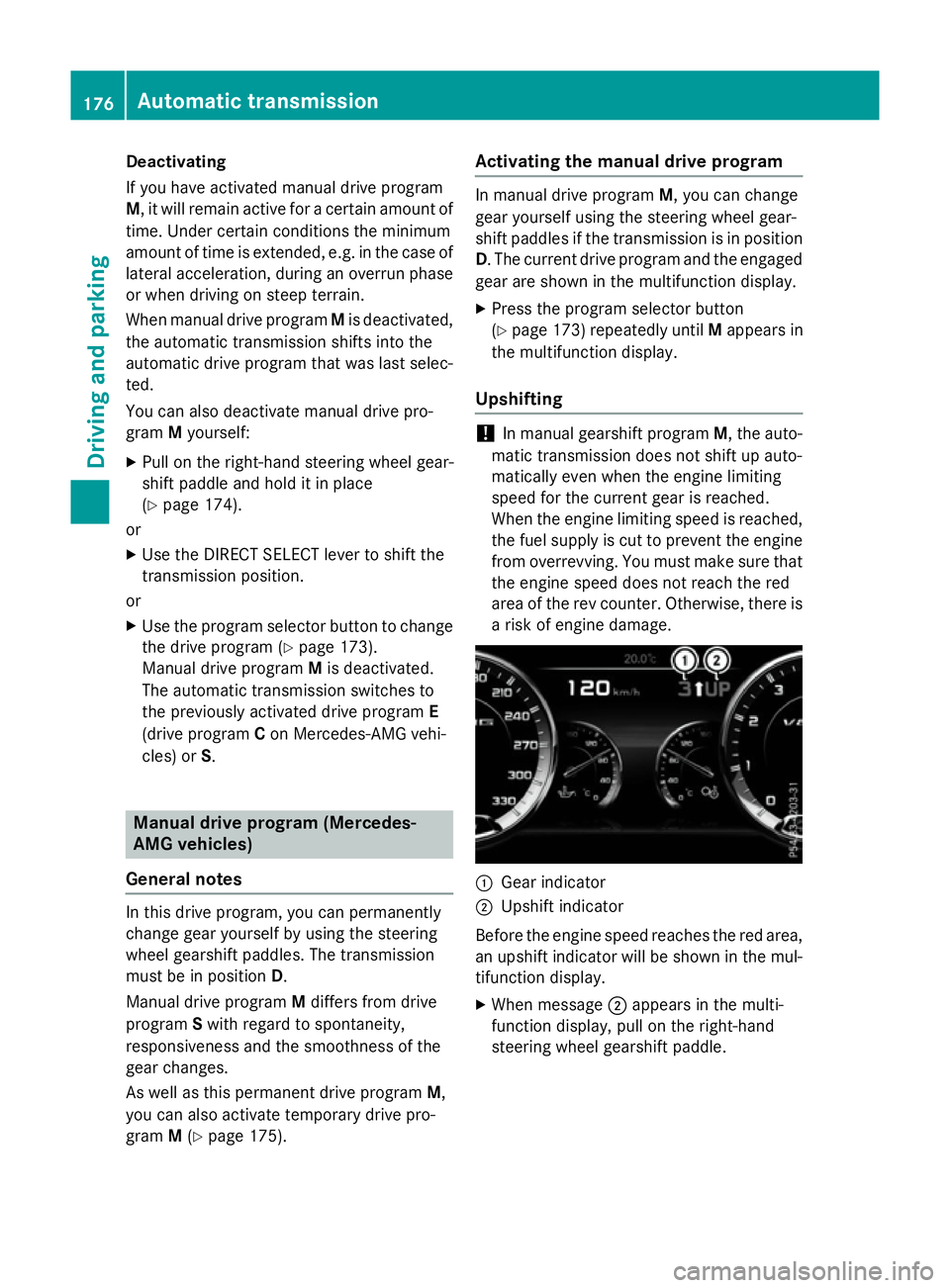
Gear indicator
; Upshift indicator
Before the engine speed reaches the red area, an upshift indicator will be shown in the mul-
tifunction display.
X When message ;appears in the multi-
function display, pull on the right-hand
steering wheel gearshift paddle. 176
Automatic transmissionDriving and pa
rking
Page 181 of 417
Problems with the transmission
Problem
Possible causes/consequences and
M
MSolutions The transmission has
problems shifting gear. The transmission is losing oil.
X Have the transmission checked at a qualified specialist work-
shop immediately. 7G-TRONIC:
The acceleration ability
is deteriorating.
The transmission no
longer changes gear.
The transmission is in emergency mode.
It is only possible to shift into
secondgear and reverse gear.
X Stop.
X Shift the transmission to position P.
X Switch off the engine.
X Wait at least ten seconds before restarting the engine.
X Shift the transmission to position Dor R.
X Have the transmission checked at a qualified specialist work-
shop immediately. 9G-TRONIC:
The acceleration ability
is deteriorating.
The transmission no
longer changes gear.
The transmission is in emergency mode.
It is only partly possible to engage the gears or the transmission is
in position N.
X Stop.
X Shift the transmission to position P.
X Switch off the engine.
X Wait at least ten seconds before restarting the engine.
X Shift the transmission to position Dor R.
X Have the transmission checked at a qualified specialist work-
shop immediately. Refuelling
Important safety notes
G
WARNING
Fuel is highly flammable. If you handle fuel
incorrectly, there is a risk of fire and explo-
sion.
You must avoid fire, naked flames, creating
sparks and smoking. Switch off the engine
and, if applicable, the auxiliary heating before refuelling. G
WARNING
Fuels are poisonous and hazardous to health. There is a danger of injury.
Do not swallow fuel or let it come into contact
with skin, eyes or clothing. Do not inhale fuel
vapours. Keep fuels out of the reach of chil-
dren. 178
RefuellingDriving and parking
Page 182 of 417
If you or others come into contact with fuel,
observe the following:
R Wash the fuel off any affected areas of skin
with water and soap immediately.
R If you get fuel in your eyes, rinse them thor-
oughly with clean water immediately. Seek
immediate medical attention.
R If fuel is swallowed, seek immediate medi-
cal attention. Do not induce vomiting.
R Change any clothing that has come into
contact with fuel immediately. G
WARNING
Electrostatic charge can cause sparks and
thereby ignite fuel vapours. There is a risk of
fire and explosion.
Always touch the vehicle body before opening the fuel filler flap or touching the fuel pump
nozzle. This discharges any electrostatic
charge that may have built up.
Do not get into the vehicle again during the
refuelling process. Otherwise, electrostatic
charge could build up again.
! Do not use diesel to refuel vehicles with a
petrol engine. Do not switch on the ignition if you accidentally refuel with the wrong
fuel. Otherwise, the fuel will enter the fuel
system. Even small amounts of the wrong
fuel can result in damage to the fuel system
and the engine. Notify a qualified specialist
workshop and have the fuel tank and fuel
lines drained completely.
! Overfilling the fuel tank could damage the
fuel system.
! Take care not to spill any fuel on painted
surfaces. You could otherwise damage the
paintwork.
! Use a filter when adding fuel from a fuel
can. The fuel lines and/or the fuel injection
system could otherwise be blocked by par- ticles from the fuel can. If you overfill the fuel tank, some fuel may
spray out when you remove the fuel pump
nozzle.
Further information on fuel and fuel quality
(Y
page 405). Refuelling
General notes Observe the important safety notes
(Y
page 178).
If you unlock/lock the vehicle from the out-
side, the fuel filler flap also unlocks/locks.
The position of the 8fuel filler cap is dis-
played in the instrument cluster. The arrow
next to the filling pump indicates the side of
the vehicle.
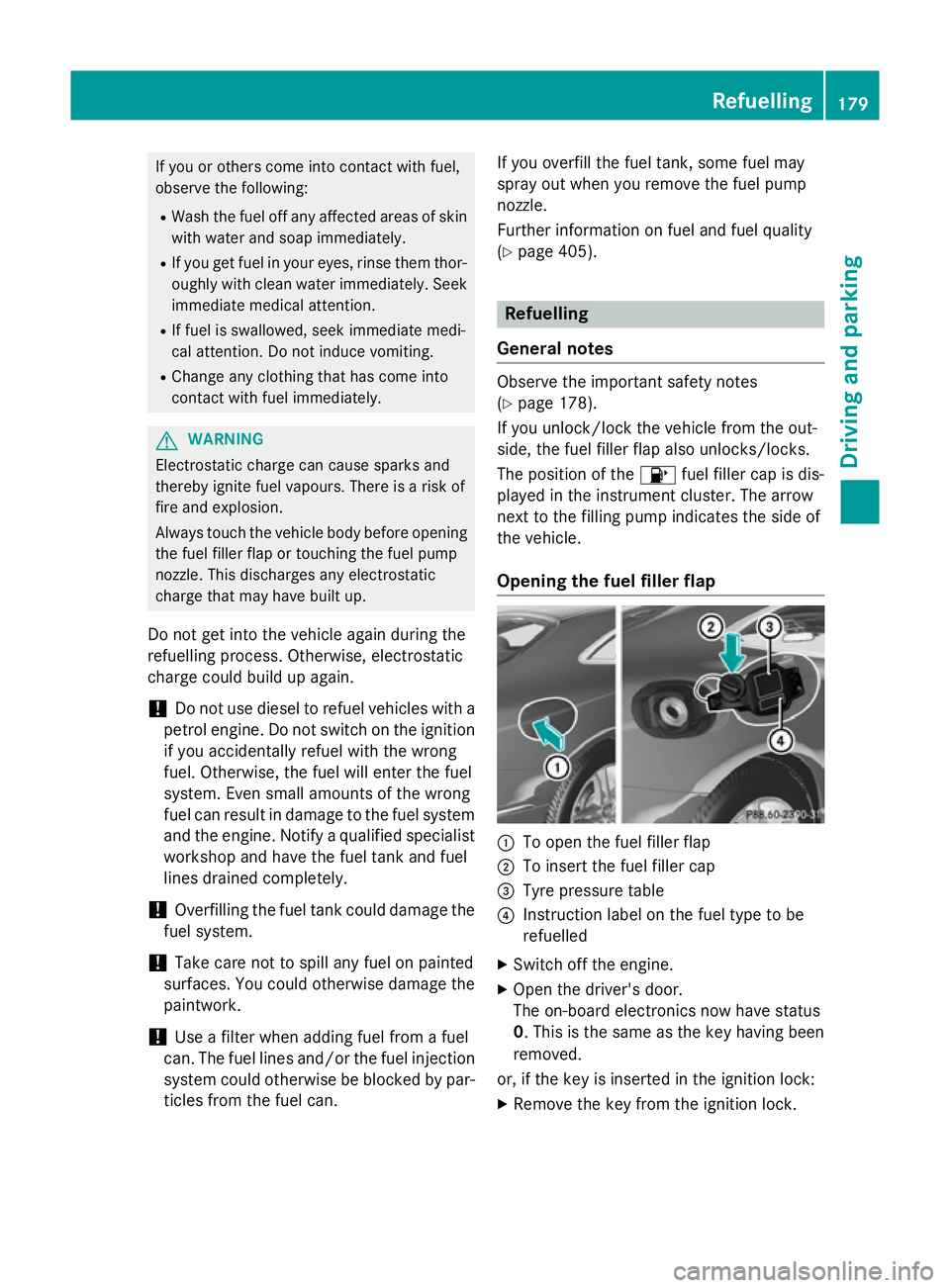
Opening the fuel filler flap :
To open the fuel filler flap
; To insert the fuel filler cap
= Tyre pressure table
? Instruction label on the fuel type to be
refuelled
X Switch off the engine.
X Open the driver's door.
The on-board electronics now have status
0. This is the same as the key having been
removed.
or, if the key is inserted in the ignition lock: X Remove the key from the ignition lock. Refuelling
179Driving and parking Z