2015 MERCEDES-BENZ S-Class ad blue
[x] Cancel search: ad bluePage 230 of 298

see a corresponding icon in the main dis-
play.
i The
Normal Track Sequence
Normal Track Sequence option is
automatically selected when you change
the disc you are currently listening to or
when you select a different medium. If an
option is selected, it remains selected after COMAND is switched on or off.
The following options are available: R Normal Track Sequence
Normal Track Sequence: the tracks are
played in the normal order (e.g. track 1, 2, 3
etc.).
R Random Medium Random Medium: all the tracks on the
medium are played in random order.
R Random
Random Track
TrackList
List: the tracks in the cur-
rently active track list are played in random
order. Bluetooth
®
audio mode Connecting Bluetooth
®
audio devices
Prerequisites X
Activate the Bluetooth ®
function in
COMAND (Y page 51).
Bluetooth ®
audio mode requires a Blue-
tooth ®
-capable audio device.
Check your Bluetooth ®
audio device for the
following (see the Bluetooth ®
audio device's
operating instructions):
R Bluetooth ®
audio profile
The Bluetooth ®
audio device must support
the A2DP and AVRCP Bluetooth ®
audio
profiles.
R Bluetooth ®
visibility
Certain Bluetooth ®
audio devices do not
just require activation of the Bluetooth ®
function. In addition, your device must be
made "visible" to other devices.
R Bluetooth ®
device name
This device name is predetermined but can
usually be changed. To make a clear selec- tion of the Bluetooth
®
device possible,
Mercedes-Benz recommends that you cus- tomize the device name (see the Blue-
tooth ®
audio device's operating instruc-
tions).
i A2DP (
Advanced AudioDistribution
Profile): Bluetooth ®
audio profile for audio
data transmission
AVRCP (Audio VideoRemote Control
Profile): Bluetooth ®
audio profile for audio
data playback.
i The Bluetooth ®
device must be visible for
authorization. After authorization,
COMAND even finds the Bluetooth ®
device
when it is not visible.
X The Bluetooth ®
function in COMAND must
be activated (Y page 51).
General notes Before using your Bluetooth
®
audio device
with COMAND for the first time, you will need
to authorize it.
When you authorize a new Bluetooth ®
audio
device, it is connected automatically. Con-
nection involves first searching for a Blue-
tooth ®
audio device and then authorizing it.
You can authorize up to fifteen Bluetooth ®
devices.
i If you authorize a mobile phone that sup-
ports Bluetooth ®
audio, the A2DP and
AVRCP Bluetooth ®
audio profiles are con-
nected automatically.
The mobile phone is then entered:
R in the Bluetooth ®
telephone list
(Y page 139)
R in the Bluetooth ®
device list
(Y page 229)
Mercedes-Benz recommends authorizing a
mobile phone in Bluetooth ®
telephony
(Y page 140). 228
Bluetooth ®
audio modeMedia
Page 231 of 298

i
If the mobile phone that is connected only
supports two Bluetooth ®
profiles at the
same time, COMAND functions may
behave as follows:
R when connecting to the Internet, play-
back is stopped on the Bluetooth ®
audio
device.
R when starting playback on the Blue-
tooth ®
audio device, the Internet con-
nection is ended. Searching for and authorizing a Blue-
tooth
®
audio device
Switching to Bluetooth ®
audio mode
X Press the 00FDbutton.
X To select Bluetooth Audio Bluetooth Audio in the menu:
turn and press the controller.
A menu appears.
If you see the No Bluetooth Audio No Bluetooth Audio
Device Connected
Device Connected message, you will
need to authorize the Bluetooth ®
audio
device first.
X To select Options
Options in the Bluetooth ®
audio
menu: slide 005200C5and press the controller.
X To select Bluetooth Audio Devices
Bluetooth Audio Devices:
press the controller.
A new menu appears. 0043
Bluetooth ®
audio player within range and
already authorized
0044 Newly detected mobile phone with Blue-
tooth ®
audio mode in range The Bluetooth
®
device list displays all author-
ized devices, whether they are within range or not. After a device search, devices which arewithin range but not authorized are also dis-
played.
Searching for Bluetooth ®
audio
X To select Search for Audio Devices Search for Audio Devices:
press the controller.
A display with text appears. X
Select Start Search Start Search.
COMAND searches for Bluetooth ®
audio
devices within range and adds them to the
Bluetooth ®
device list.
The duration of the search depends on the number of Bluetooth ®
audio devices within
range and their characteristics.
Authorizing Bluetooth ®
audio
X Select a Bluetooth ®
audio device that has
not yet been authorized from the list: turn
and press the controller.
Authorization starts.
Depending on the Bluetooth ®
audio device
used, you now have two options for con-
tinuing with authorization.
Option 1: entering the passkey
X You can find information on this in the
"Authorizing (registering) a mobile phone"
section (Y page 140).
After successful authorization, the Blue-
tooth ®
audio device is connected and
starts playing. Bluetooth
®
audio mode 229Media Z
Page 232 of 298

Option 2: Secure Simple Pairing
i The Bluetooth ®
audio device must sup-
port Bluetooth ®
version 2.1 for connection
via Secure Simple Pairing. COMAND cre-
ates a six-digit code, which is displayed on both devices that are to be connected
For some Bluetooth ®
audio devices, the
pairing must be confirmed within 10 sec-
onds.
X If the number code displayed on COMAND
and on the Bluetooth ®
audio device is the
same, select Yes
Yes: press the controller.
If you select Yes
Yes, authorization continues
and the Bluetooth ®
audio device is con-
nected. Playback starts.
If you select No No, authorization is canceled. External authorization
If COMAND does not find your Bluetooth ®
audio device, this may be due to particular
security settings on your Bluetooth ®
audio
device. In this case, check whether your Blue-
tooth ®
audio device can locate COMAND.
The Bluetooth ®
device name for COMAND is
MB Bluetooth
MB Bluetooth.
X Switch on Bluetooth ®
audio mode
(Y page 232).
X To select Options Options: slide 005200C5and press
the controller.
X To select Bluetooth Audio Devices Bluetooth Audio Devices:
press the controller.
X To select Connect via Audio Device
Connect via Audio Device:
turn and press the controller. Authorizing
X Start the authorization on the Bluetooth ®
audio device; see the operating instruc-
tions of the Bluetooth ®
audio device.
After successful authorization, the Blue-
tooth ®
audio device is connected and
starts playing.
With some Bluetooth ®
audio devices, play-
back must first be started on the device itself
so that COMAND can play the audio files. Reconnecting a Bluetooth
®
audio
device
The Bluetooth ®
audio profiles are connected
automatically under the following circum-
stances:
R one of the last two mobile phones to have
been connected has also been used as a
Bluetooth ®
audio player (if this function is
supported by the mobile phone).
R the mobile phone is automatically con-
nected. The Bluetooth ®
audio player is then
connected.
i For an automatic connection with
COMAND, the telephone must be within
range.
For most Bluetooth ®
audio devices, the
"automatic connection" must be activated
by checking a box. Depending on the
device used, this prompt often takes place
when authorizing (see the Bluetooth ®
audio
device operating instructions).
If the No Bluetooth Audio Device Con‐
No Bluetooth Audio Device Con‐
nected nected message appears, you have two
options to reconnect the Bluetooth ®
audio
device.
Option 1:
X Connect Device Connect Device in the basic display:
press the controller.
If COMAND can locate the Bluetooth ®
audio device, it will be connected and will
start playing. 230
Bluetooth ®
audio modeMedia
Page 233 of 298

Option 2:
X To select Options
Options: slide 005200C5and press
the controller.
X To select Bluetooth Audio Devices
Bluetooth Audio Devices:
press the controller.
X To select a Bluetooth ®
audio device: turn
and press the controller.
If the Bluetooth ®
audio device has been
authorized, playback starts. Bluetooth
®
audio device and simulta-
neous search for mobile phones
i When searching for a mobile phone or a
new Bluetooth ®
audio device, the connec-
tion to an already activated Bluetooth ®
audio device is separated (Y page 139).
In the Bluetooth ®
audio basic display, you will
see the No
No Bluetooth Bluetooth Audio
AudioDevice
Device Con‐
Con‐
nected
nected message and the Connect Device
Connect Device
menu item cannot be selected. Displaying details
X To select a Bluetooth ®
audio device from
the Bluetooth ®
device list: turn the control-
ler.
X To select the symbol to the right of the
Bluetooth ®
audio device: slide 00520096the con-
troller.
X To select Details Details: turn and press the con-
troller.
The following information concerning the
selected mobile phone is shown:
R Bluetooth ®
name
R Bluetooth ®
address
R availability status (shown after an
update)
R authorization status
X To close the detailed display: press the
0038 button. De-authorizing (deregistering) a Blue-
tooth
®
audio device
X To select a Bluetooth ®
audio device from
the Bluetooth ®
device list: turn the control-
ler.
X To select the symbol to the right of the
Bluetooth ®
audio device: slide 00520096and
press the controller.
X To select Deauthorize Deauthorize: press the control-
ler.
A prompt appears asking whether you
really wish to deauthorize this device.
X To select Yes YesorNo
No: turn and press the con-
troller.
If you select Yes Yes, the device will be deleted
from the Bluetooth ®
device list.
If you select No
Nothe process is canceled.
i Before re-authorizing the Bluetooth ®
audio device, you should also delete the
device name MB Bluetooth
MB Bluetooth from your
Bluetooth ®
audio device's Bluetooth ®
list
(see the Bluetooth ®
audio device's operat-
ing instructions). Switching to Bluetooth
®
audio mode
Basic display 0043
Audio transmission status (depending on
the Bluetooth ®
audio device, also title
name and artist)
0044 Data medium position in the media list
0087 Sound settings
0085 Device list Bluetooth
®
audio mode 231Media Z
Page 234 of 298

0083
To stop 00CFor start 00D0playback
0084 Name of the connected Bluetooth ®
audio
device (example)
006B Options menu
Some mobile phones only support two Blue-
tooth ®
profiles at the same time (e.g. Hands-
Free Profile for Bluetooth ®
telephony and
Bluetooth ®
audio profile for audio streaming).
If you activate Bluetooth ®
audio mode and
there is already an active Internet connection, this can cause the connection to be termi-
nated.
Switching to Bluetooth ®
Audio X
Press the 00FDbutton.
X To select Bluetooth Audio
Bluetooth Audio in the menu:
turn and press the controller.
COMAND activates the Bluetooth ®
audio
device. The basic display then appears.
Playback starts.
i If the Bluetooth ®
audio device connected
supports metadata and corresponding data is available, then the artist, track and album
name can be displayed. Starting/stopping playback
X To select Start playback 00D0: turn and
press the controller.
Playback starts. 00CFis selected.
X To stop playback: select00CF.
A message appears. 00D0is selected.
X To continue playback: select00D0.
A message appears. 00CFis selected. Starting playback if the Bluetooth
®
audio device has been stopped During the search for mobile phones, the con-
nection with the Bluetooth ®
audio device is
terminated (Y page 139). In the Bluetooth ®
audio basic display (Y page 232) you will see
the No Bluetooth Audio Device Con‐ No Bluetooth Audio Device Con‐
nected
nected message and the Connect Last
Connect Last
Used
Used Player
Player menu item cannot be selected.
When the search is finished, the Bluetooth ®
audio device can be reconnected.
X To select Start playback: 00D0: slide005200C5
and press the controller.
Playback resumes from the beginning. X
To select Connect Last Used Player Connect Last Used Player:
press the controller.
Depending on the Bluetooth ®
audio device
used, playback starts immediately or you
must start playback manually.
In this case, you will see the Bluetooth Bluetooth
Audio Device Paused
Audio Device Paused message.
i If there is an Internet connection and the
mobile phone that is connected only sup-
ports two Bluetooth ®
profiles at the same 232
Bluetooth ®
audio modeMedia
Page 235 of 298

time, the Internet connection is inter-
rupted.
i The connection to the Bluetooth ®
audio
device can also be interrupted if:
R the connected mobile phone only sup-
ports 2 Bluetooth ®
profiles at the same
time
R you connect to the Internet using
COMAND (Y page 178). Selecting a track
The function is not supported by all Blue-
tooth ®
audio devices.
Some mobile phones impair function with
regard to the following criteria:
R the number of tracks that can be selected
R the time period until the next or previous
track is played
X Switch the multifunction steering wheel to
the media menu (see the vehicle Operator's
Manual).
X To skip forwards or backwards to a
track: briefly press the 0063or0064 but-
ton on the multifunction steering wheel.
X Rapid scroll: press and hold the 0063
or 0064 button on the multifunction steer-
ing wheel until the desired track is reached.
If you press and hold the 0063or0064
buttons, the rapid scrolling speed
increases after a short time.
i In rapid scroll, track names are not
shown, but instead only Track1, Track2 etc.
The playback times for the tracks played
are not displayed. This is available as an
optional function starting with AVRCP Ver-
sion 1.3. There is also no music search
option available with Bluetooth ®
Audio. Selecting playback options
If the Bluetooth ®
audio device supports the
corresponding function, the following options
are available:
R Normal Track Sequence Normal Track Sequence: the tracks are
played in the normal order (e.g. track 1, 2, 3
etc.).
Audio data playback is determined by the
order in which the tracks are written to thedata medium. Alphabetical order is the
most common. Once all the tracks in a
folder have been played, the tracks in the
next folder are played.
R Random Random Track
TrackList
List: the current track list
is played in random order (e.g. 3, 8, 5 etc.).
R Random Medium
Random Medium : all tracks on the data
medium are played in random order (e.g.
track 3, 8, 5 etc.).
Playback options are optional functions
and are not, or only partially, supported by
Bluetooth ®
audio devices.
Selecting playback options
X To select Options Options: turn and press the con-
troller.
X Select Playback Mode
Playback Mode.
A 003B dot indicates the current setting.
X Select the desired option.
If you select Random RandomTrack
TrackList
List, you will
see a corresponding message in the dis-
play/selection window. Increasing the volume on COMAND
X To select Options Options: slide 005200C5and press
the controller.
X To select Volume Volume: turn and press the con-
troller.
A menu appears. The 003Bdot indicates the
current setting.
X Select Standard
Standard orBoost
Boost.
Information on sound settings
(Y page 250). Bluetooth
®
audio mode 233Media Z
Page 291 of 298
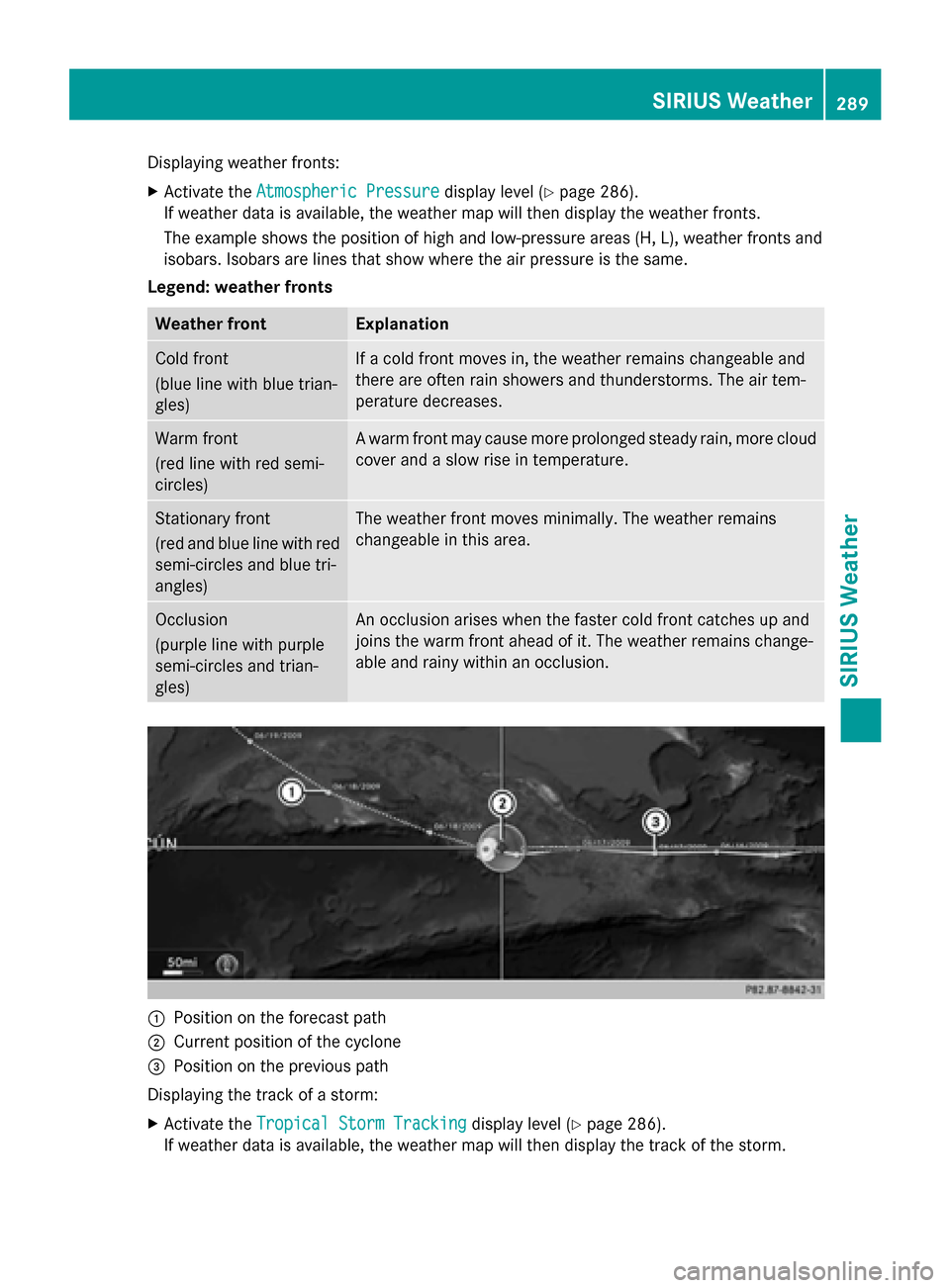
Displaying weather fronts:
X Activate the Atmospheric Pressure
Atmospheric Pressure display level (Ypage 286).
If weather data is available, the weather map will then display the weather fronts.
The example shows the position of high and low-pressure areas (H, L), weather fronts and
isobars. Isobars are lines that show where the air pressure is the same.
Legend: weather fronts Weather front Explanation
Cold front
(blue line with blue trian-
gles) If a cold front moves in, the weather remains changeable and
there are often rain showers and thunderstorms. The air tem-
perature decreases.
Warm front
(red line with red semi-
circles) A warm front may cause more prolonged steady rain, more cloud
cover and a slow rise in temperature. Stationary front
(red and blue line with red
semi-circles and blue tri-
angles) The weather front moves minimally. The weather remains
changeable in this area. Occlusion
(purple line with purple
semi-circles and trian-
gles) An occlusion arises when the faster cold front catches up and
joins the warm front ahead of it. The weather remains change-
able and rainy within an occlusion. 0043
Position on the forecast path
0044 Current position of the cyclone
0087 Position on the previous path
Displaying the track of a storm:
X Activate the Tropical Storm Tracking Tropical Storm Tracking display level (Ypage 286).
If weather data is available, the weather map will then display the track of the storm. SIRIUS Weather
289SIRIUS Weather