2015 MERCEDES-BENZ GLC SUV radiator
[x] Cancel search: radiatorPage 16 of 497
Outside temperatures .................... 211
Problems during charging .............. 218
Protective device ........................... 212
Range ............................................ 212
Terms of use ..................................2 12
Vehicle fire ....................................... 45
Hill start assist .................................. 191
HOLD function
Activating ....................................... 248
Activation conditions ..................... 247
Deactivating ................................... 248
Display message ............................ 363
Function/notes ............................ .247
General notes ................................ 247
Horn ...................................................... 32
HUD
see Head-up display
Hybrid drive system
Automatic switch off ........................ 44
Danger of electric shock .................. 44
Display message ............................ 357
General notes .................................. 44
High-voltage battery ........................ 45
Important safety notes .................... 44
Manual switch off ............................ 44
Opening the bonnet ......................... 46
Warning lamp ................................. 377
Hybrid vehicles
Important safety notes .................... 44 I
Ignition lock see Key positions
Immobiliser .......................................... 90
Indicator and warning lamp
Restraint system ............................ 383
Indicator and warning lamps
COLLISION PREVENTION ASSIST
PLUS .............................................. 386
Coolant .......................................... 384
Engine diagnostics ......................... 384
Indicator lamps
Display message ............................ 351
see Warning and indicator lamps
Insect protection on the radiator .... 416
Instrument cluster
Overview .......................................... 34 Warning and indicator lamps ........... 36
Instrument cluster lighting .............. 312
Intelligent Light System
Activating/deactivating ................. 331
Display message ............................ 352
Overview ........................................ 141
Setting the dipped-beam head-
lamps for driving on the right/left .. 332
Interior lighting
Control .......................................... .145
Emergency lighting ........................ 146
Overview ........................................ 145
Reading lamp ................................. 145
Interior motion sensor
Deactivating ..................................... 92
Function .......................................... .91
Priming ............................................ 91
Switching off .................................... 92
ISOFIX child seat securing system ....67 J
Jack Storage location ............................4 32
Using ............................................. 465
Jump starting (engine) ......................443 K
Key Changing the battery ....................... 98
Checking the battery ....................... 98
Convenience closing feature .......... 112
Convenience opening feature ....... .111
Display message ............................ 374
Door central locking/unlocking ....... 95
Emergency key element ................... 97
Important safety notes .................... 94
KEYLESS-GO start function .............. 96
Loss ................................................. 99
Modifying the programming ............. 96
Overview .......................................... 94
Positions (ignition lock) ................. 187
Problem (malfunction) ..................... 99
Starting the engine ........................ 189
Key positions
Key ................................................ 187
Start/Stop button .......................... 187 Index
13
Page 21 of 497
PRE-SAFE
®
Brake
Activating/deactivating ................. 328
Display message ............................3 44
Function/notes ................................ 87
Important safety notes .................... 88
Warning lamp ................................. 386
PRE-SAFE ®
PLUS (anticipatory
occupant protection PLUS)
Operation ......................................... 64
Protection against theft
ATA (Anti-Theft Alarm system) ......... 90
Immobiliser ...................................... 90
Interior motion sensor ..................... 91
Tow-away protectio n ........................91
Protection of the environment
General notes .................................. 25
Pulling away
Automatic transmission ................. 190
General notes ................................ 190
Hill start assist ............................... 191
Trailer ............................................ 191 Q
QR code Mercedes-Benz Guide App ................. 1
Rescue card ..................................... 29
Qualified specialist workshop ........... 28R
Radiator cover ................................... 416
Radio
Selecting a station ......................... 322
Radio-based vehicle components
Declaration of conformity ................ 27
Rain closing feature
Panorama sliding sunroo f.............. 115
RBS (Recuperative Brake System)
Warning lamp ................................. 377
Reading lamp ..................................... 145
Rear compartment
Setting the air vents ...................... 184
Setting the airflow ......................... 167
Setting the temperature ................ 165
Rear foglamp
Display message ............................ 352
Switching on/of f........................... 139 Rear lamps
see Lights
Rear seat
Adjusting the angle of the backr-
ests ................................................ 396
Display message ............................ 372
Rear window heating
Problem (fault) ............................... 170
Switching on/of f........................... 169
Rear window wiper
Replacing the wiper blad e.............. 153
Switching on/of f........................... 151
Rear-compartment seat belt sta-
tus indicator ........................................ 52
Rear-view mirror
Anti-dazzle mode (automatic) ........ 133
Dipping (manual) ........................... 131
Recuperative Brake System
Driving safety systems ..................... 46
Important safety notes .................... 46
Reflective safety vest ....................... 430
Refuelling
AdBlue ®
......................................... 207
Fuel gauge ....................................... 34
Important safety notes .................. 203
Refuelling process ......................... 204
see Fuel
Remote control
Auxiliary heating/ventilation .......... 180
Changing the batteries (auxiliary
heating) ......................................... 181
Replacing bulbs
Important safety notes .................. 146
Overview of bulb types .................. 146
Removing/replacing the cover
(front wheel arch) .......................... 147
Replacing the battery (auxiliary
heating remote control) .................... 181
Rescue card ......................................... 29
Reserve (fuel tank)
see Fuel
Reserve fuel
Display message ............................ 356
Warning lamp ................................. 384
Residual heat (climate control) ........ 171
Restraint system
Display message ............................ 346 18
Index
Page 27 of 497
Wheel bolt tightening torque
........... 467
Wheel chock ...................................... 465
Wheels
Changing a wheel .......................... 463
Changing/replacing ....................... 463
Checking ........................................ 455
Cleaning ......................................... 423
Emergency spare wheel ................. 474
Fitting a new wheel ........................ 467
Fitting a wheel .............................. .464
General notes ................................ 468
Important safety notes .................. 454
Information on driving .................... 454
Removing a wheel .......................... 466
Snow chains .................................. 457
Storing .......................................... .464
Tightening torque ........................... 467
Wheel size/tyre size ..................... .468
Windowbag
Display message ............................ 347
Operation ......................................... 56
Windows
Cleaning ......................................... 424
see Side windows
Windscreen
Demisting ...................................... 168
Windscreen washer fluid
see Windscreen washer system
Windscreen washer system
Important safety notes .................. 487
Topping up ..................................... 418
Windscreen wipers
Problem (malfunction) ................... 154
Rear window wiper ........................ 151
Replacing the wiper blades ............ 151
Switching on/off ........................... 150
Winter operation
Important safety notes .................. 456
Radiator cover ............................... 416
Slippery road surfaces ................... 226
Snow chains .................................. 457
Summer tyres ................................ 456
Winter tyres
Limiting the speed (on-board com-
puter) ............................................. 333
M+S tyres ...................................... 456
Wiper blades
Cleaning ......................................... 424 Important safety notes .................. 151
Replacing ....................................... 151
Replacing (on the rear window) ..... 153
Replacing (windscreen) .................. 151
Wooden trim (cleaning instruc-
tions) ................................................. .427 24
Index
Page 198 of 497
Problem
Possible causes/consequences and
M
MSolutions Vehicles with a petrol
engine:
The engine is not run-
ning smoothly and is
misfiring. There is a malfunction in the engine electronics or in a mechanical
component of the engine management system.
X Only depress the accelerator pedal slightly.
Otherwise, non-combusted fuel may get into the catalytic con-
verter and damage it.
X Have the cause rectified immediately at a qualified specialist
workshop. The coolant tempera-
ture display is showing
more than 120 †. A
display message may
also appear in the mul-
tifunction display and a
warning tone may
sound. The coolant level is too low. The coolant is too hot and the engine
is no longer being cooled sufficiently.
X Stop as soon as possible and allow the engine and the coolant to
cool down.
X Check the coolant level (Y page 417). Observe the warning
notes as you do so and top up the coolant if necessary. If the coolant level is correct, the engine radiator fan may be faulty.
The coolant is too hot and the engine is no longer being cooled
sufficiently.
X If the coolant temperature is below 120 †, you can continue
driving to the nearest qualified specialist workshop.
X Avoid heavy loads on the engine as you do so, e.g. driving in
mountainous terrain and stop-start traffic. DYNAMIC SELECT switch
This section describes the DYNAMIC SELECT
switch for all vehicles, except PLUG-IN
HYBRID vehicles. Information on the
DYNAMIC SELECT switch on PLUG ‑IN
HYBRID vehicles (Y page 295).
Use the DYNAMIC SELECT switch to change
the drive program. Depending on the drive
program selected, the following vehicle char- acteristics will change:
R the drive (engine and transmission man-
agement)
R the suspension
R the steering R
the availability of the ECO start/stop func-
tion
R the climate control
- the climate control settings
- the rear window heating operation period
- the performance of the seat heating
If the ignition is switched off for less than four
hours, the previously selected drive program
is activated when the engine is next started. If the ignition is switched off for more than fourhours, drive program Cis activated when the
engine is next started. DYNAMIC SELECT switch
195Driving and parking Z
Page 284 of 497
switch on the corresponding turn signal to
change lanes, you will also receive a visual
and audible collision warning. If a risk of side impact is detected, corrective braking may
help you avoid a collision. Active Blind Spot
Assist evaluates the free space in the direc-
tion of travel and to the side before making a course-correcting brake application. For this,Active Blind Spot Assist uses the forward-
facing radar sensors.
Active Blind Spot Assist supports you from a
speed of approximately 30 km/h.
Important safety notes
Active Blind Spot Assist is only an aid and is
not a substitute for attentive driving. G
WARNING
Active Blind Spot Assist does not react to
vehicles:
R overtaking too closely on the side, placing
them in the blind spot area
R if the difference in the speed of approach
and overtaking is too great
As a result, Active Blind Spot Assist may nei-
ther give warnings nor intervene in such sit-
uations. There is a risk of an accident.
Always pay careful attention to the traffic sit-
uation and maintain a safe distance at the side of the vehicle.
Radar sensors
The Active Blind Spot Assist radar sensors are
integrated into the front and rear bumpers
and behind a cover in the radiator trim. Make sure that the bumpers and the cover in the
radiator trim are free of dirt, ice or slush. The rear sensors must not be covered, e.g. by
bicycle racks or overhanging loads. Following
a severe impact or in the event of damage to the bumpers, have the function of the radar
sensors checked at a qualified specialist
workshop. Active Blind Spot Assist may oth-
erwise no longer function properly. Monitoring range G
WARNING
Active Blind Spot Assist does not detect all
traffic situations and road users. There is a
risk of an accident.
Always make sure that there is sufficient dis-
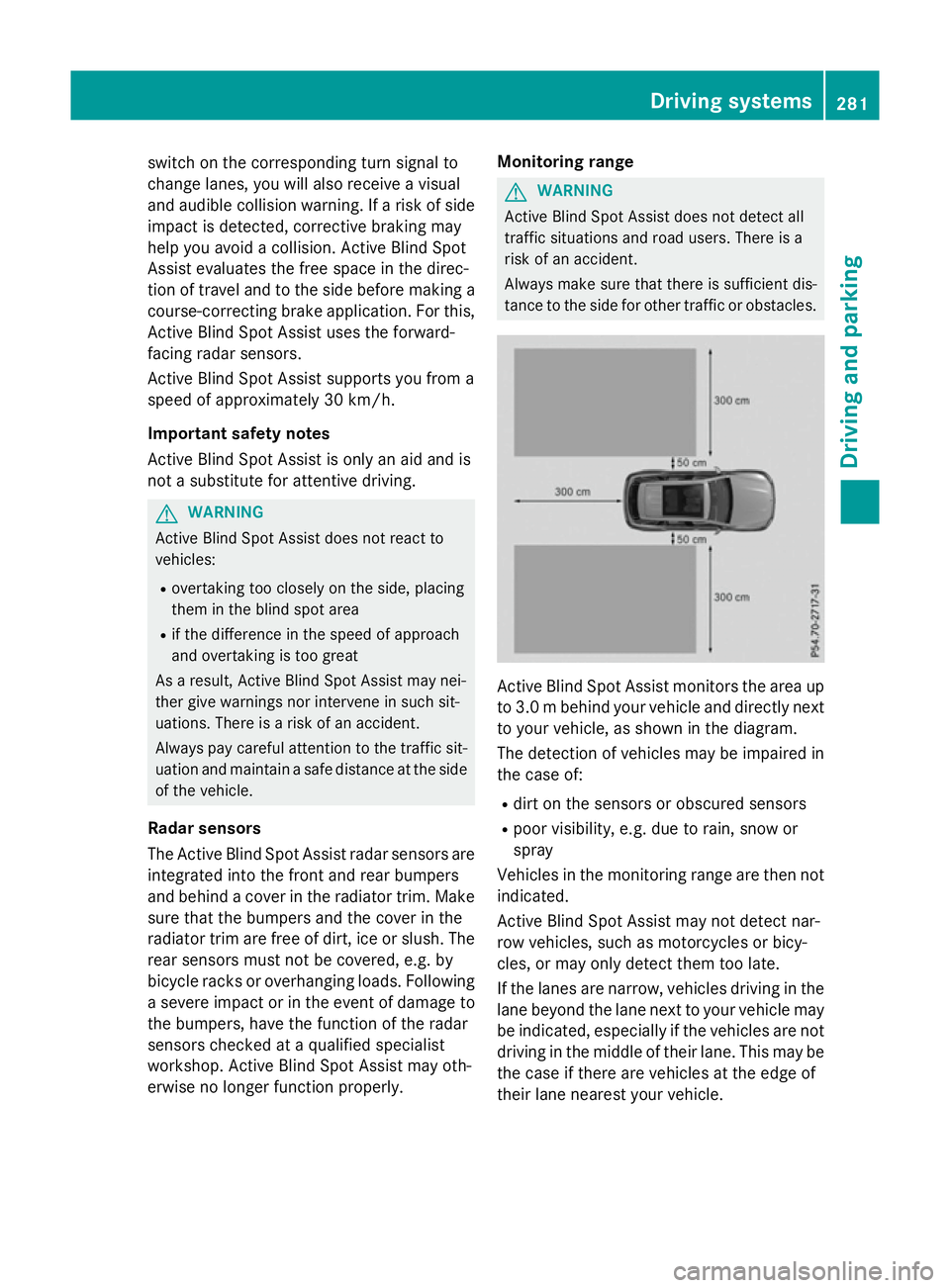
tance to the side for other traffic or obstacles. Active Blind Spot Assist monitors the area up
to 3.0 mbehind your vehicle and directly next
to your vehicle, as shown in the diagram.
The detection of vehicles may be impaired in the case of:
R dirt on the sensors or obscured sensors
R poor visibility, e.g. due to rain, snow or
spray
Vehicles in the monitoring range are then not
indicated.
Active Blind Spot Assist may not detect nar-
row vehicles, such as motorcycles or bicy-
cles, or may only detect them too late.
If the lanes are narrow, vehicles driving in the
lane beyond the lane next to your vehicle may
be indicated, especially if the vehicles are not driving in the middle of their lane. This may be
the case if there are vehicles at the edge of
their lane nearest your vehicle. Driving systems
281Driving and parking Z
Page 287 of 497
you do not react to the warning, a lane-cor-
recting application of the brakes can bring the vehicle back into the original lane.
Important safety notes
If you fail to adapt your driving style, Active
Lane Keeping Assist can neither reduce the
risk of an accident nor override the laws of
physics. Active Lane Keeping Assist cannot
take account of road and weather conditions.
It may not detect traffic situations. Active
Lane Keeping Assist is only an aid. You are
responsible for the distance to the vehicle in
front, for vehicle speed, for braking in good
time and for staying in lane.
Active Lane Keeping Assist cannot continu-
ously keep your vehicle in its lane. G
WARNING
Active Lane Keeping Assist cannot always
clearly detect lane markings.
In such cases, Active Lane Keeping Assist
can:
R give an unnecessary warning and then
make a course-correcting brake application
to the vehicle
R neither give a warning nor intervene
There is a risk of an accident.
Always pay particular attention to the traffic
situation and keep within the lane, especially
if Active Lane Keeping Assist alerts you. Ter-
minate the intervention in a non-critical driv-
ing situation.
The system may be impaired or may not func-
tion if:
R there is poor visibility, e.g. due to insuffi-
cient illumination of the road, or due to
snow, rain, fog or spray
R there is glare, e.g. from oncoming traffic,
the sun or reflection from other vehicles
(e.g. if the road surface is wet)
R the windscreen is dirty, misted up, dam-
aged or covered, for instance by a sticker,
in the vicinity of the camera R
the radar sensors in the front or rear bump-
ers or the radiator trim are dirty, e.g.
obscured by snow
R no or several, unclear lane markings are
present for one lane, e.g. in a construction
area
R the lane markings are worn away, dark or
covered up, e.g. by dirt or snow
R the distance to the vehicle in front is too
small and the lane markings thus cannot be
detected
R the lane markings change quickly, e.g.
lanes branch off, cross one another or
merge
R the road is narrow and winding
R there are highly variable shade conditions
on the road
If no vehicle is detected in the adjacent lane
and broken lane markings are detected, no
lane-correcting brake application is made.
Warning vibration through the steering
wheel
A warning may be given if a front wheel
passes over a lane marking. It will warn you by means of intermittent vibration in the steer-
ing wheel for up to 1.5 seconds.
Lane-correcting brake application
If you leave your lane under certain circum-
stances, the vehicle will brake briefly on one
side. This is intended to help you return the
vehicle to the original lane. G
WARNING
A lane-correcting brake application cannot
always bring the vehicle back into the original lane. There is a risk of an accident.
Always steer, brake or accelerate yourself,
especially if Active Lane Keeping Assist warns
you or makes a lane-correcting brake appli-
cation. 284
Driving syste
msDriving and parking
Page 348 of 497
Display messages
Possible causes/consequences and
M
MSolutions Radar sensors
Radar sensors
dirty See Owner's dirty See Owner's
Manual Manual At least one of the following driving systems or driving safety sys-
tems is temporarily restricted or inoperative:
R PRE-SAFE ®
PLUS
R PRE-SAFE ®
Brake
R COLLISION PREVENTION ASSIST PLUS
R Active Lane Keeping Assist
R Active Blind Spot Assist
R DISTRONIC PLUS with Steering Assist and Stop&Go Pilot
If the radar sensor system in front is dirty, Active Blind Spot Assist
will not perform a course-correcting brake application.
Possible causes:
R the sensors in the radiator trim and/or in the bumpers are dirty
R the function of the driving system or driving safety system is
impaired due to heavy rain or snow
A warning tone also sounds.
Once the causes listed above no longer apply, the display message goes out. All driving systems or driving safety systems are opera-
tive again.
If the display message does not disappear:
X Pull over and stop the vehicle safely as soon as possible, paying
attention to road and traffic conditions.
X Secure the vehicle against rolling away (Y page 219).
X Switch off the engine.
X Clean the sensors (Y page 425) in the following locations:
R in the radiator trim
R in the front bumper
R in the rear bumper, particularly in the middle of the rear
bumper
X Restart the engine.
The display message disappears. Display
messages
345On-board computer and displays Z
Page 357 of 497
Display messages
Possible causes/consequences and
M
MSolutions ?
Coolant Stop vehi‐ Coolant Stop vehi‐
cle Switch engine cle Switch engine
off off The coolant is too hot.
A warning tone also sounds.
G WARNING
Never drive with an overheated engine. Driving when your engine is overheated can cause some fluids which may have leaked into
the engine compartment to catch fire.
In addition, steam from an overheated engine can cause serious
burns, which can occur just by opening the bonnet.
There is a risk of injury.
X Stop the vehicle immediately, paying attention to road and traf-
fic conditions, and switch off the engine.
X Safeguard the vehicle against rolling away (Y page 219).
X Wait until the engine has cooled down.
X Make sure that the air supply to the engine radiator is not
blocked, e.g. by frozen slush.
X Do not start the engine again until the display message goes out
and the coolant temperature is below 120 †. The engine may
otherwise be damaged.
X Pay attention to the coolant temperature display.
If the temperature increases again:
X Consult a qualified specialist workshop immediately.
Under normal operating conditions and with the specified coolant
level, the coolant temperature may rise to 120 †. #
See Owner's Manual See Owner's Manual The battery is not being charged.
A warning tone also sounds.
Possible causes:
R faulty alternator
R defective power electronics (PLUG-IN HYBRID vehicles)
R torn poly-V-belt
R a malfunction in the electronics
! Do not continue driving. The engine could otherwise overheat.
X Stop the vehicle immediately, paying attention to road and traf-
fic conditions, and switch off the engine.
X Safeguard the vehicle against rolling away (Y page 219).
X Consult a qualified specialist workshop. 354
Display
messagesOn-board computer and displays