2015 MERCEDES-BENZ GLC SUV keyless
[x] Cancel search: keylessPage 110 of 497
Make sure that the key is at least 3
maway
from the vehicle.
General notes With KEYLESS-GO and HANDS-FREE
ACCESS, you can open or close the tailgate or
stop the procedure without using your hands. This is useful if you have your hands full. To do
this, make a kicking movement under the
bumper with your foot.
Observe the following points:
R Carry your KEYLESS-GO key about your
person. The KEYLESS-GO key must be in
the rear detection range of the vehicle.
R When making the kicking movement, make
sure that you are standing firmly on the
ground and that there is sufficient clear-
ance to the rear of the vehicle. You could
otherwise lose your balance, e.g. on ice. R
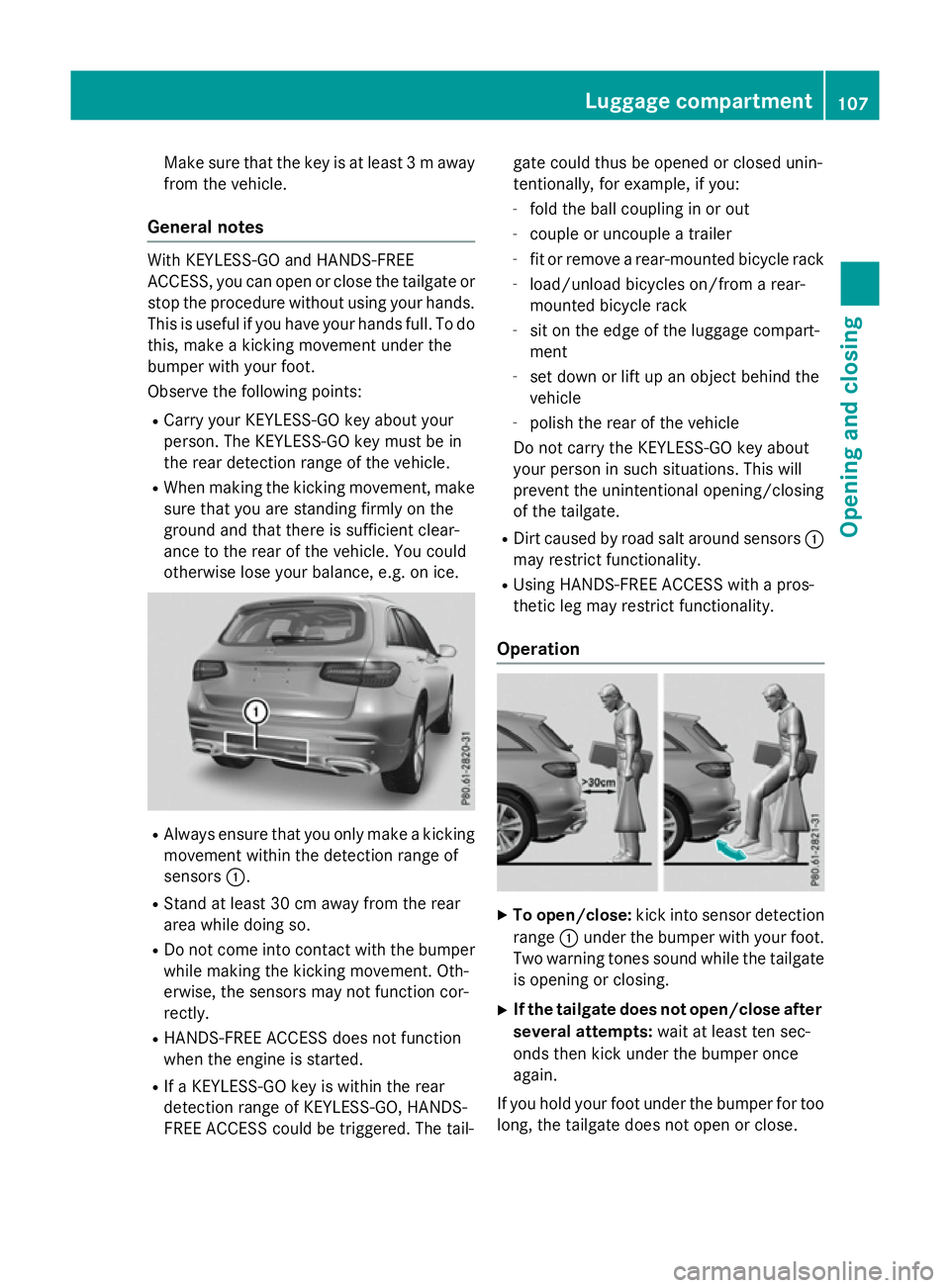
Always ensure that you only make a kicking
movement within the detection range of
sensors :.
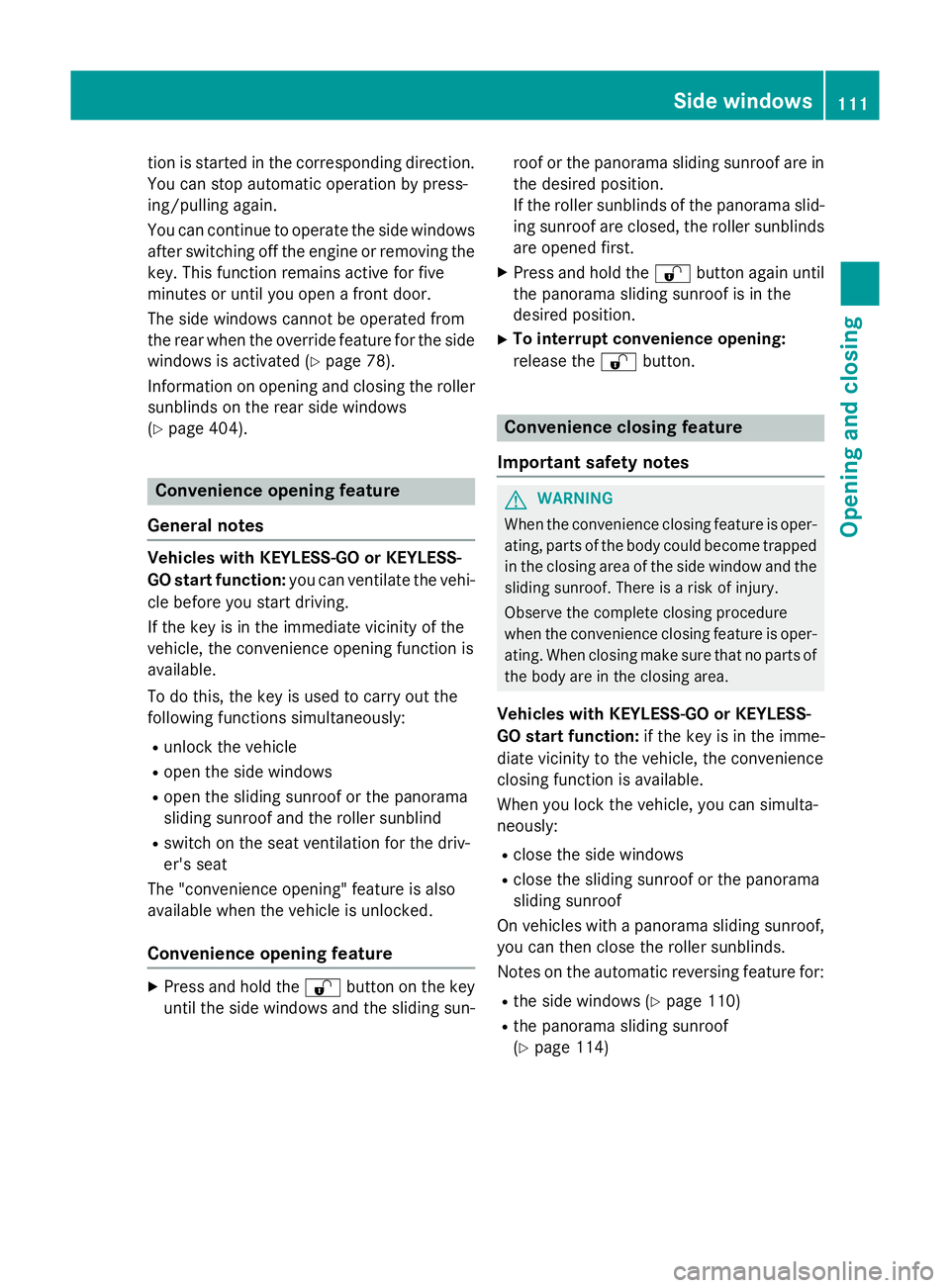
R Stand at least 30 cm away from the rear
area while doing so.
R Do not come into contact with the bumper
while making the kicking movement. Oth-
erwise, the sensors may not function cor-
rectly.
R HANDS-FREE ACCESS does not function
when the engine is started.
R If a KEYLESS-GO key is within the rear
detection range of KEYLESS-GO, HANDS-
FREE ACCESS could be triggered. The tail- gate could thus be opened or closed unin-
tentionally, for example, if you:
- fold the ball coupling in or out
- couple or uncouple a trailer
- fit or remove a rear-mounted bicycle rack
- load/unload bicycles on/from a rear-
mounted bicycle rack
- sit on the edge of the luggage compart-
ment
- set down or lift up an object behind the
vehicle
- polish the rear of the vehicle
Do not carry the KEYLESS-GO key about
your person in such situations. This will
prevent the unintentional opening/closing
of the tailgate.
R Dirt caused by road salt around sensors :
may restrict functionality.
R Using HANDS-FREE ACCESS with a pros-
thetic leg may restrict functionality.
Operation X
To open/close: kick into sensor detection
range :under the bumper with your foot.
Two warning tones sound while the tailgate
is opening or closing.
X If the tailgate does not open/close after
several attempts: wait at least ten sec-
onds then kick under the bumper once
again.
If you hold your foot under the bumper for too
long, the tailgate does not open or close. Luggage compartment
107Opening and closing Z
Page 114 of 497
tion is started in the corresponding direction.
You can stop automatic operation by press-
ing/pulling again.
You can continue to operate the side windowsafter switching off the engine or removing the
key. This function remains active for five
minutes or until you open a front door.
The side windows cannot be operated from
the rear when the override feature for the side
windows is activated (Y page 78).
Information on opening and closing the roller sunblinds on the rear side windows
(Y page 404). Convenience opening feature
General notes Vehicles with KEYLESS-GO or KEYLESS-
GO start function: you can ventilate the vehi-
cle before you start driving.
If the key is in the immediate vicinity of the
vehicle, the convenience opening function is
available.
To do this, the key is used to carry out the
following functions simultaneously:
R unlock the vehicle
R open the side windows
R open the sliding sunroof or the panorama
sliding sunroof and the roller sunblind
R switch on the seat ventilation for the driv-
er's seat
The "convenience opening" feature is also
available when the vehicle is unlocked.
Convenience opening feature X
Press and hold the %button on the key
until the side windows and the sliding sun- roof or the panorama sliding sunroof are in
the desired position.
If the roller sunblinds of the panorama slid-
ing sunroof are closed, the roller sunblinds are opened first.
X Press and hold the %button again until
the panorama sliding sunroof is in the
desired position.
X To interrupt convenience opening:
release the %button. Convenience closing feature
Important safety notes G
WARNING
When the convenience closing feature is oper- ating, parts of the body could become trapped
in the closing area of the side window and the
sliding sunroof. There is a risk of injury.
Observe the complete closing procedure
when the convenience closing feature is oper-
ating. When closing make sure that no parts of the body are in the closing area.
Vehicles with KEYLESS-GO or KEYLESS-
GO start function: if the key is in the imme-
diate vicinity to the vehicle, the convenience
closing function is available.
When you lock the vehicle, you can simulta-
neously:
R close the side windows
R close the sliding sunroof or the panorama
sliding sunroof
On vehicles with a panorama sliding sunroof, you can then close the roller sunblinds.
Notes on the automatic reversing feature for:
R the side windows (Y page 110)
R the panorama sliding sunroof
(Y page 114) Side
windows
111Opening an d closing Z
Page 115 of 497
Using the key
X
Press and hold the &button until the
side windows and the sliding sunroof or the panorama sliding sunroof are fully closed.
X Make sure that all the side windows and the
sliding sunroof or panorama sliding sunroof
are closed.
X Vehicles with panorama sliding sun-
roof: press and hold the &button once
more until the roller sunblinds of the pan-
orama sliding sunroof close.
X To interrupt convenience closing:
release the &button.
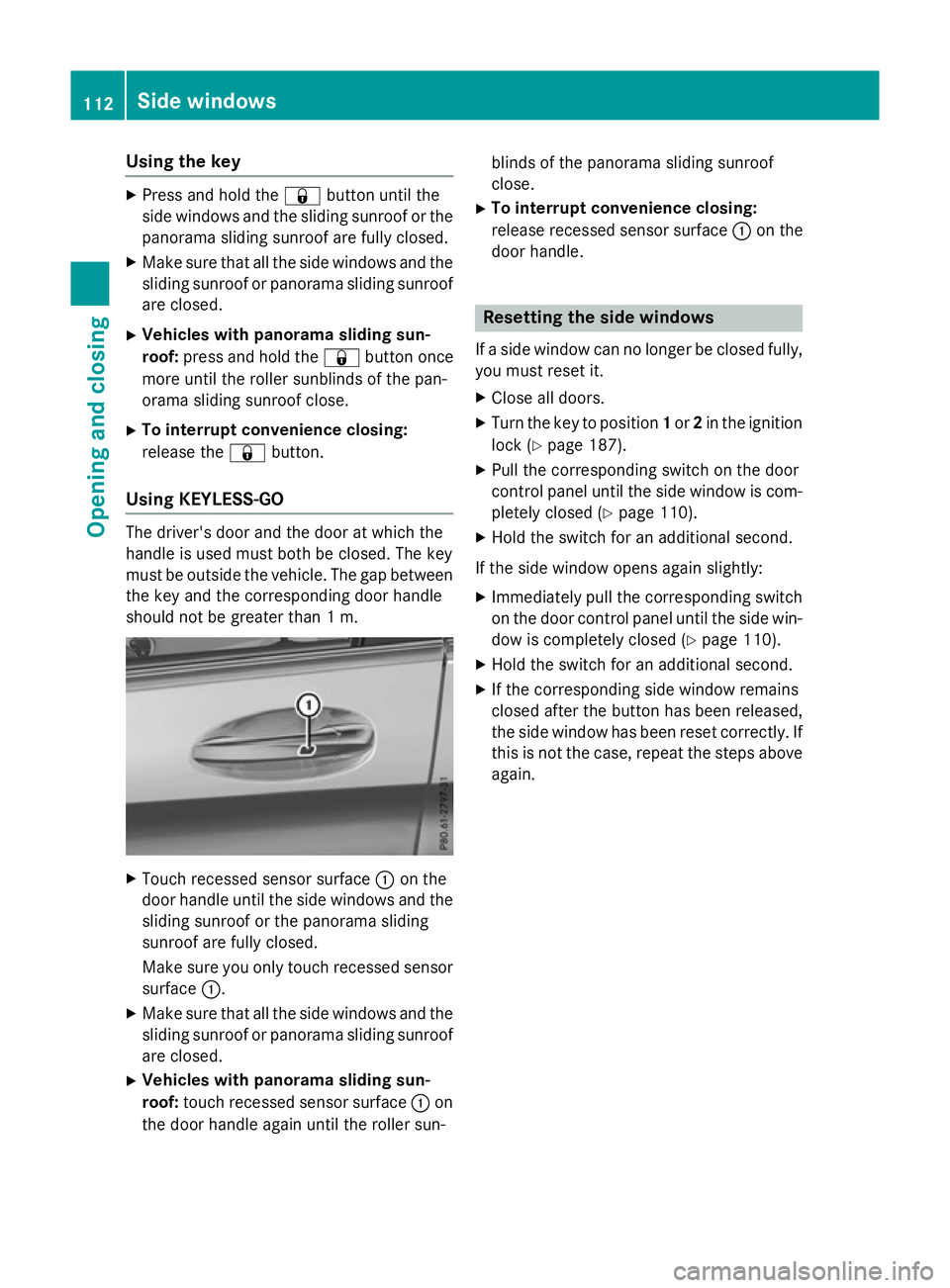
Using KEYLESS-GO The driver's door and the door at which the
handle is used must both be closed. The key
must be outside the vehicle. The gap between
the key and the corresponding door handle
should not be greater than 1 m. X
Touch recessed sensor surface :on the
door handle until the side windows and the sliding sunroof or the panorama sliding
sunroof are fully closed.
Make sure you only touch recessed sensor surface :.
X Make sure that all the side windows and the
sliding sunroof or panorama sliding sunroof
are closed.
X Vehicles with panorama sliding sun-
roof: touch recessed sensor surface :on
the door handle again until the roller sun- blinds of the panorama sliding sunroof
close.
X To interrupt convenience closing:
release recessed sensor surface :on the
door handle. Resetting the side windows
If a side window can no longer be closed fully, you must reset it.
X Close all doors.
X Turn the key to position 1or 2in the ignition
lock (Y page 187).
X Pull the corresponding switch on the door
control panel until the side window is com- pletely closed (Y page 110).
X Hold the switch for an additional second.
If the side window opens again slightly: X Immediately pull the corresponding switch
on the door control panel until the side win-
dow is completely closed (Y page 110).
X Hold the switch for an additional second.
X If the corresponding side window remains
closed after the button has been released,
the side window has been reset correctly. If
this is not the case, repeat the steps aboveagain. 112
Side windowsOpening and closing
Page 132 of 497
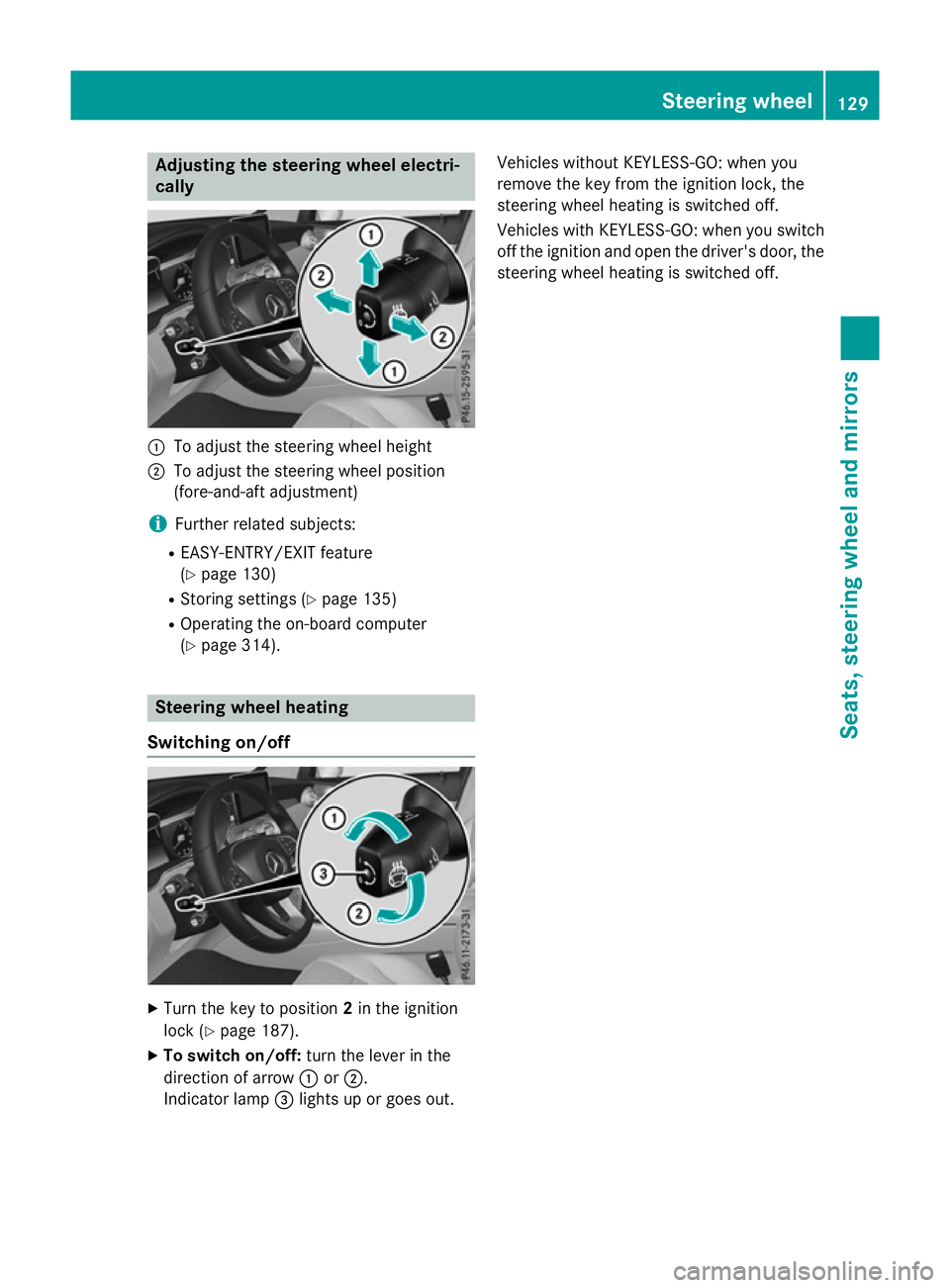
Adjusting the steering wheel electri-
cally :
To adjust the steering wheel height
; To adjust the steering wheel position
(fore-and-aft adjustment)
i Further related subjects:
R EASY-ENTRY/EXIT feature
(Y page 130)
R Storing settings (Y page 135)
R Operating the on-board computer
(Y page 314). Steering wheel heating
Switching on/off X
Turn the key to position 2in the ignition
lock (Y page 187).
X To switch on/off: turn the lever in the
direction of arrow :or;.
Indicator lamp =lights up or goes out. Vehicles without KEYLESS-GO: when you
remove the key from the ignition lock, the
steering wheel heating is switched off.
Vehicles with KEYLESS-GO: when you switch
off the ignition and open the driver's door, the steering wheel heating is switched off. Steering wheel
129Seats, steering wheel and mirrors Z
Page 133 of 497
Problems with the steering wheel heating
Problem
Possible causes/consequences and
M
MSolutions The steering wheel
heating has switched
itself off prematurely or
cannot be switched on. The on-board voltage is too low because too many electrical con-
sumers are switched on.
X Switch off electrical consumers that you do not need, such as
the rear window heating or interior lighting. EASY-ENTRY/EXIT feature
Important safety notes G
WARNING
When the EASY-ENTRY/EXIT feature adjusts
the steering wheel, you and other vehicle
occupants – particularly children – could
become trapped. There is a risk of injury.
While the EASY-ENTRY/EXIT feature is mak-
ing adjustments, make sure that no one has
any body parts in the sweep of the steering
wheel.
Move the steering wheel adjustment lever if
there is a risk of entrapment by the steering
wheel. The adjustment process is stopped.
Press one of the memory function position
buttons. The adjustment process is stopped.
This function is only available on vehicles with
a memory function. G
WARNING
If children activate the EASY-ENTRY/EXIT fea- ture, they can become trapped, particularly
when unattended. There is a risk of injury.
When leaving the vehicle, always take the key with you and lock the vehicle. Never leave
children unattended in the vehicle. G
WARNING
If you drive off while the EASY-ENTRY/EXIT
feature is making adjustments, you could lose
control of the vehicle. There is a risk of an
accident.
Always wait until the adjustment process is
complete before driving off. The EASY-ENTRY/EXIT feature makes getting
in and out of your vehicle easier.
You can activate and deactivate the EASY-
ENTRY/EXIT feature using Audio 20/
COMAND Online; see the separate Audio 20/ COMAND Online operating instructions.
Position of the steering wheel when the EASY-ENTRY/EXIT feature is active The steering wheel tilts upwards if you:
R remove the key from the ignition lock
R with KEYLESS-GO: open the driver's door;
KEYLESS-GO must be in position 1
R with the key: open the driver's door; the
key must be in position 0or 1in the ignition
lock (Y page 187)
R open the driver's door when the ignition is
switched off
i The steering wheel only tilts upwards if
the driving position is stored after the seat or steering wheel has been adjusted
(Y page 135).
The most recent driving position of the steer-
ing wheel is stored if:
R the ignition is switched off
R the setting is stored using the memory
function (Y page 135)
i The steering wheel only moves upwards if
it has not already reached the upper steer-
ing limiter. 130
Steering wheelSeats, steering wheel and mirrors
Page 134 of 497
Position of the steering wheel for driv-
ing The steering wheel is moved to the previously
set position if:
R the driver's door is closed and you insert
the key into the ignition lock
R you close the driver's door when the igni-
tion is switched on
R you press the Start/Stop button once on
vehicles with KEYLESS-GO
i The steering wheel only returns to the last
set position if the driving position is stored
after the seat or steering column has been adjusted (Y page 135).
The most recent driving position of the steer-
ing wheel is stored if:
R the ignition is switched off
R the setting is stored using the memory
function (Y page 135)
Crash-responsive EASY-EXIT feature If the crash-responsive EASY-EXIT feature is
triggered in an accident, the steering column will move upwards when the driver's door is
opened or the key is removed from the igni-
tion lock. This makes it easier to exit the vehi-
cle and rescue the occupants.
The crash-responsive EASY-EXIT feature is
only operational if the EASY-EXIT/ENTRY fea- ture is activated in Audio 20/COMAND
Online; see the separate Audio 20/COMAND Online operating instructions. Mirrors
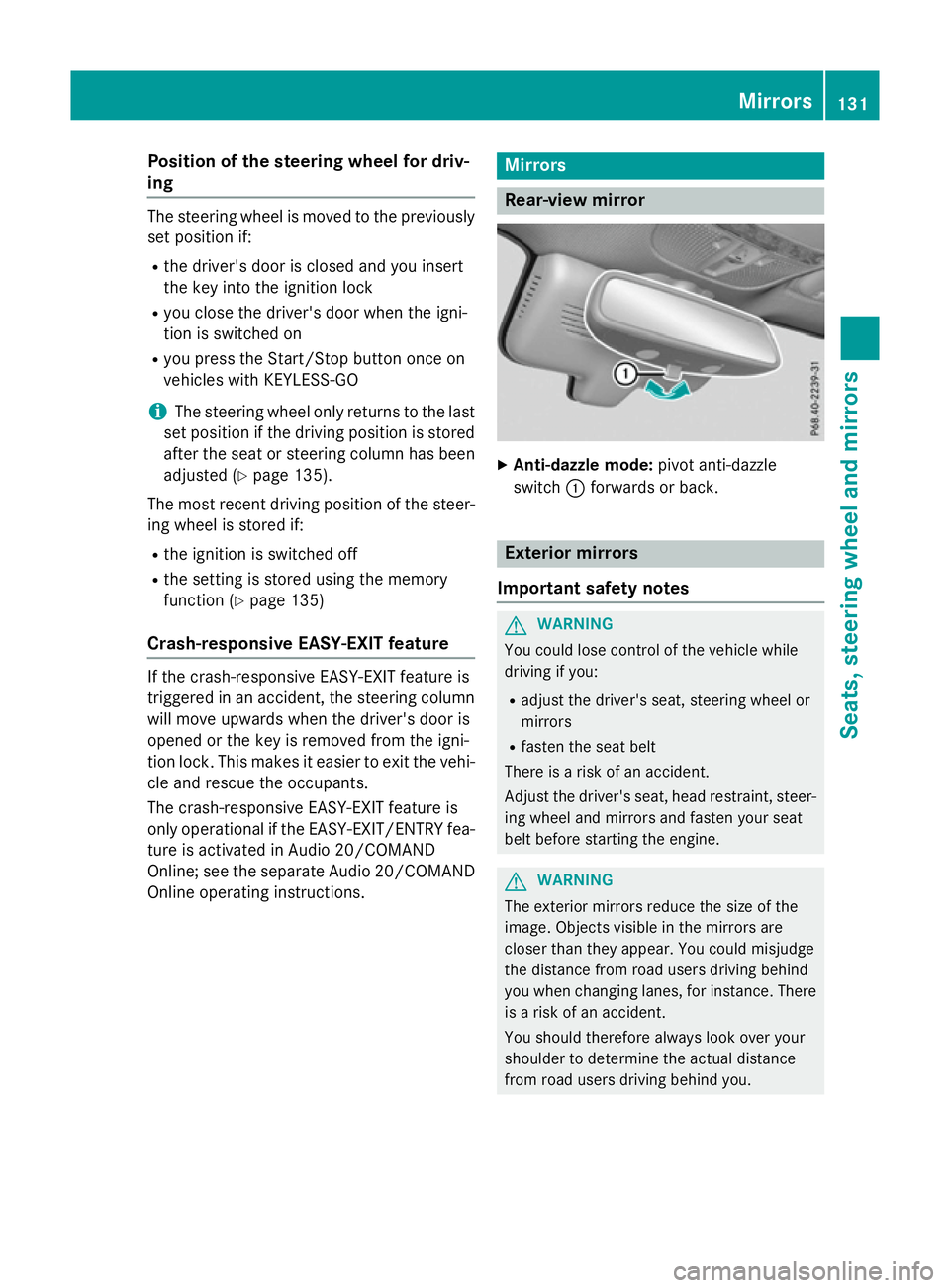
Rear-view mirror
X
Anti-dazzle mode: pivot anti-dazzle
switch :forwards or back. Exterior mirrors
Important safety notes G
WARNING
You could lose control of the vehicle while
driving if you:
R adjust the driver's seat, steering wheel or
mirrors
R fasten the seat belt
There is a risk of an accident.
Adjust the driver's seat, head restraint, steer-
ing wheel and mirrors and fasten your seat
belt before starting the engine. G
WARNING
The exterior mirrors reduce the size of the
image. Objects visible in the mirrors are
closer than they appear. You could misjudge
the distance from road users driving behind
you when changing lanes, for instance. There is a risk of an accident.
You should therefore always look over your
shoulder to determine the actual distance
from road users driving behind you. Mirrors
131Seats, steering wheel and mirrors Z
Page 154 of 497
position, causing the windscreen wiper to
wipe more frequently.
If the wiper blades are worn, the windscreen
will no longer be wiped properly. This could
prevent you from observing the traffic condi-
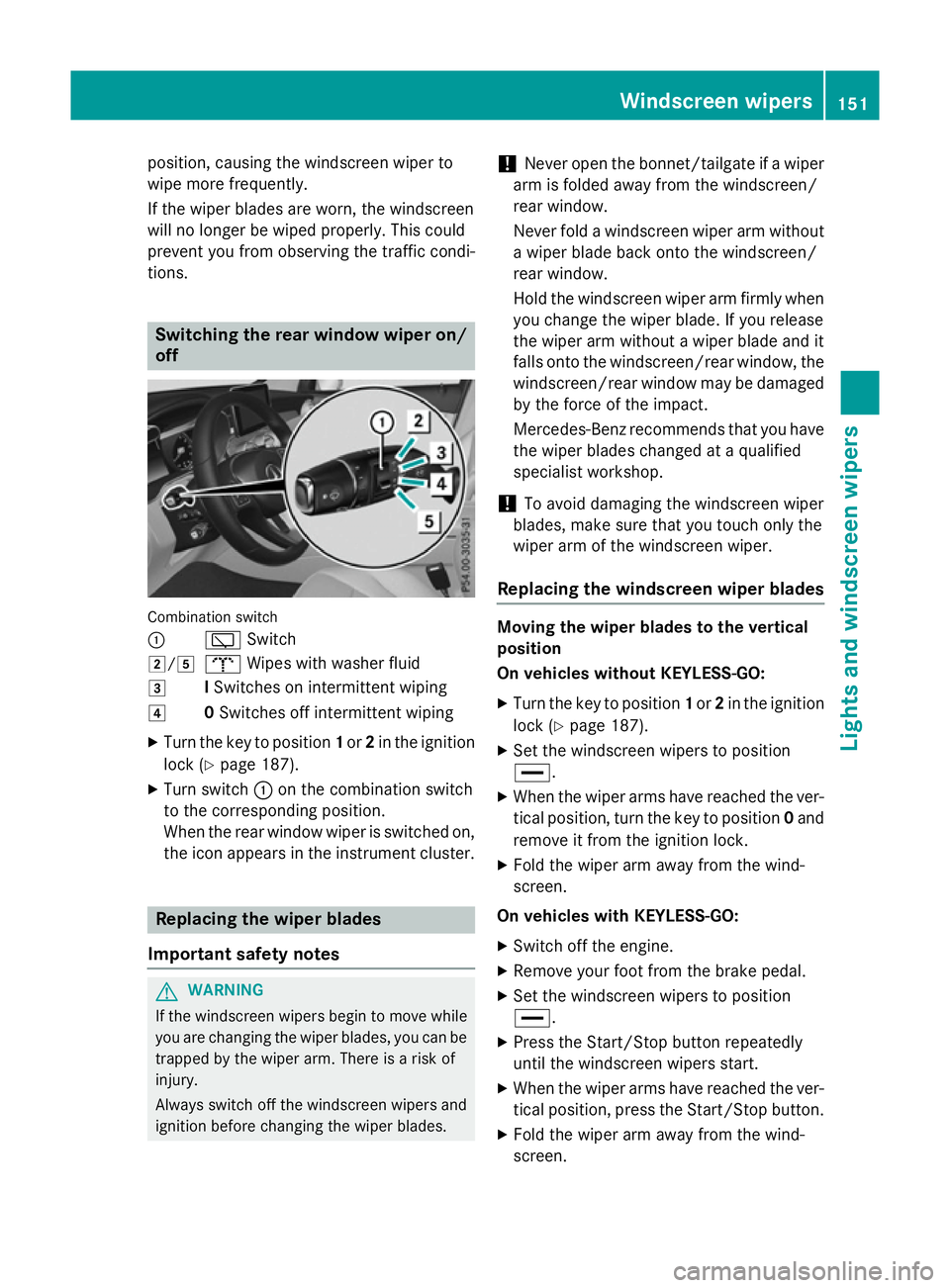
tions. Switching the rear window wiper on/
off Combination switch
:
èSwitch
2/5 bWipes with washer fluid
3 ISwitches on intermittent wiping
4 0Switches off intermittent wiping
X Turn the key to position 1or 2in the ignition
lock (Y page 187).
X Turn switch :on the combination switch
to the corresponding position.
When the rear window wiper is switched on,
the icon appears in the instrument cluster. Replacing the wiper blades
Important safety notes G
WARNING
If the windscreen wipers begin to move while
you are changing the wiper blades, you can be trapped by the wiper arm. There is a risk of
injury.
Always switch off the windscreen wipers and
ignition before changing the wiper blades. !
Never open the bonnet/tailgate if a wiper
arm is folded away from the windscreen/
rear window.
Never fold a windscreen wiper arm without a wiper blade back onto the windscreen/
rear window.
Hold the windscreen wiper arm firmly when
you change the wiper blade. If you release
the wiper arm without a wiper blade and it
falls onto the windscreen/rear window, the windscreen/rear window may be damaged
by the force of the impact.
Mercedes-Benz recommends that you have the wiper blades changed at a qualified
specialist workshop.
! To avoid damaging the windscreen wiper
blades, make sure that you touch only the
wiper arm of the windscreen wiper.
Replacing the windscreen wiper blades Moving the wiper blades to the vertical
position
On vehicles without KEYLESS-GO:
X Turn the key to position 1or 2in the ignition
lock (Y page 187).
X Set the windscreen wipers to position
°.
X When the wiper arms have reached the ver-
tical position, turn the key to position 0and
remove it from the ignition lock.
X Fold the wiper arm away from the wind-
screen.
On vehicles with KEYLESS-GO:
X Switch off the engine.
X Remove your foot from the brake pedal.
X Set the windscreen wipers to position
°.
X Press the Start/Stop button repeatedly
until the windscreen wipers start.
X When the wiper arms have reached the ver-
tical position, press the Start/Stop button.
X Fold the wiper arm away from the wind-
screen. Windscreen wipers
151Lights and windscreen wipers Z
Page 178 of 497

Activating/deactivating "Pre-entry cli-
mate control via key" Before "Pre-entry climate control via key" can
be activated, you must activate the function
via Audio 20 or COMAND Online (see sepa-
rate operating instructions).
X To activate "Pre-entry climate control
via key": unlock the vehicle with the key or
KEYLESS-GO.
To deactivate "Pre-entry climate control
via key": "Pre-entry climate control via key"
deactivates automatically when the engine is
started.
The following functions remain active after
the engine is started:
R Seat heating (heating)
R Seat ventilation (ventilation)
R Perfume atomiser
R Ionisation
An activated "Pre-entry climate control via
key" function can be deactivated using the
rocker switch (Y page 177). Operating the climate control system
175Climate control Z