2015 MERCEDES-BENZ GLC SUV air suspension
[x] Cancel search: air suspensionPage 24 of 497
Stowage compartment
Map pockets ..................................3 92
Stowage compartments
Armrest (under) ............................ .392
Centre console .............................. 391
Cup holder ..................................... 402
Door ............................................... 392
Glove compartment ....................... 391
Important safety information ......... 390
Rear ............................................... 392
Spectacles compartment .............. .391
see Stowage areas
Stowage net ....................................... 392
Stowage space
Stowage net ................................... 392
Summer tyres
In winter ........................................ 456
Sun blind
Rear side windows ......................... 404
Sun visor ............................................ 404
Suspension settings
AIR BODY CONTROL ..................... .253
Switching the auxiliary heating/
ventilation
On/off .......................................... .179 T
Tail lamps see Lights
Tailgate
Display message ............................ 371
Emergency unlocking ..................... 109
Limiting the opening angle ............. 108
Obstruction detectio n.................... 104
Opening dimensions ...................... 488
Opening/closing ............................ 104
Opening/closing (automatically
from inside) ................................... 108
Opening/closing (automatically
from outside) ................................. 105
Opening/closing (manually from
outside) ......................................... 105
Technical data
Capacities ...................................... 480
Emergency spare wheel ................. 476
Information .................................... 478
Trailer load s................................... 491 Tyres/wheels ................................. 468
Vehicle data ................................... 488
Telephone
Accepting a call (multifunction
steering wheel) .............................. 325
Display message ............................ 374
Introduction ................................... 324
Menu (on-board computer) ............ 324
Number from the phone book ........ 325
Redialling ....................................... 326
Rejecting/ending a call ................. 325
Telephone compartment ................ 392
Temperature
Coolant (display in the instrumentcluster) .......................................... 313
Coolant (on-board computer) ......... 327
Outside temperature ...................... 313
Setting (climate control )................ 165
TEMPOMAT
Function/note s............................. 230
TIREFIT kit .......................................... 435
Tyre pressure not reached ............. 436
Tyre pressure reached ................... 437
Top Tether ............................................ 68
Total distance recorder .................... 318
Tow-away protection
Activating ......................................... 91
Deactivating ..................................... 91
Function ........................................... 91
Tow-starting
Emergency engine starting ............ 448
Important safety notes .................. 445
Towing
Important safety notes .................. 445
Notes for 4MATIC vehicles ............ 448
Transporting the vehicle ................ 448
Towing a trailer
Active Blind Spot Assist ................. 283
Active Lane Keeping Assist ............ 286
Active Parking Assist ..................... 257
Axle load, permissibl e.................... 492
ESP ®
(Electronic Stability Pro-
gram) ............................................... 86
Failure check for LEDs ................... 307
General notes ................................ 303
Pulling away with a traile r.............. 191
Swinging out the ball coupling ....... 304 Index
21
Page 203 of 497
Double-clutch function
When shifting down, the double-clutch func-
tion is active regardless of the currently selec-
ted drive program. The double-clutch function reduces load change reactions and is condu-cive to a sporty driving style. The sound gen-
erated by the double-clutch function depends
on the drive program selected.
Kickdown Use kickdown for maximum acceleration:
X Depress the accelerator pedal beyond the
pressure point.
The transmission shifts to a lower gear
depending on the engine speed.
X Ease off the accelerator pedal once the
desired speed is reached.
The automatic transmission shifts back up.
Rocking the vehicle free Rocking the vehicle free by shifting the trans-
mission repeatedly between transmission
positions Dand Rmay help to free the vehicle
if it has become stuck in mud or snow.
The vehicle's engine management restricts
repeated shifting between transmission posi- tions Dand Rup to a maximum speed of
9 km/h.
To shift back and forth between transmission
positions Dand R, move the DIRECT SELECT
lever up and down past the point of resist-
ance.
Towing a trailer Towing a trailer is not possible with all mod-
els. For further information, see
(Y page 303).
X Drive in the middle of the engine speed
range on uphill gradients.
X Manual shifting: depending on the uphill
or downhill gradient, shift into a gear
(Y page 201) in which the engine will run in
the middle of the engine speed range. This also applies if cruise control,
DISTRONIC PLUS or SPEEDTRONIC are
activated. Drive programs
Drive program I (Individual) In drive program
Ithe following properties of
the drive program can be selected:
R the drive (engine and transmission man-
agement)
R the suspension
R the steering
R the availability of the ECO start/stop func-
tion
R the climate control
i To permanently select the gears in drive
program Iusing the steering wheel pad-
dles, select the M(manual) setting for the
drive.
Drive program S+ (Sport Plus) Drive program
S+is characterised by the fol-
lowing:
R the vehicle exhibits particularly sporty driv-
ing characteristics.
R the vehicle pulling away in first gear.
R the automatic transmission shifting up
later.
R As a result of the later automatic transmis-
sion shift points, the fuel consumption pos-sibly being higher.
R the suspension exhibits particularly stiff
springing and damping settings (vehicles
with AIR BODY CONTROL)
R the ECO start/stop function is not availa-
ble. 200
Automatic transmissionDriving and pa
rking
Page 204 of 497
Drive program S (Sport)
Drive program
Sis characterised by the fol-
lowing:
R the vehicle exhibits sporty driving charac-
teristics.
R the vehicle pulling away in first gear.
R the automatic transmission shifting up
later.
R As a result of the later automatic transmis-
sion shift points, the fuel consumption pos- sibly being higher.
R the suspension exhibits stiff springing and
damping settings (vehicles with
AIR BODY CONTROL).
Drive program C (Comfort) Drive program
Cis characterised by the fol-
lowing:
R the vehicle delivers comfortable, economi-
cal driving characteristics.
R the vehicle pulling away more gently in
forward and reverse gears unless the accel-
erator pedal is depressed fully.
R the vehicle having improved driving stabil-
ity, for example on slippery road surfaces.
R optimal fuel consumption resulting from
the automatic transmission shifting up
sooner. The vehicle is driven in the low
engine speed range and the wheels are less likely to spin.
Drive program E (Economy) Drive program
Eis characterised by the fol-
lowing:
R the vehicle exhibits comfortable, economi-
cal driving characteristics.
R the vehicle pulling away more gently in
forward and reverse gears unless the accel-
erator pedal is depressed fully.
R the vehicle having improved driving stabil-
ity, for example on slippery road surfaces.
R optimal fuel consumption resulting from
the automatic transmission shifting up sooner. The vehicle is driven in the low
engine speed range and the wheels are less
likely to spin.
R during deceleration, the engine is discon-
nected from the drive train. The vehicle
uses kinetic energy and consumes less fuel
(overrun mode).
R the performance of the air-conditioning and
heating systems is reduced. Manual gearshifting
General notes You can change gear yourself using the steer-
ing wheel gearshift paddles. The transmissionmust be in position D.
Depending on which gearshift paddle is
pulled, the automatic transmission immedi-
ately shifts into the next gear up or down, if
permitted.
If you activate manual gearshifting, the mul-
tifunction display will show the current gear
instead of transmission position D.
If manual gearshifting is deactivated, the
gears will be selected automatically.
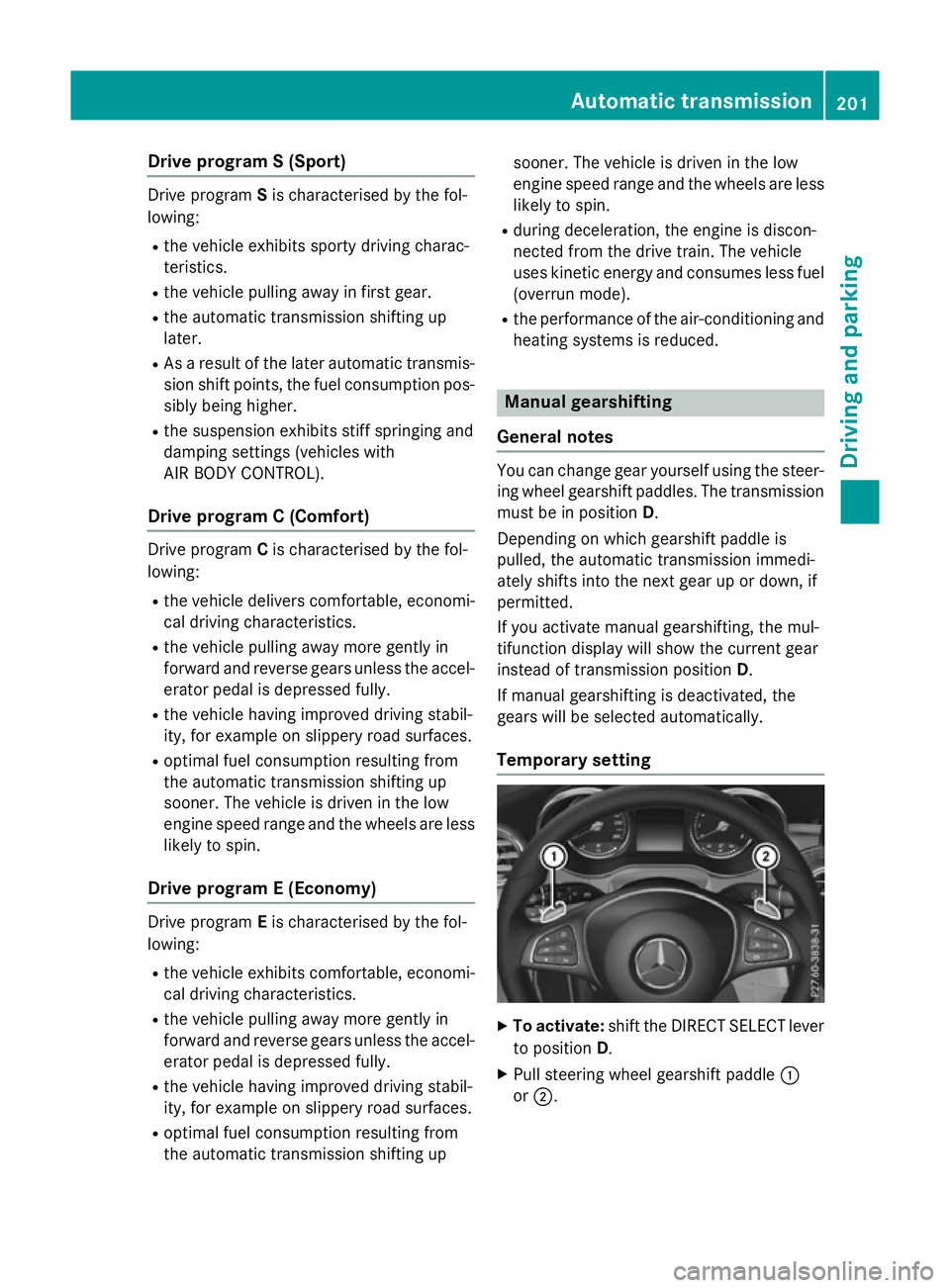
Temporary setting X
To activate: shift the DIRECT SELECT lever
to position D.
X Pull steering wheel gearshift paddle :
or ;. Automatic transmission
201Driving and parking Z
Page 253 of 497
Changing the set speed while the vehi-
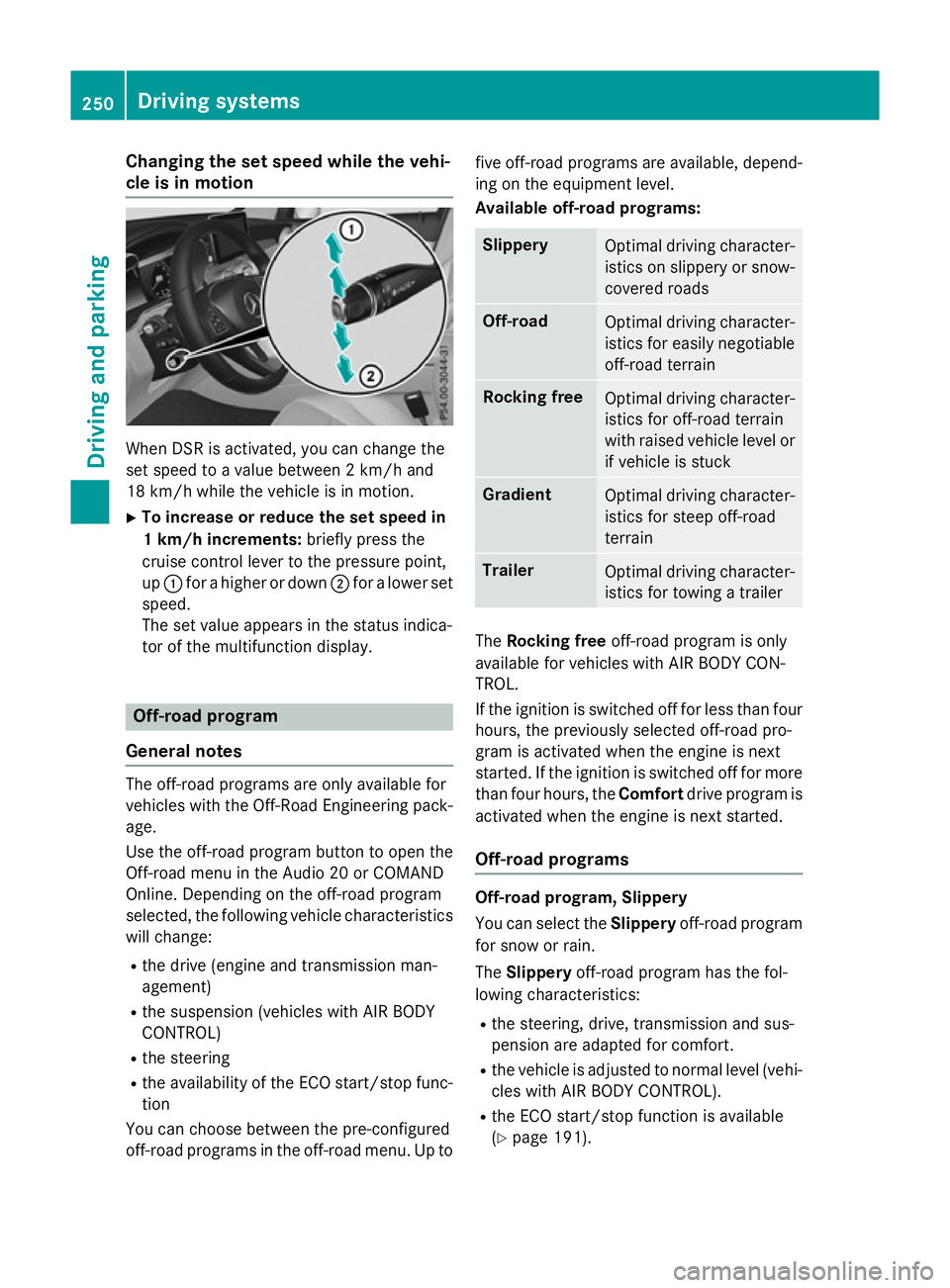
cle is in motion When DSR is activated, you can change the
set speed to a value between 2 km/h and
18 km/h while the vehicle is in motion.
X To increase or reduce the set speed in
1 km/h increments: briefly press the
cruise control lever to the pressure point,
up : for a higher or down ;for a lower set
speed.
The set value appears in the status indica-
tor of the multifunction display. Off-road program
General notes The off-road programs are only available for
vehicles with the Off-Road Engineering pack-
age.
Use the off-road program button to open the
Off-road menu in the Audio 20 or COMAND
Online. Depending on the off-road program
selected, the following vehicle characteristics
will change:
R the drive (engine and transmission man-
agement)
R the suspension (vehicles with AIR BODY
CONTROL)
R the steering
R the availability of the ECO start/stop func-
tion
You can choose between the pre-configured
off-road programs in the off-road menu. Up to five off-road programs are available, depend-
ing on the equipment level.
Available off-road programs: Slippery
Optimal driving character-
istics on slippery or snow-
covered roads Off-road
Optimal driving character-
istics for easily negotiable
off-road terrain Rocking free
Optimal driving character-
istics for off-road terrain
with raised vehicle level or
if vehicle is stuck Gradient
Optimal driving character-
istics for steep off-road
terrain Trailer
Optimal driving character-
istics for towing a trailer The
Rocking free off-road program is only
available for vehicles with AIR BODY CON-
TROL.
If the ignition is switched off for less than four
hours, the previously selected off-road pro-
gram is activated when the engine is next
started. If the ignition is switched off for more than four hours, the Comfortdrive program is
activated when the engine is next started.
Off-road programs Off-road program, Slippery
You can select the
Slipperyoff-road program
for snow or rain.
The Slippery off-road program has the fol-
lowing characteristics:
R the steering, drive, transmission and sus-
pension are adapted for comfort.
R the vehicle is adjusted to normal level (vehi-
cles with AIR BODY CONTROL).
R the ECO start/stop function is available
(Y page 191). 250
Driving systemsDriving and parking
Page 254 of 497
ESP
®
and 4ETS programs especially adapted
to slippery surfaces are also activated for
maximum stability.
For more information on driving with snow
chains see "Winter operation" (Y page 457).
Off-road program, Off-road
You can select the Off-roadoff-road program
for easily negotiable terrain, e.g. dirt roads,
gravel and sand.
The Off-road off-road program has the fol-
lowing characteristics:
R the steering, drive and suspension are
adapted for comfort
R the transmission is adapted for off-road
driving
R the vehicle is raised by 15 mm compared to
the normal level
The Off-road off-road program assists you
when driving in easily negotiable off-road ter-
rain. The engine’s performance characteris-
tics and the gearshifting characteristics of the automatic transmission are adapted for this
purpose. ABS, ESP ®
and 4ETS programs
especially adapted to off-road driving are also
activated.
Off-road program, Rocking free (vehicles
with AIR BODY CONTROL)
You can select the Rocking freeoff-road pro-
gram to free the vehicle from especially diffi- cult off-road terrain at low speeds.
The Rocking free off-road program has the
following characteristics:
R the steering, drive and suspension are
adapted for comfort
R the transmission is adapted for off-road
driving
R the vehicle is raised by 50 mm compared to
the normal level (vehicles with AIR BODY
CONTROL)
ABS, ESP ®
and 4ETS programs especially
adapted to off-road driving are also activated.
The Rocking free off-road program can be
selected up to a speed of 20 km/h. If you are driving in the
Rocking freeoff-road
program at speeds above 20 km/h
R the vehicle switches to the off-road pro-
gram Off-road
R the vehicle is lowered by 35 mm
Information about driving off-road
(Y page 226).
Off-road program, Gradient
You can use the Gradientoff-road program to
overcome steep terrain.
The Gradient off-road program has the fol-
lowing characteristics:
R the steering, drive and suspension are
adapted for comfort
R the transmission is adapted for off-road
driving
R manual gearshifting is activated
(Y page 201)
R the vehicle is raised by 15 mm compared to
the normal level
R DSR is activated (Y page 248)
ABS, ESP ®
and 4ETS programs especially
adapted to gradients are also activated.
Off-road program, Trailer
Select the Traileroff-road program when
towing a trailer.
The Trailer off-road program has the follow-
ing characteristics:
R the steering, drive and suspension are
adapted for comfort
R the transmission is adapted for off-road
driving
R the vehicle is adjusted to normal level (vehi-
cles with AIR BODY CONTROL)
R the ECO start/stop function is available
(Y page 191)
ESP ®
specially adapted for trailer operation is
also activated. Driving systems
251Driving and parking Z
Page 255 of 497
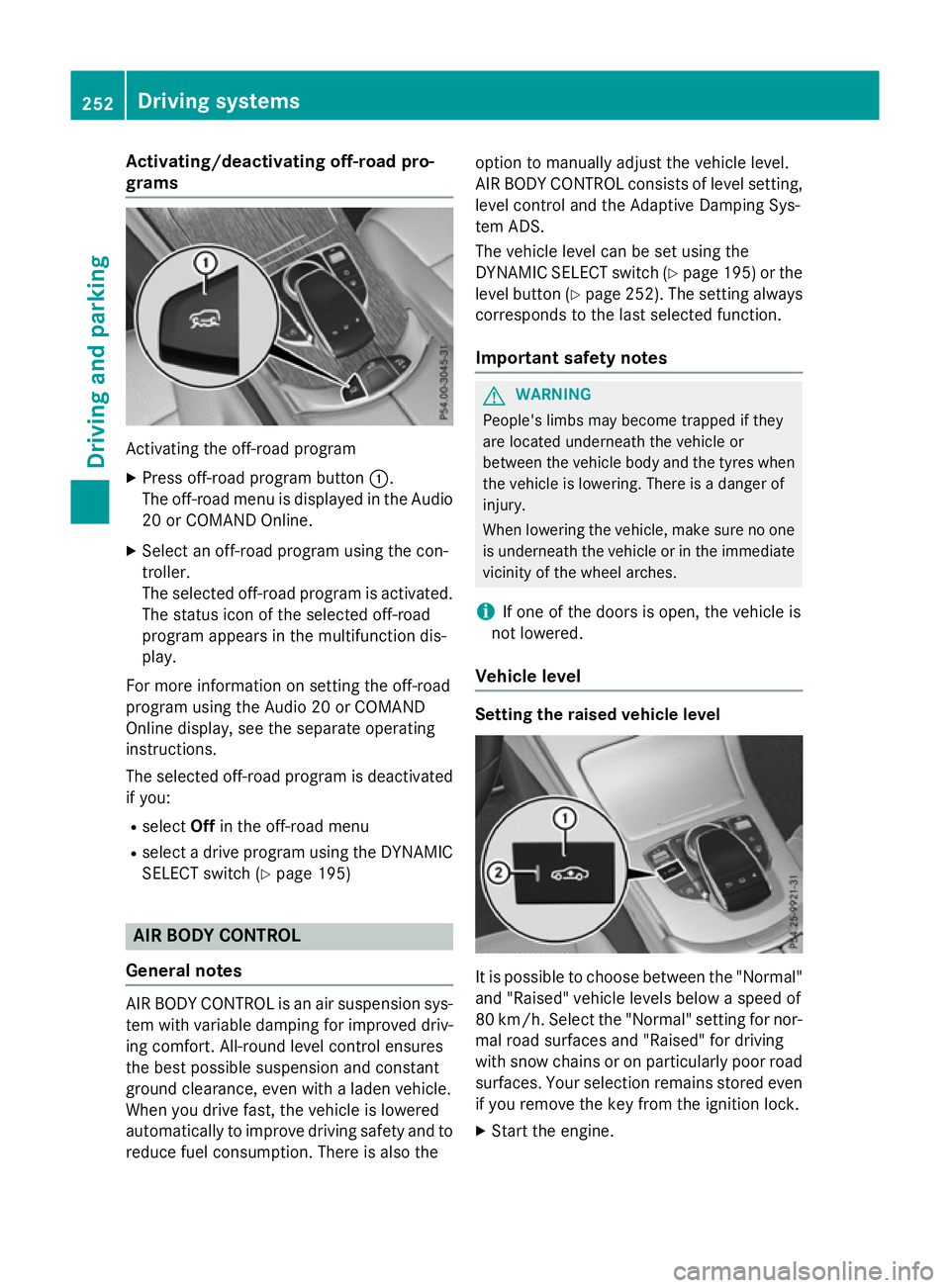
Activating/deactivating off-road pro-
grams Activating the off-road program
X Press off-road program button :.
The off-road menu is displayed in the Audio
20 or COMAND Online.
X Select an off-road program using the con-
troller.
The selected off-road program is activated.
The status icon of the selected off-road
program appears in the multifunction dis-
play.
For more information on setting the off-road
program using the Audio 20 or COMAND
Online display, see the separate operating
instructions.
The selected off-road program is deactivated if you:
R select Offin the off-road menu
R select a drive program using the DYNAMIC
SELECT switch (Y page 195)AIR BODY CONTROL
General notes AIR BODY CONTROL is an air suspension sys-
tem with variable damping for improved driv-
ing comfort. All-round level control ensures
the best possible suspension and constant
ground clearance, even with a laden vehicle.
When you drive fast, the vehicle is lowered
automatically to improve driving safety and to reduce fuel consumption. There is also the option to manually adjust the vehicle level.
AIR BODY CONTROL consists of level setting,
level control and the Adaptive Damping Sys-
tem ADS.
The vehicle level can be set using the
DYNAMIC SELECT switch (Y page 195) or the
level button (Y page 252). The setting always
corresponds to the last selected function.
Important safety notes G
WARNING
People's limbs may become trapped if they
are located underneath the vehicle or
between the vehicle body and the tyres when the vehicle is lowering. There is a danger of
injury.
When lowering the vehicle, make sure no one
is underneath the vehicle or in the immediate vicinity of the wheel arches.
i If one of the doors is open, the vehicle is
not lowered.
Vehicle level Setting the raised vehicle level
It is possible to choose between the "Normal"
and "Raised" vehicle levels below a speed of
80 km/h. Select the "Normal" setting for nor-
mal road surfaces and "Raised" for driving
with snow chains or on particularly poor road surfaces. Your selection remains stored even
if you remove the key from the ignition lock.
X Start the engine. 252
Driving systemsDriving and pa
rking
Page 457 of 497
Useful information
i This Owner's Manual describes all mod-
els, series and optional equipment for your
vehicle that were available at the time of
going to press. National variations are pos- sible. Note that your vehicle may not be
equipped with all of the functions descri-
bed. This is also the case for systems and
functions relevant to safety.
i Read the information on qualified special-
ist workshops: (Y page 28). Important safety notes
G
WARNING
If wheels and tyres of the wrong size are used, the wheel brakes or suspension components
may be damaged. There is a risk of an acci-
dent.
Always replace wheels and tyres with those
that fulfil the specifications of the original
part.
When replacing wheels, make sure to fit the
correct:
R designation
R type
When replacing tyres, make sure to fit the
correct:
R designation
R manufacturer
R type G
WARNING
A flat tyre severely impairs the driving, steer-
ing and braking characteristics of the vehicle.
There is a risk of accident.
Tyres without run-flat characteristics:
R do not drive with a flat tyre.
R immediately replace the flat tyre with your
emergency spare wheel or spare wheel, or
consult a qualified specialist workshop. Tyres with run-flat characteristics:
R pay attention to the information and warn-
ing notices on MOExtended tyres (tyres
with run-flat characteristics).
Accessories that are not approved for your
vehicle by Mercedes-Benz or are not being
used correctly can impair the operating
safety.
Before purchasing and using non-approved
accessories, visit a qualified specialist work-
shop and enquire about:
R suitability
R legal stipulations
R factory recommendations
Information on the sizes and types of wheels
and tyres for your vehicle can be found under
"Wheel/tyre combinations" (Y page 468).
Information on tyre pressure can be found:
R in the tyre pressure table in the fuel filler
flap (Y page 205)
R under "Tyre pressure" (Y page 458)
Modification work on the brake system and
wheels is not permitted. The use of spacers or
brake dust shields is not permitted. This inva- lidates the general operating permit for the
vehicle.
i Further information on wheels and tyres
can be obtained at any qualified specialist
workshop. Operation
Information on driving
Check the tyre pressures when the vehicle is
heavily laden and adjust prior to a trip.
While driving, pay attention to vibrations,
noises and unusual handling characteristics,
e.g. pulling to one side. This may indicate that the wheels or tyres are damaged. If you sus-
pect that a tyre is defective, reduce your
speed immediately. Stop the vehicle as soon
as possible to check the wheels and tyres fordamage. Hidden tyre damage could also be 454
OperationWheels and tyres
Page 466 of 497
If you wish to cancel the restart:
X Press the %button.
The tyre pressure values stored at the last
restart will continue to be monitored.
Radio type approval for the tyre pres-
sure monitor Country Radio type approval number
Argen-
tina MW2433A
H-12337
GG4
H-12338
Brazil 2770-12-8001
Model: MW2433A
0381-13-8001
Model: GG4
Abu
Dhabi
Dubai TRA, Registered NO
ER0092100/12
TRA, Registered NO
ER0099792/12
TRA, Registered NO
ER0076990/11
Dealer NO: DA0047074/10
Jordan Model: Gen Alpha Wal 2 TPMS
transmitter
Type Approval Number:
TRC/LPD/2012/114
Model: Gen Gamma Gen 4
433.92 Mhz.
Type Approval Number:
TRC/LPD/2012/190
Model: Corax 3 MRXMC34MA4
Type Approval Number:
TRC/LPD/2011/158
Type Number: LPD Morocco MR7319 ANRT 2012/
11/07/2012
MR7672 ANRT 2012/
23/11/2012
MR6706 ANRT 2011 Country Radio type approval number
Moldova 1024
Philip-
pines No: ESD-1206394C
No: ESD-1306871C
Serbia И 011 12
Singa-
pore Compliance with IDA Standard
DA- 103365
South
Africa TA-2012/719
TA-2012/1540
TA-2011/1370
Changing a wheel
Flat tyre
You can find information on what to do in the event of a flat tyre in the "Breakdown assis-
tance" section (Y page 433). Information on
driving with MOExtended tyres in the event of a flat tyre can be found under "Breakdown
assistance" (Y page 434).
Vehicles with an emergency spare wheel: in the event of a flat tyre, the emergency
spare wheel is fitted according to the descrip-
tion under "Fitting a wheel" (Y page 464). Interchanging the wheels
G
WARNING
Interchanging the front and rear wheels may
severely impair the driving characteristics if
the wheels or tyres have different dimensions. The wheel brakes or suspension components may also be damaged. There is a risk of acci-
dent.
Interchange front and rear wheels only if the
wheels and tyres are of the same dimensions.
! On vehicles fitted with a tyre pressure
monitor, electronic components are loca-
ted in the wheel. Changing a wheel
463Wheels and tyres Z