2015 MERCEDES-BENZ C-Class net
[x] Cancel search: netPage 19 of 214

R
Navigation system
-Navigation via the hard drive
- Destination entry using keyword search
- Realistic 3D map with textured city mod-
els
- Navigation functions such as Drive Infor-
mation and Google™ Maps
- Dynamic route guidance with traffic
reports via SIRIUS satellite radio
R Communication
-Messaging functions (text messages,
email)
- Address book
- Internet browser
- Mercedes-Benz Apps with Google™
Local Search, Destination/Route Down-
load, Weather, Facebook, Google™
Street View, Internet radio, stock prices,
news and much more
- Mercedes-Benz Mobile Website
- WLAN interface for the connection of a
smartphone to COMAND
- WLAN hotspot functionality to connect a
tablet PC or laptop in order to enable
access to the Internet using the custom-
er's mobile phone
R SIRIUS Weather
-Weather data as an information chart
(current forecast, 5-day preview,
detailed information)
- Weather data on the weather map, for
example as rain radars, storm character-
istics, and tracking of tropical cyclones
(hurricanes, typhoons) R
Vehicle functions
-Vehicle settings, such as ambient light-
ing, belt adjustment and tow-away alarm
- 360° camera
- Rear view camera
- Climate control functions, such as cli-
mate mode, perfume atomizer and aux-
iliary heating
- AGILITY SELECT (individual drive pro-
gram)
R Favorites button
Fast access to favorites functions using the
favorites button on the controller or on the
touchpad Display
General notes !
Do not use the space in front of the dis-
play for storage. Objects placed here could
damage the display or impair its function.
Avoid any direct contact with the display
surface. Pressure on the display surface
may result in impairments to the display,
which could be irreversible.
Wearing polarized sunglasses may impair
your ability to read the display.
The display has an automatic temperature-
controlled switch-off feature. The brightness
is automatically reduced if the temperature is
too high. The display may temporarily switch
off completely. Overview
17Overview and operation
Page 21 of 214
Buttons and controller
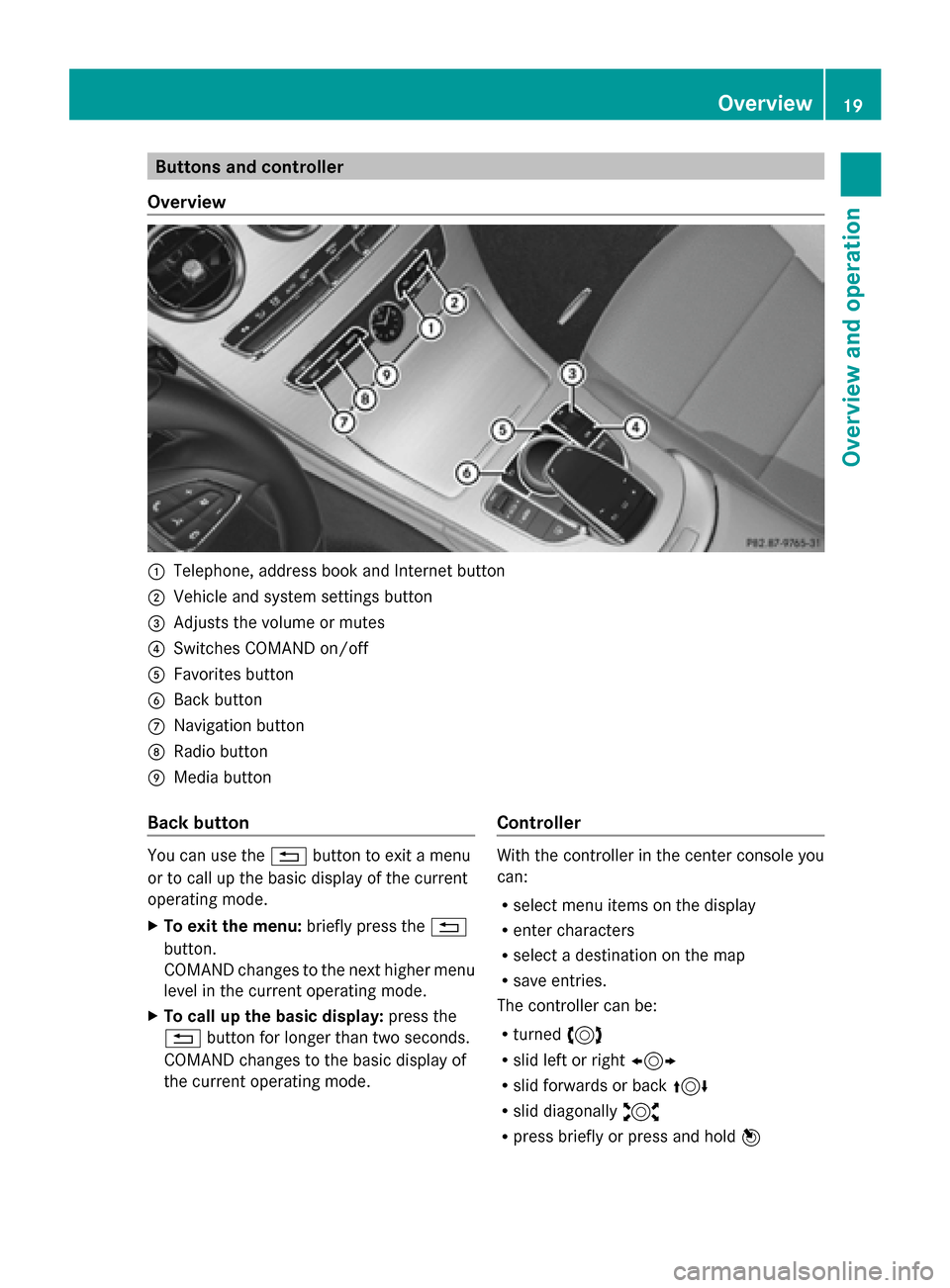
Overview 0043
Telephone, address book and Internet button
0044 Vehicle and system settings button
0087 Adjusts the volume or mutes
0085 Switches COMAND on/off
0083 Favorites button
0084 Back button
006B Navigation button
006C Radio button
006D Media button
Back button You can use the
0038button to exit a menu
or to call up the basic display of the current
operating mode.
X To exit the menu: briefly press the0038
button.
COMAND changes to the next higher menu
level in the current operating mode.
X To call up the basic display: press the
0038 button for longer than two seconds.
COMAND changes to the basic display of
the current operating mode. Controller With the controller in the center console you
can:
R
select menu items on the display
R enter characters
R select a destination on the map
R save entries.
The controller can be:
R turned 3
R slid left or right 1
R slid forwards or back 4
R slid diagonally 2
R press briefly or press and hold 7 Overview
19Overview and operation
Page 29 of 214
Switching the sound on or off
Media source sound X
Press the thumbwheel beside the control-
ler.
or
X Press the 0063button on the multifunction
steering wheel.
i When the sound is switched off, you will
see the 006Bsymbol in the status bar. If you
change the media source or change the
volume, the sound is automatically
switched on.
i Even if the sound is switched off, you will
still hear navigation system announce-
ments.
Switching navigation announcements
off and on again X
To switch off navigation announce-
ments: press the thumbwheel beside the
controller during the announcement.
The Spoken
Spoken driving driving recommendations
recommendations
have been deactivated.
have been deactivated. message
appears.
X To switch navigation announcements
back on: switch COMAND off and then on
again (Y page 26).
or
X Start a new route calculation
(Y page 69).
or
X Select 006A: while route guidance is active,
show the menu and press the controller
(Y page 82). Function menu
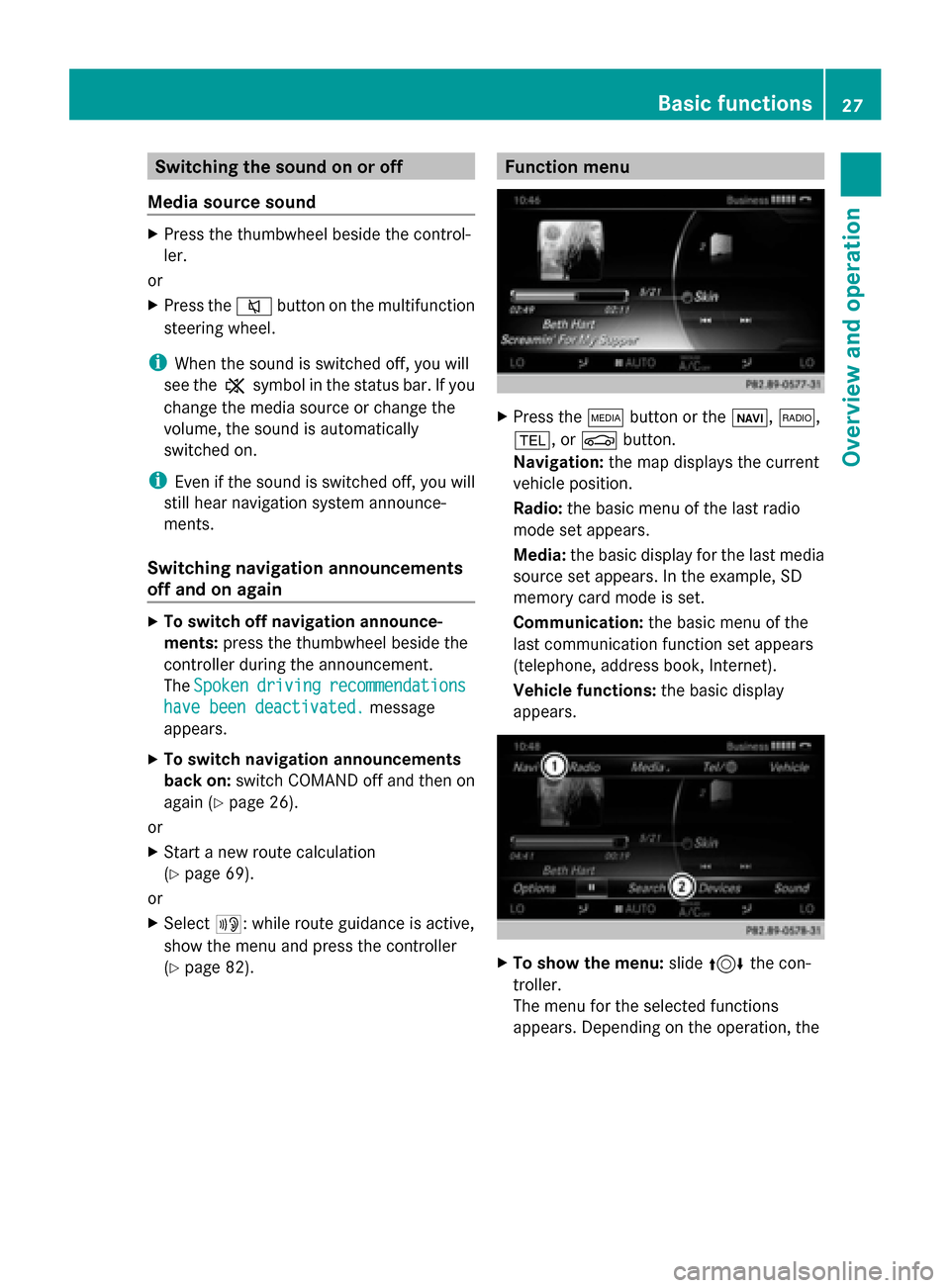
X
Press the 00FDbutton or the 00CB,002A,
002B, or 00D4button.
Navigation: the map displays the current
vehicle position.
Radio: the basic menu of the last radio
mode set appears.
Media: the basic display for the last media
source set appears. In the example, SD
memory card mode is set.
Communication: the basic menu of the
last communication function set appears
(telephone, address book, Internet).
Vehicle functions: the basic display
appears. X
To show the menu: slide4 the con-
troller.
The menu for the selected functions
appears. Depending on the operation, the Basic functions
27Overview and operation
Page 30 of 214
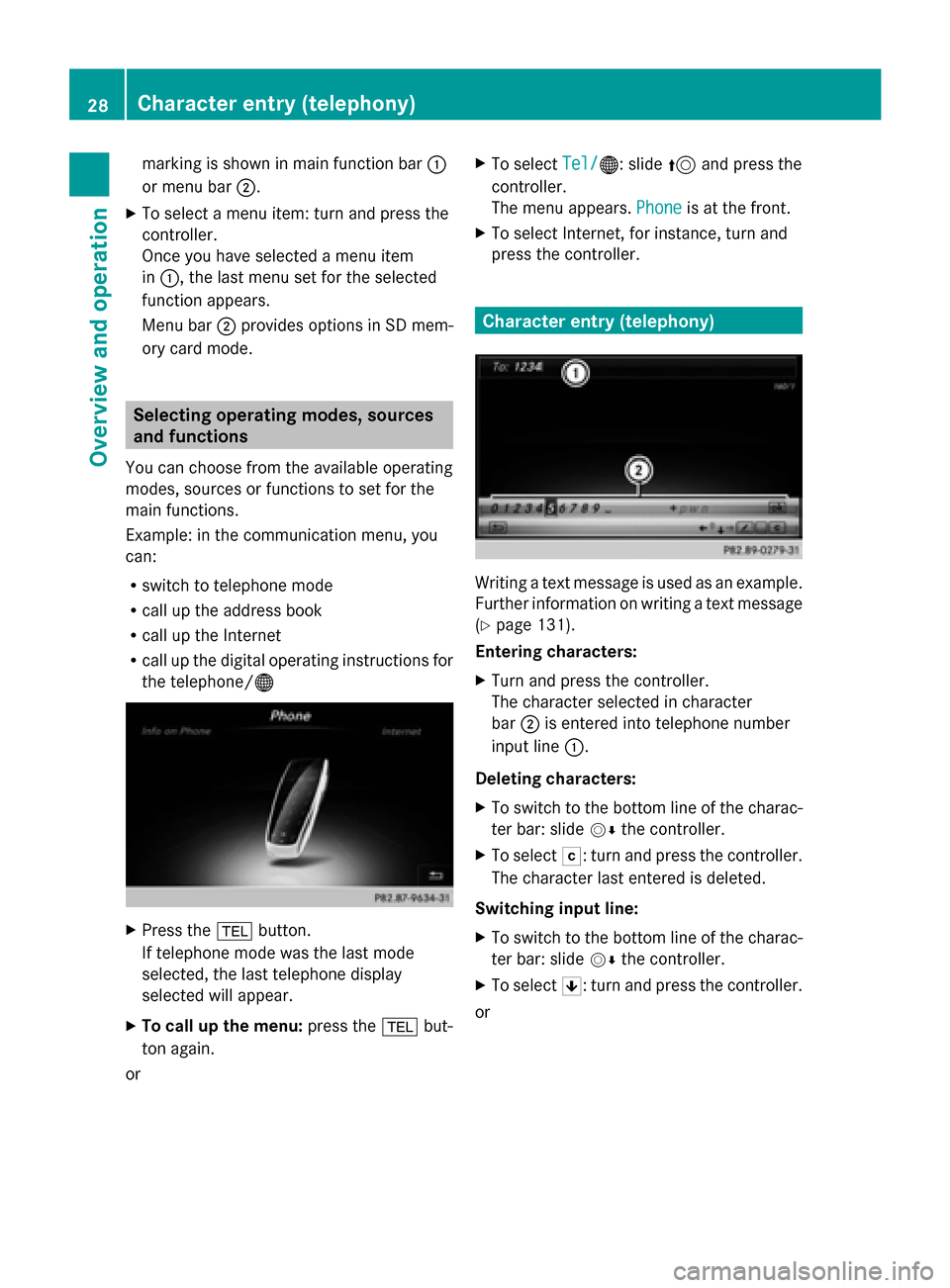
marking is shown in main function bar
0043
or menu bar 0044.
X To select a menu item: turn and press the
controller.
Once you have selected a menu item
in 0043, the last menu set for the selected
function appears.
Menu bar 0044provides options in SD mem-
ory card mode. Selecting operating modes, sources
and functions
You can choose from the available operating
modes, sources or functions to set for the
main functions.
Example: in the communication menu, you
can:
R switch to telephone mode
R call up the address book
R call up the Internet
R call up the digital operating instructions for
the telephone/00A7 X
Press the 002Bbutton.
If telephone mode was the last mode
selected, the last telephone display
selected will appear.
X To call up the menu: press the002Bbut-
ton again.
or X
To select Tel/
Tel/00A7: slide 5and press the
controller.
The menu appears. Phone Phoneis at the front.
X To select Internet, for instance, turn and
press the controller. Character entry (telephony)
Writing a text message is used as an example.
Further information on writing a text message
(Y
page 131).
Entering characters:
X Turn and press the controller.
The character selected in character
bar 0044is entered into telephone number
input line 0043.
Deleting characters:
X To switch to the bottom line of the charac-
ter bar: slide 00520064the controller.
X To select 0042: turn and press the controller.
The character last entered is deleted.
Switching input line:
X To switch to the bottom line of the charac-
ter bar: slide 00520064the controller.
X To select 0060: turn and press the controller.
or 28
Character entry (telephony)Overview and operation
Page 41 of 214
Voice Control System settings
Opening/closing the help window
The help window also shows you information
on audible instructions:
R during individualization
R during subsequent operation of the Voice
Control System.
X Press the 00D4button.
The Vehicle
Vehicle menu appears.
X To select System Settings System Settings : slide6the
controller, turn and press to confirm.
A menu appears.
X To select Voice Control
Voice Control: turn and press
the controller.
X Select Help Window
Help Window .
You have switched the help window on
0073 or off 0053.
More information on the Voice Control Sys-
tem is available in the separate operating
instructions. Individualization
Using individualization, you can fine-tune the
Voice Control System to your own voice. This
will help improve voice recognition (see the
separate operating instructions). WLAN
Overview
Conditions:
To establish a WLAN connection between
COMAND and a WLAN-enabled device, such
as a tablet computer or smartphone:
R WLAN must be activated at COMAND and
at the device to be connected. If COMAND is to be used as a WLAN hotspot:
R
COMAND must be connected to an Inter-
net-enabled mobile phone via Bluetooth ®
or USB.
R The Internet access data for the mobile
phone network provider must be selected
or set for COMAND.
R There must be an Internet connection to
COMAND. Activating WLAN
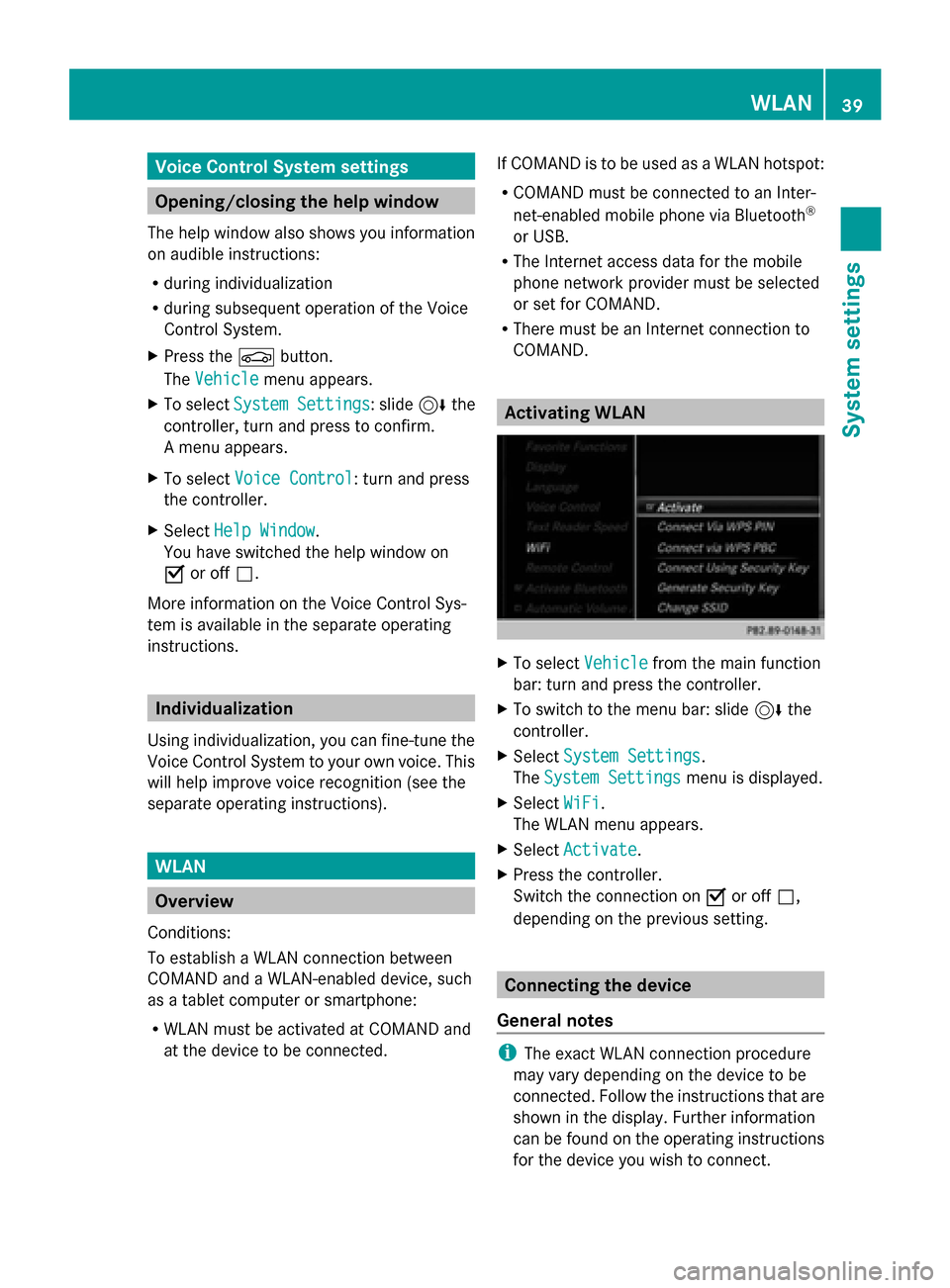
X
To select Vehicle Vehiclefrom the main function
bar: turn and press the controller.
X To switch to the menu bar: slide 6the
controller.
X Select System Settings
System Settings.
The System Settings
System Settings menu is displayed.
X Select WiFi
WiFi.
The WLAN menu appears.
X Select Activate
Activate.
X Press the controller.
Switch the connection on 0073or off 0053,
depending on the previous setting. Connecting the device
General notes i
The exact WLAN connection procedure
may vary depending on the device to be
connected. Follow the instructions that are
shown in the display. Further information
can be found on the operating instructions
for the device you wish to connect. WLAN
39System settings
Page 44 of 214
Bluetooth
®
technology is a standard for
short-range wireless data transmissions up to
approximately 10 meters. You can use Blue-
tooth ®
to connect your mobile phone to
COMAND to, for example:
R use the hands-free system
R establish an Internet connection
R listen to music using Bluetooth ®
Audio
R exchange vCards
Bluetooth ®
is a registered trademark of Blue-
tooth Special Interest Group (SIG) Inc. Activating/deactivating Bluetooth
®
X Press the 00D4button in the center con-
sole.
The Vehicle
Vehicle menu appears.
X To select System Settings System Settings : slide6the
controller, turn and press to confirm.
A menu appears.
X To select Activate Bluetooth
Activate Bluetooth: turn and
press the controller.
This switches Bluetooth ®
on 0073 or off 0053. Setting the system language
This function allows you to determine the lan-
guage for the menu displays and the naviga-
tion messages. The selected language affects
the characters available for entry.
i The navigation announcements are not
available in all languages. If a language is
not available, the navigation announce-
ments will be in English.
i When you set the system language, the
language of the Voice Control System will
change accordingly. If it is not supported
by the Voice Control System, English will be
selected. X
Press the 00D4button.
The Vehicle Vehicle menu appears.
X To select System Settings
System Settings : slide6the
controller, turn and press to confirm.
A menu appears.
X To select Language Language : turn and press the
controller.
The list of languages appears. The 003Bdot
indicates the current setting.
X Select the desired language.
COMAND loads the selected language and
sets it. Calling up and editing the Favorites
function
The Favorites function can be called up via the
system menu or via the 007Dbutton on the
controller or the touchpad.
To call up the Favorites function via the
system menu:
X Press the 00D4button.
The system menu appears.
X To select System SystemSettings
Settings: slide 6and
press the controller.
A menu appears.
X To select Favorite Favorite Functions
Functions : press the
controller.
A menu appears.
X To select the desired function, e.g. Radio
Radio:
turn and press the controller.
A menu appears.
To call up the Favorites function via the
controller or touchpad:
X Press the 007Dbutton.
Call up the Favorite Functions Favorite Functions menu.
The Favorites function can be exited at any
time. To exit the Favorites function:
R Press the 007Dbutton again
R Press the 0038button on the controller
R Press the 0038button in the display. 42
Calling up and editing the Favorites functionSystem settings
Page 72 of 214
Set as Intermediate Destination
Set as Intermediate Destination
adds the new destination in addition to the
existing destination and opens the inter-
mediate destinations list.
i The route is calculated using the digital
map data. The calculation time depends on
the distance from the destination, for
example.
The calculated route may differ from the
ideal route, e.g. due to road works or
incomplete map data. Please also refer to
the notes about the digital map
(Y page 96).
Calling up the keyword search
X To select the magnifying glass symbol:
while in the address entry menu, slide
6, turn and then press the controller.
Viewing the vicinity of the destination
X To select symbol 0043: turn the controller and
press to confirm.
You can explore the destination area.
Requirement for exploring a destination:
mbrace must be activated for Internet
access (Y page 136). Keyword search
Entering keywords The keyword search is used to help find des-
tinations using fragments of words. The key-
word search is tolerant of errors. It can be
used for an address or a POI. For example,
you can search for the Houses of Parliament
or Big Ben. The keyword search finds geoto- lerant hits. If, for example, you are searching
for a street located on the edge of a city, the
search will also cover adjacent smaller cities.
The keyword search supports languages
using Latin characters.
X
To switch to navigation mode: press the
00BE button.
X To show the menu: slide6the control-
ler.
X To select Destination Destination: turn and press the
controller.
X Select Keyword Search
Keyword Search.
X Enter the first few letters of the town and
street, e.g. STUT STUTandKÖN
KÖN.
While entering the information, the number
of exact matches/all hits is shown.
---/--- ---/--- is displayed if fewer than three
characters have been entered.
999+ 999+ is displayed if there are too many hits.
X Select OK
OK. The search results are divided into catego-
ries, such as addresses. The number of
exact/total hits is shown in brackets.
The search results will be displayed if
POI POI
Search
Search and/orAutomatic Online Search
Automatic Online Search
are enabled in the search options.
Selecting an address
X To select Addresses Addresses
Search_Results_Navi Search_Results_Navi : press the control-
ler. 70
Destination inputNavigation
Page 73 of 214

Exact hits are shown at the very top of the list.
Hits are listed alphabetically. The search term
that you entered is highlighted in orange in
the entries.
X To select an entry: turn and press the con-
troller.
The address entry menu appears, showing
the destination address.
X To start route calculation: selectStart
Start.
Selecting a point of interest
X To select POIs POIsin
inthe
the Vicinity
Vicinity orAll
All
POIs Search_Results_Navi
POIs Search_Results_Navi: turn and
press the controller.
A list appears.
X Select a point of interest.
The POI is shown.
X To start route calculation: select Start Start.
Using online search
X To select Automatic Online Search
Automatic Online Search :
turn and press the controller.
The search switches to the online func-
tions.
Online search requirement: mbrace must
be activated for Internet access
(Y page 136).
Selecting search options X
To switch to navigation mode: press the
00BE button.
X To show the menu: slide6the control-
ler.
X To select Destination Destination: turn and press the
controller. X
Select Keyword Search
Keyword Search .
X To select Search Options
Search Options: slide 5the
controller, turn and press to confirm.
X Select Fuzzy Search
Fuzzy Search ,POI Search
POI Search or
Automatic Online Search
Automatic Online Search .
Switch the setting on 0073or off 0053.
Error-tolerant search: useful if parts of the
address are incomplete or the spelling is
unclear.
POI search: points of interest are taken into
account in the search.
Online search: the search is performed via
the online functions.
Selecting the country X
To switch to navigation mode: press the
00BE button.
X To show the menu: slide6the control-
ler.
X To select Destination Destination: turn and press the
controller.
X Select Keyword Search
Keyword Search .
X To select Country
Country: slide 5the controller,
turn and press to confirm.
The alphabetical list of countries is dis-
played.
X Select a country: turn and press the con-
troller.
Searching via COMAND Requirement: mbrace must be activated for
Internet access (
Ypage 136).
X To switch to navigation mode: press the
00BE button.
X To show the menu: slide6the control-
ler.
X To select Destination Destination: turn and press the
controller.
X Select Keyword Search
Keyword Search .
X To select Online Search Online Search : slide5the
controller, turn and press to confirm.
The search switches to the online func-
tions. Destina
tion input
71Navigation Z