Page 605 of 878
6053-7. Other interior features
3
Interior features Seat heaters and ventilators
■
Operating condition
The “POWER” switch is in ON mode.■
When not in use
Set the knob at “0”. The indicator light turns off.
CAUTION■
Burns ●
Use caution when seating the following pers ons in a seat with the seat heater on
to avoid the possibility of burns:
• Babies, small children, the elderly, the sick and the physically challenged
• Persons with sensitive skin
• Persons who are fatigued
• Persons who have taken alcohol or drugs that induce sleep (sleeping drugs,
cold remedies, etc.)
●
Do not cover the seat with anything when using the seat heater.
Using the seat heater with a blanket or cushion increases the temperature of the
seat and may lead to overheating.
: If equippedThe seat heaters and ventilators heat the seats and maintain good airflow
by blowing air from the seats.
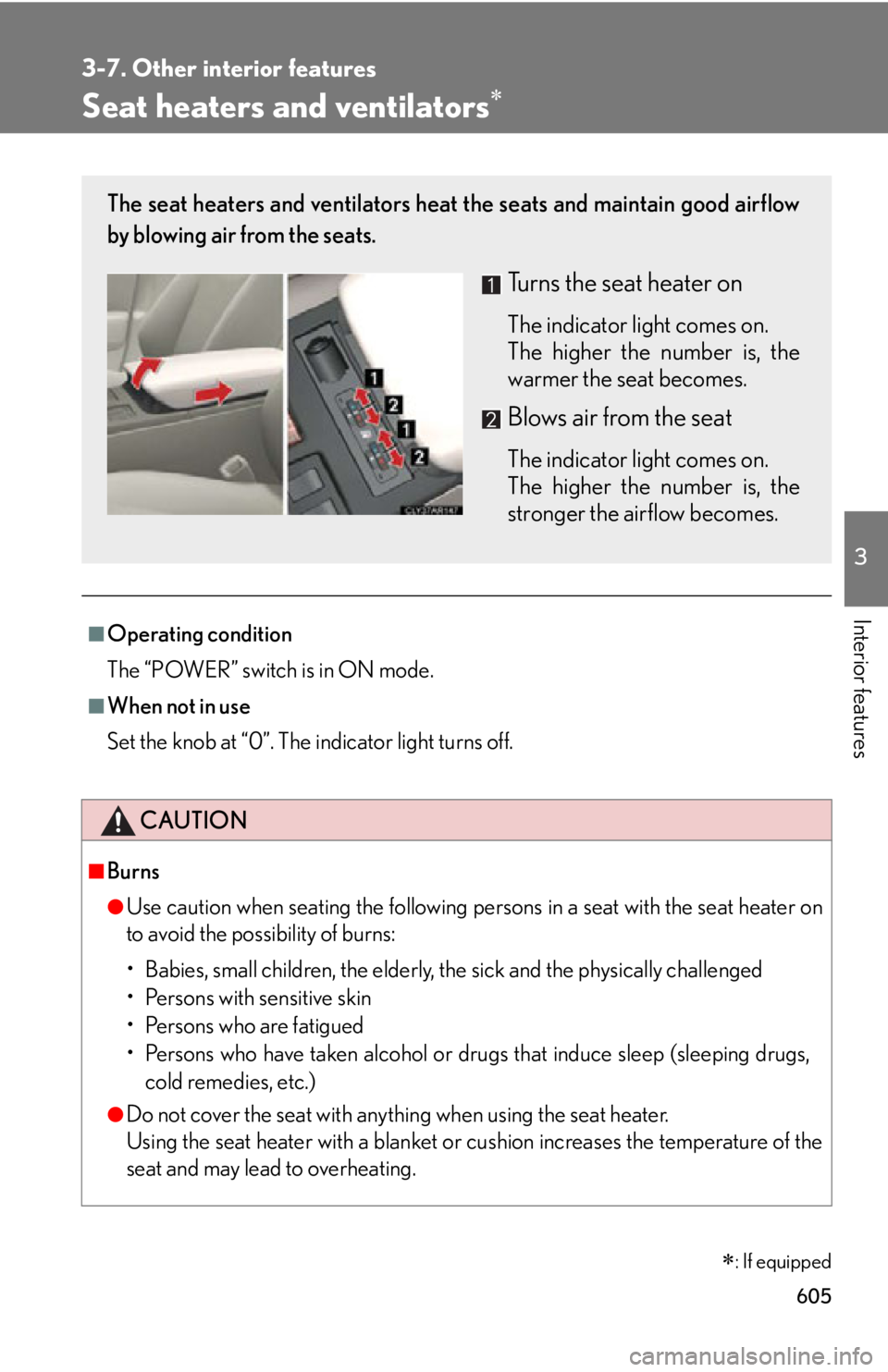
Turns the seat heater on The indicator light comes on.
The higher the number is, the
warmer the seat becomes.
Blows air from the seat The indicator light comes on.
The higher the number is, the
stronger the airflow becomes.
Page 616 of 878
6163-7. Other interior features
Garage door opener The garage door opener (HomeLink
Universal Transceiver) is manufactured
under license from HomeLink
.
Programming the HomeLink
(for U.S.A. owners)
The HomeLink
compatible transceiver in your vehicle has 3 buttons
which can be programmed to operate 3 different devices. Refer to the
programming method below appropriate for the device.
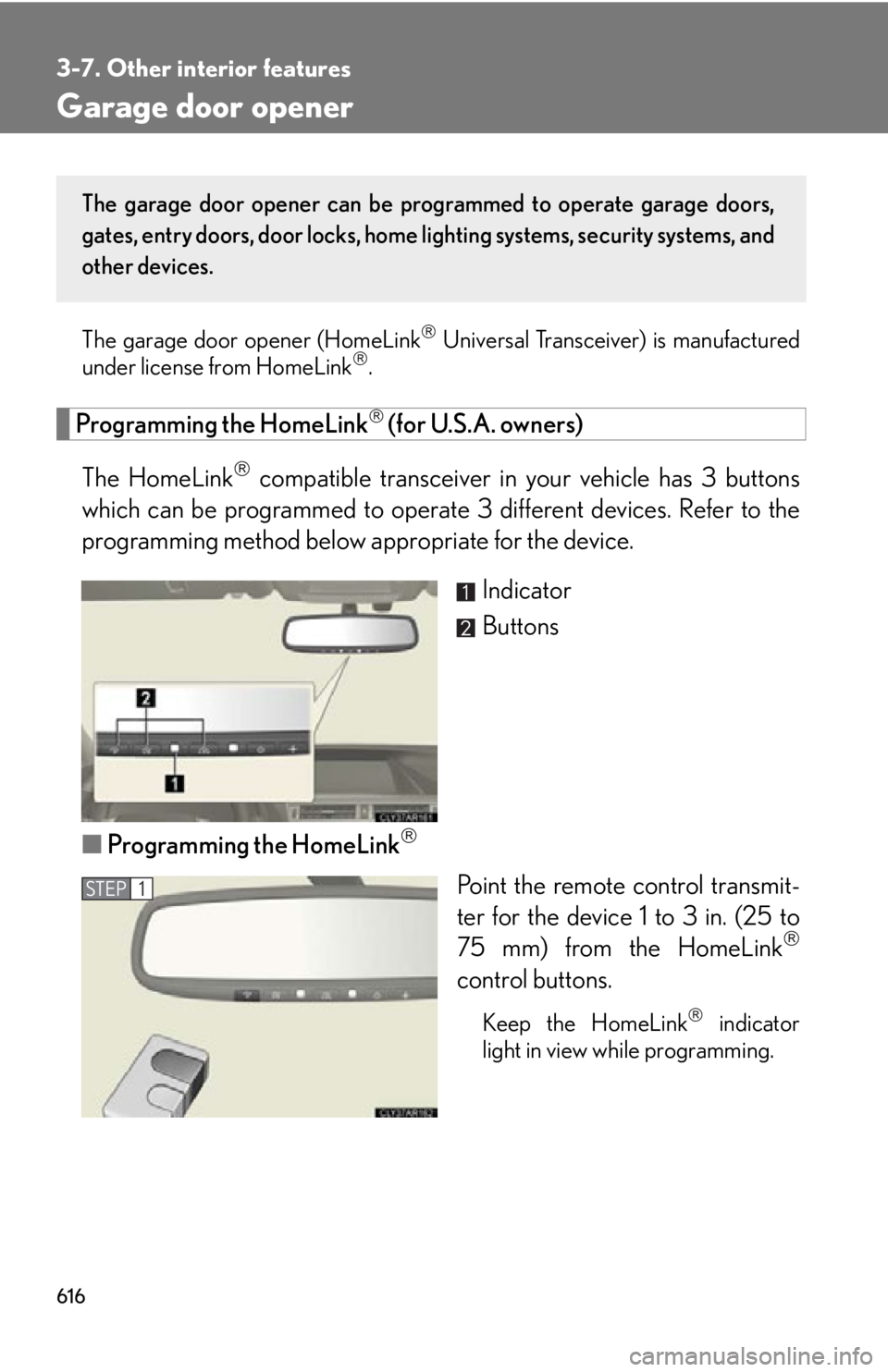
Indicator
Buttons
■ Programming the HomeLink
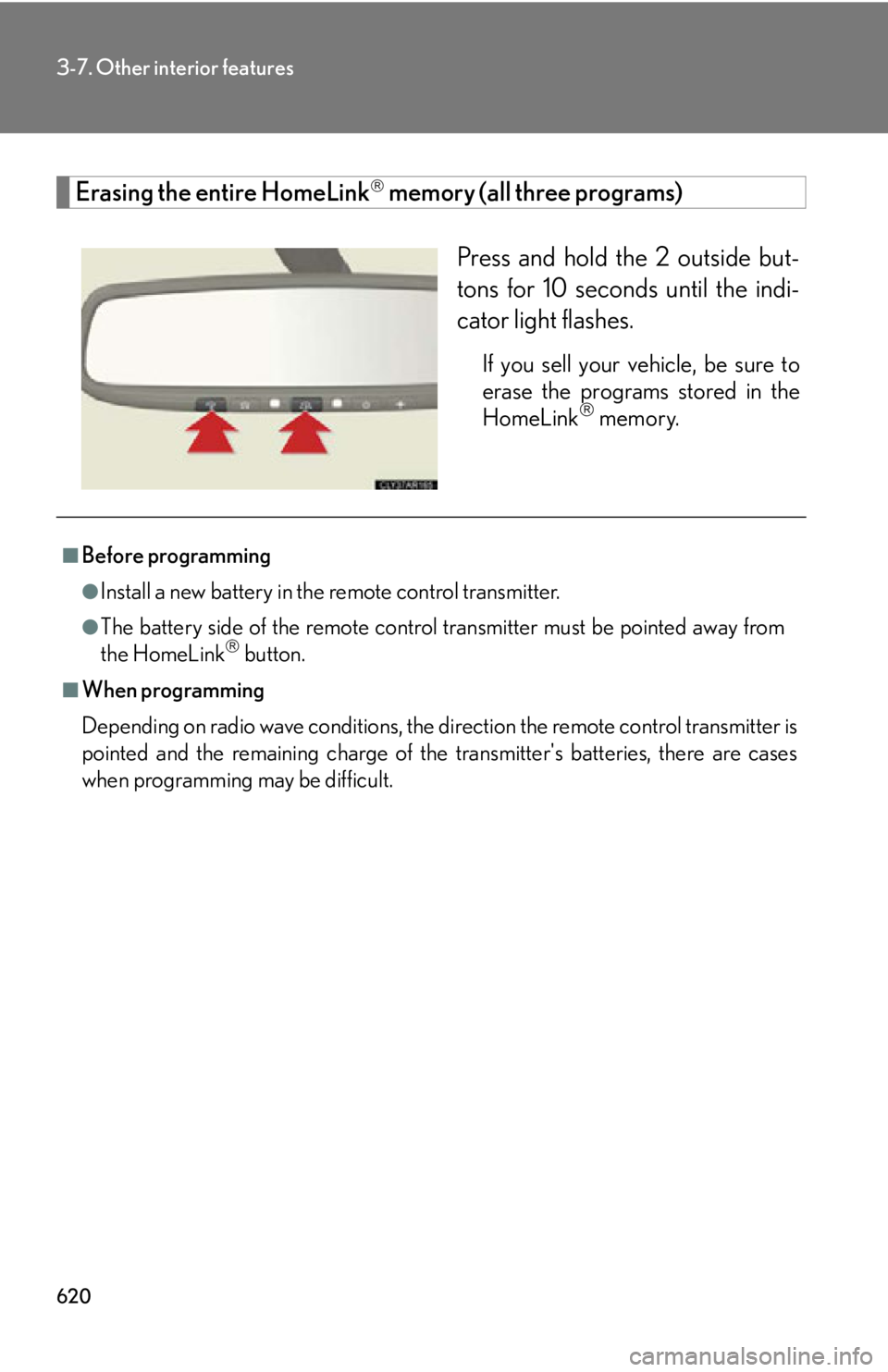
Point the remote control transmit-
ter for the device 1 to 3 in. (25 to
75 mm) from the HomeLink
control buttons.
Keep the HomeLink
indicator
light in view while programming.The garage door opener can be pr ogrammed to operate garage doors,
gates, entry doors, door locks, home lighting systems, security systems, and
other devices.
STEP 1
Page 617 of 878
6173-7. Other interior features
3
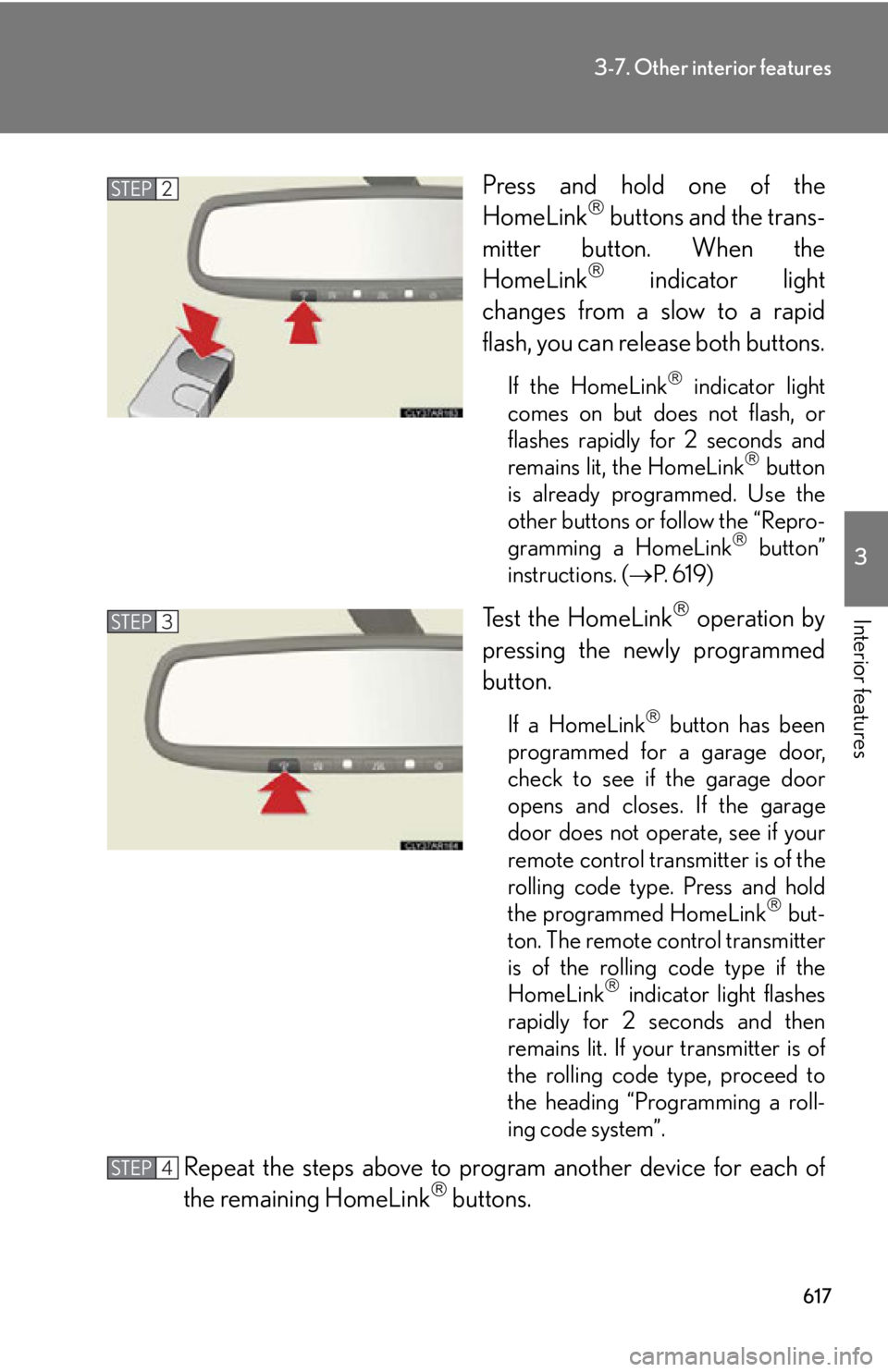
Interior features Press and hold one of the
HomeLink
buttons and the trans-
mitter button. When the
HomeLink
indicator light
changes from a slow to a rapid
flash, you can release both buttons. If the HomeLink
indicator light
comes on but does not flash, or
flashes rapidly for 2 seconds and
remains lit, the HomeLink
button
is already programmed. Use the
other buttons or follow the “Repro-
gramming a HomeLink
button”
instructions. ( P. 6 1 9 )
Test the HomeLink
operation by
pressing the newly programmed
button. If a HomeLink
button has been
programmed for a garage door,
check to see if the garage door
opens and closes. If the garage
door does not operate, see if your
remote control transmitter is of the
rolling code type. Press and hold
the programmed HomeLink
but-
ton. The remote control transmitter
is of the rolling code type if the
HomeLink
indicator light flashes
rapidly for 2 seconds and then
remains lit. If your transmitter is of
the rolling code type, proceed to
the heading “Programming a roll-
ing code system”.
Repeat the steps above to program another device for each of
the remaining HomeLink
buttons.STEP 2
STEP 3
STEP 4
Page 618 of 878

6183-7. Other interior features
■ Programming a Rolling Code system (for U.S.A. owners)
If your device is Rolling Code eq uipped, follow the steps under the
heading “Programming the HomeLink
” before proceeding with the
steps listed below.
Locate the learn button on th e ceiling mounted garage door
opener motor. The exact location and color of the button may
vary by brand of garage door opener motor. Refer to the operation manual supplied with the garage door opener
for the location of the learn button.
Press the learn button. Following this step, you have 30 se conds in which to initiate step 3
below.
Press and hold the vehi cle’s programmed HomeLink
button for
2 seconds and release it. Repeat this step once again. The garage
door may open. If the garage door opens, the programming process is complete. If the
door does not open, press and release the button a third time. This third
press and release will complete the programming process by opening
the garage door.
The ceiling mounted garage door op ener motor should now recognize
the HomeLink
signal and operate the garage door.
Repeat the steps above to prog ram another rolling code system
for any of the remaining HomeLink
buttons.
■ Programming an entry gate (for U .S.A. owners)/Programming all
devices in the Canadian market
Place your transmitter 1 to 3 in. (25 to 75 mm) away from the sur-
face of the HomeLink
.
Keep the HomeLink
indicator light in view while programming.
Press and hold the selected HomeLink
button.
Repeatedly press and release (cyc le) the device’s remote control
button for two seconds each until step 4 is completed.
When the indicator light on the HomeLink
compatible trans-
ceiver starts to flash rapidly, release the buttons.STEP 1
STEP 2
STEP 3
STEP 4
STEP 1
STEP 2
STEP 3
STEP 4
Page 619 of 878
6193-7. Other interior features
3
Interior features Test the operation of the HomeLink
by pressing the newly pro-
grammed button. Check to see if the gate/device operates cor-
rectly.
Repeat the steps above to program another device for each of
the remaining HomeLink
buttons.
■ Programming other devices
To program other devices such as home security systems, home door
locks or lighting, contact your auth orized Lexus dealer for assistance.
■ Reprogramming a button
The individual HomeLink
buttons cannot be erased but can be
reprogrammed. To reprogram a button, follow the “Reprogramming a
HomeLink
button” instructions.
Operating HomeLink
Press the appropriate HomeLink
button. The HomeLink
indicator
light should turn on. The HomeLink
compatible transceiver in your vehicle continues to send a
signal for up to 20 seconds as long as the button is pressed.
Reprogramming a HomeLink
button
Press and hold the desired HomeLink
button. After 20 seconds, the
HomeLink
indicator light will st art flashing slowly. Next, while still press-
ing and holding the HomeLink
button, press and hold the button on the
transmitter until the HomeLink
indicator light chan ges from a slow to a
rapid flash. STEP 5
STEP 6
Page 620 of 878
6203-7. Other interior features
Erasing the entire HomeLink
memory (all three programs)
Press and hold the 2 outside but-
tons for 10 seconds until the indi-
cator light flashes. If you sell your vehicle, be sure to
erase the programs stored in the
HomeLink
memory.
■
Before programming ●
Install a new battery in the remote control transmitter.●
The battery side of the remote control transmitter must be pointed away from
the HomeLink
button.■
When programming
Depending on radio wave conditions, the di rection the remote control transmitter is
pointed and the remaining charge of the transmitter's batteries, there are cases
when programming may be difficult.
Page 626 of 878
6263-7. Other interior features
Safety Connect
: If equippedSafety Connect is a subscription-based telematics service that uses Global
Positioning System (GPS) data and emb edded cellular technology to pro-
vide safety and security features to subscribers. Safety Connect is sup-
ported by Lexus’ designated response center, which operates 24 hours per
day, 7 days per week.
Safety Connect service is available by subscription on select, telematics
hardware-equipped vehicles.
By using the Safety Connect service, you are agreeing to be bound by the
Telematics Subscription Service Agreement and its Terms and Conditions,
as in effect and amended from time to time, a current copy of which is avail-
able at Lexus.com. All use of the Safety Connect service is subject to such
then-applicable Terms and Conditions.
■ System components
Microphone
LED light indicators
“SOS” button
Page 629 of 878

6293-7. Other interior features
3
Interior features Safety Connect LED light Indicators
● When the “POWER” switch is turn ed to ON mode, the red indicator
light comes on for 2 seconds then turns off. Afterward, the green indi-
cator light comes on, indicating that the service is active.
● The following indicator light patterns indica te specific system usage
conditions:
• Green indicator light on = Active service
• Green indicator light flashing = Safety Connect call in process
• Red indicator light (except at vehicle start-up) = System malfunction
(contact your Lexus dealer)
• No indicator light (off) = Saf ety Connect service not active
Safety Connect services
■ Automatic Collision Notification
In case of either airbag deployment or severe rear-end collision, the
system is designed to automatically call the response center. The
responding agent receives the vehicl e’s location and attempts to speak
with the vehicle occupants to asse ss the level of emergency. If the
occupants are unable to communicate, the agent automatically treats
the call as an emergency, contacts the nearest emergency services
provider to describe the situation, and requests that assistance be sent
to the location.