Page 284 of 573
283
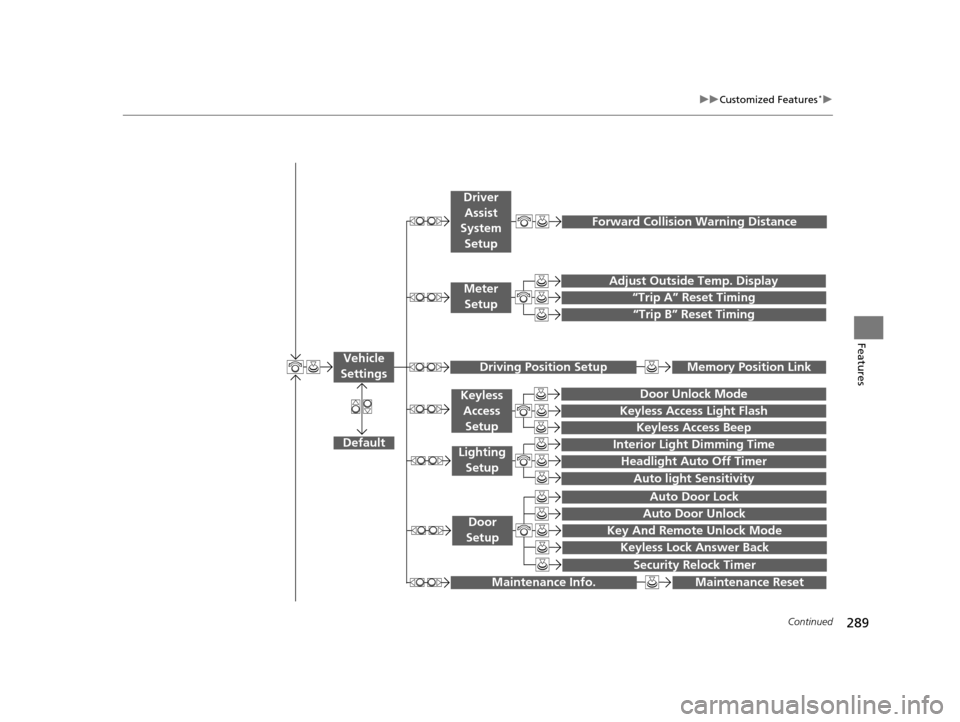
uuCustomized Features*u
Continued
Features
“Trip B” Reset Timing
Adjust Outside Temp. Display
“Trip A” Reset Timing
Keyless Access Light Flash
Auto Light Sensitivity
Auto Door Lock
Auto Door Unlock
Forward Collision Warning
Distance*
Door Unlock Mode
Interior Light Dimming Time
Headlight Auto Off Timer
Memory Position Link
Key And Remote Unlock Mode
Keyless Lock Answer Back
Security Relock Timer
Maintenance Reset
Default All
Vehicle
Settings
Driver Assist System Setup*
Meter
Setup
Driving Position Setup*
Keyless Access Setup
Lighting Setup
Door
Setup
Maintenance Info.
Keyless Access Beep
* Not available on all models
15 CROSSTOUR-31TP66500.book 283 ページ 2014年7月31日 木曜日 午後3時23分
Page 290 of 573
289
uuCustomized Features*u
Continued
Features
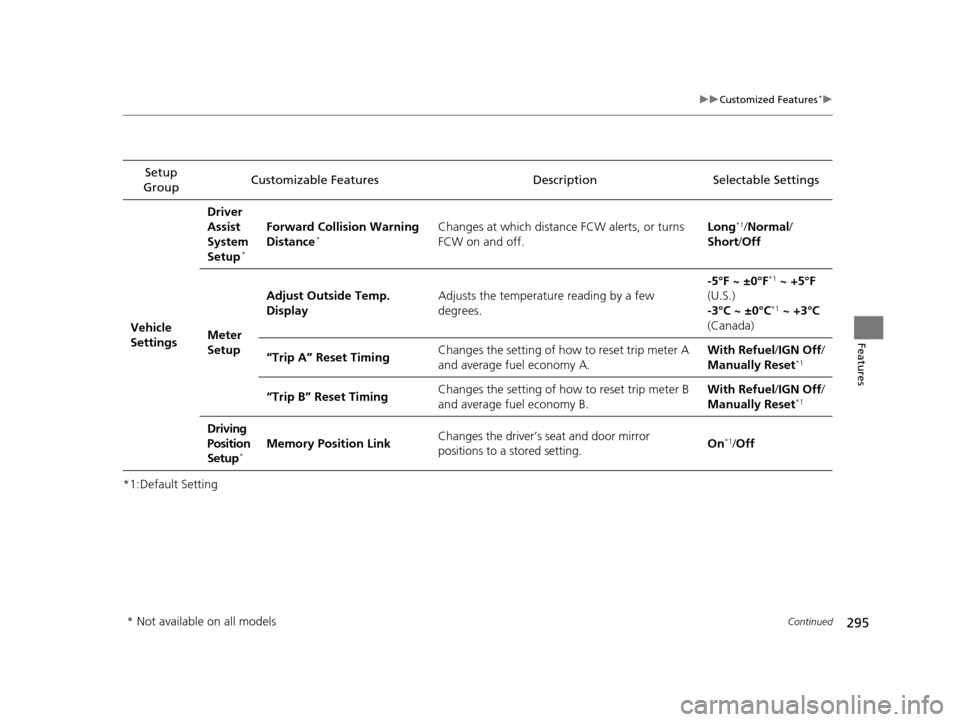
“Trip A” Reset Timing
“Trip B” Reset Timing
Adjust Outside Temp. Display
Forward Collision Warning Distance
Default
Memory Position Link
Door Unlock Mode
Keyless Access Light Flash
Interior Light Dimming Time
Headlight Auto Off Timer
Auto light Sensitivity
Key And Remote Unlock Mode
Keyless Lock Answer Back
Security Relock Timer
Auto Door Lock
Auto Door Unlock
Maintenance Reset
Vehicle
Settings
Meter Setup
Driver Assist
System
Setup
Driving Position Setup
Keyless Access
Setup
Lighting Setup
Door
Setup
Maintenance Info.
Keyless Access Beep
15 CROSSTOUR-31TP66500.book 289 ページ 2014年7月31日 木曜日 午後3時23分
Page 296 of 573
295
uuCustomized Features*u
Continued
Features
*1:Default SettingSetup
Group Customizable Features Description Selectable Settings
Vehicle
SettingsDriver
Assist
System
Setup
*
Forward Collision Warning
Distance*Changes at which distance FCW alerts, or turns
FCW on and off.
Long*1/
Normal /
Short /Off
Meter
Setup Adjust Outside Temp.
Display
Adjusts the temperature reading by a few
degrees. -5°F ~ ±0°F
*1
~ +5°F
(U.S.)
-3°C ~ ±0°C
*1 ~ +3°C
(Canada)
“Trip A” Reset Timing Changes the setting of how to reset trip meter A
and average fuel economy A. With Refuel
/IGN Off /
Manually Reset
*1
“Trip B” Reset Timing Changes the setting of how to reset trip meter B
and average fuel economy B. With Refuel
/IGN Off /
Manually Reset*1
Driving
Position
Setup
*Memory Position Link Changes the driver’s seat and door mirror
positions to a stored setting.
On*1/
Off
* Not available on all models
15 CROSSTOUR-31TP66500.book 295 ページ 2014年7月31日 木曜日 午後3時23分
Page 307 of 573
306
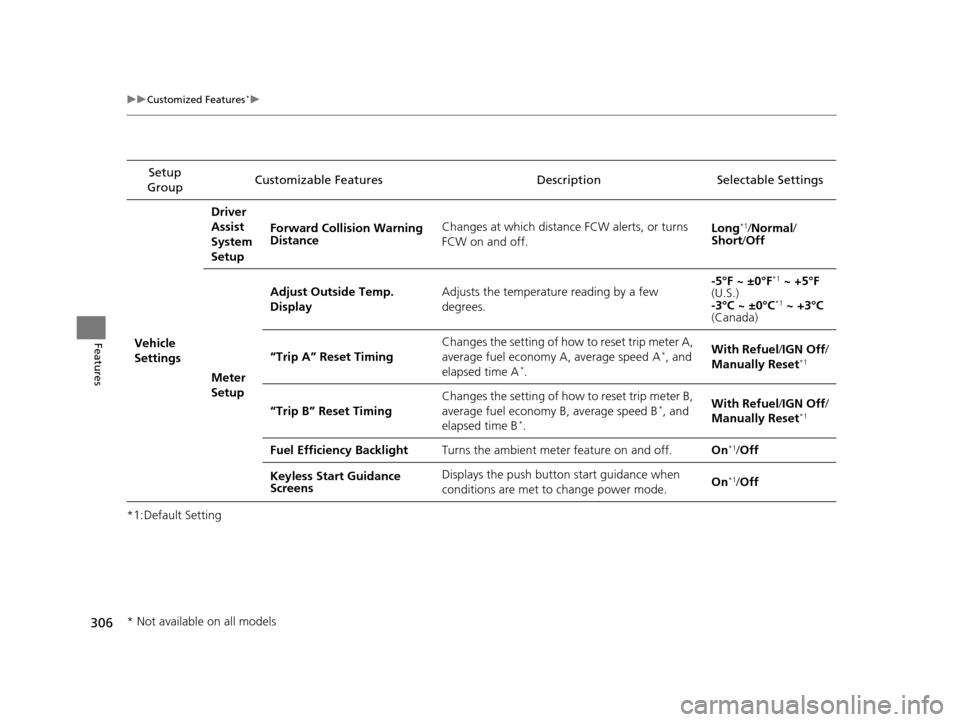
uuCustomized Features*u
Features
*1:Default SettingSetup
Group Customizable Features Descri
ption Selectable Settings
Vehicle
SettingsDriver
Assist
System
Setup
Forward Collision Warning
Distance
Changes at which distance FCW alerts, or turns
FCW on and off.
Long
*1/
Normal /
Short /Off
Meter
Setup Adjust Outside Temp.
Display
Adjusts the temperature reading by a few
degrees. -5°F ~ ±0°F
*1
~ +5°F
(U.S.)
-3°C ~ ±0°C
*1 ~ +3°C
(Canada)
“Trip A” Reset Timing Changes the setting of how to reset trip meter A,
average fuel economy A, average speed A
*, and
elapsed time A*. With Refuel
/IGN Off /
Manually Reset*1
“Trip B” Reset Timing Changes the setting of how to reset trip meter B,
average fuel economy
B, average speed B*, and
elapsed time B*. With Refuel
/IGN Off /
Manually Reset*1
Fuel Efficiency Backlight Turns the ambient meter feature on and off. On*1/Off
Keyless Start Guidance
Screens Displays the push button start guidance when
conditions are met to change power mode.
On
*1/
Off
* Not available on all models
15 CROSSTOUR-31TP66500.book 306 ページ 2014年7月31日 木曜日 午後3時23分
Page 410 of 573
409
Driving
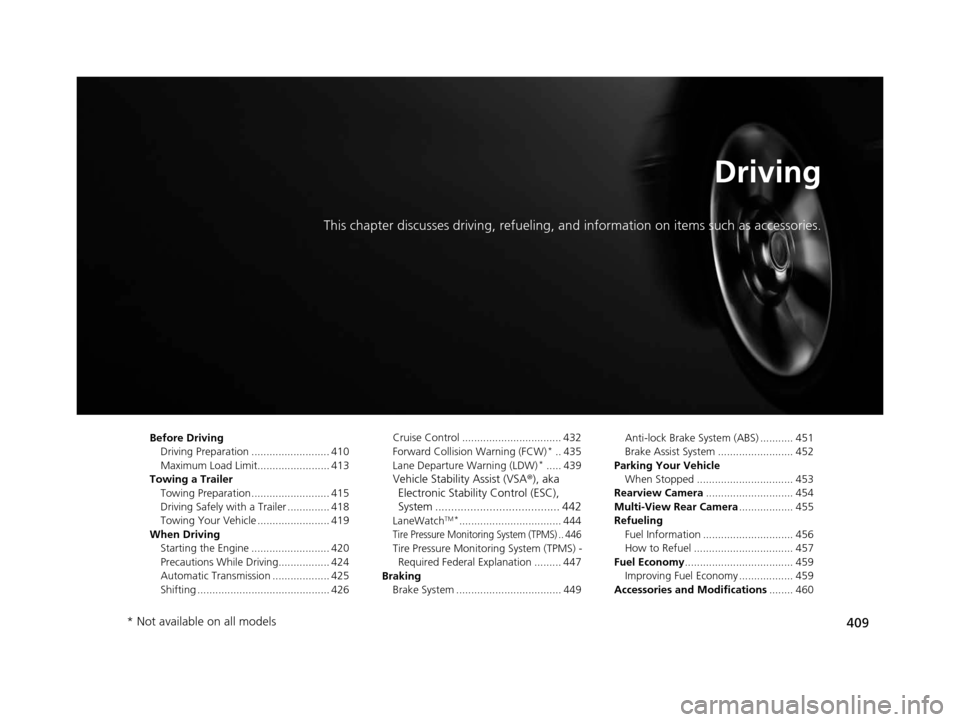
This chapter discusses driving, refueling, and information on items such as accessories.
Before Driving
Driving Preparation .......................... 410
Maximum Load Limit........................ 413
Towing a Trailer Towing Preparation .......................... 415
Driving Safely with a Trailer .............. 418
Towing Your Vehicle ........................ 419
When Driving Starting the Engine .......................... 420
Precautions While Driving................. 424
Automatic Transmission ................... 425
Shifting ............................................ 426 Cruise Control ................................. 432
Forward Collision Warning (FCW)*.. 435
Lane Departure Warning (LDW)*..... 439
Vehicle Stability Assist (VSA ®), aka
Electronic Stability Control (ESC),
System ....................................... 442
LaneWatchTM*.................................. 444
Tire Pressure Monitoring System (TPMS) .. 446
Tire Pressure Monitoring System (TPMS) -
Required Federal Explanation ......... 447
Braking Brake System ................................... 449 Anti-lock Brake System (ABS) ........... 451
Brake Assist System ......................... 452
Parking Your Vehicle When Stopped ................................ 453
Rearview Camera ............................. 454
Multi-View Rear Camera .................. 455
Refueling Fuel Information .............................. 456
How to Refuel ................................. 457
Fuel Economy .................................... 459
Improving Fuel Economy .................. 459
Accessories and Modifications ........ 460
* Not available on all models
15 CROSSTOUR-31TP66500.book 409 ページ 2014年7月31日 木曜日 午後3時23分
Page 414 of 573
413
uuBefore Driving uMaximum Load Limit
Continued
Driving
Maximum Load Limit
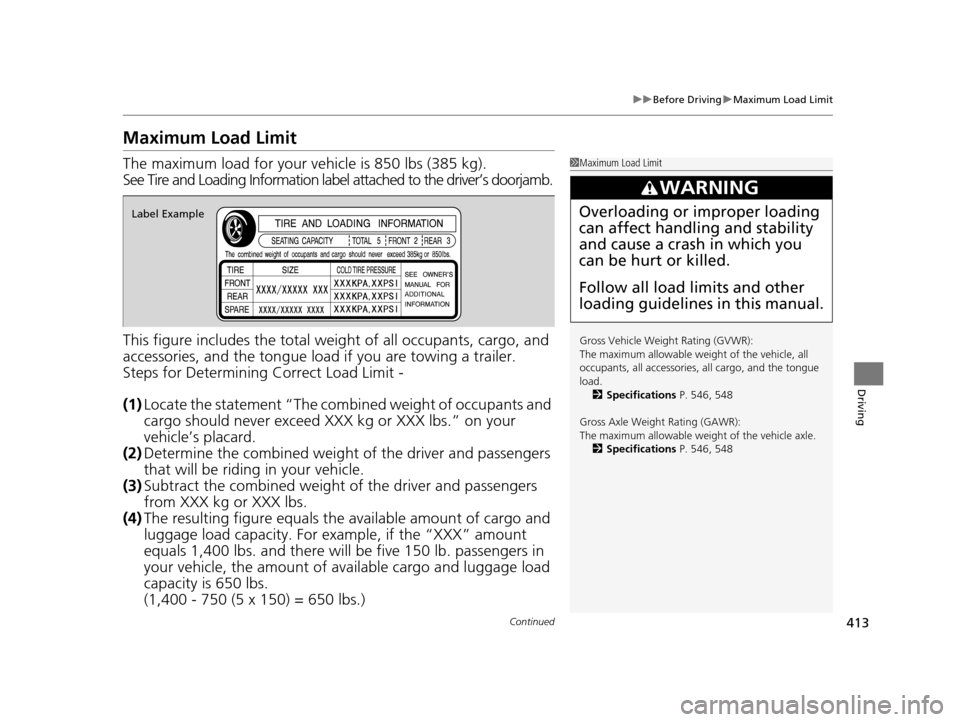
The maximum load for your ve hicle is 850 lbs (385 kg).
See Tire and Loading Information label attached to the driver’s doorjamb.
This figure includes the total weig ht of all occupants, cargo, and
accessories, and the tongue load if you are towing a trailer.
Steps for Determining Correct Load Limit -
(1) Locate the statement “The comb ined weight of occupants and
cargo should never exceed XXX kg or XXX lbs.” on your
vehicle’s placard.
(2) Determine the combined weight of the driver and passengers
that will be riding in your vehicle.
(3) Subtract the combined weight of the driver and passengers
from XXX kg or XXX lbs.
(4) The resulting figure equals the available amount of cargo and
luggage load capacity. For example, if the “XXX” amount
equals 1,400 lbs. and there will be five 150 lb. passengers in
your vehicle, the am ount of available cargo and luggage load
capacity is 650 lbs.
(1,400 - 750 (5 x 150) = 650 lbs.)1 Maximum Load Limit
Gross Vehicle Weight Rating (GVWR):
The maximum allowable weight of the vehicle, all
occupants, all a ccessories, all cargo, and the tongue
load. 2 Specifications P. 546, 548
Gross Axle Weight Rating (GAWR):
The maximum allowable weight of the vehicle axle. 2 Specifications P. 546, 548
3WARNING
Overloading or improper loading
can affect handling and stability
and cause a crash in which you
can be hurt or killed.
Follow all load limits and other
loading guidelines in this manual.Label Example
15 CROSSTOUR-31TP66500.book 413 ページ 2014年7月31日 木曜日 午後3時23分
Page 416 of 573

415Continued
Driving
Towing a Trailer
Towing Preparation
Your vehicle can tow a trailer if you carefully observe the load limits, use the proper
equipment, and follow the towing guidelin es. Check the load limits before driving.
■Total trailer weight
Maximum allowable weight of the trailer,
cargo, and everything in or on it must not
exceed 1,500 lbs (680 kg) for 6-cylinder
models and 1,000 lbs (453 kg) for 4-cylinder
models. Towing loads in excess of this can
seriously affect vehicle handling and
performance and can damage the engine and
drivetrain.
■Tongue load
The weight of the tongue with a fully loaded
trailer on the hitch should be approximately
10% of the total trailer weight.
• Excessive tongue load reduces front tire
traction and steering control. Too little
tongue load can make the trailer unstable
and cause it to sway.
• To achieve a proper tongue load, start by
loading 60% of the load toward the front
of the trailer and 40% toward the rear.
Readjust the lo ad as needed.
■Towing Load Limits1Towing Load Limits
Check if all loads are within limits at a public scale.
If a public scale is not available, add the estimated
weight of your cargo load to the weight of your
trailer (as quoted by th e manufacturer), and the
tongue load.
Break-in Period
Avoid towing a trailer duri ng your vehicle’s first 600
miles (1,000 km).
Never exceed the gross weight ratings.
Gross weight information 2 Vehicle Specifications P. 546, 548
3WARNING
Exceeding any load limit or improperly
loading your vehicle and trailer can cause a
crash in which you can be seriously hurt or
killed.
Check the loading of your vehicle and
trailer carefully before starting to drive.
Total Load
To ngue LoadTongue Load
15 CROSSTOUR-31TP66500.book 415 ページ 2014年7月31日 木曜日 午後3時23分
Page 433 of 573
432
uuWhen Driving uCruise Control
Driving
Cruise Control
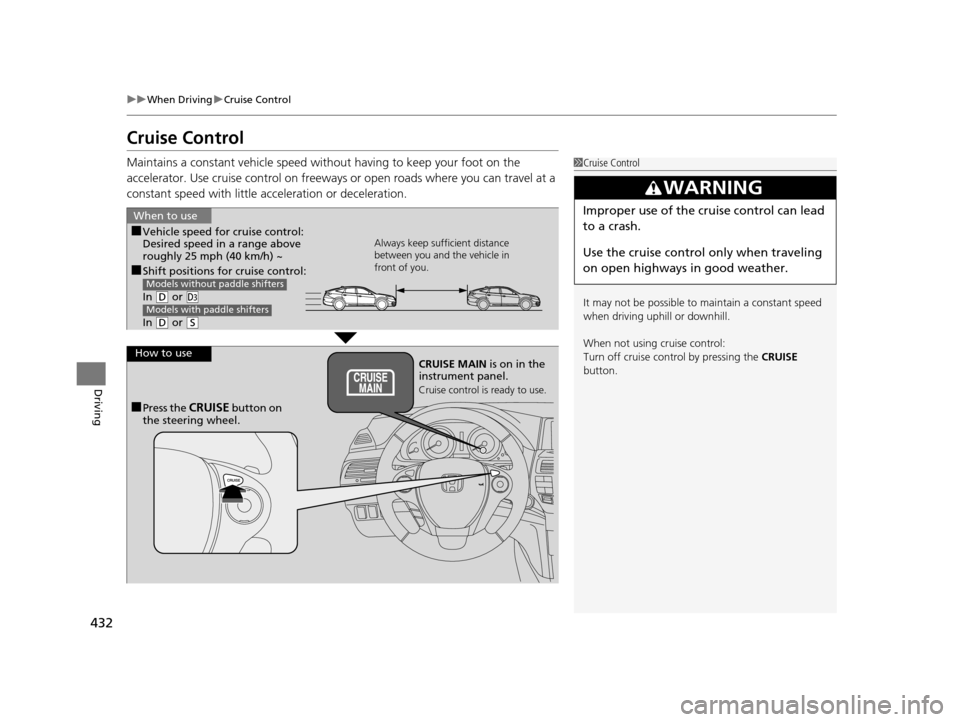
Maintains a constant vehicle speed without having to keep your foot on the
accelerator. Use cruise control on freeways or open roads where you can travel at a
constant speed with little acceleration or deceleration.1Cruise Control
It may not be possible to maintain a constant speed
when driving uphill or downhill.
When not using cruise control:
Turn off cruise control by pressing the CRUISE
button.
3WARNING
Improper use of the cruise control can lead
to a crash.
Use the cruise control only when traveling
on open highways in good weather.
■Shift positions for cruise control:
In
( D or (d
In (D or (S
Models without paddle shifters
Models with paddle shifters
When to use
Always keep sufficient distance
between you and the vehicle in
front of you.■Vehicle speed for cruise control:
Desired speed in a range above
roughly 25 mph (40 km/h) ~
How to use CRUISE MAIN is on in the
instrument panel.
Cruise control is ready to use.
■Press the CRUISE button on
the steering wheel.
15 CROSSTOUR-31TP66500.book 432 ページ 2014年7月31日 木曜日 午後3時23分