Page 12 of 573
11
Quick Reference Guide
Controls (P 87)
Clock (P88 )
aPress the DISP button, then select Info
Settings .
bSelect Clock Adjustment .
cRotate to change hour, then press
.
dRotate to change minute, then
press .
Models without navigation systemAudio system with touch screen
aPress the CLOCK button until you hear
a beep. The displayed time begins
flashing.
bPress the ( 4 (Hour) or (5 (Minute)
button to set the time. Press the
( 6
(Reset) button to set the time to the
nearest hour.
cPress the CLOCK button again to set
the time.
The navigation system receives signals from
GPS satellites, updating the clock
automatically.
Audio system without touch screen
Models with navigation system
These indicators are used to show how to
operate the selector knob or the MENU/SEL
(Menu/Selector) knob.
Rotate to select.
Press to enter.
* Not available on all models
15 CROSSTOUR-31TP66500.book 11 ページ 2014年7月31日 木曜日 午後3時23分
Page 19 of 573
18
Quick Reference Guide
*1: Icons that appear on the screen vary by the source selected.
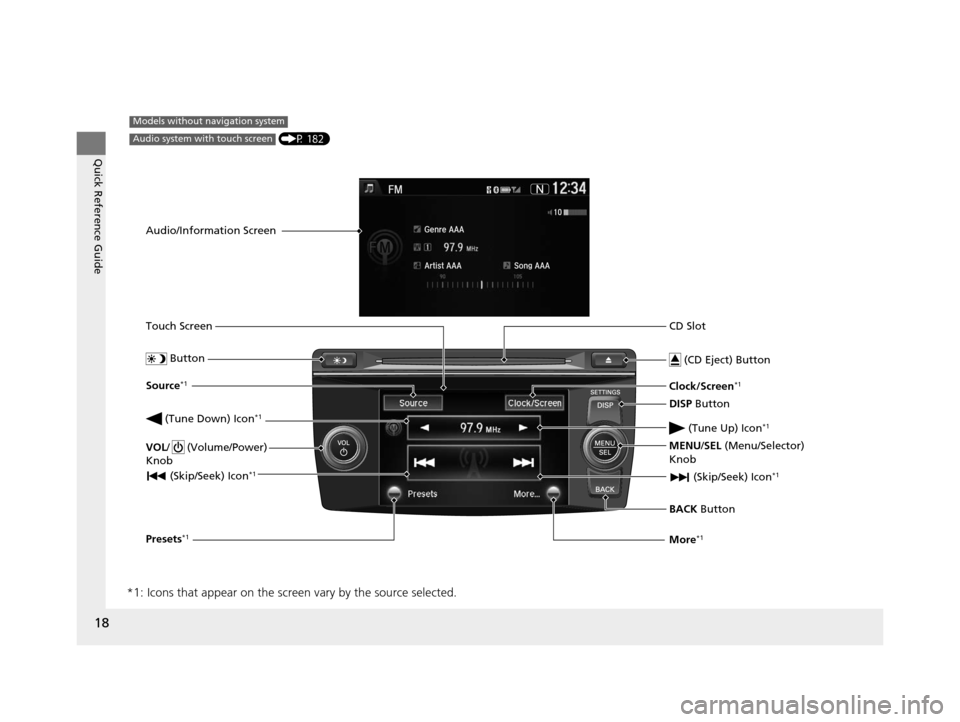
CD Slot
(CD Eject) Button
BACK Button
MENU/SEL
(Menu/Selector)
Knob
(Tune Down) Icon
*1
(Skip/Seek) Icon*1
Models without navigation system
Audio/Information Screen
Touch Screen
Button
Source*1
VOL/ (Volume/Power)
Knob
(Skip/Seek) Icon*1
Presets*1
Clock/Screen*1
DISP Button
(Tune Up) Icon
*1
More*1
(P 182)Audio system with touch screen
15 CROSSTOUR-31TP66500.book 18 ページ 2014年7月31日 木曜日 午後3時23分
Page 90 of 573
Continued89
uuSetting the Clock uClock
Controls
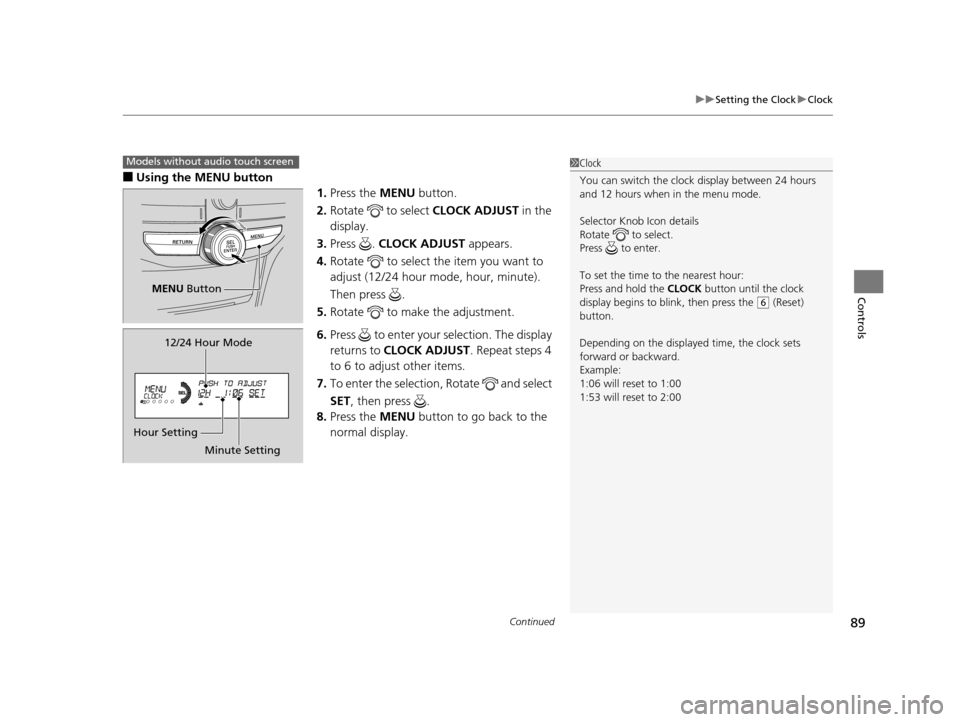
■Using the MENU button
1.Press the MENU button.
2. Rotate to select CLOCK ADJUST in the
display.
3. Press . CLOCK ADJUST appears.
4. Rotate to select the item you want to
adjust (12/24 hour mode, hour, minute).
Then press .
5. Rotate to make the adjustment.
6. Press to enter your selection. The display
returns to CLOCK ADJUST . Repeat steps 4
to 6 to adjust other items.
7. To enter the selection, Rotate and select
SET, then press .
8. Press the MENU button to go back to the
normal display.
1 Clock
You can switch the clock display between 24 hours
and 12 hours when in the menu mode.
Selector Knob Icon details
Rotate to select.
Press to enter.
To set the time to the nearest hour:
Press and hold the CLOCK button until the clock
display begins to blink, then press the
( 6 (Reset)
button.
Depending on the displayed time, the clock sets
forward or backward.
Example:
1:06 will reset to 1:00
1:53 will reset to 2:00
Models without audio touch screen
MENU Button
Minute Setting
Hour Setting 12/24 Hour Mode
15 CROSSTOUR-31TP66500.book 89 ページ 2014年7月31日 木曜日 午後3時23分
Page 189 of 573

188
uuAudio System Basic Operation uAudio/Information Screen
Features
■Info
Shows the Trip Computer or Clock/Wallpaper information.
Press , rotate to select an item, then press .
Info menu items
Current Drive (Trip computer)
Shows the range, and instant and average fu el economy of the current trip, as well
as the average fuel economy from your last trip.
History of Trip A (Trip computer)
Shows the range, average fuel economy an d distance traveled for the current trip,
as well as the average fuel economy and distances traveled during the last three
driving cycles.
Each time you reset the trip meter A, the information on the display updates. The
history of the previous th ree driving cycles is kept.
Delete History
1. Rotate to select Delete History, then press .
2. You will receive a confirmation message on the screen. Rotate to select Yes,
then press .
Clock/Wallpaper
Shows the current clock type and wallpaper
Clock/Wallpaper Change
Enters the clock and wallpaper setting menu screen.
15 CROSSTOUR-31TP66500.book 188 ページ 2014年7月31日 木曜日 午後3時23分
Page 220 of 573

219
uuAudio System Basic Operation uAudio/Information Screen
Continued
Features
■Audio
Shows the current audio information.
■Navigation
Shows the navigation screen.
2 Refer to the Navigation System Manual
■Phone
Shows the HFL information.
2 Bluetooth ® HandsFreeLink® P. 366
■Info
Shows the Trip Computer or Clock/Wallpaper and other information. Rotate
to select an item, then press .
■Trip computer (Current Drive)
Shows the range, and instant and average fuel economy of the current trip, as well
as the average fuel economy from your last trip.
■Trip computer (History of Trip A)
Shows the range, average fuel economy and dist ances traveled for the current trip, as well
as the average fuel economy and distances traveled during the last three driving cycles.
Each time you reset the trip meter A, th e information on the display updates. The
history of the previous three driving cycles is kept.
■Deleting the history manually
1. Move on the History of Trip A screen to select Delete History , then press .
2. You will receive a confirmation message on the screen. Rotate to select Yes,
then press .
■Clock/Wallpaper
Shows a clock screen or an image you import.
15 CROSSTOUR-31TP66500.book 219 ページ 2014年7月31日 木曜日 午後3時23分
Page 283 of 573
282
uuCustomized Features*u
Features
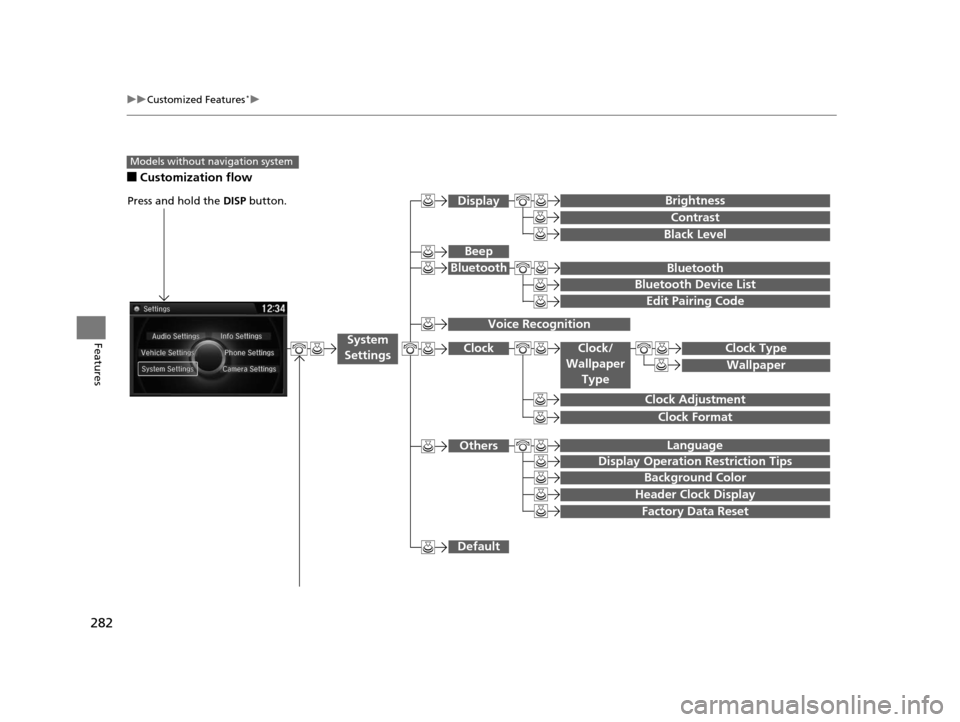
■Customization flow
Models without navigation system
Clock Format
Background Color
Header Clock Display
Factory Data Reset
Clock Adjustment
Press and hold the DISP button.
Language
Default
Edit Pairing Code
Bluetooth
Bluetooth Device List
Brightness
Contrast
Black Level
Beep
Clock/
Wallpaper TypeClock Type
Wallpaper
System
Settings
Bluetooth
Display
Clock
Others
Display Operation Restriction Tips
Voice Recognition
15 CROSSTOUR-31TP66500.book 282 ページ 2014年7月31日 木曜日 午後3時23分
Page 289 of 573
288
uuCustomized Features*u
Features
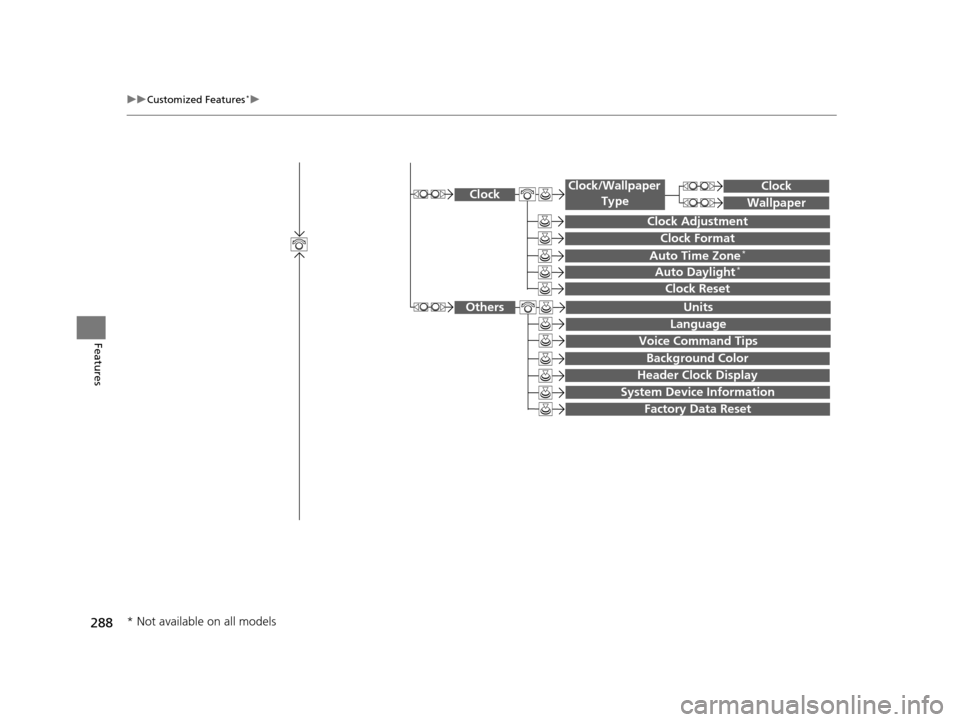
System Device Information
Factory Data Reset
Background Color
Header Clock Display
Clock Reset
Auto Time Zone*
Auto Daylight*
Clock
Clock Adjustment
Clock Format
Clock
Units
Language
Voice Command Tips
Others
Wallpaper
Clock/Wallpaper
Type
* Not available on all models
15 CROSSTOUR-31TP66500.book 288 ページ 2014年7月31日 木曜日 午後3時23分
Page 293 of 573
292
uuCustomized Features*u
Features
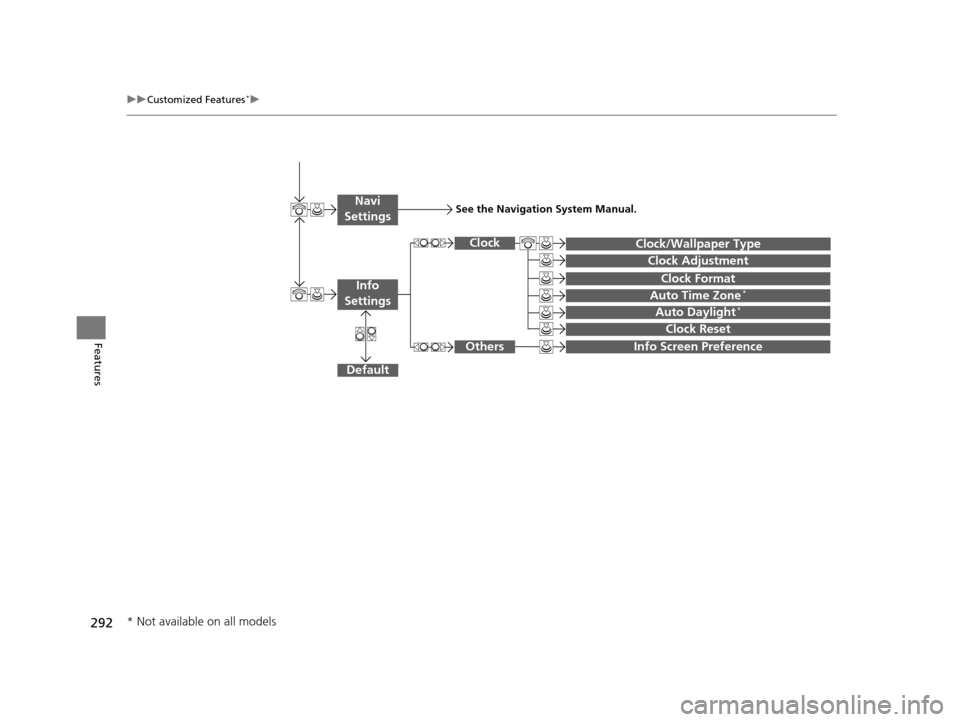
Auto Daylight*
Clock Reset
Info Screen Preference
Clock Format
Auto Time Zone*
Clock/Wallpaper Type
Clock Adjustment
Clock
Default
Others
Info
Settings
Navi
SettingsSee the Navigation System Manual.
* Not available on all models
15 CROSSTOUR-31TP66500.book 292 ページ 2014年7月31日 木曜日 午後3時23分