2015 FORD TRANSIT display
[x] Cancel search: displayPage 310 of 461

Pairing Subsequent Cell Phones
Press the phone button, then scroll to:
Action
Message
Press the OK button.
Phone settings
Press the
OK button.
Bluetooth Devices
Press the
OK button. When the following message appears
in the display.
Add Device
Find SYNC
1. Press the
OK button.
2. Put your cell phone into Bluetooth discovery mode. See your device's manual if necessary.
3. When prompted on your cell phone's display, enter the six-digit PIN provided by SYNC in the radio display. The
display indicates when the pairing is successful.
The system then prompts with questions, such as if you would like to set the current cell
phone as the primary cell phone (the cell phone SYNC automatically tries to connect
with first upon vehicle start-up) or download your phonebook.
Note: Make sure to switch on the ignition and the radio. Put the transmission in position
park (
P) (automatic transmission) or neutral with the parking brake applied (manual
transmission).
Note: To scroll through the menus, press the up and down arrows on your audio system.
Phone Voice Commands Action
Voice Command
You do not need to preceed this command by saying; phone.
call (someone | [[a]
name]) This command is not available until your cell phone informa-
tion is completely downloaded using Bluetooth.
You do not need to preceed this command by saying; phone.
Call [name] at home
This command is not available until your cell phone informa-
tion is completely downloaded using Bluetooth.
You do not need to preceed this command by saying; phone.
Call [name] at work
This command is not available until your cell phone informa-
tion is completely downloaded using Bluetooth.
You do not need to preceed this command by saying; phone.
Call [name] at office
This command is not available until your cell phone informa-
tion is completely downloaded using Bluetooth.
307Transit (TTH) Canada/United States of America, enUSA, Edition date: 03/2014 SYNC™
Page 312 of 461
Action
Voice Command
This command is not available until your cell phone informa-
tion is completely downloaded using Bluetooth.
Phonebook
cell
2
This command is not available until your cell phone informa-
tion is completely downloaded using Bluetooth.
Phonebook
other
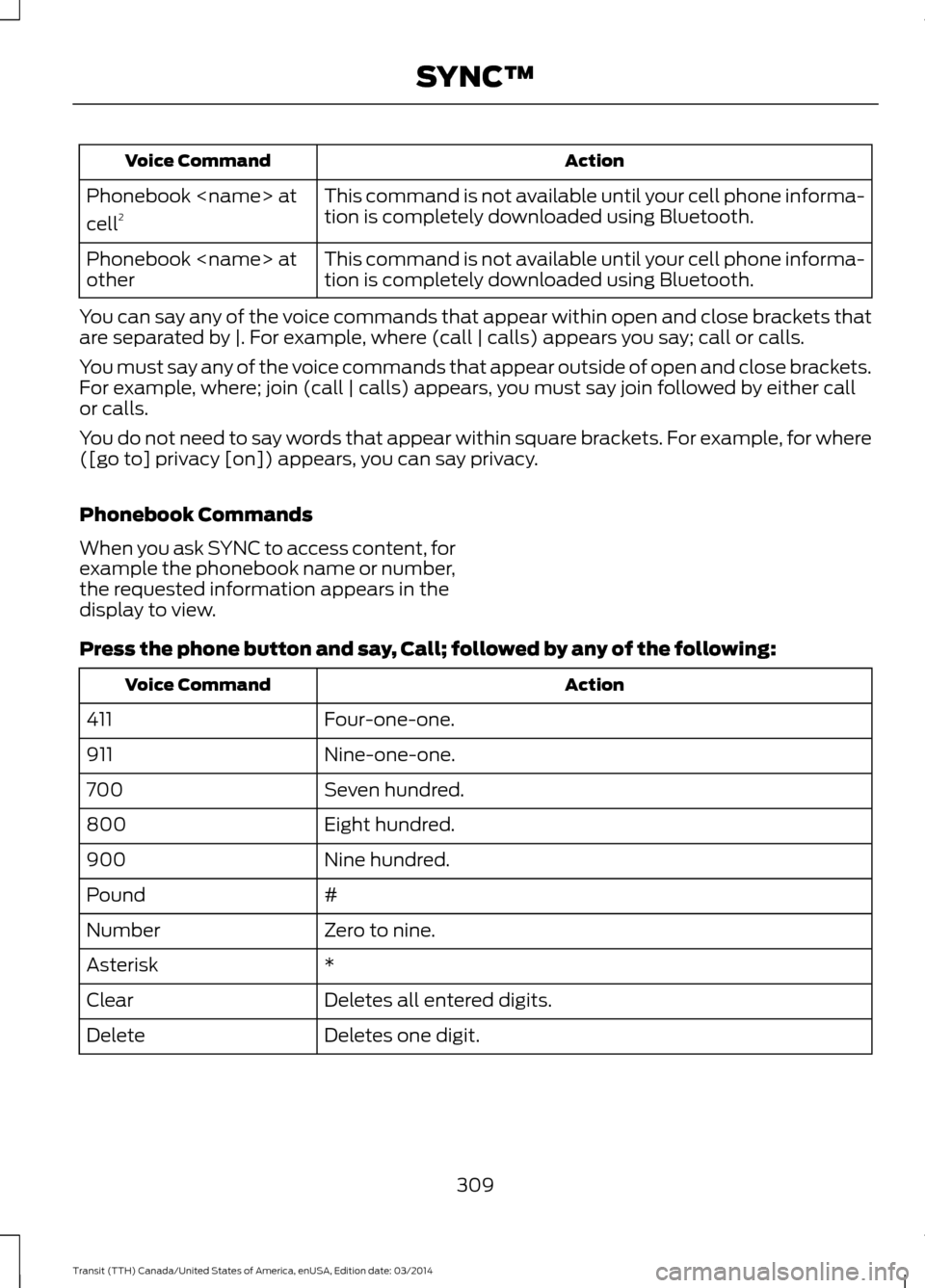
You can say any of the voice commands that appear within open and close brackets that
are separated by |. For example, where (call | calls) appears you say; call or calls.
You must say any of the voice commands that appear outside of open and close brackets.
For example, where; join (call | calls) appears, you must say join followed by either call
or calls.
You do not need to say words that appear within square brackets. For example, for where
([go to] privacy [on]) appears, you can say privacy.
Phonebook Commands
When you ask SYNC to access content, for
example the phonebook name or number,
the requested information appears in the
display to view.
Press the phone button and say, Call; followed by any of the following: Action
Voice Command
Four-one-one.
411
Nine-one-one.
911
Seven hundred.
700
Eight hundred.
800
Nine hundred.
900
#
Pound
Zero to nine.
Number
*
Asterisk
Deletes all entered digits.
Clear
Deletes one digit.
Delete
309Transit (TTH) Canada/United States of America, enUSA, Edition date: 03/2014 SYNC™
Page 314 of 461

Receiving Calls
When receiving a call, you can:
•
Answer the call by pressing the phone
button.
• Reject the call by pressing and holding
the red phone button.
• Ignore the call by doing nothing. Phone Options during an Active
Call
During an active call, you have more menu
features that become available, for
example putting a call on hold or joining
calls. Use the arrow buttons to scroll
through the menu options.
Press the MENU button during an active call, then scroll to: Action and Description
Message
Press the
OK button.
Active call
Select one of the following:
Press the
OK button to mute the call.
Mute Call
Press the
OK button to switch a call from an active hands-
free environment to your cell phone for a more private
conversation.
Privacy
Press the
OK button to put an active call on hold.
Hold
Enter numbers for passwords. Scroll until the desired number
appears in the display, then press OK; a tone sounds as
confirmation. Repeat as necessary.
Enter Tones
Join two separate calls. SYNC supports a maximum of three
callers on a multiparty call or conference call.
Join calls
1. Press the phone button.
2. Access the desired contact through SYNC or use voicecommands to place the second call. Once actively in the
second call, press MENU.
3. Scroll to Join Calls, and press the
OK button. Wait until
the following message appears.
Press the
OK button.
Join Calls?
To access your phonebook contacts.
Phonebook
1. Press the
OK button to select, and then scroll through
your phonebook contacts.
2. Press the
OK button again when the desired selection
appears in the display.
3. Press the phone button to call the contact.
311Transit (TTH) Canada/United States of America, enUSA, Edition date: 03/2014 SYNC™
Page 315 of 461
Action and Description
Message
To access your call history log.
Call History
1. Press the OK button to select, then scroll through your
call history options (incoming, outgoing or missed).
2. Press the
OK button when the desired selection appears
in the display.
3. Press the phone button to call the selection.
Exit the current menu.
Return
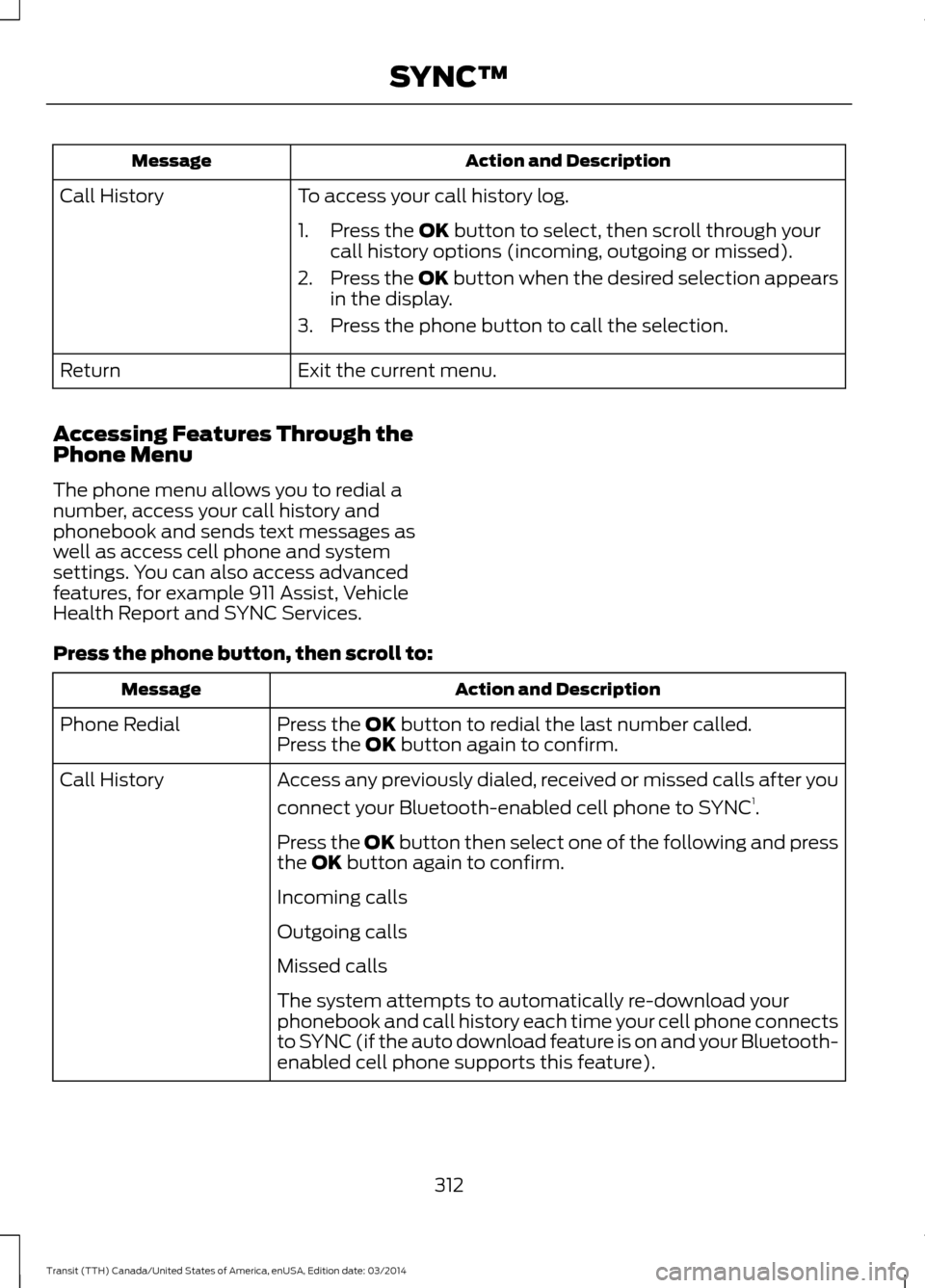
Accessing Features Through the
Phone Menu
The phone menu allows you to redial a
number, access your call history and
phonebook and sends text messages as
well as access cell phone and system
settings. You can also access advanced
features, for example 911 Assist, Vehicle
Health Report and SYNC Services.
Press the phone button, then scroll to: Action and Description
Message
Press the
OK button to redial the last number called.
Phone Redial
Press the OK button again to confirm.
Access any previously dialed, received or missed calls after you
connect your Bluetooth-enabled cell phone to SYNC 1
.
Call History
Press the OK button then select one of the following and press
the
OK button again to confirm.
Incoming calls
Outgoing calls
Missed calls
The system attempts to automatically re-download your
phonebook and call history each time your cell phone connects
to SYNC (if the auto download feature is on and your Bluetooth-
enabled cell phone supports this feature).
312Transit (TTH) Canada/United States of America, enUSA, Edition date: 03/2014 SYNC™
Page 317 of 461
Text Messaging
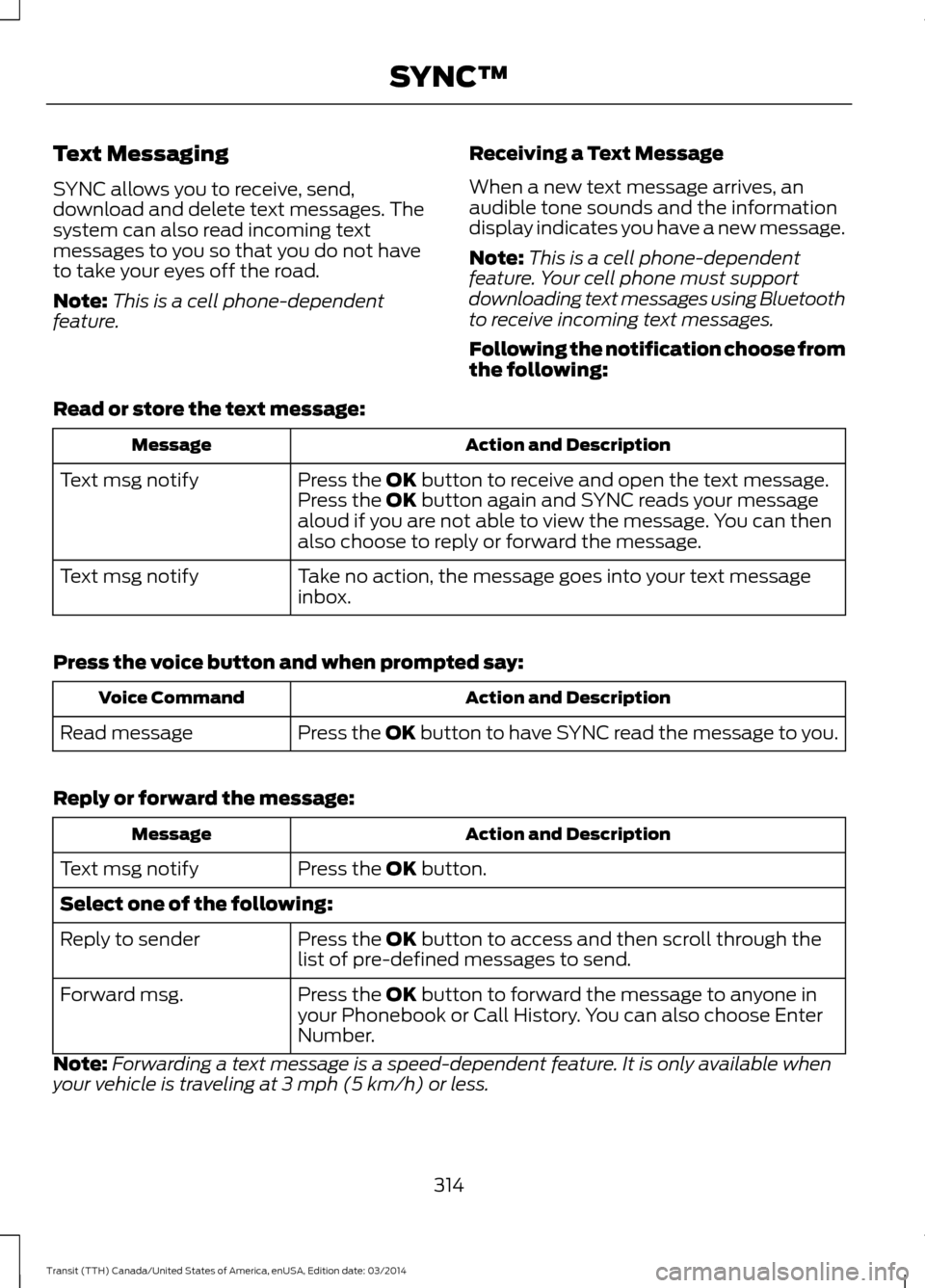
SYNC allows you to receive, send,
download and delete text messages. The
system can also read incoming text
messages to you so that you do not have
to take your eyes off the road.
Note:
This is a cell phone-dependent
feature. Receiving a Text Message
When a new text message arrives, an
audible tone sounds and the information
display indicates you have a new message.
Note:
This is a cell phone-dependent
feature. Your cell phone must support
downloading text messages using Bluetooth
to receive incoming text messages.
Following the notification choose from
the following:
Read or store the text message: Action and Description
Message
Press the OK button to receive and open the text message.
Press the OK button again and SYNC reads your message
aloud if you are not able to view the message. You can then
also choose to reply or forward the message.
Text msg notify
Take no action, the message goes into your text message
inbox.
Text msg notify
Press the voice button and when prompted say: Action and Description
Voice Command
Press the
OK button to have SYNC read the message to you.
Read message
Reply or forward the message: Action and Description
Message
Press the
OK button.
Text msg notify
Select one of the following:
Press the
OK button to access and then scroll through the
list of pre-defined messages to send.
Reply to sender
Press the
OK button to forward the message to anyone in
your Phonebook or Call History. You can also choose Enter
Number.
Forward msg.
Note: Forwarding a text message is a speed-dependent feature. It is only available when
your vehicle is traveling at 3 mph (5 km/h) or less.
314Transit (TTH) Canada/United States of America, enUSA, Edition date: 03/2014 SYNC™
Page 318 of 461
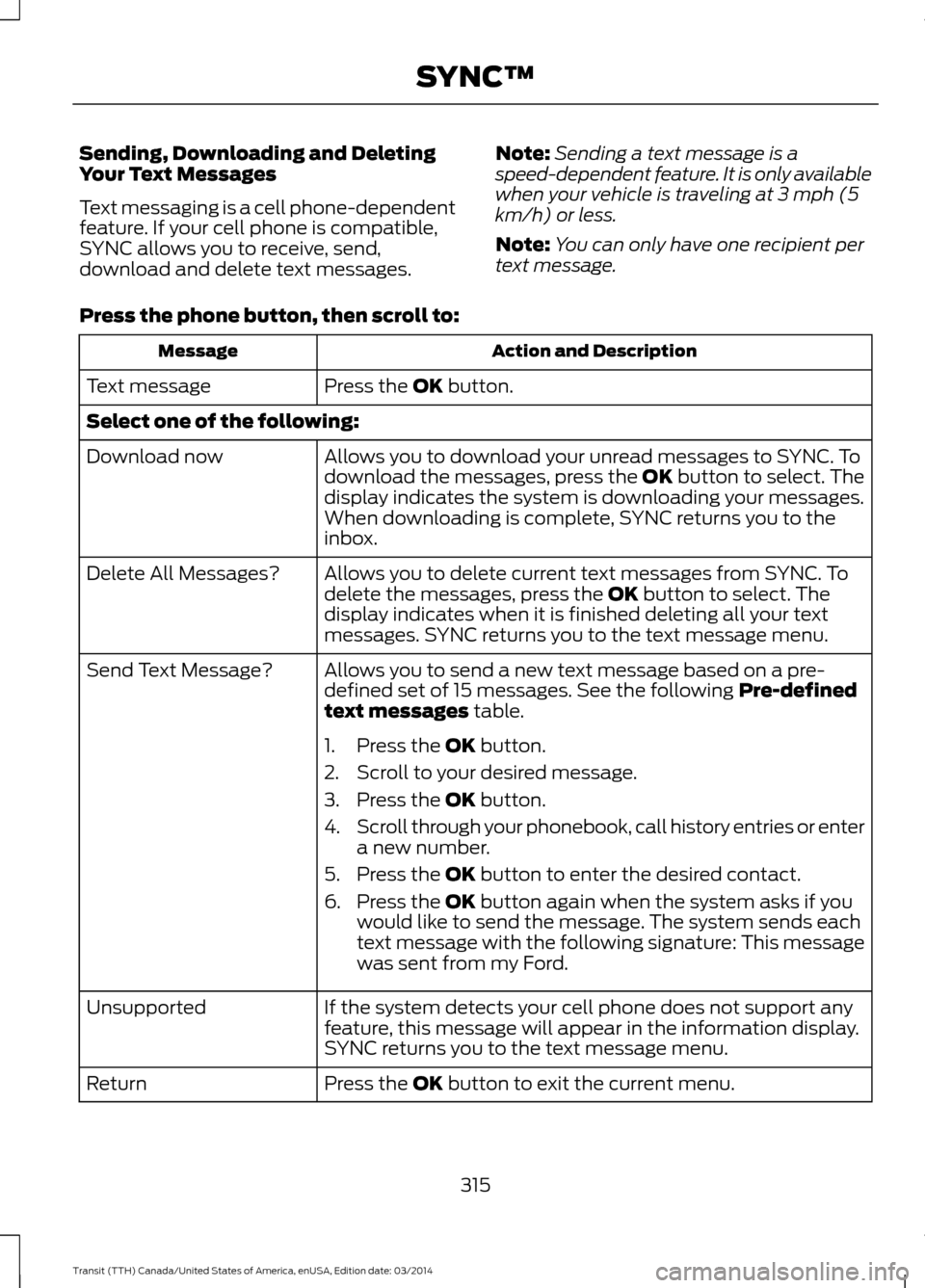
Sending, Downloading and Deleting
Your Text Messages
Text messaging is a cell phone-dependent
feature. If your cell phone is compatible,
SYNC allows you to receive, send,
download and delete text messages.
Note:
Sending a text message is a
speed-dependent feature. It is only available
when your vehicle is traveling at 3 mph (5
km/h) or less.
Note: You can only have one recipient per
text message.
Press the phone button, then scroll to: Action and Description
Message
Press the OK button.
Text message
Select one of the following:
Allows you to download your unread messages to SYNC. To
download the messages, press the
OK button to select. The
display indicates the system is downloading your messages.
When downloading is complete, SYNC returns you to the
inbox.
Download now
Allows you to delete current text messages from SYNC. To
delete the messages, press the
OK button to select. The
display indicates when it is finished deleting all your text
messages. SYNC returns you to the text message menu.
Delete All Messages?
Allows you to send a new text message based on a pre-
defined set of 15 messages. See the following Pre-defined
text messages
table.
Send Text Message?
1. Press the
OK button.
2. Scroll to your desired message.
3. Press the
OK button.
4. Scroll through your phonebook, call history entries or enter
a new number.
5. Press the
OK button to enter the desired contact.
6. Press the
OK button again when the system asks if you
would like to send the message. The system sends each
text message with the following signature: This message
was sent from my Ford.
If the system detects your cell phone does not support any
feature, this message will appear in the information display.
SYNC returns you to the text message menu.
Unsupported
Press the
OK button to exit the current menu.
Return
315Transit (TTH) Canada/United States of America, enUSA, Edition date: 03/2014 SYNC™
Page 322 of 461

Action and Description
Message
Press the OK button.
Exit the current menu.
Return
* This is a speed-dependent feature. It is only available when your vehicle is traveling at
3 mph (5 km/h) or less.
** You can only connect one device at a time. When another cell phone is connected, the
previous one is disconnected.
Advanced
The Advanced menu allows you to access
and set prompts, languages, defaults,
perform a master reset, install an
application and view system information.
Press the phone button, then scroll to: Action and Description
Message
Press the
OK button.
System settings
Press the
OK button.
Advanced
Select one of the following:
Get help from SYNC by using questions, helpful hints or asking
you for a specific action. To turn these prompts on or off:
Confirmation Prompts
1.Press the
OK button to select and scroll to select between
On and Off.
2. Press the
OK button when the desired selection appears
in the display. SYNC returns you to the Advanced menu.
1. Press
OK to select and then scroll through the languages.
Choose between English, Français and Español. Once
selected, all of the radio displays and prompts are in the
selected language.
2. Press
OK when the desired selection appears in the
display. If you change the language setting, the display
indicates that the system is updating. When complete,
SYNC returns you to the Advanced menu.
Language
Return to the factory default settings. This selection does
not erase your indexed information, for example phonebook,
call history, text messages or paired devices.
Factory Defaults
319Transit (TTH) Canada/United States of America, enUSA, Edition date: 03/2014 SYNC™
Page 323 of 461

Action and Description
Message
Press the OK button to select and then press OK again when
the following message appears in the display.
Restore Defaults?
Completely erase all information stored on SYNC, for example
phonebook, call history, text messages and paired devices,
and return the system to the factory default settings.
Master reset
Press OK to select. The display indicates when complete.
SYNC returns you to the Advanced menu.
Install applications you have downloaded.
Install Application?
Press the
OK button and scroll to select. Press the OK button
to confirm.
Access the Auto Version number as well as the FDN number.
System info
Press the
OK button to select.
This is a Bluetooth component, which can further help your
cell phone with the exchange of text messages.
MAP Profile
Exit the current menu.
Return
SYNC™ APPLICATIONS AND
SERVICES
(If Equipped)
In order for the following features to work,
your cell phone must be compatible with
SYNC. To check your phone's
compatibility, visit www.SYNCMyRide.com,
www.SYNCMyRide.ca or
www.syncmaroute.ca.
• SYNC Services *
: Provides access to
traffic, directions and information such
as travel, horoscopes, stock prices and
more.
• 911 Assist: Can alert 911 in the event of
an emergency. •
Vehicle Health Report *
: Provides a
diagnostic and maintenance report
card of your vehicle.
• SYNC AppLink: Allows you to connect
to and use certain applications, for
example Pandora and Stitcher on a
compatible cell phone.
* This is an optional feature and available
in the United States only.
911 Assist
(If Equipped) WARNINGS
Unless the 911 Assist setting is set on
before a crash, the system will not
dial for help which could delay
response time, potentially increasing the
risk of serious injury or death after a crash.
320 Transit (TTH) Canada/United States of America, enUSA, Edition date: 03/2014 SYNC™