2015 FORD SUPER DUTY reset
[x] Cancel search: resetPage 357 of 470
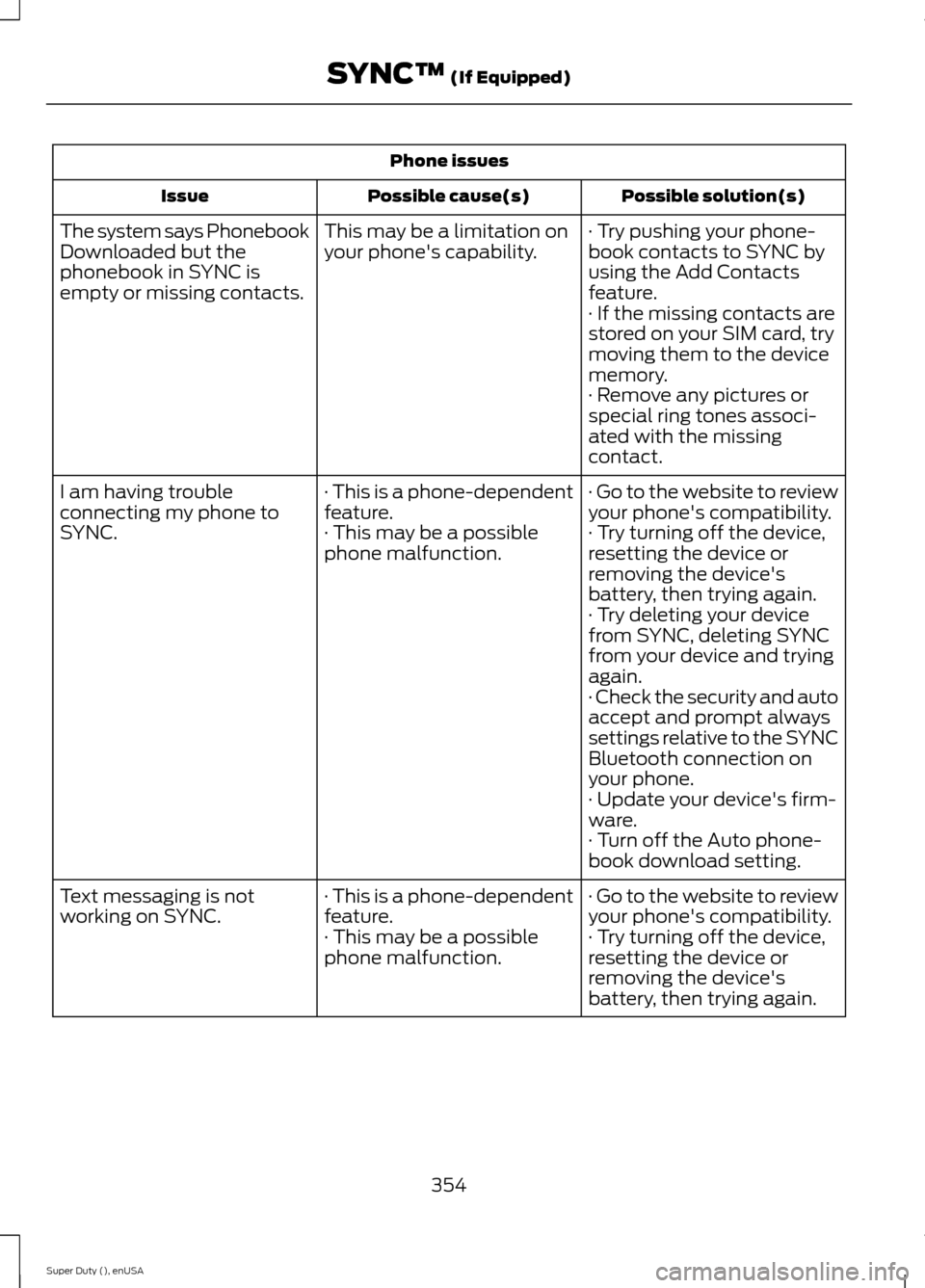
Phone issues
Possible solution(s)Possible cause(s)Issue
· Try pushing your phone-book contacts to SYNC byusing the Add Contactsfeature.
This may be a limitation onyour phone's capability.The system says PhonebookDownloaded but thephonebook in SYNC isempty or missing contacts.· If the missing contacts arestored on your SIM card, trymoving them to the devicememory.· Remove any pictures orspecial ring tones associ-ated with the missingcontact.
· Go to the website to reviewyour phone's compatibility.· This is a phone-dependentfeature.I am having troubleconnecting my phone toSYNC.· Try turning off the device,resetting the device orremoving the device'sbattery, then trying again.
· This may be a possiblephone malfunction.
· Try deleting your devicefrom SYNC, deleting SYNCfrom your device and tryingagain.· Check the security and autoaccept and prompt alwayssettings relative to the SYNCBluetooth connection onyour phone.· Update your device's firm-ware.· Turn off the Auto phone-book download setting.
· Go to the website to reviewyour phone's compatibility.· This is a phone-dependentfeature.Text messaging is notworking on SYNC.· Try turning off the device,resetting the device orremoving the device'sbattery, then trying again.
· This may be a possiblephone malfunction.
354Super Duty (), enUSASYNC™ (If Equipped)
Page 358 of 470
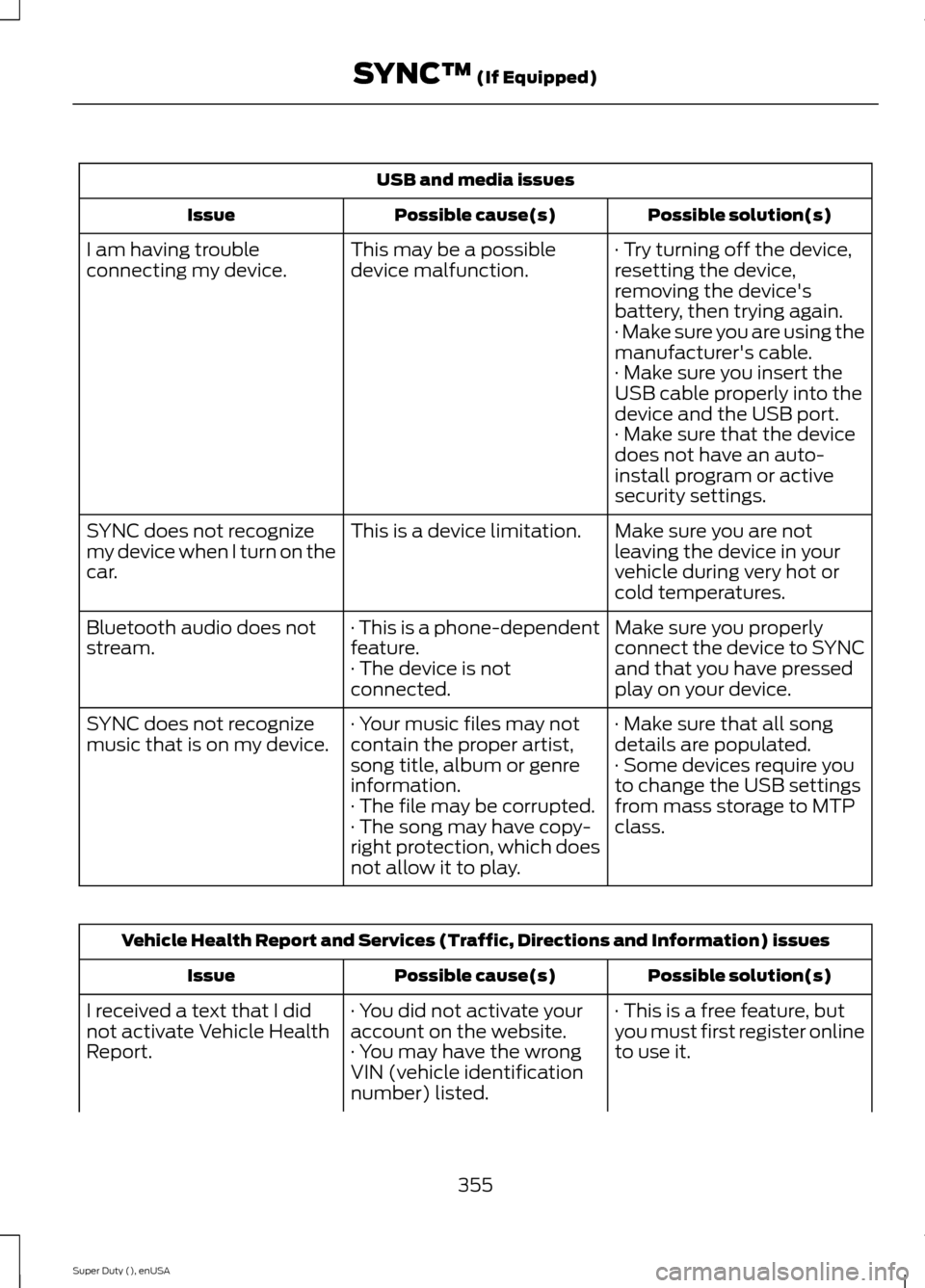
USB and media issues
Possible solution(s)Possible cause(s)Issue
· Try turning off the device,resetting the device,removing the device'sbattery, then trying again.
This may be a possibledevice malfunction.I am having troubleconnecting my device.
· Make sure you are using themanufacturer's cable.· Make sure you insert theUSB cable properly into thedevice and the USB port.· Make sure that the devicedoes not have an auto-install program or activesecurity settings.
Make sure you are notleaving the device in yourvehicle during very hot orcold temperatures.
This is a device limitation.SYNC does not recognizemy device when I turn on thecar.
Make sure you properlyconnect the device to SYNCand that you have pressedplay on your device.
· This is a phone-dependentfeature.· The device is notconnected.
Bluetooth audio does notstream.
· Make sure that all songdetails are populated.· Your music files may notcontain the proper artist,song title, album or genreinformation.
SYNC does not recognizemusic that is on my device.· Some devices require youto change the USB settingsfrom mass storage to MTPclass.· The file may be corrupted.· The song may have copy-right protection, which doesnot allow it to play.
Vehicle Health Report and Services (Traffic, Directions and Information) issues
Possible solution(s)Possible cause(s)Issue
· This is a free feature, butyou must first register onlineto use it.
· You did not activate youraccount on the website.· You may have the wrongVIN (vehicle identificationnumber) listed.
I received a text that I didnot activate Vehicle HealthReport.
355Super Duty (), enUSASYNC™ (If Equipped)
Page 366 of 470
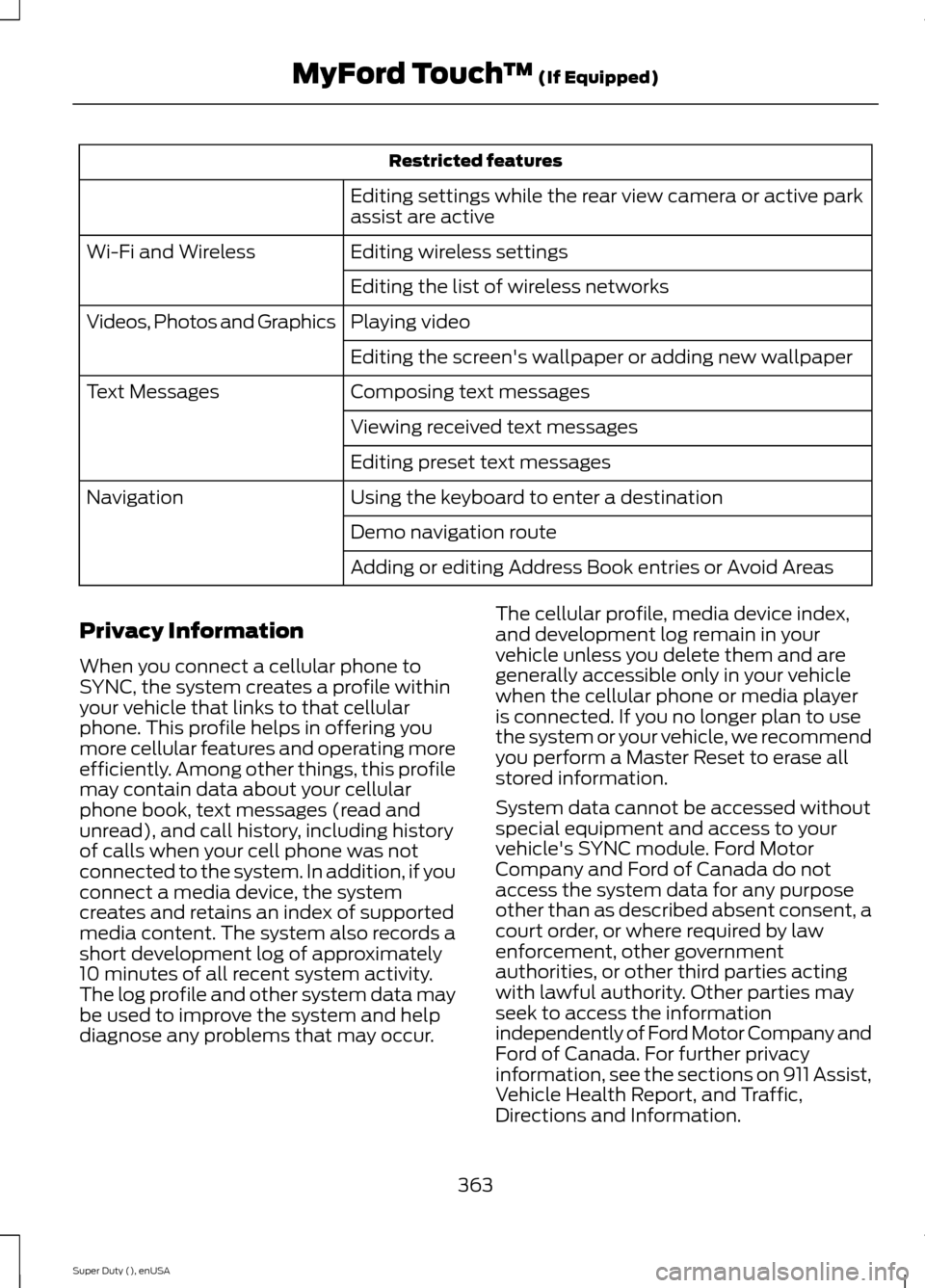
Restricted features
Editing settings while the rear view camera or active parkassist are active
Editing wireless settingsWi-Fi and Wireless
Editing the list of wireless networks
Playing videoVideos, Photos and Graphics
Editing the screen's wallpaper or adding new wallpaper
Composing text messagesText Messages
Viewing received text messages
Editing preset text messages
Using the keyboard to enter a destinationNavigation
Demo navigation route
Adding or editing Address Book entries or Avoid Areas
Privacy Information
When you connect a cellular phone toSYNC, the system creates a profile withinyour vehicle that links to that cellularphone. This profile helps in offering youmore cellular features and operating moreefficiently. Among other things, this profilemay contain data about your cellularphone book, text messages (read andunread), and call history, including historyof calls when your cell phone was notconnected to the system. In addition, if youconnect a media device, the systemcreates and retains an index of supportedmedia content. The system also records ashort development log of approximately10 minutes of all recent system activity.The log profile and other system data maybe used to improve the system and helpdiagnose any problems that may occur.
The cellular profile, media device index,and development log remain in yourvehicle unless you delete them and aregenerally accessible only in your vehiclewhen the cellular phone or media playeris connected. If you no longer plan to usethe system or your vehicle, we recommendyou perform a Master Reset to erase allstored information.
System data cannot be accessed withoutspecial equipment and access to yourvehicle's SYNC module. Ford MotorCompany and Ford of Canada do notaccess the system data for any purposeother than as described absent consent, acourt order, or where required by lawenforcement, other governmentauthorities, or other third parties actingwith lawful authority. Other parties mayseek to access the informationindependently of Ford Motor Company andFord of Canada. For further privacyinformation, see the sections on 911 Assist,Vehicle Health Report, and Traffic,Directions and Information.
363Super Duty (), enUSAMyFord Touch™ (If Equipped)
Page 371 of 470
Only the photograph(s), which meets thefollowing conditions, display:
•Compatible file formats are as follows:.jpg, .gif, .png, .bmp
•Each file must be 1.5 MB or less.
•Recommended dimensions: 800 x 384
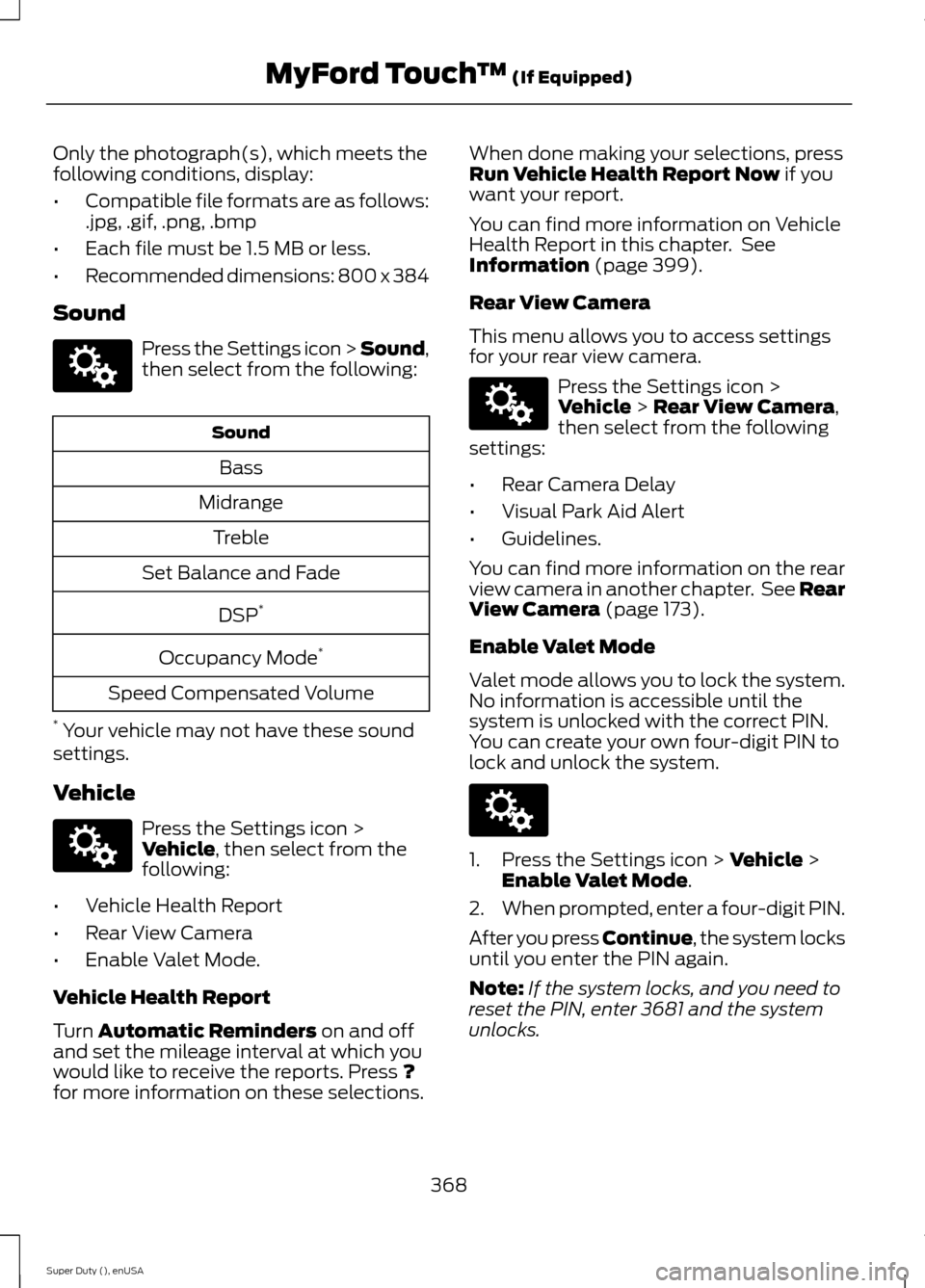
Sound
Press the Settings icon > Sound,then select from the following:
Sound
Bass
Midrange
Treble
Set Balance and Fade
DSP*
Occupancy Mode*
Speed Compensated Volume
* Your vehicle may not have these soundsettings.
Vehicle
Press the Settings icon >Vehicle, then select from thefollowing:
•Vehicle Health Report
•Rear View Camera
•Enable Valet Mode.
Vehicle Health Report
Turn Automatic Reminders on and offand set the mileage interval at which youwould like to receive the reports. Press ?for more information on these selections.
When done making your selections, pressRun Vehicle Health Report Now if youwant your report.
You can find more information on VehicleHealth Report in this chapter. SeeInformation (page 399).
Rear View Camera
This menu allows you to access settingsfor your rear view camera.
Press the Settings icon >Vehicle > Rear View Camera,then select from the followingsettings:
•Rear Camera Delay
•Visual Park Aid Alert
•Guidelines.
You can find more information on the rearview camera in another chapter. See RearView Camera (page 173).
Enable Valet Mode
Valet mode allows you to lock the system.No information is accessible until thesystem is unlocked with the correct PIN.You can create your own four-digit PIN tolock and unlock the system.
1.Press the Settings icon > Vehicle >Enable Valet Mode.
2.When prompted, enter a four-digit PIN.
After you press Continue, the system locksuntil you enter the PIN again.
Note:If the system locks, and you need toreset the PIN, enter 3681 and the systemunlocks.
368Super Duty (), enUSAMyFord Touch™ (If Equipped)E142607 E142607 E142607 E142607
Page 372 of 470
Settings
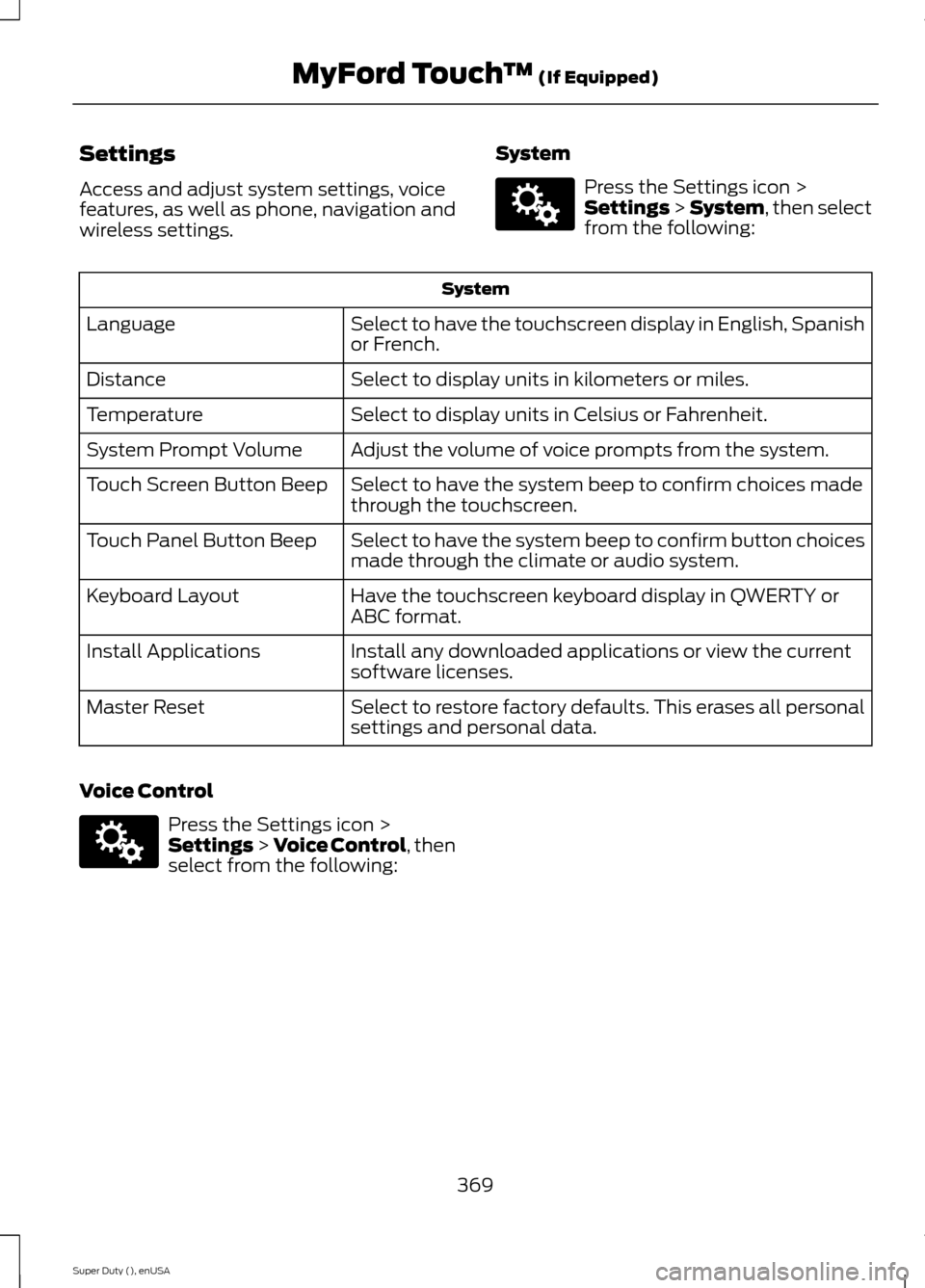
Access and adjust system settings, voicefeatures, as well as phone, navigation andwireless settings.
System
Press the Settings icon >Settings > System, then selectfrom the following:
System
Select to have the touchscreen display in English, Spanishor French.Language
Select to display units in kilometers or miles.Distance
Select to display units in Celsius or Fahrenheit.Temperature
Adjust the volume of voice prompts from the system.System Prompt Volume
Select to have the system beep to confirm choices madethrough the touchscreen.Touch Screen Button Beep
Select to have the system beep to confirm button choicesmade through the climate or audio system.Touch Panel Button Beep
Have the touchscreen keyboard display in QWERTY orABC format.Keyboard Layout
Install any downloaded applications or view the currentsoftware licenses.Install Applications
Select to restore factory defaults. This erases all personalsettings and personal data.Master Reset
Voice Control
Press the Settings icon >Settings > Voice Control, thenselect from the following:
369Super Duty (), enUSAMyFord Touch™ (If Equipped)E142607 E142607
Page 379 of 470
To access Help using the voice commands,press the voice button, then, after the tone,say "Help". The system provides allowablevoice commands for the current mode.
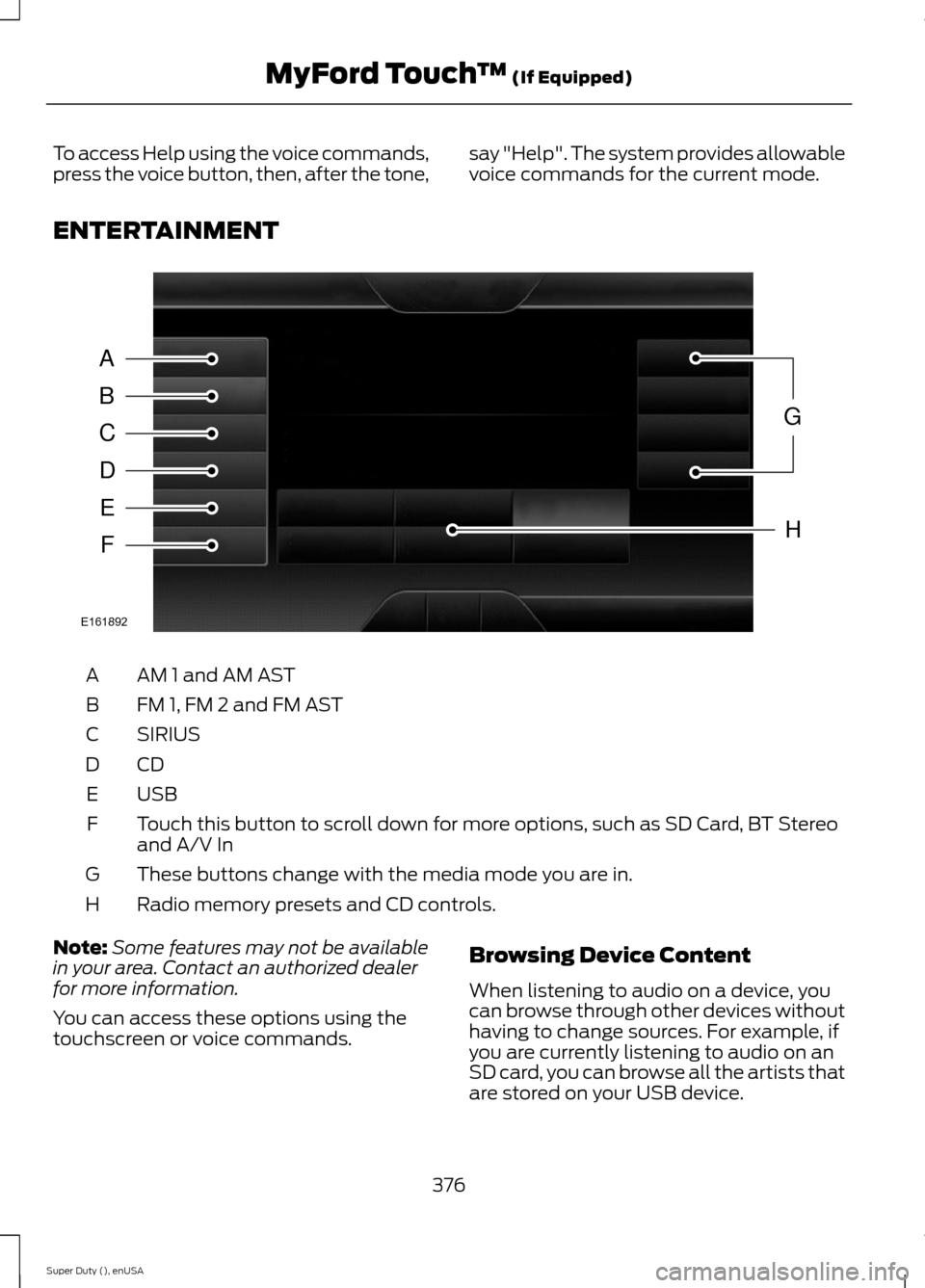
ENTERTAINMENT
AM 1 and AM ASTA
FM 1, FM 2 and FM ASTB
SIRIUSC
CDD
USBE
Touch this button to scroll down for more options, such as SD Card, BT Stereoand A/V InF
These buttons change with the media mode you are in.G
Radio memory presets and CD controls.H
Note:Some features may not be availablein your area. Contact an authorized dealerfor more information.
You can access these options using thetouchscreen or voice commands.
Browsing Device Content
When listening to audio on a device, youcan browse through other devices withouthaving to change sources. For example, ifyou are currently listening to audio on anSD card, you can browse all the artists thatare stored on your USB device.
376Super Duty (), enUSAMyFord Touch™ (If Equipped)ABCDEFGHE161892
Page 381 of 470
![FORD SUPER DUTY 2015 3.G Owners Manual Sample commands
"Sirius <0-223>"*
"Sports games"*
* This command is only usable if you havean active subscription to SIRIUS satelliteradio.** The commands that have [ ] around theword means that the w](/manual-img/11/5311/w960_5311-380.png "FORD SUPER DUTY 2015 3.G Owners Manual Sample commands
\"Sirius <0-223>\"*
\"Sports games\"*
* This command is only usable if you havean active subscription to SIRIUS satelliteradio.** The commands that have [ ] around theword means that the w")
Sample commands
"Sirius <0-223>"*
"Sports games"*
* This command is only usable if you havean active subscription to SIRIUS satelliteradio.** The commands that have [ ] around theword means that the word is optional. Forexample, if you say, "Play Metallica", thisis the same as the voice command, "Play[artist]
AM/FM Radio
Touch the AM or FM tab to listento the radio.
To change between AM and FM presets,just touch the AM or FM tab.
Memory Presets
Save a station by pressing and holding oneof the memory preset areas. There is a briefmute while the radio saves the station.Sound returns when finished.
HD Radio
Touch this button to turn HD Radio on. Thelight on the button illuminates when thefeature is on. HD Radio allows you toreceive radio broadcasts digitally, whereavailable, providing free, crystal-clearsound. See HD Radio information later inthis chapter.
Scan
Touch this button to go to the next strongAM or FM radio station. The light on thebutton illuminates when the feature is on.
Options
Sound Settings
Touch this button to adjust settings for:
•Bass
•Midrange
•Treble
•Balance and Fade
•DSP (Digital Signal processing)
•Occupancy Mode
•Speed Compensated Volume.
Note:Your vehicle may not have all thesesound settings.
Set PTY for Seek/Scan
This allows you to select a category ofmusic you would like to search for. You canthen choose to either seek or scan for thestations playing that category.
RDS Text Display
This allows you to view the informationbroadcast by FM stations.
AST
AST (Autostore) allows you to have thesystem automatically store the sixstrongest stations in your current location.
TAG Button
This feature is available when HD Radio ison, and allows you to tag a song todownload later. When you select On,TAGappears on-screen when HD Radio isactive. You can touch TAG to save theinformation of the song that is playing.When you plug in your portable musicplayer, the information transfers, ifsupported by your device. When you areconnected to iTunes, the tags appear toremind you of the songs you would like todownload. See HD Radio information laterin this chapter.
378Super Duty (), enUSAMyFord Touch™ (If Equipped)E142611
Page 383 of 470
When HD Radio broadcasts are active, youcan access the following functions:
•Scan allows you to hear a briefsampling of all available stations. Thisfeature still works when HD Radioreception is on, although it does notscan for HD2-HD7 channels. You maysee the HD logo appear if the stationhas a digital broadcast.
•Memory presets allow you to save anactive channel as a memory preset.Touch and hold a memory preset slotuntil the sound returns. There is a briefmute while the radio saves the station.Sound returns when finished. Whenswitching to an HD2 or HD3 memorypreset, the sound mutes before thedigital audio plays, because the systemhas to reacquire the digital signal.
Note:As with any saved radio station, youcannot access the saved station if yourvehicle is outside the station’s receptionarea.
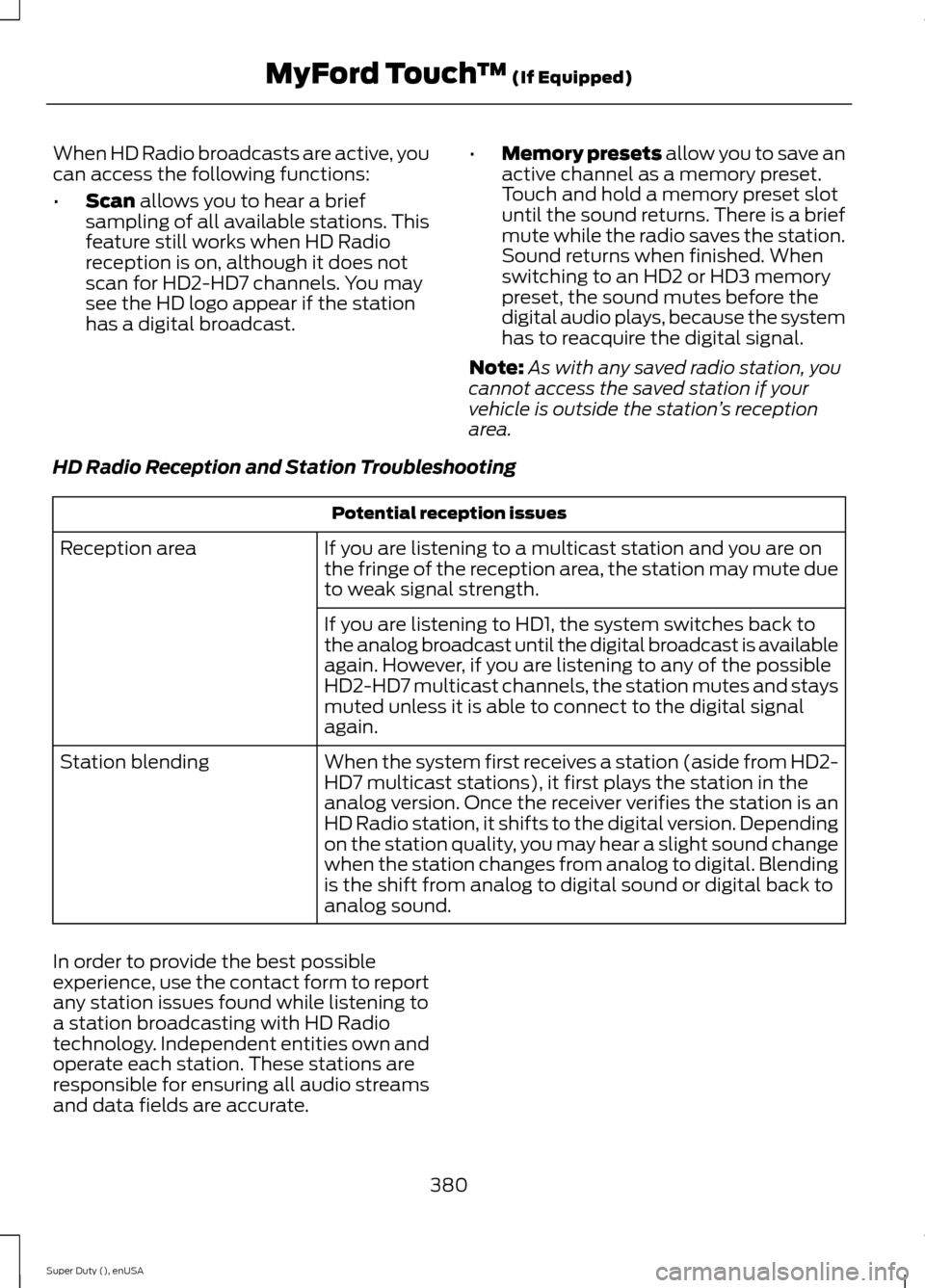
HD Radio Reception and Station Troubleshooting
Potential reception issues
If you are listening to a multicast station and you are onthe fringe of the reception area, the station may mute dueto weak signal strength.
Reception area
If you are listening to HD1, the system switches back tothe analog broadcast until the digital broadcast is availableagain. However, if you are listening to any of the possibleHD2-HD7 multicast channels, the station mutes and staysmuted unless it is able to connect to the digital signalagain.
When the system first receives a station (aside from HD2-HD7 multicast stations), it first plays the station in theanalog version. Once the receiver verifies the station is anHD Radio station, it shifts to the digital version. Dependingon the station quality, you may hear a slight sound changewhen the station changes from analog to digital. Blendingis the shift from analog to digital sound or digital back toanalog sound.
Station blending
In order to provide the best possibleexperience, use the contact form to reportany station issues found while listening toa station broadcasting with HD Radiotechnology. Independent entities own andoperate each station. These stations areresponsible for ensuring all audio streamsand data fields are accurate.
380Super Duty (), enUSAMyFord Touch™ (If Equipped)