2015 FORD SUPER DUTY reset
[x] Cancel search: resetPage 384 of 470
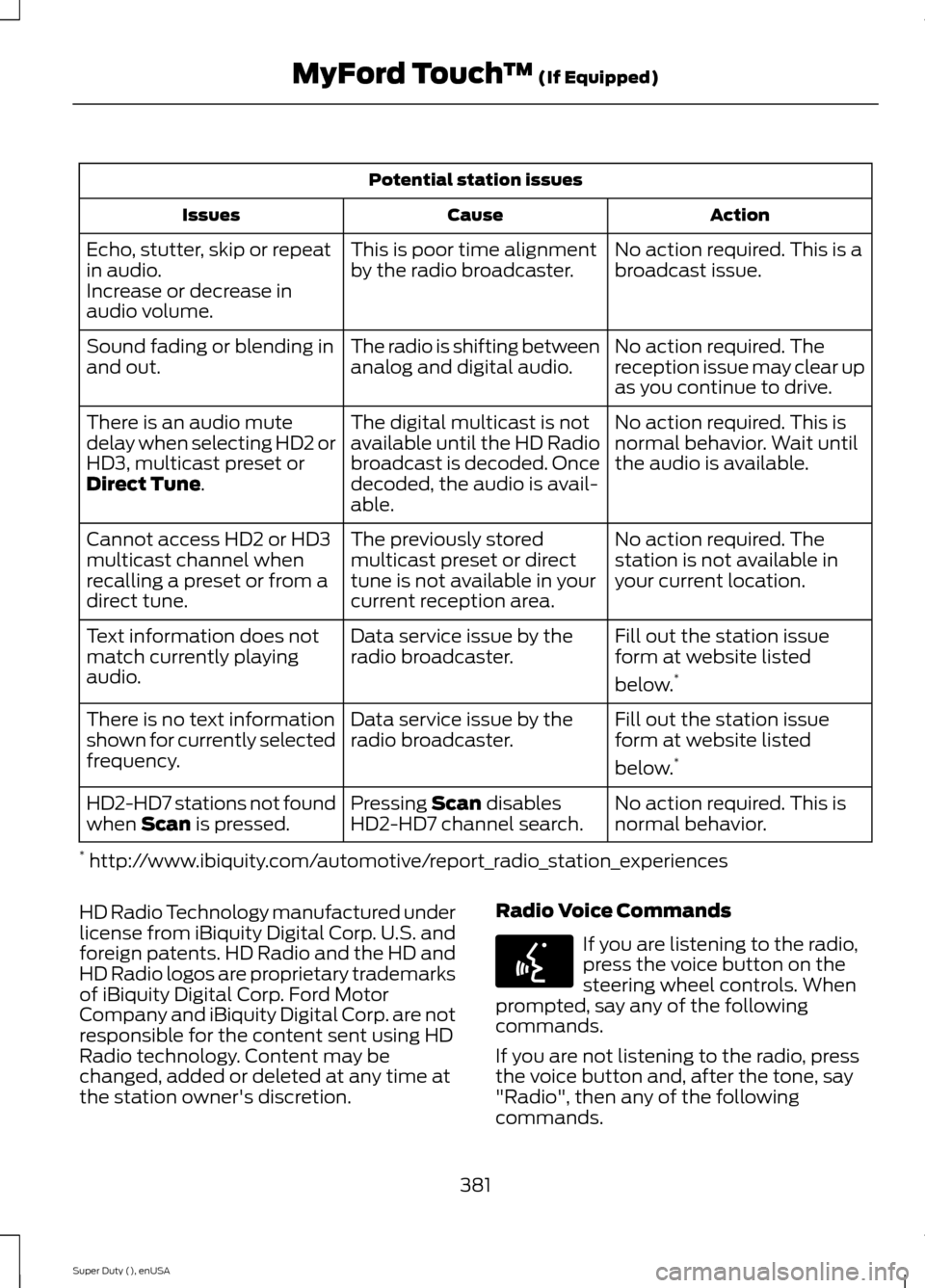
Potential station issues
ActionCauseIssues
No action required. This is abroadcast issue.This is poor time alignmentby the radio broadcaster.Echo, stutter, skip or repeatin audio.Increase or decrease inaudio volume.
No action required. Thereception issue may clear upas you continue to drive.
The radio is shifting betweenanalog and digital audio.Sound fading or blending inand out.
No action required. This isnormal behavior. Wait untilthe audio is available.
The digital multicast is notavailable until the HD Radiobroadcast is decoded. Oncedecoded, the audio is avail-able.
There is an audio mutedelay when selecting HD2 orHD3, multicast preset orDirect Tune.
No action required. Thestation is not available inyour current location.
The previously storedmulticast preset or directtune is not available in yourcurrent reception area.
Cannot access HD2 or HD3multicast channel whenrecalling a preset or from adirect tune.
Fill out the station issueform at website listed
below.*
Data service issue by theradio broadcaster.Text information does notmatch currently playingaudio.
Fill out the station issueform at website listed
below.*
Data service issue by theradio broadcaster.There is no text informationshown for currently selectedfrequency.
No action required. This isnormal behavior.Pressing Scan disablesHD2-HD7 channel search.HD2-HD7 stations not foundwhen Scan is pressed.
* http://www.ibiquity.com/automotive/report_radio_station_experiences
HD Radio Technology manufactured underlicense from iBiquity Digital Corp. U.S. andforeign patents. HD Radio and the HD andHD Radio logos are proprietary trademarksof iBiquity Digital Corp. Ford MotorCompany and iBiquity Digital Corp. are notresponsible for the content sent using HDRadio technology. Content may bechanged, added or deleted at any time atthe station owner's discretion.
Radio Voice Commands
If you are listening to the radio,press the voice button on thesteering wheel controls. Whenprompted, say any of the followingcommands.
If you are not listening to the radio, pressthe voice button and, after the tone, say"Radio", then any of the followingcommands.
381Super Duty (), enUSAMyFord Touch™ (If Equipped)E142599
Page 385 of 470
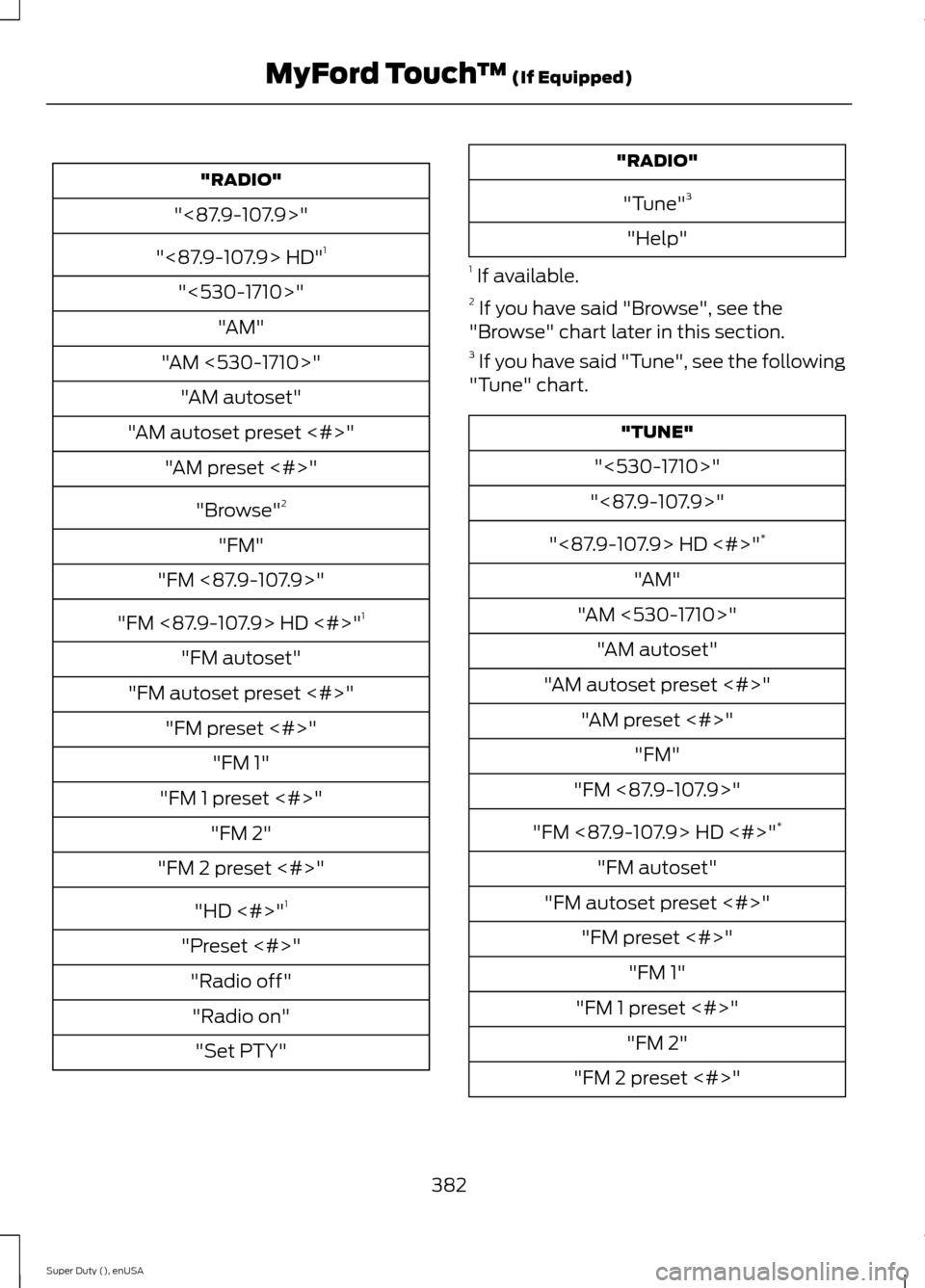
"RADIO"
"<87.9-107.9>"
"<87.9-107.9> HD"1
"<530-1710>"
"AM"
"AM <530-1710>"
"AM autoset"
"AM autoset preset <#>"
"AM preset <#>"
"Browse"2
"FM"
"FM <87.9-107.9>"
"FM <87.9-107.9> HD <#>"1
"FM autoset"
"FM autoset preset <#>"
"FM preset <#>"
"FM 1"
"FM 1 preset <#>"
"FM 2"
"FM 2 preset <#>"
"HD <#>"1
"Preset <#>"
"Radio off"
"Radio on"
"Set PTY"
"RADIO"
"Tune"3
"Help"
1 If available.2 If you have said "Browse", see the"Browse" chart later in this section.3 If you have said "Tune", see the following"Tune" chart.
"TUNE"
"<530-1710>"
"<87.9-107.9>"
"<87.9-107.9> HD <#>"*
"AM"
"AM <530-1710>"
"AM autoset"
"AM autoset preset <#>"
"AM preset <#>"
"FM"
"FM <87.9-107.9>"
"FM <87.9-107.9> HD <#>"*
"FM autoset"
"FM autoset preset <#>"
"FM preset <#>"
"FM 1"
"FM 1 preset <#>"
"FM 2"
"FM 2 preset <#>"
382Super Duty (), enUSAMyFord Touch™ (If Equipped)
Page 386 of 470
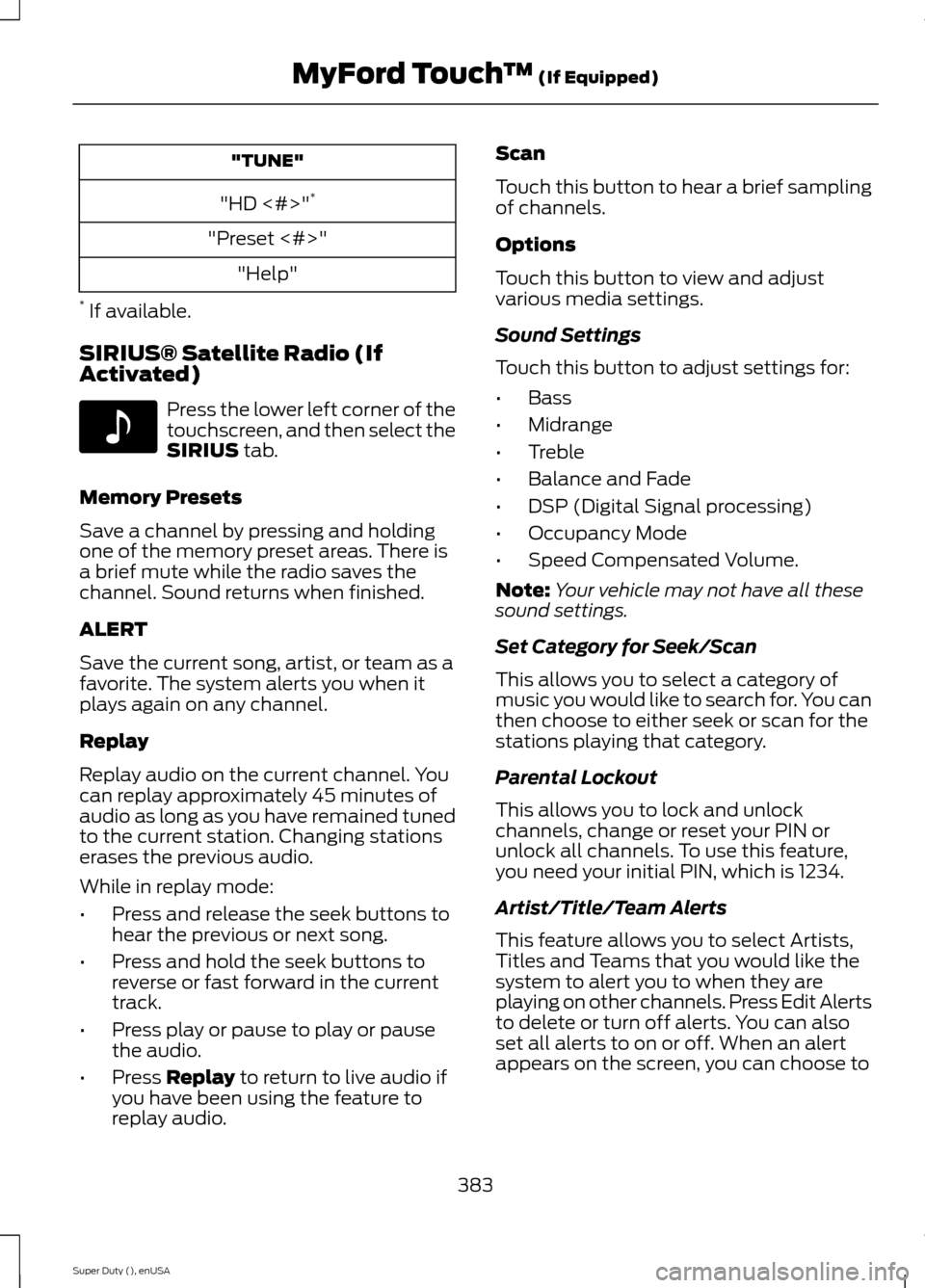
"TUNE"
"HD <#>"*
"Preset <#>"
"Help"
* If available.
SIRIUS® Satellite Radio (IfActivated)
Press the lower left corner of thetouchscreen, and then select theSIRIUS tab.
Memory Presets
Save a channel by pressing and holdingone of the memory preset areas. There isa brief mute while the radio saves thechannel. Sound returns when finished.
ALERT
Save the current song, artist, or team as afavorite. The system alerts you when itplays again on any channel.
Replay
Replay audio on the current channel. Youcan replay approximately 45 minutes ofaudio as long as you have remained tunedto the current station. Changing stationserases the previous audio.
While in replay mode:
•Press and release the seek buttons tohear the previous or next song.
•Press and hold the seek buttons toreverse or fast forward in the currenttrack.
•Press play or pause to play or pausethe audio.
•Press Replay to return to live audio ifyou have been using the feature toreplay audio.
Scan
Touch this button to hear a brief samplingof channels.
Options
Touch this button to view and adjustvarious media settings.
Sound Settings
Touch this button to adjust settings for:
•Bass
•Midrange
•Treble
•Balance and Fade
•DSP (Digital Signal processing)
•Occupancy Mode
•Speed Compensated Volume.
Note:Your vehicle may not have all thesesound settings.
Set Category for Seek/Scan
This allows you to select a category ofmusic you would like to search for. You canthen choose to either seek or scan for thestations playing that category.
Parental Lockout
This allows you to lock and unlockchannels, change or reset your PIN orunlock all channels. To use this feature,you need your initial PIN, which is 1234.
Artist/Title/Team Alerts
This feature allows you to select Artists,Titles and Teams that you would like thesystem to alert you to when they areplaying on other channels. Press Edit Alertsto delete or turn off alerts. You can alsoset all alerts to on or off. When an alertappears on the screen, you can choose to
383Super Duty (), enUSAMyFord Touch™ (If Equipped)E142611
Page 388 of 470
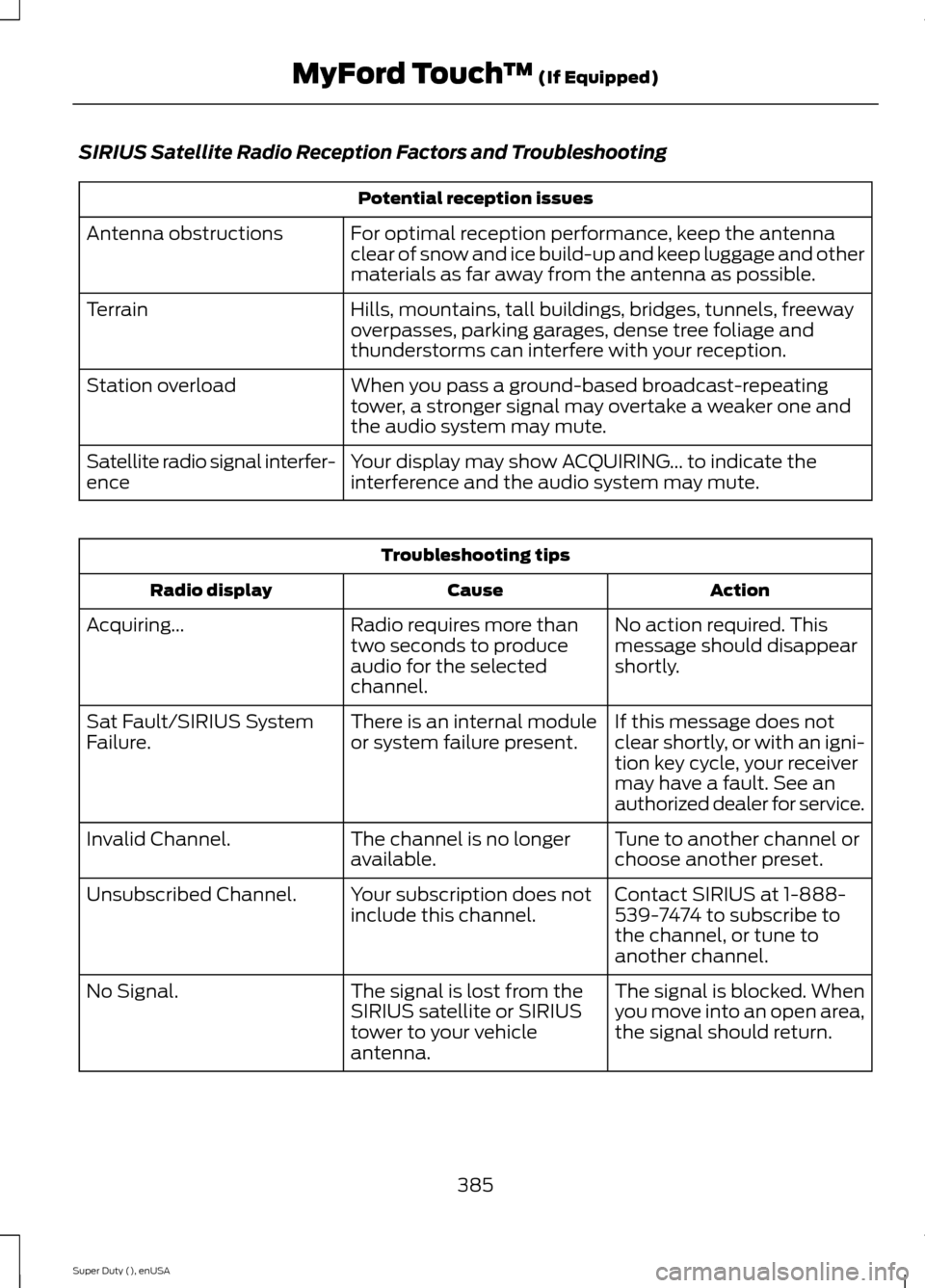
SIRIUS Satellite Radio Reception Factors and Troubleshooting
Potential reception issues
For optimal reception performance, keep the antennaclear of snow and ice build-up and keep luggage and othermaterials as far away from the antenna as possible.
Antenna obstructions
Hills, mountains, tall buildings, bridges, tunnels, freewayoverpasses, parking garages, dense tree foliage andthunderstorms can interfere with your reception.
Terrain
When you pass a ground-based broadcast-repeatingtower, a stronger signal may overtake a weaker one andthe audio system may mute.
Station overload
Your display may show ACQUIRING... to indicate theinterference and the audio system may mute.Satellite radio signal interfer-ence
Troubleshooting tips
ActionCauseRadio display
No action required. Thismessage should disappearshortly.
Radio requires more thantwo seconds to produceaudio for the selectedchannel.
Acquiring...
If this message does notclear shortly, or with an igni-tion key cycle, your receivermay have a fault. See anauthorized dealer for service.
There is an internal moduleor system failure present.Sat Fault/SIRIUS SystemFailure.
Tune to another channel orchoose another preset.The channel is no longeravailable.Invalid Channel.
Contact SIRIUS at 1-888-539-7474 to subscribe tothe channel, or tune toanother channel.
Your subscription does notinclude this channel.Unsubscribed Channel.
The signal is blocked. Whenyou move into an open area,the signal should return.
The signal is lost from theSIRIUS satellite or SIRIUStower to your vehicleantenna.
No Signal.
385Super Duty (), enUSAMyFord Touch™ (If Equipped)
Page 389 of 470
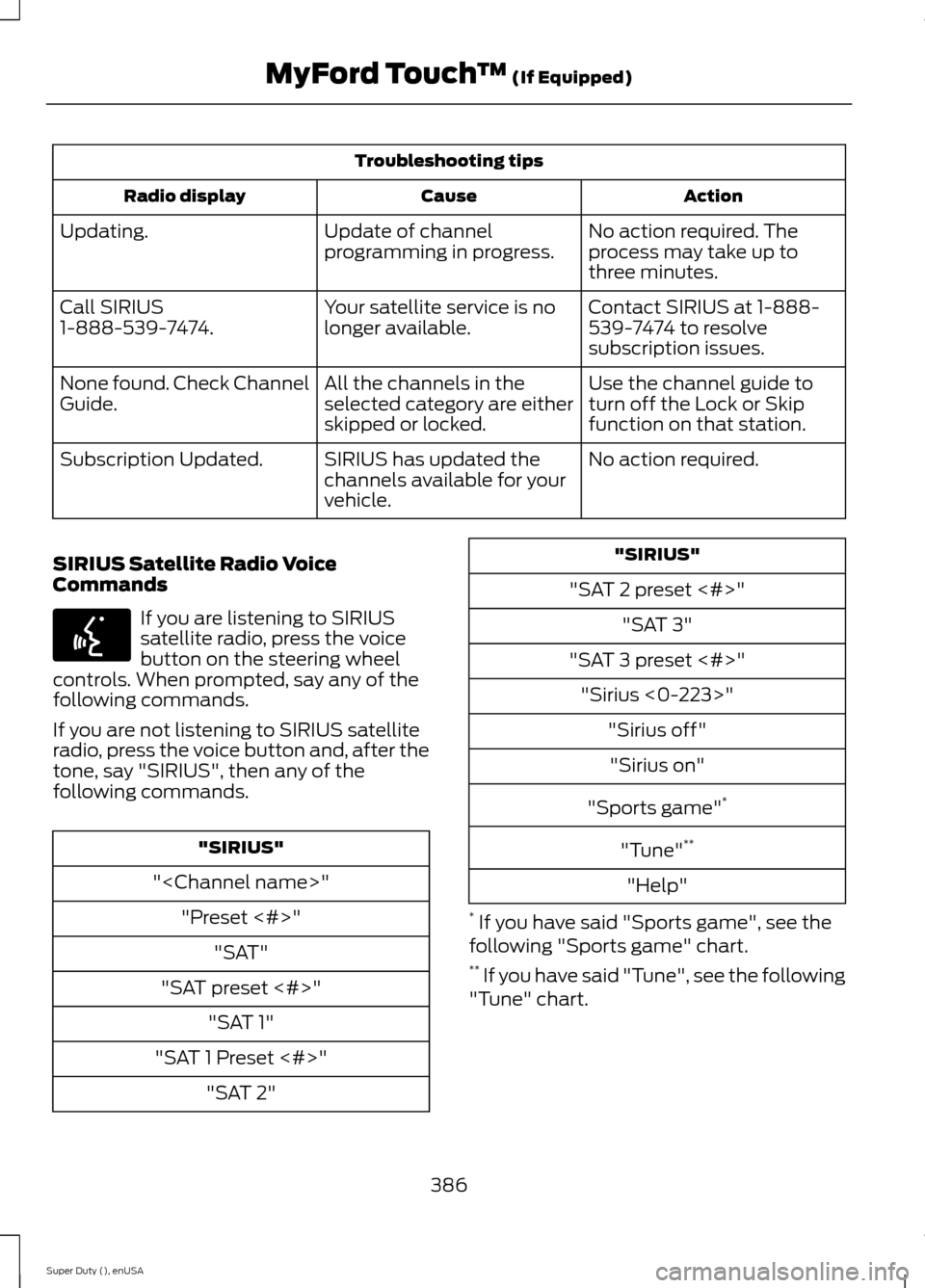
Troubleshooting tips
ActionCauseRadio display
No action required. Theprocess may take up tothree minutes.
Update of channelprogramming in progress.Updating.
Contact SIRIUS at 1-888-539-7474 to resolvesubscription issues.
Your satellite service is nolonger available.Call SIRIUS1-888-539-7474.
Use the channel guide toturn off the Lock or Skipfunction on that station.
All the channels in theselected category are eitherskipped or locked.
None found. Check ChannelGuide.
No action required.SIRIUS has updated thechannels available for yourvehicle.
Subscription Updated.
SIRIUS Satellite Radio VoiceCommands
If you are listening to SIRIUSsatellite radio, press the voicebutton on the steering wheelcontrols. When prompted, say any of thefollowing commands.
If you are not listening to SIRIUS satelliteradio, press the voice button and, after thetone, say "SIRIUS", then any of thefollowing commands.
"SIRIUS"
"
"Preset <#>"
"SAT"
"SAT preset <#>"
"SAT 1"
"SAT 1 Preset <#>"
"SAT 2"
"SIRIUS"
"SAT 2 preset <#>"
"SAT 3"
"SAT 3 preset <#>"
"Sirius <0-223>"
"Sirius off"
"Sirius on"
"Sports game"*
"Tune"**
"Help"
* If you have said "Sports game", see thefollowing "Sports game" chart.** If you have said "Tune", see the following"Tune" chart.
386Super Duty (), enUSAMyFord Touch™ (If Equipped)E142599
Page 390 of 470
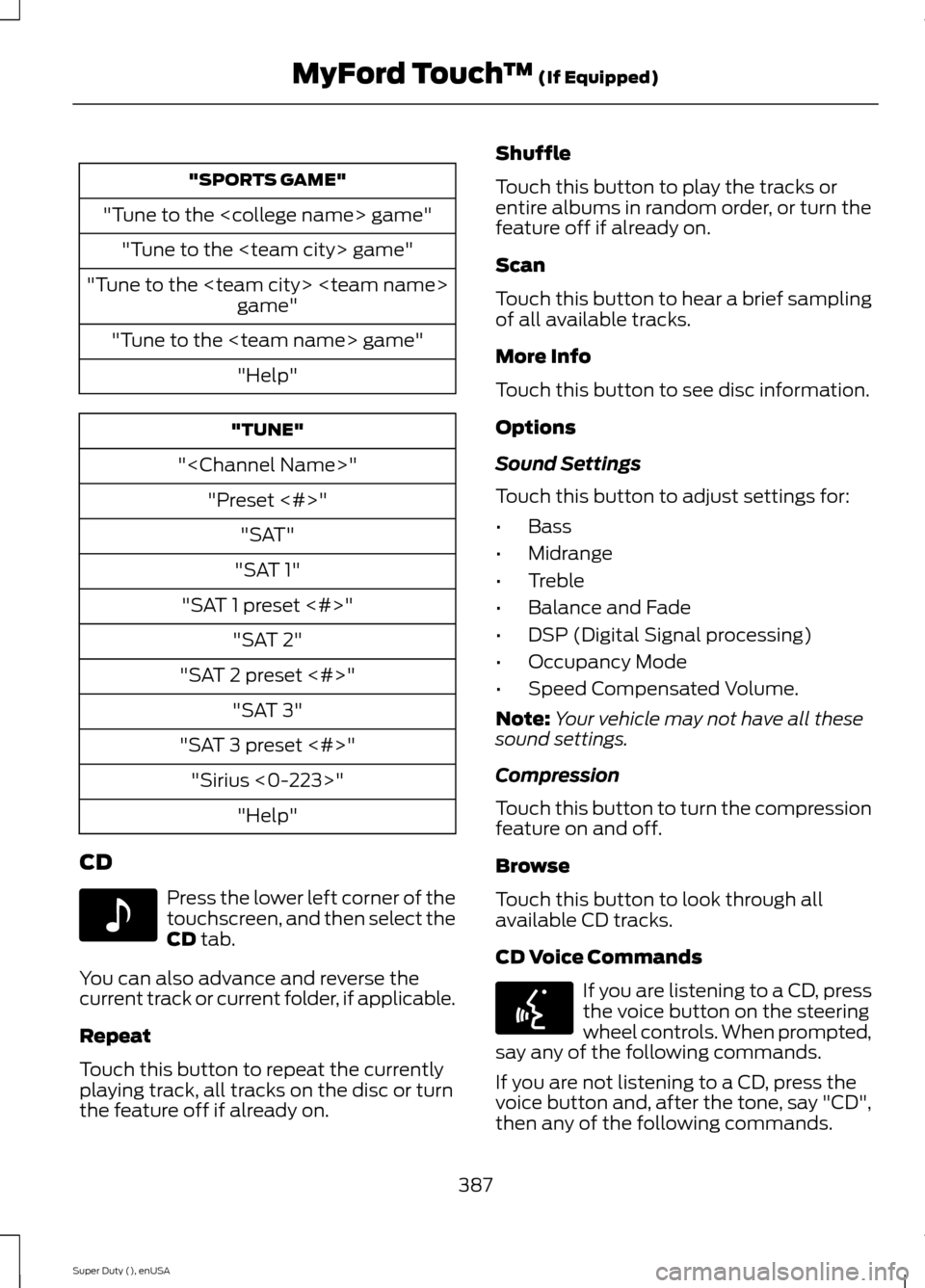
"SPORTS GAME"
"Tune to the
"Tune to the
"Tune to the
"Tune to the
"Help"
"TUNE"
"
"Preset <#>"
"SAT"
"SAT 1"
"SAT 1 preset <#>"
"SAT 2"
"SAT 2 preset <#>"
"SAT 3"
"SAT 3 preset <#>"
"Sirius <0-223>"
"Help"
CD
Press the lower left corner of thetouchscreen, and then select theCD tab.
You can also advance and reverse thecurrent track or current folder, if applicable.
Repeat
Touch this button to repeat the currentlyplaying track, all tracks on the disc or turnthe feature off if already on.
Shuffle
Touch this button to play the tracks orentire albums in random order, or turn thefeature off if already on.
Scan
Touch this button to hear a brief samplingof all available tracks.
More Info
Touch this button to see disc information.
Options
Sound Settings
Touch this button to adjust settings for:
•Bass
•Midrange
•Treble
•Balance and Fade
•DSP (Digital Signal processing)
•Occupancy Mode
•Speed Compensated Volume.
Note:Your vehicle may not have all thesesound settings.
Compression
Touch this button to turn the compressionfeature on and off.
Browse
Touch this button to look through allavailable CD tracks.
CD Voice Commands
If you are listening to a CD, pressthe voice button on the steeringwheel controls. When prompted,say any of the following commands.
If you are not listening to a CD, press thevoice button and, after the tone, say "CD",then any of the following commands.
387Super Duty (), enUSAMyFord Touch™ (If Equipped)E142611 E142599
Page 413 of 470
Touch the climate-controlled seat icon to turn the climate-controlled seat offand on (if equipped).
Touch MyTemp to select your preset temperature setpoint. Touch and holdMyTemp to save a new preset temperature setpoint.
Touch the heated steering wheel icon to turn the heated steering wheel on andoff (if equipped).
Note:If your vehicle is equipped with awood-trimmed steering wheel, it does notheat between the 10 o'clock and 2 o'clockpositions.
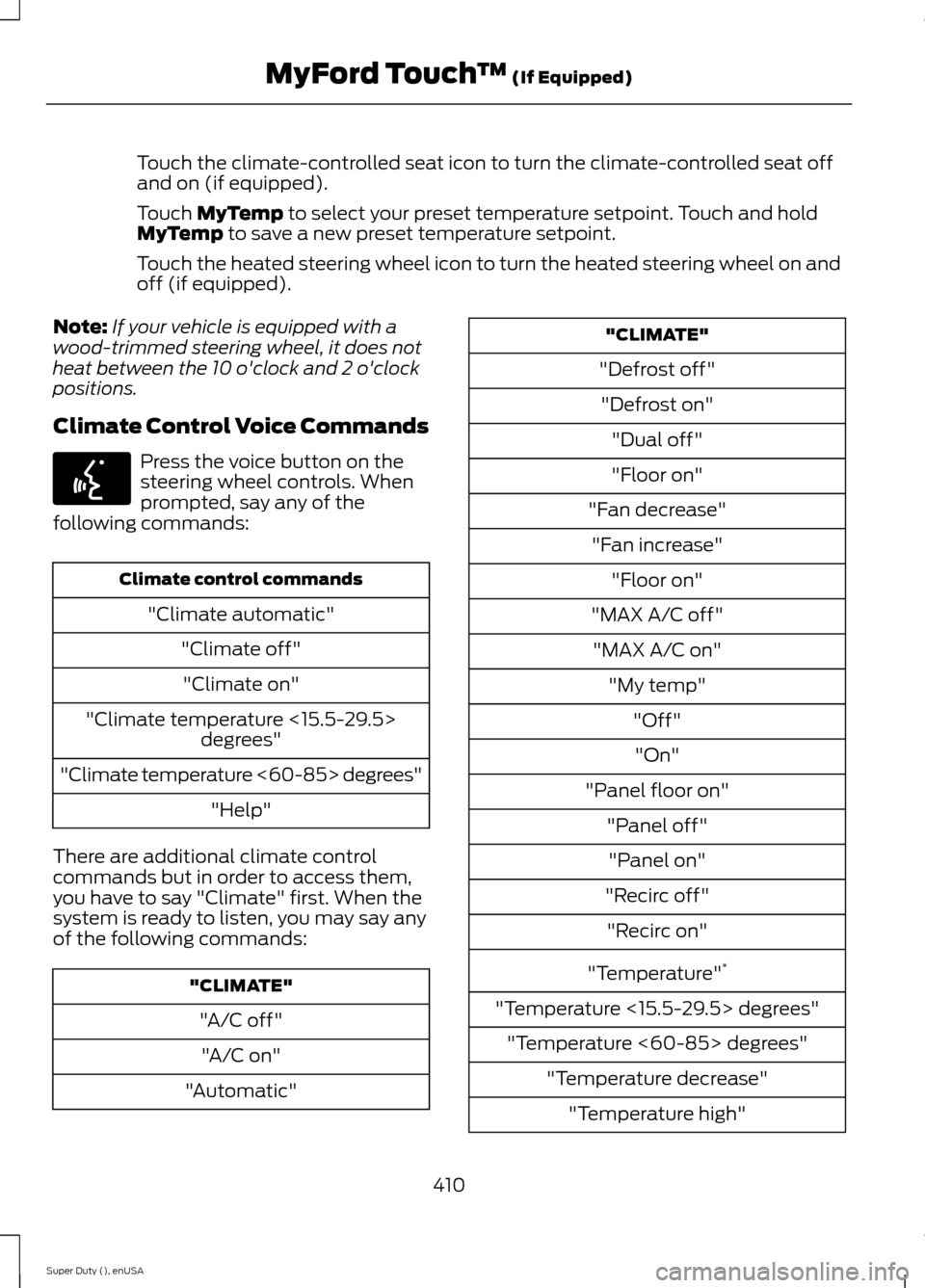
Climate Control Voice Commands
Press the voice button on thesteering wheel controls. Whenprompted, say any of thefollowing commands:
Climate control commands
"Climate automatic"
"Climate off"
"Climate on"
"Climate temperature <15.5-29.5>degrees"
"Climate temperature <60-85> degrees"
"Help"
There are additional climate controlcommands but in order to access them,you have to say "Climate" first. When thesystem is ready to listen, you may say anyof the following commands:
"CLIMATE"
"A/C off"
"A/C on"
"Automatic"
"CLIMATE"
"Defrost off"
"Defrost on"
"Dual off"
"Floor on"
"Fan decrease"
"Fan increase"
"Floor on"
"MAX A/C off"
"MAX A/C on"
"My temp"
"Off"
"On"
"Panel floor on"
"Panel off"
"Panel on"
"Recirc off"
"Recirc on"
"Temperature"*
"Temperature <15.5-29.5> degrees"
"Temperature <60-85> degrees"
"Temperature decrease"
"Temperature high"
410Super Duty (), enUSAMyFord Touch™ (If Equipped)E142599