2015 FORD FOCUS ELECTRIC battery
[x] Cancel search: batteryPage 97 of 369
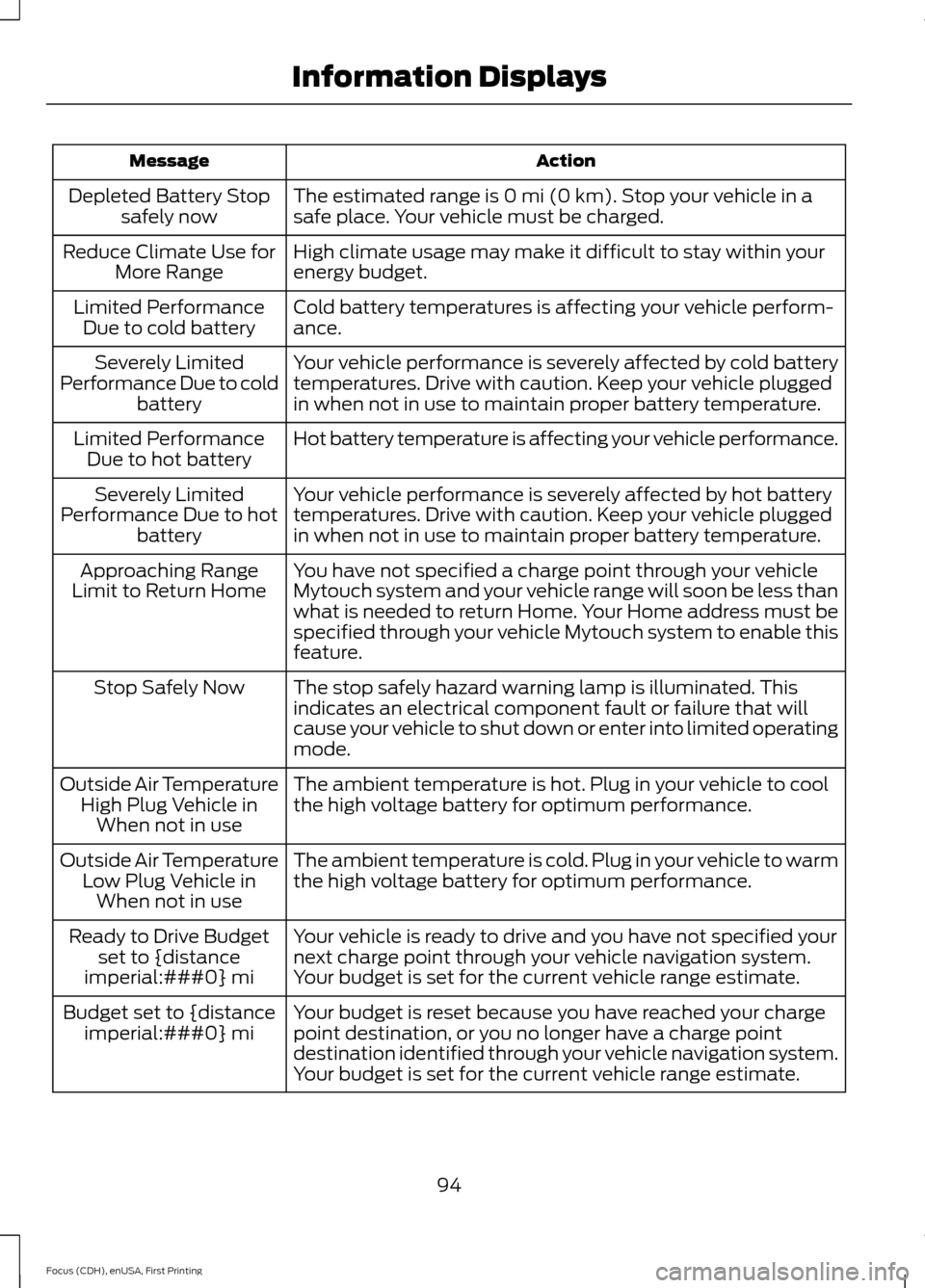
Action
Message
The estimated range is 0 mi (0 km). Stop your vehicle in a
safe place. Your vehicle must be charged.
Depleted Battery Stop
safely now
High climate usage may make it difficult to stay within your
energy budget.
Reduce Climate Use for
More Range
Cold battery temperatures is affecting your vehicle perform-
ance.
Limited Performance
Due to cold battery
Your vehicle performance is severely affected by cold battery
temperatures. Drive with caution. Keep your vehicle plugged
in when not in use to maintain proper battery temperature.
Severely Limited
Performance Due to cold battery
Hot battery temperature is affecting your vehicle performance.
Limited Performance
Due to hot battery
Your vehicle performance is severely affected by hot battery
temperatures. Drive with caution. Keep your vehicle plugged
in when not in use to maintain proper battery temperature.
Severely Limited
Performance Due to hot battery
You have not specified a charge point through your vehicle
Mytouch system and your vehicle range will soon be less than
what is needed to return Home. Your Home address must be
specified through your vehicle Mytouch system to enable this
feature.
Approaching Range
Limit to Return Home
The stop safely hazard warning lamp is illuminated. This
indicates an electrical component fault or failure that will
cause your vehicle to shut down or enter into limited operating
mode.
Stop Safely Now
The ambient temperature is hot. Plug in your vehicle to cool
the high voltage battery for optimum performance.
Outside Air Temperature
High Plug Vehicle inWhen not in use
The ambient temperature is cold. Plug in your vehicle to warm
the high voltage battery for optimum performance.
Outside Air Temperature
Low Plug Vehicle inWhen not in use
Your vehicle is ready to drive and you have not specified your
next charge point through your vehicle navigation system.
Your budget is set for the current vehicle range estimate.
Ready to Drive Budget
set to {distance
imperial:###0} mi
Your budget is reset because you have reached your charge
point destination, or you no longer have a charge point
destination identified through your vehicle navigation system.
Your budget is set for the current vehicle range estimate.
Budget set to {distance
imperial:###0} mi
94
Focus (CDH), enUSA, First Printing Information Displays
Page 105 of 369
Note:
Remove any snow, ice, or leaves from
the air intake area at the base of the
windshield.
Note: To improve air conditioning when
starting your vehicle, drive with the windows
slightly open for two to three minutes.
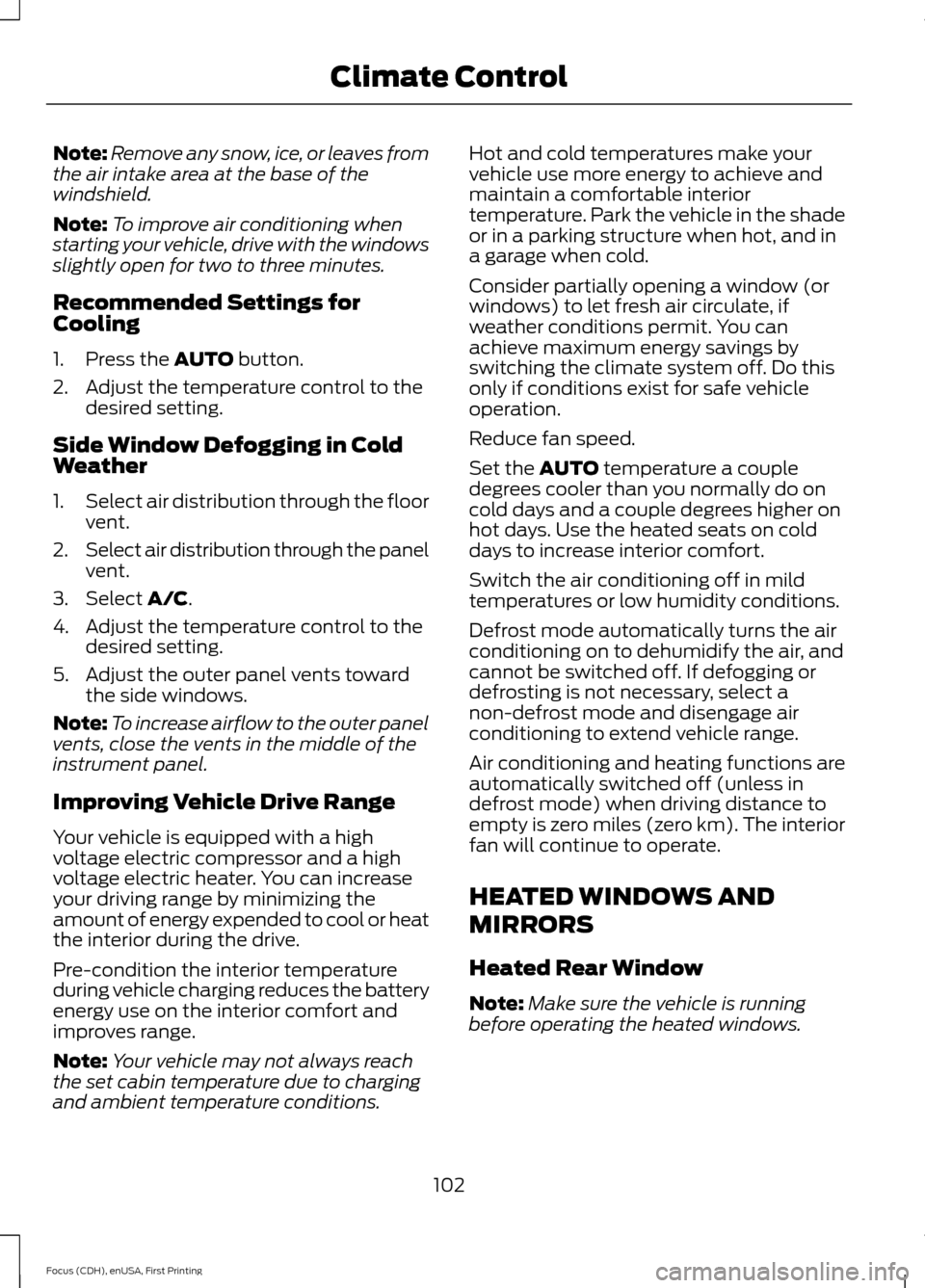
Recommended Settings for
Cooling
1. Press the AUTO button.
2. Adjust the temperature control to the desired setting.
Side Window Defogging in Cold
Weather
1. Select air distribution through the floor
vent.
2. Select air distribution through the panel
vent.
3. Select
A/C.
4. Adjust the temperature control to the desired setting.
5. Adjust the outer panel vents toward the side windows.
Note: To increase airflow to the outer panel
vents, close the vents in the middle of the
instrument panel.
Improving Vehicle Drive Range
Your vehicle is equipped with a high
voltage electric compressor and a high
voltage electric heater. You can increase
your driving range by minimizing the
amount of energy expended to cool or heat
the interior during the drive.
Pre-condition the interior temperature
during vehicle charging reduces the battery
energy use on the interior comfort and
improves range.
Note: Your vehicle may not always reach
the set cabin temperature due to charging
and ambient temperature conditions. Hot and cold temperatures make your
vehicle use more energy to achieve and
maintain a comfortable interior
temperature. Park the vehicle in the shade
or in a parking structure when hot, and in
a garage when cold.
Consider partially opening a window (or
windows) to let fresh air circulate, if
weather conditions permit. You can
achieve maximum energy savings by
switching the climate system off. Do this
only if conditions exist for safe vehicle
operation.
Reduce fan speed.
Set the
AUTO temperature a couple
degrees cooler than you normally do on
cold days and a couple degrees higher on
hot days. Use the heated seats on cold
days to increase interior comfort.
Switch the air conditioning off in mild
temperatures or low humidity conditions.
Defrost mode automatically turns the air
conditioning on to dehumidify the air, and
cannot be switched off. If defogging or
defrosting is not necessary, select a
non-defrost mode and disengage air
conditioning to extend vehicle range.
Air conditioning and heating functions are
automatically switched off (unless in
defrost mode) when driving distance to
empty is zero miles (zero km). The interior
fan will continue to operate.
HEATED WINDOWS AND
MIRRORS
Heated Rear Window
Note: Make sure the vehicle is running
before operating the heated windows.
102
Focus (CDH), enUSA, First Printing Climate Control
Page 112 of 369
HEATED SEATS
WARNING
People who are unable to feel pain
to their skin because of advanced
age, chronic illness, diabetes, spinal
cord injury, medication, alcohol use,
exhaustion or other physical conditions,
must exercise care when using the heated
seat. The heated seat may cause burns
even at low temperatures, especially if
used for long periods of time. Do not place
anything on the seat that insulates against
heat, such as a blanket or cushion. This
may cause the heated seat to overheat.
Do not puncture the seat with pins, needles
or other pointed objects. This may damage
the heating element which may cause the
heated seat to overheat. An overheated
seat may cause serious personal injury. Do not do the following:
•
Place heavy objects on the seat.
• Operate the heated seat if water or any
other liquid spills on the seat. Allow the
seat to dry thoroughly.
• Operate the heated seats unless the
vehicle is powered to Ready to Drive.
Doing so can deplete the 12-volt
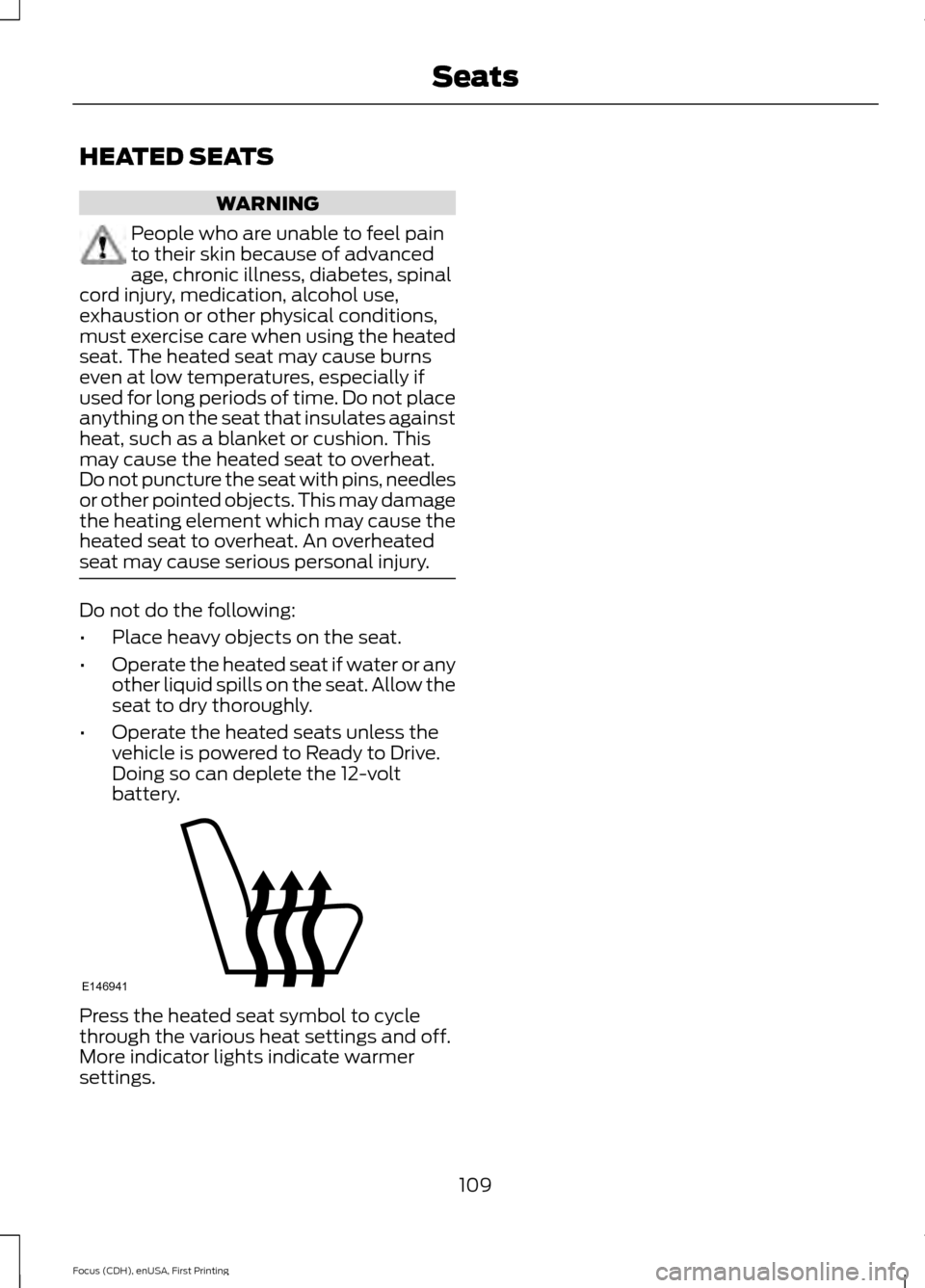
battery. Press the heated seat symbol to cycle
through the various heat settings and off.
More indicator lights indicate warmer
settings.
109
Focus (CDH), enUSA, First Printing SeatsE146941
Page 113 of 369
12 Volt DC Power Point
WARNING
Do not plug optional electrical
accessories into the cigar lighter
socket. Incorrect use of the lighter
can cause damage not covered by your
warranty, and can result in fire or serious
injury. Note:
After starting your vehicle, you can
use the socket to power 12-volt appliances
with a maximum current rating of 20 amps.
After you switch your vehicle off, the power
supply works only for a maximum of 30
minutes.
Note: Do not insert objects other than an
accessory plug into the power point. This
damages the outlet and can blow the fuse.
Note: Do not hang any type of accessory or
accessory bracket from the plug.
Note: Do not use the power point over the
vehicle capacity of 12 volt DC 180 watt or a
fuse may blow.
Note: Do not use the power point for
operating a cigar lighter element.
Note: Incorrect use of the power point can
cause damage not covered by your
warranty.
Note: Always keep the power point caps
closed when not in use.
Run the vehicle for full capacity use of the
power point.
To prevent the battery from running out of
charge:
• Do not use the power point longer than
necessary after switching the vehicle
off.
• Do not leave devices plugged in
overnight or when your vehicle is in park
(P) for extended periods. Location
You may find power points in the following
locations:
•
On the center console
• In the center console.
110
Focus (CDH), enUSA, First Printing Auxiliary Power Points
Page 115 of 369
STARTING THE ELECTRIC
MOTOR
Keyless Starting
Note:
The system may not function if the
passive key is close to metal objects or
electronic devices, for example keys or a cell
phone.
Note: A valid passive key must be located
inside your vehicle to switch the ignition on
and start your vehicle.
Note: Passive keys left inside your vehicle
when locked are disabled. A message may
appear in the information display indicating
that there is no key detected when you try
to start your vehicle. Press the unlock
button on the remote control to enable it,
and then start your vehicle.
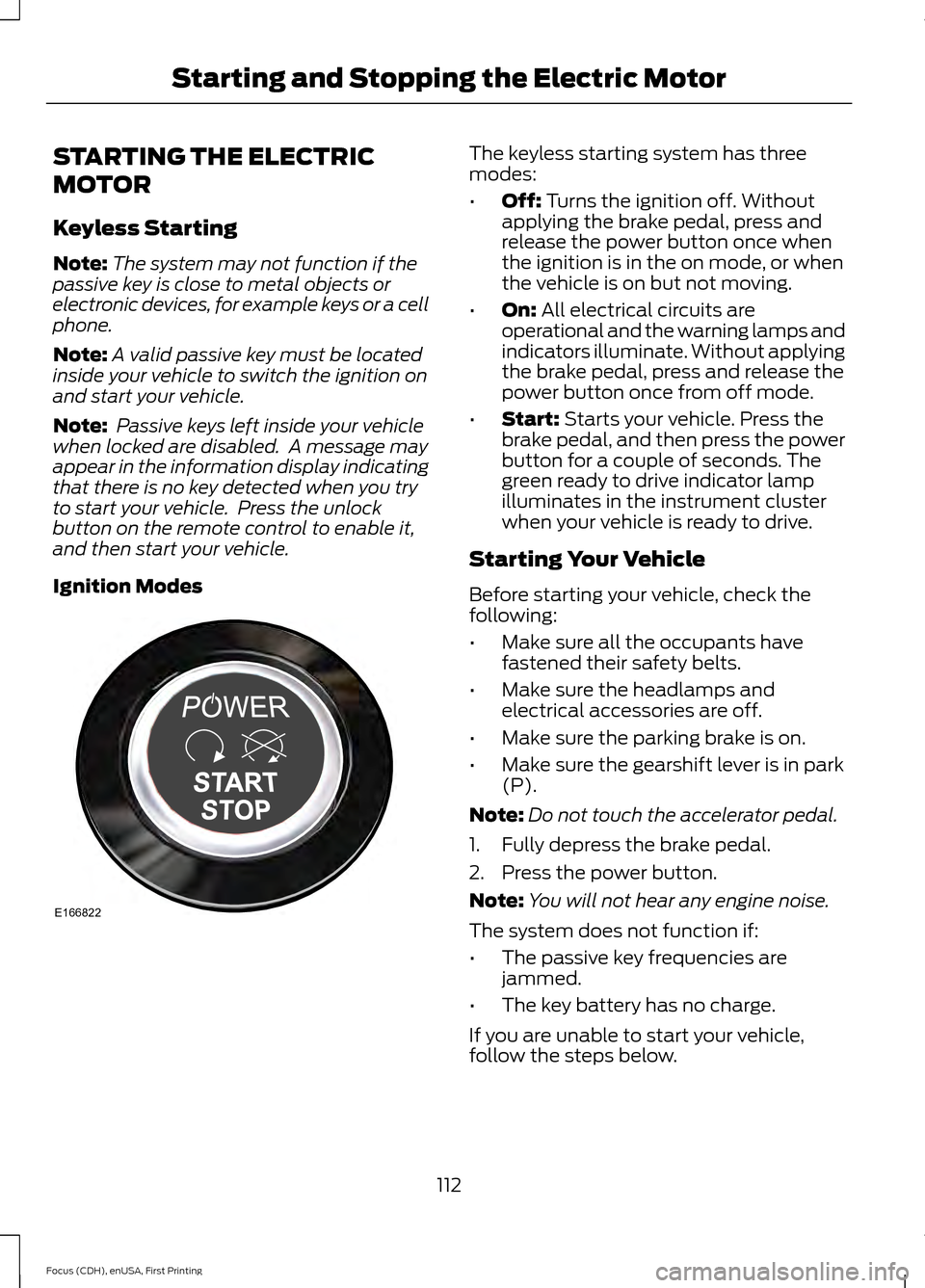
Ignition Modes The keyless starting system has three
modes:
•
Off: Turns the ignition off. Without
applying the brake pedal, press and
release the power button once when
the ignition is in the on mode, or when
the vehicle is on but not moving.
• On:
All electrical circuits are
operational and the warning lamps and
indicators illuminate. Without applying
the brake pedal, press and release the
power button once from off mode.
• Start:
Starts your vehicle. Press the
brake pedal, and then press the power
button for a couple of seconds. The
green ready to drive indicator lamp
illuminates in the instrument cluster
when your vehicle is ready to drive.
Starting Your Vehicle
Before starting your vehicle, check the
following:
• Make sure all the occupants have
fastened their safety belts.
• Make sure the headlamps and
electrical accessories are off.
• Make sure the parking brake is on.
• Make sure the gearshift lever is in park
(P).
Note: Do not touch the accelerator pedal.
1. Fully depress the brake pedal.
2. Press the power button.
Note: You will not hear any engine noise.
The system does not function if:
• The passive key frequencies are
jammed.
• The key battery has no charge.
If you are unable to start your vehicle,
follow the steps below.
112
Focus (CDH), enUSA, First Printing Starting and Stopping the Electric MotorE166822
Page 118 of 369
GENERAL INFORMATION
WARNINGS
This battery pack shall only be
serviced by an authorized electric
vehicle technician. Improper handling
can result in personal injury or death. Your vehicle consists of various high
voltage components and wiring. All
high voltage cables are labeled and
covered with a solid orange covering or
orange striped tape. Do not touch these
components. Failure to follow this warning
could result in serious personal injury or
death. The high voltage battery system is a high
voltage, lightweight lithium-ion battery
which has two individual packs. One pack
is located in the rear cargo area behind the
second row seats, the other is located
underneath the vehicle. The high voltage
battery system uses an advanced active
liquid heating and cooling system to
regulate high voltage battery temperature
and help maximize the life of the high
voltage battery.
Note:
The high voltage battery does not
require regular service maintenance.
Note: The high voltage battery will
experience gradual capacity loss with time
and usage. This is normal.
CHARGING THE HIGH
VOLTAGE BATTERY WARNINGS
Do not use the 120 volt convenience
cord with an extension cord,
two-prong adapter, surge protector,
timer or other adapter. In Canada, do not use the 120 volt
convenience cord in commercial
garages. WARNINGS
This equipment has arcing or
sparking parts, do not expose to
flammable vapors. Position this
equipment at least 18 inches (80
millimeters) above the floor. The AC wall plug must fit firmly into
the AC outlet. If the connection feels
loose, worn or the AC outlet is
damaged, please have a qualified
electrician replace the AC outlet. Using a
convenience cord with a worn outlet may
cause burns, property damage and
increase the risk of electric shock. Charging Equipment
Your vehicle is equipped with a standard
120 volt convenience cord. Lift the load
floor carpet in the rear of your vehicle to
access the 120 volt convenience cord.
Note:
The 120 volt convenience cord allows
you to charge the high voltage battery using
a standard 120 volt household outlet. It
takes approximately 18 hours to completely
charge an empty battery using the standard
120 volt convenience cord.
We recommend upgrading to the optional
240 volt charging station for faster more
efficient charging.
Note: The electrical source must meet
certain requirements for the high-voltage
batteries to charge. The AC outlet must be
a three-prong 110-120 volt AC outlet that is
properly grounded, 15– 20 amps (or greater)
and in good condition. You must use a
dedicated line, which means you cannot
have other appliances connected to the
same circuit. If you do not use dedicated
circuit, the circuit breaker could trip or open.
If you do not have a dedicated circuit,
contact a licensed professional electrician
for proper installation.
115
Focus (CDH), enUSA, First Printing High Voltage Battery
Page 119 of 369
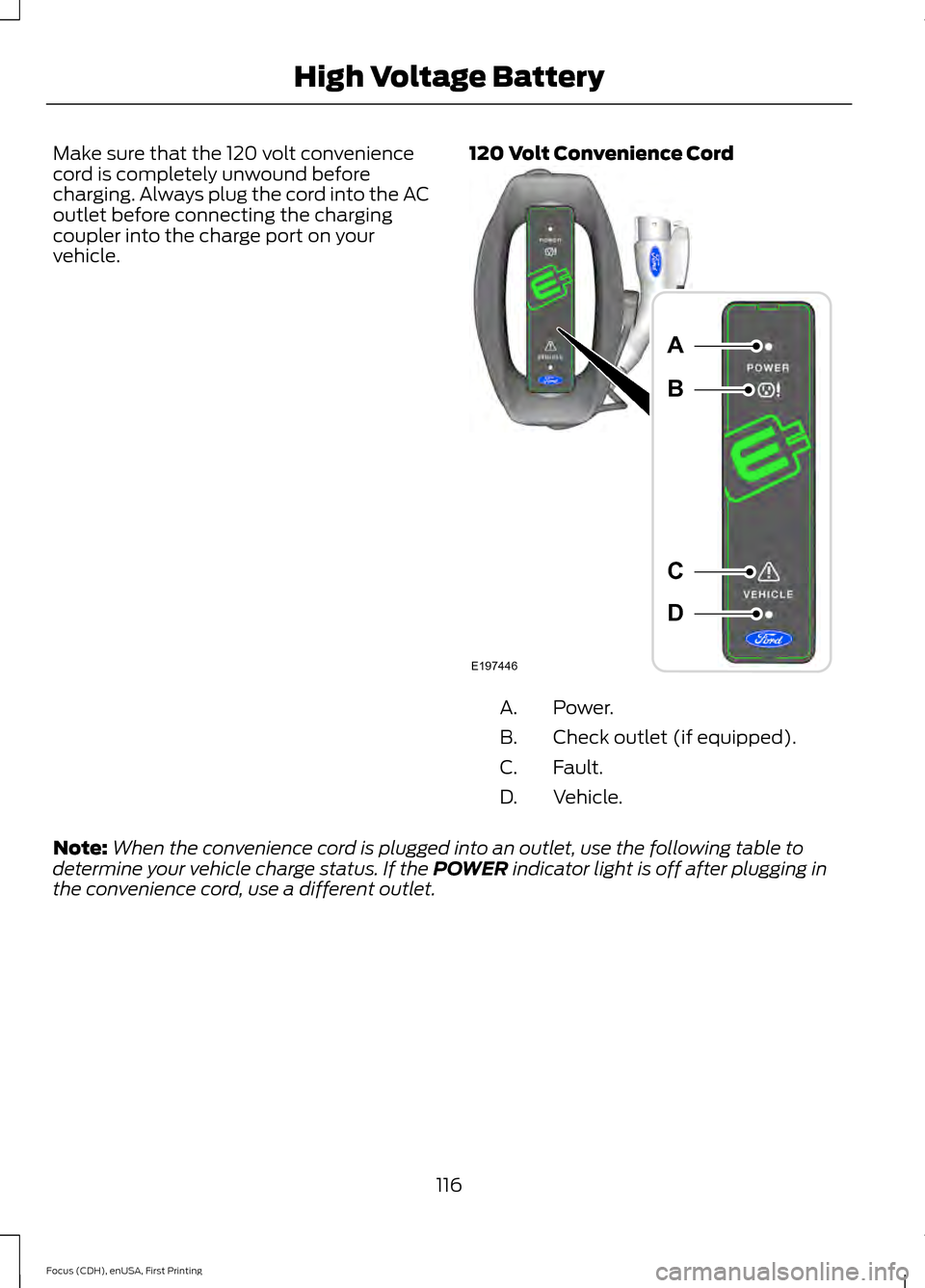
Make sure that the 120 volt convenience
cord is completely unwound before
charging. Always plug the cord into the AC
outlet before connecting the charging
coupler into the charge port on your
vehicle.
120 Volt Convenience Cord Power.
A.
Check outlet (if equipped).
B.
Fault.
C.
Vehicle.
D.
Note: When the convenience cord is plugged into an outlet, use the following table to
determine your vehicle charge status. If the POWER indicator light is off after plugging in
the convenience cord, use a different outlet.
116
Focus (CDH), enUSA, First Printing High Voltage BatteryE197446
A
B
C
D
Page 120 of 369
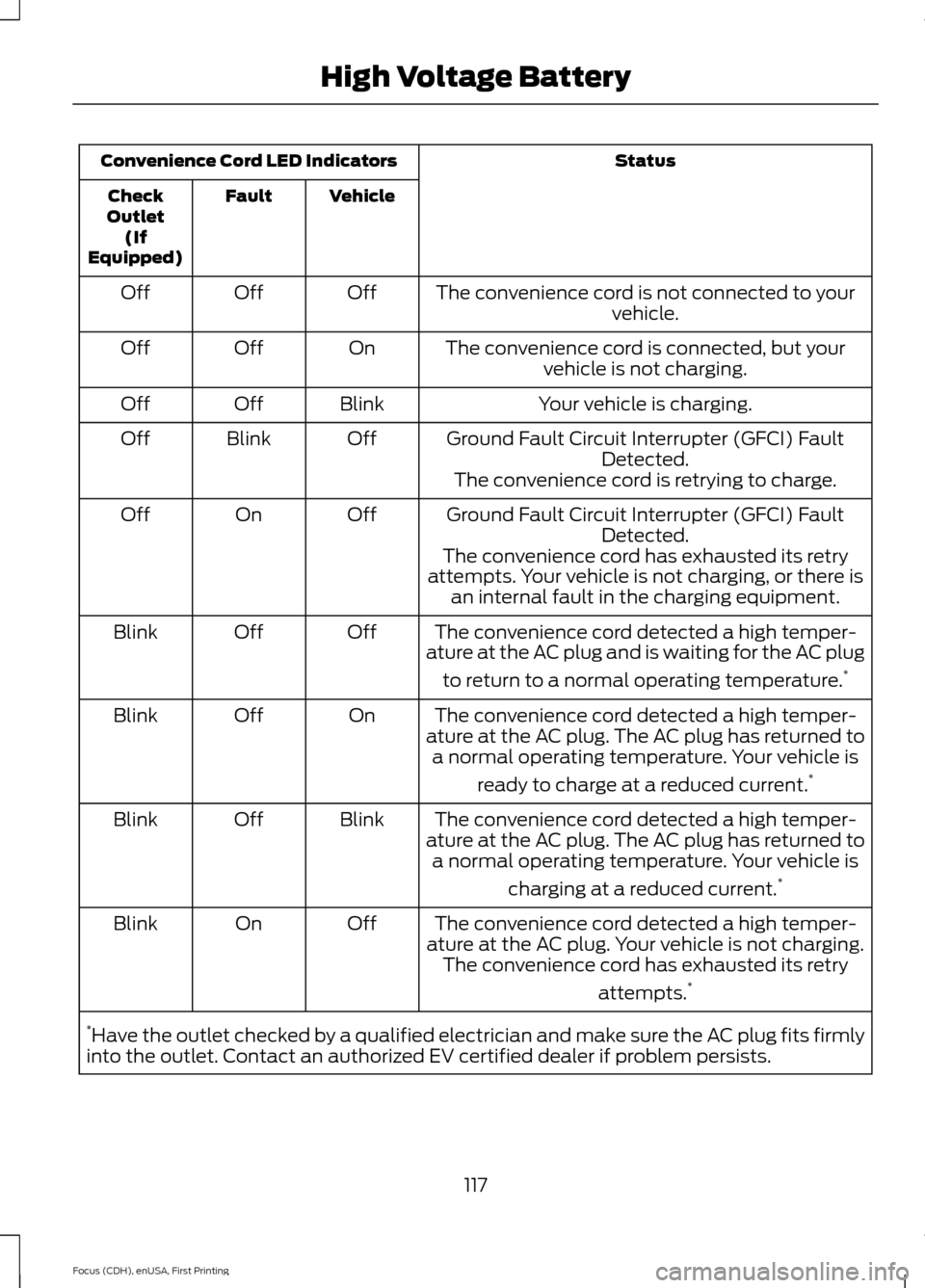
Status
Convenience Cord LED Indicators
Vehicle
Fault
Check
Outlet (If
Equipped)
The convenience cord is not connected to yourvehicle.
Off
Off
Off
The convenience cord is connected, but yourvehicle is not charging.
On
Off
Off
Your vehicle is charging.
Blink
Off
Off
Ground Fault Circuit Interrupter (GFCI) FaultDetected.
Off
Blink
Off
The convenience cord is retrying to charge.
Ground Fault Circuit Interrupter (GFCI) Fault Detected.
Off
On
Off
The convenience cord has exhausted its retry
attempts. Your vehicle is not charging, or there is an internal fault in the charging equipment.
The convenience cord detected a high temper-
ature at the AC plug and is waiting for the AC plug
to return to a normal operating temperature. *
Off
Off
Blink
The convenience cord detected a high temper-
ature at the AC plug. The AC plug has returned to a normal operating temperature. Your vehicle is
ready to charge at a reduced current. *
On
Off
Blink
The convenience cord detected a high temper-
ature at the AC plug. The AC plug has returned to a normal operating temperature. Your vehicle is
charging at a reduced current. *
Blink
Off
Blink
The convenience cord detected a high temper-
ature at the AC plug. Your vehicle is not charging. The convenience cord has exhausted its retry
attempts.*
Off
On
Blink
* Have the outlet checked by a qualified electrician and make sure the AC plug fits firmly
into the outlet. Contact an authorized EV certified dealer if problem persists.
117
Focus (CDH), enUSA, First Printing High Voltage Battery