2015 AUDI TT ROADSTER warning
[x] Cancel search: warningPage 85 of 244
Driving Notes
The forward gears are shifted up or down au
tomatically.
--
-
-
-
-
-
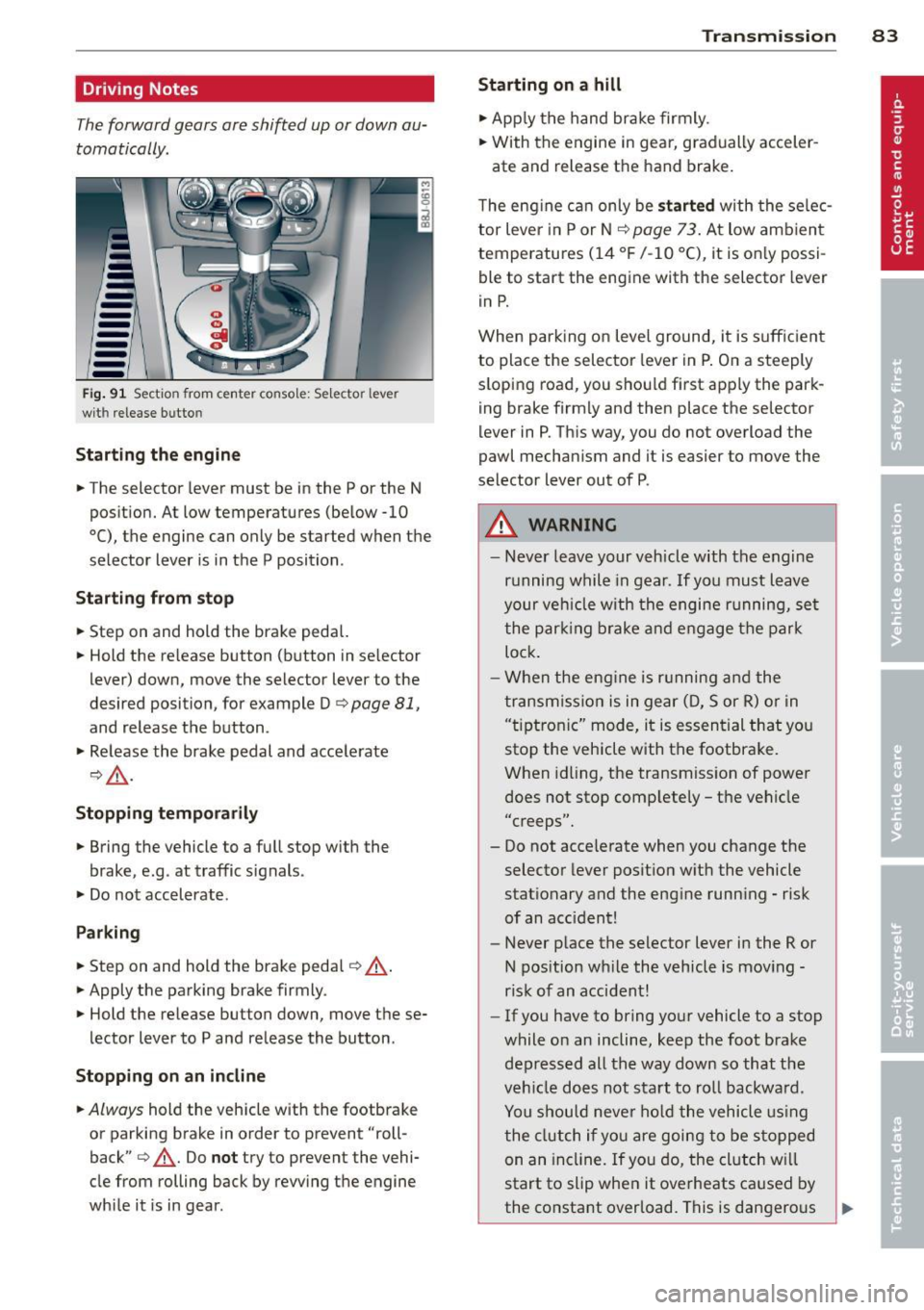
--Fig . 91 Sect io n from center co nsole: Sele ctor leve r
wit h release bu tto n
Starting the engine
.. The selector lever must be in the P or the N
position. At low temperatures (below -10
0 (), the engine can only be started when the
selector lever is in the P position .
Starting from stop
.. Step on and hold the brake pedal.
.. Hold the release button (button in se lector
lever) down, move the selector lever to the
desired position, for example D
c:> page 81,
and release the button .
.. Release the brake pedal and accelerate
¢,& .
Stopping temporarily
.. Bring the vehicle to a full stop with the
brake, e.g . at traffic signals .
.. Do not accelerate .
Parking
.. Step on and hold the brake pedal¢_& .
.. Apply the parking brake firmly.
.. Hold the release button down, move these
lector lever to P and release the button.
Stopping on an incline
.. Always hold the vehicle with the footbrake
or parking brake in order to prevent "roll
back"
¢ _& . Do not try to prevent the vehi
cle from rolling back by rewing the engine
while it is in gear.
Transmission 83
Starting on a hill
.. Apply the hand brake firmly.
.. With the engine in gear, gradually acceler-
ate and release the hand brake.
The engine can only be
started with the selec
tor lever in P or N
c:> page 7 3. At low amb ient
temperatures (14
°F /-10 °C), it is only possi
ble to start the engine with the selector lever
in P.
When parking on level ground, it is sufficient
to place the selector lever in P. On a steeply
sloping road, you should first apply the park
ing brake firmly and then place the selector
lever in P. This way, you do not overload the
pawl mechanism and it is easier to move the
selector lever out of P .
A WARNING
- Never leave your vehicle with the engine
running while in gear . If you must leave
your veh icle with the engine running, set
the parking brake and engage the park
lock .
- When the engine is running and the
transmission is in gear (D, Sor R) or in
"t iptroni c" mode, it is essential that you
stop the vehicle with the footbrake .
When idling, the transmission of power
does not stop completely - the vehicle
"creeps".
- Do not accelerate when you change the selector lever position with the vehicle
stationary and the engine running - risk
of an accident!
- Never place the selector lever in the R or
N position while the vehicle is moving -
risk of an accident!
- If you have to bring your vehicle to a stop
while on an incline, keep the foot brake depressed all the way down so that the
vehicle does not start to roll backward .
You should never hold the vehicle using
the clutch if you are going to be stopped
on an incline. If you do, the clutch w ill
start to slip when it overheats caused by
the constant overload. This is dangerous .,.
Page 86 of 244
84 Transmi ssion
because if the veh icle starts to roll
backward, you could cause an accident. If
the clutch should start to slip, you will
feel the vehicle "jerk" and the selector lever disp lay will start b linki ng .
- Before driv ing down a steep slope, re
duce you r speed and shift into a lower
gear with "tiptronic" .
- Do not ride the brakes or app ly the brake
peda l too often or too lo ng . Constant
braking causes the b rakes to over heat
and substan tially red uces bra king pe r
fo rm ance, in cr ease s bra king dis tance or
c a uses comp lete failure o f th e b rake sys
tem.
Hill Descent Assist
Hill Descent Assist helps the driver when driv
ing down inclines .
Hill Descent Ass ist is activated by pressing the
b rake w hile desce nding w hen the selecto r lev
e r i s in D/S. The S tronic t ra nsm ission au to
mat ically shifts dow n to a gea r su itab le for
the incline. Hill Descent Assist at tempts to
maintain th e current vehicle spe ed whe n the
brak ing occu rs, as far as phys ica l and techni
cal lim its a llow. It may be necessary to adjust
the speed using the brakes.
Hill Descent Assist switches off when the in
cline levels out or when the gas pedal is press
ed.
On vehi cles with cruise contro l* ¢
page 77 ,
Hill Descent Assist is a lso activated when the
speed is set.
_& WARNING
H ill Descent Assist ca nnot overcome p hys i
cal limitations, so it may not be possib le to
ma intain a constant vehicle speed under
all circ ums tances . Always be ready to ap
ply t he bra kes .
tiptronic operation
Tiptronic allows the driver to shift gears man
ually .
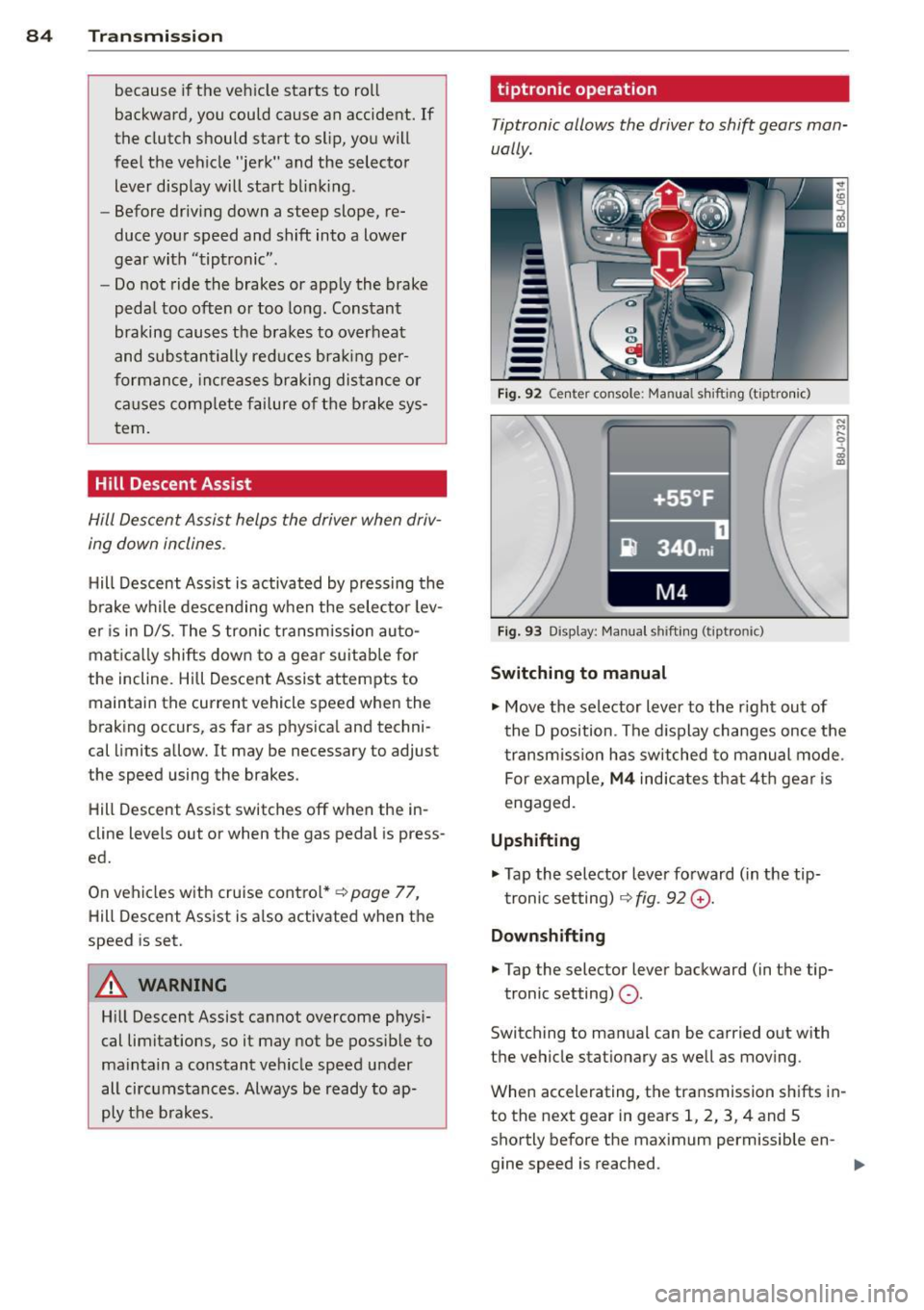
Fig . 92 Ce nte r co nso le: Ma nua l shiftin g (t iptro nic)
Fig . 9 3 D isp lay: Ma nua l shi fting (t ip tro nic )
Switching to manual
.... M .... 0
~
... Move the selector lever to the r ight out of
t he D position . The d isplay changes once the
t ra nsmiss io n has sw itched to ma nual mode .
For examp le,
M4 ind ica tes that 4t h gea r is
engaged.
Upshifting
.,. Tap the selector lever fo rward ( in the tip
t ronic setting) ¢
fig. 92 G) .
Downshifting
... Tap the selector lever backward (in t he tip-
tronic setting)
Q .
Switch ing to man ual can be carried out with
the vehicle stationary as we ll a s mov ing .
When accelerating, the transmission sh ifts in
to th e next gear in gears 1, 2, 3, 4 and S
shortly before the maximum permissible en -
gine speed is reached. ..,.
Page 87 of 244
If you have selected a lower gear than the cur
rent one, the transmission will only shift down
when the engine cannot be overspeeded .
If kick-down is actuated, the transmission
shifts into a lower gear independent ly of
speed and engine rpm .
Steering wheel with Tiptronic controls
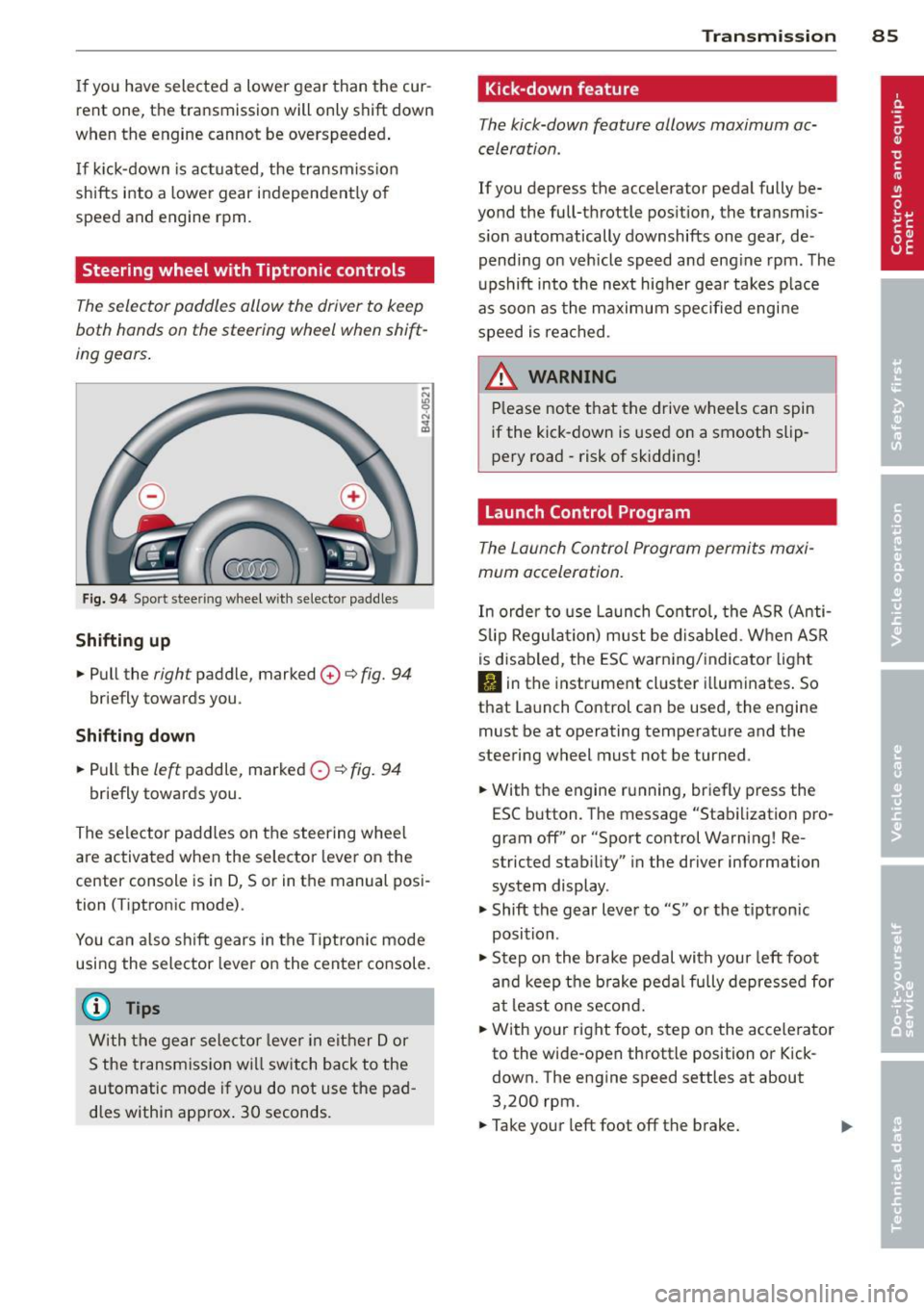
The selector paddles allow the driver to keep
both hands on the steering wheel when shift
ing gears.
Fig. 94 Sport stee ring wheel with selecto r paddles
Shifting up
.,. Pull the right paddle, marked 0 ¢ fig. 94
briefly towards you .
Shifting down
.. Pull the left paddle, marked 0 ¢ fig. 94
briefly towards you.
The selector paddles on the steering wheel
are activated when the selector lever on the
center console is in D, Sor in the manual posi
tion (Tiptronic mode).
You can also shift gears in the Tiptronic mode
using the selector lever on the center console.
@ Tips
With the gear selector lever in either Dor
S the transmission will switch back to the
automatic mode if you do not use the pad
dles within approx . 30 seconds.
Transmission 85
Kick -down feature
The kick-down feature allows maximum ac
celeration .
If you depress the accelerator pedal fully be
yond the full-throttle position, the transmis
sion automatically downshifts one gear, de
pending on vehicle speed and engine rpm. The
upshift into the next higher gear takes place
as soon as the maximum specified engine
speed is reached.
_&. WARNING
Please note that the drive wheels can spin
if the kick-down is used on a smooth slip
pery road -risk of sk idding!
Launch Control Program
The Launch Control Program permits maxi
mum acceleration.
In order to use Launch Control, the ASR (Anti
Slip Regulation) must be disabled. When ASR
is disabled, the ESC warning/indicator light
I) in the instrument cluster illuminates. So
that Launch Control can be used, the engine must be at operating temperature and the
steering wheel must not be turned .
.. With the engine running, briefly press the
ESC button . The message "Stabilization pro
gram off" or "Sport control Warning! Re
stricted stability" in the driver information
system display.
.. Shift the gear lever to "S" or the tiptron ic
position .
.. Step on the brake pedal with your left foot
and keep the brake pedal fully depressed for
at least one second .
.. With your right foot, step on the accelerator
to the wide-open throttle position or Kick
down. The engine speed settles at about
3,200 rpm.
.. Take your left foot off the brake.
Page 88 of 244
86 Transmis sion
& WARNING ,-
- Always adapt your driving to the traffic
flow.
- Only use Launch Control when road and
traffic conditions allow it and other driv
ers will not be endangered or annoyed by
your driving and the acceleration of the
vehicle .
- Make sure that ESC remains enabled.
With the ESC disabled, the vehicle could
brake away, particularly on a slick and
slippery road - risk of skidding!
- Once acce lerat ion is finished, switch ASR
on again by briefly pushing the ESC but
ton.
(j) Tips
- The transmission temperature may in
crease significantly after using the Launch Control Program. If that hap
pens, the program may not be available
for a few minutes.
It will be available
again after a cool-down period.
- When accelerating using the Launch
Control program, all vehicle parts are
subject to heavy loads . This can result in
increased wear.
Back-up program
In the event of a system malfunction, there is
a back-up program.
In the event of system malfunction, the auto
matic transmission switches to the fail-safe
mode. Al l of the selector lever position dis
plays for the automatic transmission are high
lighted with a light background in the instru
ment cluster display . In some cases you can
not use reverse gear any more.
If the transmission switches to fail-safe mode, you should take the vehicle to an au
thorized Audi dealership as soon as possible
to have the condition corrected .
Clutch is overheating
• Clutch is overheating! Please stop vehi
cle!
If the symbols are illum inated, the clutch is
overheating and could be damaged if you con
t inu e to drive. Stop the vehicle and allow the
transmission to cool with the se lector lever in
the P position while the engine runs at idle. If
the warning does not turn off, do not continue driving. See your authorized Audi dealer or
qualified repair facility for assistance. Other
wise serious transmission damage could re
sult . Once the indicator light has turned off,
drive to your authorized Audi dealer or quali
fied repa ir facility immed iately to have the
malfunction corrected .
Selector lever emergency release
If the vehicle's power supply fails, the selec
tor lever can be released in an emergency.
--
-
-
-
-
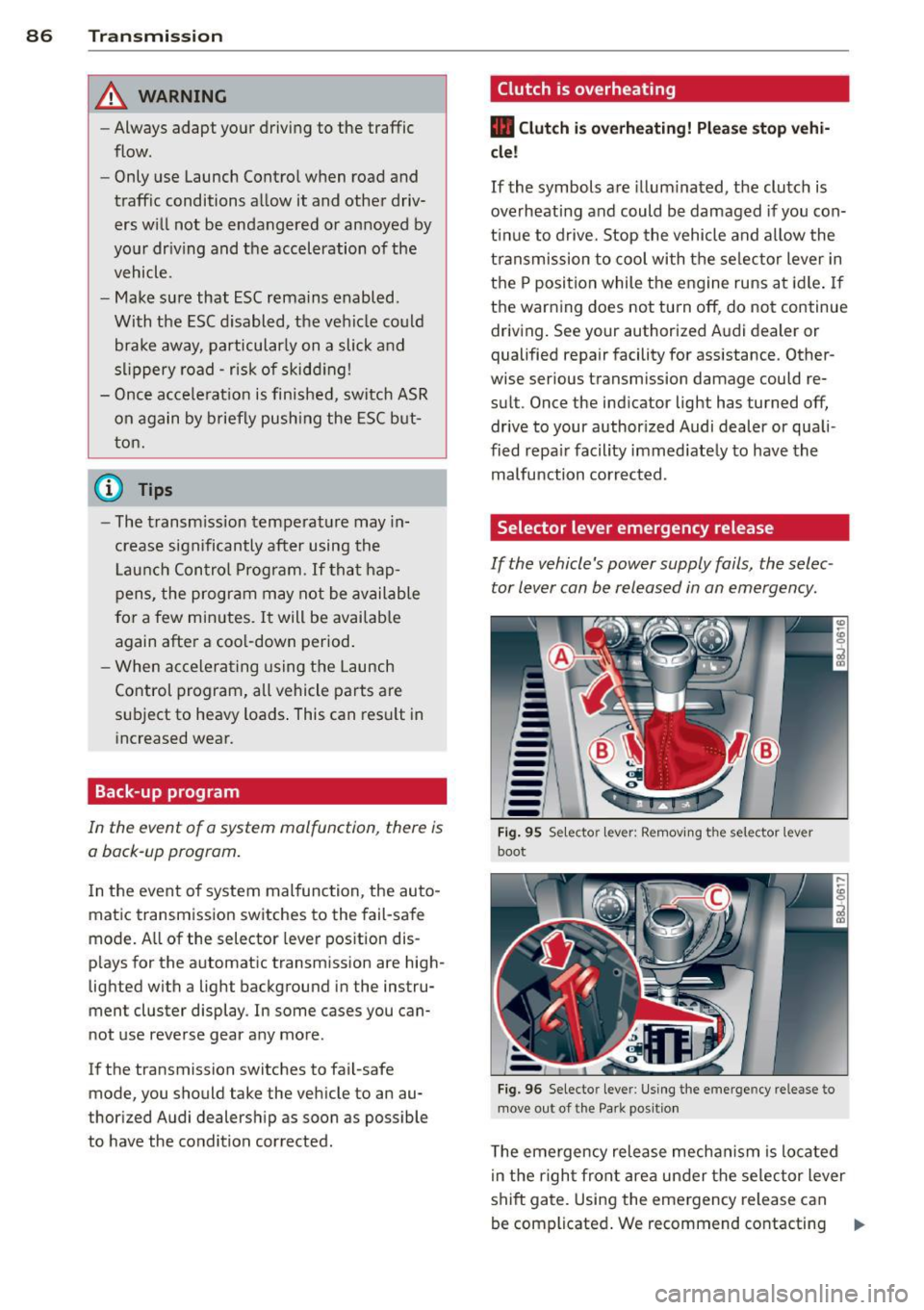
---Fig. 95 Selecto r lev er: Remov ing the selector le ver
boot
Fig. 96 Selecto r lever : Using the emerge ncy release to
move out of the Park positio n
The emergency release mechanism is located
i n the right front area under the selector lever
shift gate. Using the emergency release can
be complicated. We recommend contacting ..,_
Page 89 of 244
your authorized Audi dealer for assistance, if necessary .
Removing the selector lever boot
.,. Activate the parking b rake .
.,. Carefu lly pry the selector lever boot out of
the tr im @ using a small screwdriver .
.,. Pull both sides of the se lector lever boot up-
ward in the direction of the arrow @ .
.,. Fold the selector lever boot upward.
Selector lever eme rgency re le ase
.,. Press the release lever down and ho ld it in
place ¢ fig . 96 .
.,. Press the release button in the selector lever
© and move the lever into the N position .
.,. Clip the selector lever boot back into the
shift gate after using the emergency re lease.
If the vehicle m ust be pushed or towed due to
a power failure (for example, the battery is
d ischarged), the selector lever must first be
moved to the N pos ition using the emergency
release mechanism .
A WARNING
Only move the se lector lever out of the P
posi tion when the parking b rake is activat
ed. O therw ise, the vehicle could sta rt to
move unintentionally when the selector
lever is moved out of the P position.
Tran sm iss ion 87
Page 90 of 244
88 Homelin k
Homelink
Universal remote
control
General information
The Homelink universal remote control can
be programmed with hand-held transmitters
from existing equipment .
You must first program the Homelink trans
mitter before you can use the system
~ page 88 , Programming the Homelink
transmitter.
In order to program the Homelink transmit
ter for devices utilizing rolling code, a second
person on a ladder who can safely reach the
garage door opener motor is recommended.
It is also necessary to locate the "learn" but
ton on your garag e door open er motor . Refer
to the ope rating instructions for the opener ,
as the location and color of this bu tton may
vary by manufacturer .
You can still use the original remote control
for the device at any time.
A WARNING
-
- Never use the Homelink transmitter
with any garage door opener that does
have not the safety stop and reverse fea
ture as required by federal safety stand
ards. This includes any garage door open
er model manufactured before April 1,
1982.
- A garage door opener which cannot de
tect an object, signaling the door to stop
and reverse does not meet current feder
al safety standards. Using a garage door
opener without these features increases
risk of serious injury or death.
- For safety reasons never release the
parking brake or start the engine while
anyone is standing in front of the vehicle.
- A garage door or an estate gate may
sometimes be set in motion when the
Homelink remote control is being pro
grammed. If the device is repeatedly ac- tivated, this can overstrain motor and
damage its electrical components - an
overheated motor
is a fire hazard!
- To avoid possible injuries or property
damage, please always make absolutely
certain that no persons or objects are lo
cated in the range of motion of any
equipment being operated.
(!) Tips
- If you would like more information on
Homelink, where to purchase the Home
Link compatible products, or would like
to purchase the Homelink Home Light
ing Package, please call toll-free :
1-800-355-3515.
- For Declaration of Compliance to United
States FCC and Industry Canada regula
tions ~
page 228.
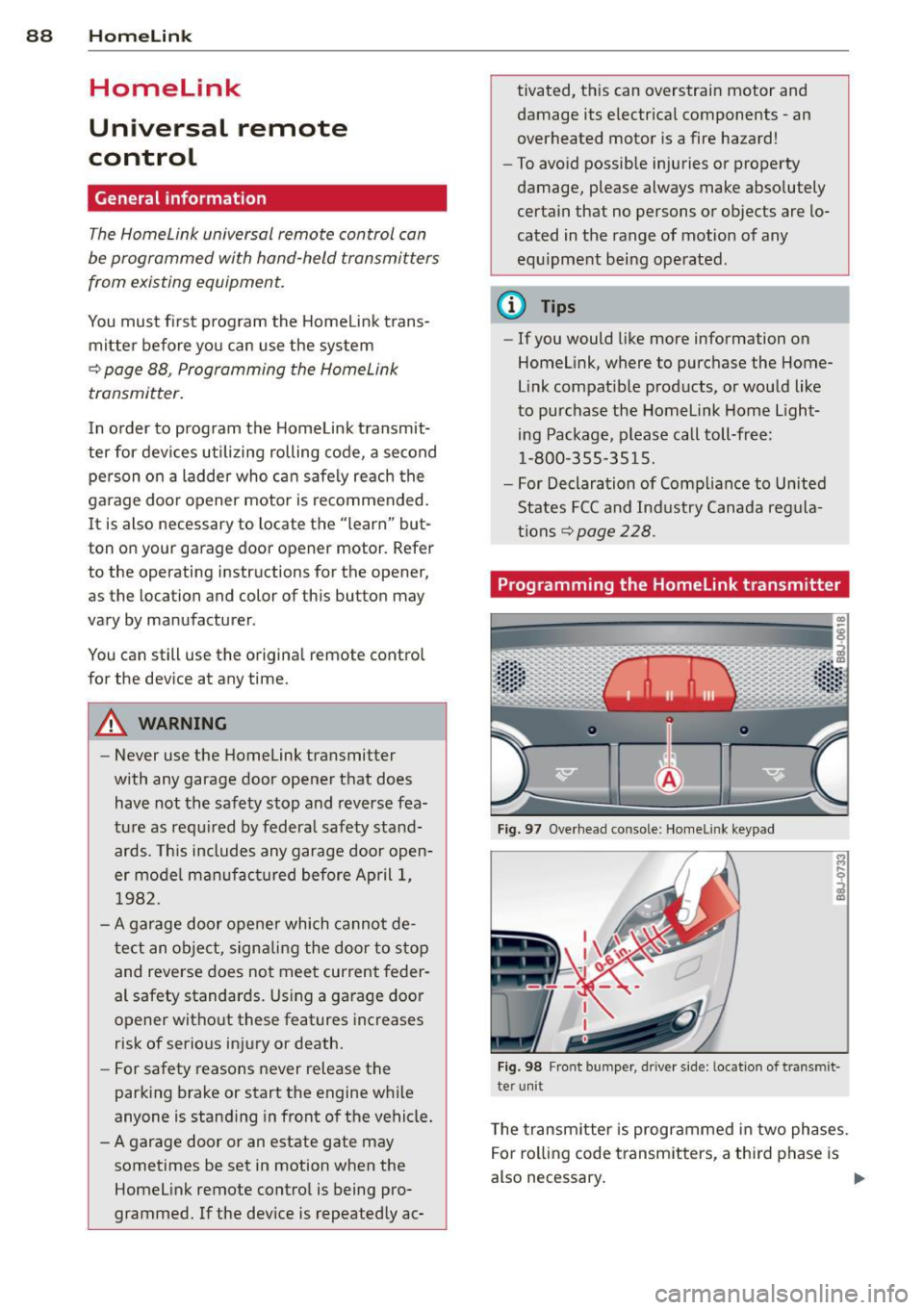
Programming the Homelink transmitter
Fig. 97 Overhead co nsole: Homelink keypad
Fig. 98 Front bumper , driver side: lo catio n of tra n smi t
te r unit
The transmitter is programmed in two phases.
For rolling code transmitters, a third phase is
also necessary.
ll-
Page 93 of 244
Driving Safely
General notes
Safe driving habits
Please remember -safety first!
This chapter contains important information,
tips, instructions and warnings that you need
to read and observe for your own safety, the
safety of your passengers and others . We have
summarized here what you need to know
about safety belts, airbags, child restraints as
well as child safety. Your safety is for us
priori
ty number 1.
Always observe the information
and warnings in this section - for your own
safety as well as for that of your passengers.
The information in this section applies to all
model versions of your vehicle . Some of the
features described in this sections may be
standard equipment on some models, or may
be optional equipment on others. If you are
not sure, ask your authorized Audi dealer.
A WARNING
- Make certain that you follow the instruc
tions and heed the WARNINGS in this
Manual. It is in your interest and in the
interest of your passengers.
- Always keep the complete Owner's Liter
ature in your Audi when you lend or sell
your vehicle so that this important infor
mation will always be available to the
driver and passengers.
- Always keep the Owner's literature handy
so that you can find it easily if you have
questions.
Safety equipment
The safety features are part of the occupant
restraint system and work together to help
reduce the risk of injury in a wide variety of
accident situations .
Your safety and the safety of your passengers
should not be left to chance. Advances in
technology have made a variety of features
available to help reduce the risk of injury in an
Driving Safely 91
accident. The following is a listing of just a
few of the safety features in your Audi:
- sophisticated safety belts for driver and all
passenger seating positions,
- safety belt pre-tensioners,
- front airbags,
- knee airbags for the front seats,
- side airbags in the front seats,
- LATCH anchorages for child restraints,
- adjustable steering column.
These individual safety features can work to
gether as a system to help protect you and
your passengers in a wide range of accidents.
These features cannot work as a system if
they are not always properly adjusted and
properly used!
Safety is everybody's responsibility!
Important things to do before driving
Safety is everybody's job! Vehicle and occu
pant safety always depends on the informed and careful driver.
For your safety and the safety of your passen
gers,
before driving always:
~ Make sure that all lights and signals are op
erating correctly .
~ Make sure that the tire pressure is correct.
~ Make sure that all windows are clean and af
ford good visibility to the outside.
~ Secure all luggage and other items carefully
c::> page 65.
~ Make sure that nothing can interfere with
the pedals.
~ Adjust front seat, head restraint and mirrors
correctly for your height .
~ Instruct passengers to adjust the head re
straints according to their height .
~ Make sure to use the right child restraint
correctly to protect children¢
page 129,
Child Safety.
~ Sit properly in your seat and make sure that
your passengers do the same¢
page 59,
General recommendations. .,..
•
•
Page 94 of 244
92 Driving Safel y
• Fasten your safety be lt and wear it properly .
Also instruct your passengers to fasten their
safety belts proper ly ¢
page 100.
What impairs driving safety?
Safe driving is directly related to the condi
tion of the vehicle, the driver as well as the
driver's ability to concentrate on the rood
without being distracted.
The driver is responsible for the safety of the
vehicle and all of its occupants. If your ability
to drive is impaired, safety risks for everybody
in the vehicle increase and you also become a
hazard to everyone else on the road ¢
.&,.
Therefore:
• Do not let yourself be distracted by passen
gers or by using a cellular telephone.
• NEVER drive when your dr iving ability is im
paired (by medicat ions, alcohol, drugs, etc.) .
• Observe all traffic laws, rules of the road
and speed limits and plain common sense.
• ALWAYS adjust your speed to road, traffic
and weather conditions.
• Take frequent breaks on long trips . Do not
drive for more than two hours at a stretch .
• Do NOT drive when you are tired , under
pressure or when you are stressed.
A WARNING ,.
Impai red driving safety increases the risk
of serious personal injury and death when
ever a vehicle is being used.
Proper occupant
seating positions
Proper seating position for the driver
The proper driver seating position is impor
tant for safe, relaxed driving.
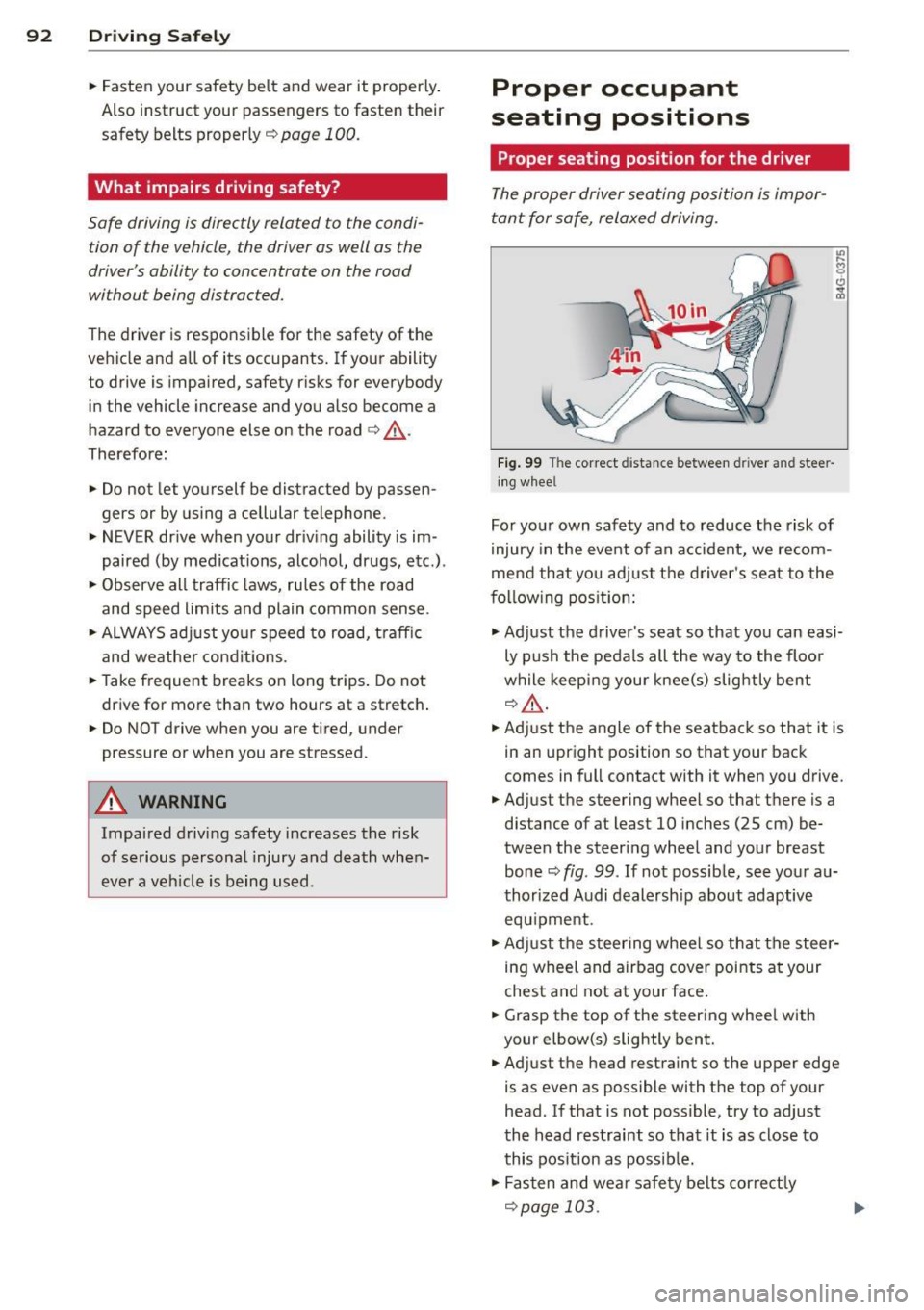
Fig. 99 The correct distance between driver and steer
ing whee l
For your own safety and to reduce the risk of
injury in the event of an accident, we recom
mend that you adjust the driver's seat to the
f o llow ing position:
• Adjust the driver's seat so that you can easi
ly push the pedals all the way to the floo r
while keeping your knee(s) slightly bent
q &_.
• Adjust the angle of the seatback so that it is
in an upright position so that your back
comes in full contact with it when you drive.
• Adjust the steering wheel so that there is a
distance of at least 10 inches (25 cm) be
tween the steering wheel and your breast bone¢
fig. 99 . If not possible, see your au
thorized Audi dealersh ip about adaptive
equ ipment.
• Adjust the steering wheel so that the steer
ing wheel and airbag cover points at your
chest and not at your face.
• Grasp the top of the steering whee l with
your elbow(s) slightly bent.
• Adjust the he ad restraint so the upper edge
is as even as possible with the top of your
head . If that is not possible, try to adjust
the head restraint so that it is as close to
this pos ition as possib le.
• Fasten and wear safety belts correctly
¢page 103.