2015 AUDI TT ROADSTER warning
[x] Cancel search: warningPage 77 of 244
(D Note
On ly after the vehi cle has come to com
plete stop, should you f irm ly set the park
ing brake and either move the selector lev
er into "P".
Parking
P ar kin g
"' Stop the vehicle using the brake pedal.
"' Set the parking brake firmly .
"' Switch
off the eng ine .
"' Move the se lector lever into the P pos ition
i=> & .
"'When on incl ines or declines, turn the steer
ing wheel so that the vehicle w ill roll into
the curb if it begins to move .
A WARNING
This is how you can reduce the risk of in
jury when leaving your veh icle.
- Never park the vehicle where it can come
in contact with dry grass, spilled f uel or
any other flammable mater ials.
- Never allow anyone -especially small
children -to remain in the vehicle when
it is locked . Locked doors make it more
difficult for rescuers to access the pas
senger compartment in the event of an
eme rgency. Danger to life!
- Never leave ch ild ren unsupervised in the
vehicle . Children co uld re lease the park
ing brake. The vehicle co uld start to roll
away and cause an accident.
- No matter what the season is, the tem
perature in a par ked vehicle can reach
dange ro us levels.
Starting on hills
App lies to vehicles : wit h hill hold assist
Hill hold ass ist makes it easier to start on
hill s.
-
The system is act ivated when the brake pedal
i s depressed for a few second s.
On the ro ad 75
After releasing the brake pedal, the b rake
power is held for a
brief moment to p revent
the ve hicle from rolling back when starting . At
th is time, you can easi ly beg in to move your
vehicle.
A WARNING
- If you did not begin moving immed iate ly
after releasing the brake pedal, under
certain ci rc u mstances, the vehicle would
beg in to rol l backwa rd. Dep ress the
bra ke peda l immedi ate ly o r engage the
hand brake .
- Should the e ngine sta ll, dep ress the
brake peda l immedi ate ly or engage the
hand brake .
- I n order to prevent the vehicle from roll
i n g back unintentionally when s tarting in
stop -and -go traffic, keep the brake pedal
depressed for a few seconds before driv
ing off.
(D Tips
You can find o ut if yo ur vehicle is eq uipped
with "Hill hold assist" at an authorized
A udi dealership.
Speed warning system
Overv iew
The speed warning system helps you to keep
your driving speed below a set speed limit.
The speed warning system warns the driver if
he exceeds a previous ly stored max imum
speed . A warning tone will sound as soon as
the ve hicle speed exceeds the set speed by
about 3 mph (3 km/h). At the same time, a
warning symbo l appea rs in the disp lay.
The speed warning system has two warning
thre sholds that function independently of
each other and that have somewhat different
purposes:
Speed warning 1
You can use speed warning 1 to set the maxi mum speed while you are driving . This setting
will remai n in effect until yo u tur n
off the .,..
Page 78 of 244
![AUDI TT ROADSTER 2015 Owners Manual 76 On the road
ignition, assum ing that you have not changed
or reset the setting.
The speed warning symbo l
ID] (USA models)/
1aj (Canada models) in the warning 1 displ ay
appears](/manual-img/6/57664/w960_57664-77.png "AUDI TT ROADSTER 2015 Owners Manual 76 On the road
ignition, assum ing that you have not changed
or reset the setting.
The speed warning symbo l
ID] (USA models)/
1aj (Canada models) in the warning 1 displ ay
appears")
76 On the road
ignition, assum ing that you have not changed
or reset the setting.
The speed warning symbo l
ID] (USA models)/
1aj (Canada models) in the warning 1 displ ay
appears when you exceed the maximum
speed. It goes o ut when the speed fa lls below
the stored max imum speed .
The speed wa rning symbo l w ill also go out i f
the speed
exceeds the sto red max imum speed
by more than about 25 mph (40 km/h) for at
l east 10 seconds. The stored maxim um speed
is deleted .
Sett ing speed warning 1
¢page 76 .
Speed warning 2
Sto ring warning 2 is re commended if you al
ways
want to be reminded of a certa in speed,
for exam ple when yo u are traveling i n a cou n
try th at has a general maximum speed limi t,
or if you do not want to exceed a specified
speed for winter tires.
The speed w arning 2 symbol,
lDJ (USA mod
e ls)/
lDJ (Canada models) appea rs in the dis
p lay when you exceed the stored speed limit .
Unlike warning 1, it will not go out unti l th e
vehicle speed drops below the stored speed limit.
Setting s peed warn ing 2
¢ page 77 .
@ Tips
Even t hough your vehicle is equ ipped wi th
a speed w arni ng sys tem, yo u shou ld st ill
watch the s peedomete r to make sure you
are not driving faster than the speed lim it.
Speed warning 1: setting a speed limit
Warning threshold 1 is set by the button .
Fig. 8 3 Sectio n of instru ment clus ter: Set/C heck b ut
to n
Storing the max imum speed
.,. Dr ive at the desired ma ximum speed.
.,. Press the knob buttonc>fig .
83 unti l the
speed warn ing
symbo1 1m1 (U SA mode ls)/ 181
(Canada models) appears.
Resetting the maximum speed
.,. Dr ive the veh icle at a spee d of at least
3 mph ( 5 km/h)
.,. Press the knob for more than 2 seconds.
T he speed warning symbol
ID] (USA mode ls)/
k•j
cate that the maximum speed has been stored
s uccessfully .
The maxim um speed remains stored until it is
c h anged by pressing the button aga in b rief ly
or unt il it is deleted by a lengthy push on the
button.
Page 79 of 244
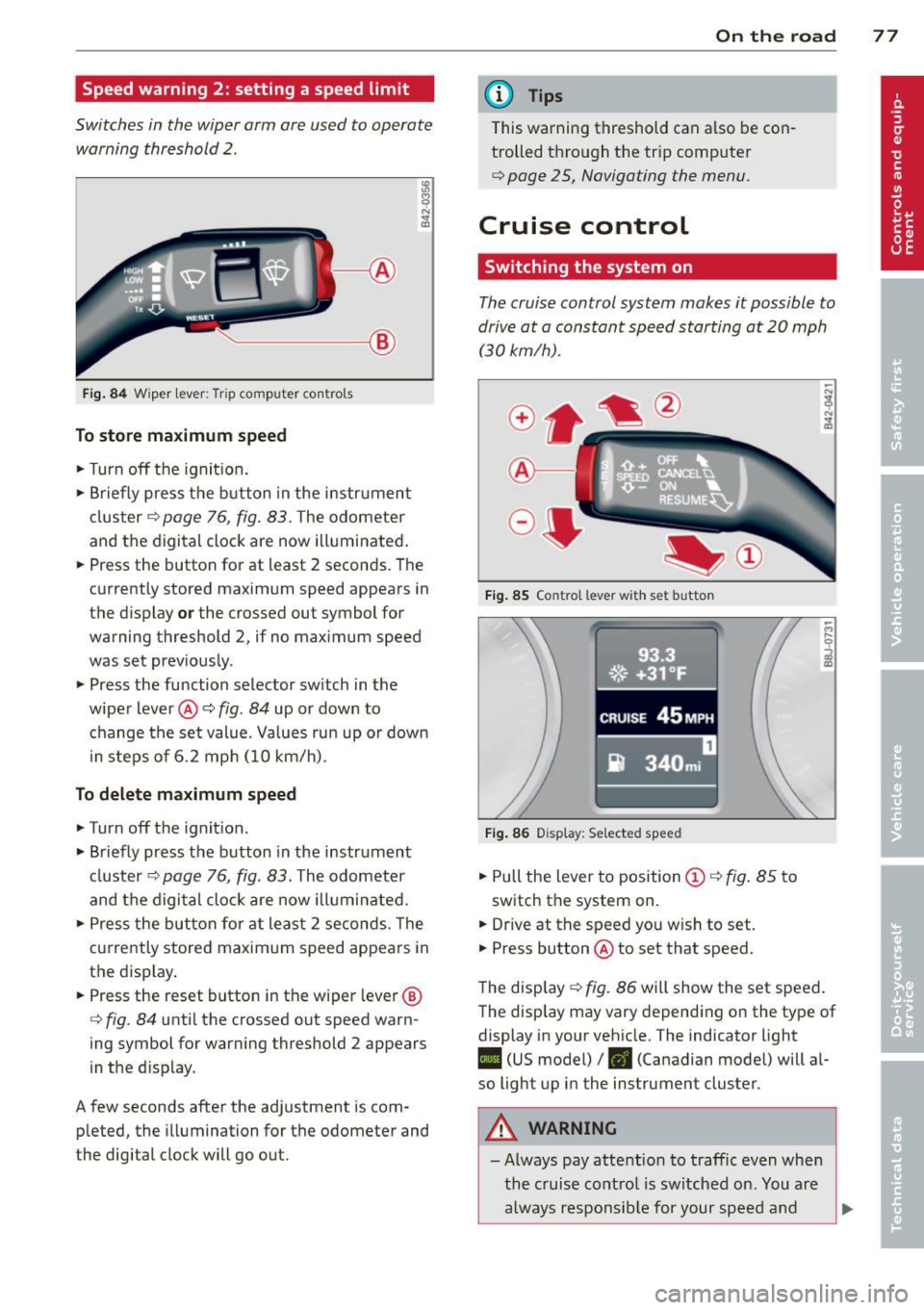
Speed warning 2: setting a speed limit
Switches in the wiper arm are used to operate warning threshold
2 .
'----I ®
Fig. 84 W iper lever: Trip computer controls
To store maximum speed
.. Turn off the ignit ion .
.. Briefly press the button in the instrument
cluster¢
page 76, fig. 83. The odometer
and the digital clock are now illuminated .
.. Press the button for at least 2 seconds. The
currently stored maximum speed appears in
the display
or the crossed out symbol for
warning threshold 2, if no maximum speed
was set previously .
.. Press the function selector switch in the
wiper lever@¢
fig. 84 up or down to
change the set value. Values run up or down
i n steps of 6.2 mph (10 km/h).
To delete maximum speed
.. Turn off the ignition.
.. Briefly press the button in the instrument
cluster ¢
page 76, fig. 83. The odometer
and the digital clock are now illuminated.
.. Press the button for at least 2 seconds. The
currently stored maximum speed appears in
the display.
.. Press the reset button in the wiper lever®
¢
fig . 84 until the crossed out speed warn
ing symbol for warning threshold 2 appears
in the d isplay.
A few seconds after the adjustment is com pleted, the illumination for the odometer and
the digital clock will go out.
On the road 77
@ Tips
This warning threshold can a lso be con
trolled through the trip computer
¢ page 25, Navigating the menu.
Cruise control
Switching the system on
The cruise control system makes it possible to
drive at a constant speed starting at
20 mph
(30kmlh).
®-
Fig. 85 Co ntro l leve r w ith set b utto n
Fig. 86 Display : Se lected speed
.. Pull the lever to position @¢ fig. 85 to
switch the system on .
.. Dr ive at the speed you w ish to set .
.. Press button @ to set that speed.
The display ¢
fig. 86 will show the set speed .
The display may vary depending on the type of
display in your vehicle. The indicator light
II (US model) /. (Canadian model) will al
so light up in the instrument cluster .
A WARNING
-Always pay attention to traffic even when
the cruise control is switched on. You are
always responsible for your speed and
Page 80 of 244
78 On the road
the distance between your vehicle and
other vehicles.
- For safety reasons, the cruise control
should not be used in the city, in stop
and-go traff ic, on twist ing roads and
when road conditions are poor (such as
ice, fog, gravel, heavy rain and hydro
planing) -risk of accident .
- Turn off the cruise control temporarily
when entering turn lanes, highway exit
lanes or in construction zones.
- Please note that inadvertently "resting" your foot on the accelerator pedal causes
the cruise control not to brake. This is
because the cruise control is overridden
by the driver's acceleration.
({) Tips
The cruise control cannot maintain a con
stant speed when driving downhill. The ve
hicle will accelerate under its own weight. Downshift to a lower gear or use the
brakes to slow down .
Changing speed
.. Press leve r in the 0 or O direction
¢ page 77, fig. 85 to increase or decrease
your speed.
.. Release the lever to save that speed.
You can also press the accelerator pedal down
to increase your speed, e.g. if you want to
pass someone. The speed you saved earlier
will resume as soon as you release the acceler
ator pedal.
If, however, you exceed your saved speed by
5 mph (10 km/h) for longer than 5 minutes,
the cruise control will turn off temporarily .
The symbol will go out but the saved speed
will be retained .
Presetting your speed
You con preset your desired speed while the
vehicle is not moving .
.. Turn on the ignition . ..
Pull lever into position
(D ¢ page 77,
fig. 85.
.. Press the lever in the 0 or O direction to
increase or decrease your speed.
.. Release the lever to save that speed.
This function makes it possible, for example,
to save the speed you want before driving on
the highw ay. Once on the highway, activate
the cruise control by pulling the lever toward
(D.
· Switching the system off
Temporary deactivation
.. Press the brake pedal, or
.. Press the lever into position @(not clicked
into place)
¢ page 77, fig . 85 , or
.. Drive for longer than 5 minutes at more
than 5 mph (10 km/h) above the stored
speed.
Switching off completely
.. Press lever into position @ (clicked into
place), or
.. Switch the ignition
off.
The system retains the saved speed if you de
activate the cruise control temporarily. To re
sume the saved speed, release the brake ped
al and pull the leve r to position
(D .
Switching the ignition off erases the saved
speed.
_& WARNING
You should only return to the saved speed
if it is not too fast for the current traffic
conditions -risk of an accident!
Page 81 of 244

Audi magnetic ride
Applies to vehicles: with magnetic ride
Damping can be adjusted to the driver's pref
erence and it adapts automatically to the cur
rent driving situation.
Fig. 87 Ce nter console : Switc h for Au di magnet ic ride
• Press the sw itch Q fig . 87 to tu rn sport set-
t ing on or off.
Aud i magnetic ride is an electronically con
trolled damping system. This chassis system
assists the dr iver by adapting to the particular
situation through imperceptible control proc
esses. The
da mping provides individua l modu
lation of damping forces. For example, with
damping characteristics set to provide greater
comfort, damping is set somewhat harder for
a brief period only
as required, when rounding
a curve and when braking.
St andard setti ng
Select the standard sett ing if you prefer a sus
pension setting emphasizing comfort .
Sport setting
Select the sport setting if you prefer a sporty
suspens ion setting . The LED in the switch
R
comes on to indicate sport setting.
@ T ips
The warning/indicator light R in the in
strument cluster comes on in the event of
a ma lfunction. Drive to the closest author
ized Audi dealer as soon as possible and
have the malfunction repaired.
On th e road 7 9
Sport mode
Applies to vehicles: wit h Sport button
Fig . 88 Butto n in the center console
.,. To switch sport mode on, press the button
in the center console . The indicator light
turns on.
• To switch sport mode off, press the button
in the center console again. The indicator
light turns on .
A more agile and sporty driving style is possi
ble when driving the vehicle in "sport mode".
T his mode affects throttle response and the
sound of the engine and the damping charac
teristics of the Audi magnetic ride for dynamic
suspension tuning .
(1} Tips
If there is a malfunction in the retractable
rear spoiler* or the Audi magnetic ride*, it
may not be poss ible to activate sport
mode.
Acoustic parking system
Rear acoustic park assist
Applies to vehicles: with 4-channe l acoustic park assist
Acoustic park assist gives a warning about
obstacles behind the vehicle.
D es cription
The rear acoustic park assist (4-channel
acoustic park assist) determines the distance
of the vehicle from an obstacle using ultra
sonic sensors. The sensors are in the rear
bumper. The volume and the pitch of the
Page 82 of 244

80 On the road
chimes can be adjusted through the menu dis
p lay
~ page 24 .
The range at which the sensors start to meas
ure is
a b ou t:
To the side 2 feet (0.60 m)
Center rea r 5 feet (1.60 m)
Activation
The parking assist
is activated when r ev erse
ge ar is engaged . A b rief tone confi rms that
the system is activated .
Backing up
Distance warning when back ing up starts
when an obstacle is detected in the range of
the park assist system . As the d istance de
creases, the time i nterva l between the audible
tones becomes shorter.
When the d istance is less than 1 foot (0.30
m), the tone becomes cont inuous . At this
poi nt you should stop backing up.
Please note that low objects already signalled
by a warning can disappear from the system 's
detection range and w ill not continue to be
signalled.
Potenti al malfunction s
If a warning buz zer sounds for a few seconds
when the ignition is sw itched on, there is a
system malfunction w ith the acoustic park as
sist . If the malfunction persists unti l the igni
tion is switched off , there will be no acoustic
warn ing at the next attempt to activate the
system . Have the problem corrected.
There is no confirmation tone when reverse
gear is engaged if there is a system ma lfunc
tion .
For the park ing ass ist to operate, the sensors
must be kept clean and free of ice.
_& WARNING
- Sensors have blind spots in which objects
cannot be detected . Pay special attention
to sma ll children and animals. They can- not a
lways be detected by the sensors -
danger of an accident!
- The parking assist cannot rep lace the
driver's attention. The driver alone is re
sponsible for parking and similar driving maneuvers. Always watch where you are
driving.
(D Note
Low obstacles already signa lled by a warn
i ng can d isappear from the system's detec
tion range as they are approached and w ill
not continue to be signalled. Objects such
as barrier chains, trailer draw bars, th in
painted vertical poles, o r fences may not
be detected by the system - risk of dam
age .
@ Tips
For the parking assist to operate, the sen
sors must be kept clean and free of snow
and ice.
Page 83 of 244
Transmission S tronic transmission
Introduction
Your vehicle is equipped with a S tronic trans miss ion, also called a double-clutch system/
transmission.
Power is transferred between the engine and
the transmission by means of two i ndepend
ent clutches. They replace the to rque convert
e r of conventional automat ic transm iss ions
and a llow the vehicle to acce lerate without a
noticeable break in the power flow .
W ith the aid
of tiptr oni c, the gea rs can op
tionally be sh ifted
manually¢ page 84.
Selector lever positions
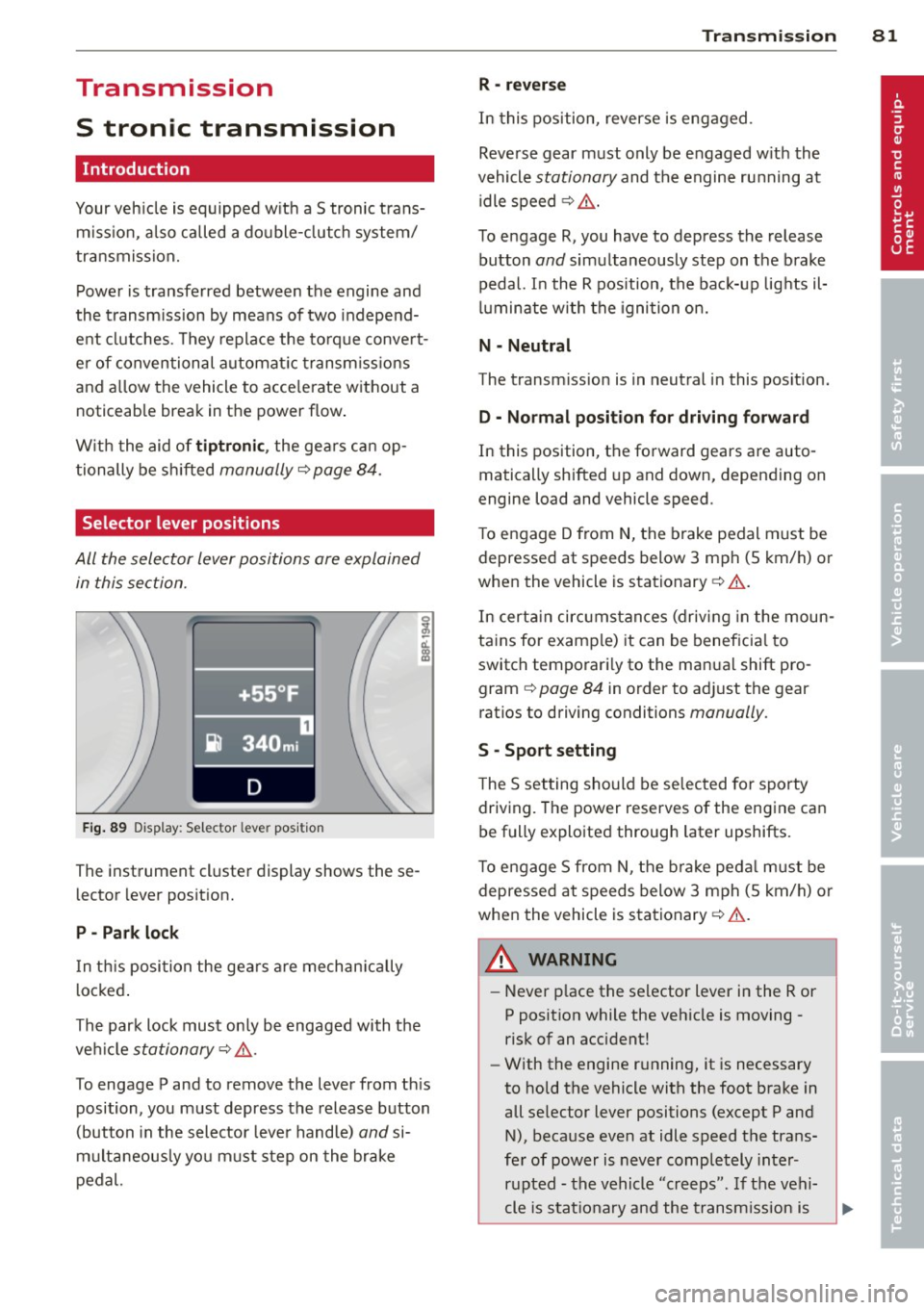
All the selector lever positions are explained
in this section.
F ig . 89 Display: Selector lever position
The instrument cluster display shows these
l ector lever position.
P -Park loc k
In th is position the gea rs are mechan ically
l ocked .
The park lock must on ly be engaged with the
ve hicle
stationary¢ /1. .
To engage P and to remove the lever from th is
position, you must depress the release button
(button in the selector lever handle)
and si
multaneously you must step on the brake
pedal.
Tran sm iss ion 8 1
R -re ver se
In this position, reverse is engaged.
Reverse gear must only be engaged w ith the
vehicle
stationary and the engine ru nning at
idle speed ¢
/1..
To engage R, you have to depress the release
button
and simultaneously step on the brake
pedal. I n the R pos ition, the bac k-up lights il
luminate w ith the ignition on.
N -Neutral
The transm iss ion is in neutral in this pos ition.
D -Normal po sition fo r dri ving fo rward
In this position, the forward gears are auto
matically shifted up and down, depending on
engine load and vehicle speed.
T o engage D from
N, the brake pedal must be
depressed at speeds below 3 mph (5 km/h) or
when the vehicle is stationary¢&. .
In certa in circ umstances (driving in the moun
tains for examp le) it can be beneficia l to
switch temporari ly to the man ual shift pro
gram ¢
page 84 in order to adjust the gear
ratios to driving conditions
manually .
S -Sport setting
The S set ting should be se lected for sporty
driving. The power reserves of the engine can
be fully exploited through later upshifts.
T o e ngage 5 from N, the b rake peda l must be
depressed at speeds below 3 mph (5 km/h) or
when the vehicle is stationary¢&. .
A WARNING
-Never p lace the selector lever i n the R or
P posit ion while the veh icle is moving -
risk of an accident!
- With the engine r unning, it is necessary
to hold the vehicle with the foot brake in
all se lector lever positions (except P and
N), because even at idle speed the trans
fe r of power is never completely inter
r u pted -the vehicle "creeps". If t he vehi
cle is stat io nary and the transm ission is
Page 84 of 244
82 Transmi ssion
engag ed, the engine shou ld neve r be
spe eded up unintentionally (e.g. manual
ly from under the hood). Otherwise the
vehicle will immediately start to move -
sometimes even if the parking brake is
firmly applied -risk of an accident!
- Before you or other persons open the
hood and work on a running eng ine, the
selector lever must be move d to P and
t h e parking bra ke applied fi rm ly -ris k of
an a ccident! Fo ll ow the warning stickers .
a) Tips
If you have inadvertently s hifted into N
while the veh icle is moving, you should r e
move your foo t from the accelerato r and
wait until the eng ine speed h as droppe d to
id le before shifting back to Dor S.
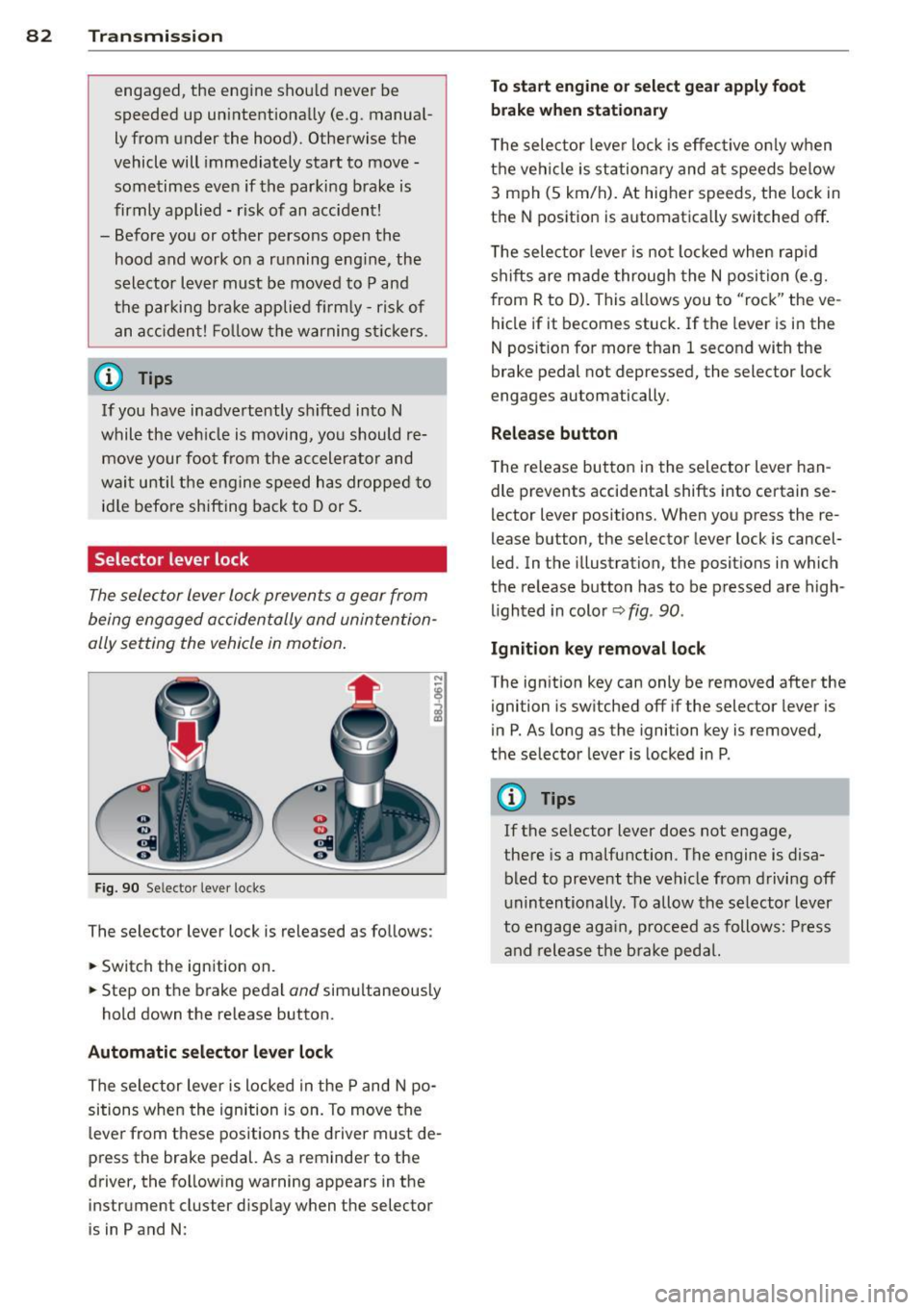
Selector lever lock
The selec tor Lever Lo ck prevents a gear from
being engaged occidentally and unintention
ally setting the vehicle in motion .
Fig. 90 Selecto r lever lo cks
The selector lever lock is released as follows:
.. Switch the ign ition on .
.. Step on the brake pedal
and simultaneous ly
hold down the release button .
Automatic selector lever lock
The selector lever is locked in the P and N po
sitions when the ignition is on. To move the
leve r from t hese positions the d river m ust de
press the brake pedal. As a reminder to the
driver, the fo llowing warning appears in the
inst rument cluster d isp lay when the selector
is in P and N :
To start engine or select gear apply foot
brake when stationar y
The selec tor leve r lock is effec tive on ly w hen
t h e veh icle is stationary and a t speeds below
3 m ph (5 km/h). At higher speeds, the lock in
t h e N position is automatica lly switched off .
T he selec tor leve r is not locked whe n rap id
shifts are made through the N posi tion (e.g.
from R to D). This a llows you to "rock" the ve
hicle if it becomes stuck. If the lever is in the
N position for more than 1 second with the
brake pedal not depre ssed, the selector lock
engages au tomatically.
Release button
T he re lease bu tton in the selector lever han
dle prevents accidenta l shifts into certain se
lector leve r positions. When you press the re
lease button, the selector lever lock is cancel
led. In the illustration, the posit ions i n which
the re lease button has to be p res sed are high
lighted in color ~
fig. 90 .
Ignition key remo val lock
The ign it ion key can only be removed after the
ignition is sw itched off if the selector lever is
in P . As long as the igni tion key is removed ,
the selector lever is locked in P.
(D Tips
If the se lector lever does not engage,
the re is a malfunction. The engine is disa
bled to prevent t he veh icle from drivi ng off
unintentionally . To allow the selector lever
to engage aga in, p roceed as follows: Press
an d release the bra ke peda l.