2015 AUDI TT ROADSTER ABS
[x] Cancel search: ABSPage 177 of 244
@ For the sake of the environment
Because of the problem of proper disposa l
of brake flu id as we ll as the special tools
requ ired and the necessary expert ise, we
recommend that you have the brake fluid
changed by your author ized Audi dealer .
Battery
General information
Your vehicle is equipped with a special bat
tery, an
ACM battery. This battery is located
in the luggage compartment and must be re
p laced w ith an original equipment battery .
Under normal operati ng conditions, the bat
tery is
maint enan ce -fre e.
Have the battery checked when you take your
ve hicle in for service. You are well adv ised to
replace a battery that is older than
5 years.
Di sconn ect ing the battery terminal s
Some vehicle functions (power window regu
lators, for example) are lost if the battery ter
minals are d isconnected. These functions have
to be re learned after the battery terminals are
connected again . To prevent this, the battery
should only be d isconnected from the vehicle
e lectr ica l system when absolutely necessary
for repairs .
Vehicles not driven for l ong period s
If you do not drive your vehicle over a period
of several days or weeks, electrical compo
nents are gradually cut back o r switched off .
This reduces energy consumption and main
tains sta rting capab ility over a longer per iod
c::> page 146. Some of the convenience func
tions may not operate, s uch as the interior
lights or power seat adjustment. The conven
ience functions will be avai lab le again when
you switch on the ignition and start the en g ine.
Winter operation
D uring the winter months, ba tte ry capaci ty
tends to decrease as temperatures d rop. This
is because more powe r is also consumed while
Checkin g and fillin g 175
starting, and the headlights, rear window de
fogger, etc ., are used more often .
Avoid unnecess ary powe r consumpt io n, p ar
t icu lar ly in city traffic o r when traveling only
sho rt distances. Let your authorized A udi
dealer check the capacity of the vehicle bat
tery before winter sets in
c::> page 178. A well
charged battery will not on ly prevent starting
problems when the weather is cold, but will
also last longer .
Replacing battery
The new battery must ha ve the same capaci
ty, voltage (12 volts), amperage, construction
and plug sea ling, as the original battery. Spec
ifications are listed o n the battery housing.
Batter ies spec ia lly developed by Audi fulfill
the maintenance, outp ut, and safety require
ments.
When installing the battery, make sure the ig nition and a ll electrical consumers are switch
ed off
c::> (D .
We recommend that you use maintenance
free or
cycle -res istant /leak-proof batter ies
accord ing to the standards TL 825 06 (from
Apr il 2008) and VW 7 50 73 (from Ap ril
2010).
Rep lacing the battery should be carried by a
qualified workshop. Please fo llow the instruc
tions on the battery cover.
([) Note
-All work on the battery requ ires techn i
cal know ledge. P lease contact an Audi
deale rship o r anot her au tho rized fac ility
for questions abo ut the batte ry -dang er
of a cid b urns and exp losion ha zard!
- T he battery must not be opened! Do not
try to cha nge the battery 's liquid level,
ot herwise de tona ting gas will esc ape
from the ba ttery -explosion ha zard!
- T he AGM battery in the l uggage com
p artment cannot leak, because the elec
tro lyte for this battery is abso rbed into a
special glass mat. This lea k-p roof battery
Iii>
•
•
Page 201 of 244

remain continuous ly illuminated . This se
quence will continue upon subsequent vehicle
start-ups as long as the ma lfunction ex ists.
When the malfunct ion indicator is ill uminat
ed, the system may not be able to detect or
signa l low tire pressure as intended. TPMS
malfunct ions may occur for a variety of rea
sons, including the installat ion of replace
ment or alternate tires or wheels on the veh i
cle that prevent the TPMS from funct io ni ng
properly. Always check the TPMS malfunct ion
tellta le afte r replacing one or more t ires or
wheels on your veh icle to ensure that the re
p lacement or a lternate tires and wheels allow
the TPMS to continue to function properly.
Tire pressure indicator appears
Applies to vehicles: with tire pressure monitoring system
The tire pressure indicator in the instrument
cluster informs you if the tire pressure is too
low or if there is a system malfunction.
F ig. 1 41 Disp lay : under in fla tion warn ing
Using the ABS sensors, the tire pressure moni
toring system compares the t ire tread circum
fe rence and vibration characteristics of the in
d iv idual tires . If the pressure decreases in one
or mo re tires, th is is indicated in the instru
ment clus ter with a warning symbol
[I] and a
message
'* fig. 141. The dr iver message in the
d isp lay goes out after 5 seconds . The driver
message can be d isplayed again by pressing
the
! CHECK I button @¢ page 10, fig . 3 . If on
ly one tire is affected, the display will indicate
its pos ition.
The ti re pressure monito ring m ust be reset in
the menu display each time the pressures are
ad justed (e.g. when switching between parti-
Tire s an d wheel s 199
al and fu ll load pressure) or after changing o r
replacing a tire on your vehicle '*
page 200.
The TPMS indicator on ly mon itors the t ire
pressure that you have previously stored . You
can f ind the recommended tire pressures for
your vehicle on the label on the driver's door
pillar ¢
page 184 .
Tire tread circumference and vibration charac
teristics can change and cause a tire pressure
warning if:
- the t ire press ure in one or more tires is too
low,
- the tire has structural damage,
- the t ire press ure was changed, wheels rotat -
ed or rep laced but the TPMS was not reset
¢ page 200.
Warning symbo ls
[I] Loss of press ure in at least one tire'*& .
Check the tire or tires and rep lace or repa ir if
necessary . The indicator light
[I] in the instru
ment cluster a lso i lluminates
¢ page 13.
Check/correct the press ures of all four tires
and reset TPMS in the menu display .
mm (T ire Pressure Monitoring System) Ti re
pre ssure! System malfun ction . Ifll appears
after switching the ign it ion on or while dr iving
and the indicator light
[I] in the instrument
clus ter blinks fo r approximately one m inute
and then stays on, there is a system malfunc
tion . Attemp t to store the correct t ire pres
su re '*
page 200 . If the ind icator light does
not turn off or if i t turns on shortly thereafte r,
immedia tely drive your vehicle to an au thor
ized Audi dea ler or author ized repai r fac ility to
have the malfunction corrected .
A WARNING
=
-If the tire pressure indicator appears in
the instrument cluster display, one or
more of your t ires is significant ly under
inflated. Reduce your speed immediately
and avoid any hard steer ing or b rak ing
maneuvers. Stop as soon as possib le and
check the tires and their pressu res . In
flate the tire pressure to the prope r pres-
sure as indicated on the vehicle's tire .,..
•
•
Page 215 of 244

Fuse Location, Instrument Panel left
0
Fig. 161 Fuse carrier behind the instrument panel end
face, cover removed
Some of the eq u i prnent items listed a re op
tional or only available on certain model con
f igurations.
Note that the following table is accurate at
the time of going to press and is subject to
change. In the event of d iscrepancies, the la
bel on the in side of the cover always takes
precedence .
The power seats are protected by circuit
breakers ,
which automatically reset after a
few seconds after the overload has been rem
ed ied.
No. Equipment Amps
Engine relay, fuel tank cont ro l
1
unit, A irbag Off light, light
10 switch (sw itch illumi nation), di-
agnostic connector
2
ABS, ASR, ESC, brake light
5 switch
3 AFS headlight (left) 5
No.
4
5
6
7
8
9
10
11
12
13
14
15
16
17
18
19
20
21 22
23
Fuses and bulbs 213
Equipment Amps
Oil level sensor (extended main-
tenance interval)
(WIV), t ir e
press ure monitoring system,
sw itch for Electron ic Stabiliza-
5 tion Control (ESC), AFS head-
lights (control unit), A/C system
(pressure sensor), backup light
sw itch
Automatic headlight range con- trol, AFS headlight (right) /
5/10
manual headlight range con-
trol, halogen headlights
Control unit for CAN data trans-
fer (gateway), electrornechani-
5 cal steering, automatic trans-
miss ion shift gate
Acoustic Park Assist, automatic
d ip ping interior rear
view rnir-
ror, garage door opener, heata-
5 ble windshield washer nozzles,
washer pump, w ind deflector
relay (Roadster)
H aldex clutch/Ha ldex clutch
5/10 (TTS)
Control un it Audi magnetic ride
5
A irbag contro l unit 5
Mass airflow sensor, crankcase 5/10
heating
Door control unit (central lock -
10 ing driver/passenger)
Diagnostic connector
10
Rain sensor, automatic trans-
5 miss ion sh ift gate
Roof light (interior lighting)
5
A/C system (contro l unit) 10
Tire pressure monitoring sys -
5 tern (control un it)
Not used
Not used
Not used
Fuel injectors (gasoline eng ine)
10
Wind deflector (Roadster) 30
Horn 20
Page 221 of 244
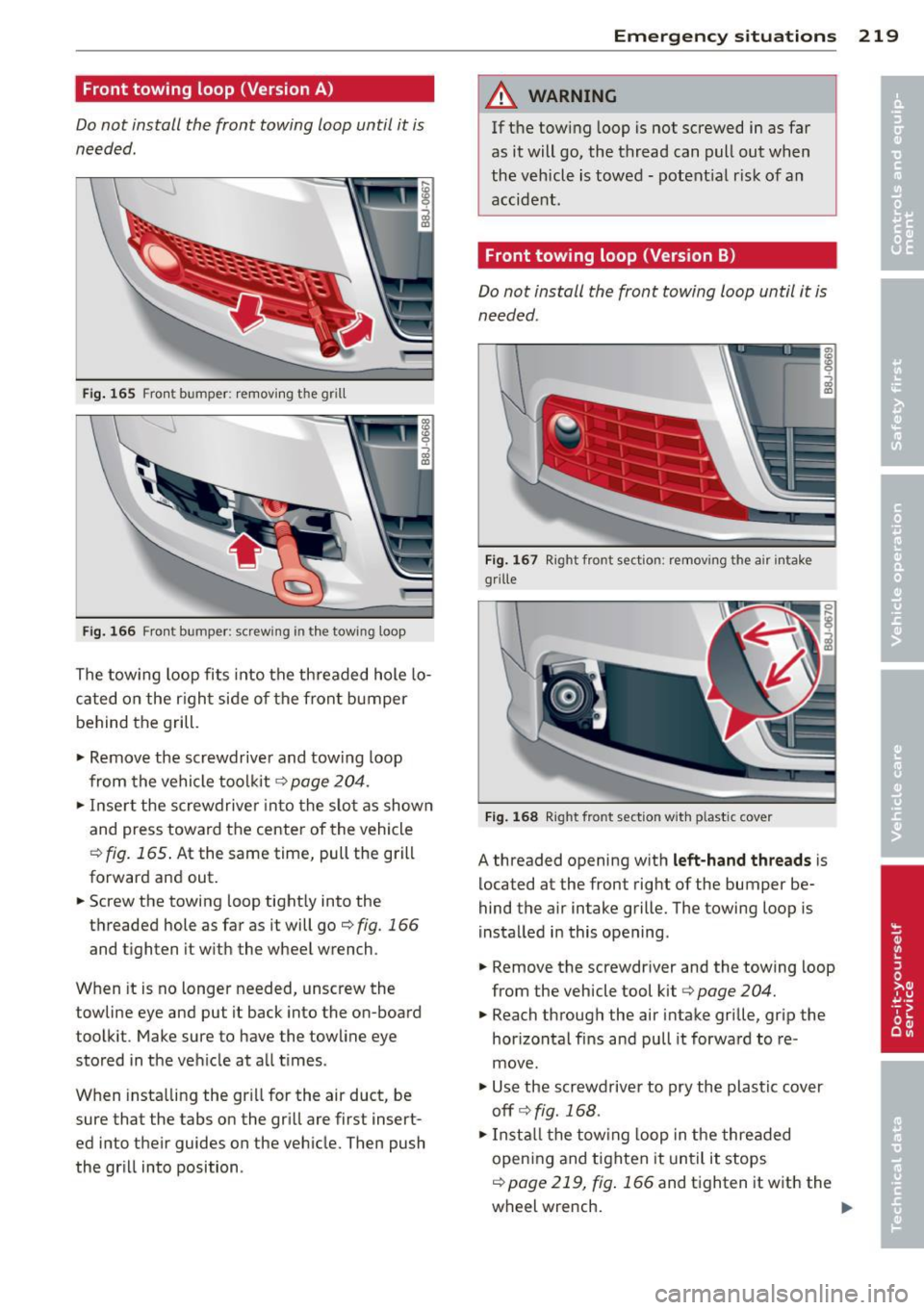
Front towing loop (Version A)
Do not install the front towing loop until it is
needed.
Fig. 165 Fro nt bumper: removing t he grill
Fi g. 166 Fron t bumper: screw ing in t he tow ing loop
The tow ing loop fits into the threaded hole lo
cated on the righ t side of the fron t bumper
behind the grill.
"' Remove the screwdriver and towing loop
from the vehicle tool kit ¢
page 204.
"'Inse rt the screwdrive r into the slo t as shown
and press toward the center of the vehicle
c;, fig. 165 . At the same time, pull the grill
forward and out.
"' Screw the towing loop tightly into the
threaded hole as far as it will go
c;, fig. 166
and tighten it w ith the wheel wrench .
When it is no longer needed, unscrew the
towline eye and put it back into the on -board
toolkit . Make sure to have the towline eye
stored in the ve hicle at all times .
When insta lling the gr ill for the air duct, be
sure that the tabs on the grill are first insert
ed into their guides on the veh icle. Then push
the gr ill into position .
Emergency situations 219
A WARNING
If the tow ing loop is not screwed in as far
as it will go, the thread can pull out when
the vehicle is towed -potential risk of an
accident .
Front towing loop (Version B)
Do not install the front towing loop until it is
needed.
Fig. 167 Right front sectio n: remov ing the air intake
g ri lle
Fig. 168 Right fro nt sect ion w it h plast ic cove r
A threaded opening w ith left-hand threads is
located at the front right of the bumper be·
hind the air intake grille. The towing loop is
i nstalled in this opening .
"' Remove the screwdr iver and the towing loop
from the vehicle tool kit
c:> page 204.
"'Reach through the air intake grille, grip the
hor izonta l fins and pull it forward to re·
move .
"' Use the screwdrive r to pry the plastic cover
offr=;,fig. 168.
"'Install the towing loop in the threaded
opening and tighten it unt il it stops
c;, page 219, fig . 166 and tighten it with the
wheel wrench.
...
Page 222 of 244
220 Emergency situations
Remove the towing loop when you are done
using it and place it back in the vehicle tool
kit. Always keep the towing loop in the vehi
cle .
When installing the air intake grille, insert the
tabs on the grille in the mounts on the vehicle
f ir st. Then press the grille in to secure it.
A WARNING
If the towing loop is not tightened until it
stops when installing, the threads may be
pulled out when tow ing the vehicle and
that could cause an accident .
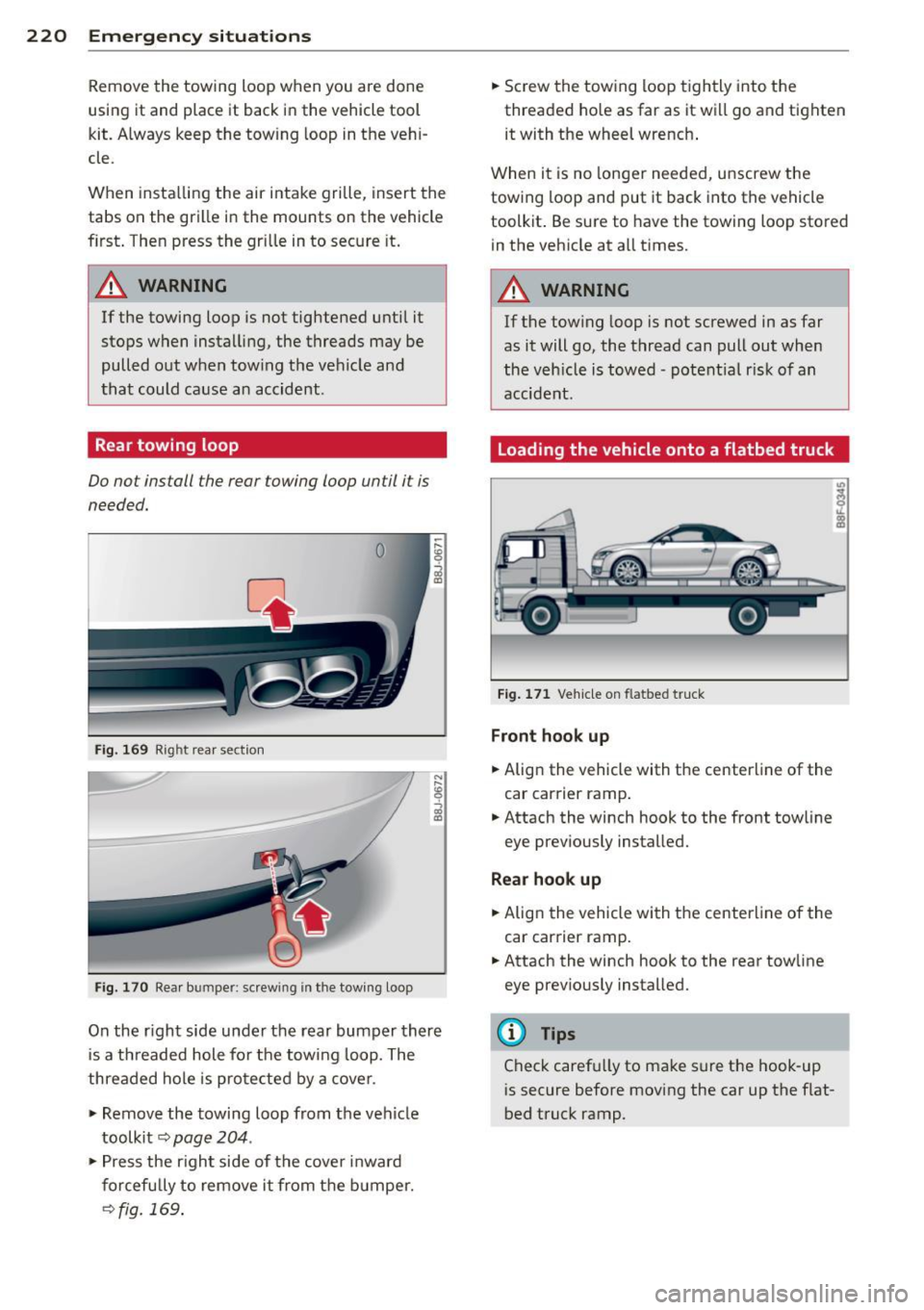
Rear towing loop
Do not install the rear towing loop until it is
needed.
Fig. 169 Right rear section
Fig. 170 Rear bum per: screw ing in the towing loop
On the r ight side under the rear bumper there
is a threaded hole for the towing loop. The
threaded hole is protected by a cover.
"' Remove the towing loop from the vehicle
toolkit ~
page 204 .
"'Press the right side of the cover inward
forcefully to remove it from the bumper.
~fig. 169.
"' Screw the towing loop tightly into the
threaded hole as far as it will go and tighten
it with the wheel wrench .
When it is no longer needed, unscrew the
towing loop and put it back into the vehicle
toolkit . Be sure to have the towing loop stored
in the vehicle at all times.
A WARNING
-If the towing loop is not screwed in as far
as it will go, the thread can pull out when
the veh icle is towed -potent ial risk of an
accident.
Loading the vehicle onto a flatbed truck
Fig. 171 Vehicle on flatbed t ruck
Front hook up
"' Align the vehicle with the centerline of the
car carrier ramp .
"' Attach the winch hook to the front towline
eye previously installed.
Rea r hook up
"' Align the vehicle with the centerline of the
car carrier ramp.
"' Attach the winch hook to the rear towline
eye previously installed.
(D Tips
Check carefu lly to make sure the hook-up
is secure before moving the car up the flat
bed truck ramp.
Page 240 of 244

238 Index
Tire pressure monitoring system ...... . 198 Trip computer ..... ............. ..... 23
Loss of air pressure ........ ... .... .
199 Single-trip memory ................. 23
M alfunct ion . ............. ... .... .
199 Tota l-trip memory .................. 23
Resetting tire pressures . . . . . . . .
200, 201 Trip odometer . .. .. ............. .. .. . 12
Tire repair kit ............. .. .. .... . 205 What does it mean when dEF appears in
Tires .. .. .... .......... ........ ... .
180 the trip odometer display? ....... ... . 12
Replacing .. ................ ... ... 191 Trunk lid ...... ... .. .............. .. 37
run-flat .. ... ............ .. .. .. .. .
201 Trunk escape handle ........... .. .. 204
Service life .............. .. .. .... . 190 Turn signals ... .. .. ............. .. .. . 50
speed rat ing letter code . .. .. .. .. .. . 192 Warning/indicator lights ........ .. .. . 21
Tire manufacturing date ......... ... 192
Tire specifications ............ .... . 192 U
Tread depth .............. ... .... . 190
Uniform tire quality grading .. .. ..... 194
Winter tire s ............... .. .... . 195
Tires/Whee ls
Low aspect ratio tires ....... ... .. .. .
197
Tire mobility system ....... .... ... . 205
Tire pressure monitoring system .... . 198
Tire repair kit ............ .. .. .. .. . 205
Tir es and vehicle load limits ... ... .... . 188
Tires and wheels
Check ing tire pressure ..............
186
Cold tire inflation pressure ..... .. .. . 184
Dimensions ............ .. .. .. .. .. .
191
General notes .............. .. .... . 180
Glossary of tire and loading termino lo-
gy . ... .... ................ ..... .
181
New tires and wheels ............... 191
Replacing ............... .. .. .... . 192
Snow chains ............... .. .... . 196
Tires and vehicle load limits .. .. .. ... 188
Wheel bolts ... ... .... ..... .. .. .. .
197
W inter t ires ... .......... .. .. .. .. . 195
Tire serv ice life .. .......... .. .. .... . 190
Tool kit ..... ................ ..... . 204
Towing
Front eyelet .................. ....
219
Rear eyelet ... ......... .. .. .. .. .. . 220
Tow truck procedures ............... 218
TPMS
Tire pressure monitoring system .. ... 199
Trailer towing . . . . . . . . . . . . . . . . . . . . . . 153
Transmission
S tron ic transmission ................ 81
Transport Canada . . . . . . . . . . . . . . . . . . . .
98
Tread Wear Indicator (TWI) ... ... .. .. . 190
Unfastening safety belts
Unidirectional tires .... .......... .. . .
Uniform tire quality grading ......... .
Univ ersal Radio- Frequency Remote Con-105
180
194
trol (HomeLink) . .. ............. .. .. . 88
Unlocking
Power locking switch ......... .. .. .. .
36
Rear lid/trunk lid ................. .. 37
Remote control key .................
35
Using the key ...................... 36
V
Vanity mirror . . . . . . . . . . . . . . . . . . . . . . . . 54
Vehicle
care/cleaning .. .. ... .......... ....
154
Vehicle electrical system ......... .... . 16
Vehicle Identification Number (V IN) . ... 222
Vehicle jack ... .. .. ....... ...... .. .. 209
Vehicle literature ..................... 5
Vehicle shut-down .............. .. ..
151
Vehicle tool kit .. .. ....... ...... .. .. 204
Ventilation ..... .. ............. ..... 67
Vinyl
Cleaning .. ...... ............. ....
157
w
Warning/ind icator lights . . . . . . . . . . 10, 12
Airbag system . .. ............. .. .. . 15
Anti-lock brake system (ABS) . . . . . . . . . 18
Brake system . . . . . . . . . . . . . . . . . . . . . .
14
Convertible top . . . . . . . . . . . . . . . . . . . . 17
Cruise contro l . . . . . . . . . . . . . . . . . . . . . . 21
Electronic power control .......... .. . 19