2015 AUDI TT ROADSTER battery
[x] Cancel search: batteryPage 35 of 244
Master key with remote control
The remote control allows you to lock or un
lock the vehicle electronically .
The transmitter and battery are located in the
head of the remote control. The receiver is lo
cated inside the vehicle. The maximum effec
tive range depends on several things . Remem
ber, if the battery is wea k, the effective range
decreases.
If you need to replace the remote control, or if
you need to have it repaired, you must see
your author ized Audi dealer. Only then can
you use the key again.
(D Tips
- If the ignition is sw itched on, the remote
control system is deactivated .
- The remote control system can be affect ed by other systems operating in the
same frequency range close to the vehi
cle, such as mobi le telephones, televi
sion broadcasting stations, etc.
- Fo r De clarat ion of Compliance to United
Sta tes FCC and Indus try Canada regula
tions ¢
page 228.
Master key battery replacement
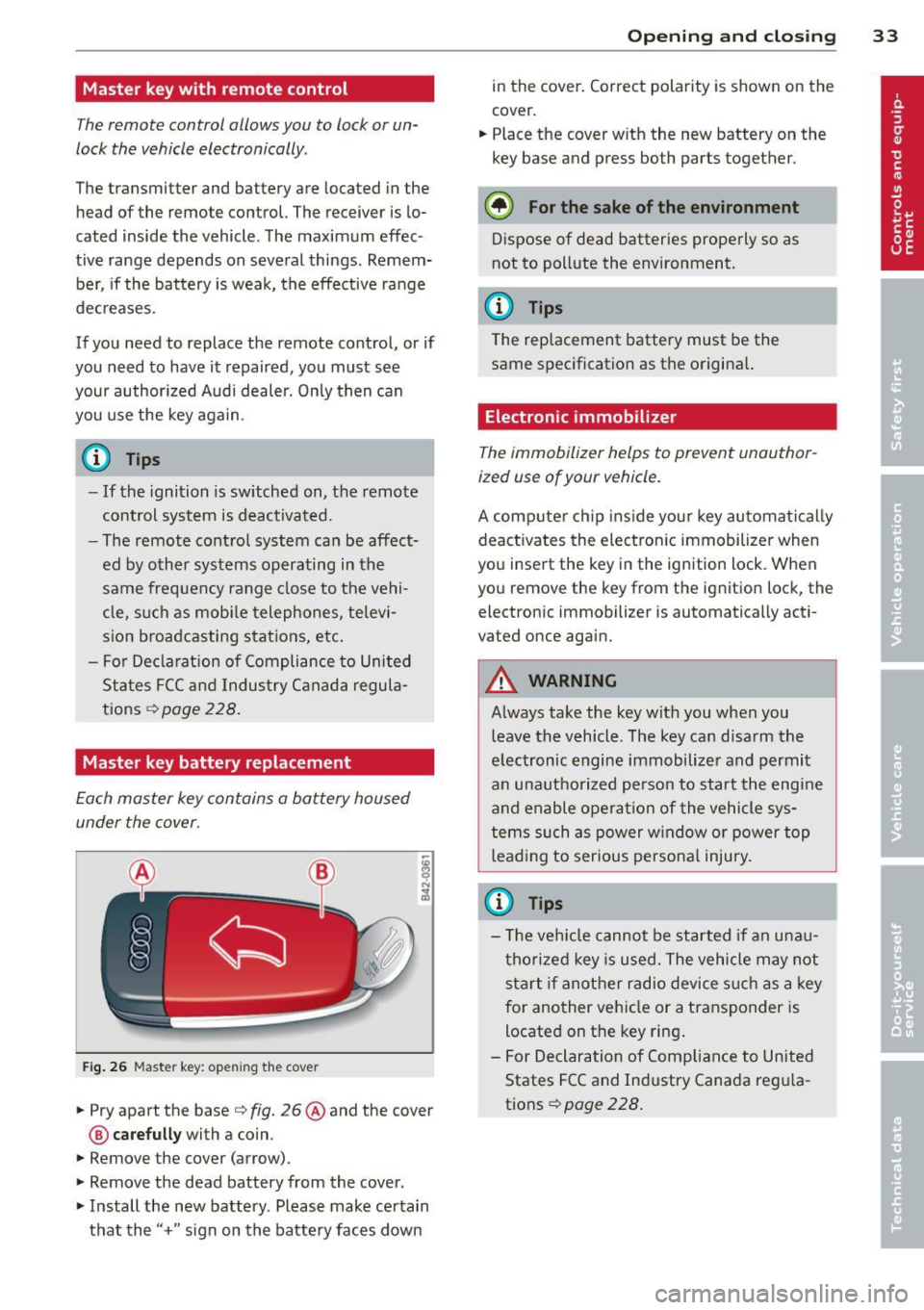
Each master key contains a battery housed
under the cover .
Fig . 26 Maste r key: open ing the cover
.. Pry apart the base¢ fig. 26@and the cover
@ care full y with a coin .
.,. Remove the cover (arrow) .
.,. Remove the dead battery from the cover .
.. Install the new battery . Please make certain
that the" +" sign on the batte ry faces down
Op enin g an d clos ing 33
in the cover . Correct polarity is shown on the
cover .
.. Place the cover with the new battery on the
key base and press both parts together .
@ For the sake of the env ironment
Dispose of dead batteries properly so as
not to pollute the environment.
(D Tips
The replacement battery must be the
same specification as the origina l.
Electronic immobilizer
The immobilizer helps to prevent unauthor
ized use of your vehicle.
A computer chip ins ide your key automatica lly
deactivates the electron ic immobilizer when
you insert the key in the ign ition lock. When
you remove the key from the ignition lock, the
electronic immobilizer is automatically acti
vated once again.
A WARNING
---
Always take the key with you when you leave the vehicle. The key can disarm the
electronic engine immobilizer and permit
an unauthorized person to start the engine
and enable operation of the vehicle sys
tems such as power w indow or power top
leading to serious persona l injury.
(D Tips
- T he ve hicle cannot be started if an unau
thorized key is used. The vehicle may not
start if another radio device s uch as a key
for another vehicle or a transponder is
located on the key ring .
- For Declaration of Compliance to United
States FCC and Industry Canada reg ula
tions¢
page 228 .
Page 37 of 244
accidentally press the power locking
switch.
- Do not leave children inside the vehicle
unsupervised. In an emergency it would
be impossible to open the doors from
the outside without the key.
@ Tips
- In the event of a crash with airbag de
ployment a ll locked doors will be auto
matically unlocked to g ive access to the
vehicle occupants from the outside.
- If the power locking system should mal
function, you can lock each door individ
ually using the vehicle key .
- If the power locking system should fail,
you can still open the fue l tank flap in an
emergency
c>page 163.
- You are well advised not to keep valua
bles inside an unattended vehicle, visible
or not . Even a properly locked vehicle
cannot provide the security of a safe!
Unlocking and locking the vehicle w ith
the remote control
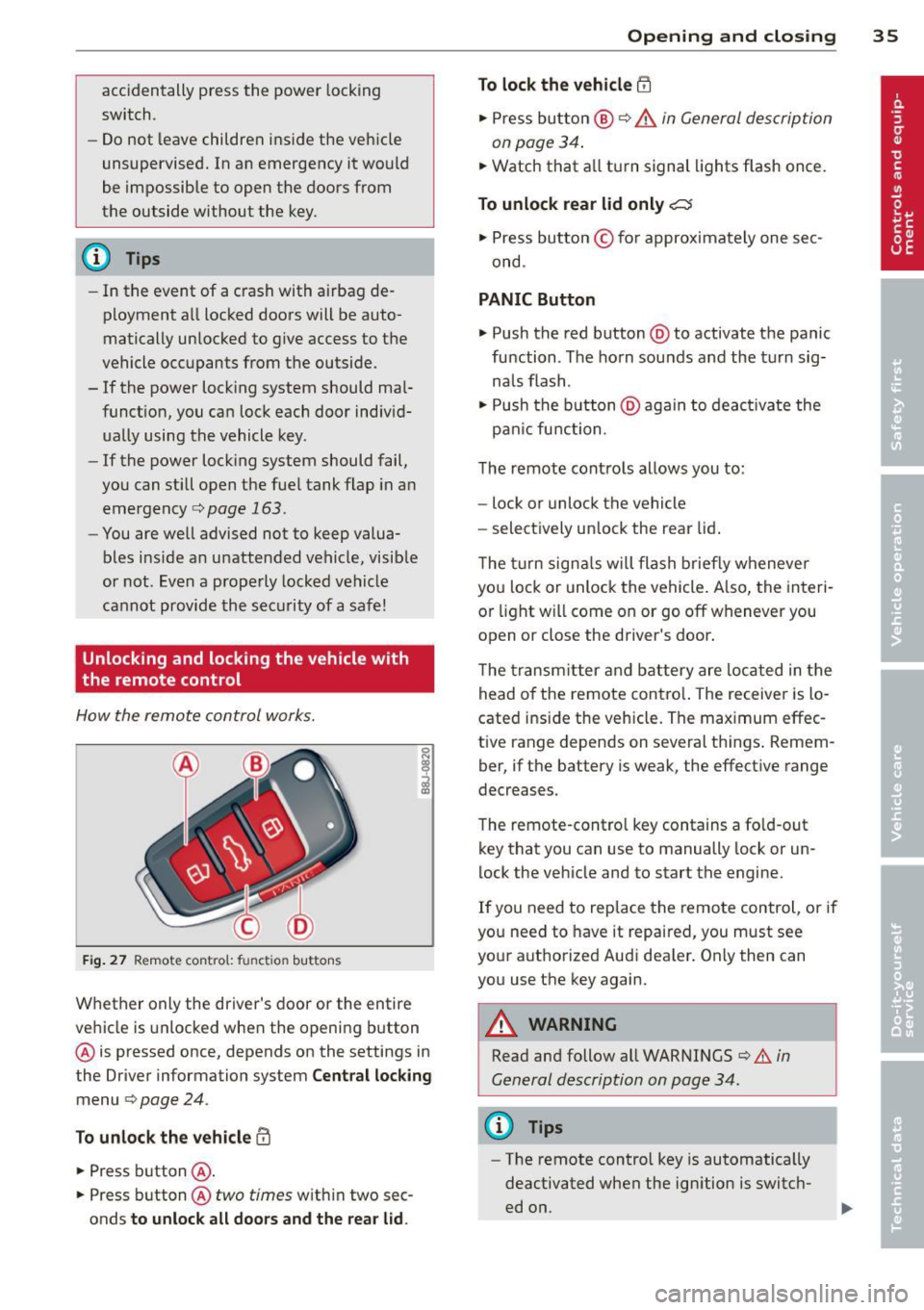
How the remote control works.
Fig . 27 Remote contro l: fu nctio n buttons
0
I
Whether only the driver's door or the entire
vehicle is unlocked when the opening b utton
@ is pressed once, depends on the settings in
the Driver information system
Central locking
menu c> page 24.
To unlock the vehicle !Ii
.,. Press button @.
.,. Press button @
two times with in two sec
onds
to unlock all doors and the rear lid.
Opening and closing 35
To lock the vehicle efl
.,. Press button @ c> &. in General description
on page 34 .
.,. Watch that a ll turn signal lights flash once.
To unlock rear lid only~
.,. Press button © for approximately one sec
ond .
PANIC Button
.,. Push the red button @to activate the panic
function . The horn sounds and the turn sig
na ls flash .
.,. Push the button @aga in to deact ivate the
pan ic function .
The remote controls allows you to:
- lock or unlock the vehicle
- select ively unlock the rear lid.
The turn signals will flash briefly whenever
you lock or unlock the vehicle. Also, the interi
or light will come on or go off whenever you
open or close the driver's door .
The transm itter and battery are located in the
head o f the remote contro l. The receiver is lo
cated ins ide the vehicle. The max imum effec
tive range depends on several th ings . Remem
ber, if the battery is weak, the effective range
decreases.
The remote-control key contains a fo ld-out
key that you can use to manually lock or un
lock the vehicle and to start the engine.
If you need to replace the remote control, or if
you need to have it repaired, you must see
your authorized Aud i dealer. Only then can
you use the key again.
A WARNING
Read and follow all WARNINGS c> .&. in
General description on page 34.
(0 Tips
- The remote contro l key is automatically
deactivated when the ignition is switch
ed on.
-
Page 41 of 244

When will the anti theft ala rm system be
triggered?
When the vehicle is locked , the alarm system
monitors and protects the following parts of
the vehicle:
- engine compartment
- luggage compartment
- doo rs
- ignition
When the system is activated, the alarm will
be triggered if one of the doors, the engine
hood or the rear lid are opened, or if the ign i
tion is turned on.
The anti-theft alarm system will also go off
when the battery is disconnected.
You can a lso trigger the alarm by pressing the
PANIC button on your remote-control key.
This will alert other people in case of emer
gency. Press the
PANIC button again to turn
off the alarm .
How is the anti-theft alarm switched off
when triggered?
The alarm system is switched off when you
unlock the vehicle using the remote-control key or when the ignition is sw itched on . The
a larm will also switch itse lf off when it comes
to the end of its cycle.
Emergency flasher
The emergency flasher will blink briefly when
the doors, engine hood and rear lid are prop
erly closed.
If the emergency flashers do not blink, check
the doors, engine hood and rear lid to make
sure they are properly closed. If you close a
door, the hood or the rear lid with the ant i
theft alarm switched on, the emergency flash
ers will blink only after you have closed the
door or lid.
(1) Tips
For the anti-theft alarm system to func
tion properly, make sure all vehicle doors
and windows are closed before leaving the
vehicle.
Opening and closing 39
Power windows
Controls
The driver can operate all windows .
Fig. 35 Driver's door: power w indow switches
If the respective switch is pushed or pulled
the window w il l open or clos e. The power win
dow switches have a two-position function :
Opening the windows
.,. Press the switch and hold it down until the
w indow has reached the desired position .
.,. Press the switch
briefly to open the window
automatically. By briefly pressing the switch
again, the downward travel of the window
can be stopped in any position<=-> .&_.
Closing the windows
.,. Pull the sw itch and hold it unti l the window
has reached the desired position .
.,. Pull the switch
briefly to close the window
automatically. By briefly press ing the switch
aga in, the upward travel of the window can
be stopped in any position
~ .&_ .
Switch @<=->fig .
35 operates the window in
the driver's door.
Switch @ operates the window in the front
passenger 's door.
&_ WARNING
- Do not leave children unattended in the
vehicle, especially with access to vehicle
keys . Unsupervised use of the keys can
result in start ing of the engine and use
of vehicle systems such as power win
dows, etc. wh ich could result in serious
injury.
Page 42 of 244
40 Opening and closing
-Remember -you can still open or close
the power windows for about ten mi
nutes after the ignition is switched off.
Only when either of the front doors are
opened are the power windows sw itched
off.
- Be careful when closing the windows.
Check to see that no one is in the way, or
serious injury could result!
- Always remove the ignition key whenever
you leave your vehicle .
- If you lock your vehicle from the outside,
no one, especially children, should re
ma in in the vehicle.
- Do not stick anything on the w indows or
the windsh ield that may interfere with
the driver's field of vision.
(D Tips
-When the doors are opened, the w in
dows are automat ically lowered 10 mm .
- The windows can still be opened and
closed for about ten m inutes after the
ignition has been turned off. The power
windows are not shut off until one of the
fron t doors is opened.
Convenience close/open feature
You can close or open the windows from out
side when you lock or unlock your car with the
key.
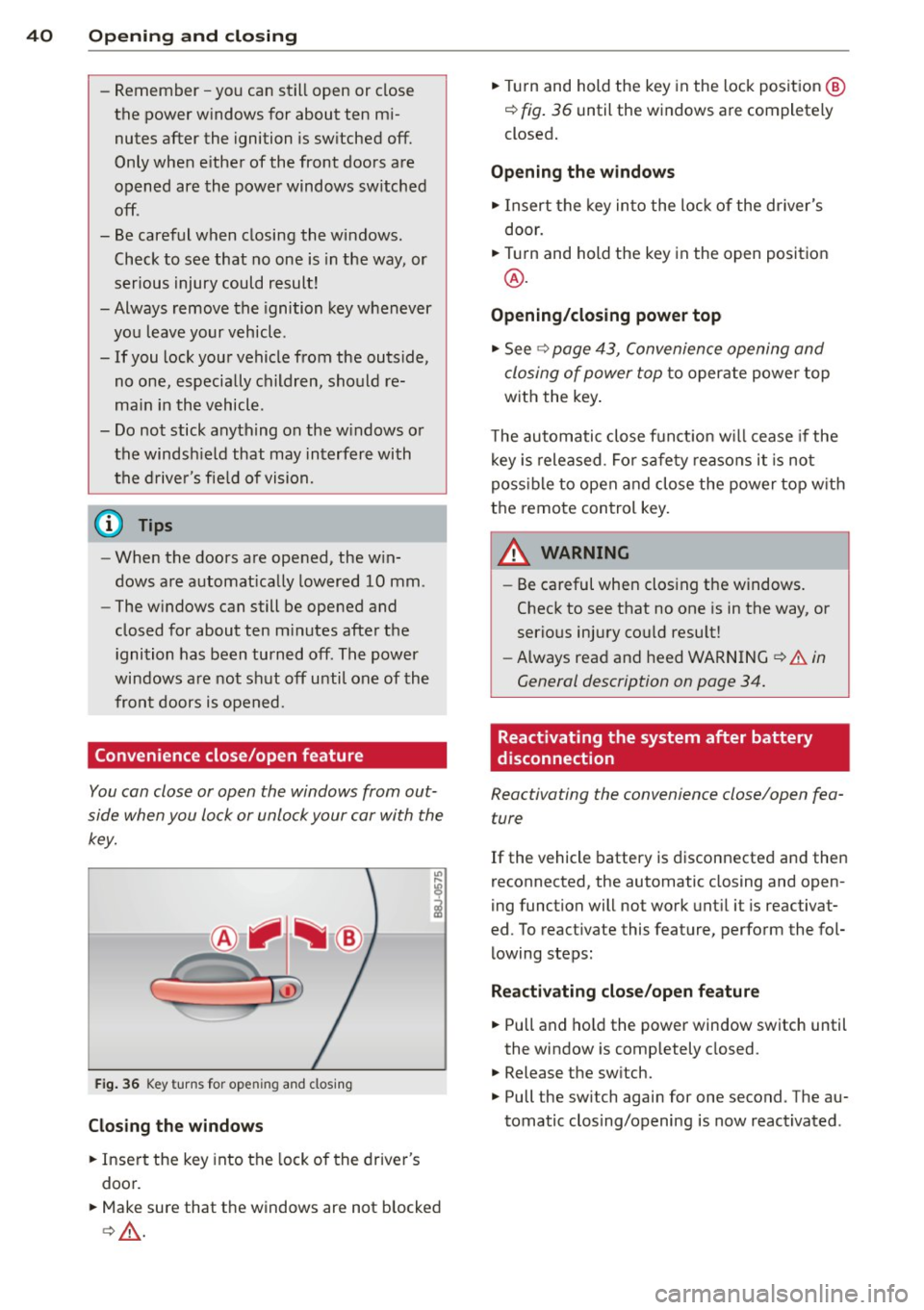
F ig. 36 Key turns for open ing and closing
Closing the windows
• Insert the key into the lock of the driver's
door.
• Make sure that the windows are not blocked
c> & .
• Tu rn and hold the key in the lock position @
¢ fig. 36 until the windows are completely
closed.
Opening the windows
• Insert the key into the lock of the driver's
door.
• Turn and hold the key in the open position
@.
Opening/closing power top
• See c> page 43, Convenience opening and
closing of power top
to operate power top
with the key.
T he automatic close funct io n w ill cease if the
key is released. Fo r sa fety reasons it is not
poss ible to open and close the power top w ith
the remote control key.
A WARNING
-
- Be careful when clos ing the windows.
Check to see that no one is in the way, or
serious injury cou ld resu lt!
- Always read and heed WARNING
~.&. in
General description on page
34.
Reactivating the system after battery
disconnection
Reactivating the convenience close/open fea
ture
If the vehicle battery is disconnected and then
reconnected, the automatic closing and open
ing function will not work until it is reactivat
ed. To react ivate this feature, perform the fol
lowing steps:
Reactivating close/open feature
• Pull and hold the power window switch until
the window is completely closed.
• Release the sw itch.
• Pull the sw itch again for one second . The au
tomatic clos ing/opening is now reactivated .
Page 45 of 244
that the top will be opened by the wind.
Th is can result in injuries and damage to
the vehicle.
@ Tips
The indicator light for the convertible top goes out as soon as it is correctly latched .
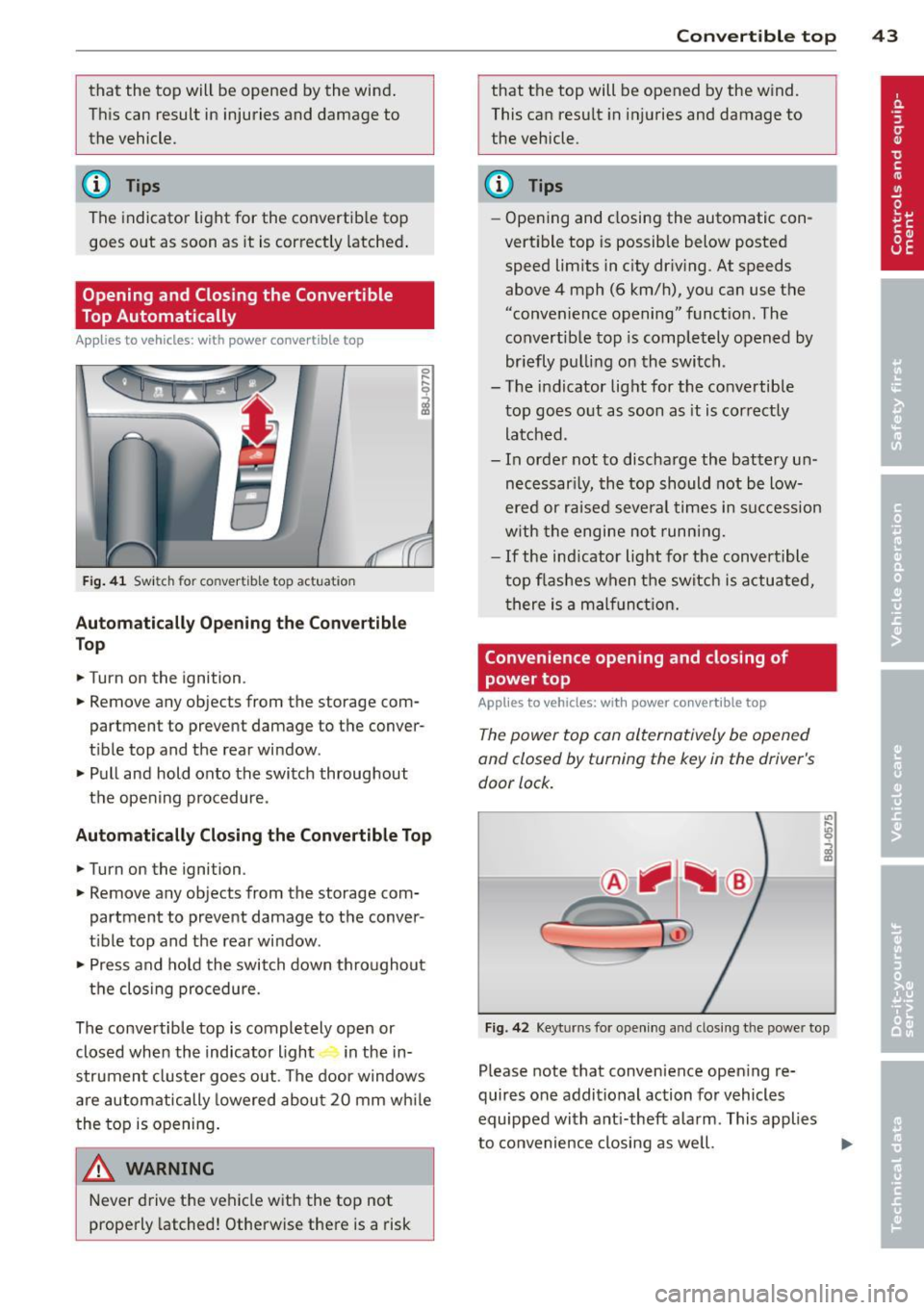
Opening and Closing the Convertible
Top Automatically
App lies to vehicles: with power convertible top
Fig . 41 Switch for convertible top actuation
Au tomaticall y Op ening th e Convertible
Top
.. Turn on the ignition .
.. Remove any objects from the storage com
partment to prevent damage to the
conver
tible top and the rear window.
.. Pull and hold onto the switch throughout
the opening procedure.
Automatic ally C losing th e Con vertible T op
.. Turn on the ignition .
.. Remove any objects from the storage com
partment to prevent damage to the
conver
t ible top and the rear window .
.. Press and hold the switch down throughout
the closing procedure.
The convertible top is completely open or
closed when the indicator light in the in-
strument cluster goes out . The door windows
are automatically lowered about 20 mm wh ile
the top is opening .
& WARNING
Never drive the vehicle with the top not
properly latched! Otherwise there is a risk
-
Con vert ible top 4 3
that the top will be opened by the wind.
This can result in in juries and damage to
the vehicle.
(D Tips
- Opening and closing the automatic con
vertible top is possible below posted speed lim its in city driv ing. At speeds
above 4 mph (6 km/h), you can use the
"convenience opening" funct ion. The
convertible top is completely opened by
br iefly pulling on the switch .
- The indicator light for the co nvertible
top goes o ut as soon as it is correctly
latched.
- In order not to discharge the battery un
necessar ily, the top should not be low
ered or raised several times in succession
w ith the engine not running.
- If the ind icator light for the convertible
t op flashes when the switch is actuated,
there is a malf unct ion.
Convenience opening and closing of
power top
Applies to vehicles: with power co nvertible top
The power top can alternatively be opened
and closed by turning the key in the driver's
door lock.
c
F ig. 42 Keyt urns for ope ning and closing th e power top
Please note that convenience open ing re
quires one additional action for vehicles
equipped with ant i-theft alarm . This applies
to convenience closing as we ll.
Page 66 of 244
64 Seats and storage
A WARNING
Never put waste paper in the ashtray. Hot
ashes or othe r hot objects in the asht ray
co uld set waste paper on fire.
Cigarette Lighter/
socket
Cigarette lighter
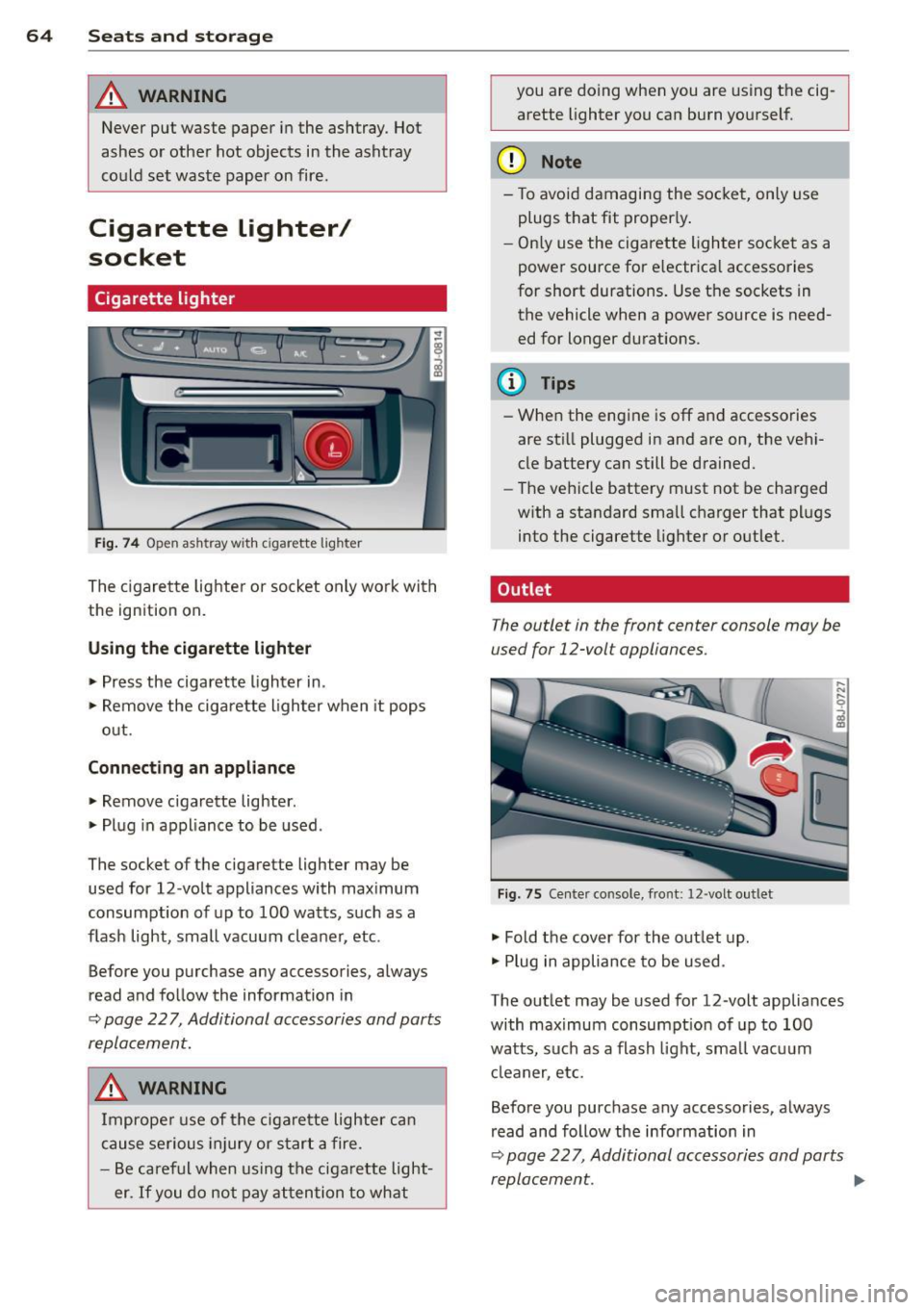
Fi g. 74 O pen ash tray w ith c iga rett e ligh ter
The cigare tte lighte r or socket only work with
the ign ition on.
Using the cigarette lighter • Press the cigarette lighter in.
• Remove the ciga rette lighter when it pops
out.
Conn ecting an appliance
• Remove cigarette lighter .
• Plug in appliance to be used.
The socket of the cigarette lighter may be used for 12 -volt appliances with max imum
consumption of up to 100 watts, such as a
flash light, small vacuum cleaner, etc.
Before you purchase any accessories, always
read and follow the information in
~ page 22 7, Additional accessories and parts
replacement.
A WARNING
Improper use of the cigarette lighter can
cause serious injury or star t a fire.
- Be careful when using the ciga rette light
er.
If you do not pay attention to what you are doing when you are using t
he cig
arette lighter you can burn yourself.
(D Note
- To avoid damagi ng the socket, only use
plugs that fit proper ly .
- Only use the cigarette lighter socket as a
power source for e lectrica l accessories
for short durations. Use the sockets in
the vehicle when a power source is need ed for longer durations .
(D Tips
- When the engine is off and accessories
are sti ll plugged in and are on, the vehi
cle battery can still be drained.
- The vehicle battery must not be charged
w ith a standard small charger that plugs
into the cigarette lighter or outlet .
Outlet
T he outlet in the front center console may be
used for 12-volt appliances.
Fig . 75 Ce nter co nso le, fro nt: 12 -volt out let
• Fold the cover for the outlet up .
• Plug in appliance to be used .
The outlet may be used for 12 -volt appliances
with maximum consumpt ion of up to 100
watts, such as a flash light, small vacuum
cl eaner, etc.
Before you purchase any accessories, always
read and follow the information in
~ page 22 7, Additional accessories and parts
replacement . .,,.
Page 75 of 244
you leave your vehicle. This makes a vehicle
theft even more difficult ¢ .&. .
Ign ition key safety lock
Afte r switch ing off the ignition, the ig nit ion
key ca n only be removed from the ig nition
l ock when the se lector lever is in the "P"
(Park) position . After you have removed the
key, the selector lever is locked and cannot be
moved.
Ign ition on (D
If it is diffic ult to turn the key afte r you have
inse rted it into the ignition lock, turn the
steering whee l back and forth. This will take
the load
off the steering lock mechanism and
you will be able to turn the key freely and start the engine.
Starting th e engine @
In this position the engine starts . While the
engine is starting, the power supply to the headlights and other e lectrica l consumers is
temporari ly interrupted to conserve battery
power. After the engine has started, release
the key and it will return to posit io n
(D .
Before the starter can be operated again the
key must be turned back to position @. The
non-repeat lock prevents you from damaging
the starter when the engine is runn ing .
A WARNING
-Never remove the key from the ign ition
lock whi le the vehicle is mov ing . The
steering wheel will lock causing loss of
co ntrol.
- If you have to leave your veh icle - even
for just a m inute - a lways remove t he ig
ni tion key and take it with you. This is es
pecially important if you are going to
leave ch ildren behind in the vehicle. The
children co uld start the engine or use
other vehicle controls. Unsupervised use
of vehicle controls (for example, power
windows) can cause serious personal in
jur ies .
-
On th e ro ad 73
(D Tips
If the vehicle battery has been disconnect
ed and then reconnected, then yo u must
l eave the key in posit ion
(D for about 5
seconds before you can start the engine.
Starting and stopping
the engine
' Starting the engine
The engine can only be started with an origi
nal Audi key .
.,. Se t the par king brake.
.,. Move the selector lever in P or
N q .&_ .
.,. Turn the ignition key to position @
~ page 72, fig. Bl -do not depress the gas
peda l when starting the engine!
.,. Let go of the key as soon as the engine
starts .
A cold engine may at first be loud after it has
been started. This is due to the hydraulic
valves bu ild ing up the oil pressure. Th is nor
mal and no need for concern .
If the engine does not start immediately, stop
trying after 10 seconds and then try to restart
the engine about 30 seconds later.
A WARNING
-Never start or let the eng ine run in a con-
fined o r enclosed area . Exhaust fumes
from the engine co ntain carbon monoxide,
a colorless and odo rless gas. Ca rbon mon
oxide can be f atal if inhaled.
- Never leave the engine id ling unattend
ed. An una ttended veh icle w ith a runn ing
engine poses a danger o f personal injury
or theft .
(D Note
-Avo id high engine speeds, fast accelera
tion or heavy engine loads while the en
gine is still cold. This could damage the
engine.
- The e ngine cannot be started by pushing
or towing the vehicle . .,..
Page 89 of 244
your authorized Audi dealer for assistance, if necessary .
Removing the selector lever boot
.,. Activate the parking b rake .
.,. Carefu lly pry the selector lever boot out of
the tr im @ using a small screwdriver .
.,. Pull both sides of the se lector lever boot up-
ward in the direction of the arrow @ .
.,. Fold the selector lever boot upward.
Selector lever eme rgency re le ase
.,. Press the release lever down and ho ld it in
place ¢ fig . 96 .
.,. Press the release button in the selector lever
© and move the lever into the N position .
.,. Clip the selector lever boot back into the
shift gate after using the emergency re lease.
If the vehicle m ust be pushed or towed due to
a power failure (for example, the battery is
d ischarged), the selector lever must first be
moved to the N pos ition using the emergency
release mechanism .
A WARNING
Only move the se lector lever out of the P
posi tion when the parking b rake is activat
ed. O therw ise, the vehicle could sta rt to
move unintentionally when the selector
lever is moved out of the P position.
Tran sm iss ion 87