2015 AUDI S3 SEDAN ECO mode
[x] Cancel search: ECO modePage 67 of 282
....,
N
0 > co
rl I.O
"'
"'
"'
rl
Climate control system controls
Applies to vehicles: with manual climate control system
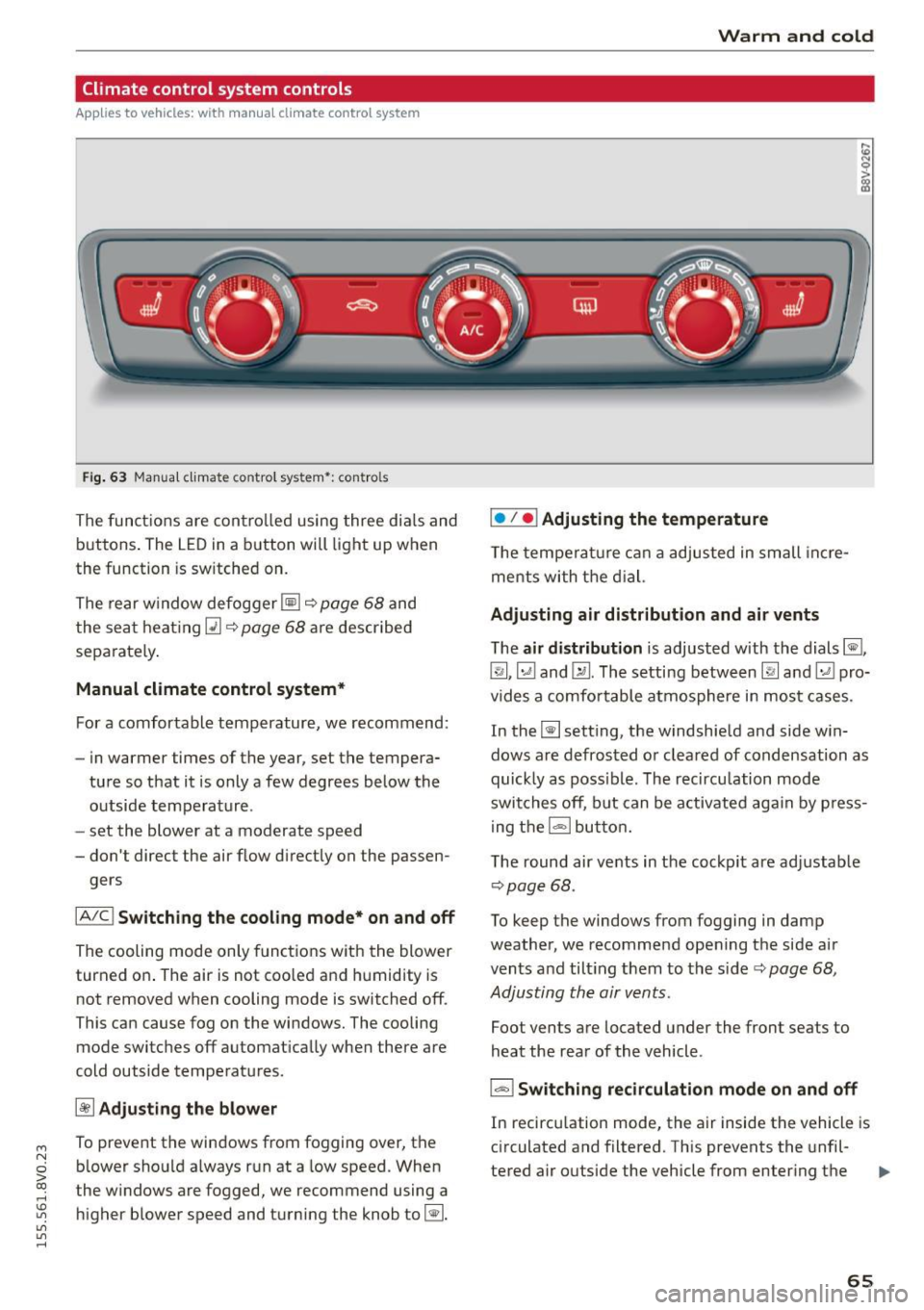
F ig. 63 Manua l clima te co ntro l system *: contro ls
The functions are controlled using three dia ls and
buttons . The LED
in a button will light up when
the function is sw itched on.
The rear window defogger ~~
page 68 and
the seat heating~~
page 68 are described
sepa rately .
Manual climate control system*
For a comfortable temperature, we recommend:
- in warmer time s of the year, set the tempera-
ture so that it is only a few degrees below the outside temperature .
- set the blower at a moderate speed
- don't direct the air flow d irectly on the passen-
gers
IA/C l Switching the cooling mode* on and off
The cooling mode only functions with the blower
turned on . The air is not coo led and humidity is
not removed when cooling mode is switched off .
This can cause fog on the windows. The cooling
mode switches off automat ically when there are
cold outside temperatures.
~ Adjusting the blower
To prevent the windows from fogging over, the b lower should a lways run at a low speed. When
t he w indows are fogged, we recommend using a
higher blower speed and turning the knob to~-
Warm and cold
I• I • I Adjusting the temperature
T he temperature can a adjusted in small incre
me nts with the dial.
Adjusting air distribution and air vents
The air distribution is adjusted with the dials ~.
~.~ and~-The setting between
IR! and ~ pro
vides a comfo rtable atmosphere in most cases.
In the~ setting, the windshield and side win
dows are defrosted or cleared of condensation as
quickly as poss ible. The recircu lation mode
switches off, but can be activated again by press
ing the
l = I button.
The round air vents in the cockpit are adjustab le
¢ page 68 .
To keep the windows from fogging in damp
weather, we recommend opening the side air
vents and tilt ing them to the side ¢
page 68,
Adjusting the air vents .
Foot vents are located under the front seats to
heat the rear of the vehicle .
I-I Switching recirculation mode on and off
In recirculation mode, the air inside the vehicle is
circulated and filtered. This prevents the unfil-
tered air outside the vehicle from enter ing the .,..
65
Page 68 of 282
Warm and col d
vehicle interior . We recommend switching recir
culation mode on when driving through a tunne l
or when s itting in traffic¢.&. .
Recircula tion mode is sw itched off in the defrost
setting ~.
Automatic climate control system controls
Applies to vehicles: with automatic air conditioner
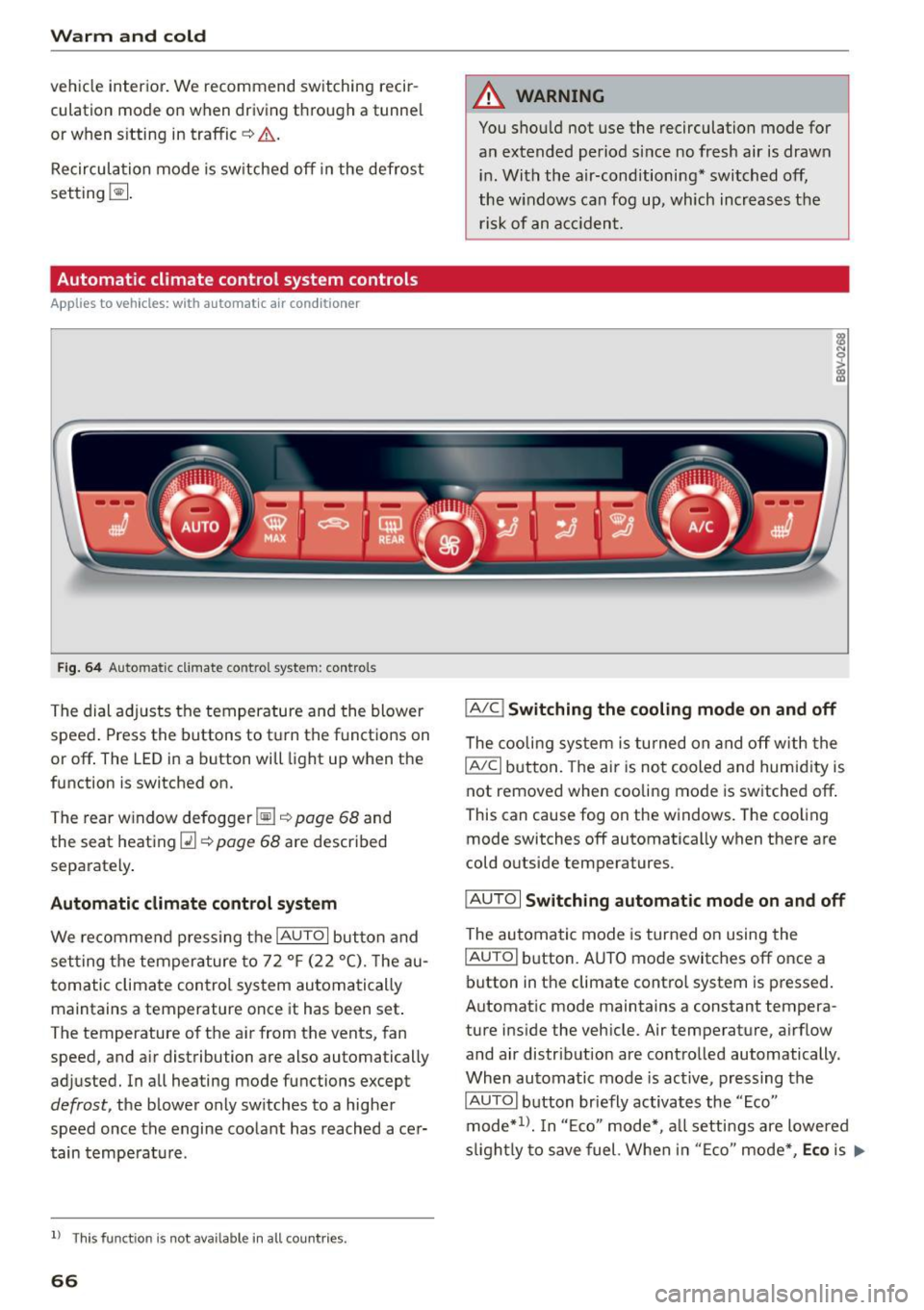
Fig. 6 4 Automa tic climat e co ntro l system : contro ls
The dial ad justs the temperature and the blower
speed . Press the buttons to turn the functions on
or off . The LED in a button will light up when the
function is switched on.
T he rear w indow defogger ~¢
page 68 and
the seat heat ing
Q] ¢ page 68 are described
separately .
Automatic climate cont rol system
We recommend p ress ing t he IAU TOI button and
se tting the temperature to 72
°F (22 °(). T he au
tomatic climate control system au tomatically
maintains a temperature once it has been set .
The temperature of the ai r from the vents, fan
speed, and a ir distribution are also automatically
adjusted. In all heating mode functions except
defrost, the b lower only sw itches to a higher
speed once the engine coo lant has reached ace r
tain tempe rat ure.
ll Thi s fun ctio n is not ava ilable in a ll countries.
66
A WARNING
You shou ld not use the recirculation mode for
an extended period s ince no fresh air is drawn
i n . With the air-conditioning* switched off,
the w indows can fog up, which increases the
risk of an a cciden t.
IA/C l Switching the cooling mode on and off
The cooli ng sys tem is turned on a nd off with the
IAJC I button. The ai r is no t cooled and humid ity is
not removed when cooling mode is switched off .
This can cause fog on the windows. The coo ling
mode switches off automatically when there are
cold o utside temperatures.
IAU TO I Switching automatic mode on and off
The au tomatic mode is turned on using the
IAU TO I button. A UTO mode switches off once a
button in the climate contro l system is pressed.
Automat ic mode maintains a constant tempera
ture i nside the vehicle. Air temperature, a irflow
and air distribut ion are contro lled automatically.
When automatic mode is active, pressing the
IAUTOI b utton briefly activates the "Eco"
mode*
1> . I n "E co" mode*, a ll setti ngs are lowered
s ligh tly to save fuel. Whe n in "E co" mode *,
Eco is .,..
Page 69 of 282
shown in the disp lay. To exit "Eco" mode*, press
the
! AUTO ! button again .
I• I • I Setting the temperature
The temperature can be adjusted individually for
the dr iver and front passenger using the dials.
Tempe ratures between 60 °F ( +16 °C) and 84 ° F
(+28 °C) can be set. If outside of this range, LO or
HI will appear in the climate control system dis
p lay. In both settings, the climate contro l runs
with constantly at the maximum cooling or heat ing level. The temperature is not regulated.
Synchronization: by pressing the IAUTO I button
for two seconds, the temperature setting for the
driver is transferred to the front passenger's side.
This applies a temperature change to the front
passenger's side.
~ Adjusting the blower
To prevent the windows from fogging over, the b lower sho uld a lways ru n at a low speed. You can
ad just the volume of air generated by the b lower
to your preference. To have the blower regu lated
automatically, press the !AU TO I button .
Adjusting the air distribution
The air distribution is adjusted with the~, U!i
and ~ buttons. To have the air d istr ibut ion regu
lated automatically, press the
IAUTOI button.
The round air vents in the cockpit are adjustable
¢page 68.
To keep the windows from fogging in damp
weather, we recommend opening the side air
vents and ti lting them to the side
~ page 68,
Adjusting the air vents .
Foot vents are located under the front seats and
adjustable vents on the end o f the center console
to heat the rear of the vehicle .
~ Switching the defroster on and off
The windshield and side windows are defrosted
or cleared of condensation as quickly as possible .
The maximum amount of air flows main ly from
M
N the vents below the windshie ld. Recirculation 0
iii mode switches off . The temperat ure is contro lled
~ automatically. In the Ii] sett ing, the IA/C i cooling
Vl
Vl
......
Warm and cold
mode switches on automatically, depending on
the outside air temperat ure.
T he
IAUTO ! button switches the defroster off.
l"""I Switching recirculation mode on and off
The recircu lation mode can be turned on manual
ly or automatically* .
- Switching manual recirculation mode on and
off : press
1.,,.,1 The LED light up when switched
on .
- Automatic* recirculation mode: the auto recir
culat ion must be act ivated in the MMI. Select:
the
I MENU I button > Car > Systems* control
button
> AC > Auto recirculation . The air quali
ty sensor that is designed for diesel and gaso
line exhaust automatically switches the recircu
lation mode on or off depending on the level of
pollutants in the outside air .
In recircu lation mode, the air inside the vehicle is
c ir cula ted and filtered. This prevents the unfil
tered air outside the vehicle from entering the
vehicle interior. We recommend switching recir
cu lation mode on when driving through a tunnel
or when sitting in traffic~ &.
T he
1-1 button, !AUTO ! or the [ii bu tton switches
recirculation mode off.
T he system switches to recirculation mode when
driv ing in reverse when the engine is cold.
_&. WARNING
You should not use the recirculation mode for
an extended period sin ce no fresh air is drawn
in. With the air-conditioning switched off, the
windows can fog up, which increases the risk
of an acc ident.
67
Page 73 of 282
M N
0 > co ,...., \!) 1.1'1
1.1'1
1.1'1
,....,
If you anticipate w hat you need to do next and
drive economically, you can easily cut your fue l
consumption by 10-15 percent. Th is sect ion will
g ive you some tips on how you can help the envi
ronment and your pocketbook.
The consumpt ion estimates as published by
ENVIRONMENTAL PROTECTION AGENCY (EPA)
and Transport Canada may not correspond to
your actual consumption on the road, which
w ill vary depend ing upon vehicle load and
speed, road and weather conditions, trip
length, e tc.
Drive smoothly and keep a lookout ahead
Vehicles use the most fuel when they are acceler
ating.
.. Avoid unnecessary accelerating and braking.
Vehicles use the most fuel when they are acceler
ating. If you anticipate what is going to happen next, you will need to brake less and, thus, accel
erate less. Let the vehicle coast whenever possi b le -for example when you see that the next traf
fic light is red.
Avoid full throttle
Driving at moderate speeds saves fuel and im
proves your mileage .
.. Try and keep well be low your car's max imum
speed .
Accelerating gently reduces fuel consumpt ion,
engine wear, and does not d isturb the env iron
ment .
Fue l consumption, exha ust emissions and eng ine
noise increase disproportionately at high speeds.
If you drive at approx imately t hree quarters of
top speed, fuel consumpt ion w ill be reduced by
one half . Never dr ive faste r than the posted
speed limit a nd weather conditions perm it.
Dri ving
Reducing unnecessary idling
Even when your car is just idling it burns up fuel .
.. Shut the eng ine off when you are not driving
the vehicle .
.. Do not warm up the vehicle by lett ing the en-
gine run at idle.
It is efficient to switch off the engine when stop
ped at ra ilroad crossings and long red lights.
Turning the engine off for just 30-40 seconds
saves more fuel than is b urned by starti ng the
engine aga in .
It takes a long t ime for the engine to warm up
fully when it is ru nning at idle. However, wear
and noxious emissions are espec ia lly hig h when
t h e engine is warming up. So you should d rive
away as soon as you sta rt the eng ine and avoid
run ning at high rpms w hile the eng ine is s till
warmi ng up .
@ Note
Do no t leave eng ine idl ing una ttended afte r
s ta rtin g.
If war ning lig hts s hou ld come on to
i ndica te imprope r operat ion, they would go
u nheede d. Extended idling also produces
heat, which could result in overheat ing or oth
er damage to the ve hicle or other property.
Regular maintenance
A badly tuned engine unnecessarily wastes a lot
of fuel.
.. Have your ve hicle serviced at reg ular in tervals.
B y havi ng your ve hicle regu la rly se rv iced by an
Audi dealer he lps to ensu re that it ru ns p rope rly
and economically. The condi tion of your veh icle
not only affects its sa fety and ability to ho ld i ts
val ue, it also affects
fuel consumption.
Check your oil each time you fill your tank.
The amou nt of oi l used is re lated to engine load
and speed.
It is normal for the oil consumption of a new en
gine to reach its lowest value after a certai n m ile-
age has been dr iven. ...,
71
Page 80 of 282

Driving
This message appea rs and a warn ing tone sounds
if you open the driver's door when the ignit ion is
sw itched on. Switch the ign ition
off so that the
battery will not discharge.
Pressing st a rt /s to p button a gain will swit ch off
engine!
This message appears whe n you press the
I S TART ENGINE STOP !* button while driv ing
q page 76, Emergency off .
Engine start sy ste m malfunc tion . Pl ea se c on
ta ct Ser vice
The engine automatic start system has a mal
function . Drive to a n author ized Audi dealer or
author ized Audi Serv ice Facility immediately to
have the m alfunction correc ted . T o star t the en
g ine, press and hold the
I S TAR T ENGINE ST OP I
button.
DJ Ke y not r ecogniz ed. See owner 's manual
This message appears if there is no convenience
key inside the ve hicle or if the system does not
recogn ize the key . The convenience key may not
be recogn ized, for example , if it is covered by an
object that
disrupts the s ignal (such as a brief
case), or if the key battery is weak . E lectronic de
vices s uch as cell phones can also interfere w ith
the signa l.
To st ill be able to start or stop the eng ine, refer
to "Correcting a ma lfunction"
q page 77.
Ill Key not in vehicle?
The Ill indicator light turns on and this message
appears if the convenience key was removed from
the vehicle whe n the eng ine was runn ing.
If the
convenience key is no longer in the vehicle , you
cannot switch the ig nition on or start the eng ine
once yo u stop it . In add it io n, you ca nnot lock the
ve hicl e from the o utside.
Pr ess brake pedal
This message appears if you do not press the
brake peda l when starting the engine .
Please engage N or P
This message appea rs when starting or s topping
the engine if the selector leve r is not in the Nor P
position. The engine will not start/stop.
78
Shift to P, otherwi se vehicle can roll awa y.
Door s do n ot l ock
if le ver is not in P
This message appears for safety reasons a long
with a warning tone.
It appears if the selec to r
l ever for the a utomat ic transm iss ion is not in the
P position when switching the ignition
off with
the
I S TART ENGINE STOP I* button . Shift these
l ector lever to the P pos ition . Otherw ise, the vehi
cle co uld roll. You also cannot lock the vehicle us
ing the lock ing sensor o n the doo r hand le or us
i ng the conven ience key .
Electromechanical
parking brake
Operating
The electromechanical parking brake replaces
the hand brake.
Fig. 71 C ente r consol e: pa rk in g b rake
.. Pull the sw itch @¢ fig. 71 to set the pa rking
br ake . The - (USA models)/ . (Can ada
mode ls) indica to r li ghts in the button and in
the inst rument cluste r display turn on .
.. To release the pa rking brake, press the brake or
accelerator pedal wh ile the ignition is sw itched
on and press the button @ at the same time.
The - (USA models)
I. (Canada models)
ind icator lights in the button and in the display
turn off .
Your vehicle is equipped with an e lectromechani
ca l park ing brake. The parking brake is designed
to prevent the vehicle from ro lling un intent ional
l y and replaces the hand brake .
In add ition to the normal functions of a tradition-
al hand brake, the electromechanical parking ..,_
Page 84 of 282
Automatic transmi ssion
Automatic transmission
S tronic
Introduction
Applies to veh icles: w ith S tro nic transmiss ion
Your vehicle is equ ipped w ith an electronically
contro lled DSG transmission ca lled S tronic. Two
independent clutches transfer the power be
tween the eng ine and t ransmission. It a llows the
vehicle to accelerate without a noticeable inter
ruption in tract ion .
The transmission upshifts or downsh ifts auto
matica lly. The driv ing style contin uously influen
ces the se lection of the driving program .
When a
mod era te driving style is used, the
transmiss ion se lects the mos t econom ica l driving
mode. The transmission upsh ifts at a lower RPM
and downshifts at a higher RPM to improve fuel
efficiency .
The transmission swit ches to a sporty mode after
a kick-down or when the driver uses a
s po rty driv
ing sty le
characterized by quick accelerator pedal
movements, heavy acceleration, frequent
changes in speed and t raveling at the maximum
speed.
If desired, the drive r can a lso se lect the gears
manually ( tiptronic mode) ¢ page 87, Shift ing
manually (tiptronic mode) .
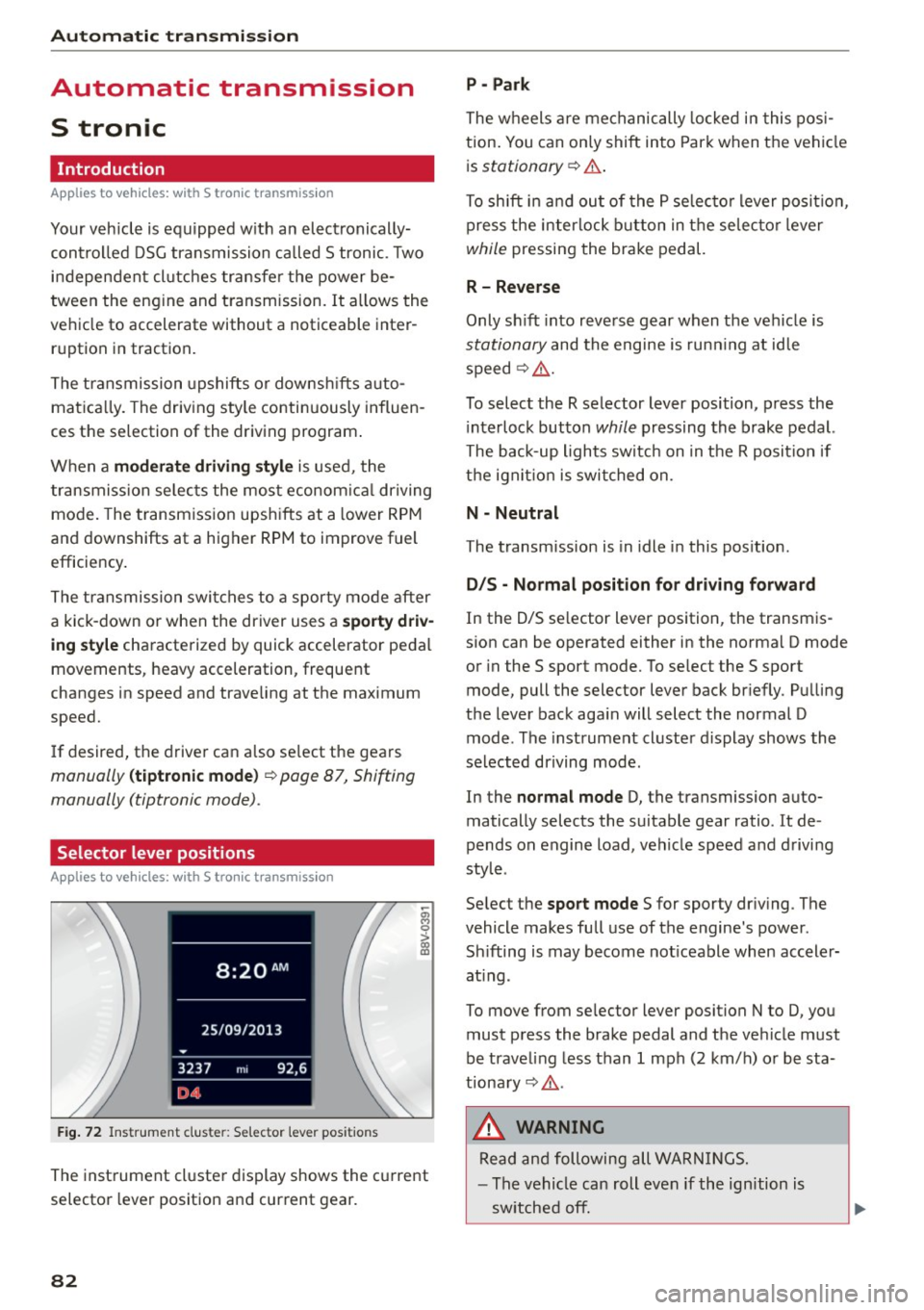
Selector lever positions
Applies to vehicles: w ith S tro nic transmiss ion
F ig. 72 In strum ent clus te r: S electo r lev er pos it io ns
-~ 0 > a, ID
The inst rument cl uste r display shows the c urrent
selector lever position and current gear.
82
P - Park
The wheels a re mechanically locked i n this pos i
tion . You can on ly shift into Par k when the vehi cle
i s
stationary ¢.&. .
To shift i n and ou t of the P se lec to r lever posit io n,
press the interlock button in the selec tor lever
while pressing the brake pedal.
R - Reverse
Only sh ift into reve rse gear when the vehicle is
stationary and the engine is run ning at id le
speed¢ .&..
To select the R selector lever position, p ress the
i nterlock button
while pressing the brake pedal.
The back-up lights switc h on in the R posit ion if
the ign it io n is switched on.
N - Neutral
The transm ission is in idle in this pos ition .
D/S - Normal po sit ion fo r dri ving f orward
In the D/S se lector lever position , the transm is
s ion can be operated either in the norma l D mode
or in the S sport mode. To se lect the S sport
mode, pull the selector lever back br iefly . Pu lling
the lever back aga in will select the normal D
mode . The instrument cluster display shows the
selected driving mode .
In the
normal mode D, the transmission auto
matically selects the suitable gear ratio. It de
pends on engine load, vehicle speed and d rivi ng
style .
Se lect the
sport mode S for sporty dr iv ing . The
vehicle makes fu ll use of the engine 's power.
Sh ifting is may become not iceable when accele r
at ing .
To move from se lec tor lever position N to D, you
must p ress the brake pedal and the ve hicle must
be traveling less than 1 mph (2 km/h) o r be sta
tiona ry¢ .&..
&, WARNING
Read and following all WA RN IN GS.
- The vehicle can roll even if the ignition is
sw itched off.
Page 87 of 282
M N
0 > co ,...., \!) ..,.,
..,.,
..,., ,....,
Stopp ing /p ark in g
If the se lector lever is not in the P position when
you open the driver's door, the vehicle cou ld roll.
In vehicles with a convenience key*, the message:
Shift t o P, o ther wis e vehi cle c an roll away .
D oo rs do not lo ck if l ever i s not i n P
appears . You
will also hear a warning tone.
~ Press and ho ld the brake pedal c:> A
~ Set the parking brake.
~ Se lect the P selector lever pos ition.
Stopping on an incline
~ Always press the b rake pedal to hold the vehi
cle in place and prevent it from "rolling back"
c:> A -Do not try to prevent the vehicle from
"rolling back" when a gear is engaged by in
creasing the engine speed
c:> @ .
Starting on an incline in vehicl es without H ill
H old *
~ Set the parking brake.
~ With the driving gear se lected, press the accel
erator pedal carefully. The parking brake releas
es automatically . Requ irement: The door must
be closed .
Starting o n an incline in veh icles with Hill
Hol d*
~ With the driving gear selected, remove your
foot from the brake pedal and press the accel
erator pedal
c:> page 80, Hill hold.
Under certain circumstances, (such as driving in
the mountains or towing a tra iler), it may be use
ful to sw itch temporarily to the manual sh ift pro
gram in order to adjust the gears to the driving
conditions by hand~
page 87.
When parking on a level surface, simply place the
selector lever in the P position. On inclines, acti
vate the parking brake first and then move the
selecto r lever to the P position~
page 78. This
prevents the locking me chanism from being load
ed too heavi ly and wi ll make it easier to move the
selector lever out of the P posit ion .
Aut omatic transm issio n
A WARNING
-The vehicle can roll even when the engine is
sw itched off.
- Unintended vehicle movement can lead to
serious injuries.
- Never leave your vehicle with the engine running while in gear. If you must leave your
veh icle when the engine is running, set the
parking brake and move the selector lever to
the P position.
- Power is still transferred to the wheels when
the eng ine is running at idle. To prevent the
veh icle from "creeping", you must keep your
foot on the brake when the engine is run
n ing and the selec to r l ever is in the D, Sor R
position or "tiptronic" mode is selected .
- Do not inadvertently press the accelera tor
pedal when the vehicle is stationa ry. Other
wise the vehicle will start to move immedi
ately, even if the parking brake is set. This
could res ult in a crash.
- Do not press the accelerator pedal when
changing the se lector lever position while
the vehicle is stationary and the eng ine is
running.
- Never engage the R or P selector level pos i
tions while dr iv ing.
It could cause a crash.
- Before driving down a steep s lope, reduce
your speed and shift into a lower gear with
"t iptronic".
- Do not ride the brakes or press the brake
pedal too often or too long when driving
down a hill. Constant braking causes the
brakes to overheat and substantially re
duces braking performance, increases brak
ing d istance or causes comp lete failure of
the brake system.
- If you must stop on an incline, always hold
the vehicle in place with the foot brake or pa rking brake to prevent it from ro lling
back.
- Never hold the vehicle on an incline with a slipping clut ch. The cl utch opens au tomati
cally when it becomes too hot from the
overload . The
mJ indicator light turns on
and a message appears
c:> page 88 when
the clutch is overloaded .
85
Page 89 of 282
....,
N
0 > co
rl I.O
"'
"'
"'
rl
Shifting manually (tiptronic mode)
Applies to vehicles: with 5 tronic transmiss ion/ shi ft padd les
The tiptronic allow the driver to shift the gears
manually.
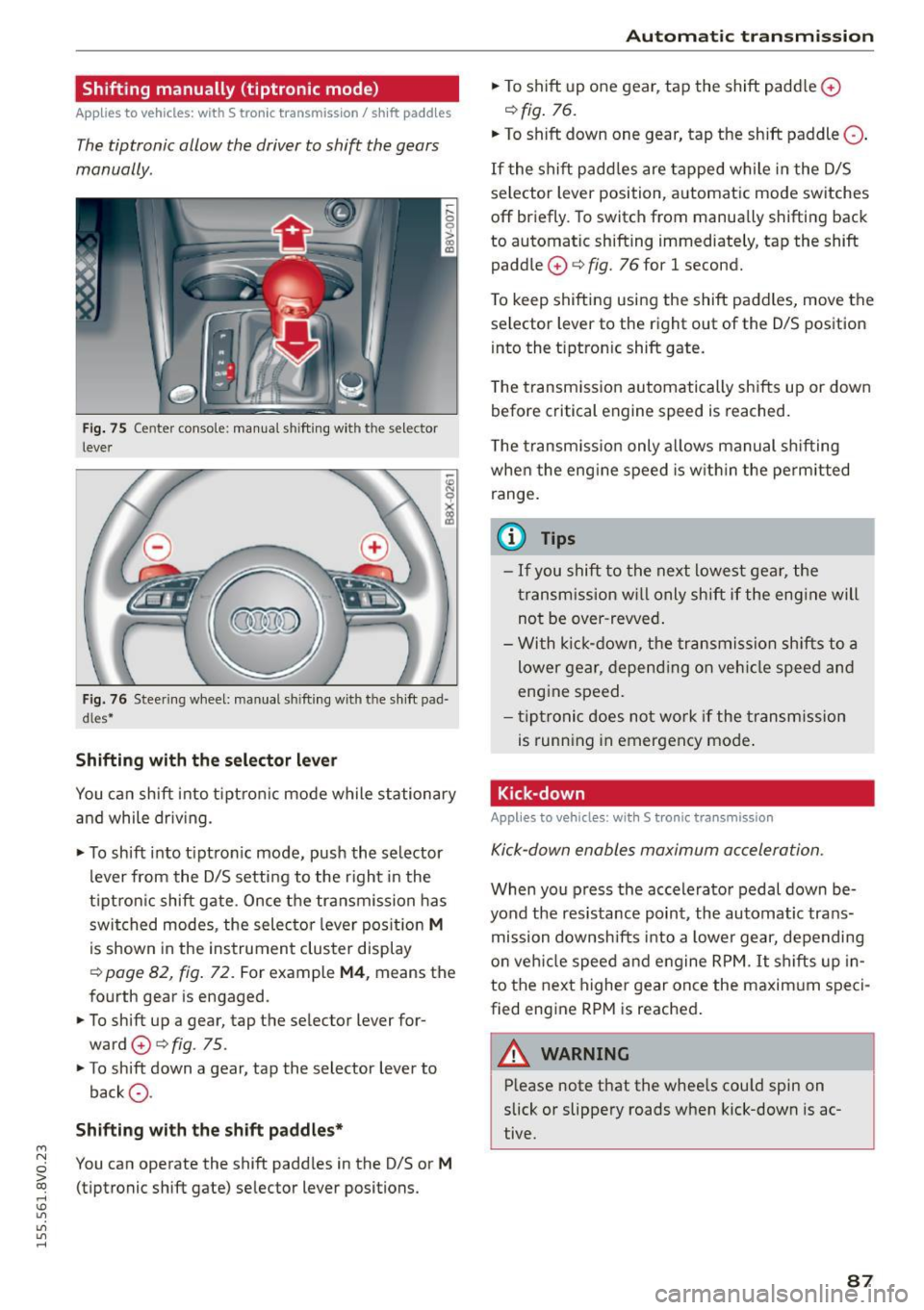
Fig. 75 Center c_onso le: manual shi fting wi th the selec tor
lever
Fig. 76 Steering wheel: manual shi fting with t he shift pad
d les*
Shifting with the selector lever
You can shift into tiptronic mode while stationary
and while driv ing.
• To shift into tip tron ic mode, push the selector
lever from the D/S setting to the right in the
tiptron ic shift gate. Once the transmission has
switched modes, the selecto r lever position
M
is shown in the instrument cluster display
r:::> page 82, fig. 72 . For example M4, means the
fourth gear is engaged.
• To shift up a gear, tap the selector lever for
ward
0 r:::> fig . 75.
• To shift down a gear, tap the selector lever to
back
0 -
Shifting with the shift paddles*
You can operate the shift paddles in the D/S or M
(tiptronic shift gate) selector lever positions.
Automatic transmission
• To shift up one gear, tap the shift padd le 0
r:::> fig. 76.
• To shift down one gear, tap the shift paddle 0 -
If the shift paddles are tapped while in the D/S
selector lever position, automatic mode switches
off briefly. To switch from manually shifting back
to automatic shifting immediately, tap the shift paddle
0 ¢ fig. 76 for 1 second.
To keep shifting using the shift paddles, move the
selector lever to the right out of the D/S position
into the t iptron ic shift gate.
T he transmission automatically shifts up or down
before critical engine speed is reached.
The transmission only allows manual shifting
whe n the engine speed is within the permitted
range.
(0 Tips
- If you shift to the next lowest gear, the
transmission will only shift if the engine will
not be over-revved.
- With kick-down, the transmission shifts to a
lower gear, depending on vehicle speed and
engine speed.
- tiptronic does not work if the transmission
is running in emergency mode .
Kick-down
Applies to vehicles: wit h S tronic transm issio n
Kick-down enables maximum acceleration.
When you press the accelerator pedal down be
yond the resistance point , the automatic trans
mission downsh ifts into a lower gear, depending
on veh icle speed and engine RPM.
It shifts up in
to the next higher gear once the maxim um speci
fied eng ine RPM is reached.
A WARNING ~
Please note that the whee ls cou ld spin on
slick or slippery roads when kick-down is ac
tive .
-
87