2015 AUDI RS5 COUPE automatic transmission
[x] Cancel search: automatic transmissionPage 86 of 254

Automatic transmission
vehicle when the engine is running, activate
the parking brake and move the selector lev
er to P.
- Power is still transmitted to the wheels
when the engine is running at idle. To pre
vent the vehicle from "creeping", you must
keep your foot on the brake when the engine
is running and the selector lever is in D/S or
R or "tiptronic" mode is selected.
- Do not press the accelerator pedal when
changing the selector lever position while
the vehicle is stationary and the engine is
running.
- Never shift into R or P while driving.
- Before driving down a steep slope, reduce
your speed and shift into a lower gear with
"tiptronic".
- Do not ride the brakes or press the brake
pedal too often or too long when driving
down a hill. Constant braking causes the
brakes to overheat and substantially re
duces braking performance, increases brak
ing distance or causes complete failure of
the brake system.
- To prevent the vehicle from rolling back
when stopping on inclines, always hold it in
place with the brake pedal or parking brake.
- Never hold the vehicle on an incline with a
slipping clutch. The clutch opens automati
cally when it becomes too hot from the
overload. An indicator lamp
5] illuminates
and a driver message appears¢
page 86
when the clutch is overloaded.
- If the engine must remain running, never
have any driving position engaged when
checking under the hood. Make sure these
lector lever has securely engaged and is
locked in P with the parking brake set
¢page 187. Otherwise, any increase in en
gine speed may set the vehicle in motion,
even with the parking brake applied.
(D Note
-When stopping on an incline, do not try to
hold the vehicle in place by pressing the ac
celerator pedal while a driving gear is se
lected. This can cause the transmission to
overheat and can damage it. Activate the
84
parking brake or press the brake pedal to
prevent the vehicle from rolling.
- Allowing the vehicle to roll when the engine
is stopped and the selector lever is in N will
damage the transmission because it is not
lubricated under those circumstances .
(D Tips
For safety reasons, the parking brake is re
leased automatically only when the driver's
safety belt is engaged in the buckle .
Hill descent control
The hill descent control system assists the driver
when driving down declines.
Hill descent control is activated when the selec
tor lever is in D/S and you press the brake pedal.
The transmission automatically selects a gear
that is suitable for the incline. Hill descent con
trol tries to maintain the speed achieved at the
time of braking, within physical and technical
limitation s.
It may still be necessary to adjust the
speed with the brakes .
Hill descent control switches off once the decline
level s out or you press the accelerator pedal.
On vehicles with the cruise control system*
¢
page 78, hill descent control is also activated
when the speed is set.
A WARNING
Hill descent control cannot overcome physical
limitations, so it may not be able to maintain
a constant speed under all conditions. Always
be ready to apply the brakes.
Page 87 of 254

"' N
0:: loo
rl I.O
"' N
"' rl
Manual shift program
Using the manual shift program you can man
ually select gears.
Fig. 86 Center conso le: shift in g th e gea rs manually
Fig. 87 S teerin g wh eel: shift paddl es
Gear selection with selector lever
The tiptronic mode can be selected either with
the vehicle stationary or on the move.
• Push the selector lever to the right from D/S.
An M appears in the instrumen t cluste r display
as soon as the transm ission has shifted.
• To upshift, push the selector lever forward to
the plus position
0 c::> fig. 86.
• To downshift, push the lever to the minus posi-
tion
0 .
Gear selection with shift paddles*
The shift padd les are activated when the selector
lever is in D/S or the tiptronic manual shift pro
gram.
• To upshift , touch the shift paddle on the right
(vc::>fig. 87.
• To downshift, touch the shift paddle on the left
0 -
• If you do not press a shift paddle within a short
time while in the D/S position, the transmission
will return to automatic mode . To keep shifting
Automatic transmission
using the shift padd les, move the selector lever
to the right out of the D/S position.
When accelerating, the transmission does
not
automatically shift to the next gear shortly be
fore the maximum permitted engine RPM is
reached .
If you have selected a lower gear than the current
one, the automatic transmission will shift down
only when the engine wi ll not be over-revved.
With kick-down , the transmission shifts into a
lower gear depending on speed and engine RPM.
@ Tips
Tiptronic is inoperative when the transmission
is in the fail-safe mode.
Kick-down
Kick-down enables maximum acceleration .
When you depress the accelerator peda l beyond
the resistance point, the automatic transmission downsh ifts into a lower gear, depending on vehi
cle speed and engine speed. The upshift into the
next higher gear takes place once the maximum
specified eng ine speed is reached .
& WARNING
Please note that the wheels can spin if kick
down is used on a smooth slippery road -
there is a risk of skidding .
Launch Control Program
The Launch Control Program provides the best
acceleration possible when starting from a stop.
Requirement: The engine must be at ope rat ing
temperature and the steering wheel must not be
turned .
• Press the
I.$ OFF ! button c::> page 170 while the
eng ine is running. The
II indicator l ight illumi
nates in the instr ument cluster and
Stabiliza
tion control (ESC): Sport. Warning! Restricted
stability
appears in the driver information sys -
tem display.
IJJ,,
85
Page 88 of 254

Automatic transmi ssion
"' Move the selector leve r to the D/S position to
select sport mode (5) or select the
dyn ami c
driv ing mode in drive select* ¢ page 102 .
"'Press the brake peda l strongly with your left
foot and hold it down for at least 1 second.
"' At the same time, press the accelerator pedal
down completely with your right foot until the
engine reaches and maintains a high RPM .
"' Remove your foot from t he b rake pedal w it hi n 5
seco nds ¢,& .
A WARNING
-Always adapt you r driving to the traffic flow.
- Only use the La unch Control P rogram when
road and t raff ic conditions a llow i t and oth
er drivers wi ll not be endangered or annoye d
by your driving and the veh icle's accelera
t ion.
- Please note that the driving wheels can spin
and the vehicle can brea k away w hen spo rt
mode is switched on, especially when the
road is slippery.
- Once you have accelerated, yo u should
switch sport mode off
by pressing the
I ~ OF FI button.
(D Tips
- The t ransmission tempe ratu re may inc rease
significantly after using the La unch Control
Program. If that happens, the program may
not be available for a few minutes. It will be
ava ilable again after a coo l-down period .
- When accelerat ing using the Launch Contro l
program, all vehicle pa rts a re subject to
heavy loads. This can result in increased
w ear.
Transmission malfunction
[i1 Transmission : Press brake pedal and sele ct
gear again .
Press the brake pedal and se lect the desi red se
lecto r leve r pos it ion aga in . You can then continue
d riving.
[O] Transmi ssion overheating: Please drive con
servativ ely.
86
The transm ission temperat ure has inc reased s ig
nificantly d ue to the sporty driving manner. Drive
i n a less sporty manne r until the temperature re
turns to the normal range and the indicator light
switches of.
[i1 Trans mission malfunction: You can continue
driving
The re is a system mal func tion in the t ransm is
s ion . You may contin ue driving . Drive to yo ur au
thorized Audi dea ler or qualified repa ir facility
soon to have the malfunction corrected .
[i1 Transmission malfun ction : Limited driving
functionality
There is a system malfunct ion in the t ransm is
s io n. The t ransm ission is swi tching to eme rgency
mode. This mode on ly shifts in to cer tain gears or
will no longer shift at al l. The engine may stall.
D rive to your authorized A udi dealer or qualified
repair fac ility immediately to have the mal func
tion corrected.
[il ffl Trans mission malfunction: No reverse
You can continue dri ving
There is a system malfunct ion in the t ransm is
s ion. The t ransm ission is swi tch ing to eme rgency
mode. This mode on ly shifts into certain gears or
will no longer shift at al l. The engine may sta ll.
You cannot engage the reverse gear. Drive to yo ur
authori zed Aud i dea ler or q ualified repa ir facility
i mmediately to have the malfunct ion corrected.
[i1 Transmission malfunction: Stop vehicle and
shift to park.
Do no t con tinue dr iv ing . Se lec t the P sele ctor lev
er position and see your au thorized A udi dealer
o r q ualified repai r facility for assistance.
(D Note
If th e tr ansmission swi tches to emer gen cy
mode, you should take the ve hicle to an au
thorized Audi dea lership as soon as possible
to have the condition corrected.
Page 89 of 254

"' N
0:: loo
rl I.O
"' N
"' rl
Selector lever emergency release
If the vehicle's power supply fails, the selector lever can be released in an emergency.
Fi g. 88 Front center console: Remov ing the ashtray insert
Fig. 89 Selector lever emergency release
.. To access the emergency release mechanism,
remove the ashtray insert @ using the release
switch @c::>
fig. 88 .
.. Loosen and remove the cap in the ashtray
mount.
.. You now have access to a pin. Using a screwdr iv
er or simi lar object, press the pi n down and
hold it in t hat posit ion
c::> fig . 89 .
.. Now p ress the release bu tto n and move the se -
lector lever to the N position.
The selector lever can only be moved from the P
posi tion if the key is in the lock and the ig nitio n is
sw itched on. If the p owe r su pply fa ils (for e xam
p le, the batte ry is disch arged) and the vehicle
must be pushed or towed, move the se lector lev
er to the N pos ition first using the emergency re
lease.
Automatic transmission
87
Page 103 of 254

Audi drive select Driving settings
Introduction
App lies to vehicles: with Audi drive select
Drive select provides the possibi lity to experience
d ifferent types of vehicle settings in one vehicle.
F or instance, using the three
Comfort, Auto and
Dynamic modes, the driver can switch from a
sporty to a comfortable driving mode with the
press of a button.
Addit ionally, in vehicles with
MM I*, the vehicle
setup for
Individual* mode can be customized by
you. This makes it possib le to combine settings
such as a sporty engine tuning with comfortab le
steering .
A WARNING
-
Improper use of the Audi drive select can
cause collisions, other acc idents and serious
personal injury.
Description
App lies to vehicles: with Audi drive select
The vehicle setup in each mode depends on the
veh icle's featu res . However, the engine, automat
ic transmission and steering are always involved.
Engine and automatic transmission
Depending on the mode, the engine and the au
tomatic transmission respond quicker or in a
more balanced manner to accelerator pedal
movements. In the sporty dynamic mode, the au
tomatic transmission shifts at higher RPMs . Th e
engine sound is adjusted by opening or clos ing
the exhaust doors for the respective mode.
Steering
The steering adapts in te rms of steering effort
and steering ratios . Indirect steering that moves
eas ily, like the steering in comfort mode, is best
suited to long drives on a highway. In contrast,
~ dynamic mode provides sporty, direct steering.
0::
~ The follow ing applies to vehicles with dynamic ,....,
~ steering*: the steering ratio changes based on ve-
~ hicle speed in order to maintain optimum steer -,....,
Audi drive select
ing effort for the driver at all times. This sets the
steering to be less sensitive at higher speeds in
order to provide improved vehicle control. At re
duced speeds, however, steering is more direct in
order to keep the steering effort as minimal as
possible when the driver is maneuvering the vehi
cle. At low and average speeds, dynamic steer ing
additionally provides more responsive steering
performan ce.
Sport differential*
As a component of the all wheel drive system
(quattro)
<=> page 174, the sport differential* dis
tributes the driving power to the rear axle de
pend ing on the s ituation . The distribution of
power varies depending on the mode selected.
T he goal is a high level of agility and ability to ac
ce lerate on curves. The vehicle is very responsive
to steering .
Audi adaptive cruise control*
The behav ior when accelerating can be adjusted
from comfortable to sporty, depending on the
drive select mode. Adaptive cruise control also
responds to the driving behavior of the vehicle
ahead in a more conservative or sporty manner.
Engine sound*
T he sound of the eng ine is adapted to the select
ed mode and ranges from subtle to sporty.
(D Tips
-In some models, the maximum vehicle
speed can only be reached in the
Auto and
Dynamic modes.
- Selecting the
Dynamic mode results in spor
ty shifting characteristics. The S gear posi
tion engages automatically.
- In vehicles that have dynamic steering*, op
erating noise is heard when starting or stop
ping the engine. This does not indicate a
problem .
101
Page 104 of 254
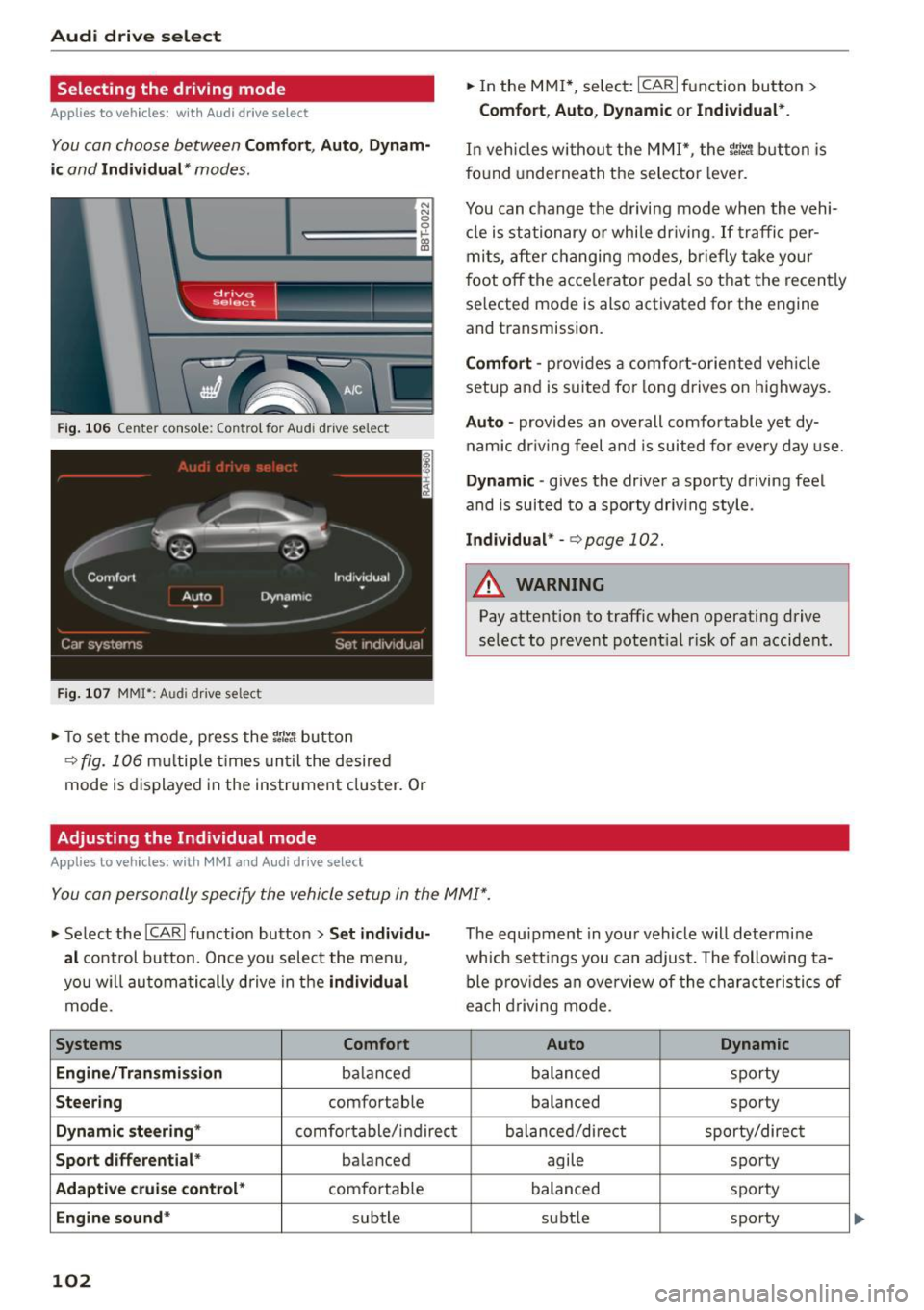
Audi drive select
Selecting the driving mode
Applies to vehicles: with Audi drive select
You can choose between Comfort, Auto, Dynam
ic
and Individual * modes.
N
N
0
0
c:====::::· ~ ID
Fig. 106 Cente r console : Con trol fo r Aud i drive se lect
F ig . 107 MM!*: Audi dr ive se lec t
... To set the mode , press the ~:i:r. 1 button
¢fig. 106 multiple times until the desired
mode is displayed in the instrument cluster. Or
Adjusting the Individual mode
Applies to vehicles: with MMI and Audi drive select
.,. In the MMI*, select: ICARI function button >
Comfort, Auto, Dynamic or Individual *.
In vehicles withou t the MMI*, the ~:i:r.1 button is
f o und underneath the selecto r lever.
You can c hange the driving mode when the vehi
cl e is stationary or while dr iving . If traffic per
mits, after changing modes, briefly take your
foot
off the acce lerator pedal so that the recently
selected mode is also activated for the engine
and transmission.
Comfort -pro vides a comfort-oriented vehicle
setup and is suited for long drives on highways.
Auto -provides an overall comfortable yet dy
namic driv in g feel and is suited for every day use.
Dynamic -gives the driver a sporty driving feel
and is suited to a sporty driv ing style .
Individual * -<=> page 102.
A WARNING
Pay attention to traffic when operating drive
select to prevent potential risk of an accident.
You can personally specify the vehicle setup in the MMI" .
.,. Se lect the ICAR I function button > Set individu
al
control button. Once you select the menu ,
you w ill automatically drive in the
individual
mode.
Systems Comfort
Eng i ne/Tra nsm ission
ba lan ced
Steering comfortable
Dynamic steering* comfortable/ indirect
Sport differential * balanced
Adaptive cruise control* comfortable
Engine sound* subtle
102
The equipment in your vehicle will determine
wh ich sett ings you can adjust. The following ta
ble provides an overview of the characteristics of
ea ch driving mode.
Auto Dynamic
balanced sporty
balanced sporty
balanced/direct sporty/direct
agile sporty
balanced sporty
subt le sporty
Page 190 of 254

Checking and Filling
compartment. Wait until no steam or cool
ant can be seen or heard before carefully
opening the hood.
- Keep children away from the engine com
partment.
- Never spill fluids on hot engine compo
nents. They can cause a fire.
- Never touch the radiator fan. The auxiliary
electric fan is temperature controlled and
can switch on suddenly.
- Never open the coolant reservoir cap when
the engine is still warm . The coolant system
is pressurized and hot coolant could spray
out .
- Protect your face, hands and arm from
steam or hot engine coolant by placing a
thick rag over the cap when you open the coolant reservoir .
- Do not remove the engine cover under any
circumstances . This increases the risk of
burns .
- If work on the fuel system or the electrical
system is necessary :
= Always disconnect the battery.
- Never smoke or work near heaters or open
flames. Fluids in the engine compartment
could start a fire.
- Keep an approved fire extinguisher imme
diately available.
- To avoid electrical shock and personal injury
while the engine is running or being started,
never touch:
- Ignition cables
- Other components of the high voltage
electronic ignition system.
- If you must perform a check or repair with
the engine running:
- First, fully apply the parking brake, move
selector lever of automatic transmission
to "P" (Park) .
- Always use extreme caution to prevent
clothing, jewelry, or long hair from getting
188
caught in the radiator fan, V-belts or other
moving parts, or from contacting hot
parts. Tie back hair before starting, and do
not wear clothing that will hang or droop
into the engine.
- Minimize exposure to emission and chemi
cal hazards
¢ A .
A WARNING
California Proposition 65 Warning:
- Engine exhaust, some of its constituents,
and certain vehicle components contain or
emit chemicals known to the State of Cali
fornia to cause cancer and birth defects and
reproductive harm. In addition, certain flu
ids contained in vehicles and certain prod
ucts of component wear contain or emit
chemicals known to the State of California
to cause cancer and birth defects or other
reproductive harm.
- Battery posts, terminals and related acces
sories contain lead and lead compounds,
chemicals known to the State of California
to cause cancer and reproductive harms.
Wash hands after handling.
([) Note
When adding fluids, always make sure that
they are poured into the proper container or
filler opening, otherwise serious damage to
vehicle systems will occur.
@ For the sake of the environment
To detect leaks in time, inspect the vehicle
floor pan from underneath regularly. If you
see spots from oil or other vehicle fluids, have
your vehicle inspected by an authorized Audi dealer .
Page 231 of 254

"' N
0:: loo
rl I.O
"' N
"' rl
When jump starting or charging the battery,
never connect the negative ground cable to
the battery negat ive post because the battery
manager system must be able to detect the
battery's state of charge. Always connect the
negative g round cab le to the negative ground
post of the battery manager control unit.
Use of jumper cables
Make sure to connect the jumper cable clamps in
exactly the order described below!
Fig. 187 Engine compa rtment: Connectors for jumper ca
b les and c harger
Fig. 188 Ju m p sta rting with the battery of anot her veh icle :
@ boos te r ba ttery, @ discharged veh icle battery
The procedure described below for connecting
jumper cables is intended to provide a jump start
for your vehicle.
Vehicle with discharged battery :
.. Turn
off lights and accessories, move lever of
automatic transmission to N (Ne utra l) or P
(Park) and set parking brake.
Connect POSITIVE(+) to POSITIVE(+) (red)
.. Remove the cover above the jump start connec
t ion.
.. Open the cover on the posit ive pole ¢
fig. 187.
Emergency situations
1. Connect one end of the red positive cable on
the jump start bolt~
fig. 188 (D (Bolts un
der cover= "positive") of the vehicle to be
started @.
2. Connect the other end to the positive termi- nal@of the booster battery @.
Connect NEGATIVE (-) to NEGATIVE(-)
(black)
3. Connect one end of the black negative cable
to the negative terminal ® of the booster
battery @.
4 . Connect the other end to the jump start bolt
@ (Bolts with hex head= "negative") of the
vehicle to be started @.
Starting the engine .. Start the engine of the veh icle with the booster
battery @. Run the eng ine at a moderate
speed .
.. Start engine with discharged vehicle battery @
in the usual manner.
.. If the engine fails to start: do not keep the
starter cranking for longer than 10 seconds.
Wait for about 30 seconds and then try again .
.. With engine running, remove jumper cables
from both vehicles in the exact
reverse order .
.. Close the cover on the positive pole.
The battery is vented to the outside to prevent
gases from entering the vehicle inter ior. Make
sure that the jumper clamps are well connected
with their
metal parts in full contact with the
batte ry terminals.
A WARNING
To avoid serious personal injury and damage
to the vehicle, heed all warnings and instruc
tions of the jumper cable manufacturer. If in
doubt, call for road service.
- Jumper cables must be long enough so that
the vehicles do not touch .
- When connecting jumper cables, make sure
that they cannot get caug ht in any moving
parts in the eng ine compartment.
- Do not bend over the batteries -danger of
chemi cal burns!
229