2015 AUDI Q5 steering
[x] Cancel search: steeringPage 102 of 302

Hybrid
© Vehicle drive ready (READY)
® High voltage battery charge status
® Recuperation (CHARGE)
(f) Driving within the combustion en
gine's full load range
@ 100% combust ion engine
® Boosting -the electric engine as
sists the combustion engine (BOOST)
@ Engaging the convent ional brakes
with recuperation
@ Vehicle not drive ready (OFF)
@ EV mode active
The needle remains at
OFF when the ignition is
turned on. When the vehicle enters drive ready mode, the status message
hybrid ready appears
briefly in the instrument cluster d isplay and the
needle in the power meter points to
READY .
Indicator lights and messages
Applies to vehicles: with hybrid drive
The indicator lights in the instrument cluster
b lin k or tu rn on. They i ndicate functions o r mal
functions.
W ith some ind icator lights, messages may ap
pear and a warning tone may sound. Also note
the indicator l ights in ¢
page 2 7.
Press brake pedal to start vehicle
This message appears if you do not press the
brake pedal when starting the vehicle.
Shift to N or P to start vehicle
This message appears if the selector lever for the
automatic transmission is not in the Nor P posi
tions when starting the vehicle .
-Hybrid drive: System fault! Power
brakes, steering malfunction pos sible
lfthe indicator light turns on and this message
appears, there is a malfunction in the hybrid sys
tem. The brake booster and the power steering
may stop working. Stop the vehicle in a safe loca
tion as soon as possible.
100
You may continue driving if the indicator light
turns off after starting the vehicle severa l times.
Drive to an authorized repair facility immediately
to have the malfunct ion corrected.
Q/ij:@ ,j rlybrid drive: System fault! Contact
dealer
If the indicator light turns on and this message
appears, there is a malfunct ion in the hybr id sys
tem. Drive to an authorized repair facility imme
diately to have the ma lfunction corrected.
Ill Hybrid system : Performance restricted .
Please contact dealer
If the indicator light turns on and this message
appears, there is an engine control malfunction .
The
ffa i ndicator light in the instrument cluster
also t urns on. The eng ine output is red uced . Drive
to you r autho rized Aud i deale r o r qualified repair
facility immediate ly to have the malfunction cor
rected.
Hybrid drive deactivated. Please restart
engine manually.
This message appears if the high volta ge battery
charge level has fallen be low a certain range or if
the ignition key is no longer inside the vehicle fo r
vehicles with the convenience key*.
Start the engine with e ither the ignition key
¢
page 84 or with the !S TAR T EN GINE STOPI but
ton* ¢
page 87.
Hybrid battery: Low battery charge. Battery
will be charged while driving.
This message appears if the high volta ge battery
charge level has fa llen below a certain range. If
this message turns off after a litt le while, the
high voltage battery charged enough w hile driv
i ng .
If the message does not turn off, have an autho r
ized repair facility correct the malfunct ion as
soon as possible.
EV mode is currently unavailable.
This message appears if the cond itions
¢ page 101 for enhanced elect ric driving are not
met. Try again at a later time.
Page 104 of 302

Hybrid
St art-Stop function
The combust ion engine is operated only as need
ed . Genera lly, the combustion engine turns
off
when the vehicle is stationary and the high volt
age battery powers the electrical vehicle sys
tems .
The purpose o f automatica lly shutting the com
bustion engine
off in hybrid drive mode is to save
fue l. All of the important vehicle systems, such
as steering, brakes and the A/C system, contin ue
to remain active. In some cases, systems may re
qu ire the combustion engine to continue running
when the vehicle is stationary. When driv ing in
congested traffic for long periods of t i me, the
combustion engine will cycle on when the veh icle
is stationa ry to keep the h igh voltage battery
charged .
Gliding
If the gas pedal is not pressed and the D position
is selected, the combustion engine rema ins
turned
off up to speeds of approximate ly 99 mph
(160 km/h). Dr iving conse rvative ly like this can
r educe fue l consumpt ion.
Energy recovery (recup eration )
When braking, the e lectr ic motor will act as a
generator creating electric energy that is then
s to red in the h igh voltage batte ry. This also oc
curs when the ve hicle is coas ting or dr iv ing down
hi ll. The combust ion engine is automatically
turned
off in t his case.
Tips for Driving Efficiently with your Hybrid
Applies to veh icles: w ith hybrid drive
Driving situa- Conditions
tions
- Shift into the D pos ition .
Starting from a -
Release the brake pedal.
stop -
Only press mode rate ly on the ac-
celer ator peda l.
102
The vehicle is braked with the electric motor by
applying early and even press ure to t he brakes
and us ing short pedal movements¢
page 99,
fig. 110@. By do ing th is, a large amount of the
k inet ic energy is recovered and may be stored as
electric energy in the high voltage batte ry. Dur
i ng heavy braking, the convent ional brakes are al
so act ivated
¢ page 99, fig . 110 @.
The energy recovery is shown in the MMI display
¢page 105 .
Automatic start of the combu stion engine
Various operating conditions cause the combus
tion eng ine to start a utomatica lly :
- T he high vo ltage battery charge leve l is low.
- T he temperature of the combustion engi ne is
low.
- Th e temperature of the cataly tic converte r is
low.
- T he power output needed for the A/C system is
high.
- T he veh icle speed is high .
- The vehicle acceleration is h igh .
- The incline is steep.
- High charge level for the high voltage battery
when coasting. In this case, the hig h voltage
battery cannot absorb any more ene rgy and so
the electric motor cannot s low down the veh i
cle. The combustion engine tur ns on (eng ine
brake) . In this situation the high voltage bat
tery will show a Max cha rge.
Vehicle behavior
In the D posit io n, the hybrid system adapts
to the driving s ituat ion by automatically
sw itch ing between the combust io n engine
a nd e lectr ic dr ive types or by combini ng
them.
Page 122 of 302

Audi drive select
Audi drive select
Driving settings
Introduction
Applies to veh icles: w ith Audi drive select
Drive select provides the possibility to experience
d ifferent types of vehicle settings in one vehicle.
F or instance, using the three
Comfort, Auto and
Dynamic modes, the driver can switch from a
sporty to a comfortable driving mode with the press of a button.
Addit ionally, in vehicles with MM I*, the vehicle
setup for
Individual* mode can be customized by
you. This makes it possible to combine settings
such as a sporty engine tuning with comfortable
steering .
A WARNING
-
Improper use of the drive select can cause
collisions, other accidents and serious person
al injury.
Description
Applies to veh icles: w ith Audi dr ive select
The vehicle setup in each mode depends on the
veh icle's features . However, the engine, automat
ic transmission and steering are always involved.
Engine and automatic transmission
Depending on the mode, the engine and the au
tomatic transmission respond quicker or in a
more balanced manner to accelerator pedal
movements. In the sporty dynamic mode, the au
tomatic transmission shifts at higher RPMs.
Steering
The steering adapts in terms of steering effort and steering ratios. Indirect steer ing that moves
easily, like the steering in comfort mode, is best
suited to long drives on a highway. In contrast,
dynamic mode provides sporty, direct stee ring.
The follow ing applies to vehicles with dynam ic
steer ing*: the steering ratio changes based on ve
h icle speed in order to maintain optimum steer
ing effort for the dr iver at all times. This sets the
s teer ing to be less sensitive at higher speeds in
120
order to provide improved vehicle control. At re
duced speeds, however, steering is more direct in
order to keep the steer ing effort as m inima l as
possib le when the driver is maneuvering the vehi
cle. At low and average speeds, dynamic steering
additionally provides more responsive steering
performance.
Adaptive dampers*
The adaptive dampers* use sensors to record in
formation regarding steering movements, brak ing and acceleration operations by the driver,
road surface, driving speed, and load. This makes
i t possible to adapt damp ing to the driving situa
tion virtually in real t ime . Drive select also makes
i t possible to sat isfy the desire fo r sporty suspen
s ion (Dynamic) and comfortable suspension
(Comfo rt) without giving up ba lanced tuning (Au
to).
Engine sound*
T he sound of the engine is adapted to the select
ed mode and ranges from subtle to sporty.
Adaptive cruise control*
The behavior when accelerating can be adjusted
from comfortable to sporty, depending on the
drive select mode . Adaptive cruise control a lso
r esponds to the driving behavior of the vehicle
ahead in a more conse rvative or sporty manner.
@ Tips
- In some models, the maximum vehicle
speed can only be reached in the
Auto and
Dynamic modes.
- Selecting the
Dynamic mode resu lts in spor
ty shifting characteristics. The 5 gear pos i
tion engages automatical ly.
- In vehicl es that have dynamic stee ring*, op
erating noise is heard when starting or stop
ping the engine. This does not indicate a
problem .
Page 123 of 302

M N
co ~ co
rl I.O
"' N
"' rl
Selecting the driving mode
Applies to vehicles: with Audi drive select
You con choose between Comfort, Auto, Dynam
ic
and Individual* modes .
«>
~ 9
c:=====::::;: ~ a,
drive I I r.,. select _ - ~
Fig. 132 Center console: Contro l for drive select
Fig. 133 MMI": Audi drive select
.. To set the mode, press the r:i.r., button
c>fig. 132 multiple times until the desired
mode is displayed in the instrument cluster. Or
Adjusting the Individual mode
Applies to vehicles: with Audi drive select and M MI
Audi drive select
.. In the MMI*, select: ICARI function button>
Comfort , Auto, Dynamic or Individual* .
In veh ides without M MI*, the r~~, button is found
und ernea th the selector lever .
You can change the driving mode when the vehi cle is stationary or while driving . If traffic per
mits, after changing modes, briefly take your
foot off the accelerator pedal so that the recently
selected mode is also activated for th e engine
and transmission.
Comfort -provides a comfort-oriented vehicle
setup and is suited for long drives on highways.
Auto -provides an overall comfortable yet dy
namic driving feel and is suited for every day use.
Dynamic -gives the driver a sporty driving feel
and is suited to a spo rty driving style .
Individual* -c> page 121.
A WARNING
-Pay attention to traffic when operating drive
select to prevent potential risk of an accident.
You can personally specify the vehicle setup in the MMI" .
.. Select: I CARI function button > Set individual
control button. Once you select the menu, you
will automatically drive in the
individual mode.
The equipment in your vehicle will determine
which settings you can adjust . The following ta-
Systems Comfort
Engine/transmission
balanced
Steering comfortable
Dynamic steering * comfortable/indirect
Adaptive dampers* comfortable ble
provides an overview of the characteristics of
each driving mode.
Auto Dynamic
balanced sporty
balanced sporty
balanced/direct sporty/direct
balanced sporty
121
Page 134 of 302

Parking syste m
Reverse Parking
App lies to veh icles: w ith Audi park ing system p lus w ith rear
view ca mera
Parking mode 1 can be used when parking in a
garage or into a parking space.
Fig. 147 MMI display: aiming at a parking spot
Fig. 148 MMI d isplay: align ing the vehicle
.,. Switch the MMI on and select reverse gear .
.,. Turn the steering wheel until the orange orien
tation lines
(D appear in the parking spot
c::> fig. 147. Use the markings @to help you es
t imate the d istance from an obsta cle. Each
mar king represents 3
ft (1 meter). The bl ue
area represents an extension o f the ve hicle's
outline by approximately 16
ft (5 meters) to
the rear .
.,. While driving in reverse gear, adjust the steer
ing wheel angle to fit the parking space with
the aid of the orange orientation lines
c::>@. @
marks the rear bumper. Stop the vehicle when
the red or ientat ion line @ borders an object
c::>,&. .
.&_ WARNING
- T he re arview camera does not show the en
t i re area behind the vehicle
c::> page 129,
132
fig. 143 . Watch out especially for small chil
dren and anima ls. The rearview camera can
not always detect them, posing risk of an
accident!
- Please note that objects not touching the
ground can appear to be further away than
they really are (for example, the bumper of
a parked veh icle, a trai ler hitch, or the rear
of a truck). In this case, you should not use
the help lines to help with parking, which
poses dange r of an accident!
(D Note
In the MMI display, the direction of travel of
the veh icle rear is represented depend ing on
the steer ing whee l ang le. The vehicle front
swings o ut more than the vehicle rear. Main
tain plenty o f distance so that yo ur outside
mirror or a corner of your vehicle does not co l
li de with any obstacles. This can damage to
your vehicle.
Page 135 of 302
M N
co ~ co
rl I.O
"'
Parallel Parking
Applies to vehicles: with Audi parking system p lus w ith rear
view came ra
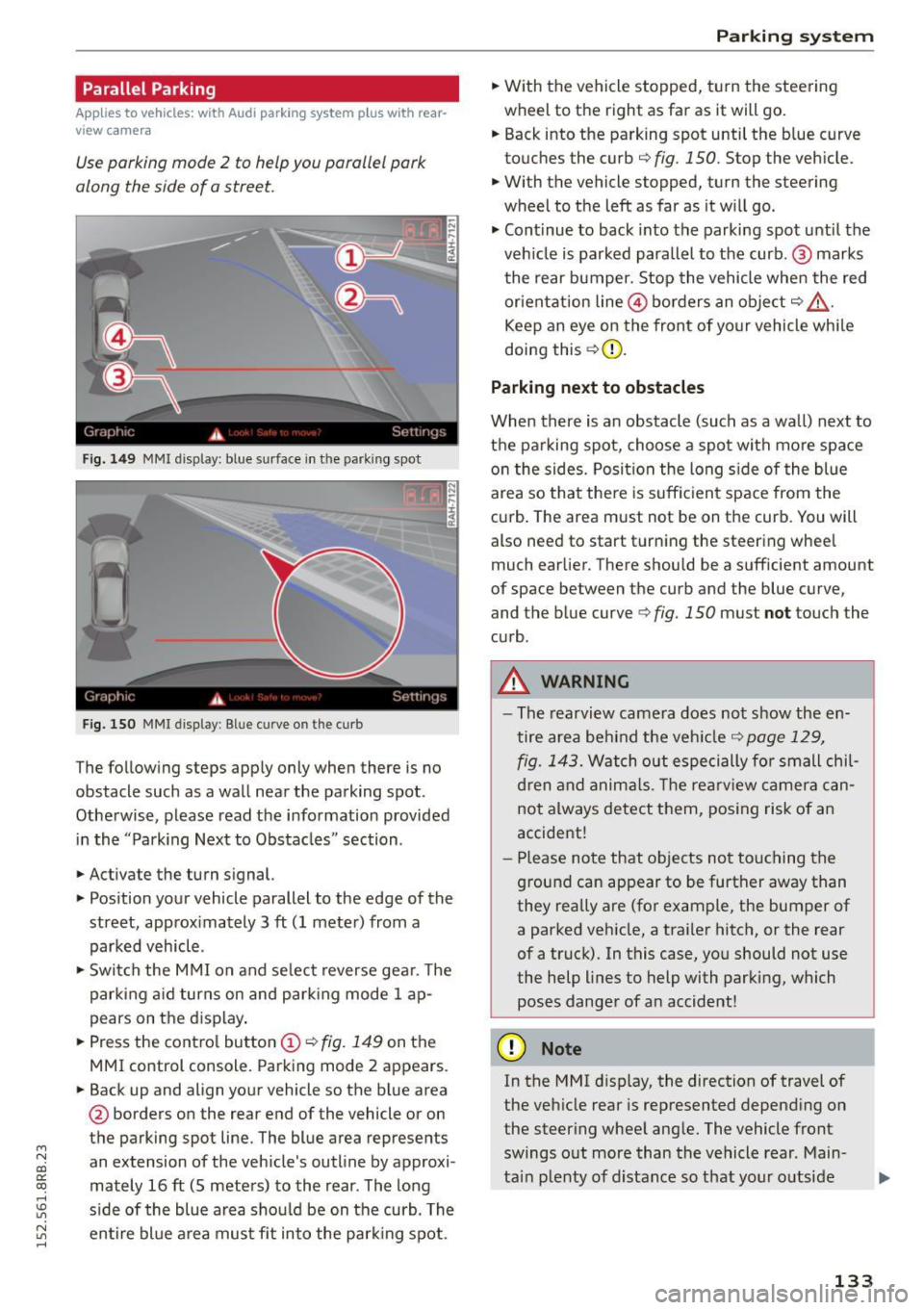
Use parking mode 2 to help you parallel pork
along the side of o street.
Fig. 149 MMI disp lay: blue surface in th e parking spot
Fig. 150 MMI display: Blue curve on th e curb
The follow ing steps app ly only when there is no
obstacle such as a wall near the parking spot.
Othe rwise, please read the informat ion provided
in the "Parking Next to Obstacles" section .
.,. Activate the turn s ignal.
.,. Position your vehicle parallel to the edge of the
street, approx imately 3 ft (1 meter) from a
parked vehicle .
.,. Swi tch the M MI on and se lect reverse gea r. T he
park ing a id turns on and park ing mode 1 ap
pears on the d isplay .
.,. Press the contro l button (!)¢
fig. 149 on the
MMI control console. Parking mode 2 appears.
.,. Back up and align your vehicle so the b lue area
@ borders on the rear end of the vehicle or on
the parking spot line. The blue area represents
an extension of the vehicle's outline by approxi
mately 16 ft (S meters) to the rear . The long
s ide of the blue area should be on the curb. The
~ entire bl ue a rea mus t fit into the par king spot .
Parking system
.,. With the vehicle stopped, t urn the steering
wheel to the right as far as it will go.
... Back into the parking spot until the b lue curve
to uches the curb
q fig. 150. Stop the vehicle.
.,. With the vehicle stopped, turn the steering
wheel to th e left as far as it w ill go .
.,. Cont inue to back into the parking spot until the
veh icle is parked para llel to the curb .@ marks
the rear bumper. Stop the vehicle when the red
or ientation line@ borders an obje ct
q .&, .
Keep an eye on the front of yo ur vehicle whi le
doing this ¢(D.
Parking next to obstacles
When there is an obstacle (such as a wall) next to
t h e pa rking spot, choose a spot with mo re space
o n the sides. Posi tion the long s ide of the blue
area so tha t the re is suff icient space from the
cu rb . T he area m ust not be on the curb. You will
also need to start t urn ing the steering wheel
much earlier. There should be a sufficient amount
of space between the curb and the blue curve
'
and the blue curve 9 fig. 150 must not touch the
c u rb .
A WARNING
-The rearvi ew camera does no t show the en
tire area be hind the veh icle
q page 129,
fig. 1 43.
Watch out especi ally for small chil
d ren and anima ls. The rearv iew camer a ca n
not always detect t hem, posing risk of a n
accident!
- Pl ease no te that objects no t to uch ing the
g round can appear to be further away than
they really are (for example, the bumper of
a parked vehicle, a traile r hitc h, or the rear
of a truck). In this case, you should not use
the help lines to help with parking, which
poses danger of an accident!
(D Note
In the MMI d isplay, the direction of travel of
the veh icle rear is represented depend ing on
the steer ing whee l ang le. The vehicle front
swings o ut more than the vehicle rear . Main
ta in plenty of d istance so that your o utside
133
Page 137 of 302

M N
co
a:
co
Driving safety
Basics
Safe driving habits
Please remember -safety first!
This chapter contains important information,
tips, instructions and warnings that you need to
read and observe for your own safety, the safety
of your passengers and others . We have summar
ized here what you need to know about safety
belts, airbags , chi ld restraints as well as child
safety. Your safety is for us
priority number 1. Al
ways observe the informat ion and warn ings in
this section - for your own safety as well as that
of your passengers .
The information in this section app lies to all
model ve rsions of your vehicle . Some of the fea
tures described in this sections may be standard
equipment on some models, or may be optional
eq uipment on others .
If you are not sure, ask
your authorized Audi dealer.
A WARNING
- Always make sure that you follow the in
struct ions and heed the WARNINGS in this
Manual. It is in your interest and in the in
terest of your passengers.
- Always keep the complete Owne r's Litera
ture in your Aud i when you lend or sell your
vehicle so that this important info rmation
will always be ava ilable to the driver and
passenge rs.
-
- Always keep the Owner's literature handy so
that you can find it easily if you have ques
tions.
Safety equipment
The safety features are part of the occupant re
straint system and work together to help reduce the risk of injury in a wide variety of accident sit
uations.
Your safety and the safety of your passenge rs
should not be left to chance. Advances in tec h-
; nology have made a var iety of fea tures available
~ to help reduce the r isk o f injury in an accident. ,....,
Dr ivin g sa fet y
The following is a list of just a few of the sa fety
features in your A udi:
- sophisticated s afety be lts fo r drive r and a ll pas-
senger seat ing pos itions,
- be lt fo rce limi ters for the front seats,
- belt pretensioners for the seats,
- be lt he ight adjustment for the front seats,
- head restra ints for each seating posit ion,
- front airbags,
- side airbags in the front seats and outer rear
seats *,
- side curtain airbags,
- specia l LATCH anchorages for child rest raints,
- adjustab le steering colum n.
These ind iv idual safety features, can work to
gether as a system to help protect you and your
passengers in a w ide range of accidents . T hese
features cannot work as a system if they are not always cor rect ly adjusted and co rrectly used.
S afet y is ev erybod y's re sponsibil it y !
Important things to do before driving
Safety is everybody 's job! Vehicle and occupant
safety always depends on the informed and care
ful driver .
For your safety and the safety of your passen
gers,
before driv ing alway s:
.,. Make s ure that all lights and signals are operat
ing correctly .
.,. Make sure that the tire pressure is correct .
.,. Make sure that all windows are clean and afford
good vis ibility to the outs ide .
.,. Secure all luggage and other items carefully
Q page 77 .
.,. Ma ke s ure that nothing can inte rfere wi th the
peda ls .
.,. Adjust front seat, head restraint and mirrors
correctly for your height.
.,. Instruct passengers to adjust the head re
straints according to the ir height.
.,. Make sure to use the r ight child restraint cor
rectly to protect ch ildren
Q page 172, Child
safety.
1 3 5
Page 138 of 302

Driving safet y
• Sit properly in your seat and make sure that
your passengers do the same
c:> poge 63,
General information .
• Fasten your safety belt and wear it properly. Al
so instruct your passengers to fasten their safe
ty be lts properly
c:> page 144 .
What impairs driving safety?
Safe driving is directly related to the condition of
the vehicle, the driver os well as the driver 's abili
ty to concentrate on the rood without being dis
tracted .
The driver is responsible for the safety of the ve
hicle and all of its occupants . If your ab ility to
drive is impaired, safety r isks for everybody in the
veh icle increase and you also become a hazard to
eve ryone else on the road
c:> .& . Therefo re:
• Do not let yourself be distracted by passengers
or by us ing a cellular te lephone .
• NEVER drive when your driv ing ability is im
paired (by medicat ions, alcohol, drugs, etc.).
• Observe all traffic laws, ru les of the road and
speed limits and pla in common sense.
• ALWAYS adjust your speed to road, traffic and
weather cond itions.
• Take frequent breaks on long trips. Do not drive
for more than two hours at a stretch .
• Do NOT drive when you are t ired, under pres
sure or when you are stressed.
A WARNING
Impaired d riving safety increases the risk of
ser ious personal inju ry and death whenever a
vehicle is being used.
136
Correct passenger
seating positions
Proper seating position for the drive r
The proper driver seating position is important
for safe, relaxed driving.
Fig. 151 Co rrect seat ing posit ion
For your own safety and to reduce the risk of in
jury in the event of an accident, we recommend
that you adjust the driver's seat to the following pos ition:
• Adjust the driver 's seat so that you can easily
push the pedals all the way to the floor while
keeping your knee(s) slightly bent
c:> & -
• Adjust the angle of the seatback so that it is in
an upright position so that your back comes in
full contact with it when you dr ive.
• Ad just the steering wheel so th at t here is a dis
tance of at least 10 inches (25 cm) between the
steer ing whee l and your breast bone
c:> fig. 151.
If not possible, see your authorized A udi dealer
about adaptive equipment.
• Adjust the steering wheel so that the steering
wheel and airbag cover points at your chest and
not at your face.
• Grasp the top of the steer ing wheel with your
elbow(s) slightly bent.
• Ad just the head rest rain t so the upper edge is
as even as possib le w ith the top of you r head .
If
that is not possib le, try to adjust the head re
straint so that it is as close to this position as
possible.
• Fasten and wear safety belts correctly
<=>page 147.
• Always keep both feet in the footwell so that
you are in control of the vehicle at all times .