2015 AUDI Q3 wheel
[x] Cancel search: wheelPage 87 of 258

M N
M N
0 ::i co ,...., \!) ..,.,
,...., ..,., ,....,
~ To upshift, push the selector lever fo rward
to the plus position
0 ~ fig. 88.
~ To downshift, push the lever to the minus
posit ion
Q .
Gea r se lection with shift paddl es*
The shift padd les are act ivated when these
l ector lever is in D/S or the tiptronic manual
shift program .
~ To upsh ift, touch the paddle on the right 0
~ fig. 89.
~ To downshift, touch the padd le on the left
Q .
~ If you do not press a shift paddle within a
short time while in the D/S position, the
transmission will return to automa tic mode .
To keep shifting using the shift paddles, move the selector lever to the right out of
the D/S position .
T he transmission automatically shifts up or
down before critical engine speed is reached .
The transmission only a llows manua l shifting
when the engine speed is within the permit
ted range .
(D Tips
-When yo u sh ift into the next lower gear,
the transmiss ion will downshift only
when there is no possibility of over-rev
v ing the engine .
- When the kick-down comes on, the
transmission will sh ift down to a lower
gear, depending on vehicle and engine
speeds.
- Tiptronic is inoperat ive when the trans
mission is in the fail-safe mode .
Kick-down
Kick-down enables maximum acceleration .
When you depress the accelerator pedal be
yond the resistance po int, the automat ic
transmission downshifts into a lower gear, de pending on vehicle speed and engine speed .
The upshift into the next higher gear takes
Automa tic tran sm iss ion 85
place once the maximum specified engine
speed is reach ed.
A WARNING
P lease note that the drive wheels can spin
if kick-down is used on a smooth slippery
road -there is a risk of skidding.
Transmission malfunction
l'!J Tran smission overh eating! Please stop
ve hicl e!
The transmission temperature has increased
s ignificantly due to the sporty driving manner.
Drive in a less sporty ma nner until the tem
perature returns to the normal range and the
indicator light switches of.
@ Note
If the transmission switches to emergency
mode, you should take the vehicle to an
a uthorized Audi dea le rship as soon as pos
sible to have the condition cor rected.
Page 89 of 258

M N
M N
0 ::i co ,...., \!) 1.1"1 ,...., 1.1"1 ,....,
Parking systems
General information
App lies to vehicles: with rea r parking sys te m /pa rk in g sys
tem plus w ith rear view camera
Depending on your vehicle's equipment, vari
ous parking a ids w ill help you when parking
and maneuvering.
The
r ea r pa rk ing sys te m is an audible parking
aid that warns you of obstacles
behind the ve
hicle
¢ page 88 .
The p ark in g syste m plus assists you when
parking by audibly and visually indicat ing ob
jects detected
in front of and behind the vehi
cle
¢ page 88.
The re ar view ca mera shows the area behind
the veh icle in the Infotainment d isplay. This
display assists you when you are c ross or par
allel parking ¢
page 89. In addition , you are
assisted by the functions from the parking
system plus
q pag e 88.
A WARNING
-Always look for traffic and check the area
around your vehicle by looking at it di
rect ly as well. The parking system cannot
replace the driver's attent ion. The driver
is always respons ible for safety during
park ing and for all other maneuvers .
- Please note that some surfaces, such as
clothing, are not detected by the system .
- Sensors and cameras have blind spots in
wh ich people and objects cannot be de
tected . Be especially cautious of children
and animals.
- The sensors can be displaced by impacts
or damage to the radiato r grille, bumper ,
wheel housing and the underbody . The
par king systems may become impaired
as a result. Have your authorized Audi
dealer or qualified workshop check their
function.
- Make su re the sensors are not covered by
stickers, deposits or any other obstruc
tions as it may impair the sensor func
tion . For information on cleaning, refer
to
¢ page 170.
Par king system s 87
@ Note
-Some objects are not detected by the
system under certain circumstances :
- Objects such as barrier chains, trailer draw bars, vertical poles or fences
- Objects above the sensors such as wall extensions
- Objects w ith specific surfaces or struc
tures such as chain link fences or pow
der snow .
- If you continue driving closer to a low -ly
ing object, it may disappear from the
sensor range. Note that you w ill no lon
ger be warned about this obstacle.
(D Tips
- T he system may provide a warning even
though there are no obstacles in the cov
erage area i n some situations, such as:
- certain road surfaces or for long grass.
- externa l ultrasonic sources e .g . from
cleaning vehicles.
- heavy rain, snow or thick vehicle ex
ha ust.
- We recommend tha t you prac tice park
ing in a traffic-free location or par king
lot to become familiar with the system.
When doing this, there should be good
light and weather cond itions.
- You can change the vo lume and pitch of
the signals as we ll as the disp lay
¢ page 93.
-Please refer to the instructions for tow
ing a trailer
¢ page 93.
-What appears in the infotainment dis
play is somewhat time-delayed .
Page 92 of 258

90 Parking systems
General information
Applies to vehicles: with park ing system p lus with rear
view camera
0
~ CX) ID
Fig. 97 Area covere d (!) and area not covered @by the
r ea r view came ra
Fig. 98 Re ar lid: Locatio n of the rear view camera
The rear view camera is located above the rear
license plate bracket . Make sure that the lens
for the parking system~
fig. 98 is not covered
by deposits or any other obstructions because
this can affect the function of the parking sys
tem. For info rmation on cleaning, refer to
¢page 170.
The rear view camera coverage area includes
@Q fig. 97. Only this area is shown in the In
fotainment display. Objects that are outside
of this area @are not displayed.
The accuracy of the orientation lines and the blue surfaces is reduced if the
Dynamic mode
is activated
~ page 79.
.&, WARNING
-Always read and follow the applicable
warnings ¢_&.
in General information on
page 87.
- If the position and the installation angle
of the rear view camera was changed, for example, after a collision, do not contin
ue to use the system for safety reasons. Have
it checked by your authorized Audi
dealership or authorized repair facility .
- Only use the rear view camera to assist
you if it shows a good, clear picture . For
example, the image may be affected by
the sun shining into the lens, dirt on the
lens or if there is a system fault.
- Use the rear view camera only if the lug
gage compartment lid is completely
closed . Make sure any objects you may
have mounted on the luggage compart
ment lid do not block the rear view cam
era.
- The camera lens enlarges and distorts
the field of vision. The object appears both altered and inaccurate on the
screen.
- In certain situations, people or objects in
the display appear closer or further
away:
- objects that do not touch the ground,
such as the bumper of a parked vehicle,
a trailer hitch or the rear of a truck . Do
not use the help lines in this case .
- If driven from a level surface onto an incline, or a downward slope .
- If driven toward protruding objects .
- If the vehicle is carrying too much load
in the rear.
(D Note
-Always read and follow the applicable
warnings ¢(I)
in General information on
page 87.
- The orange colored orientation lines in
the Infotainment display show the vehi
cle path depending on the steering
wheel angle . The front of the vehicle
front swings out more than the rear of
the vehicle . Maintain plenty of distance
so that your outside mirror or a corner of
your vehicle does not collide with any ob
stacles .
Page 93 of 258

M N M N
0 ::i co
rl I.O
"' rl
"' rl
Switching on/off
Applies to vehicles: with parking system plus with rea r
view camera
Switching on
• Shift into reverse or
• press the
p,,1, button in the center console
c:> page 89, fig . 93 . A short confirmation
tone sounds and the LED in the button turns
on.
S wi tc hing between the rear v iew came ra
a nd optical di splay
• Press the G raphic control button ®
r::!.> page 91, fig. 99 to see the optical d is
play.
• Press the
Rearvi ew con trol button to see the
rear view camera image.
Switching off
• Drive forward faster than 6 mph (10 km/h),
o r
• Press the
P,qA button, or
• Swi tch the ignition off.
@ Tips
The v isua l disp lay in t he left pa rt of the
disp lay sho uld help you detect the critical
vehicle areas.
Cross parking
Applies to vehicles: with parking system plus with rear
view camera
This view may be used when parking in a ga
rage or in a parking space.
Fig. 99 Infota inment: aiming at a park ing space
P arking systems 91
Fig. 100 Infotainment : aligning th e ve hicle
• Turn the Infotainment on and shift into re
verse gear .
• The orange colored orientation lines
(D
show the direction of travel of the vehicle.
Tu rn the steering wheel until the orange ori
entation lines appear in the parking space
c:> fig. 99. Use the ma rkings @to he lp you
estimate the distance from an obstacle.
Each marking represents about
3 ft (1 m) .
The blue area represents an extension of the
vehicle's outline by approximate ly 16 ft
(5 m) to the rear.
• Wh ile driving in reverse gear, adjust the
steering wheel angle to fit the parking space
w ith the aid of the orange or ientat ion lines
c:> ,& in General information on page 90,
c:>(D in General information on page 90. @
marks the rear bumper. Stop the veh icle
when the red orientation line © borders an
object .
Page 94 of 258
92 Park in g s ystems
Parallel parking
App lies to vehicles: with park ing system p lus with rear
view camera
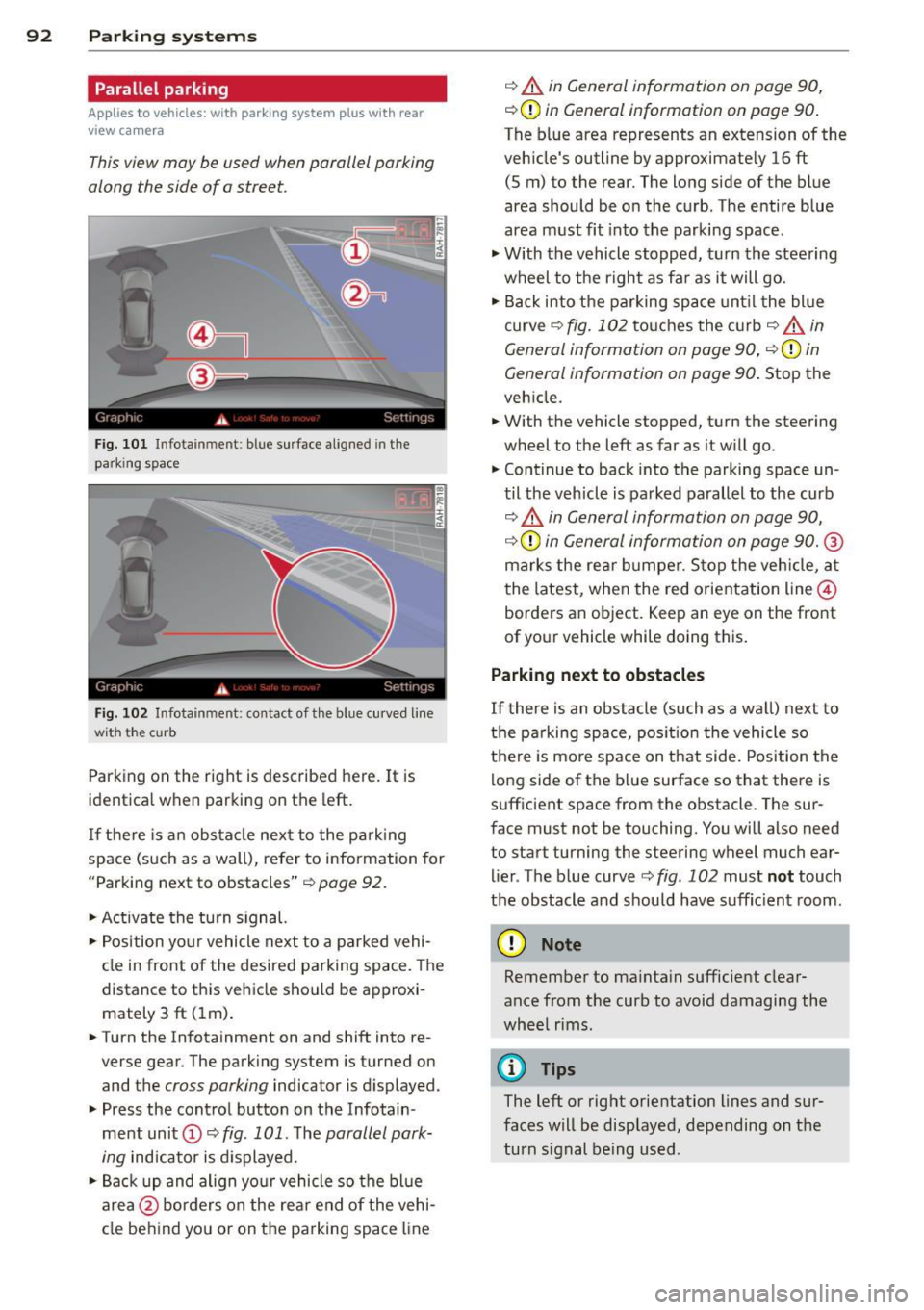
This view may be used when parallel parking
along the side of a street.
Fig. 1 01 Infotainment: blue surface aligned in the
parking space
Fig. 102 Infotainment: contact of th e blue curved line
wit h the cu rb
Parking on the right is described here. It is
identica l when parking on the left.
If there is an obs tacle nex t to the pa rk ing
space (such as a wall), refer to information for
"Parking next to obstacles" ¢
page 92.
~ Activate the turn s ignal.
~ Position yo ur vehicle next to a parked vehi
cle in front of the desired parking space. The
distance to this vehicle should be approxi
mately 3 ft (lm) .
~ Turn the Infotainment on and shift into re
verse gear. The parking system is turned on
and the
cross parking indicator is displayed.
~ Press the cont rol button on the Infotain
ment unit
(D ~ fig . 101 . The parallel park
ing
indicator is d isplayed.
~Backup and align yo ur vehicle so the bl ue
area @ borders on the rear end of the vehi
cle behind you or on the parking space line
¢ A in General information on page 90,
¢ (D in General information on page 90.
The blue area represents an extension of the
veh icle's outline by approximate ly 16 ft
(5 m) to the rear. The long side of the blue
area should be on the curb. The entire blue
area must fit into the parking space.
~ With the vehicle stopped, turn the steering
wheel to the right as fa r as it will go.
~ Back i nto the parking space unt il the blue
curve ¢
fig. 102 touches the c urb¢ A in
General information on page 90,
¢ (Din
General information on page 90. Stop the
veh icle .
~ With the vehicle stopped, turn the steering
wheel to the left as far as it w ill go.
~ Continue to back into the parking space un
til the veh icle is parked parallel to the curb
¢ A in General information on page 90,
¢ (Din General information on page 90. ®
marks the rea r bumper. Stop the veh icle, a t
the latest, when the red orientation line@
borders an object. Keep an eye on the front
of your vehicle while doing this .
Parking next to obstacles
If
there is an obstacle (such as a wa ll) next to
the pa rking space, pos ition the vehicle so
there is mo re space on that side. Position the
long side of the blue surface so that there is
sufficient space from the obstacle. The sur
face must not be touching. You will also need
to start turning the steering wheel much ear
lier . The blue curve ¢
fig. 102 must not touch
the obstacle and should have suffic ient room.
(D Note
Remember to ma inta in sufficient clear
ance from the curb to avoid damaging the
whee l rims .
(D Tips
The left or right orientation lines and sur
faces will be displayed, depending on the
turn s ignal being used .
Page 97 of 258

M N M N
0 ::i co
rl I.O
"' rl
"' rl
.. Sit properly in your seat and make sure that
your passengers do the same¢
page 51,
Front seats .
.. Fasten your safety belt and wear it properly.
Also instruct your passengers to fasten their
safety belts properly¢
page 104 .
What impairs driving safety?
Safe driving is directly related to the condi
tion of the vehicle , the driver as well as the
driver's ability to concentrate on the road
without being distracted .
The driver is responsible for the safety of the
vehicle and all of its occupants. If your ability
to drive is impaired, safety r isks for everybody
in the vehicle increase and you a lso become a
hazard to everyone else on the road
~ .&_.
Therefo re:
.. Do not let yourself be dist racted by passen
gers or by using a cellular telephone .
.. NEVER drive when yo ur driving ability is im
paired (by medicat ions, alcohol, drugs, etc.).
.. Observe all traffic laws, rules of the road
and speed limits and plain common sense .
.. ALWAYS adjust your speed to road, traffic
and weather conditions .
.,. Take frequent breaks on long trips. Do not
drive for more than two hours at a stretch.
.. Do NOT drive when you are t ired, under
pressure or when you are stressed .
& WARNING
Impaired driving safety increases the risk
of serious personal injury and death when
ever a vehicle is being used.
Driving Safely 95
Proper occupant
seating positions
Proper seating position for the driver
The proper driver seating position is impor
tant for safe, relaxed driving.
Fig. 103 Correct seat ing pos it ion
For your own safety and to reduce the risk of
injury in the event of an accident, we recom
mend that you adjust the driver's seat to the
follow ing pos ition:
.. Adjust the driver's seat so that you can easi
ly push the pedals all the way to the floor
wh ile keeping your knee(s) slightly bent
¢&_ .
.. Adjust the angle of the seatback so that it is
in an upr ight position so that your back
comes in full contact w ith it when you drive.
.. Adjust the steering wheel so that th ere is a
distance of at least 10 inches (25 cm) be
tween the steering wheel and yo ur breast
bone ~
fig. 103. If not possible, see your au
thorized Audi dealer about adaptive equip
ment.
.. Adjust the steering wheel so that the steer
ing wheel and airbag cover points at your
chest and not at your face .
.,. Grasp the top of the steer ing whee l with
your elbow(s) slightly bent .
.. Adjust the head rest raint so the upper edge
is as even as possible with the top of your
head. If that is not poss ible, try to adjust
the head restraint so that it is as close to
this position as possible.
.. Fasten and wear safety belts correctly
¢page 107.
Page 98 of 258

96 Driving Safely
• Always keep both feet in the footwell so
that you are in control of the vehicle at all
times.
For detailed information on how to adjust the
driver's seat, see
¢ page 51.
A WARNING
Drivers who are unbelted, out of position
or too close to the airbag can be seriously
injured by an airbag as it unfolds. To help
reduce the risk of serious personal injury:
- Always adjust the driver's seat and the
steering wheel so that there are at least
10 inches (25 cm) between your breast
bone and the steering wheel.
- Always hold the steering wheel on the
outside of the steering wheel rim with
your hands at the 9 o'clock and 3 o'clock positions to help reduce the risk of per
sonal injury if the driver's airbag inflates.
- Never hold the steering wheel at the
12 o'clock position or with your hands at
other positions inside the steering wheel
rim or on the steering wheel hub. Hold
ing the steering wheel the wrong way
can cause serious injuries to the hands,
arms and head if the driver's airbag de
ploys.
- Pointing the steering wheel toward your
face decreases the ability of the supple
mental driver's airbag to protect you in a
collision.
- Always sit in an upright position and nev
er lean against or place any part of your
body too close to the area where the air
bags are located.
- Before driving, always adjust the front
seats and head restraints properly and
make sure that all passengers are prop
erly restrained.
- Never adjust the seats while the vehicle
is moving . Your seat may move unexpect
edly and you could lose control of the ve
hicle.
- Never drive with the backrest reclined or
tilted far back! The farther the backrests
are tilted back, the greater the risk of in- jury due to incorrect positioning of the
safety belt and improper seating posi
tion.
- Children must always ride in child safety
seats ¢
page 133. Special precautions
apply when installing a child safety seat
on the front passenger seat¢
page 112.
Proper seating position for the front
passenger
The proper front passenger seating position
is important for safe, relaxed driving .
For your own safety and to reduce the risk of
injury in the event of an accident, we recom
mend that you adjust the seat for the front
passenger to the following position :
• Adjust the angle of the seatback so that it is
in an upright position and your back comes
in full contact with it whenever the vehicle is
moving .
• Adjust the head restraint so the upper edge
is as even as possible with the top of your
head. If that is not possible, try to adjust
the head restraint so that it is as close to
this position as possible ¢
page 52.
• Keep both feet flat on the floor in front of
the front passenger seat .
• Fasten and wear safety belts correctly
¢page 107.
For detailed information on how to adjust the
front passenger's seat, see
¢ page 51.
A WARNING
-Front seat passengers who are unbelted,
out of position or too close to the airbag
can be seriously injured or killed by the air
bag as it unfolds. To help reduce the risk of
serious personal injury:
- Passengers must always sit in an upright
position and never lean against or place
any part of their body too close to the
area where the airbags are located.
- Passengers who are unbelted, out of po
sition or too close to the airbag can be
seriously injured by an airbag as it
Page 108 of 258

106 Safety belts
occupant will slam violently into the steering
wheel, instrument panel, windshield, or what
ever else is in the way
c::> fig. 109. This imp act
with the vehicle interior has all the energy
t hey had just before the crash.
Never rely on a irbags alone for protection.
Even when they deploy, airbags provide only
additional protection. Airbags are not sup
posed to deploy in all kinds of accidents. Al
though your Audi is equipped with airbags, all
vehicle occupants, including the driver , must
wear safety belts correctly in order to mini
mize the risk of severe injury or death in a
crash.
Remember too, that airbags will deploy only
once and that your safety belts are always
there to offer protection in those accidents in
which airbags are not supposed to deploy or
when they have already deployed . Unbelted
occupants can also be thrown out of the vehi
cle where even more severe or fatal injuries
can occur.
It is also important for the rear passengers to
wear safety belts correctly. Unbelted passen
gers in the rear seats endanger not only them
selves but also the driver and othe r passen
gers ~
fig. 110. In a frontal collision they will
be thrown forward violently, where they can
hit and injure the driver and/or front seat pas
senger .
Safety belts protect
People think it's possible to use the hands to
brace the body in a minor collision . It's simply
not true !
Fig. 111 Driver is co rr ect ly re strain ed in a sudd en brak
ing maneuve r
Safety belts used properly can make a big dif
ference. Safety belts help to keep passengers
in their seats, gradually reduce energy levels
applied to the body in an accident, and help
prevent the uncontrolled movement tha t can
cause serious injuries . In addition, safety belts
reduce the danger of being thrown out of the
vehicle .
Safety belts attach passengers to the car and
give them the benefit of being slowed down
more gently or "softly" through the "give" in
the safety belts, crush zones and other safety
features engineered into today's vehicles. By
"absorbing " the kinetic energy over a longer
period of ti me, the safety belts make the
forces on the body more "tolerable" and less
likely to cause injury.
Although these examples are based on a fron
tal collision, safety belts can also substantial
ly reduce the r isk of injury in other kinds of
crashes. So, whether you're on a long trip or
just going to the corner store, always buckle up and make sure others do, too. Accident sta
tistics show that vehicle occupants properly
wearing safety belts have a lower risk of being
injured and a much better chance of surviving
an accident. Properly using safety belts also
greatly increases the ability of the supplemen
tal airbags to do their job in a collision . For
this reason, wearing a safety belt is legally re
quired in most countries including much of
the United States and Canada.
Although your Audi is equipped with airbags,
you still have to wear the safety belts provid
ed. Front airbags , for example, are activated
only in some frontal collisions. The front air
bags are not activated in all frontal collisions,
in side and rear collisions, in roll overs or in
cases where there is no t enough decelera tion
through impact to the front of the vehicle .
The same goes for the other airbag systems in
your Audi . So, always wear your safety belt
and make sure everybody in your vehicle is
properly restrained!