2015 AUDI Q3 key battery
[x] Cancel search: key batteryPage 15 of 258
M N
M N
0 ::i co ,...., \!) 1.1'1 ,...., 1.1'1 ,....,
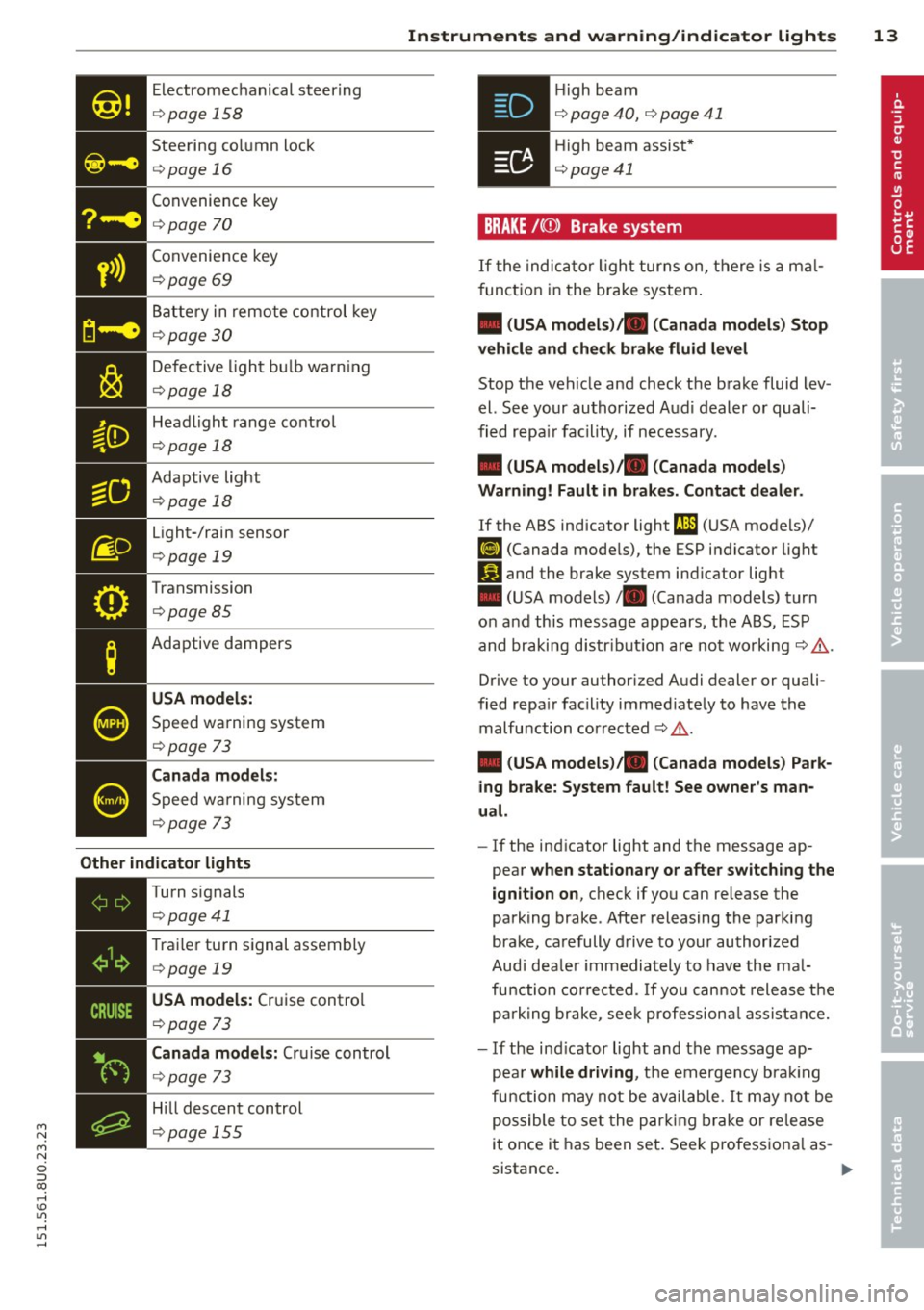
Electromechanical steering
¢page 158
Steering column lock
¢page 16
Convenience key
¢page 70
• Convenience
key ¢page 69
Battery in remote control key
¢ page 30
Defective light bulb warn ing
¢ page 18
Headlight range control
¢page 18
- Adaptive light
- ¢page18
Light-/rain sensor
¢ page 19
Transmission
¢page 85
Adaptive dampers
USA models:
Speed warning system
¢page 73
Canada models:
Speed wa rning system
¢page 73
Other indicator lights
•iii
Turn
signals
¢ page41
• T
rai ler turn signal assembly ¢ page 19
• USA models:
Cruise control
¢
page 73
Canada models: Cruise control
¢page 73
Hill descent control
¢page 155
Instruments and warning/indicator lights 13
.Hi gh beam
• ¢ page 40, ¢ page 41
• High beam assist*
¢page41
BRAKE /((D ) Brake system
If the indicator light turns on, there is a mal
function in the brake system.
• (USA models)/ . (Canada models) Stop
vehicle and check brake fluid level
Stop the veh icle and check the brake fluid lev
el. See your authorized Aud i dealer or quali
fied repa ir facility, if necessary.
• (USA models)/ . (Canada models)
Warning! Fault in brakes. Contact dealer .
If the ABS indicator light t1l1 (USA models)/
fiJ (Canada models), the ESP indicator light
Iii and the brake system ind icator light
• (USA models)/ . (Canada models) turn
on and this message appears, t he ABS, ESP
and braking distr ibution are not working¢&.
Drive to your authorized Audi dealer or quali
fied repa ir facility immed iately to have the
malfunction corrected ¢ & .
• (USA models)/ . (Canada models) Park
ing brake: System fault! See owner's man
ual.
- If the indicator light and the message ap
pear
when stationary or after switching the
ignition on,
check if you can release the
park ing brake . After releasing the parking
brake, carefully drive to your author ized
Audi dea le r im mediately to have the mal
function corrected. If you can not release the
park ing brake , seek professional assistance.
- If the ind icator light and the message ap
pea r
while driving , the emergency brak ing
function may not be available. It may not be
possible to set the parking brake or release
it once it has been set. Seek pro fessiona l as-
sistance. .,.
Page 32 of 258

30 Opening and clo sing
@ Tips
- The operation of the remote contro l key
can be temporarily disrupted by interfer
ence from transmitters in the vicinity of
the veh icle work ing in the same frequen
cy range (e.g. a cell phone, radio equip
ment) .
- For security reasons, replacement keys
are on ly available from author ized Audi
dealer .
- For Decla ration of Compliance to United
States FCC a nd Industry Canada regula
t ions
9 page 24 0.
Check light and battery in remote
master key
Fig . 18 Remote co nt rol key : LE D
Fi g. 19 Remote co ntrol key: Open in g the cove r
LED in the remote cont rol key
The LED 9 fig . 18 can tell you about the func
tion of the remote contro l key .
.. If you press a button q uickl y, the LED blinks
once.
1> If you press a button longer, the LED blinks
several times .
.. If the L ED does not blink, the remote con
tro l key battery is dead. The message
Ill
Plea se change key battery can also appear in
the instrument cluster display . Rep lace
the batte ry .
Replacing the remote control key battery
.. Pry apart the base @and the cover @ care
fu lly with a coin~
fig. 19.
.,. Remove the cove r (ar row) .
.. Insert the new battery with the" +" facing
up.
.. Press the cove r back onto the key until it
clicks into p lace.
We recommend having the battery rep laced
by an a uthorized Audi dea ler or qua lified re
pair facility .
$ For the sake of the environment
Dispose of dead batteries prope rly so as
not to poll ute the environment.
(D Tips
The rep lacemen t battery mus t be the
same spec ification as the origina l.
Resetting the remote control
The remote control must be reset if the vehi
cle does not unlock .
.. Press the unlock b utton @on the re mote
contro l.
.. Man ually un lock the dr iver's door loc k with
the ignition key w ith in 30 seconds .
.. Press either the lock-~ or the unlock @ but
ton to complete the reset seq uence.
Locking and unlocking the vehicle with
the remote control
Fig . 20 Remote maste r key: funct ion butto ns
Page 38 of 258

36 Opening and clo sing
The a utomatic closi ng process begins if you
push down on the rear lid.
.&_ WARNING
- Never close the rear lid inatten tively or
without checking first. Although the closing force of the rear lid is limited,
you can st ill ser iously injure yourself or
others .
- Always ensure that no one is w ith in
range of the rear lid when it is mov ing, in
part icu la r close to the h inges and the up
per and lowe r edges -fingers or hands
can be pin ched.
- To help p revent po isonous exha ust gas
from bei ng drawn into the vehicle, al
ways keep the rear lid closed while driv ing. Never transport objects large r than
those which fit completely into the l ug
gage area, because then the rear lid can
not be fully closed.
- Never leave yo ur vehicle u nattended es
pecially with the rear lid left open . A
child could crawl into the car through the
luggage compa rtment and pull the lid
shut, becom ing trapped and unable to
get out . To reduce the risk of persona l in
jury, never let ch ildren play in or around
yo ur vehicle . A lways keep the rear lid as
we ll as the vehicle doo rs closed when not
in use.
- If there i s a luggage ra ck or b icycle ra ck
mounted on the rear l id, it may not be
able to open comple tely or an opened
rear lid may close by itself beca use of the
added weight. So the ope n rear lid must
be s upported or the weight m ust be re
moved from the luggage rack first .
@ Tips
-When the vehicle is locked, the rear lid
can be un locked sepa rately by pressing
the button
c:s on the master key. W hen
t h e rear lid is closed aga in, it locks auto
matically.
- The following applies to veh icles equip
ped with the conven ience key* feature: if
the remote control key is left in the lug- gage compa
rtment, luggage compart
ment wi ll automatically unlock itself af
ter yo u lock the vehicle. T his prevents
you from unintentionally lock ing your
key in the l uggage compartment.
- If the vehicle battery charge drops be
low a certain level, you can still open or
close the rear lid manua lly, however , you
w ill need to app ly more force to close it .
Rear lid emergency release
Fig. 2 9 Rear lid o penin g: a cces s to t he e mergency re
lea se
The rea r lid can be rel eas ed in an emergency
from inside the luggage compa rtment.
., Remove the cover from t he luggage com
pa rtment lid with the ignit ion key .
., Press the leve r in the di rection of the arrow
w ith the ign ition key until the luggage com
pa rtment lid releases.
Child safety Locks
Child safety locks in the rear doors
The child saf ety locks© prevent the rear
doors from opening from the inside.
Fi g. 30 Rear doo rs : chi ld safe ty lo ck
Page 40 of 258

38 Opening and closing
Convenience opening feature
.,. Insert the key into the lock of the driver 's
door .
.,. Turn the key to position
c::> fig. 32@ until all
the windows have reached the desired posi
tion and the sunroof is open.
Convenience closing feature
.,. Turn the key in the lock of the driver's doo r
to the lock position @ until the windows
and the power sunroof are closed
c::> A.
For vehicles w ith pano rama sunroof*: When
you open or close the panorama sunroof*, the
power sunshade will also open or close.
~ WARNING
- Never close the windows and the power
sunroof inattentively and without check
ing -there is risk of injury.
- You must always watch when the win
dows are being ra ised so that no one can
be trapped. If you release the key, the
closing action is immed iately canceled .
- Always read and heed WARNING
c::, &. in
General description on page 28 .
Correcting power window malfunctions
After disconnecting the vehicle battery , the
one-touch up and down feature must be acti
vated again.
.,. Pull the power window switch until the win
dow is comp lete ly raised .
.,. Re lease the switch and pull it again for at
least one second.
.,. Press and hold the electric window sw itch
until the window is fully open .
.,. Re lease the switch and then press it again
for at least one second. You shou ld now be
able to close the window in the usual way.
Panorama sunroof
Description
Fig. 33 Section of h eadliner: Pan orama s unroof button
The button has two stages. In the second
stage, the roof automat ically runs to the end
pos ition (open/closed) when the button is op
erated br iefly. The movement can be stopped
by pressing the button .
@ Tilting and sliding
.,. To t ilt the sunroof completely, press the
sw itch briefly to the second level.
.,. To close the roof completely, pull the switch
down briefly to the second level or slide the
switch forward briefly to the second level
c::, A-
.. To set an intermed iate posi tion, press/pu ll
the switch until the roof reaches the desired
position.
@ Opening and closing
.,. To open the sunroof completely, slide the
switch back to just before the second level.
.,. To close the roof completely , push the
switch forward briefly to the second level o r
pull the switch down briefly to the second
level
c::> A .
.,. To set an intermediate position, press/pu ll
the switch until the roof reaches the desired
position .
© Opening and closing the sunshade
.,. To open the sunshade complete ly, briefly
press the right button .
.. To close the sunshade completely, briefly
press the left button .
Page 71 of 258

M N M N
0 ::i co
rl I.O
"' ,....,
"' rl
@ Tips
-After starting a cold engine, there may
be a brief period of increased noise be
cause the oil pressure must first build up
i n the hydraulic valve adjusters . This is
norma l and not a cause for concern .
Switching engine off
Applies to vehicles: with conven ience key
• Bring your veh icle to a complete stop .
• Move the selecto r lever to the P or N posi
t ion.
• Press the
!S TA RT ENGINE S TO PI button
~ pag e 68, fig. 75.
Steering lock
The steering locks when you turn the engine
off us ing the
I START ENGIN E STOP I button
and ope n the dr iver 's door. The locked stee r
i n g helps preven t vehicle theft.
Emergenc y Off functi on
If necessary in an emergency, the engine can
be sw itched off while the vehicle is st ill mov
ing. Press the
I S TAR T ENG IN E ST OPI button
tw ice in quick succession or ho ld it in for lon
ger than two seconds .
_& WARNING
-Never t urn off the engine before the ve
h icle has come to a complete stop . The
full function of the brake booster and the power steering is not guaranteed. You
must use more force to turn or brake if
necessary . Because you cannot steer and
brake as you usually would, this could
lead to crashes and serious injur ies .
- For safety reasons, you should always
park your vehicle with the se lector lever
in P. Otherwise, the ve hicl e co uld inad
vertent ly roll away.
- The rad iator fan can continue to run for
up to 10 min utes even after you have
t urned off the eng ine and removed the
ignition key . The radiator fan can also
turn on again if the engine coolant heats
On th e road 69
up because of intense sunlight or heat
bui ld-up in the engine compartment.
- Always take the key with you whenever
you leave your vehicle. Otherwise, the
engine could be started or electrical
equipment such as the power windows
could be operated . This can lead to seri
ous injury.
(D Note
If the engine has been under heavy load
for an extended period, heat bu ilds up in
the eng ine compartment after the engi ne
i s sw itched off - there is a r isk of damag ing
the engine . A llow the engine to run at idle
for about two minutes before switching it
off .
Starting the engine after a malfunction
Applies to vehicles: wit h convenience key
If the remote control key battery is exhausted
or if radio interference or a system malfunc
tion o ccurs, extra steps may be necessary in
order to start the engine .
Fig. 76 Steer ing co lumn/remote contro l key : Start ing
t he en gi ne a fter a m alfu ncti on
Requ irement: The message No k ey identifi ed.
S ee owner' s manu al.
must be displayed and
the indicator lamp
m must be lit .
• Ho ld the remote control key vertically
aga inst the symbol
y >l) ~ fig . 76.
• Press the b rake pedal ~.&.
in Starting the
engin e on page 68 .
• Press the ~ I s =T -A -R =T ~ E= N~ G~IN ~ E-s=T -O ~ P~I button. The
eng ine shou ld start.
• Drive to a qualified workshop soon and h ave
the faul t rectified. .-
Page 72 of 258

70 On the road
@ Tips
You ca n call up the dr iver message aga in
by pressi ng the
!ST ART ENGINE STOPI but
ton.
Driver messages
Turn off ignition. Battery discha rging
T his message appears and a war ning tone
sounds if yo u open the dr iver's door when the
ignit io n is switched on.
Press brakepedal to start engine .
This message appears if you do not press t he
b rake pedal to start the engine in a vehicle
with a n automatic t ransmission .
Please engage N or P .
This message appears if you try to start or
switch off the eng ine when the selector lever
is not i n Nor P. The eng ine can then not be
started or sw itched off.
fll Is key in the vehicle?
If t h e in dicator lamp lights up and the mes
sage appears, the convenience key* was re
moved from the vehicle while the e ngine was
runni ng .
If the convenience key is not in the
ve hicle you will not be able to switch on the
ignit io n or restart the engine after it has been
switched off . You w ill also not be ab le to l ock
the veh icle from the outside .
Shift to P, vehicle can roll away . Doors can
only be locked in P.
F or safety reasons , this messa ge will ap pear
together with a wa rning tone if t he se lector
l eve r is not in position P when you switch off
the ign ition. Put the selector lever in posi
tion P; otherw ise the vehicle can roll away and
cannot be locked .
II No key identified. See owner's manual.
If the indi cator lamp lights up and the mes
sage ap pears, a malfunct ion has occ urred
c:::> poge 69.
Electromechanical
parking brake
Operation
The ele ctrome chani cal parking brake replace s
t he hand broke.
Fi g. 77 Center co nsole: pa rk in g b rake
.,. Pull the(®) switch@ c:::> fig. 77 to app ly the
parking brake. The indicator lights . in the
sw itch and . (USA models)/ . (Canada
models) in the instrument cluster illumi
nate.
.,. To releas e th e pa rking bra ke, pr ess the bra ke
or ac celera to r peda l with t he igni tion
sw itche d on and simu ltaneously p ress the
sw itch (®) . Th e in d ic ator lig hts . in the
sw itch and . (USA models)/ . (Canada
mo dels) in the instr ument cluster go out.
Your ve hicle is equipped wi th a n ele ctro me
ch anical parking brake. The parkin g bra ke is
designe d to prevent the ve hicle from rolling
u nintentionally and replaces the hand b rake.
In ad diti on to the normal fu nctions o f a tra d i
tio na l han d brake, the e lectromechanical
parking brake provi des vario us convenience
and safety f unct ions .
When starting from rest
- The integral s tart ing as sist help s you when
d riving by au toma tically re leasi ng the pa rk
ing brake
c:::> poge 71, S tarting from res t.
- W he n star ting o n incl ines, t he s tar tin g as
sis t p reven ts the vehicle from uni nte ntion al
ly ro lling back . The braking force of the
parking brake is not re leased unt il suffic ient
driving force has been bui lt up at the
wheels .
Page 80 of 258
78 Audi side assist
- Side assist is not active wh ile you are
making the adjus tment.
- Your settings are automatically sto red
and ass igned to the remote control key
being used.
Driver messages
App lies to vehicles: with Audi side assist
If s ide ass ist switches off by itse lf, t he LED in
the butto n tur ns off a nd a message will ap
pear in t he instr ume nt cl uster d is p lay:
Audi side assist: Unavailable. Sen sor view
The radar sensors' vision is affected. Do not
c o ver the area in fr ont of the senso rs with bike
wheels, stickers, dirt or other objects. Clean
the area in front of the sensors, if necessary
c::;, page 76, fig . 82.
Audi side as sist: Unavailable.
Side assist cannot be switched on tempo rari ly
beca use there is a malfunctio n (for example,
the battery charge leve l may be too low).
Aud i side assist: System fault!
The system ca nnot guara ntee that it w ill de
tect ve hicles co rrectly a nd it is switched off .
The sensors have been displaced or are faulty.
H ave the system checked by an authorized
Aud i dea le r or aut horized Aud i Service Fac ility
soon .
Audi side assist: Unavailable when
towing.
Side assist sw itches off automatically whe n a
factory -insta lled trailer hitch is connected to
the ele ct rical connector on t he trailer . There is
n o guara ntee the system will switc h off whe n
usi ng a retrofit ted traile r hi tch . D o not use
si de assis t whe n towing a trailer .
Page 245 of 258

M N
M N
0 ::i co ,...., \!) ..,.,
,...., ..,., ,....,
Selector lever ...................... 81
Selector lever emergency release . . . . . . 86
Automatic wipers .......... .... .. .... 46
Auto Safety Hotline ........ .. .. .. .. . 101
Average speed . . . . . . . . . . . . . . . . . . . . . . . 22
Avoid damaging the vehicle ...... ... .. 161
B
Bass box .. .. ............. .... .. .. . 217
Battery . . . . . . . . . . . . . . . . . . . . . . . 15, 190
Battery location inside the luggage com-
partment .. .. ........... .. .. .. ... 190
Charging . .. ............. .... .. ... 192
Important warnings when working on
the battery . ................ ... ... 190
Jump starting .... .. ...... .. .. .. .. . 228
Low ... .. .. .. ... .. ..... ... .. .. .. . 159
Replacing the battery ..... .. .. .. .. . 193
State of charge . . . . . . . . . . . . . . . . . . . . 159
Winter operation ............ ... .. . 190
Working on the battery ....... ... .. . 190
Before driving . . . . . . . . . . . . . . . . . . . . . . . 94
Blended gasoline .......... .... .. .. . 17 5
Blower (automatic climate control) . . . . . . 65
Booster seats ................ ... ... 141
Brake fluid Changing the brake fluid ... .. .. .. .. . 189
Checking the brake fluid level . .. .. .. . 189
Reservoir .. ... ... .... ... .. .. .. .. . 189
What is the correct brake fluid level? .. 189
What should I do if the brake fluid warn-
ing light comes on? ....... .. .. .. .. . 189
Brake system . . . . . . . . . . . . . . . . . . . . . . . 189
Brake assist system . . . . . . . . . . . . . . . . 153
Brake fluid ........... ...... .... .. 189
Brake fluid specifications for refill and re-
placement . ............. .... .. .. . 189
Brake light defective ...... .. .. .. .. .. 18
Brake power assist unit ...... .. .. .. . 156
Brakes ..... .. ................ .... 156
Electromechanical parking brake .. .. .. 70
General information ......... ... .. . 156
Warning/indicator lights ..... .. .. .. .. 13
Worn brake pads symbol . . . . . . . . . . . . . 17
Braking Emergency braking function . . . . . . . . . . 72
Starting on inclines . . . . . . . . . . . . . . . . . 72
Index 243
Break-in period . ..... ............... 161
Tires 161
Bul bs ........ .. .. ................. 226
C
California Proposition 65 Warning ... .. 180
Battery specific .................. . 191
Capacities .. .. .. .. ............... .. 235
Caps for wheel bolts, removing ...... .. 220
Carbon parts Cleaning . . . . . . . . . . . . . . . . . . . . 172, 173
Care ....... .. .. .. ................. 170
Cargo area
refer to Loading the luggage compart-
ment ....... .. .... ............... 100
Catalytic converter ................. . 161
Center armrest Adjusting . .. .. .. .. ............... . 51
Storage compartment . ...... ..... .. . 51
Central locking . ..... ................ 28
Central locking switch ............... 32
Convenience key . . . . . . . . . . . . . . . . . . . . 31
Remote control key . . . . . . . . . . . . . . . . . 30
Certification . . . . . . . . . . . . . . . . . . . . . . . 240
Changing a flat tire ... . .. .. .. .... .... 218
Changing a wheel ...... ............. 218
Changing engine oil .. ........... .... 185
Checking Engine coolant level ............... . 186
Checking tire pressure .............. . 201
Child restraints
Danger of using child restraints in the
front seat . . . . . . . . . . . . . . . . . . . . . . . . 114
System anchors .. .. .............. . 146
Where can I get additional information
about child restraints and their use? .. 151
Child safety ... .. ...... ........... .. 133
Convertible locking retractor ........ . 143
Important safety instructions for using
child safety seats ... .............. . 136
Important things to know when driving
with children .. .. ............... .. 133
Installing a child restraint using the
LATCH system . . . . . . . . . . . . . . . . . . . . . 148
Mounting and releasing the anchorage
hook ... .. .. .. .. .. . ....... ..... .. 148
•
•