2014 YAMAHA TRICITY fuel
[x] Cancel search: fuelPage 6 of 84

TABLE OF CONTENTSSAFETY INFORMATION.................. 1-1
Further safe-riding points ............... 1-5
DESCRIPTION .................................. 2-1
Left view ......................................... 2-1
Right view ....................................... 2-2
Controls and instruments ............... 2-3
INSTRUMENT AND CONTROL
FUNCTIONS ...................................... 3-1
Main switch/steering lock............... 3-1
Keyhole shutter .............................. 3-2
Indicator lights and warning lights............................................ 3-2
Self-diagnosis device ..................... 3-3
Multi-function meter unit ................ 3-4
Handlebar switches ........................ 3-8
Front brake lever ............................ 3-8
Rear brake lever ............................. 3-9
Fuel tank cap .................................. 3-9
Fuel ............................................... 3-10
Catalytic converter ....................... 3-11
Seat .............................................. 3-12
Passenger footrest ....................... 3-13
Storage compartment .................. 3-13
Luggage hook............................... 3-14
Sidestand ..................................... 3-14
Ignition circuit cut-off system ....... 3-15
Auxiliary DC connector ................. 3-17 FOR YOUR SAFETY –
PRE-OPERATION CHECKS
............. 4-1
OPERATION AND IMPORTANT
RIDING POINTS ................................ 5-1
Starting the engine .......................... 5-1
Starting off ...................................... 5-2
Acceleration and deceleration ........ 5-2
Braking ............................................ 5-3
Tips for reducing fuel consumption ................................ 5-3
Engine break-in ............................... 5-3
Parking ............................................ 5-4
PERIODIC MAINTENANCE AND
ADJUSTMENT ................................... 6-1
Owner’s tool kit ............................... 6-2
Periodic maintenance chart for the
emission control system .............. 6-3
General maintenance and
lubrication chart ........................... 6-4
Removing and installing the panel ............................................ 6-8
Checking the spark plug ................. 6-8
Engine oil and oil strainer .............. 6-10
Final transmission oil..................... 6-12
Coolant.......................................... 6-13
Air filter and V-belt case air filter elements .................................... 6-14
Checking the throttle grip free play ............................................ 6-16 Valve clearance............................. 6-16
Tires .............................................. 6-17
Cast wheels .................................. 6-18
Checking the front brake lever
free play..................................... 6-19
Checking the rear brake lever free play..................................... 6-19
Checking the front and rear
brake pads ................................ 6-20
Checking the brake fluid level ...... 6-20
Changing the brake fluid .............. 6-22
Checking and lubricating the cables ........................................ 6-22
Checking and lubricating the
throttle grip and cable ............... 6-22
Lubricating the front and rear brake levers ............................... 6-23
Checking and lubricating the centerstand and sidestand........ 6-23
Checking the front fork ................. 6-24
Checking the steering................... 6-25
Checking the wheel bearings ....... 6-25
Checking the steering tie rod ....... 6-25
Checking the leaning system ....... 6-26
Battery .......................................... 6-26
Replacing the fuses ...................... 6-27
Replacing the headlight bulb ........ 6-29
Tail/brake light .............................. 6-30
Turn signal light bulb .................... 6-30
Auxiliary light ................................ 6-30
Troubleshooting............................ 6-31U2CME0E0.book Page 1 Friday, May 2, 2014 2:55 PM
Page 15 of 84

DESCRIPTION
2-2
2
EAU10421
Right view
1
3
4,5
6
2
8
7
1. Owner’s tool kit (page 6-2)
2. Passenger footrest (page 3-13)
3. Fuel tank cap (page 3-9)
4. Main fuse (page 6-27)
5. Fuse box (page 6-27)
6. Battery (page 6-26)
7. Spark plug (page 6-8)
8. Engine oil filler cap (page 6-10)
U2CME0E0.book Page 2 Friday, May 2, 2014 2:55 PM
Page 20 of 84

INSTRUMENT AND CONTROL FUNCTIONS
3-4
3
EAUU1730
Multi-function meter unit
WARNING
EWA12423
Be sure to stop the vehicle before
makin g any settin g chan ges to the
multi-function meter unit. Chan gin g settin
gs while ri din g can d istract the
operator an d increase the risk of an
acci dent.
The multi-function meter unit is
equipped with the following:
a speedometer
a fuel meter
a clock
an outside air temperature display
an odometer
two tripmeters
a fuel reserve tripmeter
an oil change tripmeter
a V-belt replacement tripmeter
an oil change indicator
a V-belt replacement indicatorTIPBe sure to turn the key to “ON” be-
fore using the “SELECT” and “RE-
SET” buttons.
For the UK only: To switch the
speedometer and odometer/trip-
meter displays between kilome-
ters and miles, press the
“SELECT” button for at least one
second.
If the coolant temperature warning
light and engine trouble warning
light remain on during the initial
display mode, have the battery
charged by a Yamaha dealer.
Speed ometer
The speedometer shows the vehicle’s
traveling speed.
1. Clock
2. “SELECT” button
3. Fuel level warning indicator “ ”
4. Fuel meter
5. Speedometer
6. “RESET” button
7. Outside air temperature display
8. Odometer/tripmeters
9. Oil change indicator “OIL CHANGE”
10.V-belt replacement indicator “V-BELT”1
234
7
5
68
9
10
1. Speedometer
1
U2CME0E0.book Page 4 Friday, May 2, 2014 2:55 PM
Page 21 of 84

INSTRUMENT AND CONTROL FUNCTIONS
3-5
3
Fuel meter
The fuel meter indicates the amount of
fuel in the fuel tank. The display seg-
ments of the fuel meter disappear to-
wards “E” (Empty) as the fuel level
decreases. When the bottom segment
of the fuel meter and fuel level warning
indicator “ ” start flashing, refuel as
soon as possible. When the key is
turned to “ON”, all of the display seg-
ments of the fuel meter will appear for
a few seconds, and then the fuel meter
shows the actual fuel level.
TIPThis fuel meter is equipped with a self-
diagnosis system. If a problem is de-
tected in an electrical circuit, all the dis-
play segments and fuel level warning
indicator start flashing. If this occurs,
have a Yamaha dealer check the elec-
trical circuit.Clock
To set the clock:1. Push the “SELECT” button and
“RESET” button together for at
least two seconds.
2. When the hour digits start flash- ing, push the “RESET” button to
set the hours. 3. Push the “SELECT” button, and
the minute digits will start flashing.
4. Push the “RESET” button to set the minute digits.
5. Push the “SELECT” button and then release it to start the clock.
Outsid e air temperature display
“OUT TEMP”
This display shows the outside air tem-
perature from –10 °C to 40 °C in 1 °C
increments. The temperature dis-
played may vary from the actual out-
side air temperature.
1. Fuel level warning indicator “ ”
2. Fuel meter
12
1. Clock
1
1. Outside air temperature display
1
U2CME0E0.book Page 5 Friday, May 2, 2014 2:55 PM
Page 22 of 84
INSTRUMENT AND CONTROL FUNCTIONS
3-6
3
TIPIf the outside air temperature falls
below –10 °C, a lower temperature
than –10 °C will not be displayed.
If the outside air temperature
climbs above 40 °C, a higher tem-
perature than 40 °C will not be dis-
played.
The accuracy of the temperature
reading may be affected when rid-
ing slowly [approximately under
20 km/h (12 mi/h)] or when
stopped at traffic signals, railroad
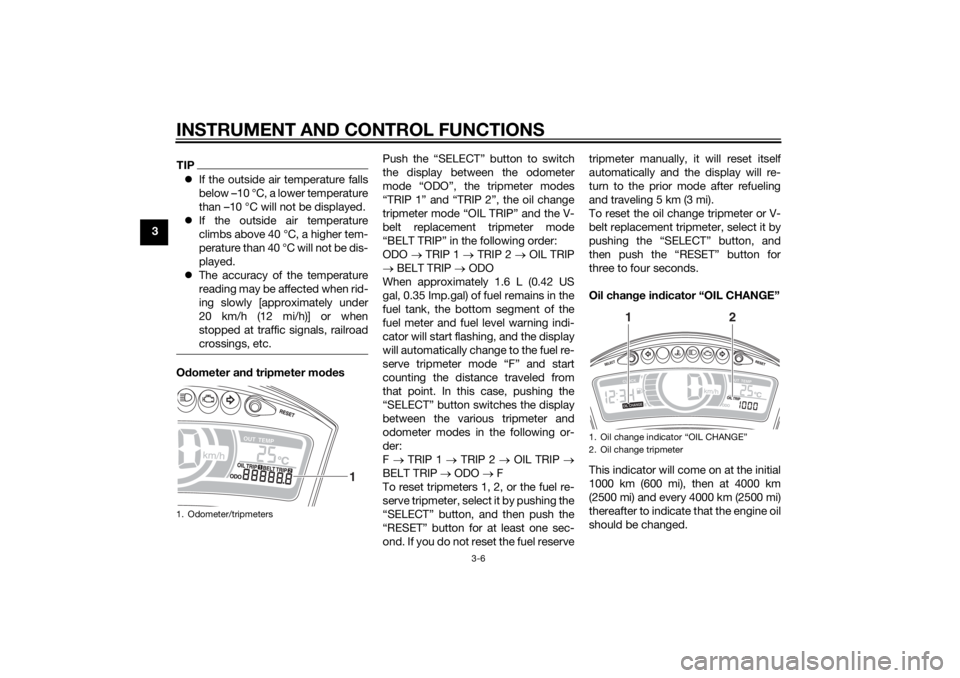
crossings, etc.Odometer an d tripmeter mo des Push the “SELECT” button to switch
the display between the odometer
mode “ODO”, the tripmeter modes
“TRIP 1” and “TRIP 2”, the oil change
tripmeter mode “OIL TRIP” and the V-
belt replacement tripmeter mode
“BELT TRIP” in the following order:
ODO
TRIP 1 TRIP 2 OIL TRIP
BELT TRIP ODO
When approximately 1.6 L (0.42 US
gal, 0.35 Imp.gal) of fuel remains in the
fuel tank, the bottom segment of the
fuel meter and fuel level warning indi-
cator will start flashing, and the display
will automatically change to the fuel re-
serve tripmeter mode “F” and start
counting the distance traveled from
that point. In this case, pushing the
“SELECT” button switches the display
between the various tripmeter and
odometer modes in the following or-
der:
F TRIP 1 TRIP 2 OIL TRIP
BELT TRIP ODO F
To reset tripmeters 1, 2, or the fuel re-
serve tripmeter, select it by pushing the
“SELECT” button, and then push the
“RESET” button for at least one sec-
ond. If you do not reset the fuel reserve tripmeter manually, it will reset itself
automatically and the display will re-
turn to the prior mode after refueling
and traveling 5 km (3 mi).
To reset the oil change tripmeter or V-
belt replacement tripmeter, select it by
pushing the “SELECT” button, and
then push the “RESET” button for
three to four seconds.
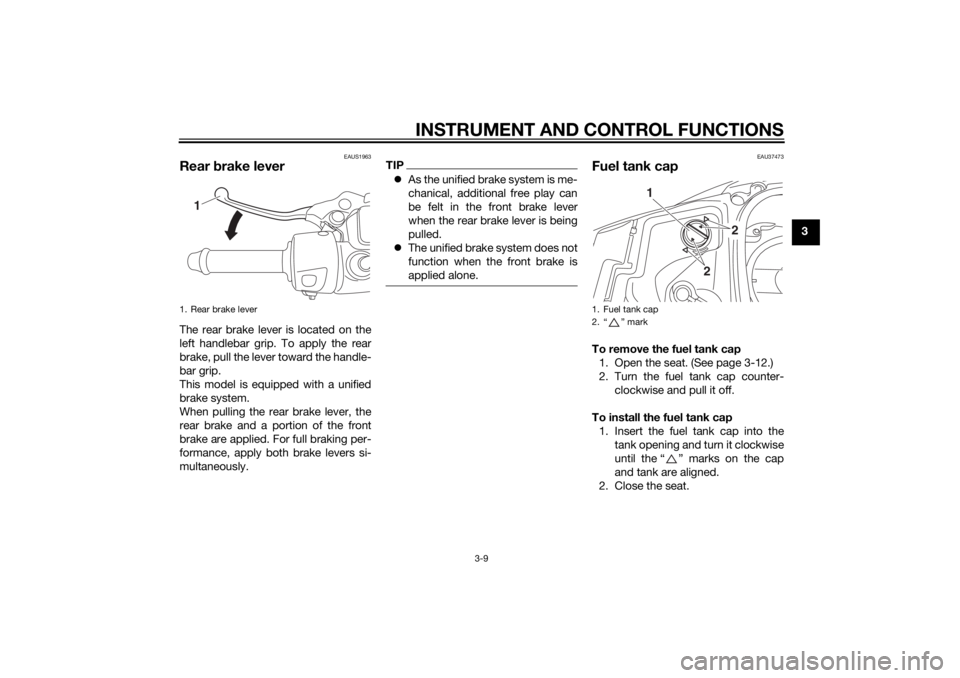
Oil chan
ge in dicator “OIL CHANGE”
This indicator will come on at the initial
1000 km (600 mi), then at 4000 km
(2500 mi) and every 4000 km (2500 mi)
thereafter to indicate that the engine oil
should be changed.1. Odometer/tripmeters
1
1. Oil change indicator “OIL CHANGE”
2. Oil change tripmeter
1
2
U2CME0E0.book Page 6 Friday, May 2, 2014 2:55 PM
Page 25 of 84
INSTRUMENT AND CONTROL FUNCTIONS
3-9
3
EAUS1963
Rear brake leverThe rear brake lever is located on the
left handlebar grip. To apply the rear
brake, pull the lever toward the handle-
bar grip.
This model is equipped with a unified
brake system.
When pulling the rear brake lever, the
rear brake and a portion of the front
brake are applied. For full braking per-
formance, apply both brake levers si-
multaneously.
TIP As the unified brake system is me-
chanical, additional free play can
be felt in the front brake lever
when the rear brake lever is being
pulled.
The unified brake system does not
function when the front brake is
applied alone.
EAU37473
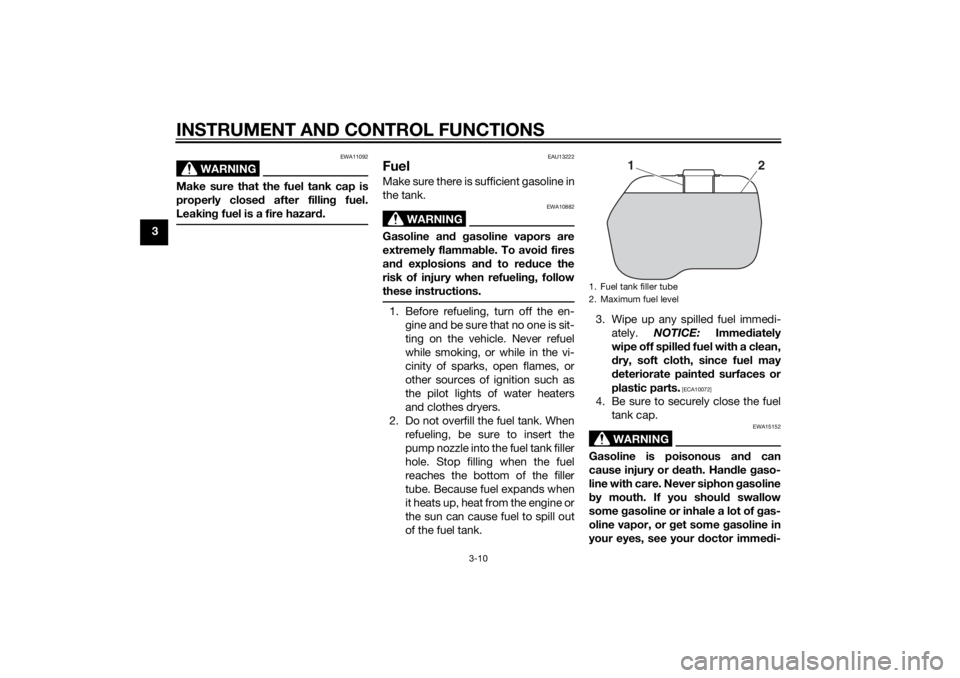
Fuel tank capTo remove the fuel tank cap
1. Open the seat. (See page 3-12.)
2. Turn the fuel tank cap counter- clockwise and pull it off.
To install the fuel tank cap 1. Insert the fuel tank cap into the tank opening and turn it clockwise
until the “ ” marks on the cap
and tank are aligned.
2. Close the seat.
1. Rear brake lever
1
1. Fuel tank cap
2. “ ” mark
2
2
1
U2CME0E0.book Page 9 Friday, May 2, 2014 2:55 PM
Page 26 of 84
INSTRUMENT AND CONTROL FUNCTIONS
3-10
3
WARNING
EWA11092
Make sure that the fuel tank cap is
properly closed after fillin g fuel.
Leakin g fuel is a fire hazar d.
EAU13222
FuelMake sure there is sufficient gasoline in
the tank.
WARNING
EWA10882
Gasoline an d g asoline vapors are
extremely flamma ble. To avoi d fires
an d explosions an d to re duce the
risk of injury when refuelin g, follow
these instructions.1. Before refueling, turn off the en- gine and be sure that no one is sit-
ting on the vehicle. Never refuel
while smoking, or while in the vi-
cinity of sparks, open flames, or
other sources of ignition such as
the pilot lights of water heaters
and clothes dryers.
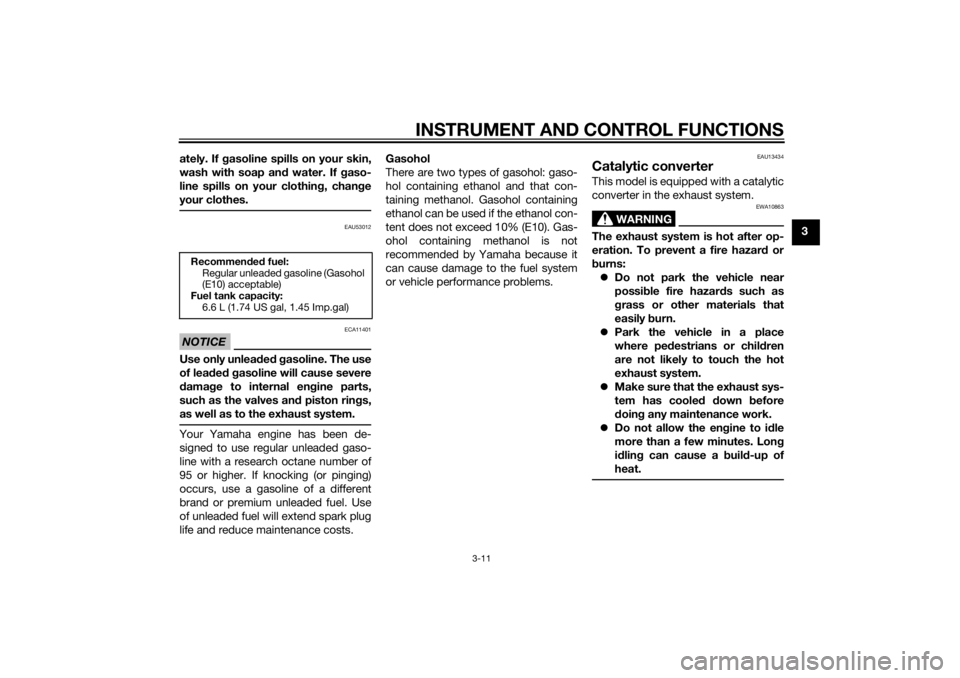
2. Do not overfill the fuel tank. When refueling, be sure to insert the
pump nozzle into the fuel tank filler
hole. Stop filling when the fuel
reaches the bottom of the filler
tube. Because fuel expands when
it heats up, heat from the engine or
the sun can cause fuel to spill out
of the fuel tank. 3. Wipe up any spilled fuel immedi-
ately. NOTICE: Immediately
wipe off spille d fuel with a clean,
d ry, soft cloth, since fuel may
d eteriorate painted surfaces or
plastic parts.
[ECA10072]
4. Be sure to securely close the fuel tank cap.
WARNING
EWA15152
Gasoline is poisonous an d can
cause injury or death. Han dle gaso-
line with care. Never siphon gasoline
b y mouth. If you shoul d swallow
some gasoline or inhale a lot of g as-
oline vapor, or g et some gasoline in
your eyes, see your doctor imme di-1. Fuel tank filler tube
2. Maximum fuel level
1
2
U2CME0E0.book Page 10 Friday, May 2, 2014 2:55 PM
Page 27 of 84
INSTRUMENT AND CONTROL FUNCTIONS
3-11
3
ately. If g
asoline spills on your skin,
wash with soap an d water. If gaso-
line spills on your clothin g, chan ge
your clothes.
EAU53012
NOTICE
ECA11401
Use only unlea ded g asoline. The use
of lead ed g asoline will cause severe
d amag e to internal en gine parts,
such as the valves an d piston rin gs,
as well as to the exhaust system.Your Yamaha engine has been de-
signed to use regular unleaded gaso-
line with a research octane number of
95 or higher. If knocking (or pinging)
occurs, use a gasoline of a different
brand or premium unleaded fuel. Use
of unleaded fuel will extend spark plug
life and reduce maintenance costs. Gasohol
There are two types of gasohol: gaso-
hol containing ethanol and that con-
taining methanol. Gasohol containing
ethanol can be used if the ethanol con-
tent does not exceed 10% (E10). Gas-
ohol containing methanol is not
recommended by Yamaha because it
can cause damage to the fuel system
or vehicle performance problems.
EAU13434
Catalytic converterThis model is equipped with a catalytic
converter in the exhaust system.
WARNING
EWA10863
The exhaust system is hot after op-
eration. To prevent a fire hazar
d or
b urns:
Do not park the vehicle near
possi ble fire hazar ds such as
g rass or other materials that
easily burn.
Park the vehicle in a place
where pe destrians or chil dren
are not likely to touch the hot
exhaust system.
Make sure that the exhaust sys-
tem has coole d down before
d oin g any maintenance work.
Do not allow the en gine to i dle
more than a few minutes. Lon g
i d lin g can cause a b uild-up of
heat.
Recommen ded fuel:
Regular unleaded gasoline (Gasohol
(E10) acceptable)
Fuel tank capacity:
6.6 L (1.74 US gal, 1.45 Imp.gal)
U2CME0E0.book Page 11 Friday, May 2, 2014 2:55 PM