2014 VOLVO XC90 warning light
[x] Cancel search: warning lightPage 159 of 308
06 Starting and driving
Parking brake
06
157
G026992
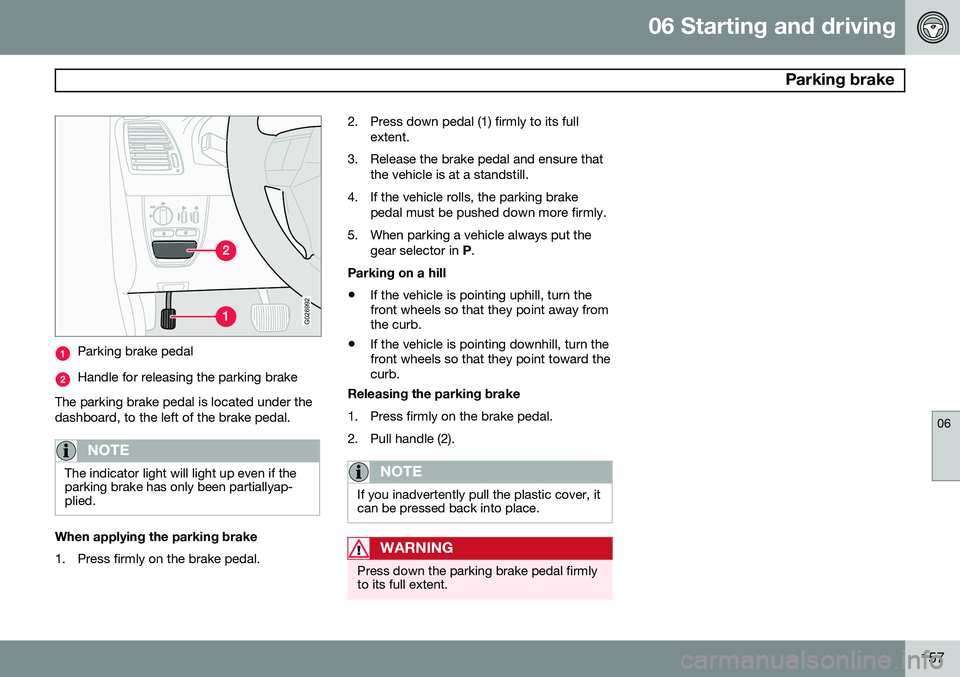
Parking brake pedal
Handle for releasing the parking brake
The parking brake pedal is located under the dashboard, to the left of the brake pedal.
NOTE
The indicator light will light up even if the parking brake has only been partiallyap-plied.
When applying the parking brake
1. Press firmly on the brake pedal. 2. Press down pedal (1) firmly to its full
extent.
3. Release the brake pedal and ensure that the vehicle is at a standstill.
4. If the vehicle rolls, the parking brake pedal must be pushed down more firmly.
5. When parking a vehicle always put the gear selector in P.
Parking on a hill • If the vehicle is pointing uphill, turn the front wheels so that they point away fromthe curb.
• If the vehicle is pointing downhill, turn thefront wheels so that they point toward thecurb.
Releasing the parking brake
1. Press firmly on the brake pedal.
2. Pull handle (2).
NOTE
If you inadvertently pull the plastic cover, it can be pressed back into place.
WARNING
Press down the parking brake pedal firmly to its full extent.
Page 160 of 308

06 Starting and driving
Stability system
06
158
Dynamic Stability Traction Control (DSTC)
The stability system consists of a number of functions designed help reduce wheel spin,counteract skidding, and to generally helpimprove directional stability.
NOTE
A pulsating sound will be audible when the system is actively operating and is normal.
Traction control (TC)This function is designed to help reduce wheel spin by transferring power from a drivewheel that begins to lose traction to thewheel on the opposite side of the vehicle (onthe same axle). TC is most active at low speeds.This is one of DSTC's permanent functions and cannot be switched off.
Spin control (SC)The spin control function is designed to helpprevent the drive wheels from spinning whilethe vehicle is accelerating. Under certain circumstances, such as when driving with snow chains, or driving in deepsnow or loose sand, it may be advisable totemporarily switch off this function for maxi-mum tractive force.
Temporarily switching off Spin control1. Turn the thumbwheel (1) on the left-side
steering wheel lever until the DSTC menu
is displayed.
2. Hold down the RESET button (2) to tog-
gle between
DSTC ON or DSTC SPIN
CONTROL OFF.
NOTE
• The message DSTC SPIN CONTROL
OFF indicates that the stability sys-
tem's spin control function has tempo- rarily been switched off.
• The stability control indicator light willilluminate and remain on until spincontrol has been reactivated.
• The spin control function is automati-cally enabled each time the engine isstarted.
•
DSTC ON indicates that all system
functions are active.
Active Yaw Control (AYC)This function helps maintain directional stabil- ity, for example when cornering, by brakingone or more of the wheels if the vehicleshows a tendency to skid or slide laterally. This is one of DSTC's permanent functions
and cannot be switched off.
WARNING
The car's handling and stability characte- ristics will be altered if the DSTC systemfunctions have been disabled.
Page 161 of 308

06 Starting and driving
Stability system
06
159
DSTC-related messages in the text window
•TRACTION CONTROL TEMPORARILY OFF : The system has been temporarily
switched off due to high brake tempera- ture and will automatically switch onagain when the brakes have cooled.
•
ANTI-SKID SERVICE REQUIRED: The
system has been automatically disen- gaged due to a fault. A trained and quali-fied Volvo service technician shouldcheck the system.
Symbols in the instrument panel
The Stability Control indicator lightThis light indicates different con- ditions, depending on how it illu-minates.
The Stability Control indicator light illuminates for approximately 2 seconds
This indicates that the system is performing a self-diagnostic test when the ignition isswitched on.
The Stability Control indicator light
flashes
This indicates that the stability system is actively functioning to help counteract wheelspin and/or a skid.
The Stability Control indicator light glows steadily
ANTI-SKID SERVICE REQUIRED will be
displayed in the text window at the same time. A fault is indicated in the stability system.
• Stop the vehicle in a safe place and switch off the engine.
• Restart the engine.
• If the indicator light goes out, the faultwas temporary and no further action isrequired.
• If the indicator light remains on, drive toan authorized Volvo workshop as soon aspossible to have the system checked.
The Stability Control indicator light
glows steadily
If DSTC SPIN CONTROL OFF is displayed
in the text window at the same time, this is a reminder that spin control has been disabledby the driver.
The warning symbolThe warning symbol glowssteadily yellow
The system has been temporarily switched off due to high brake temperature.
TRACTION CONTROL TEMPORARILY OFF will be displayed. The system will auto-
matically switch on again when the brakes have cooled.
WARNING
The stability system is intended to help improve driving safety. It supplements, butcan never replace, the driver's judgementand responsibility when operating the vehi-cle. Speed and driving style should alwaysbe adapted to traffic and road conditions.
Page 162 of 308

06 Starting and driving
Front/rear park assist*
06
160* Option/accessory, for more information, see Introduction.
Front/rear park assist
The park assist system is designed to assist you when driving into parking spaces,garages, etc. It utilizes four ultrasound sen-sors located in one or both bumpers to meas-ure the distance to a vehicle, object, or a per-son who may be close to the front or rear ofyour vehicle. Park assist is available in two versions:
• Rear bumper only
• Front and rear bumpers
WARNING
Park Assist is an information system, NOT a safety system. This system is designedto be a supplementary aid when parkingthe vehicle. It is not, however, intended toreplace the driver's attention and judge-ment.
Function
The system is activated automatically when the vehicle is started. The indicator light in thebutton in the center console illuminates. • The front park assist system is active from the time the engine is started untilthe vehicle exceeds a speed of approxi-mately 10 mph (15 km/h). It is also activewhen the vehicle is backing up.
• Rear park assist is active when the engineis running and reverse gear has beenselected.
Rear park assistThe distance monitored behind the vehicle is approximately 5 ft (1.5 m). The signal comesfrom the rear speakers. The system must be deactivated when towing a trailer, carrying bicycles in a rear-mountedcarrier, etc, which could trigger the rear parkassist system's sensors.
NOTE
Rear park assist is deactivated automati- cally when towing a trailer if Volvo genuinetrailer wiring is used.
Front park assistThe distance monitored in front of the vehicle is approximately 2.5 ft (0.8 m). The audiblesignal comes from the audio system's frontspeakers.
• It may not be possible to combine auxili- ary headlights and front park assist sincethese lights could trigger the system'ssensors.
Activating/deactivating park assist
The system is activated automatically when the vehicle is started.
• Press the Park assist button on the center console (see page 65) to temporarilydeactivate the system(s). The indicatorlight in the button will go out when thesystem has been deactivated.
• Park assist will be automatically reactiva-ted the next time the engine is started, orif the button is pressed (the indicator lightin the button will illuminate).
Page 165 of 308

06 Starting and driving
Towing
06
163
CAUTION
Vehicles with AWD (All Wheel Drive) with the front wheels off the ground should notbe towed at speeds above 50 mph(70 km/h) or for distances longer than30 miles (50 km).
CAUTION
•Please check with state and local authorities before attempting this typeof towing, as vehicles being towed aresubject to regulations regarding maxi-mum towing speed, length and type oftowing device, lighting, etc.
• If the vehicle's battery is dead, do notattempt to start the vehicle by pushingor pulling it as this will damage thethree-way catalytic converter(s). Theengine must be jump started using anauxiliary battery (see page 152).
• If the vehicle is being towed on a flatbed truck, the towing eyelets must notbe used to pull the vehicle up onto theflat bed or to secure the vehicle on theflat bed. Consult the tow truck opera-tor.
WARNING
•The power brakes and power steering will not function when the engine is notrunning. Approximately 5 times morepressure will be required on the brakepedal and the steering wheel will beconsiderably harder to turn.
• The towing eyelets must not be usedfor pulling the vehicle out of a ditch orfor any similar purpose involvingsevere strain.
G030862
Towing vehicles with front wheel drive/All Wheel Drive
Volvo recommends the use of flat bed equip- ment. If wheel lift equipment must be used, please use extreme caution to help avoid damage tothe vehicle.
In this case, the vehicle should
be towed with the rear wheels on theground if at all possible. If it is absolutely necessary to tow the vehicle with the front wheels on the ground, pleaserefer to the towing information on the previ-ous page.
CAUTION
• Sling-type equipment applied at the front will damage radiator and air con-ditioning lines.
• It is equally important not to use sling-type equipment at the rear or apply lift-ing equipment inside the rear wheels;serious damage to the rear axle mayresult.
• If the vehicle is being towed on a flatbed truck, the towing eyelets must notbe used to secure the vehicle on theflat bed. Consult the tow truck opera-tor.
Page 168 of 308

06 Starting and driving
Towing a trailer
06
166
WARNING
•Bumper-attached trailer hitches must not be used on Volvos, nor shouldsafety chains be attached to thebumper.
• Trailer hitches attaching to the vehiclerear axle must not be used.
• Never connect a trailer's hydraulicbrake system directly to the vehiclebrake system, nor a trailer's lightingsystem directly to the vehicle lightingsystem. Consult a trained and qualifiedVolvo service technician for correctinstallation.
• When towing a trailer, the trailer'ssafety wire must be correctly fastenedto the hole or hook provided in thetrailer hitch on the vehicle. The safetywire should never be fastened to orwound around the drawbar ball.
LevelingIf your vehicle is equipped with automatic lev- eling, the rear suspension always retains thecorrect ride height regardless of the load.
• The system adjusts the rear suspension to the correct level after the vehicle hasbeen driven a short distance.
• When the vehicle is stationary, the rearsuspension lowers, which is normal.
Page 172 of 308

06 Starting and driving
Before a long distance trip
06
170
It is always worthwhile to have your vehicle checked by a trained and qualified Volvoservice technician before driving long dis-tances. Your retailer or service technician willalso be able to supply you with bulbs, fuses,spark plugs and wiper blades for your use inthe event that problems occur. As a minimum, the following items should be checked before any long trip:• Check that engine runs smoothly and that fuel consumption is normal.
• Check for fuel, oil, and fluid leakage.
• Check transmission oil level 1
.
• Check condition of drive belts.
• Check state of the battery's charge.
• Examine tires carefully (the spare tire aswell), and replace those that are worn.Check tire pressures.
• The brakes, front wheel alignment, andsteering gear should be checked by atrained and qualified Volvo service techni-cian only.
• Check all lights, including high beams.
• Reflective warning triangles are legallyrequired in some states/provinces. •
Have a word with your Volvo retailer ifyou intend to drive in countries where itmay be difficult to obtain the correct fuel.
• Consider your destination. If you will bedriving through an area where snow or iceare likely to occur, consider snow tires.
1
To prevent injury from contact with hot surfaces, do not inspect your vehicle’s transmission fluid yourself. Have your vehicle’s transmission fluid level inspected by a qualified Volvo service techni- cian.
Page 173 of 308

06 Starting and driving
Blind Spot Information System*
06
* Option/accessory, for more information, see Introduction.171
G020295
BLIS camera
Indicator light
BLIS symbol
The Blind Spot Information System (BLIS) is an information system that indicates the pres-ence of another vehicle moving in the samedirection as your vehicle in the side-view mir-ror's "blind area." The system is based on digital camera tech- nology. The cameras (1) are located beneaththe side-view mirrors. When one (or both) of the cameras have detected a vehicle in the blind area (up to approximately 10 ft. (3 meters) from the sideof your vehicle, and up to approximately 31 ft.(9.5 meters) behind the side-view mirror), seethe illustration, the indicator light in the doorpanel (2) illuminates. The light will glow con-tinuously to alert the driver of the vehicle inthe blind area.
WARNING
•
BLIS is an information system, NOT a warning or safety system.
• BLIS does not eliminate the need foryou to visually confirm the conditionsaround you, and the need for you toturn your head and shoulders to makesure that you can safely change lanes.
• As the driver, you have full responsibil-ity for changing lanes in a safe man-ner.
NOTE
The door panel indicator light illuminates on the side of the vehicle where the sys-tem has detected another vehicle. If yourvehicle is passed on both sides at thesame time, both lights will illuminate.
Areas monitored by BLIS
Distance A = approx. 10 ft. (3 meters) Distance B = approx. 31 ft. (9.5 meters)BLIS has an integrated function that alerts the driver if a fault should occur with the system.For example, if one or both of the system'scameras are obscured, a message ( see thetable on page 173) will appear in the informa-tion display in the instrument panel. If thisoccurs, clean the camera lenses. If neces-sary, the system can be temporarily switchedoff (for instructions, see page 173).
When does BLIS functionThe system functions when your vehicle ismoving at speeds above 6 mph (10 km/h).