2014 VOLVO V60 warning
[x] Cancel search: warningPage 144 of 442

05 Loading and storage
05
142* Option/accessory, for more information, see Introduction.
Loading
Payload depends on the car's kerb weight. Payload depends on the car's kerb weight. The total of the weight of the passengers andall accessories reduces the car's payload bya corresponding weight. For more detailedinformation on weights, see Weights (p. 390).
The tailgate is opened via a buttonon the lighting panel or the remotecontrol key, see Locking/unlocking -
tailgate (p. 167).
WARNING
The car’s driving properties change depending on the weight and positioningof the load.
To bear in mind when loading
• Position the load firmly against the rear seat's backrest.
Note that objects must not prevent the func- tion of the WHIPS system for the front seats ifany of the rear seat's backrests is foldeddown, seeWHIPS - seating position (p. 35).
• Centre the load.
• Heavy objects should be placed as low as possible. Avoid placing heavy loads onlowered backrests.
• Cover sharp edges with something soft toavoid damaging the upholstery. •
Secure all loads to the load retaining eye-lets with straps or web lashings.
WARNING
A loose object weighing 20 kg can, in a frontal collision at a speed of 50 km/h,carry the impact of an item weighing1000 kg.
WARNING
The protection provided by the inflatable curtain in the headlining may be compro-mised or eliminated by high loads.
• Never load cargo above the backrest.
WARNING
Always secure the load. During heavy braking the load may otherwise shift, caus-ing injury to the car's occupants. Cover sharp edges and sharp corners with something soft. Switch off the engine and apply the park- ing brake when loading/unloading longitems. Otherwise you may accidentallyknock the gear lever or gear selector withthe load into a drive position - and the carcould then move off.
Related information
•
Load retaining eyelets (p. 143)
• Safety net* (p. 145) •
Loading - long load (p. 143)
• Roof load (p. 143)
ProCarManuals.co’
Page 145 of 442

05 Loading and storage
05
143
Loading - long load
To simplify loading (p. 142) in the cargo area, the rear seat backrest can be folded down.The passenger seat backrest can also be folded for an extra long load2
.
Lowering the rear seat backrestTo simplify loading in the cargo area, the rear seat backrest can be folded down, see Seats,rear (p. 74).
Roof load
The load carriers recommended for roof loads are the ones developed by Volvo. This is inorder to avoid damage to the car and in orderto achieve the maximum possible safety dur-ing a journey. Carefully follow the installation instructions supplied with the carriers.
• Check periodically that the load carriers and load are properly secured. Lash theload securely with retaining straps.
• Distribute the load evenly over the loadcarriers. Put the heaviest objects at thebottom.
• The size of the area exposed to the wind,and therefore fuel consumption, increasewith the size of the load.
• Drive gently. Avoid quick acceleration,heavy braking and hard cornering.
WARNING
The car's centre of gravity and driving cha- racteristics are altered by roof loads. Forinformation about the maximum allowableload on the roof, including load carriersand any space box, Weights (p. 390).
Related information
•
Loading (p. 142)
Load retaining eyelets
The folding load retaining eyelets are used to fasten straps in order to anchor items in thecargo area.
WARNING
Hard, sharp and/or heavy objects which protrude may cause injury under violentbraking. Always secure large and heavy objects with a seatbelt or cargo retaining straps.
Related information
• Loading (p. 142)
2
Only applies to comfort seats.
ProCarManuals.co’
Page 148 of 442

||
05 Loading and storage
05
146* Option/accessory, for more information, see Introduction.
Removing the net cassettes1. Roll the safety nets into the cassettes in
accordance with the procedure in the section entitled "Using the safety net",but in reverse.
2. Fold the whole backrest forward.
3. Slide the cassettes out until they loosen from the anchor rails.
Store the cassettes in their compartment under the cargo area floor hatch.
WARNING
Loads in the luggage compartment must be anchored well, and also using a cor-rectly fitted safety net.
Related information
• Loading (p. 142)
• Safety grille (p. 146)
Safety net* combined with cargo cover
A safety net prevents loads from being thrown
forward in the passenger compartment in the event of sudden braking.
Puller-straps for raising the net.
The safety net can also be raised from the rear seat when the cargo cover is extended. Follow the procedure described in the section "Using the safety net" (p. 145). The straps forfolding up are located by the arrows.
Related information
• Safety net* (p. 145)
• Loading (p. 142)
• Load retaining eyelets (p. 143)
Safety grille
A safety grille prevents loads or pets from being thrown forward in the passenger com-partment in the event of sudden braking.
Folding upTake hold of the bottom of the safety grille and pull back/up.
IMPORTANT
The protective grille cannot be folded up or down when a cargo cover is fitted.
Fitting/removalThe safety grille is normally permanently installed in the car because it can easily befolded up in the roof and so be out of the wayif a longer cargo area is required. However, if
ProCarManuals.co’
Page 151 of 442

06 Locks and alarm
06
* Option/accessory, for more information, see Introduction.149
Remote control key with key blade
The remote control key is used to start the car and for locking and unlocking. It contains adetachable key blade (p. 155) made of metal.The visible section is available in two versionsso that it is possible to distinguish betweenthe remote control keys. The car is supplied with 2 remote control keys or PCCs* (Personal Car Communicator). Additional remote control keys can be ordered - up to 6 can be programmed andused for the same car.
WARNING
If there are children in the car: Remember to switch off the supply to the power windows and sunroof by removingthe remote control key if the driver leavesthe car.
Remote control key with PCC (p. 153) has increased functionality compared with theremote control key, see PCC* - unique func-tions (p. 153).
Related information
• Remote control key - functions (p. 151)
Remote control key - losing
If you lose a remote control key then a new one can be ordered at a workshop - anauthorised Volvo workshop is recommended. The remaining remote control keys must be taken to the Volvo workshop. The code of themissing remote control key must be erasedfrom the system as a theft prevention meas-ure. The current number of keys registered tothe car can be checked in the menu systemMY CAR
. For a description of the menu sys-
tem, see MY CAR (p. 103).
Related information
• Remote control key - functions (p. 151)
Key memory*
The key memory in the remote control key (p. 149) means that certain settings in the car canbe individually adapted for different people. The key memory function is available in com- bination with power seat and power rearviewand door mirrors. Settings for door mirrors,driver's seat and steering force can be savedin the key memory.
Key memory – door mirrors and driver's
seat
The settings are automatically connected toeach respective remote control key, see Keymemory* in remote control key (p. 74) andAdjustable steering force* (p. 257). Afterlocking with the remote control key the set-ting of the combined instrument panel'stheme is also saved in the key, see MY CAR(p. 103). The function can be activated/deactivated in the menu system MY CAR. For a description
of the menu system, see MY CAR (p. 103). For cars with the Keyless drive function, see Keyless drive* (p. 159).
ProCarManuals.co’
Page 154 of 442
||
06 Locks and alarm
06
152* Option/accessory, for more information, see Introduction.
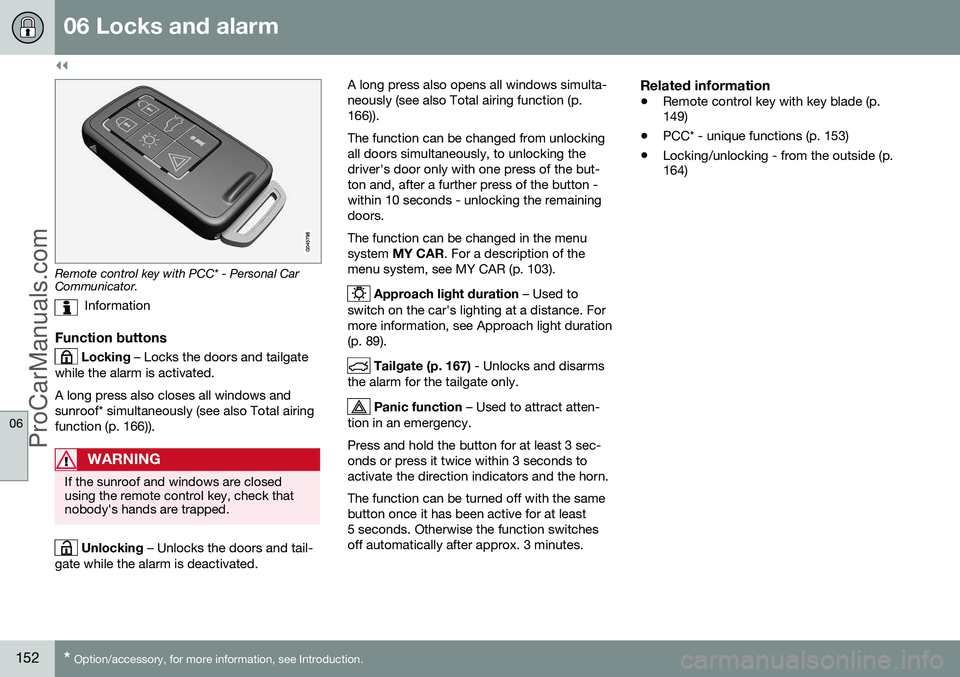
Remote control key with PCC* - Personal Car Communicator.
Information
Function buttons
Locking – Locks the doors and tailgate
while the alarm is activated. A long press also closes all windows and sunroof* simultaneously (see also Total airingfunction (p. 166)).
WARNING
If the sunroof and windows are closed using the remote control key, check thatnobody's hands are trapped.
Unlocking – Unlocks the doors and tail-
gate while the alarm is deactivated. A long press also opens all windows simulta- neously (see also Total airing function (p.166)). The function can be changed from unlocking all doors simultaneously, to unlocking thedriver's door only with one press of the but-ton and, after a further press of the button -within 10 seconds - unlocking the remainingdoors. The function can be changed in the menu system
MY CAR . For a description of the
menu system, see MY CAR (p. 103).
Approach light duration – Used to
switch on the car's lighting at a distance. For more information, see Approach light duration(p. 89).
Tailgate (p. 167) - Unlocks and disarms
the alarm for the tailgate only.
Panic function – Used to attract atten-
tion in an emergency. Press and hold the button for at least 3 sec- onds or press it twice within 3 seconds toactivate the direction indicators and the horn. The function can be turned off with the same button once it has been active for at least5 seconds. Otherwise the function switchesoff automatically after approx. 3 minutes.
Related information
• Remote control key with key blade (p. 149)
• PCC* - unique functions (p. 153)
• Locking/unlocking - from the outside (p.164)
ProCarManuals.co’
Page 155 of 442

06 Locks and alarm
06
* Option/accessory, for more information, see Introduction.153
Remote control key - range
Remote control key (p. 149) functions have a range of about 20 metres from the car. If the car does not verify a button being pressed - move closer and try again.
NOTE
The remote control key functions may be disrupted by surrounding radio waves,buildings, topographical conditions, etc.The car can always be locked/unlockedwith the key blade, Detachable key blade -unlocking doors (p. 156).
If the remote control key is removed from the car when the engine is running or key position(p. 70) I or II is active, and if all doors are
closed, then a warning message is shown inthe information display in the combinedinstrument panel and an audio reminder sig-nal sounds at the same time. The message is extinguished and the audible reminder signal stops when the remote con-trol key is brought back to the car aftereither/or:
• The remote control key has been inserted into the ignition switch.
• Speed exceeds 30 km/h.
• the
OK button has been pressed.
Related information
• Remote control key - functions (p. 151)
PCC* - unique functions
Remote control key with PCC has extended functionality compared with remote controlkey without PCC (p. 149) in the form of aninformation button and indicator lamps.
Remote control key with PCC* - Personal Car Communicator.
Information button
Indicator lamps
Using the information button enables access to certain information from the car via theindicator lamps.
Using the information button–Press the information button .
> All indicator lamps flash for approxi- mately 7 seconds and the light travels around on the PCC. This indicates thatinformation from the car has beenread. If any of the other buttons are pressed during this time then the reading isinterrupted.
NOTE
If none of the indicator lamps illumi-
nates with repeated use of the information button and in different locations (as well asafter 7 seconds and after the light hastravelled around on the PCC), contact aworkshop - an authorised Volvo workshopis recommended.
Indicator lamps display information in accord- ance with the following illustration:
ProCarManuals.co’
Page 161 of 442

06 Locks and alarm
06
* Option/accessory, for more information, see Introduction.159
NOTE
Volvo recommends that the batteries to be used in the remote control key/PCC fulfilUN Manual of Test and Criteria, Part III,sub-section 38.3. Batteries fitted in thefactory or replaced by an authorised Volvoworkshop fulfil the above criteria.
Assembly1. Press the remote control key together.
2. Hold the remote control key with the slot
pointed up and lower the key blade into its slot.
3. Lightly press the key blade. You should hear a "click" when the key blade islocked in.
IMPORTANT
Make sure that exhausted batteries are disposed of in a manner which is kind tothe environment.
Related information
• Remote control key with key blade (p. 149)
• Remote control key - functions (p. 151)
Keyless drive*
Keyless drive, only with PCC (p. 153) 2
means
that the car's lock and starting systems can be operated keylessly. The Keyless drive function in the PCC allows the car to be unlocked (p. 161), driven andlocked without the need for a key. You simplyhave to have the PCC with you. The systemmakes it easier and more convenient to openthe car, e.g. when your hands are full. Both of the car's PCCs incorporate the Keyless function. Additional PCCs can beordered, see Remote control key with keyblade (p. 149). The car's electrical system can be set to three different levels - key position 0, I and II
(p. 70) - with the remote control key.
Related information
• Keyless drive* - PCC range (p. 159)
• Keyless drive* - handling the PCC safely (p. 160)
• Keyless drive* - interference to PCC func-tion (p. 160)
Keyless drive* - PCC range
In order to open a door or the tailgate, a PCC must be no more than approx. 1.5 metresfrom the car door handle or tailgate. The person who wishes to lock or unlock a door must have the PCC with him or her. It isnot possible to lock or unlock a door if thePCC is on the opposite side of the car.
The red rings in the above figure indicate the range covered by the system's antennas. If all PCCs are removed from the car when the engine is running or key position
I or II (p.
70) is active, and if all doors are closed, thena warning message is shown in the informa-tion display in the combined instrument paneland an audio reminder signal sounds at thesame time.
2 Personal Car Communicator.
ProCarManuals.co’
Page 162 of 442

||
06 Locks and alarm
06
160* Option/accessory, for more information, see Introduction.
When the PCC has been returned to the car, the warning message goes off and the audi-ble reminder ceases once either/or:
• a door has been opened and closed
• the PCC is inserted into the ignition switch
• the
OK button has been pressed.
Related information
• Keyless drive* (p. 159)
• Keyless drive* - antenna location (p. 163)
Keyless drive* - handling the PCC safely
It is important to handle all remote control keys with great care. If a PCC with keyless function is left in the car, it is deactivated temporarily when the caris locked. This prevents unauthorised entry. However, if someone breaks into the car and finds the PCC, it can be reactivated. It istherefore important to handle all PCCs withgreat care.
IMPORTANT
Never leave a PCC in the car.
Related information
•
Keyless drive* (p. 159)
Keyless drive* - interference to PCC function
Electromagnetic fields and screening can interfere with the Keyless function.
NOTE
Do not place/store the PCC near a mobile phone or metal object - no closer than10-15 cm.
If interference is experienced nonetheless, use the PCC and the key blade as a remotecontrol key, see Remote control key - func-tions (p. 151).
Related information
• Remote control key/PCC - replacing the battery (p. 158)
• Keyless drive* - handling the PCC safely(p. 160)
• Keyless drive* - PCC range (p. 159)
ProCarManuals.co’