2014 VOLVO V60 warning
[x] Cancel search: warningPage 205 of 442

07 Driver support
07
* Option/accessory, for more information, see Introduction.203
The same symbol is also shown when adap- tive cruise control is activated.
NOTE
The higher the speed the longer the calcu- lated distance in metres for a given timeinterval. The set time interval is also used by the function adaptive cruise control (p. 189). Only use the time intervals permitted by local traffic regulations.
Related information
•
Distance Warning* - limitations (p. 203)
Distance Warning* - limitations
Distance Warning (Distance Alert) is a function that informs the driver about the distance tovehicles in front. The function uses the sameradar sensor as the Adaptive cruise control (p.188) and Collision warning with auto brake (p.212), has some limitations.
NOTE
Strong sunlight, reflections or strong varia- tions in light intensity, as well as wearingsunglasses, could mean that the warninglight in the windscreen cannot be seen. Poor weather or winding roads could affect the radar sensor's capacity to detectvehicles in front. The size of other vehicles could also affect detection capacity, e.g. motorcycles. Thiscould mean that the warning lamp illumi-nates at a shorter distance than the settingor that the warning is temporarily absent. Extremely high speeds can also cause the lamp to illuminate at a shorter distancethan that set due to limitations in sensorrange.
For further information on radar sensor limita- tions, see Radar sensor - limitations (p. 197)and (p. 218).
Related information
•Distance Warning* (p. 202)
• Distance Warning* - symbols and mes- sages (p. 204)
ProCarManuals.co’
Page 206 of 442

07 Driver support
07
204* Option/accessory, for more information, see Introduction.
Distance Warning* - symbols and messages
Distance Warning (Distance Alert) is a function that informs the driver about the time interval to vehicles in front. The function has certainlimitations.
Symbol
AMessageSpecification
Radar blocked See manualDistance Warning temporarily disengaged. The radar sensor is blocked and cannot detect other vehicles, e.g. in the event of heavy rain or if slush has collected in front of the radar sensor. Read about radar sensor limitations (p. 197).
Collision warn. Service requiredDistance Warning and Collision Warning with Auto Brake fully or partially disengaged. Visit a workshop if the message remains - an authorised Volvo workshop is recommended.
A
Symbols are schematic - may vary by market and car model.
Related information
• Distance Warning* (p. 202)
• Distance Warning* - limitations (p. 203)
ProCarManuals.co’
Page 207 of 442

07 Driver support
07
* Option/accessory, for more information, see Introduction.205
City Safety™
City Safety™ is a function for helping the driver to avoid a collision when driving inqueues, amongst other things, when changesin the traffic ahead, combined with a lapse inattention, could lead to an incident. The City Safety™ function is active at speeds under 50 km/h and it helps the driver by auto-matically braking the car in the event of immi-nent risk of collision with vehicles in front,should the driver not react in time by brakingand/or steering away. City Safety™ is activated in situations where the driver should have started braking earlier,which is why it cannot help the driver in everysituation. City Safety™ is designed to be activated as late as possible in order to avoid unnecessaryintervention. City Safety™ must not be used as an excuse for the driver to change his/her driving style. Ifthe driver solely relies on City Safety™ to dothe braking, there will be a collision sooner orlater. The driver or passengers normally only notice City Safety™ if a situation arises where thecar is extremely close to being in a collision. If the car is also equipped with Collision Warning with Auto Brake (p. 212)* these twosystems complement each other.IMPORTANT
Maintenance and replacement of City Safety™ components must only be per-formed by a workshop - an authorisedVolvo workshop is recommended.
WARNING
City Safety™ does not engage in all driv- ing situations or traffic, weather or roadconditions. City Safety™ does not react to vehicles driving in a different direction from the car,to small vehicles and motorcycles or tohumans and animals. City Safety™ can prevent collision at a speed difference of less than 15 km/h - ata higher speed difference, it is only possi-ble to reduce collision speed. In order toobtain full brake function, the driver mustdepress the brake pedal. Never wait for City Safety™ to engage. The driver always bears responsibility formaintaining the proper distance andspeed.
Related information
• City Safety™ - limitations (p. 207)
• City Safety™ - function (p. 205)
• City Safety™ - operation (p. 206)
• City Safety™ - laser sensor (p. 209)
• City Safety™ - symbols and messages (p. 211)
City Safety™ - function
City Safety™ detects the traffic in front of the car with a laser sensor fitted in the top edgeof the windscreen. If there is an imminent riskof collision, City Safety™ will automaticallybrake the car, which may be experienced assudden braking.
ProCarManuals.com
Page 209 of 442

07 Driver support
07
207
WARNING
The laser sensor also transmits laser light when City Safety™ is disabled manually.
Related information
•City Safety™ (p. 205)
• City Safety™ - limitations (p. 207)
• City Safety™ - function (p. 205)
• City Safety™ - laser sensor (p. 209)
• City Safety™ - symbols and messages (p. 211)
• MY CAR (p. 103)
City Safety™ - limitations
The sensor in City Safety™ is designed to detect cars and other large vehicles in front ofthe car irrespective of whether it is day ornight. However, the function has a number oflimitations. However, the sensor has limitations and has poorer functionality - or none at all - in e.g.heavy snowfall or rain, dense fog, duststorms or white-out situations. Mist, dirt, iceor snow on the windscreen may disrupt thefunction. Low-hanging objects, e.g. a flag/pennant for projecting load, or accessories such as auxili-ary lamps and bull bars that are higher thanthe bonnet limit the function. The laser beam from the sensor in City Safety™ measures how the light is reflected.The sensor cannot detect objects with lowreflection capacity. The rear sections of thevehicle generally reflect the light sufficientlythanks to the number plate and rear lightreflectors. On slippery road surfaces the braking dis- tance is extended, which may reduce thecapacity of City Safety™ to avoid a collision.In such situations the ABS and DSTC sys-tems will provide best possible braking forcewith maintained stability. When your own car is reversing, City Safety™ is temporarily deactivated. City Safety™ is not activated at low speeds -under 4 km/h, which is why the system doesnot intervene in situations where a vehicle infront is being approached very slowly, e.g.when parking. Driver commands are always prioritised, which is why City Safety™ does not intervenein situations where the driver is steering oraccelerating in a clear manner, even if a colli-sion is unavoidable. When City Safety™ has prevented a collision with a stationary object the car remains sta-tionary for a maximum of 1.5 seconds. If thecar is braked for a vehicle in front that is mov-ing, then speed is reduced to the same speedas that maintained by the vehicle in front. On a car with manual gearbox the engine stops when City Safety™ has stopped thecar, unless the driver manages to depress theclutch pedal beforehand.
NOTE
•
Keep the windscreen surface in front of the laser sensor free from ice, snowand dirt (see the illustration for sensorlocation (p. 205)).
• Do not affix or mount anything on thewindscreen in front of the laser sensor
• Remove ice and snow from the bonnet- snow and ice must not exceed aheight of 5 cm.
ProCarManuals.co’
Page 211 of 442

07 Driver support
07
}}}}
209
City Safety™ - laser sensor
The City Safety™ function includes a sensor which transmits laser light (see illustration (p.205) for sensor location). Contact a qualifiedworkshop in the event of a fault or if the lasersensor needs servicing - an authorised Volvoworkshop is recommended. It is absolutelyessential to follow the prescribed instructionswhen handling the laser sensor. The following two labels relate to the laser sensor:
The upper label in the figure describes the laser beam's classification:• Laser radiation - Do not look into the laser beam with optical instruments -Class 1M laser product.
The lower label in the figure describes the laser beam's physical data: •
IEC 60825-1:1993 + A2:2001. Complies with FDA (U.S. Food Administration)standards for laser product design withthe exception of deviations in accordancewith "Laser Notice No. 50" from26 July 2001.
Radiation data for the laser sensorThe following table specifies the laser sen- sor's physical data.
Maximum pulse energy2.64
µJ
Maximum average output45 mW
Pulse duration33 ns
Divergence (horizontal x verti- cal)28° × 12°
WARNING
If any of these instructions are not followed then there is a risk of eye injury!
• Never look into the laser sensor (which emits spreading invisible laser radia-tion) at a distance of 100 mm or closerwith magnifying optics such as a mag-nifying glass, microscope, lens or simi-lar optical instruments.
• Testing, repair, removal, adjustmentand/or replacement of the laser sen-sor's spare parts must only be carriedout by a qualified workshop - we rec-ommend an authorised Volvo work-shop.
• To avoid exposure to harmful radia-tion, do not carry out any readjust-ments or maintenance other thanthose specified here.
• The repairer must follow speciallydrawn up workshop information for thelaser sensor.
• Do not remove the laser sensor (thisincludes removing the lenses). Aremoved laser sensor does not fulfillaser class 3B as per standard IEC60825-1. Laser class 3B is not eye-safe and therefore entails a risk ofinjury.
• The laser sensor's connector must beunplugged before removal from thewindscreen.
ProCarManuals.co’
Page 214 of 442

07 Driver support
07
212* Option/accessory, for more information, see Introduction.
Collision warning system*
"Collision Warning with Auto Brake and Cyclist and Pedestrian Detection" is an aid toassist the driver when there is a risk of collid-ing with a pedestrian, bicycle or vehicle infront that are stationary or moving in the samedirection. Collision Warning with Auto Brake & Pedes- trian Detection is activated in situations wherethe driver should have started braking earlier,which is why it cannot help the driver in everysituation. Collision Warning with Auto Brake & Pedes- trian Detection is designed to be activated aslate as possible in order to avoid unnecessaryintervention. Collision Warning with Auto Brake & Pedes- trian Detection may prevent a collision orreduce the collision speed. Collision Warning with Auto Brake & Pedes- trian Detection must not be used as anexcuse for the driver to change his/her drivingstyle. If the driver solely relies on CollisionWarning with Auto Brake to do the braking,there might be a risk of a collision sooner orlater.
Two system levelsThe Collision Warning with Auto Brake &Pedestrian Detection function is available in two variants, depending on how the car isequipped: Level 1 The driver is merely warned
14
of occurring
obstacles by means of visual and acoustic signals - no automatic braking intervenes, thedriver must himself brake. Level 2 The driver is warned of occurring obstacles by means of visual and acoustic signals - thecar is braked automatically if the driver him-self does not act within a reasonable time.
IMPORTANT
Maintenance of components included in Collision Warning with Auto Brake &Pedestrian Detection must only be carriedout in a workshop - an authorised Volvoworkshop is recommended.
Related information
• Collision warning system* - function (p. 213)
• Collision warning system* - detection ofpedestrians (p. 216)
• Collision warning system* - cyclist detec-tion (p. 214)
• Collision warning system* - operation (p.217) •
Collision warning system* - general limita-tions (p. 218)
• Collision warning system* - camera sen-sor limitations (p. 220)
• Collision warning system* - symbols andmessages (p. 222)
14
No warning for cyclists with "Level 1".
ProCarManuals.co’
Page 215 of 442
07 Driver support
07
}}
* Option/accessory, for more information, see Introduction.213
Collision warning system* - function
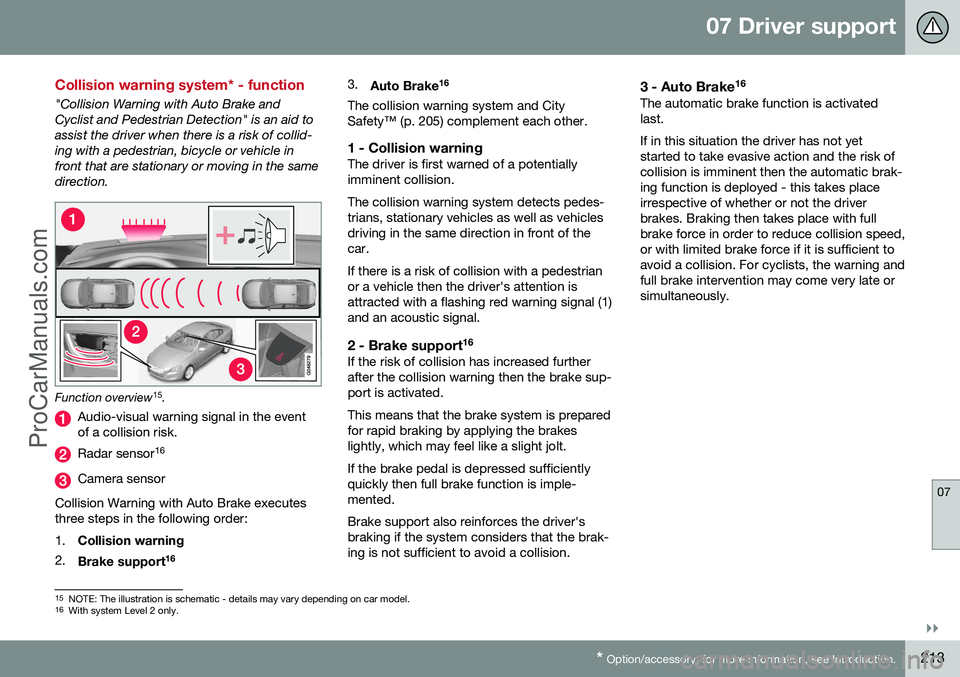
"Collision Warning with Auto Brake and Cyclist and Pedestrian Detection" is an aid toassist the driver when there is a risk of collid-ing with a pedestrian, bicycle or vehicle infront that are stationary or moving in the samedirection.
Function overview 15
.
Audio-visual warning signal in the event of a collision risk.
Radar sensor 16
Camera sensor
Collision Warning with Auto Brake executes three steps in the following order: 1. Collision warning
2. Brake support 16 3.
Auto Brake 16
The collision warning system and City Safety™ (p. 205) complement each other.
1 - Collision warningThe driver is first warned of a potentiallyimminent collision. The collision warning system detects pedes- trians, stationary vehicles as well as vehiclesdriving in the same direction in front of thecar. If there is a risk of collision with a pedestrian or a vehicle then the driver's attention isattracted with a flashing red warning signal (1)and an acoustic signal.
2 - Brake support 16If the risk of collision has increased furtherafter the collision warning then the brake sup-port is activated. This means that the brake system is prepared for rapid braking by applying the brakeslightly, which may feel like a slight jolt. If the brake pedal is depressed sufficiently quickly then full brake function is imple-mented. Brake support also reinforces the driver's braking if the system considers that the brak-ing is not sufficient to avoid a collision.
3 - Auto Brake
16The automatic brake function is activatedlast. If in this situation the driver has not yet started to take evasive action and the risk ofcollision is imminent then the automatic brak-ing function is deployed - this takes placeirrespective of whether or not the driverbrakes. Braking then takes place with fullbrake force in order to reduce collision speed,or with limited brake force if it is sufficient toavoid a collision. For cyclists, the warning andfull brake intervention may come very late orsimultaneously.
15
NOTE: The illustration is schematic - details may vary depending on car model.
16 With system Level 2 only.
ProCarManuals.co’
Page 216 of 442

||
07 Driver support
07
214* Option/accessory, for more information, see Introduction.
WARNING
The collision warning system does not engage in all driving situations or traffic,weather or road conditions. The collisionwarning system does not react to vehiclesor cyclists driving in another direction tothe car or to animals. Warning only activated in the event of a high risk for collision. This section "Func-tion" and the section "Limitations" informabout limitations that the driver must beaware of before using the Collision Warn-ing system with Auto Brake. Warnings and brake interventions for pedestrians and cyclists are deactivated ata vehicle speed exceeding 80 km/h. Warnings and brake interventions for pedestrians and cyclists do not work indarkness and tunnels - not even whenstreetlights are lit. The auto-brake function can prevent a col- lision or reduce collision speed. To ensurefull brake performance, the driver shouldalways depress the brake pedal - evenwhen the car auto-brakes. Never wait for a collision warning. The driver is always responsible that the cor-rect distance and speed are maintained -even when the collision warning systemwith auto-brake is used.
Related information
• Collision warning system* (p. 212)
• Collision warning system* - detection of pedestrians (p. 216)
• Collision warning system* - cyclist detec-tion (p. 214)
• Collision warning system* - operation (p.217)
• Collision warning system* - general limita-tions (p. 218)
• Collision warning system* - camera sen-sor limitations (p. 220)
• Collision warning system* - symbols andmessages (p. 222)
Collision warning system* - cyclist detection
"Collision Warning with Auto Brake and Cyclist and Pedestrian Detection" is an aid toassist the driver when there is a risk of collid-ing with a pedestrian, bicycle or vehicle infront that are stationary or moving in the samedirection.
Optimum examples of what the system interprets as a cyclist - with clear body and bicycle con-tours, directly from behind and in the car's cen-tre line.
Optimal performance of the system requires that the system function that detects a cyclistreceives as unambiguous information as pos-sible about the body and bicycle contours -this implies the opportunity to identify thebicycle, head, arms, shoulders, legs, upperand lower body combined with a normalhuman pattern of movement.
ProCarManuals.co’