Page 66 of 872
66 1-2. Opening, closing and locking the doors
SIENNA_OM_OM45483U_(U)
■When all the doors are locked with the wireless remote control or key
The doors cannot be unlocked with the door lock switch.
The door lock switch can be reset by unlocking all the doors with the wire-
less remote control or key.
■ Using the mechanical key (vehicles with a smart key system)
The doors can also be locked and unlocked with the mechanical key.
(P. 781)
■ Customization that can be co nfigured at Toyota dealer
Settings (e.g. unlocking function using a key) can be changed.
(Customizable features: P. 828)
CAUTION
■To prevent an accident
Observe the following precautions while driving the vehicle.
Failing to do so may result in a door opening and an occupant falling out,
resulting in death or serious injury.
●Always use a seat belt.
● Always lock all the doors.
● Ensure that all doors are properly closed.
● Do not pull the inside handle of the doors while driving.
The doors may be opened and the passengers could be thrown out of the
vehicle which may result in serious injury or death.
Be especially careful for the front doors, as the doors may be opened even
if the inside lock buttons are in the locked position.
Page 67 of 872
67
1
1-2. Opening, closing and locking the doors
Before driving
SIENNA_OM_OM45483U_(U)
Sliding doors
Vehicles without power sliding doors
The sliding doors can be opened and closed using the sliding door
handle. The sliding door can be locked and unlocked using the wire-
less remote control, door lock switch or inside lock knob.
Vehicles with power sliding doors
The power sliding doors can be opened and closed using the sliding
door handle, power sliding door switches or wireless remote control.
The power sliding doors can be locked and unlocked using the wire-
less remote control, door lock switch or inside lock knob.
■ Wireless remote control
P. 5 3
■ Door lock switch
P. 6 1
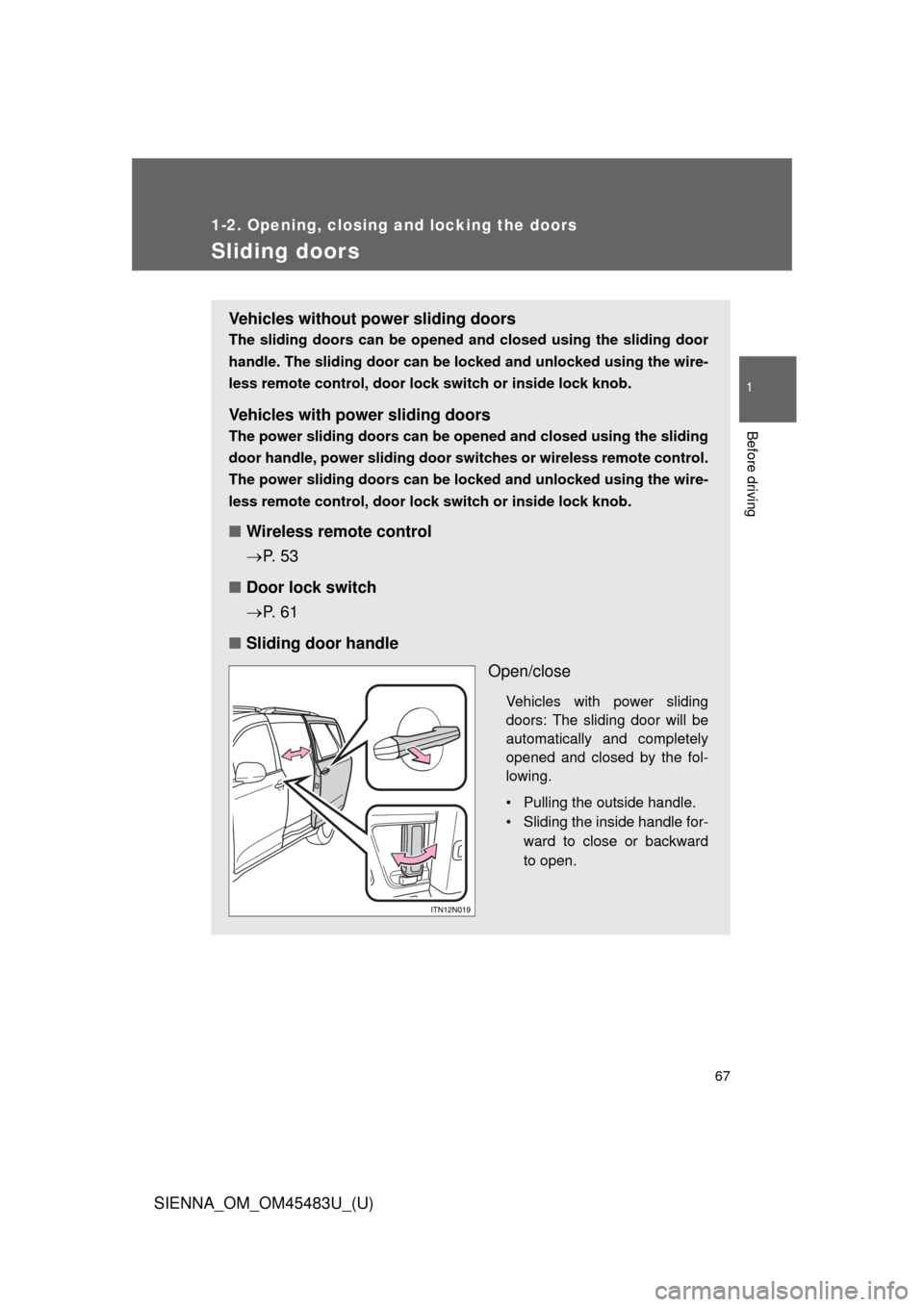
■ Sliding door handle
Open/close
Vehicles with power sliding
doors: The sliding door will be
automatically and completely
opened and closed by the fol-
lowing.
• Pulling the outside handle.
• Sliding the inside handle for-ward to close or backward
to open.
Page 70 of 872
70 1-2. Opening, closing and locking the doors
SIENNA_OM_OM45483U_(U)
Canceling the power sliding door system (vehicles with power
sliding doors)
Turn the main switch off to dis-
able the power sliding door sys-
tem.Off
The sliding doors can only be
opened and closed manually.
On*
The power sliding door can be
opened and closed with the
power sliding door switches for
the front occupants or wireless
remote control even if the sliding
door child-protectors are locked.
*: Orange mark on the switchshould be visible when the switch
is on.
Locking the sliding doors from th e outside without the wireless
remote control
Move the inside lock knob to the lock position.
Close the sliding door.
STEP1
STEP2
Page 72 of 872

72 1-2. Opening, closing and locking the doors
SIENNA_OM_OM45483U_(U)
■Power sliding doors
●If the power sliding door outside handle is pulled while the power sliding
door is opening or closing, the door will reverse the operation directio\
n.
● During opening operation:
Stroking the power sliding door handle forward will reverse the direction
and start closing.
Stroking the handle backward will continue opening.
During closing operation:
Stroking the power sliding door handle backward will reverse the direc-
tion and start opening.
Stroking the handle forward will continue closing.
● The power sliding doors can be opened/closed manually when the power
sliding door function is canceled with the main switch.
● Vehicles without a smart key system: A buzzer sounds if you put the shift
lever out of P with the engine switch in the “ON” position and the sliding
door not completely closed.
Vehicles with a smart key system: A buzzer sounds if you put the shift
lever out of P with the “ENGINE START STOP” switch in IGNITION ON
mode and the sliding door not completely closed.
● Vehicles with AUTO ACCESS SEAT : If the AUTO ACCESS SEAT has
not been locked in place after being stowed, the right-hand sliding door
will not close and a beep will sound twice.
For details, refer to “AUTO ACCESS SEAT OWNER’S MANUAL”.
● In an emergency, power slide door operation can be stopped by any of
the following:
• Pulling the outside handle three consecutive times
• During opening operation, sliding t he inside handle forward three con-
secutive times
• During closing operation, sliding the inside handle backward three con-
secutive times
• Pressing the power sliding door switch three consecutive times
• Pressing the power sliding door button on wireless remote control three consecutive times ( P. 53)
After stopping, power sliding door brake function will be activated ( P. 73)
Page 82 of 872
82
1-2. Opening, closing and locking the doors
SIENNA_OM_OM45483U_(U)
Back door
The back door can be locked and unlocked using the entry function
(vehicles with a smart key system), wireless remote control or door
lock switch.
The back door can be opened using the back door opener.
In addition, the power back door can be opened/closed using the
power back door switch or wireless remote control.
■ Locking and unlocking the back door
Entry function (vehicles with a smart key system)
P. 3 7
Wireless remote control
P. 5 3
Door lock switch
P. 6 1
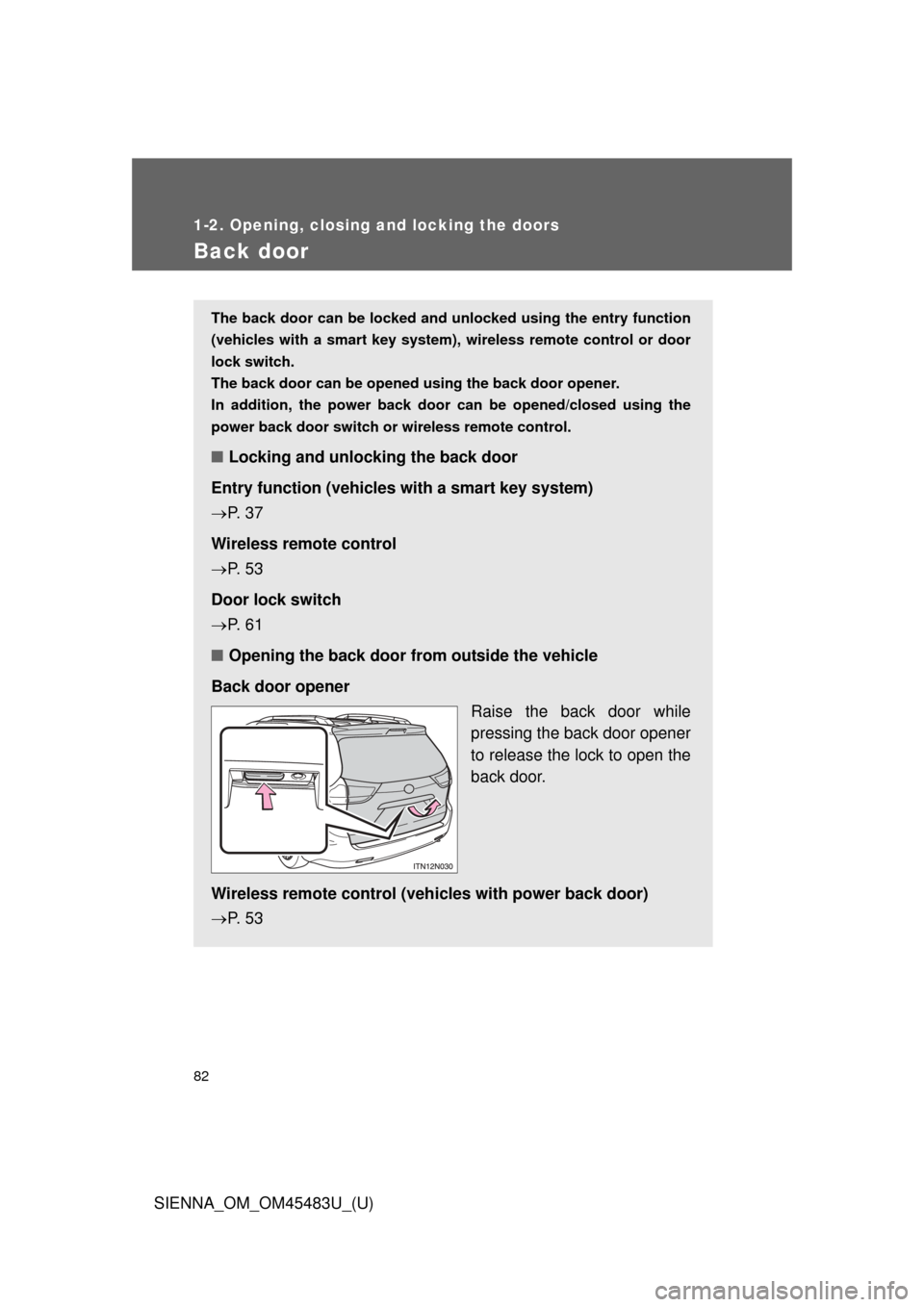
■ Opening the back door from outside the vehicle
Back door opener Raise the back door while
pressing the back door opener
to release the lock to open the
back door.
Wireless remote control (veh icles with power back door)
P. 5 3
Page 87 of 872
87
1-2. Opening, closing and locking the doors
1
Before driving
SIENNA_OM_OM45483U_(U)
■
The power back door can be operated when
●The shift lever is in P.
● The back door is unlocked.
■ Jam protection function (vehicles with power back door)
●If anything obstructs the power back door while it is closing or opening,
the back door will automatically operate in the opposite direction.
● If the jam protection function operates during two consecutive closing
operations, the back door will be stopped at that position.
■ Back door closer (vehicl es with power back door)
In the event that the back door is left slightly open, the back door closer will
automatically close it to the fully closed position.
■ When the battery is disconnected
●The back door will be automatically locked after the battery is recon-
nected.
● The power back door (if equipped) must be initialized in order to ensure
proper operation.
Unlock the back door with the wireless remote control or door lock
switch.
Close the back door completely by hand.
STEP1
STEP2
Page 123 of 872
123
1-3. Adjustable components (s
eats, mirrors, steering wheel)
1
Before driving
SIENNA_OM_OM45483U_(U)
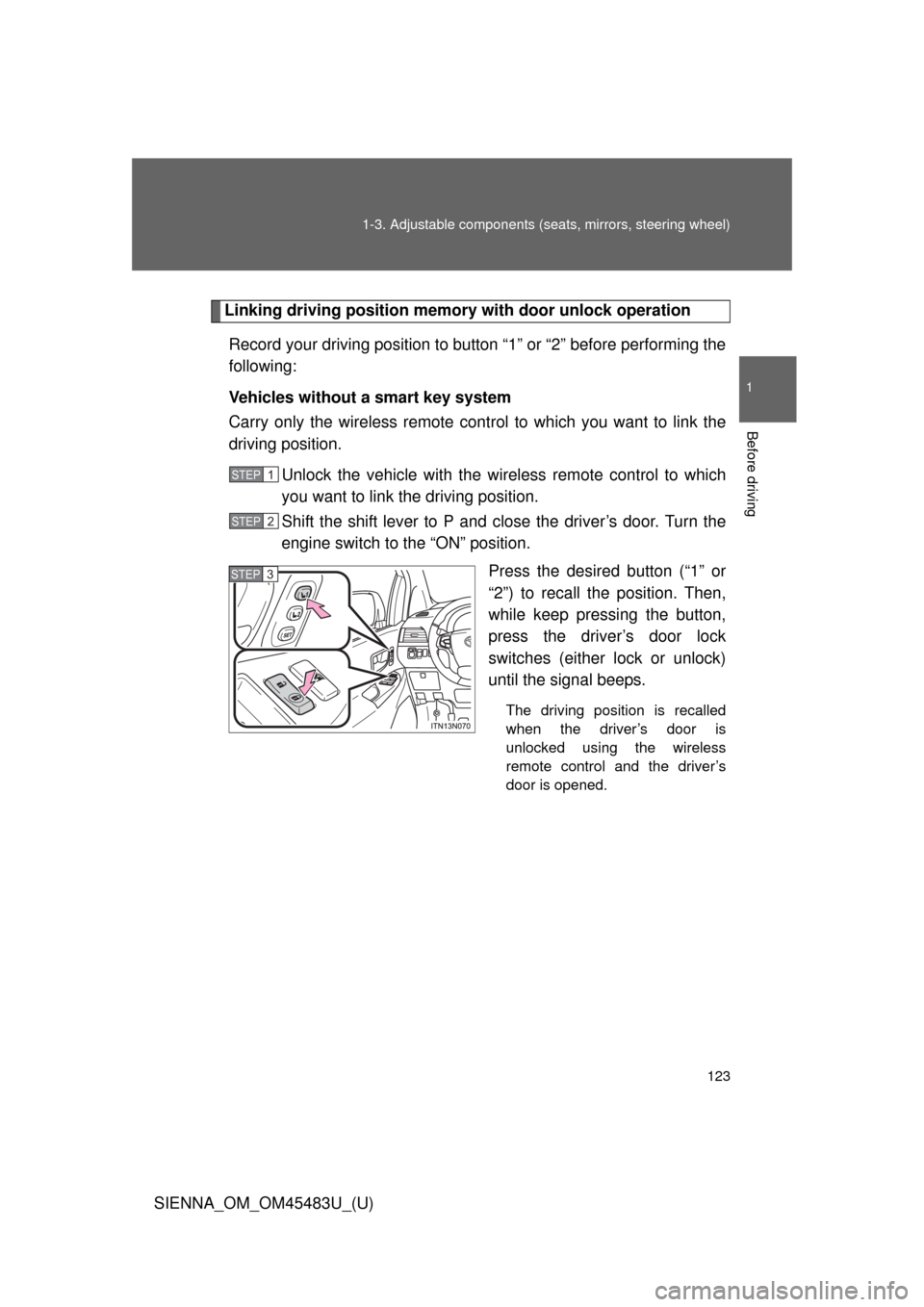
Linking driving position memory with door unlock operation
Record your driving position to button “1” or “2” before performing the
following:
Vehicles without a smart key system
Carry only the wireless remote cont rol to which you want to link the
driving position.
Unlock the vehicle with the wire less remote control to which
you want to link the driving position.
Shift the shift lever to P and close the driver’s door. Turn the
engine switch to the “ON” position.
Press the desired button (“1” or
“2”) to recall the position. Then,
while keep pressing the button,
press the driver’s door lock
switches (either lock or unlock)
until the signal beeps.
The driving position is recalled
when the driver’s door is
unlocked using the wireless
remote control and the driver’s
door is opened.
STEP1
STEP2
STEP3
Page 124 of 872
124 1-3. Adjustable components (seats, mirrors, steering wheel)
SIENNA_OM_OM45483U_(U)Vehicles with a smart key system
Carry only the electronic key to wh
ich you want to link the driving
position. If 2 or more keys are in the vehicle, the driving position can-
not be linked properly.
Shift the shift lever to P and close the driver’s door. Turn the
“ENGINE START STOP” switch to IGNITION ON mode. Press the desired button (“1” or
“2”) to recall the position. Then,
while keep pressing the button,
press the driver’s door lock
switches (either lock or unlock)
until the signal beeps.
The driving position is recalled
when the driver’s door is
unlocked using the wireless
remote control and the driver’s
door is opened.
STEP1
STEP2