Page 366 of 872
366 2-5. Driving information
SIENNA_OM_OM45483U_(U)
CAUTION
■Storage precautions
●Secure all items in the occupant compartment, as they may shift and
injure someone during sudden braking, sudden swerving or an acci-
dent.
●When you fold down the rear seats, long items should not be placed
directly behind the front seats.
●Never allow anyone to ride in the luggage compartment. It is not
designed for passengers. They should ride in their seats with their seat
belts properly fastened. Otherwise, they are much more likely to suffer
death or serious bodily injury, in t he event of sudden braking, sudden
swerving or an accident.
■Capacity and distribution
●Do not exceed the maximum axle weight rating or the total vehicle
weight rating.
●Even if the total load of occupant’s weight and the cargo load is less
than the total load capacity, do not apply the load unevenly.
Improper loading may cause deterioration of steering or braking con-
trol which may cause death or serious injury.
■Cross rail adjustment
Make sure the cross rails are locked securely by pushing forward and
rearward them.
Failure to do so may cause an unexpected accident.
Page 370 of 872
370 2-5. Driving information
SIENNA_OM_OM45483U_(U)
Selecting tire chainsUse the tire chains of correct size and type.
Use SAE Class “S” type radial tire chains, with the exception of radial
cable chains or V-bar type chains.
Regulations on the use of tire chains
Regulations regarding the use of ti re chains vary depending on loca-
tion and type of road. Always chec k local regulations before installing
chains.
■ When driving the vehicle
Accelerate the vehicle slowly and drive at a reduced speed suit-
able to road conditions.
■ When parking the vehicle
Park the vehicle and move the shift lever to P without setting the
parking brake. The parking brak e may freeze up, preventing it
from being released. If necessary , block the wheels to prevent
inadvertent sliding or creeping.
Page 381 of 872
381
2-5. Driving information
2
When driving
SIENNA_OM_OM45483U_(U)
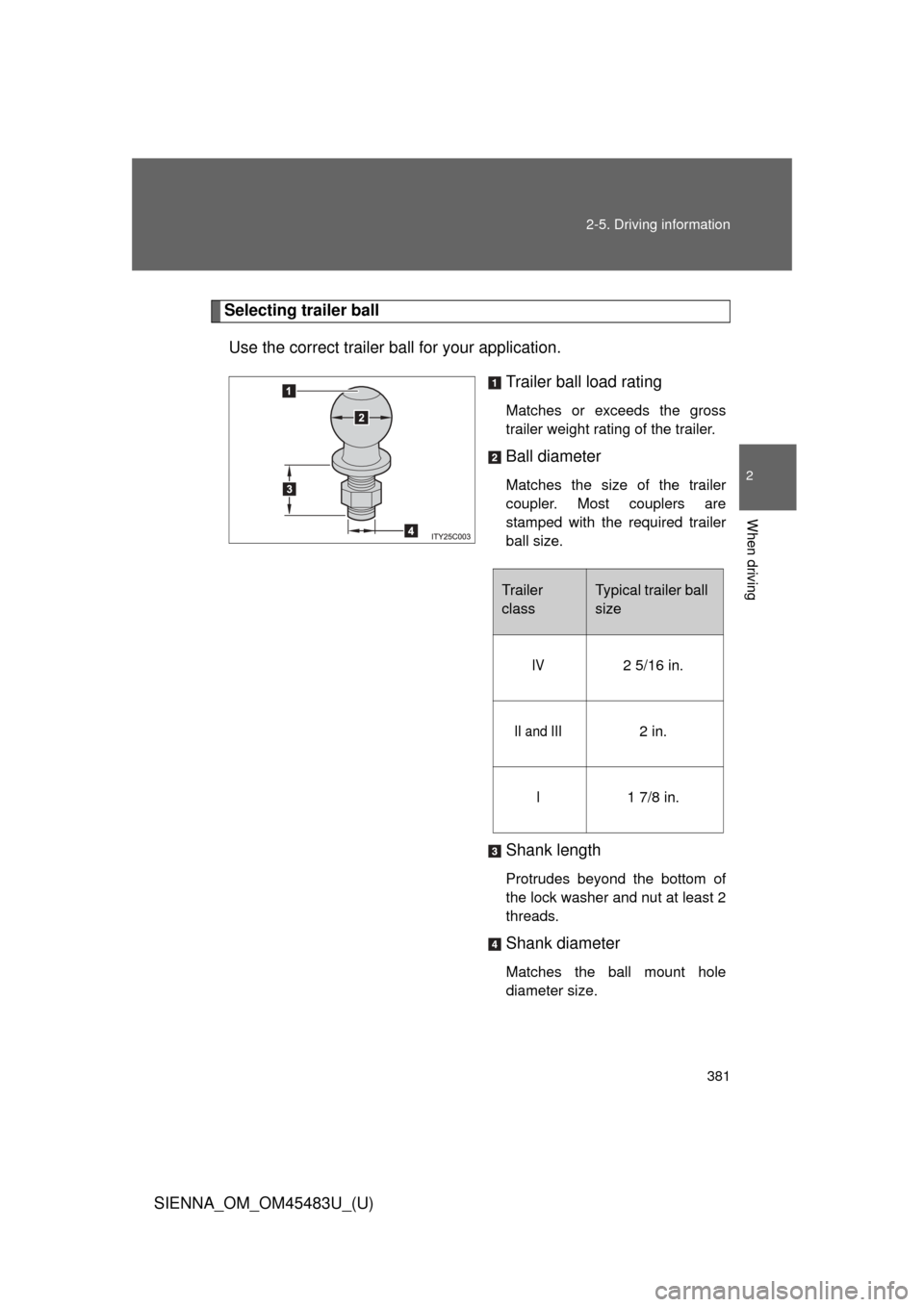
Selecting trailer ball
Use the correct trailer ball for your application. Trailer ball load rating
Matches or exceeds the gross
trailer weight rating of the trailer.
Ball diameter
Matches the size of the trailer
coupler. Most couplers are
stamped with the required trailer
ball size.
Shank length
Protrudes beyond the bottom of
the lock washer and nut at least 2
threads.
Shank diameter
Matches the ball mount hole
diameter size.
Trailer
classTypical trailer ball
size
IV2 5/16 in.
II and III2 in.
I1 7/8 in.
Page 386 of 872
386 2-5. Driving information
SIENNA_OM_OM45483U_(U)●
Always place wheel blocks under both the vehicle’s and the
trailer’s wheels when parking. Ap ply the parking brake firmly, and
put the transmission in P. Avoid parking on a slope, but if unavoid-
able, do so only after performing the following:
Apply the brakes and keep them applied.
Have someone place wheel blo cks under both the vehicle’s
and trailer’s wheels.
When the wheel blocks are in place, release the brakes slowly
until the blocks absorb the load.
Apply the parking brake firmly.
Shift into P and turn off the engine.
● When restarting after parking on a slope:
With the transmission in P, start the engine. Be sure to keep
the brake pedal pressed.
Shift into a forward gear. If reversing, shift into R.
Release the parking brake and brake pedal, and slowly pull or
back away from the wheel blocks. Stop and apply the brakes.
Have someone retrieve the blocks.
STEP1
STEP2
STEP3
STEP4
STEP5
STEP1
STEP2
STEP3
STEP4
Page 395 of 872
Interior features3
395
SIENNA_OM_OM45483U_(U)
3-5. Using the hands-free phone system (for cellular phone)
Hands-free phone system (for cellular phone)
features .......................... 545
Using the hands-free phone system (for cellular
phone)............................ 550
Making a phone call ......... 559
Setting a cellular phone ... 564
Security and system setup .............................. 569
Using the phone book ...... 574
3-6. Using the interior lights Interior lights list ............... 582
• Personal/interior light main switch ............................. 583
• Personal/interior lights ... 584
• Personal lights ............... 586
• Rear ceiling lights .......... 586 3-7. Using the storage features
List of storage features .... 588
• Glove boxes ................... 589
• Console box ................... 591
• Overhead console .......... 594
• Cup holders ................... 595
• Bottle holders ................. 598
• Door pockets .................. 600
• Auxiliary boxes ............... 601
3-8. Other interior features Sun visors ........................ 606
Vanity mirrors ................... 607
Clock ................................ 608
Conversation mirror ......... 609
Power outlets ................... 610
Seat heaters..................... 614
Armrests........................... 616
Assist grips....................... 618
Rear side sunshades ....... 619
Grocery bag hooks........... 620
Floor mat .......................... 622
Luggage compartment features .......................... 624
Garage door opener......... 626
Compass .......................... 634
Safety Connect ................ 639
Page 397 of 872
397
3-1. Using the air conditioning system
and defogger
3
Interior features
SIENNA_OM_OM45483U_(U)Driver’s side temperature control dial
Turn the temperature control dial clockwise (warm) or coun-
terclockwise (cool).
If is not pressed, the system will blow ambient temperature air
or heated air.
For quick cooling, turn the temperature control dial to the “MAX A/C”
position. The air conditioning will automatically turn on and the air
circulation mode will be set to recirculated air mode.
When the dial is in the “MAX A/C” position, the air conditioning sys-
tem cannot be turned off even if is pressed.
Front passenger’s side temperature control dial
Turn the temperature control dial clockwise (warm) or counter
clockwise (cool).
STEP2
Page 399 of 872
399
3-1. Using the air conditioning system
and defogger
3
Interior features
SIENNA_OM_OM45483U_(U) Air flows to the feet and the
windshield defogger operates.
■ Switching between outside air and recirculated air modes
Press .
The mode switches between outside air mode (introduces air from out-
side the vehicle) (indicator off) and recirculated air mode (recycles air
inside the vehicle) (indicator on) each time the button is pressed.
Changing the rear setting
■ Adjusting the temperature setting
Turn the rear temperature control dial clockwise (increase) or
counterclockwise (decrease).
When the rear temperature control dial is turned to “REAR
CTRL”, the rear temperature and fan speed can be operated
from the rear air conditioning control panel. ( P. 414)
Page 403 of 872
403
3-1. Using the air conditioning system
and defogger
3
Interior features
SIENNA_OM_OM45483U_(U)
CAUTION
■To prevent the windshield from fogging up
Do not use during cool air operation in extremely humid weather. The
difference between the temperature of the outside air and that of the wind-
shield can cause the outer surface of the windshield to fog up, blocking your
vision.
NOTICE
■To prevent battery discharge
Do not leave the air conditioning system on longer than necessary when the
engine is stopped.