Page 289 of 620

289
3-2. Using the audio system
3
Interior features
■
About iPod
●“Made for iPod” and “Made for iPhone” mean that an electroni\
c acces-
sory has been designed to connect specifically to iPod or iPhone,
respectively, and has been certified by the developer to meet Apple per-
formance standards.
● Apple is not responsible for the operation of this device or its compliance
with safety and regulatory standards. Please note that the use of this
accessory with iPod or iPhone may affect wireless performance.
● iPhone, iPod, iPod classic, iPod nano, and iPod touch are trademarks of
Apple Inc., registered in the U.S. and other countries. Lightning is a
trademark of Apple Inc.
■ iPod cover art
●Depending on the iPod and songs in the iPod, iPod cover art may be dis-
played.
● This function can be changed to On/Off. ( P. 287)
● It may take time to display iPod cover art, and the iPod may not be oper-
ated while the cover art display is in process.
● Only iPod cover art that is saved in JPEG format can be displayed.
■ iPod functions
●When an iPod is connected and the audio source is changed to iPod
mode, the iPod will resume play from the same point in which it was last
used.
● Depending on the iPod that is connected to the system, certain functions
may not be available. If a function is unavailable due to a malfunction (as
opposed to a system specification), disconnecting the device and recon-
necting it may resolve the problem.
Page 293 of 620
293
3-2. Using the audio system
3
Interior features
Listening to a USB memor y device
Connecting a USB memory device P. 2 6 2
Audio control screen
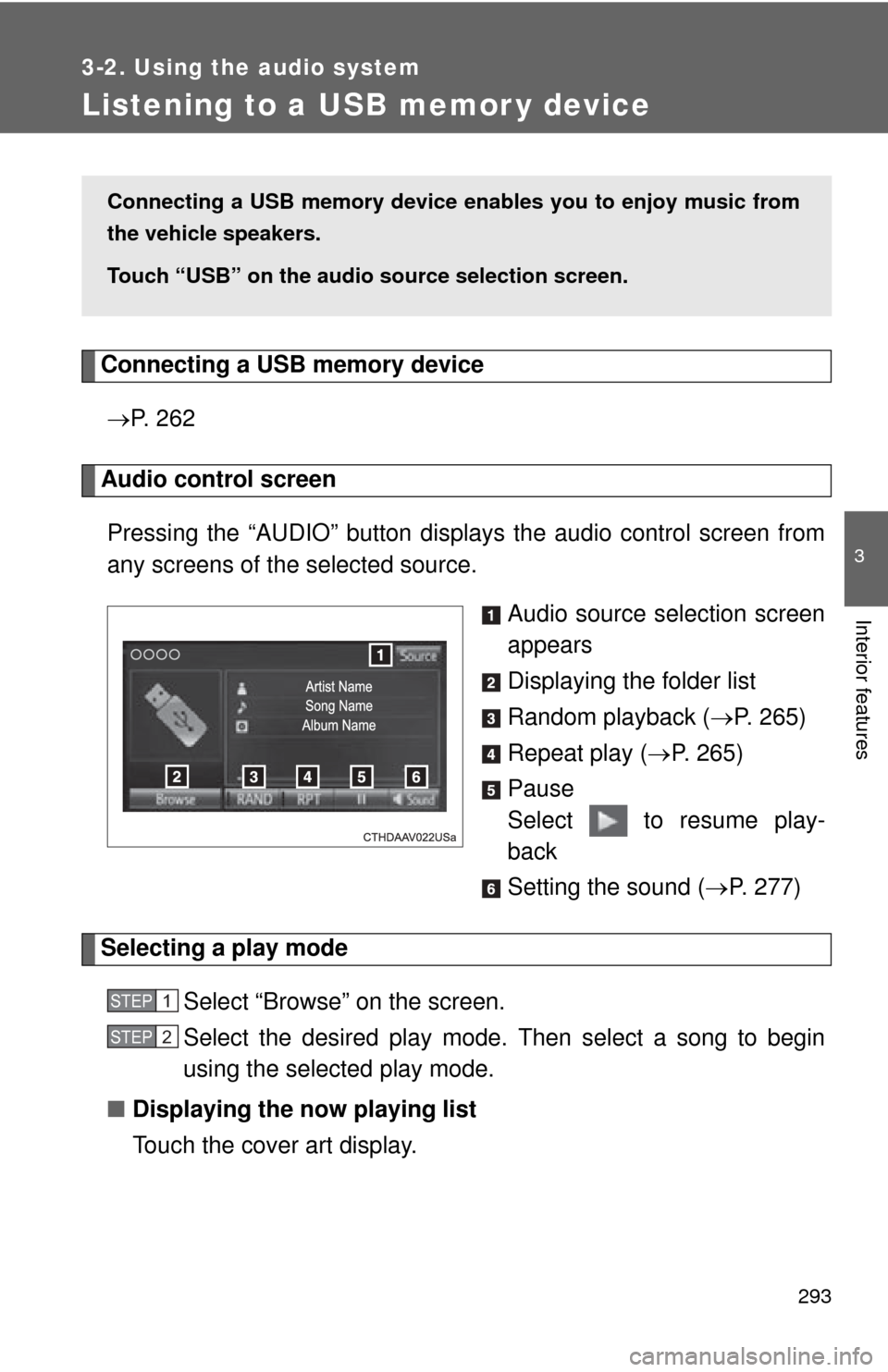
Pressing the “AUDIO” button disp lays the audio control screen from
any screens of the selected source.
Audio source selection screen
appears
Displaying the folder list
Random playback (P. 265)
Repeat play ( P. 265)
Pause
Select to resume play-
back
Setting the sound ( P. 277)
Selecting a play mode
Select “Browse” on the screen.
Select the desired play mode. Then select a song to begin
using the selected play mode.
■ Displaying the now playing list
Touch the cover art display.
Connecting a USB memory device en ables you to enjoy music from
the vehicle speakers.
Touch “USB” on the audio source selection screen.
STEP1
STEP2
Page 295 of 620
295
3-2. Using the audio system
3
Interior features
■
USB memory
●Compatible devices
USB memory device that can be used for MP3, WMA and AAC playback.
● Compatible device formats
The following device format can be used:
• USB communication format: USB2.0 HS (480 Mbps) and FS (12 Mbps)
• File system format: FAT16/32 (Windows)
• Correspondence class: Mass storage class
MP3, WMA and AAC files written to a device with any format other than
those listed above may not play correctly, and their file names and
folder names may not be displayed correctly.
Items related to standards and limitations are as follows:
• Maximum directory hierarchy: 8 levels
• Maximum number of folders in a device: 3000 (including the root)
• Maximum number of files in a device: 9999
• Maximum number of files per folder: 255
● MP3, WMA and AAC files
MP3 (MPEG Audio LAYER 3) is a standard audio compression format.
Files can be compressed to approximately 1/10 of their original size using
MP3 compression.
WMA (Windows Media Audio) is a Microsoft audio compression format. This
format compresses audio data to a size smaller than that of the MP3 format.
AAC is short for Advanced Audio Coding and refers to an audio compression
technology standard used with MPEG2 and MPEG4.
MP3, WMA and AAC file and media/formats compatibility are limited.
Page 299 of 620
299
3-2. Using the audio system
3
Interior features
Using the AUX port
Connecting a portable audio player P. 2 6 2
■Operating portable audio players connected to the audio system
The volume can be adjusted using the vehicle's audio controls. All other
adjustments must be made on the portable audio player itself.
■ When using a portable audio player connected to the power outlet
Noise may occur during playback. Use the power source of the portable
audio player.
CAUTION
■ While driving
Do not connect a portable audio player or operate the device controls.
To use the AUX port, connect a portable player, press the “AUDIO”
button, then select “AUX” to display the audio control screen.
Page 303 of 620
303
3-2. Using the audio system
3
Interior features
Registering and connecting from
the “Bluetooth* Setup” screen
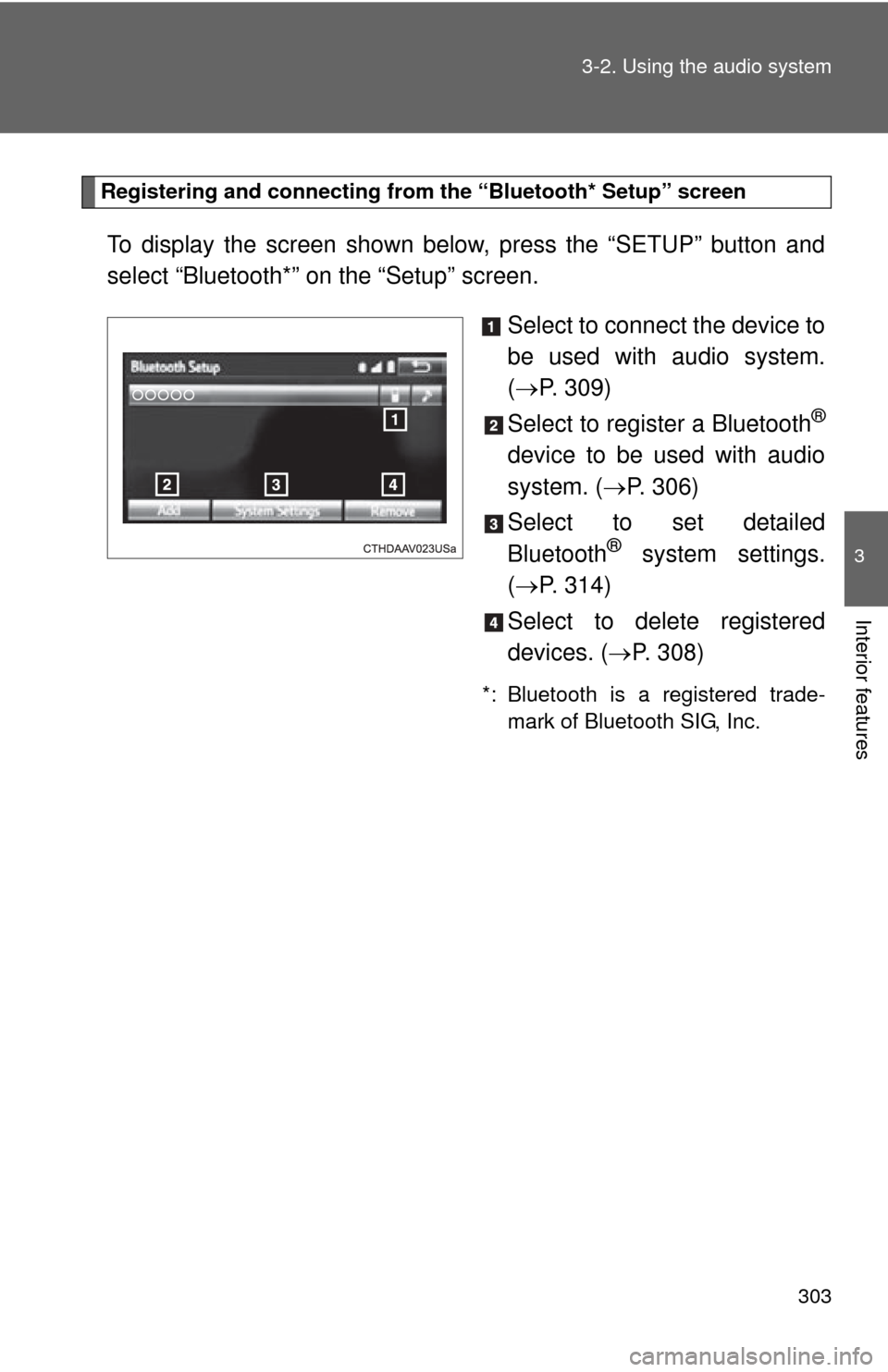
To display the screen shown below, press the “SETUP” button and
select “Bluetooth*” on the “Setup” screen.
Select to connect the device to
be used with audio system.
( P. 309)
Select to register a Bluetooth
®
device to be used with audio
system. ( P. 306)
Select to set detailed
Bluetooth
® system settings.
( P. 314)
Select to delete registered
devices. ( P. 308)
*: Bluetooth is a registered trade-
mark of Bluetooth SIG, Inc.
Page 306 of 620

306
3-2. Using the audio system
Registering a Bluetooth® device
How to register a Bluetooth® device
Display the “Bluetooth* Setup” screen. ( P. 303)
*:Bluetooth is a registered trademark of Bluetooth SIG, Inc.
Select “Add”.
When this screen is displayed,
search for the device name dis-
played on this screen on the
screen of your Bluetooth
®
device.
For details about operating the
Bluetooth® device, see the man-
ual that comes with it.
To cancel the registration, select
“Cancel”.
Register the Bluetooth® device using your Bluetooth® device.
A PIN-code is not required for SSP (Secure Simple Pairing) compat-
ible Bluetooth® devices. Depending on the type of Bluetooth® device
being connected, a message confirming registration may be dis-
played on the Bluetooth
® device’s screen. Respond and operate the
Bluetooth® device according to the confirmation message.
Bluetooth® compatible phones (HFP) and portable audio players
(AVP) can be registered simultane ously. You can register up to 5
Bluetooth
® devices.
STEP1
STEP2
STEP3
STEP1STEP4
Page 307 of 620
307
3-2. Using the audio system
3
Interior features
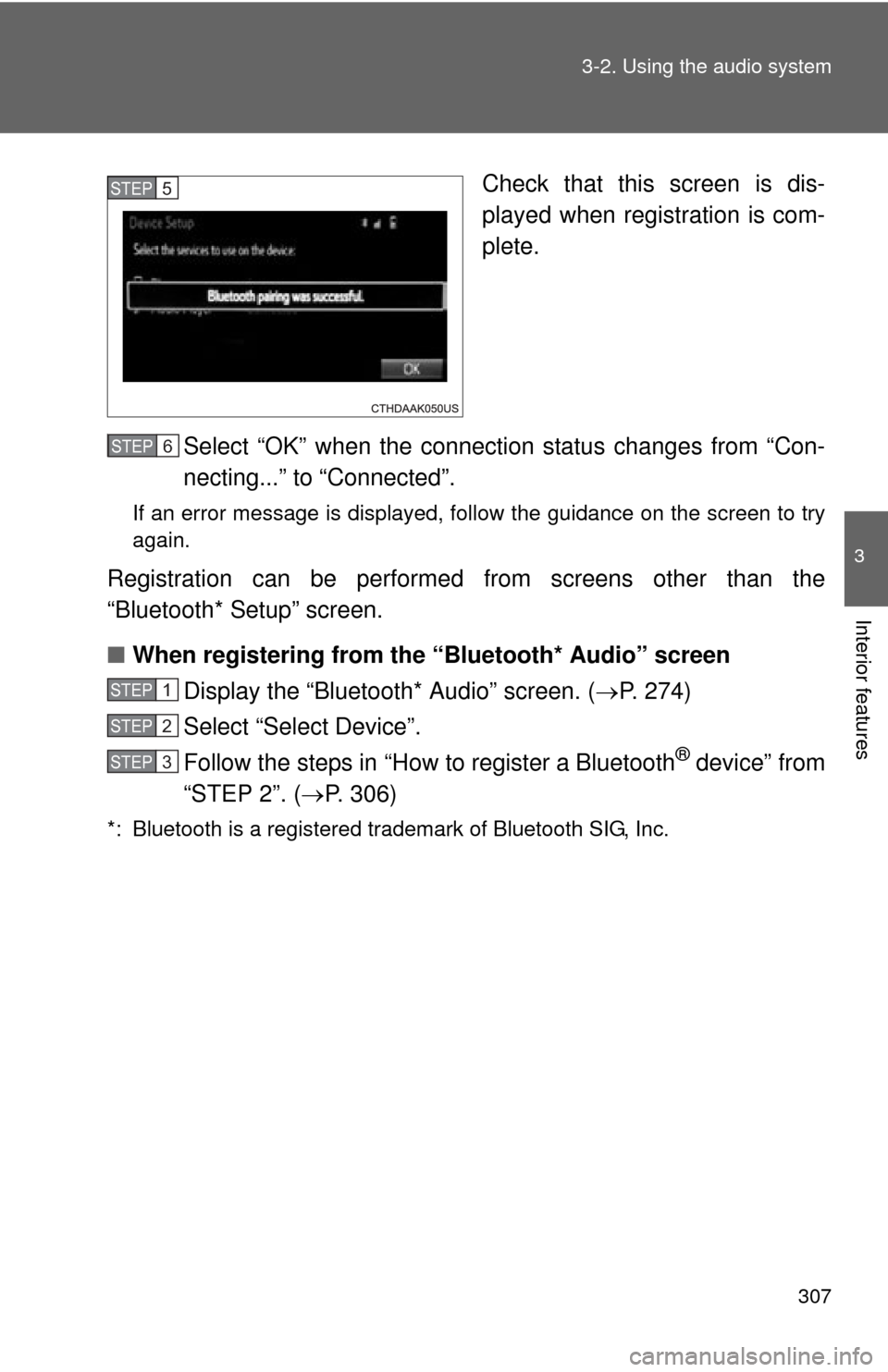
Check that this screen is dis-
played when registration is com-
plete.
Select “OK” when the connection status changes from “Con-
necting...” to “Connected”.
If an error message is displayed, follow the guidance on the screen to try
again.
Registration can be performed from screens other than the
“Bluetooth* Setup” screen.
■ When registering from the “Bluetooth* Audio” screen
Display the “Bluetooth* Audio” screen. ( P. 274)
Select “Select Device”.
Follow the steps in “How to register a Bluetooth
® device” from
“STEP 2”. ( P. 306)
*: Bluetooth is a registered trademark of Bluetooth SIG, Inc.
STEP5
STEP1STEP6
STEP1
STEP2
STEP3
Page 308 of 620
308 3-2. Using the audio system
Deleting a Bluetooth® device
Display the “Bluetooth* Setup” screen. ( P. 303)
*: Bluetooth is a registered trademark of Bluetooth SIG, Inc.
Select “Remove”.
Select the desired device.
A confirmation message will be displayed, select “Yes” to
delete the device.
Check that a confirmation screen is displayed when the oper-
ation is complete.
STEP1
STEP2
STEP3
STEP4
STEP5