Page 182 of 620
182 2-2. Instrument cluster
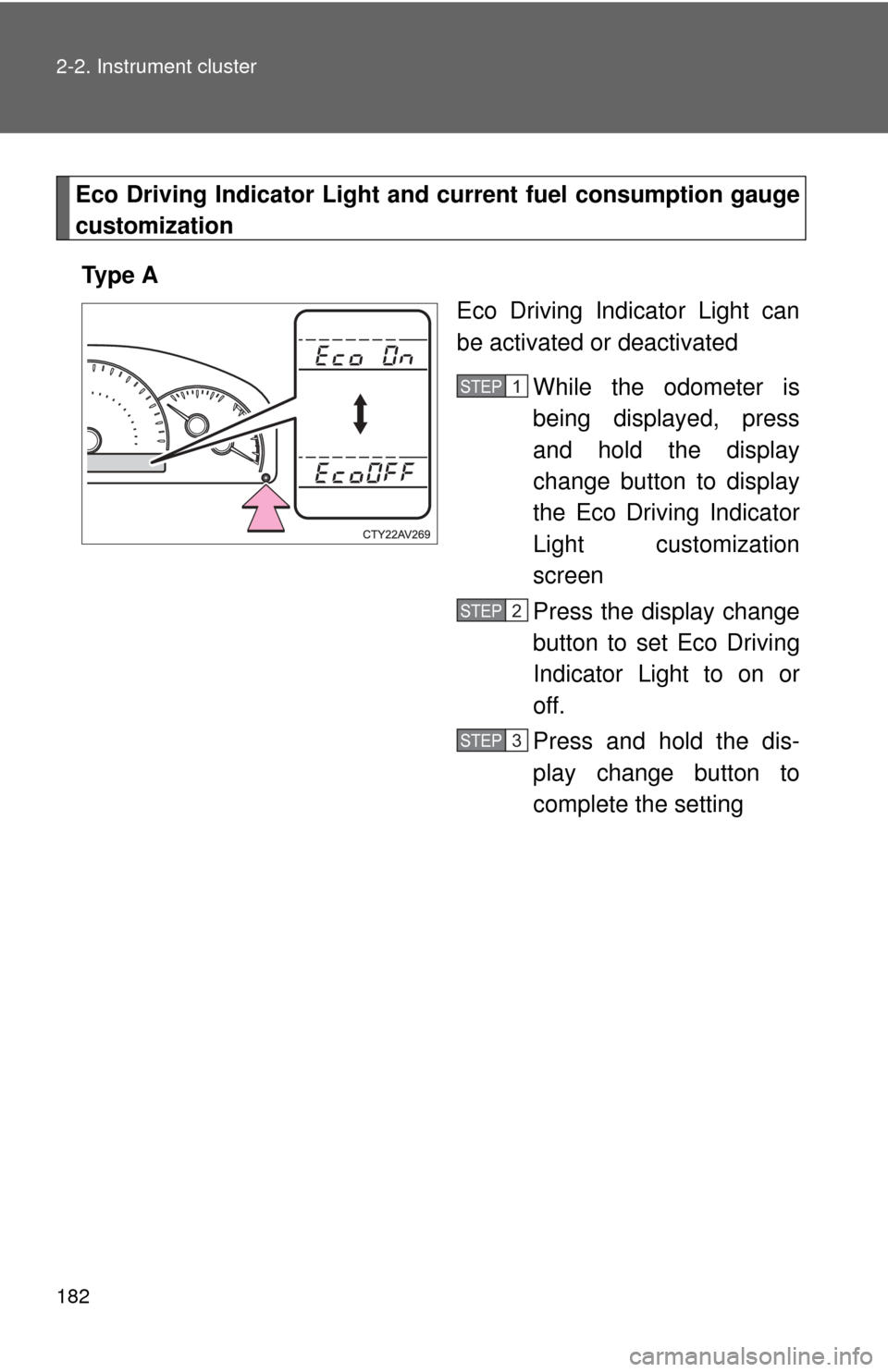
Eco Driving Indicator Light and current fuel consumption gauge
customization
Ty p e A Eco Driving Indicator Light can
be activated or deactivated
While the odometer is
being displayed, press
and hold the display
change button to display
the Eco Driving Indicator
Light customization
screen
Press the display change
button to set Eco Driving
Indicator Light to on or
off.
Press and hold the dis-
play change button to
complete the setting
STEP1
STEP2
STEP3
Page 183 of 620
183
2-2. Instrument cluster
2
When driving
Ty p e B
Eco Driving Indicator Light and
current fuel consumption gauge
can be activated or deactivated
While the odometer is
being displayed, press
and hold the display
change button to display
the Eco Driving Indicator
Light customization
screen
Press the display change
button to set Eco Driving
Indicator Light to on or
off.
Press and hold the dis-
play change button to
complete the setting
If off is selected, Eco Driving
Indicator Light and the current
fuel consumption gauge (if
equipped) will not be displayed.
STEP1
STEP2
STEP3
■ The meters and display illuminate when
Vehicles without a smart key system:
The engine switch is in the “ON” position.
Vehicles with a smart key system:
The “ENGINE START STOP” switch is in IGNITION ON mode.
Page 184 of 620

184 2-2. Instrument cluster
■The brightness of the instrument panel lights
When the tail lights are turned on, the meter’s brightness will be reduced
slightly unless the meter brightness level adjustment is set to the brightest
setting.
On some models: If the tail lights are turned on when the surroundings are
dark, the meter’s brightness will reduce slightly. However, when the sur-
roundings are bright, such as during the daytime, the meter’s brightness will
not be reduced even if the tail lights are turned on.
■ Fuel gauge and odometer/trip meter display remain on mode
Vehicles without a smart key system:
After the engine switch has been turned off, the fuel gauge and odometer/
trip meter display remain on for 10 minutes, enabling the fuel gauge and
odometer/trip meter values to be checked again without having to turn the
engine switch to the “ON” position.
When confirming the gauges and meters, turn the headlight switch to the
position. Press the display change button to change between the
odometer and trip meter displays.
Vehicles with a smart key system:
After the “ENGINE START STOP” switch has been turned off, the fuel gauge
and odometer/trip meter display remain on for 10 minutes, enabling the fuel
gauge and odometer/trip meter values to be checked again without having to
turn the “ENGINE START STOP” switch to IGNITION ON mode.
When confirming the gauges and meters, turn the headlight switch to the
position. Press the display change button to change between the
odometer and trip meter displays.
NOTICE
■ To prevent damage to the engine and its components
●Do not let the indicator needle of the tachometer enter the red zone, which
indicates the maximum engine speed.
● The engine may be overheating if the rightmost segment of the engine
coolant temperature display is flashing. In this case, immediately stop the
vehicle in a safe place, and check the engine after it has cooled com-
pletely. ( P. 544)
Page 236 of 620

236
3-1. Using the air conditioning system and defogger
Manual air conditioning system ........................... 238
Automatic air conditioning system ........................... 245
Rear window and outside rear view mirror
defoggers ....................... 253 3-2. Using the audio system
Audio system types .......... 255
Audio system ................... 257
Steering wheel audio switches ......................... 260
USB/AUX port .................. 262
Basic audio operations..... 264
Setup menu...................... 267
General settings ............... 268
Audio settings .................. 270
Display settings ................ 271
Voice settings................... 273
Selecting the audio source ............................ 274
List screen operation........ 275
Optimal use of the audio system.................. 277
Radio operation................ 278
CD player operation ......... 280
Listening to an iPod ......... 287
Listening to a USB memory device .............. 293
Using the AUX port .......... 299
Preparations to use wireless
communication ............... 300
Registering a Bluetooth
®
audio player for the
first time ......................... 304
Registering a Bluetooth
®
phone for the
first time ......................... 305
Registering a Bluetooth
®
device ............................ 306
Interior features3
Page 237 of 620

Interior features3
237
Connecting a Bluetooth®
device ............................ 309
Displaying a Bluetooth
®
device details ................. 312
Detailed Bluetooth
®
system settings .............. 314
Listening to Bluetooth
®
audio .............................. 316
Using a Bluetooth
®
phone ............................. 318
Making a call .................... 320
Receiving a call ................ 324
Speaking on the phone ............................. 325
Bluetooth
® phone
message function........... 329
Using the steering wheel switches............... 334
Bluetooth
® phone
settings .......................... 335
Contact/Call history settings .......................... 337
What to do if... (Troubleshooting)........... 348
Bluetooth
®........................ 352
Voice command system ........................... 357
Rear view monitor system ........................... 360 3-3. Using the interior lights
Interior lights list ............... 371
• Interior lights .................. 372
• Personal lights ............... 373
3-4. Using the storage features
List of storage features .... 375
• Glove box....................... 376
• Console box ................... 377
• Coin holder .................... 378
• Bottle holders ................. 379
• Cup holders ................... 380
• Auxiliary boxes ............... 382
3-5. Other interior features Sun visors ........................ 384
Vanity mirrors ................... 385
Clock ................................ 386
Outside temperature display............................ 387
Ashtray ............................. 389
Power outlets ................... 390
Seat heaters..................... 393
Armrest ............................ 395
Assist grips....................... 396
Coat hooks ....................... 397
Floor mat .......................... 398
Trunk features .................. 400
Garage door opener......... 401
Compass .......................... 408
Safety Connect ................ 412
Page 245 of 620
245
3-1. Using the air conditioning system and defogger
3
Interior features
Automatic air conditioning system
: If equipped
Air outlets and fan speed are automatically adjusted according to the
temperature setting.
Cooling and dehumidification
function on/off button
Front passenger’s side
temperature setting display
Driver’s side
temperature control
“DUAL” button
Automatic
mode
Off
Driver’s side temperature
setting display
Fan speedOutside air or recirculated air mode Fan speed
display
Change the air outlets used Front passenger’s side
temperature control
Windshield defogger Air outlet display
Page 257 of 620
257
3-2. Using the audio system
3
Interior features
Audio system
Audio system operation buttons
Operations such as listening to audio, using the hands-free phone
and changing audio settings are st arted by using the following but-
tons.
“AUDIO” button
Display the “Select Audio Source”
screen or audio top screen. ( P. 274)
button
Press this button to access the
Bluetooth
® hands-free system.
( P. 318)
“CAR” button
Press this button to access the fuel
consumption screen. ( P. 179)
“SETUP” button
Press this button to customize the
function settings. ( P. 267)
Page 258 of 620
258 3-2. Using the audio system
Operating the touch screenBy touching the screen with your finger, you can control the audio
system, etc.
■ Drag
*
Touch the screen with your finger, and move the screen to the
desired position.
●Scrolling the lists
■ Flick
*
Touch the screen with your finger and quickly move the screen by
flicking your finger.
●Scrolling the main screen page
*:The above operations may not be performed on all screens.
■When using the touch screen
●If the screen is cold, the display may be dark, or the system may seem to
be operating slightly slower than normal.
● The screen may seem dark and hard to see when viewed through sun-
glasses. Change your angle of viewing, adjust the display on the “Dis\
play
Settings” screen ( P. 271) or remove your sunglasses.
● Flick operations may not be performed smoothly in high altitudes.