Page 274 of 612
274
3-2. Using the audio system
CD player operation
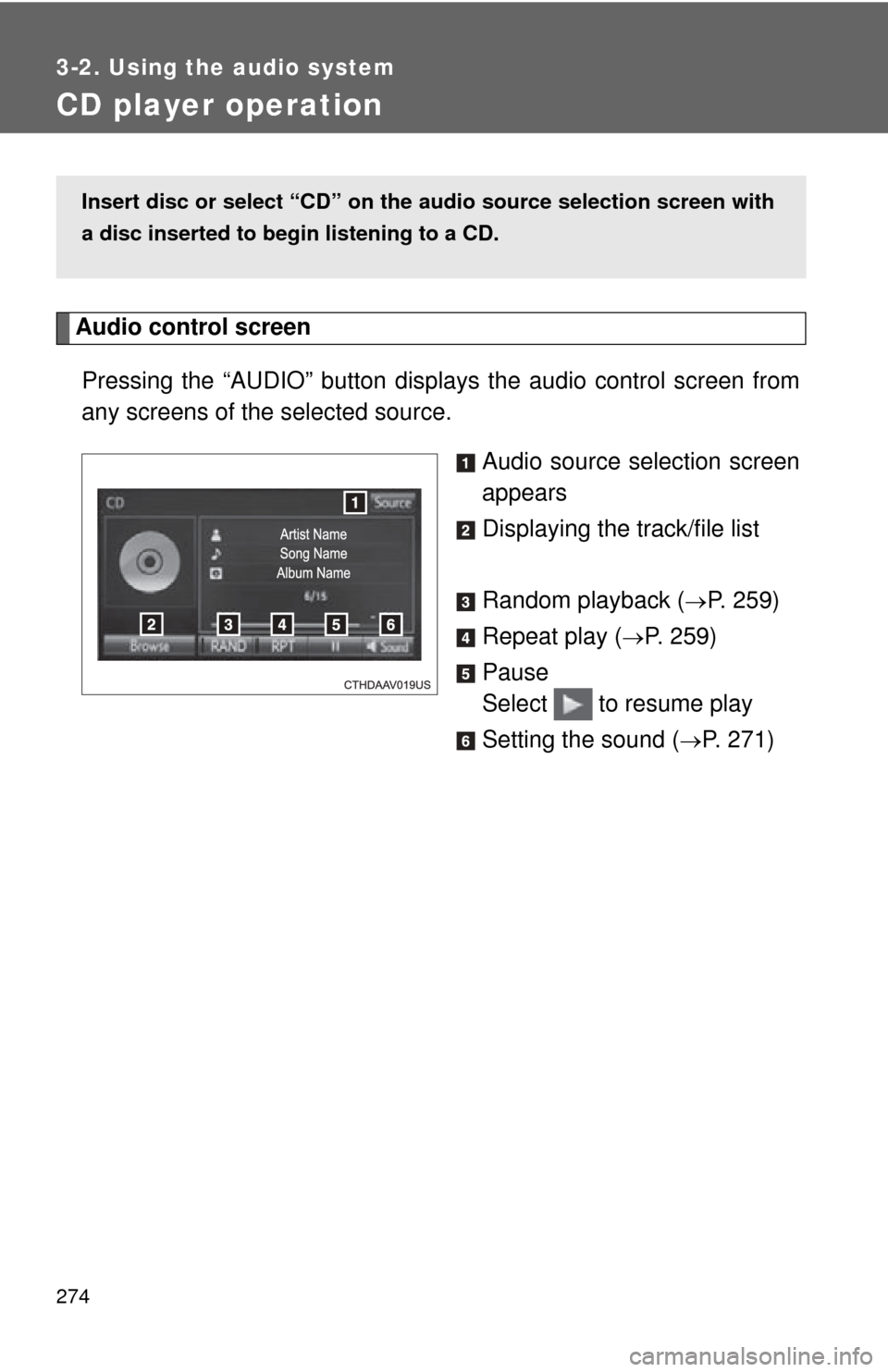
Audio control screenPressing the “AUDIO” button disp lays the audio control screen from
any screens of the selected source.
Audio source selection screen
appears
Displaying the track/file list
Random playback (
P. 259)
Repeat play (
P. 259)
Pause
Select to resume play
Setting the sound (
P. 271)
Insert disc or select “CD” on the audio source selection screen with
a disc inserted to begin listening to a CD.
Page 275 of 612
275
3-2. Using the audio system
3
Interior features
■
Displaying the title and artist name
If a CD-TEXT disc is inserted, the title of the disc and track will be displayed.
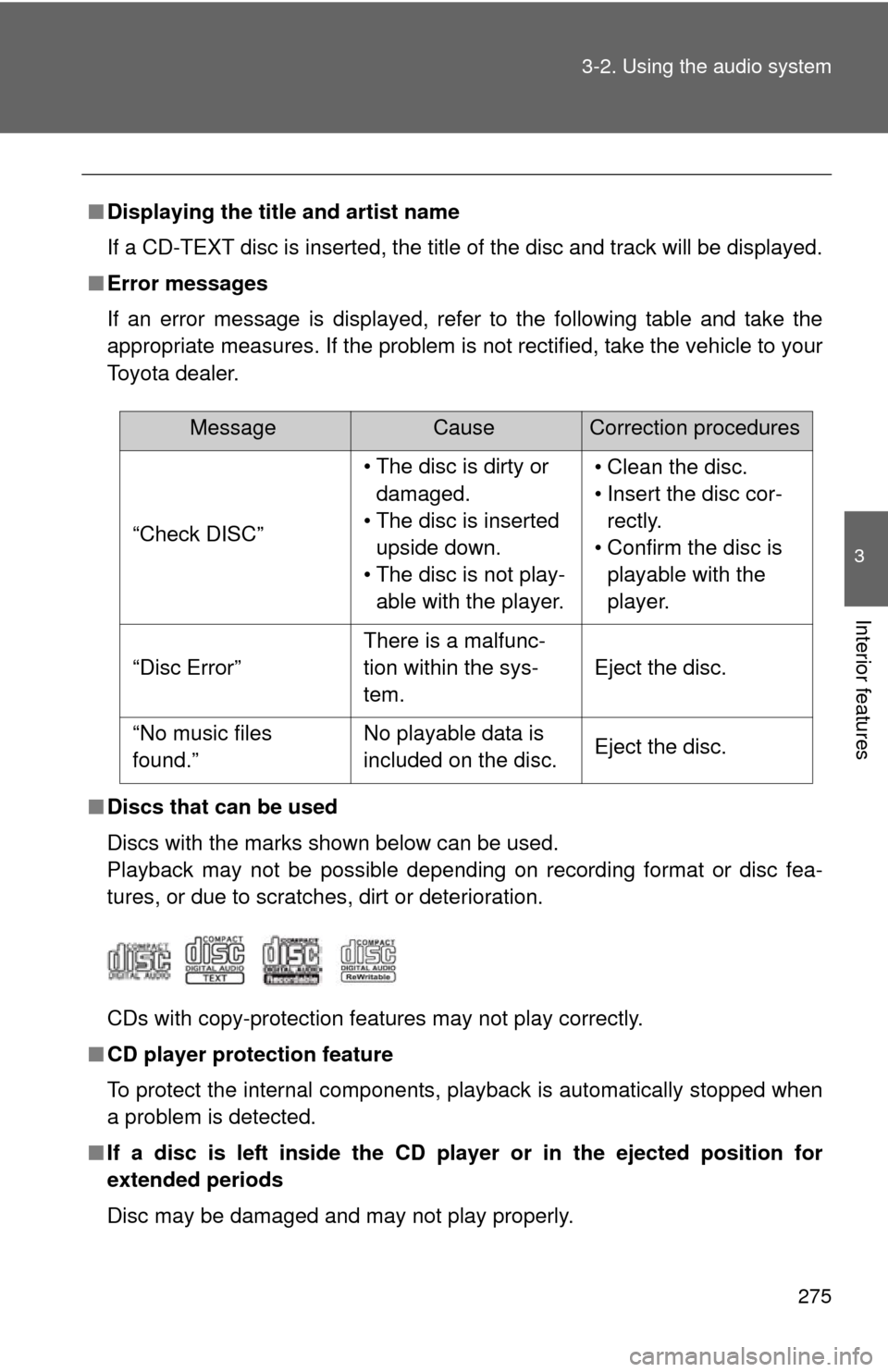
■ Error messages
If an error message is displayed, refer to the following table and take the
appropriate measures. If the problem is not rectified, take the vehicle to your
Toyota dealer.
■ Discs that can be used
Discs with the marks shown below can be used.
Playback may not be possible depending on recording format or disc fea-
tures, or due to scratches, dirt or deterioration.
CDs with copy-protection features may not play correctly.
■ CD player protection feature
To protect the internal components, playback is automatically stopped when
a problem is detected.
■ If a disc is left inside the CD pl ayer or in the ejected position for
extended periods
Disc may be damaged and may not play properly.
MessageCauseCorrection procedures
“Check DISC” • The disc is dirty or
damaged.
• The disc is inserted upside down.
• The disc is not play- able with the player. • Clean the disc.
• Insert the disc cor-
rectly.
• Confirm the disc is playable with the
player.
“Disc Error” There is a malfunc-
tion within the sys-
tem.Eject the disc.
“No music files
found.” No playable data is
included on the disc.
Eject the disc.
Page 276 of 612
276 3-2. Using the audio system
■Lens cleaners
Do not use lens cleaners. Doing so may damage the CD player.
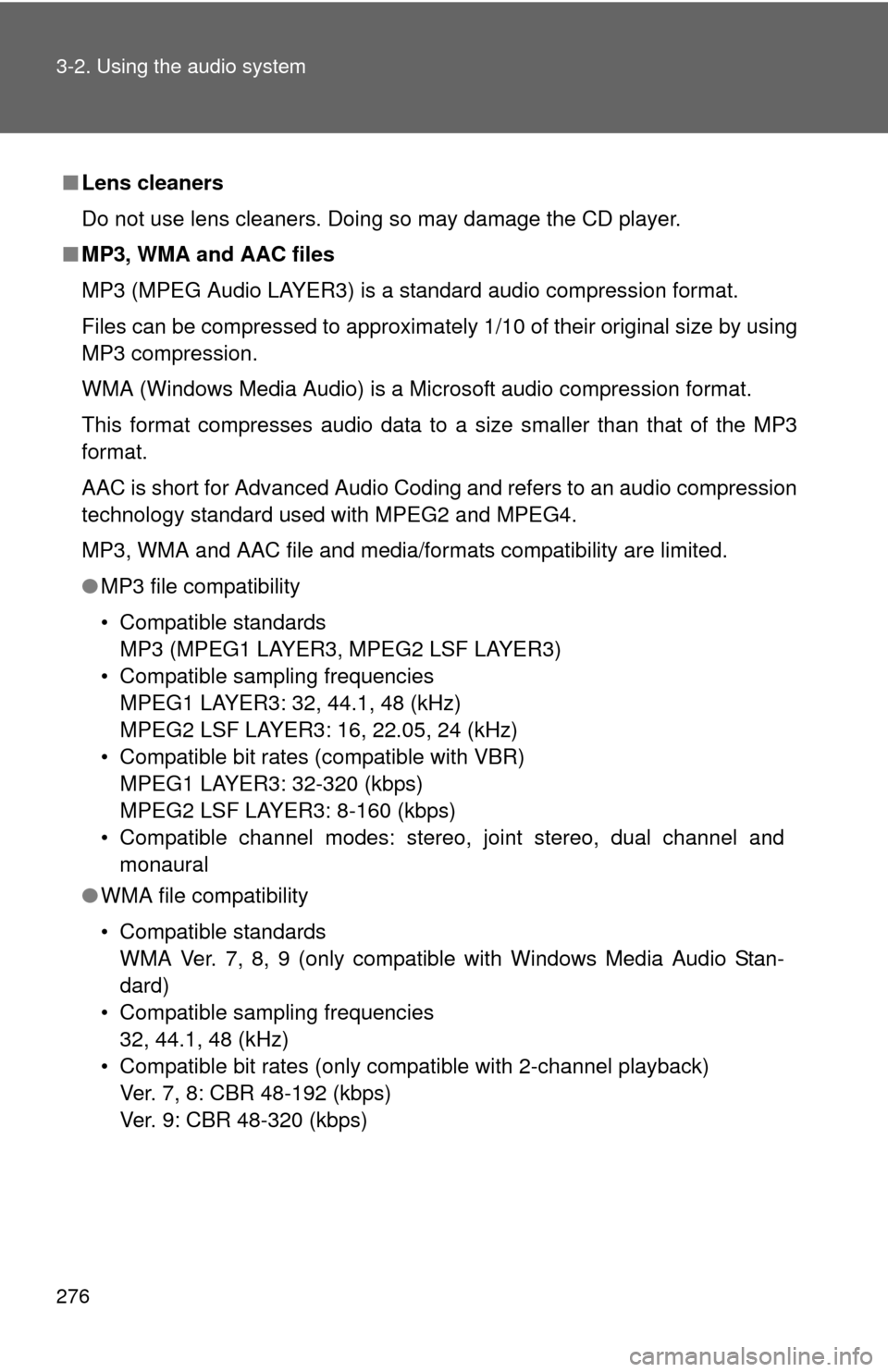
■ MP3, WMA and AAC files
MP3 (MPEG Audio LAYER3) is a standard audio compression format.
Files can be compressed to approximately 1/10 of their original size by using
MP3 compression.
WMA (Windows Media Audio) is a Microsoft audio compression format.
This format compresses audio data to a size smaller than that of the MP3
format.
AAC is short for Advanced Audio Coding and refers to an audio compression
technology standard used with MPEG2 and MPEG4.
MP3, WMA and AAC file and media/formats compatibility are limited.
●MP3 file compatibility
• Compatible standards
MP3 (MPEG1 LAYER3, MPEG2 LSF LAYER3)
• Compatible sampling frequencies MPEG1 LAYER3: 32, 44.1, 48 (kHz)
MPEG2 LSF LAYER3: 16, 22.05, 24 (kHz)
• Compatible bit rates (compatible with VBR) MPEG1 LAYER3: 32-320 (kbps)
MPEG2 LSF LAYER3: 8-160 (kbps)
• Compatible channel modes: stereo, joint stereo, dual channel and monaural
● WMA file compatibility
• Compatible standards
WMA Ver. 7, 8, 9 (only compatible with Windows Media Audio Stan-
dard)
• Compatible sampling frequencies 32, 44.1, 48 (kHz)
• Compatible bit rates (only compatible with 2-channel playback) Ver. 7, 8: CBR 48-192 (kbps)
Ver. 9: CBR 48-320 (kbps)
Page 280 of 612
280 3-2. Using the audio system
NOTICE
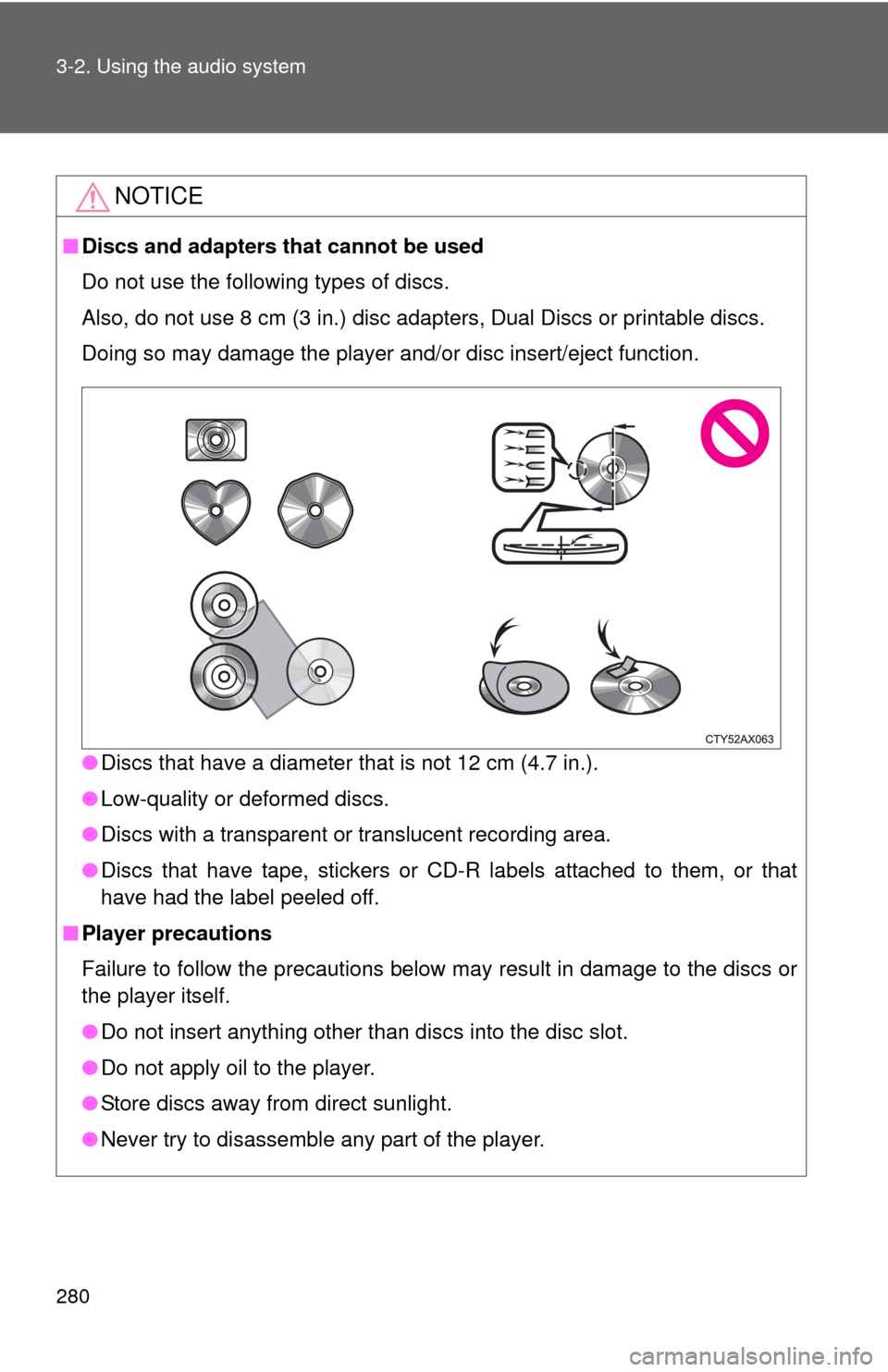
■Discs and adapters that cannot be used
Do not use the following types of discs.
Also, do not use 8 cm (3 in.) disc adapters, Dual Discs or printable discs.
Doing so may damage the player and/or disc insert/eject function.
●Discs that have a diameter that is not 12 cm (4.7 in.).
● Low-quality or deformed discs.
● Discs with a transparent or translucent recording area.
● Discs that have tape, stickers or CD-R labels attached to them, or that
have had the label peeled off.
■ Player precautions
Failure to follow the precautions below may result in damage to the discs or
the player itself.
●Do not insert anything other than discs into the disc slot.
● Do not apply oil to the player.
● Store discs away from direct sunlight.
● Never try to disassemble any part of the player.
Page 293 of 612
293
3-2. Using the audio system
3
Interior features
Using the AUX port
Connecting a portable audio player P. 2 5 6
■Operating portable audio players connected to the audio system
The volume can be adjusted using the vehicle's audio controls. All other
adjustments must be made on the portable audio player itself.
■ When using a portable audio player connected to the power outlet
Noise may occur during playback. Use the power source of the portable
audio player.
CAUTION
■ While driving
Do not connect a portable audio player or operate the device controls.
To use the AUX port, connect a portable player, press the “AUDIO”
button, then select “AUX” to display the audio control screen.
Page 294 of 612
294
3-2. Using the audio system
Preparations to use wireless communication
■About Bluetooth®
CAUTION
■Certifications for the Bluetooth
FCC ID: BABFT0049B
The following can be performed using Bluetooth® wireless commu-
nication:
■ A portable audio player can be operated and listened to via
audio system
■ Hands-free phone calls can be made via a cellular phone
In order to use wireless communicat ion, register and connect a
Bluetooth
® device by performing the following procedures.
Bluetooth is a registered trademark of
Bluetooth SIG, Inc.
Page 298 of 612
298
3-2. Using the audio system
Registering a Bluetooth® audio player for the first time
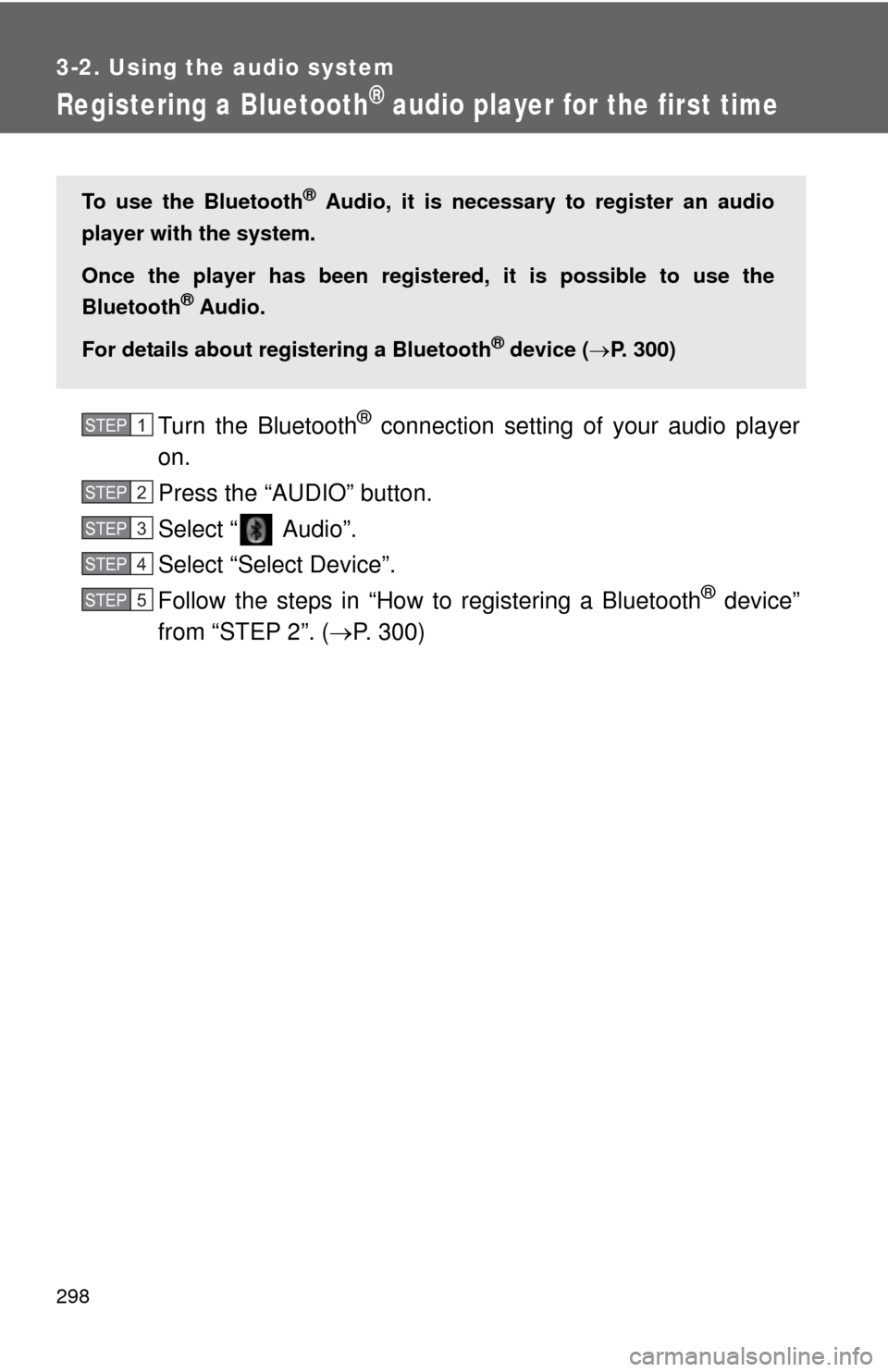
Turn the Bluetooth® connection setting of your audio player
on.
Press the “AUDIO” button.
Select “ Audio”.
Select “Select Device”.
Follow the steps in “How to registering a Bluetooth
® device”
from “STEP 2”. ( P. 300)
To use the Bluetooth® Audio, it is necessary to register an audio
player with the system.
Once the player has been register ed, it is possible to use the
Bluetooth
® Audio.
For details about registering a Bluetooth
® device ( P. 300)
STEP1
STEP2
STEP3
STEP4
STEP5
Page 300 of 612
300
3-2. Using the audio system
Registering a Bluetooth® device
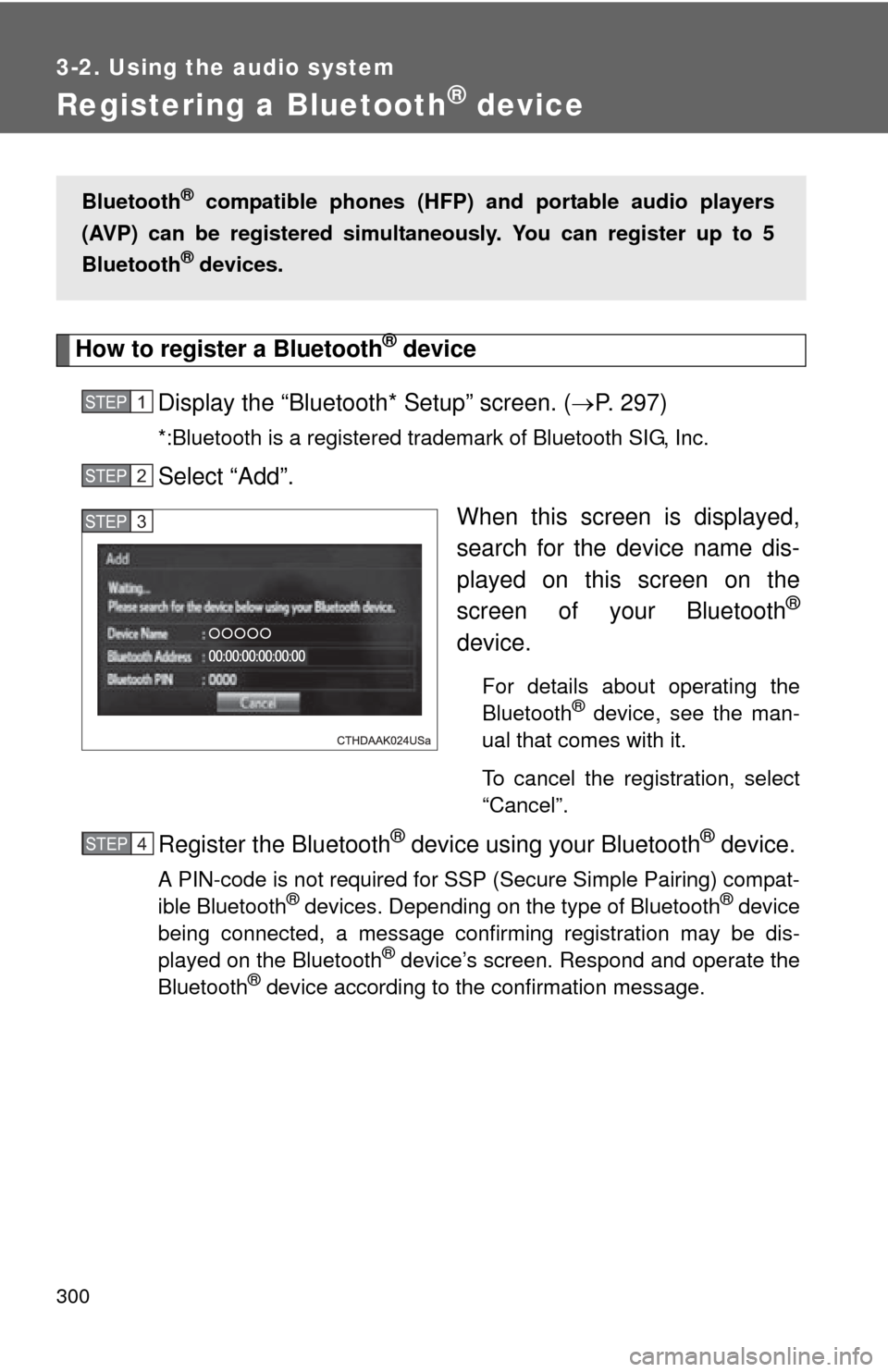
How to register a Bluetooth® device
Display the “Bluetooth* Setup” screen. ( P. 297)
*:Bluetooth is a registered trademark of Bluetooth SIG, Inc.
Select “Add”.
When this screen is displayed,
search for the device name dis-
played on this screen on the
screen of your Bluetooth
®
device.
For details about operating the
Bluetooth® device, see the man-
ual that comes with it.
To cancel the registration, select
“Cancel”.
Register the Bluetooth® device using your Bluetooth® device.
A PIN-code is not required for SSP (Secure Simple Pairing) compat-
ible Bluetooth® devices. Depending on the type of Bluetooth® device
being connected, a message confirming registration may be dis-
played on the Bluetooth
® device’s screen. Respond and operate the
Bluetooth® device according to the confirmation message.
Bluetooth® compatible phones (HFP) and portable audio players
(AVP) can be registered simultane ously. You can register up to 5
Bluetooth
® devices.
STEP1
STEP2
STEP3
STEP1STEP4