Page 218 of 426
waveband will be displayed.
*2: Only when a CD is in the player.
*3: Only vehicle equipped with RSE (Rear SeatEntertainment)
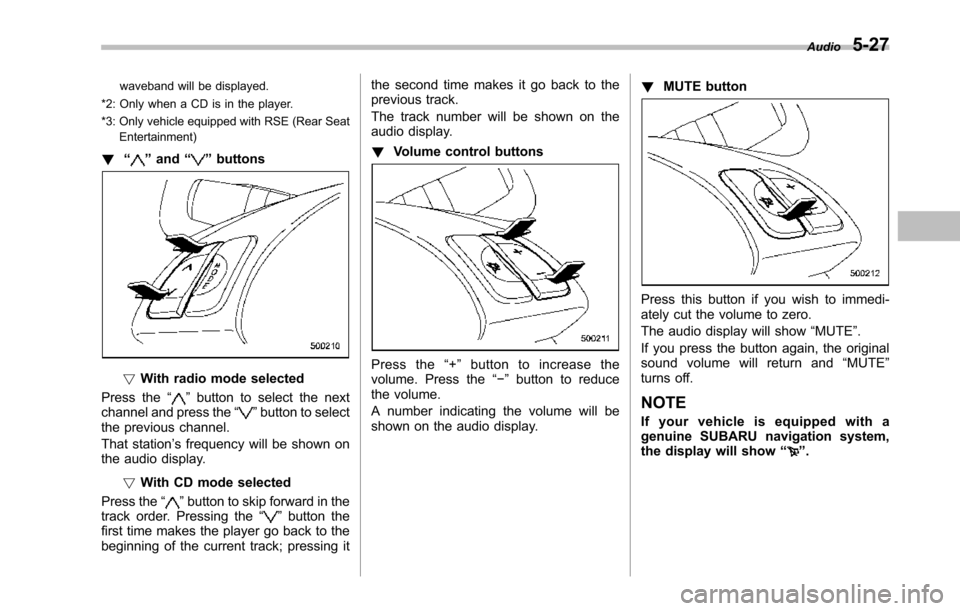
!“”and“”buttons
!With radio mode selected
Press the“”button to select the nextchannel and press the“”button to selectthe previous channel.
That station’s frequency will be shown onthe audiodisplay.
!With CD mode selected
Press the“”button to skip forward in thetrack order. Pressing the“”button thefirst time makes the player go back to thebeginning of the current track; pressing it
the second time makes it go back to theprevious track.
The track number will be shown on theaudio display.
!Volume control buttons
Press the“+”button to increase thevolume. Press the“!”button to reducethe volume.
A number indicating the volume will beshown on the audio display.
!MUTE button
Press this button if you wish to immedi-ately cut the volume to zero.
The audio display will show“MUTE”.
If you press the button again, the originalsound volume will return and“MUTE”turns off.
NOTE
If your vehicle is equipped with agenuine SUBARU navigation system,the display will show“”.
Audio5-27
Page 219 of 426
5-28Audio
Auxiliary input jack
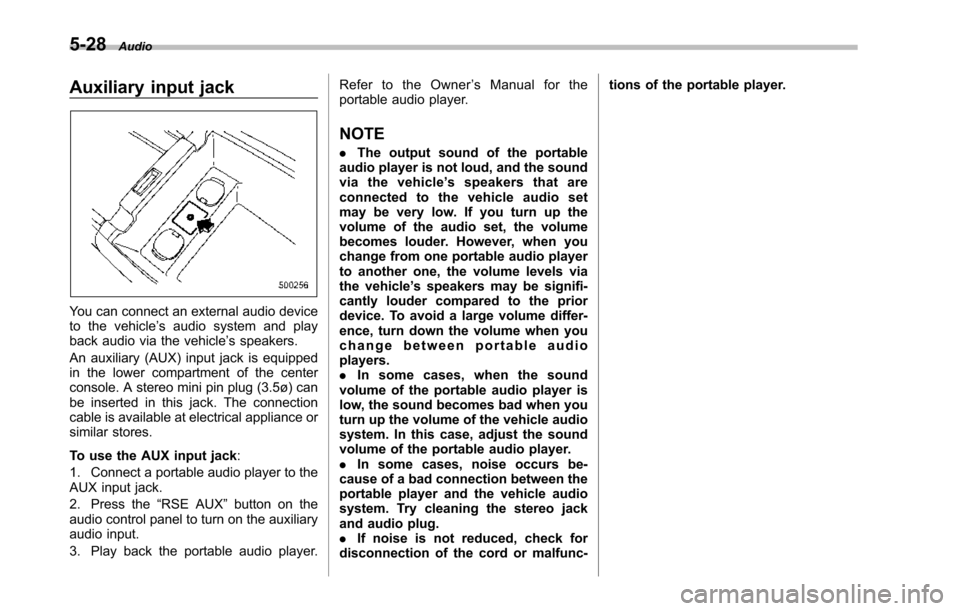
You can connect an external audio deviceto the vehicle’s audio system and playback audio via the vehicle’s speakers.
An auxiliary (AUX) input jack is equippedin the lower compartment of the centerconsole. A stereo mini pin plug (3.5ø) canbe inserted in this jack. The connectioncable is available at electrical appliance orsimilar stores.
To use the AUX input jack:
1. Connect a portable audio player to theAUX input jack.
2. Press the“RSE AUX”button on theaudio control panel to turn on the auxiliaryaudio input.
3. Play back the portable audio player.
Refer to the Owner’sManualfortheportable audio player.
NOTE
.The output sound of the portableaudio player is not loud, and the soundvia the vehicle’sspeakersthatareconnected to the vehicle audio setmay be very low. If you turn up thevolume of the audio set, the volumebecomes louder. However, when youchange from one portable audio playerto another one, the volume levels viathe vehicle’s speakers may be signifi-cantly louder compared to the priordevice. To avoid a large volume differ-ence, turn down the volume when youchange between portable audioplayers..In some cases, when the soundvolume of the portable audio player islow, the sound becomes bad when youturn up the volume of the vehicle audiosystem. In this case, adjust the soundvolume of the portable audio player..In some cases, noise occurs be-cause of a bad connection between theportable player and the vehicle audiosystem. Try cleaning the stereo jackand audio plug..If noise is not reduced, check fordisconnection of the cord or malfunc-
tions of the portable player.
Page 220 of 426
Rear Seat Entertainment
(RSE) system operation (if
equipped)
If your vehicle is equipped with the RearSeat Entertainment (RSE) system, youcan listen to the audio via the vehiclespeakers. Push the“RSE AUX”button toplay a DVD using the Rear Seat Entertain-ment system.
For detailed operating procedures, refer tothe Owner’s Manual supplement for theRear Seat Entertainment (RSE) system.
NOTE
.To watch a DVD in the front seatsusing the monitor of the navigationsystem, park the vehicle in a safelocation and apply the parking brake.Images of the DVD will not be displayedon the front monitor unless the parkingbrake is applied..The harman/kardon®audio systemis a stereo system with 2 channels. If aharman/kardon®audio system isequipped, the Rear Seat Entertainment(RSE) system may not generate asatisfying realistic sound when playing5.1 channel audio sources.
Precautions to observe when
handling a compact disc
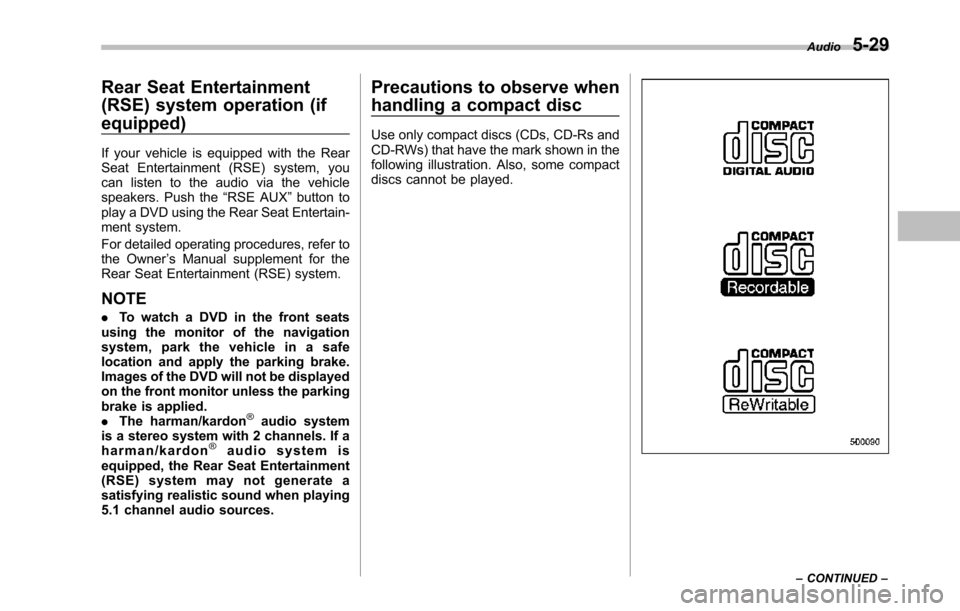
Use only compact discs (CDs, CD-Rs andCD-RWs) that have the mark shown in thefollowing illustration. Also, some compactdiscs cannot be played.
Audio5-29
–CONTINUED–
Page 221 of 426
5-30Audio
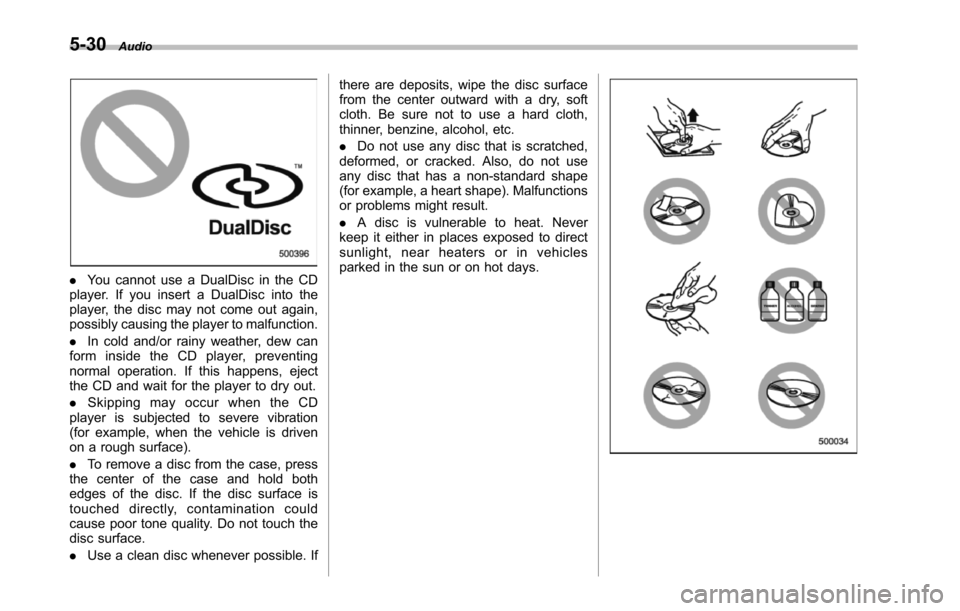
.You cannot use a DualDisc in the CDplayer. If you insert a DualDisc into theplayer, the disc may not come out again,possibly causing the player to malfunction.
.In cold and/or rainy weather, dew canform inside the CD player, preventingnormal operation. If this happens, ejectthe CD and wait for the player to dry out.
.Skipping may occur when the CDplayer is subjected to severe vibration(for example, when the vehicle is drivenon a rough surface).
.To remove a disc from the case, pressthe center of the case and hold bothedges of the disc. If the disc surface istouched directly, contamination couldcause poor tone quality. Do not touch thedisc surface.
.Use a clean disc whenever possible. If
there are deposits, wipe the disc surfacefrom the center outward with a dry, softcloth. Be sure not to use a hard cloth,thinner, benzine, alcohol, etc.
.Do not use any disc that is scratched,deformed, or cracked. Also, do not useany disc that has a non-standard shape(for example, a heart shape). Malfunctionsor problems might result.
.A disc is vulnerable to heat. Neverkeep it either in places exposed to directsunlight, near heaters or in vehiclesparked in the sun or on hot days.
Page 328 of 426
Exterior care....................................................... 10-2Washing............................................................. 10-2Waxing and polishing......................................... 10-3Cleaning aluminum wheels................................. 10-3
Corrosion protection.......................................... 10-4Most common causes of corrosion..................... 10-4To help prevent corrosion................................... 10-4
Cleaning the interior.......................................... 10-5Seat fabric......................................................... 10-5Leather seat materials........................................ 10-5Synthetic leather upholstery............................... 10-5Climate control panel, audio panel, instrumentpanel, console panel, switches, combinationmeter, and other plastic surface....................... 10-5Navigation monitor (if equipped)........................ 10-6
Appearance care
10
Page 332 of 426
Cleaning the interior
Use a soft, damp cloth to clean the climatecontrol panel, audio equipment, instru-ment panel, center console, combinationmeter panel, and switches. (Do not useorganic solvents.)
&Seat fabric
Remove loose dirt, dust or debris with avacuum cleaner. If the dirt is caked on thefabric or hard to remove with a vacuumcleaner, use a soft blush then vacuum it.
Wipe the fabric surface with a tightlywrung cloth and dry the seat fabricthoroughly. If the fabric is still dirty, wipeusing a solution of mild soap and luke-warmwater then dry thoroughly.
If the stain does not come out, try acommercially available fabric cleaner. Usethe cleaner on a hidden place and makesure it does not affect the fabric adversely.Use the cleaner according to its instruc-tions.
NOTE
When cleaning the seat, do not usebenzine, paint thinner, or any similarmaterials.
&Leather seat materials
The leather used by SUBARU is a highquality natural product which will retain itsdistinctive appearance and feel for manyyears with proper care.
Allowing dust or road dirt to build up on thesurface can cause the material to becomebrittle and to wear prematurely. Regularcleaning witha soft, moist, natural fibercloth should be performed monthly, takingcare not to soak the leather or allow waterto penetrate the stitched seams.
A mild detergent suitable for cleaningwoolen fabrics may be used to removedifficult dirt spots, rubbing with a soft, drycloth afterwards to restore the luster. Ifyour SUBARU is to be parked for a longtime in bright sunlight, it is recommendedthat the seats and headrests be covered,or the windows shaded, to prevent fadingor shrinkage.
Minor surface blemishes or bald patchesmay be treated with a commercial leatherspray lacquer. You will discover that eachleather seat section will develop soft foldsor wrinkles, which is characteristic ofgenuine leather.
&Synthetic leather upholstery
The synthetic leather material used on theSUBARU may be cleaned using mild soap
or detergent and water, after first vacuum-ing or brushing away loose dirt. Allow thesoap to soak in for a few minutes and wipeoff with a clean, damp cloth. Commercialfoam-type cleaners suitable for syntheticleather materials may be used whennecessary.
NOTE
Strong cleaning agents such as sol-vents, paint thinners, window cleaneror gasoline must never be used onleather or synthetic interior materials.
&Climate control panel, audio
panel, instrument panel,
console panel, switches,
combination meter, and other
plastic surface
Use a soft, damp cloth to clean the climatecontrol panel, audio equipment, instru-ment panel, center console, combinationmeter panel, and switches.
CAUTION
.Do not use organic solvents suchas paint thinners or fuel, orstrongcleaning agents that con-tain those solvents.
.Do not use chemical solvents
Appearance care10-5
–CONTINUED–
Page 333 of 426
10-6Appearance care
that contain silicone on the vehi-cle audio system, electrical com-ponents of the air-conditioner orany switches. If silicone adheresto these parts, it may causedamage to electrical compo-nents.
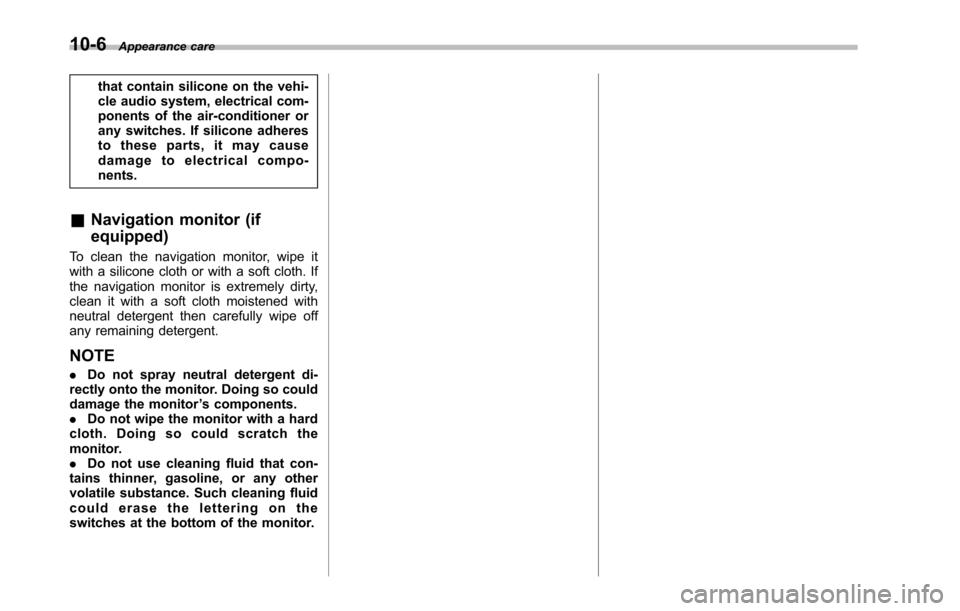
&Navigation monitor (if
equipped)
To clean the navigation monitor, wipe itwith a silicone cloth or with a soft cloth. Ifthenavigation monitor is extremely dirty,clean it with a soft cloth moistened withneutral detergent then carefully wipe offany remaining detergent.
NOTE
.Do not spray neutral detergent di-rectly onto the monitor. Doing so coulddamage the monitor’s components..Do not wipe the monitor with a hardcloth. Doing so could scratch themonitor..Do not use cleaning fluid that con-tains thinner, gasoline, or any othervolatile substance. Such cleaning fluidcould erase the lettering on theswitches at the bottom of the monitor.
Page 387 of 426
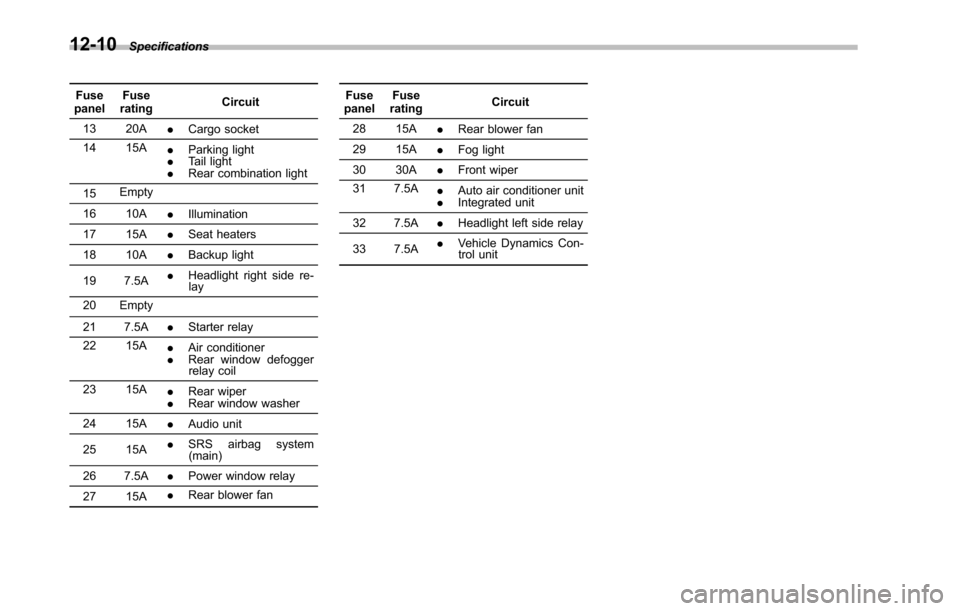
12-10Specifications
FusepanelFuseratingCircuit
13 20A.Cargo socket
14 15A.Parking light.Tail light.Rear combination light
15Empty
16 10A.Illumination
17 15A.Seat heaters
18 10A.Backup light
19 7.5A.Headlight right side re-lay
20 Empty
21 7.5A.Starter relay
22 15A.Air conditioner.Rear window defoggerrelay coil
23 15A.Rear wiper.Rear window washer
24 15A.Audio unit
25 15A.SRS airbag system(main)
26 7.5A.Power window relay
27 15A.Rear blower fan
FusepanelFuseratingCircuit
28 15A.Rear blower fan
29 15A.Fog light
30 30A.Front wiper
31 7.5A.Auto air conditioner unit.Integrated unit
32 7.5A.Headlight left side relay
33 7.5A.Vehicle Dynamics Con-trol unit